Fixed session count
Require the client to select exactly the number of appointments included in the package.
LunaCal lets clients choose several appointment dates in one booking. Set an exact session count or let them choose within a range, then collect payment for the package through Stripe or PayPal.
Start your free trialCompare scheduling tools ↓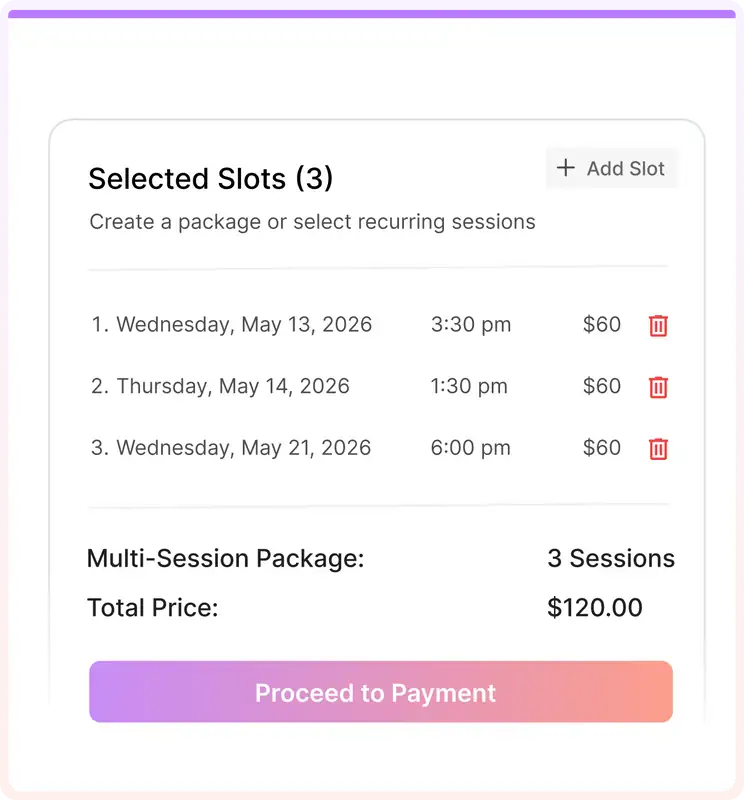
A package connects the appointments a client needs to the dates they can actually attend.
Require the client to select exactly the number of appointments included in the package.
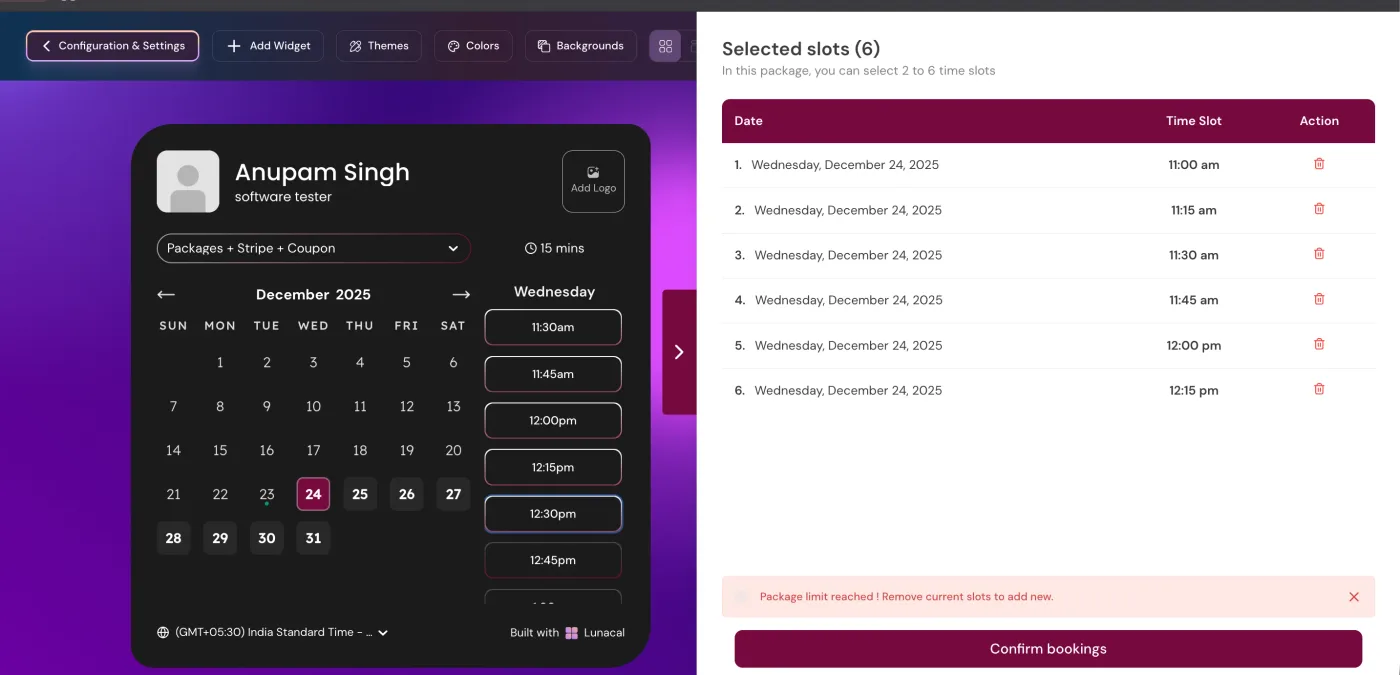
Let clients choose a session count within the range you set.
Configure packages with a session count from 1 to 20.
Offer daily, weekly, multi-week or monthly booking patterns.
Combine a repeating schedule with individually selected dates in the same package.
Flag unavailable dates before the client completes the booking.
Offer packages on individual and supported team events, excluding collective scheduling.
Connect Stripe or PayPal to take payment as part of the booking process.
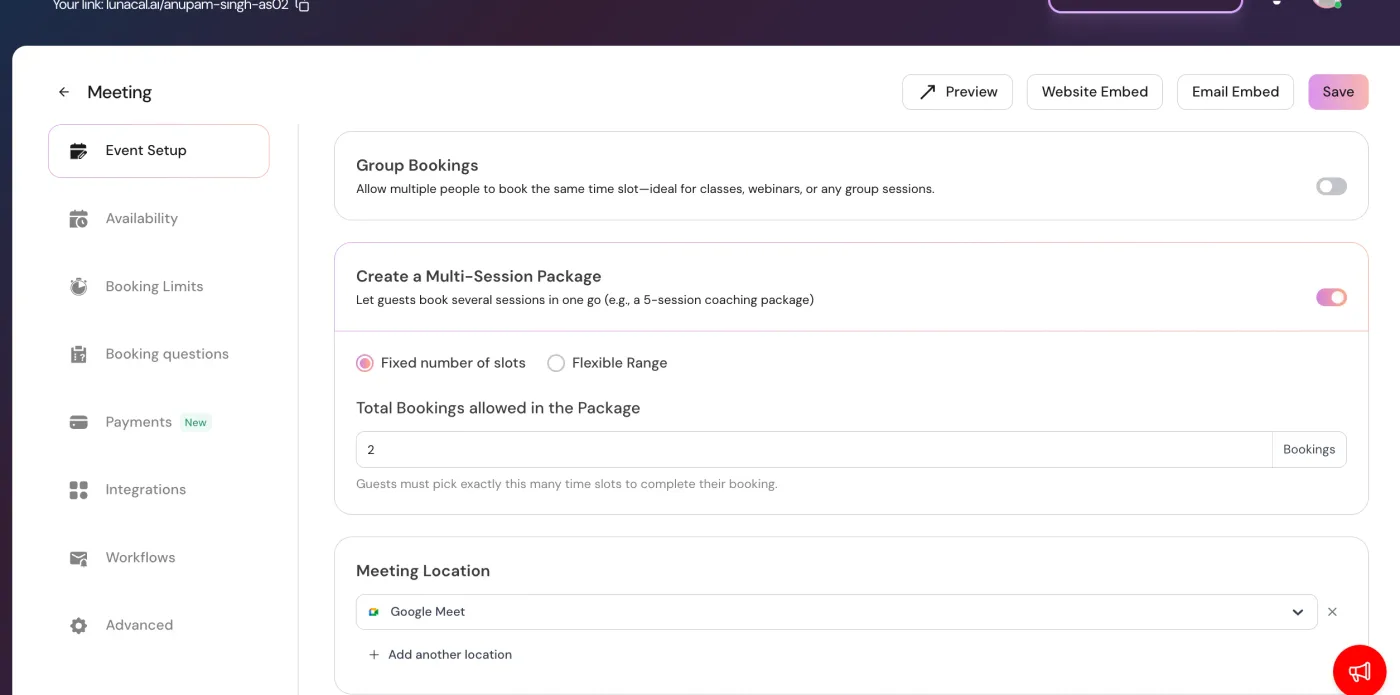
The package belongs to an event type. A fixed count suits a defined course of appointments; a range lets the client decide how many sessions to reserve without creating a separate service for each quantity.
Enable the recurrence options that suit the service: daily, weekly, every two, three or four weeks, or monthly. Monthly appointments can follow a date or a weekday.
The client starts with a time slot, picks a pattern and reviews the proposed dates. The number of repetitions stays within the package’s remaining slots.
An unavailable date is marked before checkout. The client must adjust it; a recurring pattern does not override calendar availability.
Clients can add some dates manually and use a recurring pattern for the rest. A package does not have to follow one identical interval throughout.
In LunaCal’s multi-session booking flow, clients select the required dates before completing the package. This suits services where agreeing the schedule matters as much as taking payment.
Explore calendar availability →A fixed package cannot be completed with fewer than the required sessions.
A range package can be completed once the selection is between your minimum and maximum.
Choosing several dates is different from setting up an automatically renewing payment. A recurring appointment pattern determines when meetings happen, not when a subscription renews.
The booking page brings the selected appointments together. For recurring sessions, LunaCal also keeps the calendar and confirmation behavior tied to the series.
LunaCal is a good fit when a package needs an agreed schedule, not just a balance of prepaid sessions.
A minimum and maximum let clients book the amount they need while you retain control over the size of the commitment.
Manual and recurring selection work together. Clients can keep a regular cadence without forcing every appointment onto that pattern.
The Teams plan lists packages, round robin and webhooks at $15 per user per month, with payments and reminders included. LunaCal takes no commission on paid bookings.
The biggest difference is when dates are agreed. LunaCal builds the schedule during package booking; credit-based packages are useful when clients want to buy now and arrange visits later.
| Capability | LunaCal | Calendly | Acuity | SimplyBook.me |
|---|---|---|---|---|
| Fixed session bundles | Yes | Yes | Yes | Yes |
| Package unit | Appointment slots | Meeting sessions | Visits / minutes / value | Services / products |
| Client chooses a count range | Yes | Preset bundle | Preset bundle | Preset bundle |
| When dates are selected | During package booking | After purchase | When redeeming | When redeeming |
| Client booking access | Booking page | Unique scheduling link | Package code | Client account |
| One-to-one appointments | Yes | Yes | Yes | Yes |
| Individual date selection | Yes | Yes | Yes | Yes |
| Appointment availability checks | Yes | Yes | Yes | Yes |
| Custom intake questions | Yes | Yes | Yes | Yes |
| Email appointment reminders | Yes | Yes | Yes | Yes |
| Online payment collection | Yes | Stripe only | Yes | Yes |
| Website booking embed | Yes | Yes | Yes | Yes |
In the multi-session booking flow described here, clients select the required dates before completing the booking. With a fixed package, they select the exact count. With a range, they select any count between the minimum and maximum.
Yes. Enable Package Booking, then Allow Recurring Bookings and the patterns you want to offer. Clients can combine recurring dates with individually selected slots.
Packages are not available for collective scheduling. Recurring bookings are also unavailable on events with Seats enabled, so a group event cannot use the recurring-date option.
LunaCal marks it Unavailable. The client must change the date before completing the package; the series does not bypass existing calendar commitments.
No. A session package groups appointments. A recurring booking sets their dates. A subscription concerns repeated billing, so choose it separately when the service needs automatic payment renewal.
Multi-session packages are listed in the Teams plan at $15 per user per month. The plan also includes team scheduling, round robin and webhooks.