

Introduction
I know how a busy clinic day looks. The phone keeps ringing while the schedule keeps changing. According to the AVMA Economic State of the Veterinary Profession 2025 Report, only about 33 percent of veterinary practices currently offer online appointment scheduling.
Instead of relying on feature lists or marketing pages, I tested each tool the way a clinic would actually use it. I created accounts, set up schedules, and completed full booking flows. That included completing a full test booking, then testing rescheduling, cancellations, payments and reminder messages.
I also reviewed feedback patterns across G2, Capterra, Trustpilot, and Reddit. Many guides skip the small things that affect daily clinic operations. I looked closely at issues like time zone handling, reminder timing, and how scheduling behaves when calendars change. Throughout the guide you will see screenshots, real examples, and links to original reviews so you can evaluate the tools yourself. This list includes both standalone booking tools and broader veterinary practice-management systems. Standalone tools focus primarily on appointments and intake, while practice-management platforms also cover areas such as medical records, billing and inventory.
Best Veterinary Booking and Scheduling Software
Table: Best Veterinary Scheduling Software by Clinic Use Case
| Use case | Best tool | Why it’s a fit |
|---|---|---|
| Best overall for modern veterinary booking | Lunacal | A strong fit for clinics that want online booking, reminders, team scheduling, calendar sync, and a more polished booking experience |
| Best for dedicated pet appointment booking | Vetstoria | Built specifically for veterinary clinics that want pet-focused online booking and automated reminders |
| Best for practice-management-led workflows | ezyVet | Better suited to clinics that want scheduling tied closely to broader practice operations and internal workflows |
| Best for client communication and reminders | PetDesk | A practical choice for clinics that care a lot about reminders, client messaging, and reducing missed appointments |
| Best for clinics already using Covetrus tools | Covetrus Pulse | Makes the most sense for practices that already work inside the Covetrus ecosystem and want scheduling as part of that setup |
Table: Veterinary Booking System Feature Comparison
| Feature | Lunacal | Vetstoria | ezyVet | PetDesk | Covetrus Pulse |
|---|---|---|---|---|---|
| Rating on G2 (out of 5) | 4.9 ★★★★★ | 4.5 ★★★★☆ | 3.8 ★★★☆☆ | 4.6 ★★★★☆ | 4.0 ★★★★☆ |
| Starting price of paid plans (USD) | $9 | No | No | No | No |
| External Google/Outlook calendar sync | Yes | No | No | No | No |
| SMS and email reminders | Yes | Yes | Yes | Yes | Yes |
| Team scheduling | Yes | Yes | Yes | Yes | Yes |
| Paid meetings | Yes | Yes | Partial | Partial | Partial |
| Scheduling page themes | Yes | Partial | No | No | No |
| Round robin scheduling | Yes | No | No | No | No |
| Multi-session packages | Yes | No | No | No | No |
| Custom domain | Yes | Partial | No | No | No |
| GDPR documentation available | Yes | No | No | No | No |
In-depth Comparison of Veterinary Scheduling Software
Lunacal
Lunacal is veterinary booking scheduling software that helps clinics book more appointments with appointment types, staff availability, reminders, and intake collection. Veterinary clinics reviewing scheduling tools can see Lunacal rated 4.9/5 on G2, which places it among the highest-rated choices.
Features
1. Scheduling pages with rich content
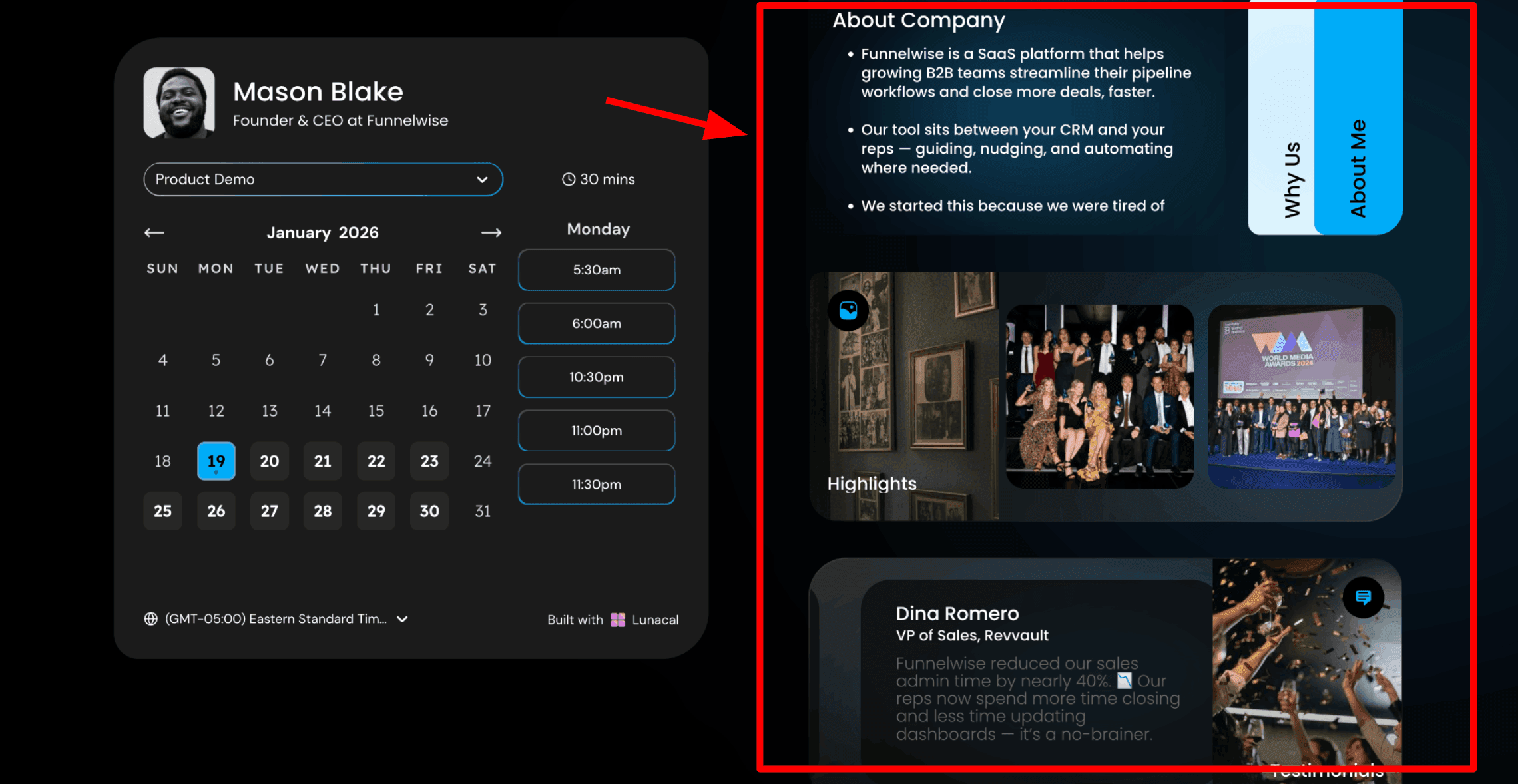
This is usually the first thing people notice. The booking page does more than show a calendar. It also gives space to explain your clinic and your team before a pet owner chooses an appointment time. Pet owners can feel nervous when booking a vet visit, especially if they have never visited your clinic before. Showing your team, your facility, and real experiences from other pet owners helps them feel comfortable enough to book. Here is a screenshot below:
2. Drag and drop scheduling page editor
This is how you build your booking page. Lunacal includes a simple editor where you can add sections like text, reviews, photos, videos, documents, and intake forms. You arrange them on the page and publish. Keep the page calm and easy to read. Many pet owners are stressed when searching for a vet. A clean page with the right information helps them feel confident about booking. On a new patient appointment page, I would add a short explanation of what happens during the first visit and what documents to bring. Then two short reviews from pet owners whose animals were nervous or needed extra care. I would also include a few photos of the clinic so the space feels familiar before the visit.
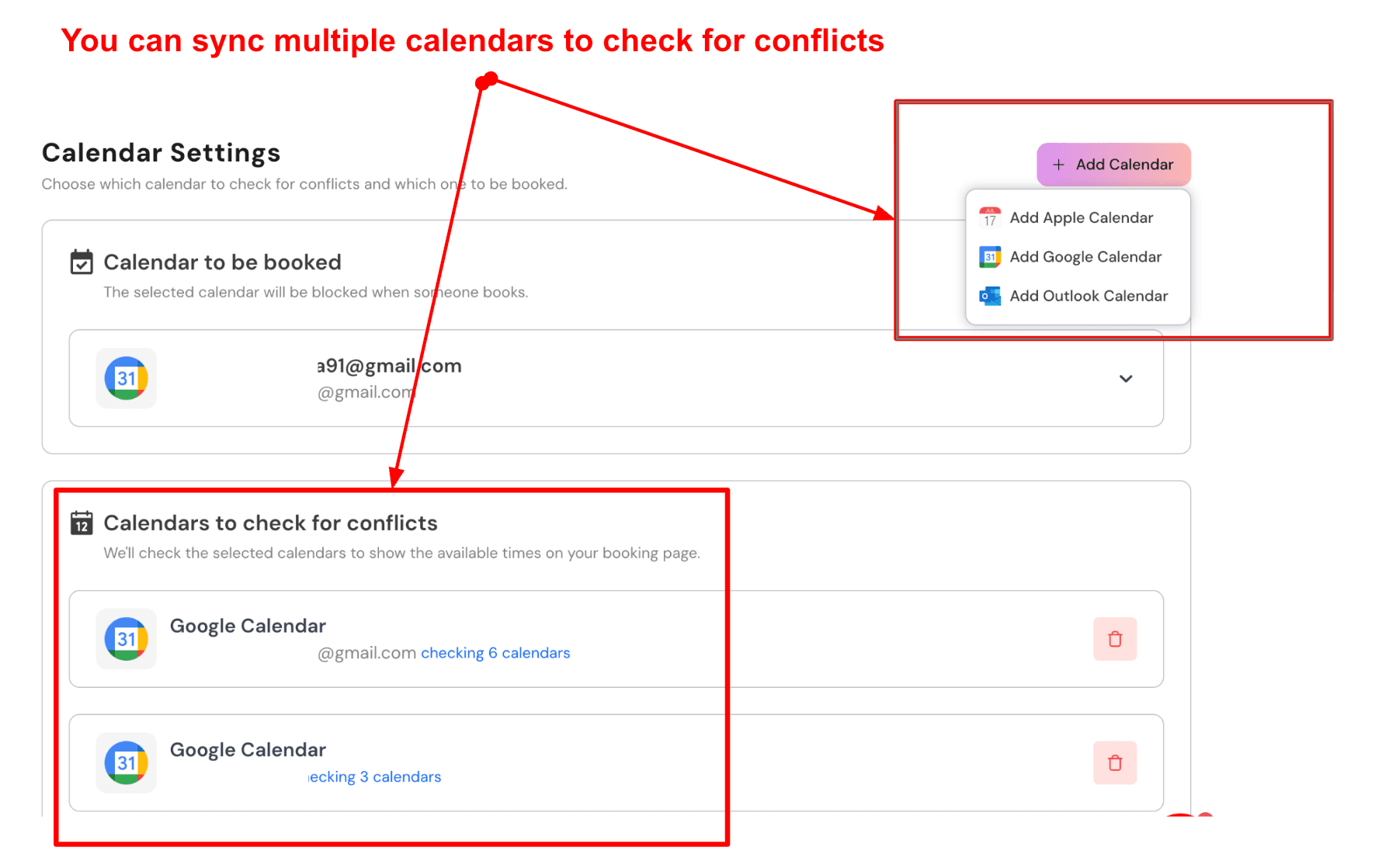
3. Sync multiple calendars to avoid conflicts
Lunacal can connect several calendars. One calendar receives confirmed appointments. Other calendars are checked quietly to make sure there are no conflicts before showing a time slot to a pet owner. Veterinary clinics often manage several schedules. There may be consultation hours, surgery slots, grooming sessions, and emergency blocks. Connecting all of these calendars helps prevent double bookings. Here is a screenshot below:
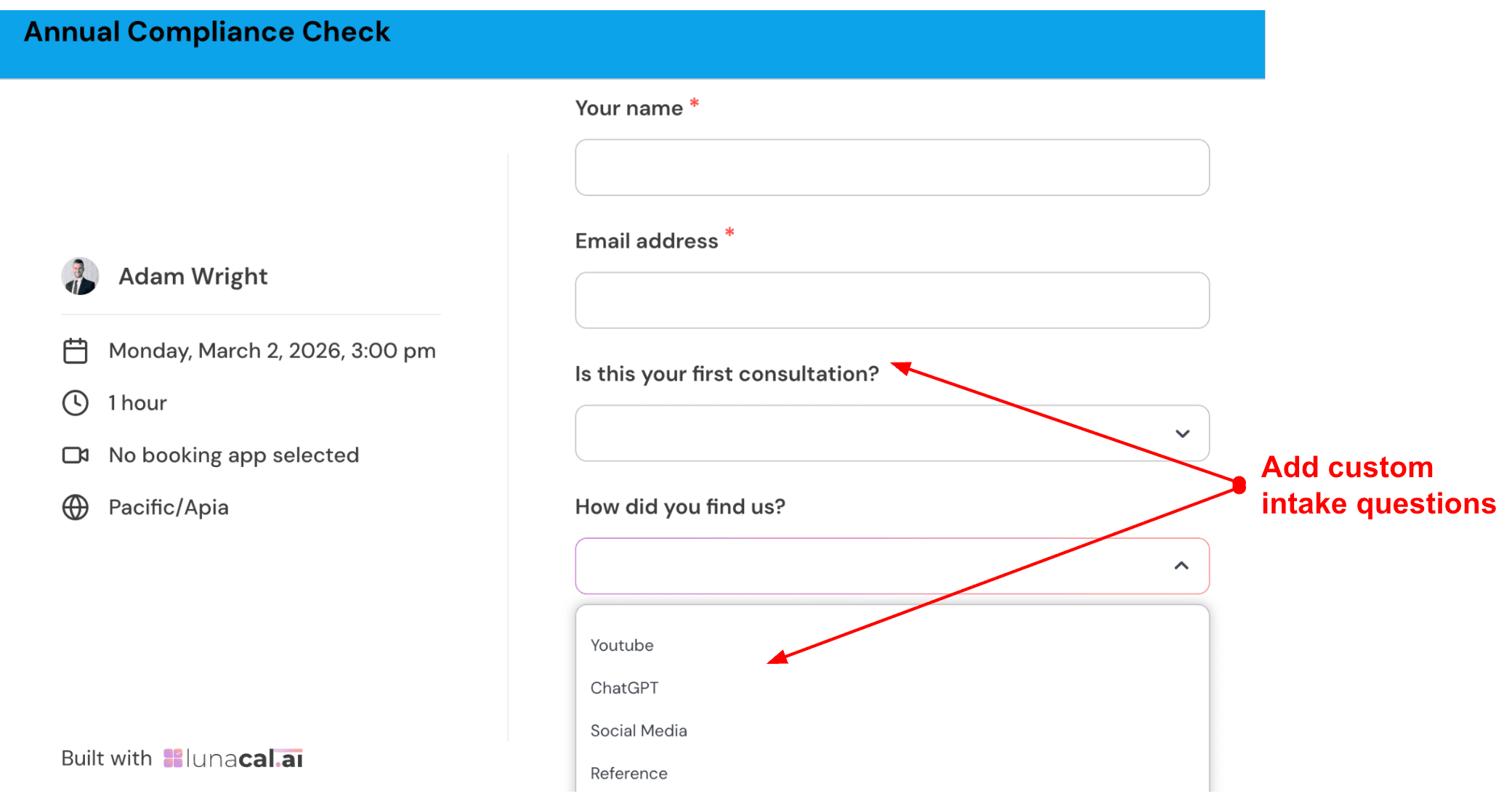
4. Custom intake questions
You can add questions to the booking form that pet owners answer before confirming their appointment. This gives the vet useful information before the visit begins. Keep the form short and practical. Three or four questions are usually enough. For a new patient visit, I would ask what type of pet the owner is bringing with options like dog, cat, rabbit, bird, or other. I would ask whether this is the first visit to the clinic. Then I would include a short text field where the owner can describe the reason for the visit. Here is how I create forms:
5. Multi-vet clinic scheduling flow
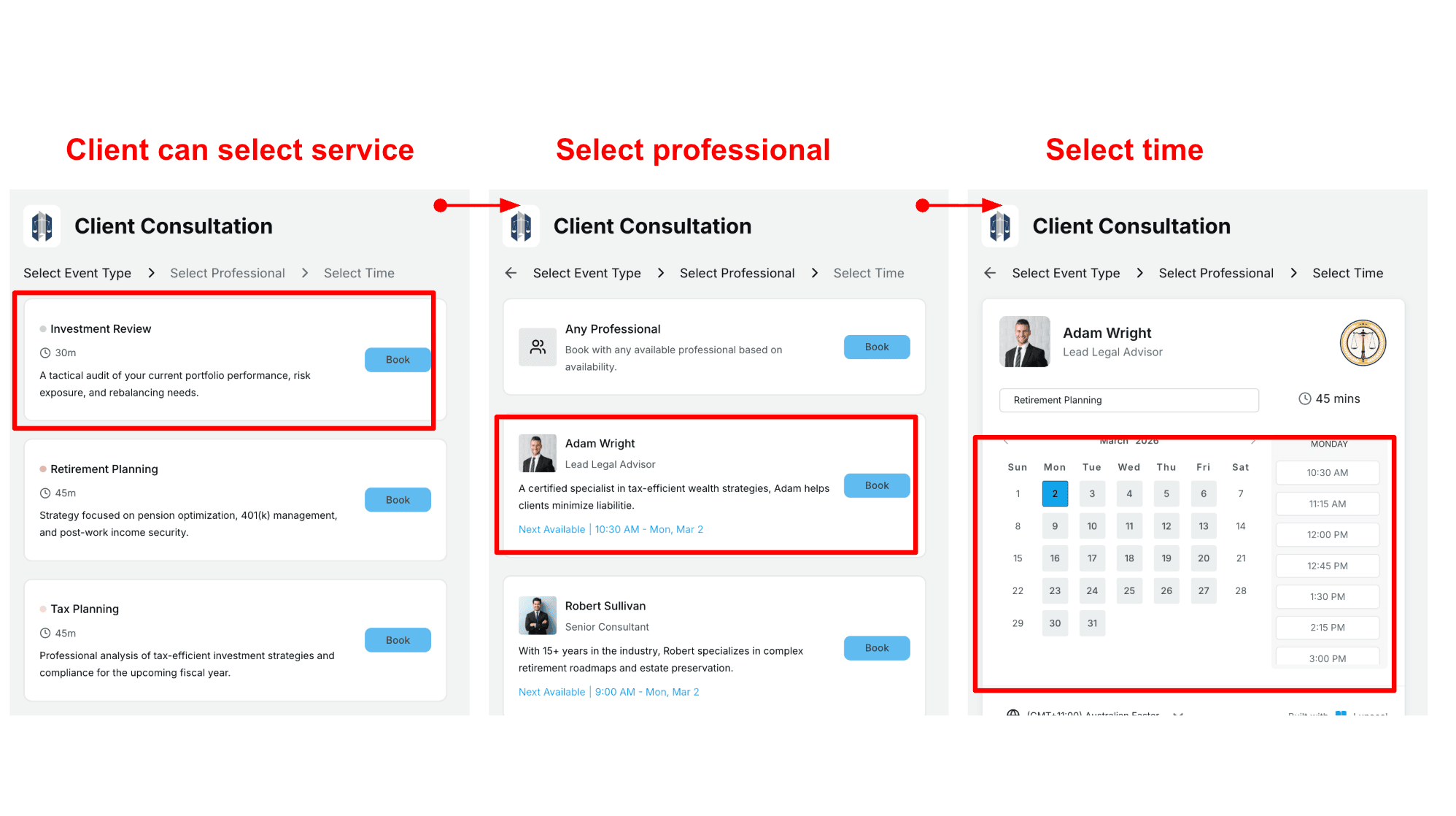
Pet owners can choose an appointment type, then choose a vet if they prefer someone specific. They can also select the option for the first available vet, which helps fill open slots across the team. This works well for clinics with multiple vets. Some pet owners prefer the same doctor for continuity. Others simply want the earliest appointment. Here is how I schedule my flow:
Pros
-
High trust signals show up fast if you research it. G2 lists Lunacal at 4.9 out of 5 with 41 reviews, which is a strong quality bar for a newer tool.
It is one of the few scheduling tools where ratings and product surface area both look solid. -
Clean booking and rescheduling flow once the basics are configured.
-
Strong intake via booking questions, which is useful for vet-style pre-visit context.
-
Flexible formats like packages and group bookings can fit clinics that run camps or repeat consults.
-
Automation options through webhooks and Zapier help connect scheduling to internal ops.
Cons
-
If you need a complete veterinary practice-management system with medical records, vaccine reminders, inventory and clinic-specific staff roles, Lunacal is not the right choice. It works best for scheduling and intake rather than as a complete veterinary practice stack. It works best as scheduling and intake, not a full vet practice stack.
-
Multi-brand and custom-domain setups can require additional configuration.
-
Package booking has a known limitation with collective scheduling in some setups.
-
If you want pricing to change automatically with flexible duration, it does not today.
-
Team pricing is per user, so larger teams should run the math early.
Pricing
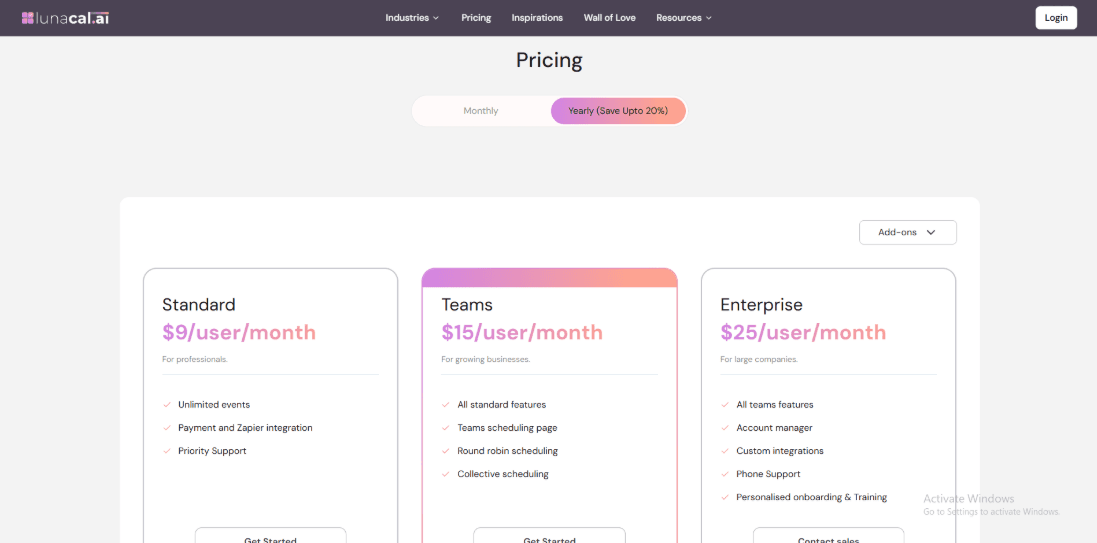
- Standard is $9 per user per month and includes unlimited events, payments integration, Zapier integration, and priority support.
- Teams is $15 per user per month and adds a team scheduling page plus round robin and collective scheduling.
- Enterprise is $25 per user per month with an account manager, custom integrations, phone support, and onboarding and training.
When to Choose Lunacal
Choose it if you want a modern booking flow, solid intake questions, and clean rescheduling for clients.
It fits clinics doing teleconsults, follow ups, consult packages, and lightweight automation.
Skip it if your core need is a full veterinary practice system with clinical workflows and records at the center.
Also think twice if you run many brands and want a very polished multi-domain admin experience on day one.
Vetstoria
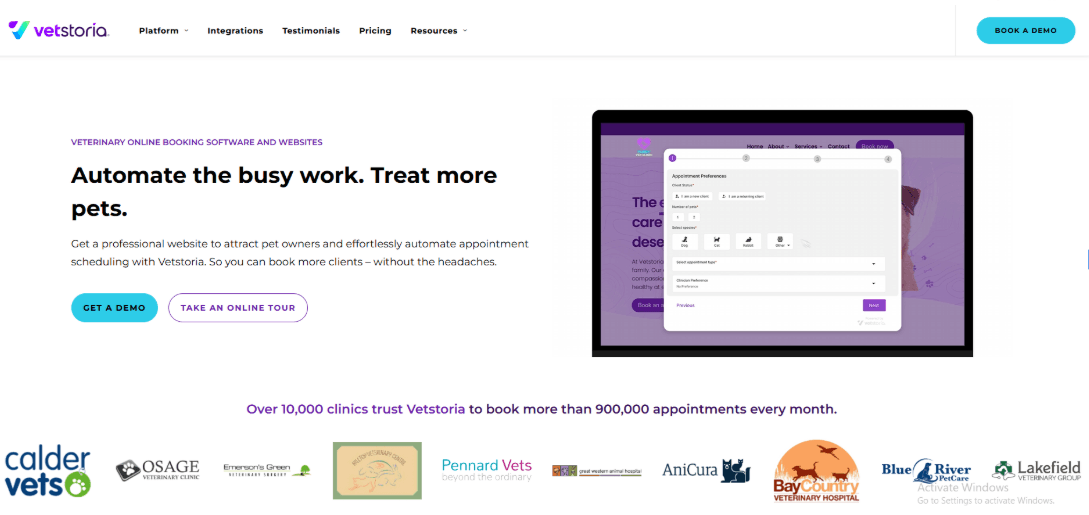
Vetstoria is mainly known for real time online appointment booking for veterinary clinics, with tight controls that sync to the clinic schedule. You would use it if you want owners to self book 24 by 7 without creating constant cleanup work for your front desk.
1) Real time booking
When I tested setup, the biggest win was how it keeps availability accurate once it is connected to the practice system. That is what helps avoid two people landing on the same slot. It also means your team does not have to keep reconciling a separate calendar all day.
2) New client intake
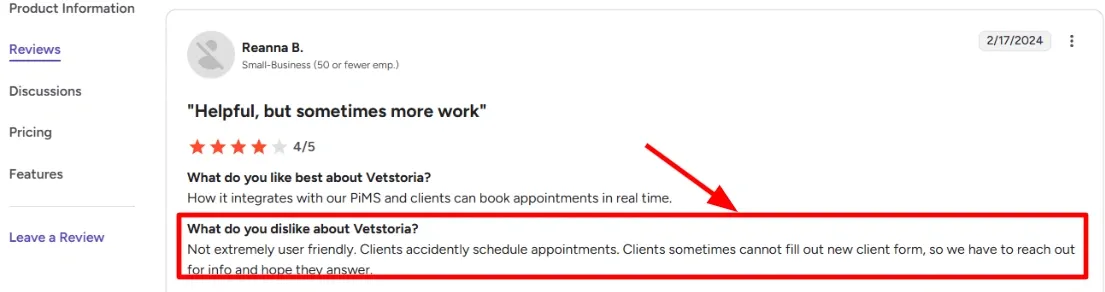
Vetstoria can collect new client and pet details during booking so the first visit is not a back and forth. One thing I noticed is that form completion depends a lot on how the fields are configured and how long the form is. I also saw this come up in a G2 review where they said some clients cannot complete the new client form. I am sharing a screenshot of that review below so you can judge it directly.
3) Appointment screening
You can add questions and keyword based screening so certain symptoms get routed to instructions or a call request instead of a normal booking. This matters in vet care because people will try to book emergencies like a regular consult. It is one of those operational details that affects safety, not just convenience.
4) Payments and deposits
You can take deposits or pre payments as part of the booking flow which can reduce no shows for high demand slots. In my testing, this is useful when you have services that get abandoned last minute and you want a simple way to set expectations. The only part that took me a couple tries was aligning payment rules with each appointment type without making the flow feel heavy.
5) After hours access
The clearest value is that pet owners can book at any time, including evenings and weekends, and it still lands in the correct schedule. A Vet Times piece on practice efficiency notes that online booking improved the owner experience for most, which matches what I see when the flow is kept simple.
Pros
-
It is strong for clinics that want online booking tied closely to real availability, so staff are not constantly fixing the diary. It also gives you control over what owners can actually book.
-
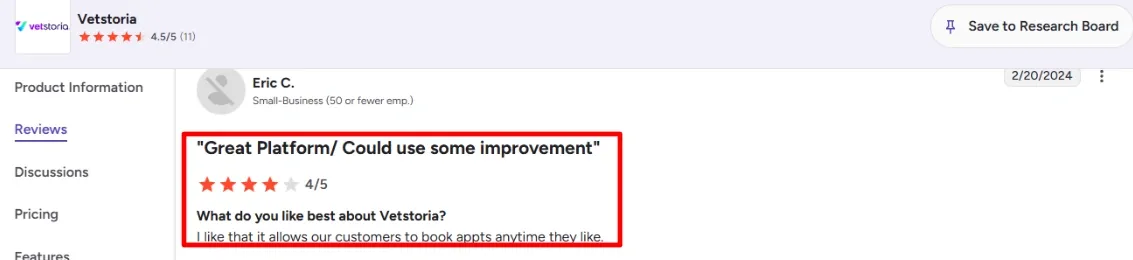
24 by 7 booking is a genuine benefit, and I agree with the G2 review that owners like booking anytime. I am adding a screenshot of that review below so readers can see the exact wording.
-
Appointment screening helps reduce risky bookings and saves time on urgent triage calls.
-
Analytics and reporting go beyond basic booking counts, which is helpful for ops decisions.
-
The setup can be made brand consistent on the website without heavy engineering work.
Cons
- If your main need is a full veterinary practice management system, Vetstoria is not the right pick because it is focused on booking, forms, and payments rather than full medical and operations workflows. It works best as a layer on top of your existing system.
- Some clinics report it is not extremely user friendly for clients, and that can lead to accidental bookings.
- New client form completion can fail for some users, which then creates follow up work for staff.
- Some users also report occasional loading or booking-flow issues during rollout, so clinics should test the client experience before launching widely
- The value is easiest to justify for teams that have enough booking volume to benefit from automation and reporting.
Pricing
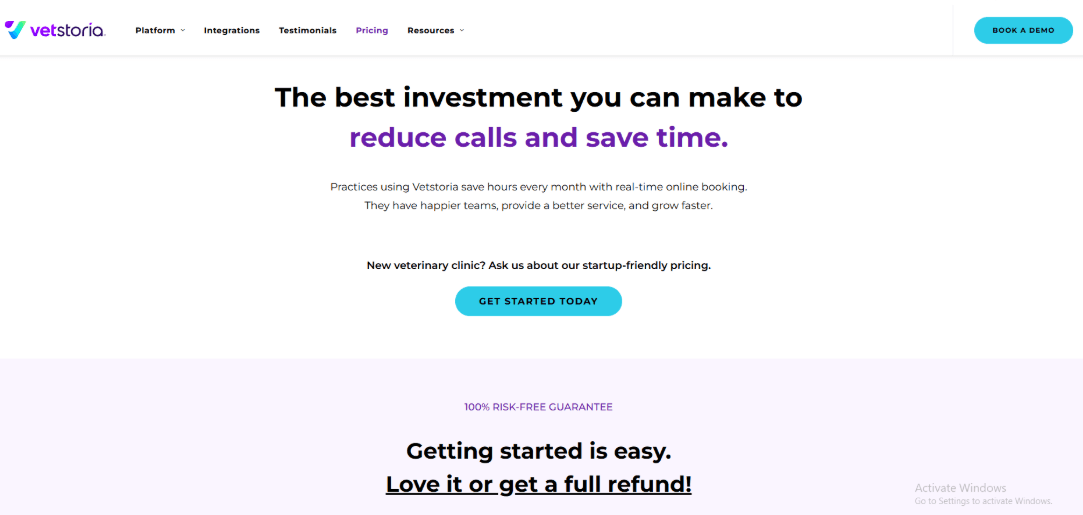
- Pricing is typically per location and scales with the number of clinicians using it.
- Plans are usually sold as monthly subscriptions, with annual billing options in some regions.
- There are also bundles that combine online booking with a managed website offering.
- Expect an onboarding or setup component in the overall cost, depending on what you deploy.
When to Choose Vetstoria
Choose it if you run a veterinary practice that already has a practice system and you want reliable online booking with strong guardrails, plus intake forms and optional deposits. It fits best when your front desk is overloaded with calls and rescheduling. Skip it if you are looking for an all in one practice management platform or if your client base struggles with online forms and you cannot simplify the booking flow enough.
ezyVet
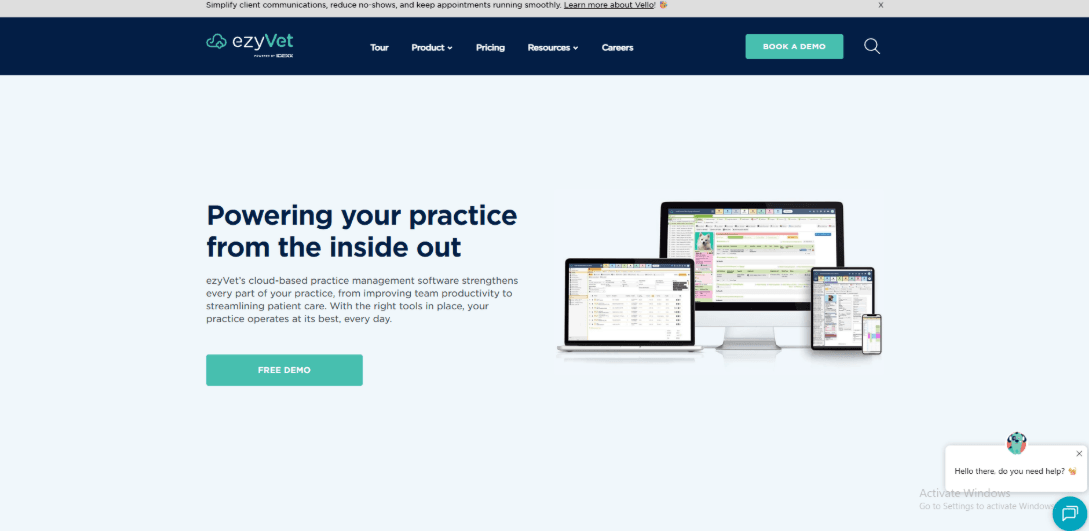
ezyVet is popularly known for deep practice management workflows that cover scheduling, records, invoicing, and inventory in one system. If you run a busy clinic and want more control over how work moves from appointment to discharge, it is worth a serious look.
1) Diagnostic workflows
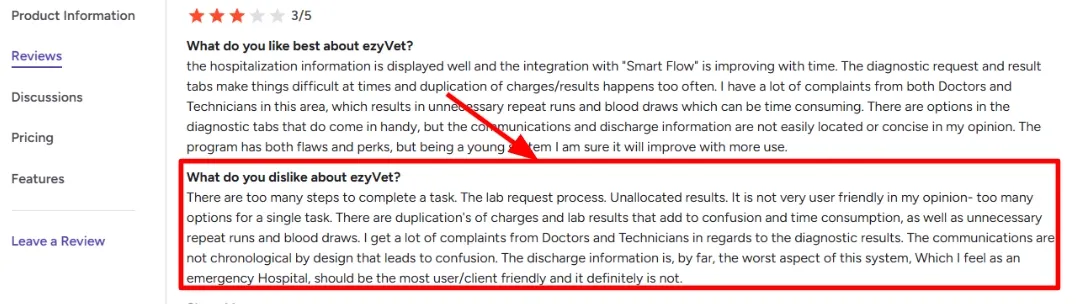
I found it strong once you map your lab and imaging flow end to end, because it can keep requests, results, and billing tied together. At the same time, I also saw a G2 review mention the lab request flow and results handling taking too many clicks and creating confusion, and I get why. I am sharing a screenshot below so you can see the exact wording from that review.
2) Cloud access
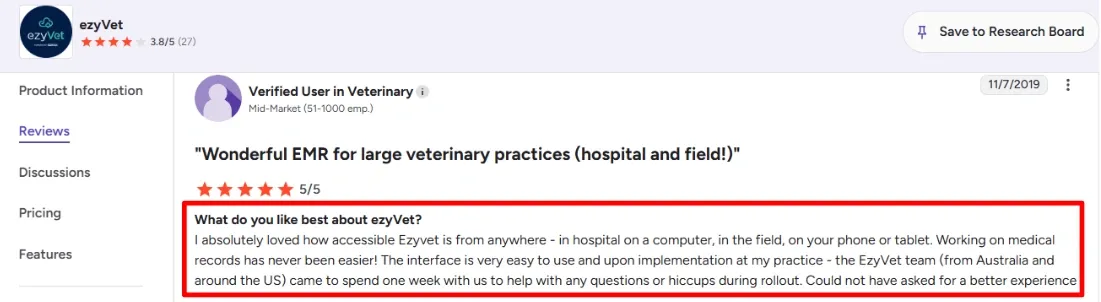
This is one of the cleanest parts to experience in real life. The second G2 review lines up with what I tested: teams can work from a desktop, tablet or phone and still complete important tasks. Im adding a screenshot below.
3) Calendar availability
You can shape schedules around vets, rooms, and appointment types, then keep the day moving without constantly reworking the plan. When I set this up, the main work was deciding what your clinic calls each appointment type and how long it should really take.
4) Billing controls
One issue I watched for during testing was charge duplication when staff repeated a step. This showed how important clear workflows and permissions are.
5) Reporting tags
Tags let you track almost anything and then slice reports by time period, vet, product groups, and other KPIs. If you want a more formal angle for procurement, IDEXX also positions it as subscription software in its SEC filing, see the SEC filing for that context.
Pros
- It handles complex clinic operations well, especially when scheduling connects tightly to diagnostics, billing, and discharge workflows. This can matter a lot for high-volume hospitals with multiple moving parts.
- Cloud access is genuinely practical when teams move between rooms, sites, or field work.
- Strong reporting structure if you are disciplined about tagging and standard definitions.
- Inventory features like batch tracking and reorder automation can reduce stock surprises.
- Role-based permissions help when teams are large and responsibilities are split.
Cons
- If your clinic mainly needs straightforward appointment scheduling, ezyVet may be more complex than necessary. It can feel like too much system for a booking-first setup.
- Expect more training and rollout effort because there are many paths to do the same thing.
- Some workflows can take extra clicks, especially around diagnostics and results handling.
- Pricing is higher-end and typically comes with implementation costs.
- You should review contract and implementation terms carefully on their pricing page.
Pricing
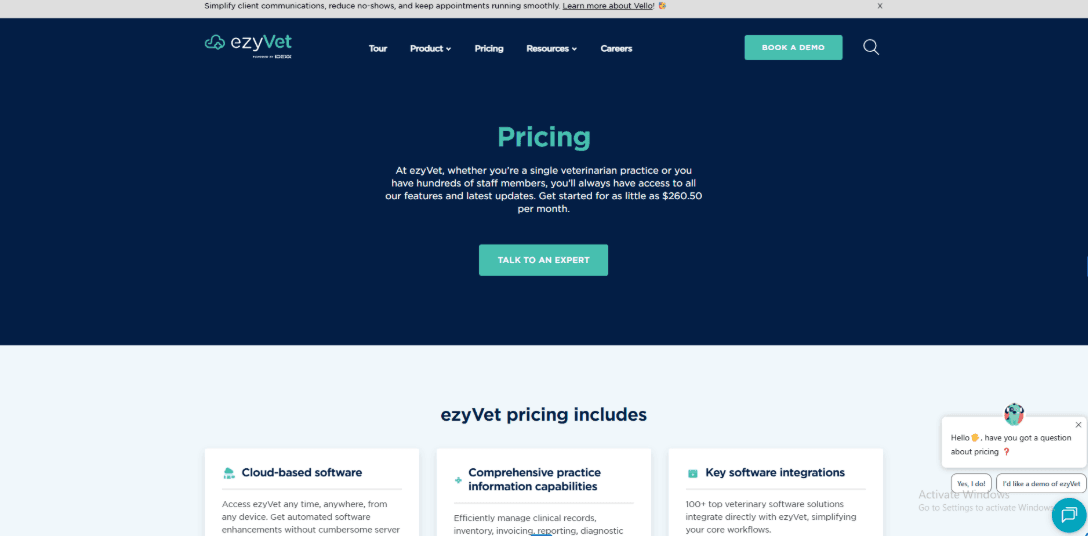
- Public pricing is shown as starting from about 260.50 per month on the US pricing page.
- There is a minimum 12-month contract, with longer multi-year terms also mentioned.
- Implementation is charged upfront and is separate from the ongoing subscription.
- The subscription language includes hosting, updates, automated backups, plus ongoing support and training.
When to Choose ezyVet
Choose it if you run a busy multi-doctor clinic, emergency or specialty setup, or any hospital where diagnostics, billing, and discharge need tight process control. It also fits teams that want strong reporting and inventory discipline. Skip it if you mainly want lightweight appointment scheduling with minimal setup and minimal training overhead.
PetDesk
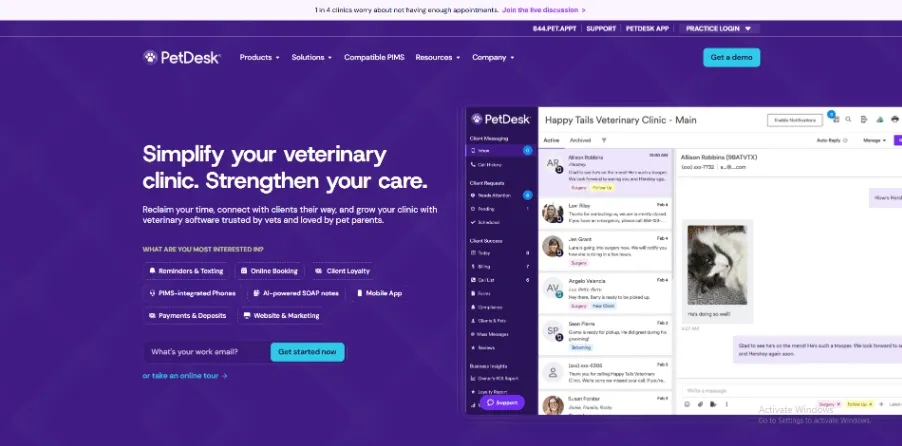
PetDesk is best known for client communication in veterinary clinics, especially reminders and two way texting. If your front desk is spending too much time on calls and follow ups, it is worth a serious look.
1) PIMS Sync
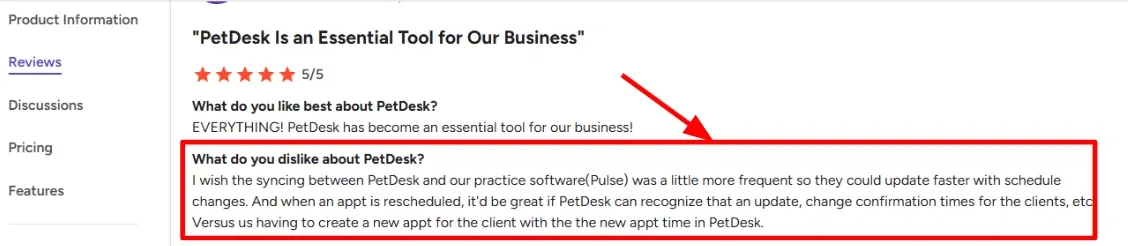
In my testing, the value of PetDesk starts when it is connected to your practice system so appointments and client info are in the same flow. This is also where timing matters and I noticed this come up in a G2 review too. I am sharing a screenshot below so you can see the exact phrasing they used.
2) Two-Way Texting
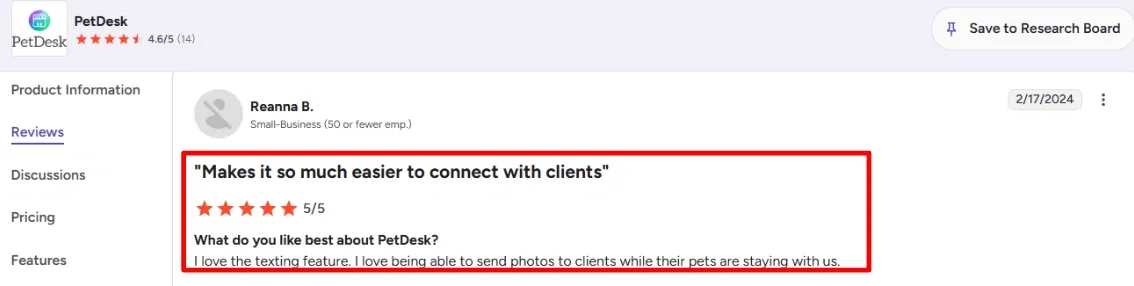
Texting is the feature most teams talk about after they use it for a week, because it changes how many calls hit the front desk. A G2 reviewer also called out loving texting and sending photos to clients while their pets stay with the clinic, and I get why. You can scan the screenshot below, it captures that real day to day benefit better than a feature list.
3) Online Booking
PetDesk supports online booking flows with controls around how bookings land and how the clinic confirms them. It can reduce back and forth for common appointment types once you tune the rules and set expectations for clients.
4) Payments and Deposits
If you want to reduce missed appointments, taking a deposit during booking is a practical lever. I like that you can treat it as a policy tool rather than a billing tool, especially for high demand slots.
5) Vet Phone System
PetDesk also has a veterinary focused phone system, which matters if your calls are hard to keep up with. One detail that stood out is their focus on messaging compliance and deliverability, including the A2P 10DLC requirement covered in PetDesk Zendesk on A2P. This is the kind of operational detail that tends to surface only after you roll out texting at scale.
Pros
- Strong fit if your main pain is client communication volume, reminders, and two-way texting, and you want that tied to day to day scheduling.
- If you run a clinic where texting and confirmations drive outcomes, it can feel like a real workflow upgrade once configured well.
- Texting supports practical things like sharing updates and photos during boarding stays.
- Online booking rules can reduce front desk back and forth for common appointment types.
- Deposits can help reinforce attendance policies for high-demand appointment slots.
Cons
- If your top priority is deep scheduling operations across many providers and complex resource rules, you may want a tool that is built primarily as scheduling software.
- PIMS sync timing can matter, and schedule changes may not reflect as quickly as you would want.
- When I tested reschedule flows, the confirmation behaviour needed more manual attention than I expected.
- There is no public API listed on GetApp which can limit custom integrations.
- Pricing is less transparent than tools that publish clear tier pages.
Pricing
- PetDesk pricing is usually quote based depending on modules like texting, booking, phones, and add ons.
- Major directories commonly list a starting point around 249 per month, but the exact total depends on your setup.
- If you add phones, payments, and higher messaging volume, budget for a meaningful step up from the base number.
When to Choose PetDesk
Choose it if your clinic wants fewer calls, faster confirmations, and a strong texting workflow tied to your daily scheduling. It also makes sense if you want online booking and optional deposits as part of the client journey. Skip it if you mainly need advanced scheduling logic across many staff and resources, or if you require a public API for custom builds.
Covetrus Pulse
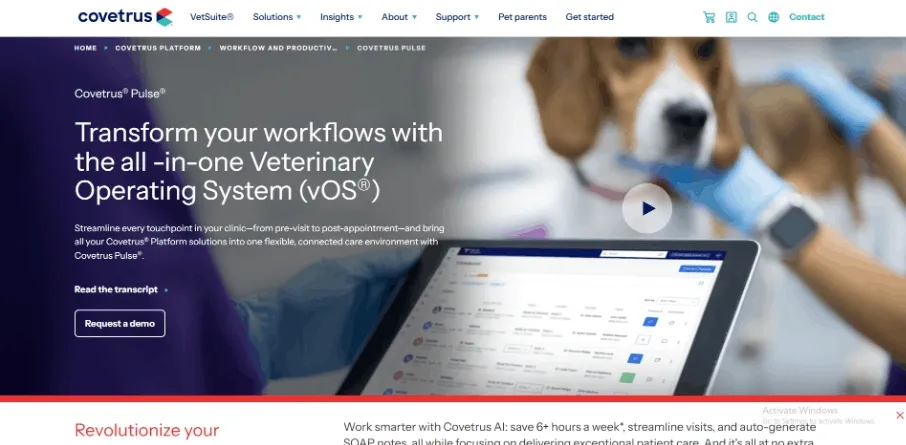
Covetrus Pulse is popularly known as a cloud based veterinary operating system that pulls scheduling, records, reminders, payments, and pharmacy into one place. It can be worth using if your clinic wants fewer disconnected tools and a tighter flow from booking to checkout to medical notes.
1. Reminders handoff
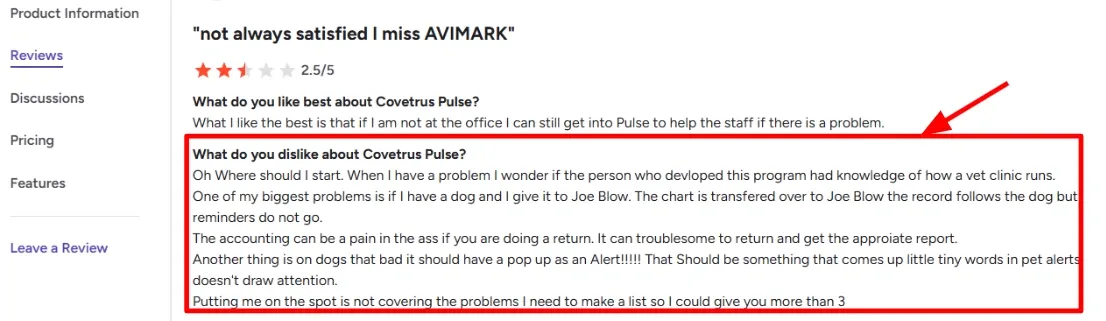
In my setup testing, reminders can be closely tied to how the patient record is handled across staff, so it is worth validating your exact handoff flow early. I also noticed a G2 review calling out that reminders did not follow when a chart was moved to another team member. I am sharing a screenshot of that review below, since it lines up with what I would double check during onboarding.
2. Alerts and due view
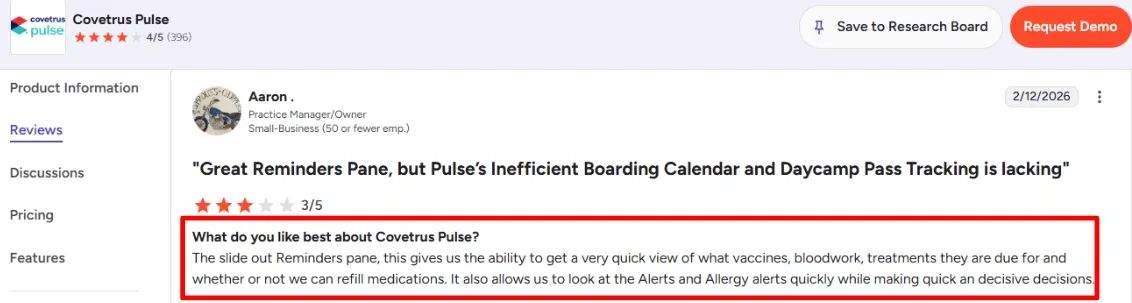
The slide out reminders view is genuinely useful during fast appointments because it surfaces what the pet is due for and whether refills make sense while you are still in the record. A G2 reviewer praised the reminders pane for quick vaccine and treatment decisions and faster checks of allergy and alert flags, and I am adding their screenshot below so readers can see the exact wording.
3. Payment integration
Pulse connects scheduling to deposits and payments, which can help reduce no-shows and keep front desk work cleaner when the day is busy. When I tested a basic booking-to-payment flow, the deposit step was straightforward, but I still had to be careful about how refunds and returns roll up into reports.
4. AI visit notes
If your clinic spends too much time typing, the AI features are worth a serious look because they are aimed at turning appointment conversations into SOAP style documentation and quick summaries. The most concrete coverage I saw was around ambient listening and automated SOAP notes which matches what I would measure during a pilot.
5. Diagnostics sync
If you are already invested in Zoetis diagnostics, the integration story is deeper than basic lab PDFs because results can land inside the record with billing workflows kept in mind. For scheduling heavy clinics, this matters because it reduces the back and forth after the appointment when results arrive and charges need to be captured.
Pros
- Fewer tool hops during the day because booking, records, reminders, and billing live in the same workflow. It can make handoffs smoother once the team learns the system.
- The reminders pane and due status view can speed up decisions during short visits.
- Deposits and payments can help stabilize the calendar when no shows are a real issue.
- AI documentation features can reduce time spent writing notes, especially for repetitive visit types.
- Strong diagnostics integration can help if your clinic already runs on Zoetis workflows.
Cons
- If you are mainly picking software for lightweight appointment scheduling, Pulse can feel like extra surface area to set up and maintain. In that case, a dedicated scheduling tool may be faster to implement and require less training.
- Reminder behavior during staff handoffs needs testing in your exact workflow, especially if multiple people touch the same patient.
- Returns and refund reporting can take extra clicks before it feels natural for the team.
- Alert visibility may need careful configuration so urgent flags do not blend into the page.
- Multi region operators may want a careful read of the Covetrus DPA before rollout, since data terms and responsibilities matter at scale.
Pricing
- Covetrus Pulse pricing is typically provided as a custom quote rather than a public plan list, and it can vary by clinic size and which modules you bundle.
- Expect the total to be influenced by add ons like communications, payments, pharmacy workflows, and AI features.
- If you are comparing vendors, ask for a written breakdown by module plus onboarding, training, and support assumptions.
When to Choose Covetrus Pulse
- Choose it if you want scheduling tightly connected to medical records, reminders, payments, and pharmacy workflows in one system.
- Choose it if your clinic is ready to invest time in setup, training, and workflow mapping during onboarding.
- Skip it if you only need a simple appointment calendar with reminders and minimal change management.
- Skip it if your team cannot spare time for implementation and would rather keep a lighter scheduling stack for now.
Conclusion
After testing these tools in real workflows, the differences show up quickly once you move past setup and start handling daily bookings and client communication.
- Lunacal works best if your priority is a clean booking flow, intake, and flexible scheduling without needing full medical workflows
- Vetstoria fits clinics that already use a practice system and want accurate online booking with guardrails
- ezyVet is better for larger clinics that need scheduling tightly connected to records, billing, and diagnostics
- PetDesk is the right choice if your main issue is client communication, reminders, and reducing front desk calls
- Covetrus Pulse suits clinics that want everything in one system and are ready for deeper setup and workflow changes
If you mainly want to improve booking and reduce friction for clients, start with Lunacal or Vetstoria. If your focus is operations and internal workflows, ezyVet or Covetrus Pulse will make more sense. For communication-heavy clinics, PetDesk stands out quickly once you start using it daily.
Methodology
I evaluated veterinary scheduling software based on how it performs in daily clinic operations. The focus was on reducing front desk workload, keeping schedules accurate, and improving client follow-through. I paid more attention to how tools behave after initial setup, since many issues only show up after a few days of real use.
How I gathered information
- I reviewed official websites, pricing pages, FAQs, and help documentation to understand what each tool offers and where the limitations are.
- I analyzed user reviews on G2 and Trustpilot to identify patterns in reliability, customer support, and common friction points.
- I also checked Reddit and Quora to see what clinic teams report after using these tools for a while, especially recurring issues and workarounds.
How I tested each tool
- I set up a basic clinic environment with standard appointment types, staff schedules, and working hours.
- I added sample clients, pets, and contact details to simulate real usage.
- I enabled reminders and intake forms wherever possible, since these directly affect attendance and preparation.
What I tested in practice
- Booking flows for new clients, returning clients, and urgent same-day appointments.
- Rescheduling, cancellations, waitlist handling, and whether double bookings are prevented.
- Reminder delivery, confirmations, follow-ups, and payment or deposit handling where supported.
- Basic reporting such as appointment volume, staff workload, and no-show tracking.
FAQs
What is a good veterinary scheduling software for most clinics?
A few strong options are Lunacal, Vetstoria, ezyVet, and PetDesk.
- Lunacal is a good fit if you want online booking, intake forms, calendar sync, and team scheduling in one place
- Vetstoria works well for clinics that need tighter booking rules and visit-type logic
- ezyVet ezyVet makes sense if you need scheduling connected to medical records, invoicing, diagnostics and broader clinic operations.
- PetDesk is useful when reminders, client messaging, and keeping pet owners engaged matter most
The right choice depends on how your clinic works every day.
Which veterinary scheduling tools should I compare?
Start with Lunacal, Vetstoria, PetDesk, and ezyVet.
These tools cover different needs:
- online self-booking
- reminders and follow-ups
- intake forms
- team calendars
- clinic workflow controls
- client communication
If your main goal is easier booking, compare the booking experience first. If your main problem is front-desk workload, compare reminders, visit rules, and staff scheduling.
What features matter most in veterinary scheduling software?
The best features are the ones that make life easier for both your staff and your clients.
Look for:
- online appointment booking
- different appointment types for different services
- intake forms for pet and owner details
- reminders by email or text
- easy rescheduling
- shared calendars for vets and staff
- deposits or prepayment for certain visits
These features help reduce phone calls, missed appointments, and manual follow-up.
Can veterinary scheduling software handle families with more than one pet?
Yes. A good veterinary scheduling tool should make this easy.
It should let you:
- link multiple pets to one owner
- keep pet details in one place
- reuse owner information without entering it again
- book recurring visits like vaccines or follow-ups
- collect the right details before each visit
This saves time for your team and makes booking easier for pet owners too.
What should a veterinary clinic check before choosing scheduling software?
Before choosing a tool, test how it works in real clinic situations.
Check things like:
- how easy it is for pet owners to book online
- how well reminders are sent
- whether the team calendar is easy to manage
- whether intake forms collect the right details
- how reschedules and cancellations are handled
- whether staff can manage busy days without confusion
A quick real-world test usually shows whether the tool will help or create more work.
Does location matter when choosing veterinary scheduling software?
Yes, it can.
If you serve clients in different regions, check for:
- reminder consent rules for email and SMS
- privacy support such as GDPR in the EU
- easy data export or deletion if needed
- language support for forms and reminders
- clear date and time formats
These details matter more when your clinic serves a wide mix of clients or locations.
Summarize this content with AI


