

Introduction
If recurring bookings and parent communication feel cumbersome in your current scheduler, a better-fit tool can simplify the process. I reviewed these music lesson scheduling tools with that decision in mind, focusing on day-to-day booking and administration.
I compared Lunacal, My Music Staff, Fons, Music Teacher's Helper, and Acuity Scheduling, and I focused on the criteria that matter most in this category: calendar sync, payments, lesson packages, and studio admin depth. I also cross-checked what I found against public sources where relevant, including G2, Trustpilot, Reddit, official documentation, help centers, and pricing pages, so the trade-offs are easy to verify.
I also considered regional factors such as GDPR support, time-zone handling, payment availability, cross-border payments, and SMS costs. These details can affect teachers working with students in different countries. The tables below should help you identify the best fit.
Best Music Lesson Booking Software
Best fit by teaching setup
| Music teaching setup | Best-fit software | Why it fits |
|---|---|---|
| Solo teacher with strong branding needs | Lunacal | Best when you want a polished booking page, custom domain, payments, packages, and room to grow into team routing later |
| Private teacher with heavy admin work | My Music Staff | Better fit when lesson billing, attendance, calendars, and day-to-day studio admin matter as much as the booking page |
| Recurring lesson packages | Fons | Strong choice for teachers selling repeat lessons and prepaid packages with a client-facing flow built around ongoing teaching |
| Budget-first studio admin | Music Teacher's Helper | Works for teachers who want reminders, invoicing, and simple scheduling without paying for broader sales or team-routing features |
| Flexible mainstream scheduling | Acuity Scheduling | Good fit for teachers or studios that want a widely used scheduler with forms, payments, team support, and broader integration depth |
Music lesson booking software feature matrix
| Feature | Lunacal | My Music Staff | Fons | Music Teacher's Helper | Acuity Scheduling |
|---|---|---|---|---|---|
| Best fit | Branded lessons and growing studios | Admin-heavy private teaching | Recurring lessons and packages | Simple studio admin | Flexible mainstream scheduling |
| Paid plan starts at | $9 | $16.95 | $19.95 | $14 | $16 |
| G2 rating | 4.9 ★★★★★ | No public G2 rating | No public G2 rating | 4.4 ★★★★ | 4.7 ★★★★ |
| Calendar sync | Yes | Yes | Partial | Partial | Yes |
| SMS or email reminders | Yes | Yes | Yes | Yes | Yes |
| Online payments | Stripe, PayPal | Stripe, PayPal | Yes | Yes | Stripe, Square |
| Branded booking page | Strong | Good | Partial | Partial | Good |
| Team scheduling | Yes | Yes | Yes | Partial | Yes |
| Round robin routing | Yes | No | No | No | Yes |
| Lesson packages | Yes | Partial | Yes | No | Yes |
| Custom domain | Yes | Yes | No | Partial | Partial |
| GDPR support | Yes | Yes | No | No | Yes |
| Music-school admin depth | Basic | Strong | Partial | Strong | Basic |
| Biggest watchout | Fewer mature integrations than older incumbents | Public review footprint is thin | Limited for larger studio operations | Scheduling flow feels dated | Team pricing rises fast |
In-depth comparison
This section compares what each tool does well, where it is limited, and which types of teachers or music schools it suits best.
Lunacal
Features
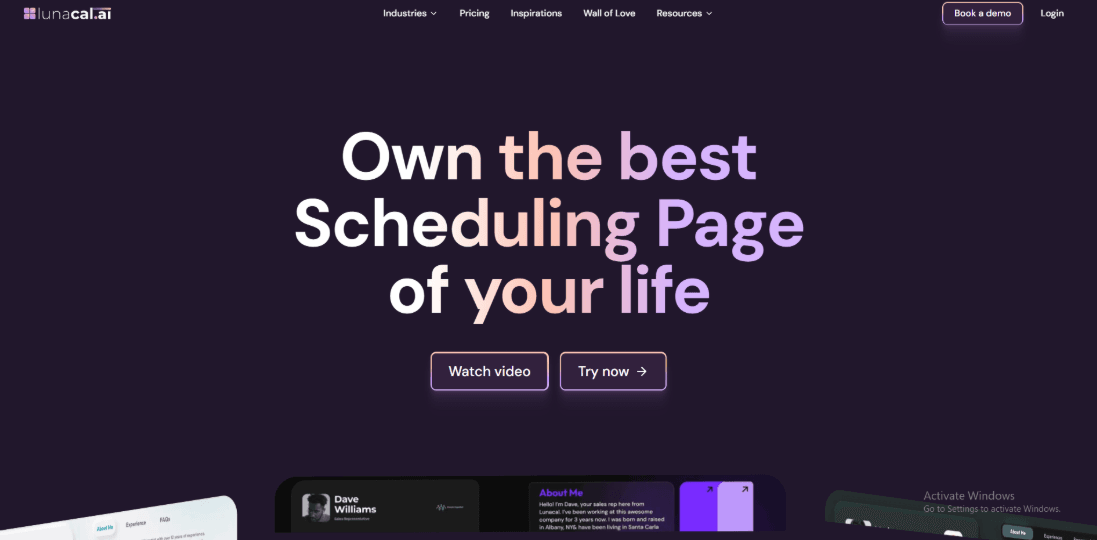
Lunacal is music lesson scheduling software that turns a simple booking link into a profile-style page. When someone opens your page they can learn about you, see lesson details, and understand pricing before choosing a time. Instead of a plain schedule link, the page gives space to explain your teaching style and lesson structure. Many teachers using music lesson booking scheduling software look for this type of setup because it answers common questions before the first lesson.
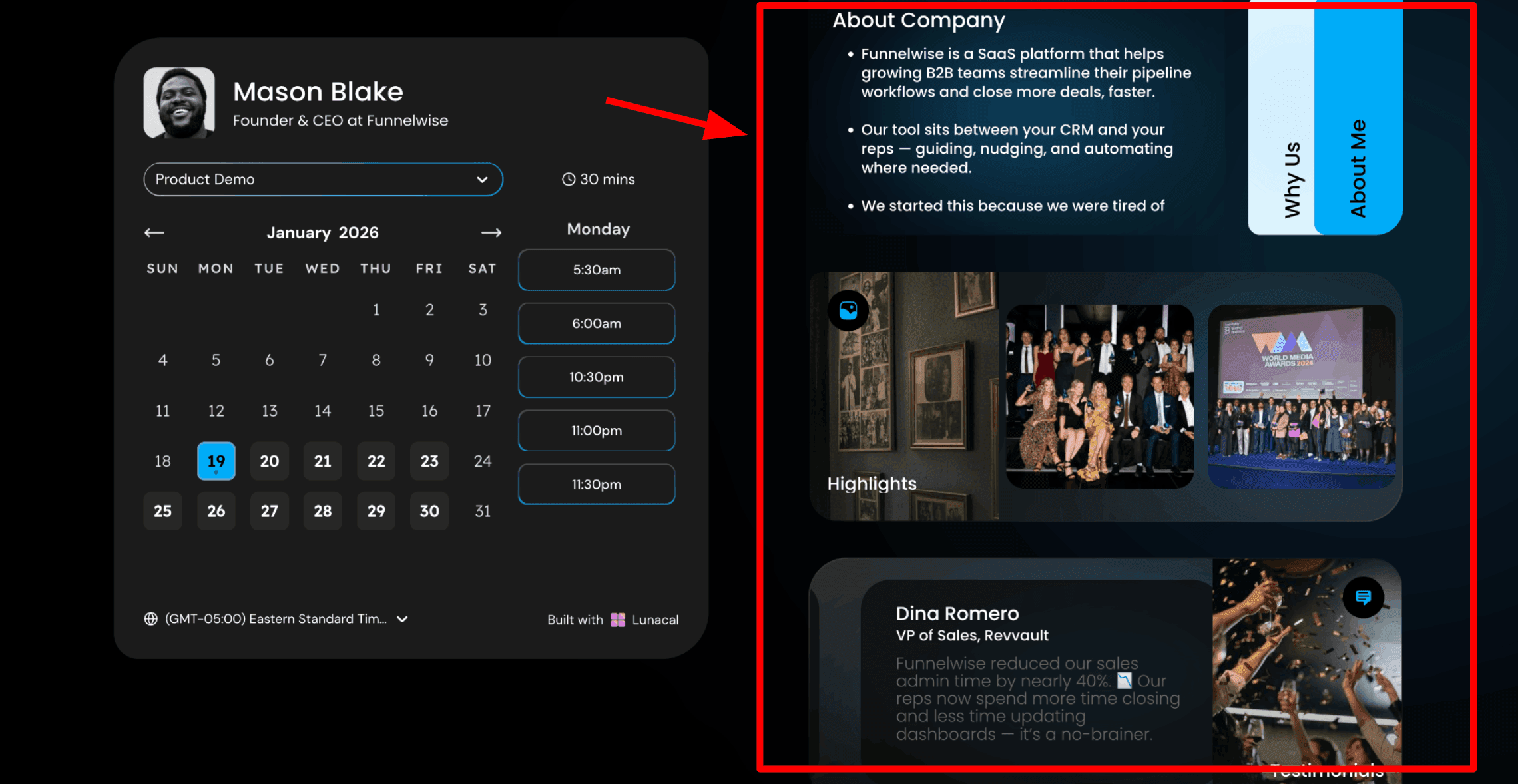
1. Scheduling pages with rich content: This is usually the first thing I show teachers. It changes how new students experience the lesson booking process. In Lunacal, the booking page can include helpful information right beside the calendar. Visitors can read about your teaching style, your background, and your studio before choosing a time. For teachers looking for reliable music lesson booking scheduling software, this feature makes a real difference. Here is a screenshot below:
2. Drag-and-drop scheduling page editor: This is the tool you use to build the page. Lunacal has a simple editor that lets you add blocks such as text, testimonials, images, videos, and documents. You place them where you want and publish the page. Teachers who are searching for music lesson booking scheduling software often worry about the technical setup. This editor keeps things simple. You focus on the information students need before booking.
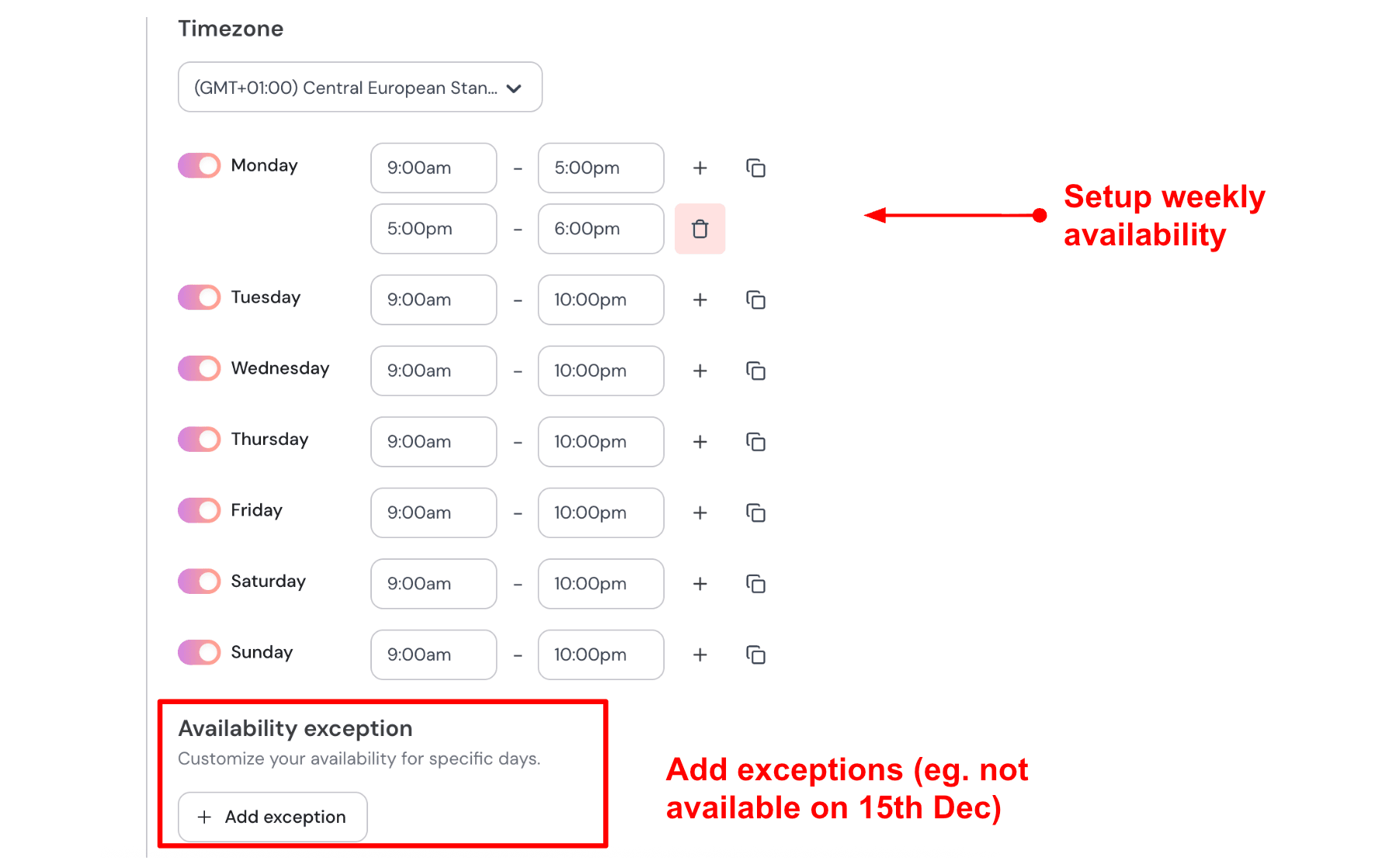
3. Weekly availability with date exceptions: After setting up the page, the next step is availability. You choose your teaching hours for each day of the week. You can also block specific dates such as recitals, school holidays, or personal days. Teachers who use music lesson booking scheduling software often have changing schedules. Setting weekly hours saves time because the system automatically handles bookings. Here is how I set up my availability:
4. Sync multiple calendars to avoid conflicts: Lunacal connects to multiple calendars. One calendar receives new bookings. Other calendars are checked to make sure there are no conflicts. This helps teachers who keep separate calendars for studio lessons, school work, and personal plans. When everything is connected, the booking page only shows available times. Lesson bookings go into a studio Google Calendar. A school calendar and a personal Outlook calendar can also be connected for conflict checking. If a school performance appears at 4
PM, that time disappears from the booking page.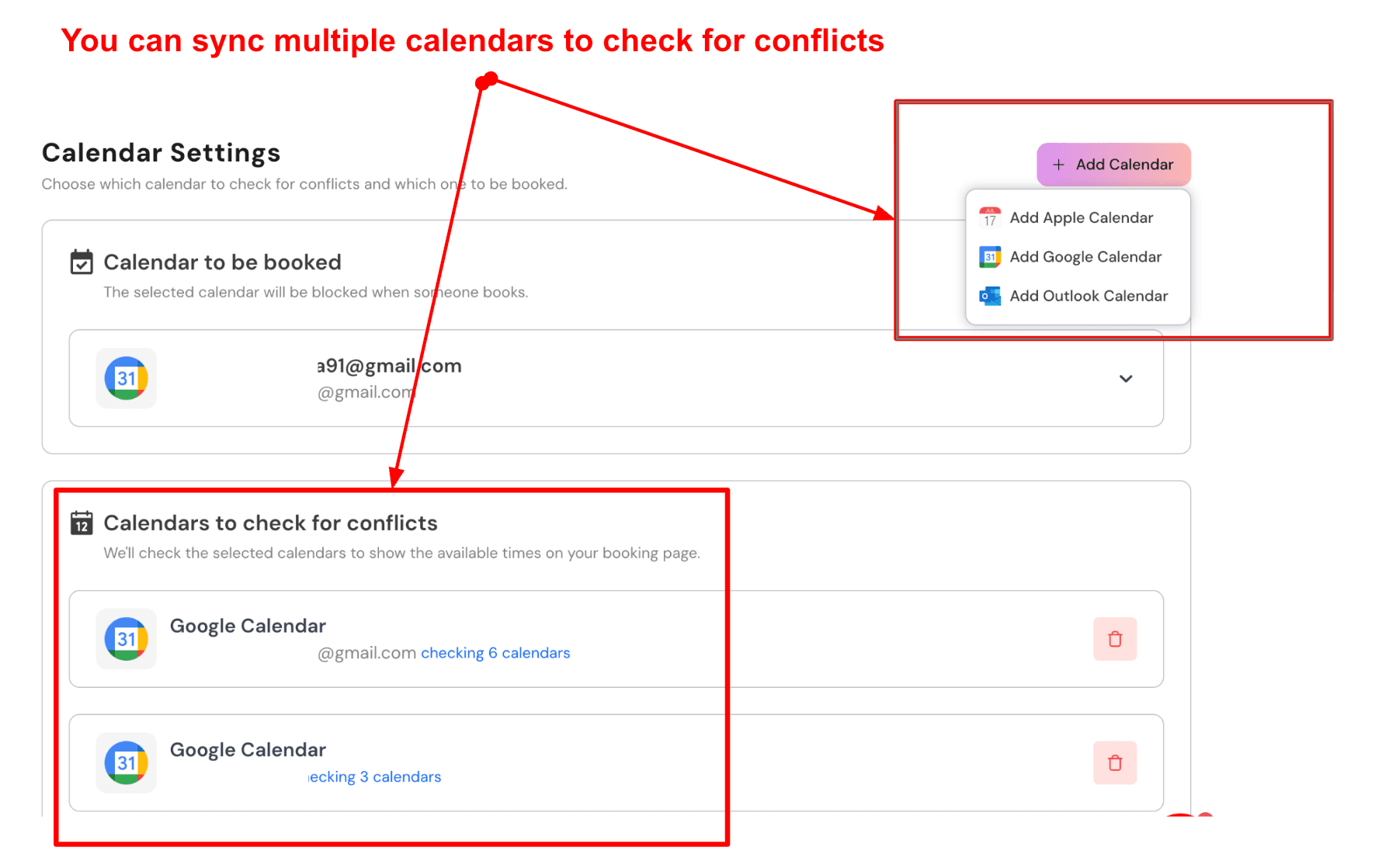
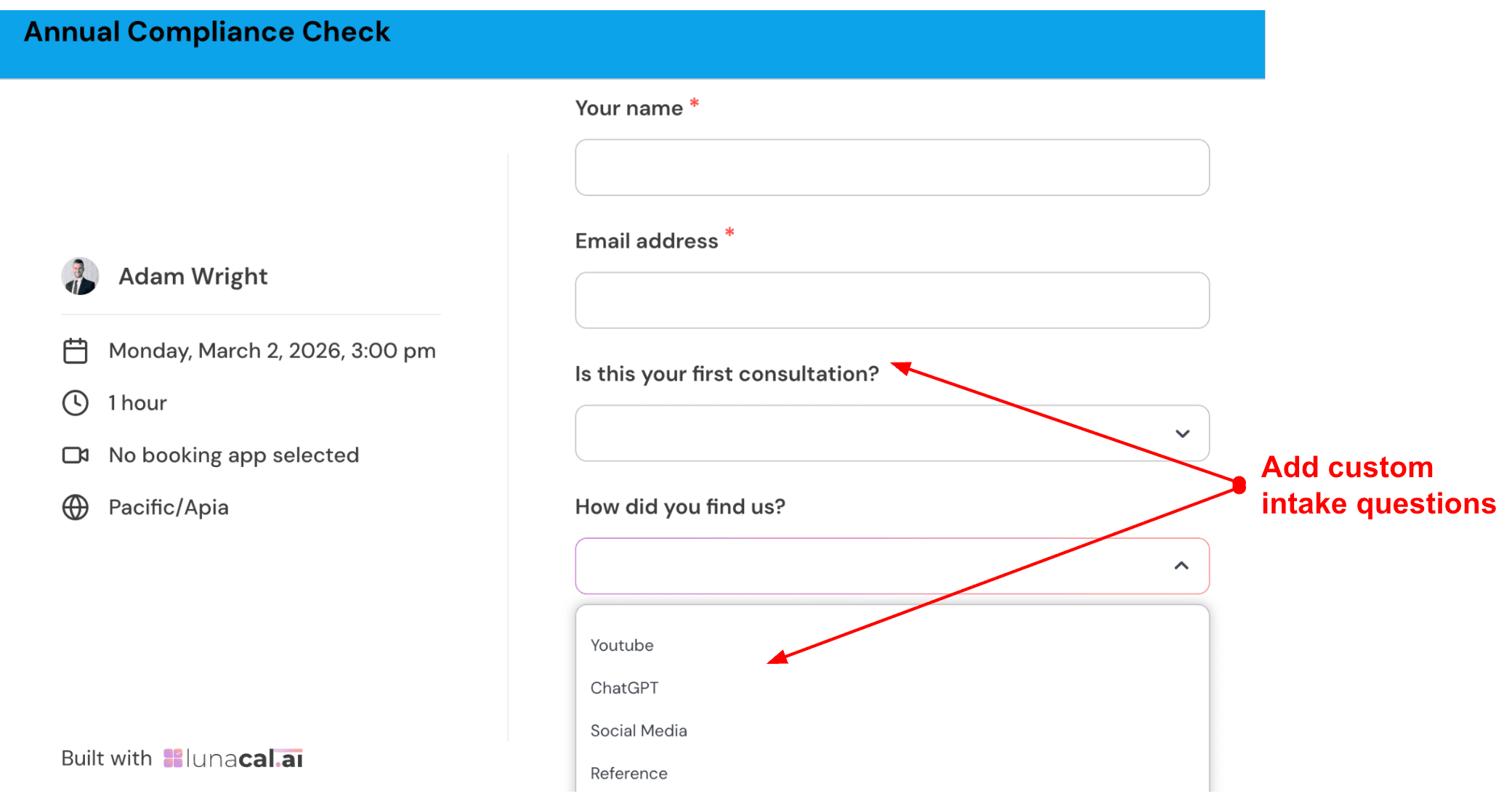
5. Custom intake questions: You can add a few questions to the booking form. Students or parents answer them before confirming the lesson. This helps you prepare in advance. For a trial lesson I ask which instrument the student wants to learn. Options include Piano, Guitar, Violin, and Drums. The second question asks about current level such as Complete Beginner or Some Experience. The final question lets parents share anything important about the student’s goals.
Check out the intake form I created:
6. Automated email and SMS reminders: Lunacal sends automatic reminders by email and SMS before each lesson. Messages can include the student's name, lesson time, and the meeting link or studio address. A simple reminder setup works well for most teachers. One email goes out 24 hours before the lesson with full details. One SMS is sent 1 hour before the lesson. For a 45-minute online guitar lesson, the email reminder includes the lesson time and Zoom link. The SMS reminder shortly before the lesson includes the teacher's name and the join link.
Pros
- Works well when you want your lesson booking link to also answer questions and build confidence for parents and students. The booking page can carry your story and details without extra back-and-forth.
- Payments and packages can reduce unpaid no-shows for trial lessons and one-off sessions.
- Calendar connection is quick, and conflict blocking worked reliably in my test.
- Rescheduling is clean and keeps changes in one place, which reduces message threads.
- Embeds are flexible for teachers who want it on a website or a simple landing page.
Cons
- If you need grading, detailed student roster management, or deeper class administration, a dedicated music-school management platform may be a better fit.
- Multi-company setup and custom domains can feel rough around the edges in the current experience.
- The admin side can take a little time to feel natural when you are setting up many lesson types.
- Some people ask for better documentation and setup guidance on advanced parts like tracking and automation.
- SMS pricing can vary by country and message length, which can surprise teams doing high-volume reminders. See SMS pricing Help Center.
Pricing
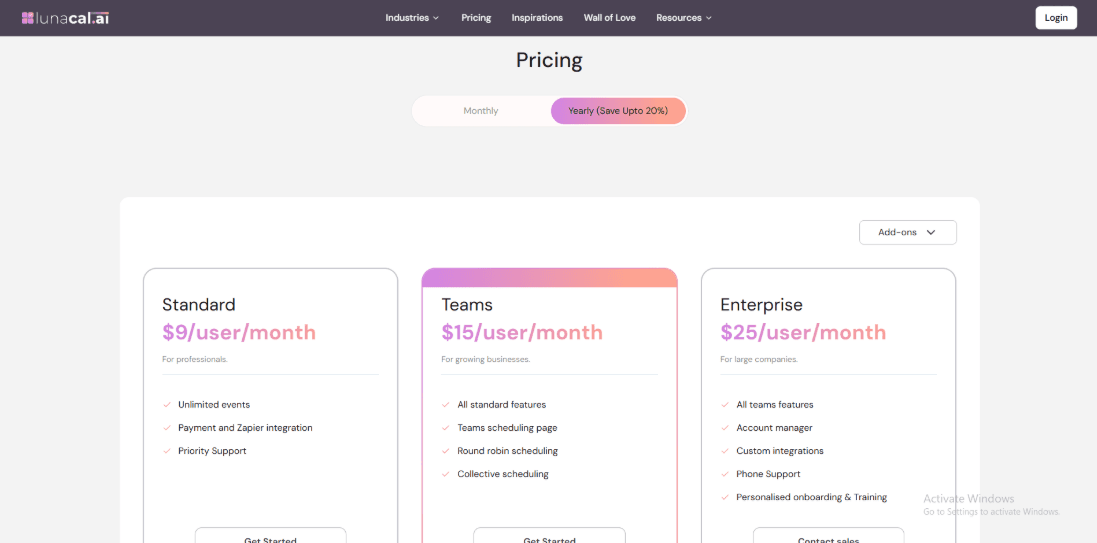
- Standard is $9 per user per month and fits solo teachers who want music teacher scheduling software with payments and core customization.
- Teams is $15 per user per month and adds team scheduling options like round robin and collective scheduling.
- Enterprise is $25 per user per month and adds account support onboarding and custom integrations.
- Annual billing can reduce the effective monthly cost depending on the plan.
When to Choose Lunacal
Lunacal works well for teachers who want their booking page to explain their teaching style and lesson structure. It also helps when you want to collect payments and manage bookings in one place. Teachers working with students across different time zones or managing several calendars will find it useful. It is a practical option when you want music lesson booking scheduling software that also acts as a simple profile page for your teaching services. If your focus is on school administration, grading systems, or large institutional scheduling rules, a specialized school platform may fit better.
My Music Staff
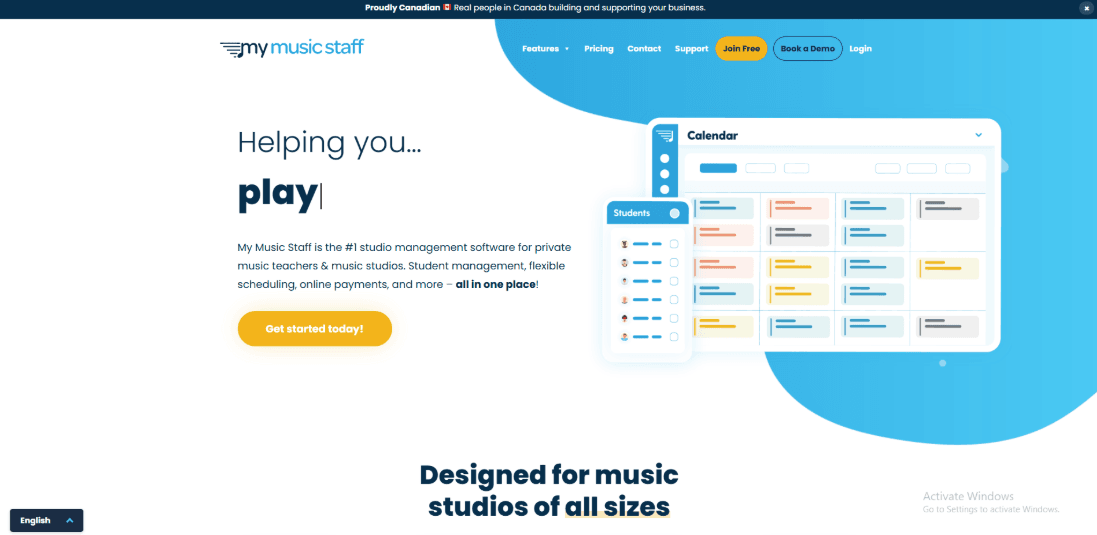
My Music Staff is a tool many music teachers use to manage lessons and students. It brings scheduling, billing, attendance, and a student portal into one place. Teachers who want fewer spreadsheets often look at tools like this when researching music lesson booking scheduling software.
Features
- Auto invoicing: The platform can generate invoices automatically on a schedule. This helps when students take recurring weekly lessons. I tested this by creating a few students with repeating lessons. Once the setup was complete, invoices started appearing on schedule without extra work. I also saw a similar concern in a reddit review, where someone spent too much time on invoices and attendance. Here is a screenshot below.

-
Payment integration: You can connect Stripe or PayPal so parents and students can pay online. This reduces the need to send payment reminders. I tested the autopay feature with a few student profiles. Once autopay was enabled for each student, payments were automatically processed each cycle. The first setup step can take a moment to find in the interface, though it becomes easy once you know where it lives. A second reddit screenshot below says once autopay is turned on it runs smoothly after initial setup, and that matched what I saw.

-
Student portal: Students and parents can log in to see schedules, invoices, and shared materials. This is useful if you share files or practice notes in one place and do not want to email attachments all the time. I set it up with a test parent account, and the basics were easy to find.
-
Practice log: The platform includes a simple practice log. Students can track practice time and upload files. This feature helps teachers see how students practice between lessons. A student can quickly record practice sessions and share recordings or files if needed. I tried adding a short practice entry and the process felt simple enough for younger students.
-
Calendar sync: Two-way calendar sync is included so your teaching calendar stays aligned with Google or Outlook. This matters when you teach across locations and rely on your personal calendar to stay clean. The company’s update notes mention that earlier Google sync issues were resolved and service returned to normal. This is worth noting if calendar reliability is especially important to you.
Pros
- It covers the full administrative workflow for music lessons, including scheduling, billing, attendance, and parent access, which can reduce the number of separate systems you need.
- Strong automation potential once you finish setup for each student, especially for invoicing and autopay.
- Practice logs and file sharing fit real teaching workflows without extra apps.
- Multilingual support is helpful if your student base is mixed.
- Pricing is straightforward, and the trial period is generous.
Cons
- If your main goal is hands-off automation with minimal setup, My Music Staff may feel heavier than simpler lesson-payment tools.
- Adding multiple teachers increases monthly cost as you grow.
- For some workflows you may still end up spending time tuning invoices and attendance settings before it feels smooth.
- Calendar sync depends on Google and Outlook changes at times as noted in their own update about sync behavior returning to normal.
- If you use its website builder to host student files, migrating that content later may require additional effort, according to one Reddit review.
Pricing
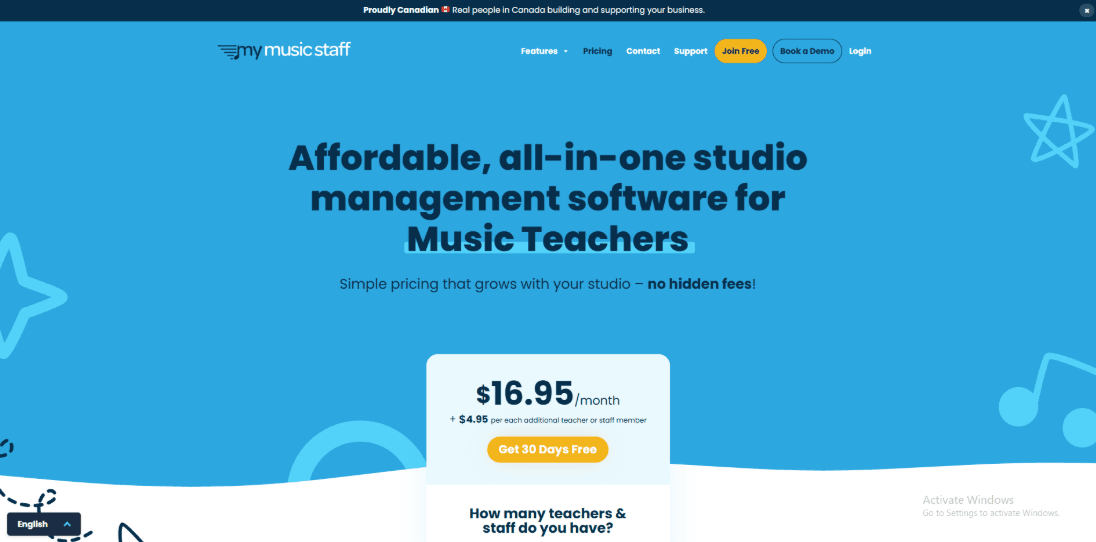
- Starts at 14.95 per month for one teacher account.
- Each additional teacher or staff member is an extra 4.95 per month.
- There is a 30 day free trial with no credit card required.
- They also offer a 90-day money-back guarantee which is uncommon in this category.
- Pricing is positioned as all features included rather than tiered plans.
When to Choose My Music Staff
Choose My Music Staff if you run private music lessons or a small studio and want scheduling, billing, payments, attendance, and a student portal in one place. It works well when you take a little time to set up each student. After that, many tasks run automatically. Teachers who want a full studio management system often include it on their shortlist when comparing music lesson booking scheduling software.
Fons
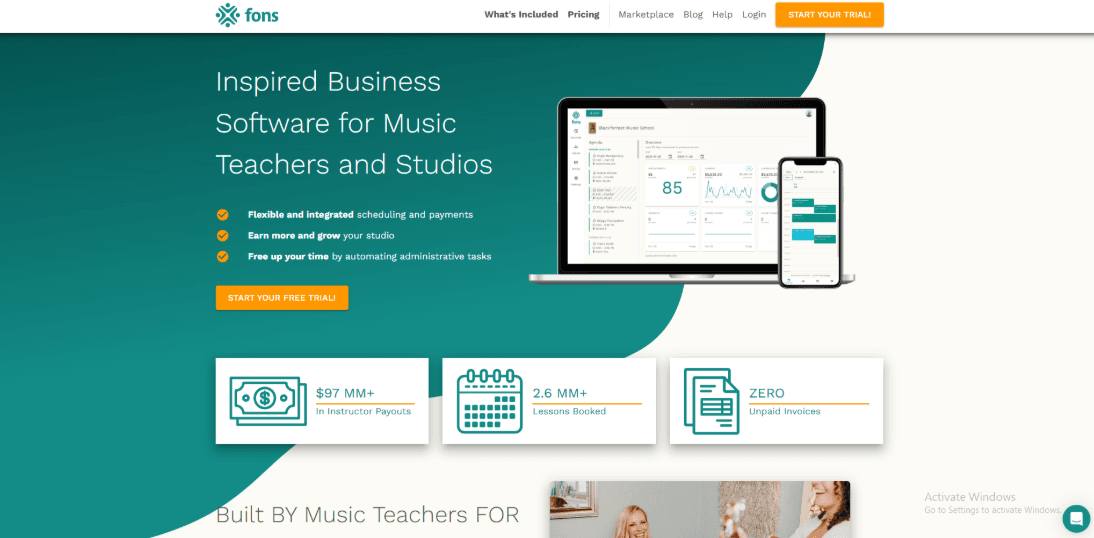
Fons is a music lesson booking and scheduling software that helps teachers manage lesson times and payments in one place. It works well for music teachers who want fewer payment reminders and fewer scheduling messages.
Features
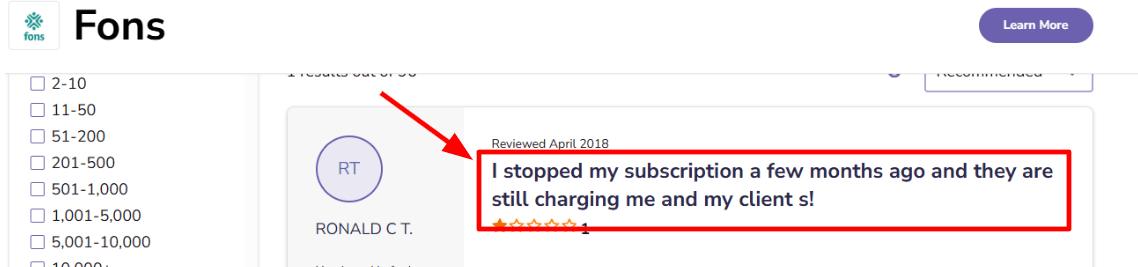
- Auto Billing: When I tested the setup, the billing flow was easy to understand. It feels designed for lesson based teaching and recurring students. You can set automatic charges based on your lesson schedule. Cards are billed on the dates you choose, and payment updates are sent to both you and the parent. I also saw a similar issue mentioned in a Software Advice review about charges continuing after cancellation. I am sharing that screenshot below so you can judge the context.
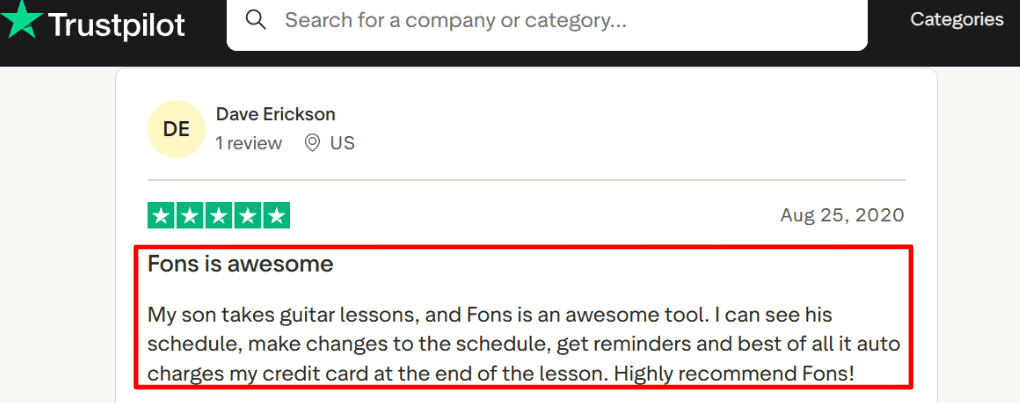
- Online Booking: Parents can book lessons online using your lesson rules and service options. You can also add registration questions when someone signs up. During testing, it was easy to place a new student into an open lesson slot. Fewer follow-up messages were needed to confirm details. A Trustpilot review also noted how easy it is to see the schedule, get reminders, and get auto-charged, and I am adding the screenshot below for reference.
-
Calendar Integration: Fons connects with Google Calendar and can block lesson times based on existing events. Once connected, it helped prevent double bookings. Lesson times stayed aligned with my calendar. It took a bit of testing to get the calendar blocks to appear exactly as I wanted. This mainly depended on event titles and time zone settings already in my calendar.
-
Cancellation Policy: You can set a cancellation window for lessons. If someone cancels at the last minute, you can apply a cancellation charge. This protects lesson income and removes the need to explain the policy every time. If your studio prefers flexible policies, the rule can be turned off as well.
-
Payout Controls
Payments appear as itemised deposits, making it easier to track their source. Payout timing depends on the payment method, and changing payout frequency may require account verification.
Pros
- Great fit for solo teachers and small studios that want scheduling plus auto payments with minimal admin work. I found the core setup quick once services and billing were defined.
- Strong payments automation for tuition-style recurring lessons.
- Clear client reminders and payment notifications reduce no-shows and late payments.
- Supports packages and workshop style billing for camps and masterclasses.
- Multi-currency support helps when parents pay from different locations.
Cons
- If you only need simple time slot booking and already run payments elsewhere, this can be too heavy for a basic music lesson scheduling software stack. In that scenario, a lighter scheduler can be easier to maintain.
- ACH payouts can be slow, which can matter during peak season.
- Changing payout frequency depends on account verification status.
- Refund handling can feel rigid since processing fees are not refunded per the Fons pricing help doc on fees.
- Cross-border card fees can add up if many parents pay with international cards.
Pricing
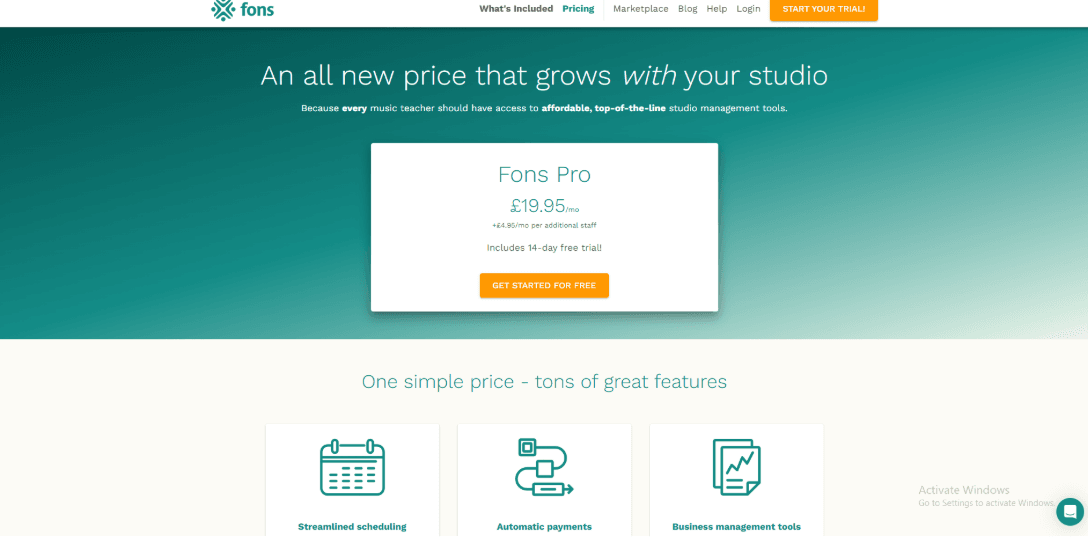
- Monthly software fee is typically around 19.95 per month for the first teacher in USD and GBP, with a smaller fee per additional staff member
- Card processing is commonly 2.9 percent plus 0.30 per charge
- International cards are commonly higher at 3.9 percent plus 0.30
- ACH is listed at 1.8 percent and is US only
- Some billing types can add an extra Stripe subscription fee so it is worth checking your exact billing mix
When to Choose Fons
Choose Fons if you run weekly music lessons and want scheduling, billing, reminders, and lesson policies handled in one system. It works well for teachers who run recurring classes, lesson packages, or seasonal workshops. Many studios use it as their main music lesson booking scheduling software because it keeps lessons and payments organized. It may feel unnecessary if you only need a simple booking link and prefer to manage payments in another tool.
Music Teacher's Helper
Music Teacher’s Helper is widely used by music teachers who want to manage lessons without relying on spreadsheets. It combines scheduling, billing, reminders, and a student portal in one system. For teachers searching for music lesson booking scheduling software, it offers a simple way to keep lessons and payments organized. Some documentation and plan pages use the Duet Partner name. For consistency, this section refers to the product as Music Teacher’s Helper.
Features
-
Lesson Scheduling: I set up a few weekly lessons and the calendar made it easy to see the whole studio schedule. Each lesson stayed linked to the student record, so when I moved a session to another day the information stayed organized.
-
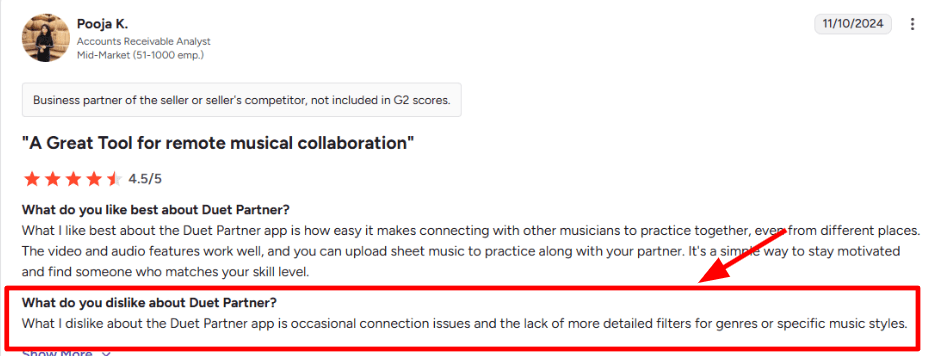
Calendar Integration: Calendar syncing helped keep the schedule accurate and prevented double bookings. My day felt more predictable once everything was connected. When I changed several lessons in a short time, the sync took a little longer to update. I also saw a similar point in a G2 review, and I am sharing that screenshot below so you can judge it yourself.
-
Student Portal Access: Families can log into a portal to check schedules and balances on their own. This reduces the number of messages asking about upcoming lessons. One detail I liked is the ability to control what a child can see in the portal so payment information stays private.
-
Billing and Payments: Charges, payments, and balances stay in one place. Online payments are processed through services such as PayPal and Authorize.Net. Duet explains that the platform does not store card details and instead sends payments through these processors. That setup keeps daily payment handling simpler for teachers.
-
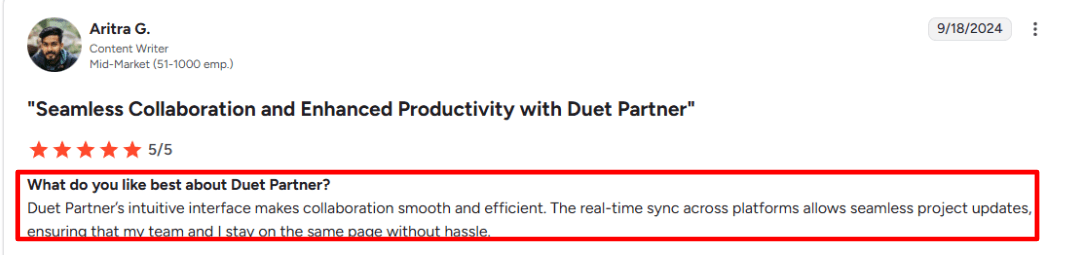
Attendance and Reminders: Attendance tracking and automated reminders are built in, which helps keep the week running on time. A G2 review G2 review also notes that the interface is easy to learn and that syncing keeps updates consistent across devices. The screenshot below shows that feedback.
Pros
- If you are comparing music lesson scheduling tools, this can reduce the number of systems you need.
- Friendly portal experience for families which reduces back and forth messages.
- Built in attendance tracking for quick record keeping.
- Useful exports when you want your own backups and reports.
- Supports international settings like time zone and currency which matters for teachers outside the US.
Cons
- If your goal is hands-off automation with minimal setup, this may feel heavier than simpler lesson-payment tools.
- Occasional connection or sync reliability can show up at the wrong time.
- Multi teacher studios may need a different product path as noted in the Duet FAQ.
- If you need detailed genre tagging and advanced search filters, this may feel limiting for a busy studio.
- Support is available within set hours so you may wait if you work late nights.
Pricing
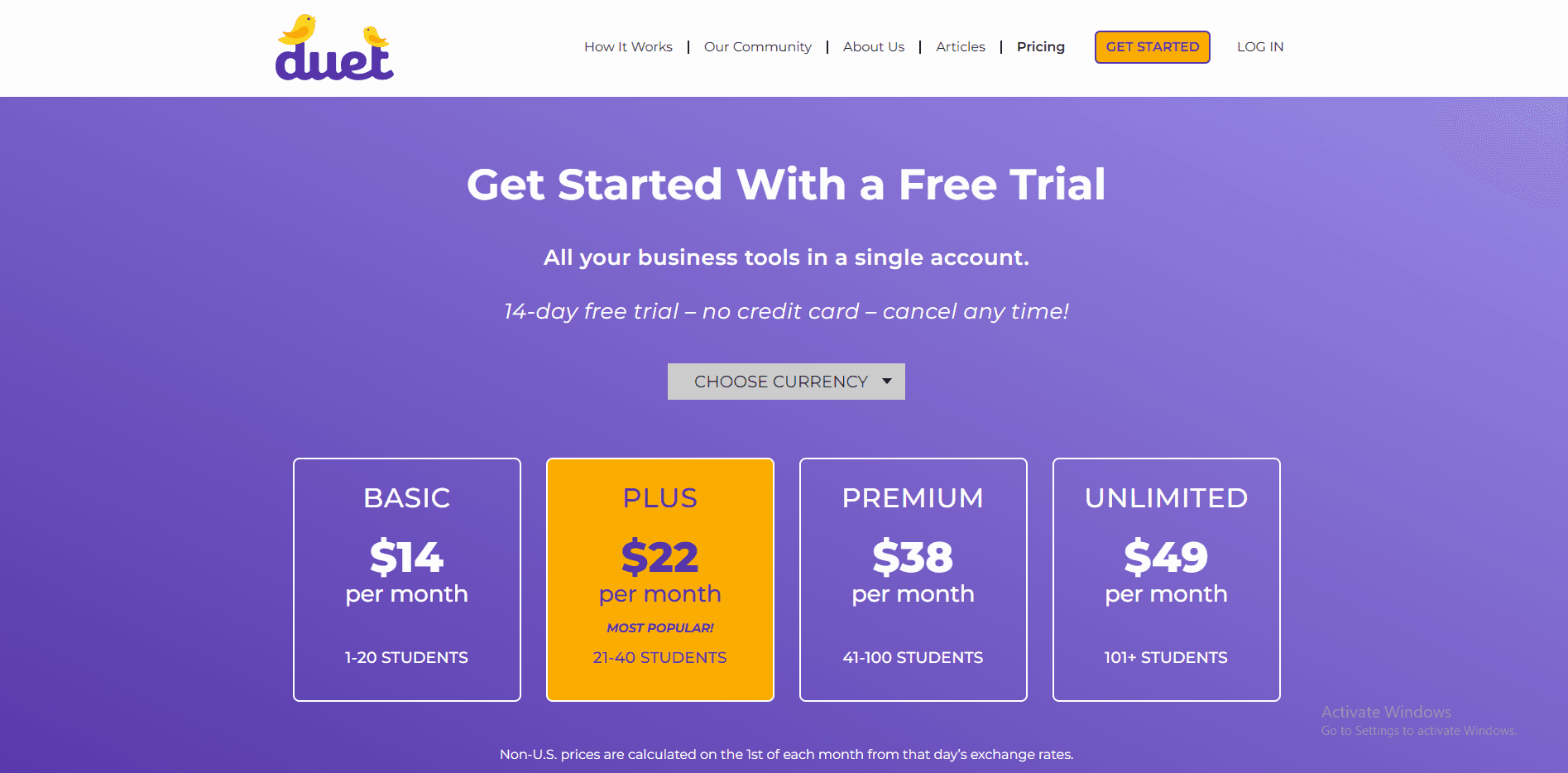
- Duet Partner lists tiered plans that start around the low teens per month and go up for larger studios.
- Annual billing options reduce the effective monthly cost.
- Plan tiers typically change limits like active students and storage.
- Some directories also show a lower entry price for smaller studios so it is worth double checking the plan page.
When to Choose Music Teacher's Helper
Choose Music Teacher’s Helper if you are a solo teacher or small studio that wants scheduling, billing, reminders, and a family portal in one place. It is best suited to teachers who want a straightforward weekly system without advanced school-management features.
It works well when you want to set up a weekly teaching system quickly and keep it running with minimal effort. Teachers who prefer straightforward music lesson scheduling software often appreciate that the core features remain easy to manage.
Acuity Scheduling
Acuity Scheduling is a flexible appointment-booking tool for independent music teachers and small studios that need more control over lesson types, availability, payments, and student information. It is not built specifically for music education, but it covers most of the scheduling tasks involved in running private lessons.
Key Features
- Recurring lesson scheduling
Teachers can create repeating appointments for students who attend weekly or fortnightly lessons. This works well for maintaining a regular teaching schedule without requiring parents or students to book every lesson separately.
- Packages and lesson bundles
Acuity supports packages that can be used for selling a fixed number of lessons in advance. This can be useful for teachers offering five-lesson, ten-lesson, or term-based bundles.
- Online payments
Teachers can collect payments during booking through supported payment integrations. Deposits and full payments can help reduce unpaid lessons and last-minute cancellations.
- Custom intake forms
Booking forms can collect information such as the student’s age, skill level, preferred instrument, previous experience, lesson goals, and parent contact details.
- Automated reminders
Email and text reminders can be sent before lessons. This helps reduce missed appointments and gives students or parents time to reschedule when necessary.
- Multiple calendars and lesson types
Teachers can create separate availability for different instructors, instruments, locations, or lesson formats. For example, a studio could offer piano, guitar, vocal, and online lessons through the same booking system.
- Calendar integrations
Acuity can connect with commonly used external calendars, helping teachers avoid double-bookings and keep personal and teaching commitments in one place.
Pros of Acuity Scheduling
- Strong control over availability
Teachers can set different schedules, buffers, booking limits, and availability rules for each lesson type.
- Useful for prepaid lesson packages
The package system works well for teachers who sell blocks of lessons rather than charging separately after every class.
- Detailed student intake forms
The forms provide enough flexibility to collect important information before the first lesson.
- Suitable for solo teachers and small teams
Acuity can support an individual instructor as well as a studio with multiple teachers or calendars.
- Good payment and reminder automation
Payments, confirmations, and reminders can be handled within the booking process, reducing repetitive administrative work.
Cons of Acuity Scheduling
- Not designed specifically for music schools
It does not include specialist features such as practice tracking, student progress reports, repertoire management, or music-specific learning records.
- Setup can take time
Creating appointment types, forms, packages, calendars, and availability rules may take longer than using a simpler booking tool.
- The booking page can feel functional rather than personal
Teachers who want a profile-style page with videos, testimonials, detailed introductions, and richer branding may find the standard booking experience limited.
- Limited student-management features
Acuity handles appointments well, but it is not a complete system for managing student development, attendance history, assignments, or parent communication.
When to Choose Acuity Scheduling
Choose Acuity Scheduling when you need flexible recurring appointments, prepaid lesson packages, detailed intake forms, online payments, and multiple teacher calendars. It is best suited to independent music teachers and small studios that primarily need a reliable booking system rather than complete music-school management software.
Music Lesson Booking Software Conclusion
For most buyers, the choice becomes clearer once you separate simple lesson-booking needs from deeper music-school administration. The main criteria are package support, calendar sync, staff coordination, administrative depth, and the quality of the student booking experience.
- Pick Lunacal if you want a stronger booking page, payments, packages, custom domain control, and team routing as your teaching business grows.
- Pick My Music Staff if your daily work depends on attendance, billing, lesson tracking, and teacher-side admin staying organized.
- Pick Fons if recurring lessons and package sales are central to how you run your teaching business.
- Pick Music Teacher's Helper if you want a lower-cost tool for reminders, invoicing, and simpler studio operations.
- Pick Acuity Scheduling if you want a broadly adopted scheduler with solid forms, payments, and team support.
Methodology
Sources
- I began by reviewing each tool’s official website to understand its core value proposition and intended audience. I then examined FAQ sections and help documentation to verify how features like recurring lessons, rescheduling policies, and student record management function in practice.
- Wherever possible, I conducted hands-on trials to base evaluations on actual setup and day-to-day usability. To validate marketing claims, I analysed user reviews from G2 and Trustpilot and cross-referenced recurring concerns raised on Reddit.
Test setup for music lesson scheduling software
- I created a sample studio environment consisting of two teachers and 35 students, including a combination of weekly private lessons and small group classes.
- I integrated a calendar, configured teaching hours, buffer times, and holiday schedules, and implemented policies for late cancellations and no-shows.
- Payment processing and invoicing features were set up where available, and email as well as SMS reminders were tested using realistic notification timings.
Common scenarios I tested
- A parent booking a first trial lesson, then converting to a recurring weekly schedule.
- Student-driven reschedules, teacher time-off changes, and waitlist fills for popular time slots.
- Group class enrollment limits, make-up lessons, and how cleanly the tool tracks attendance and notes.
- Basic reliability checks, including mobile usability, message delivery, and support response quality.
FAQs
What is the best music lesson scheduling software for most teachers?
Strong options include Lunacal, My Music Staff, Fons, Music Teacher’s Helper, and Acuity Scheduling. Acuity is especially worth comparing if you need flexible forms, payments, and team scheduling.
Which music lesson scheduling software should private teachers and studios compare?
A few strong options are Lunacal, My Music Staff, Fons, and Music Teachers Helper.
- Lunacal is great for clean booking pages, easy setup, packages, and payments
- My Music Staff works well for studios that need more admin tools
- Fons is useful for recurring tuition and autopay
- Music Teachers Helper is worth looking at for studio basics and student tracking
The right choice depends on how simple or detailed your teaching setup is.
What features matter most in music lesson scheduling software?
The most useful features are the ones that save time every week.
Look for:
- recurring lesson scheduling
- easy rescheduling for make-up classes
- payment collection
- reminders for students or parents
- student notes and intake forms
- teacher assignment if you have a team
These features make day-to-day teaching much easier to manage.
What should music teachers look for when handling make-up lessons?
Make-up lessons can get messy fast, so the software should make this simple.
Look for a tool that helps you:
- reschedule lessons easily
- set clear cut-off rules
- track lesson credits
- show your make-up policy before booking or payment
This helps avoid confusion for both teachers and parents.
What should music teachers check if they teach kids or work with families?
If you teach children, the booking setup should collect the right details from the start.
That usually includes:
- parent contact details
- emergency contact info
- student age or level
- any important notes for the lesson
It also helps if reminders are clear and easy for parents to follow.
Does location matter when choosing music lesson scheduling software?
Yes, it can.
If you teach students in different countries, check for:
- clear time zone handling
- language support for forms and reminders
- privacy features such as GDPR support in the EU
- proper consent for text reminders
These details matter more when your students or parents are booking from different regions.
Summarize this content with AI


