

Introduction
Running a personal training business means your calendar is always active. That is why personal trainer booking scheduling software matters more than many people realize. When booking feels slow or confusing, potential clients often leave the page and the session is lost.
This guide helps you choose a tool that fits the way you train and the way your clients book sessions.I tested each platform where possible, focusing on its booking flow, payments, rescheduling, reminders, and mobile experience. I also reviewed feedback from G2, Capterra, Trustpilot, and Reddit discussions. During testing I looked at practical details such as deposits, refunds, rescheduling, reminder reliability, and mobile booking speed. Screenshots and links are included so you can review the tools yourself.
Personal Trainer Software Shortlist
Best tools by trainer use case
| Trainer setup | Best tool | Why it fits |
|---|---|---|
| Solo PT selling sessions | Lunacal | Branded booking pages, payments, packages in one flow |
| Online coaching business | ABC Trainerize | Programs, nutrition, messaging beyond scheduling |
| Hybrid coaching + sessions | PT Distinction | Combines coaching delivery with payments and scheduling |
| Simple 1 booking links | Calendly | Fast setup, clean scheduling, minimal friction |
| Paid sessions + packages | Acuity Scheduling | Strong payments, packages, intake forms |
| Multi-trainer studio | Mindbody | Staff scheduling, memberships, reporting |
| Budget-friendly setup | Setmore | Free plan, basic scheduling, group classes |
Feature comparison for PT scheduling tools
| Feature | Lunacal | ABC Trainerize | PT Distinction | Calendly | Acuity Scheduling | Mindbody | Setmore |
|---|---|---|---|---|---|---|---|
| Starting price (USD) | $9 | $10 | $19 | $10 | $20 | $99 | $0 |
| G2 rating | 4.9 | 4.5 | 4.9 | 4.7 | 4.7 | 4.3 | 4.4 |
| Calendar sync | Yes | Partial | Partial | Yes | Yes | Yes | Yes (paid) |
| Payments | Yes | Yes | Yes | Yes | Yes | Yes | Yes |
| Packages / bundles | Yes | Partial | Yes | No | Yes | Yes | Partial |
| Coaching features | No | Yes | Yes | No | No | Partial | No |
| Group classes | Yes | Yes | Yes | No | Yes | Yes | Yes |
| Team scheduling | Yes | Yes | Yes | Yes | Yes | Yes | Partial |
| Round robin | Yes | No | No | Yes | No | Yes | No |
| Custom branding | Yes | Partial | Partial | Partial | Yes | Yes | Partial |
| Intake forms | Yes | Yes | Yes | No | Yes | Yes | Partial |
| Automation / workflows | Yes | Yes | Yes | Yes | Yes | Yes | Limited |
Partial means the feature is available only in limited configurations or workflows; see the individual review for details.
The sections below provide an in-depth analysis of how we reached these recommendations.
Features
Lunacal
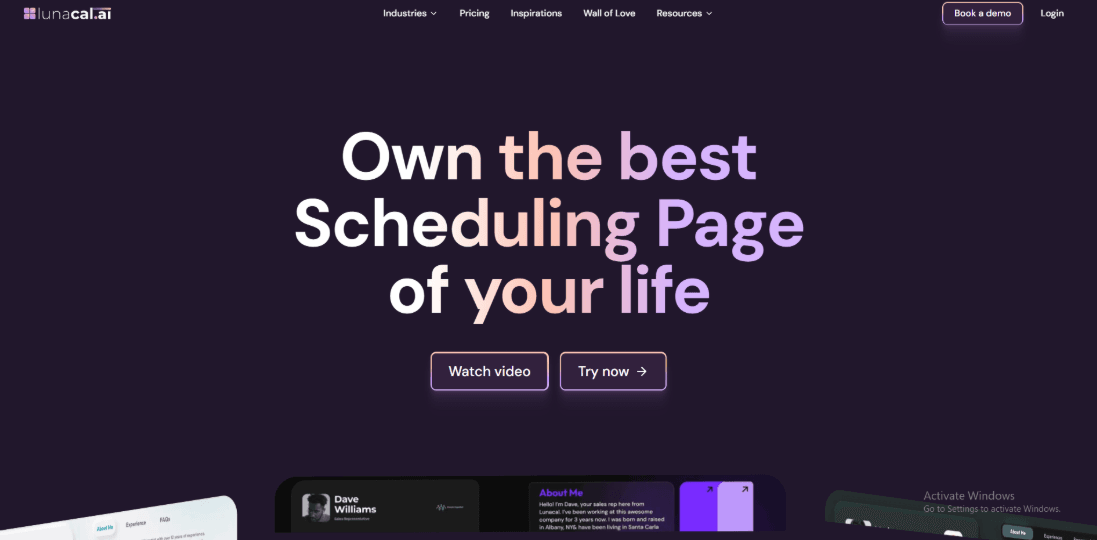
“Lunacal is booking and scheduling software for personal trainers, with branded booking pages, session packages, reminders, and payments. Personal trainers choosing scheduling software will find Lunacal rated 4.9/5 on G2, which makes it one of the highest-rated tools for this audience. For trainers searching for reliable personal trainer booking scheduling software, Lunacal focuses on making the booking page informative so clients understand the trainer’s style and services before scheduling a session.
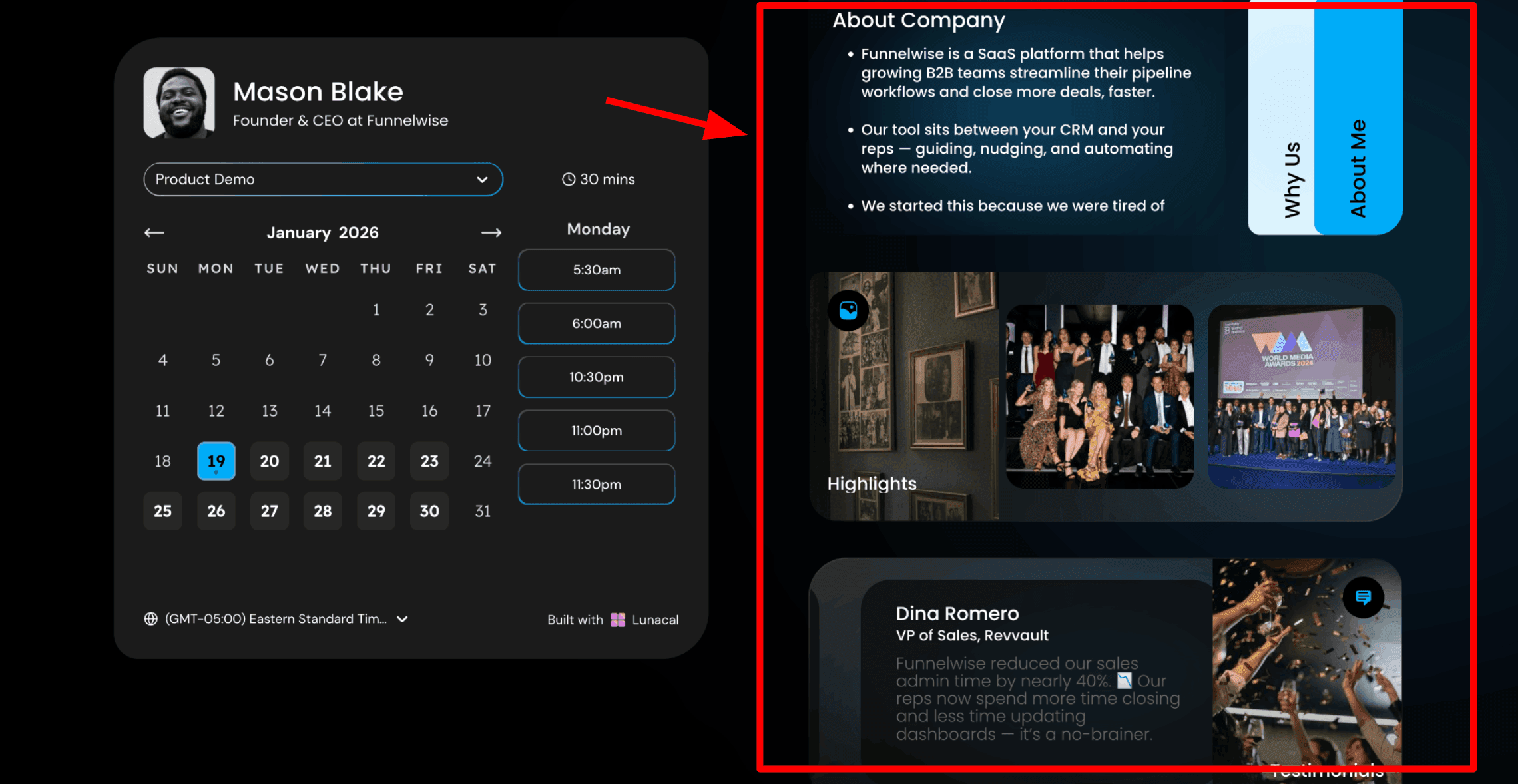
- Scheduling pages with content: This is usually the first thing people notice. Your booking page can include more than just a calendar. You can add information beside the schedule so visitors understand your training style before choosing a time. Clients often want to know who they are training with. When they see your background, results, and approach, they feel more comfortable booking a session. For trainers using personal trainer booking scheduling software, this helps turn a simple booking page into a small introduction to your service. Here is a screenshot below:
-
Simple page editor: Lunacal includes a drag-and-drop editor for the scheduling page. You can add text, images, testimonials, videos, documents, or intake forms. You do not need coding skills. Just add the blocks you want and arrange them on the page. Keep the page simple. Most people will book sessions from their phone, so it should be quick to read. On a personal training page, I would add a short explanation of the first session, two client testimonials showing results, and a short video of a warm-up or training style. That is usually enough for a new client.
-
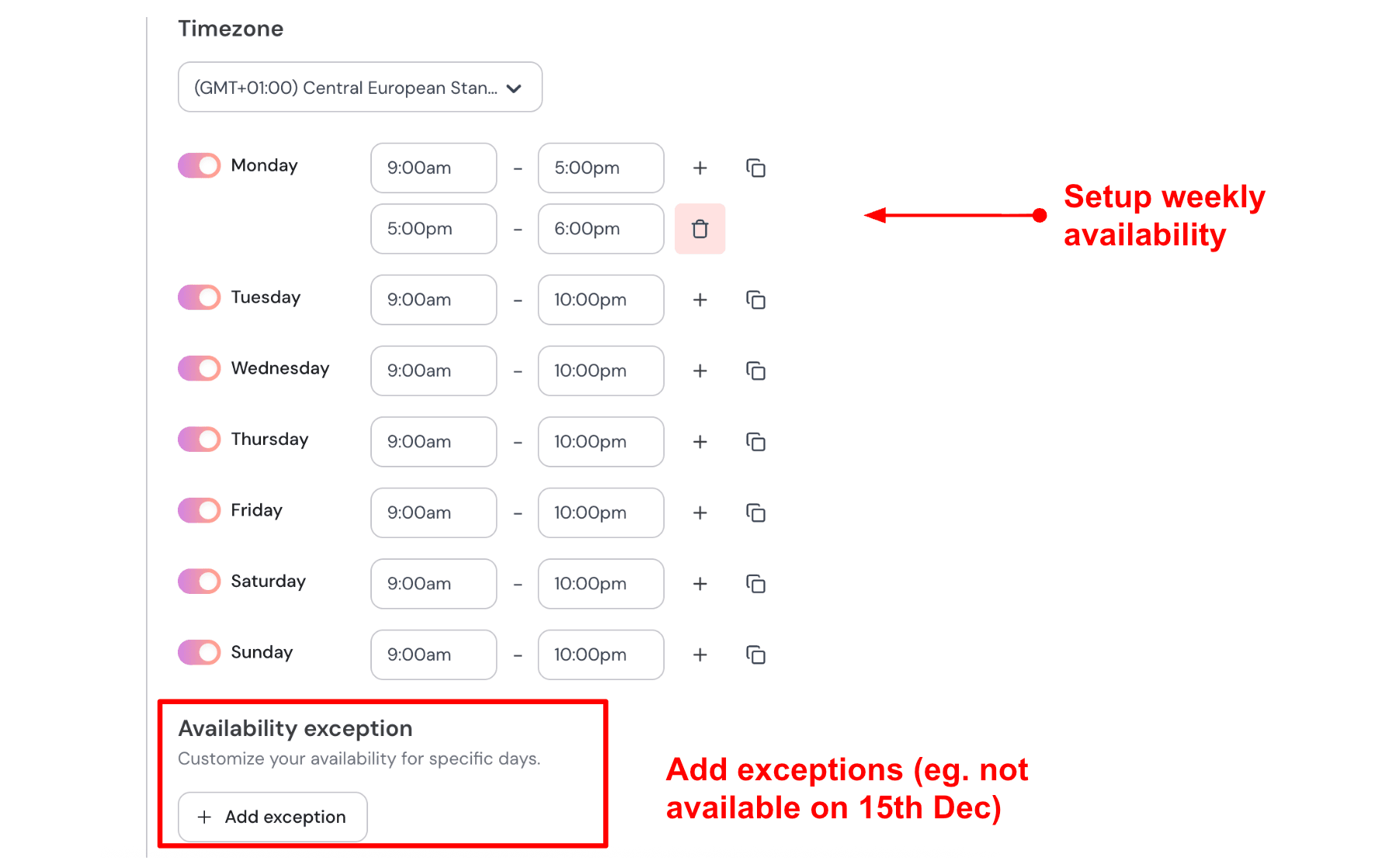
Weekly availability with date exceptions: You can set your regular training hours for each day of the week. You can also block specific dates when you are not available. This keeps the booking link safe to share with clients. They cannot accidentally book you when you are off. Here is how I set up my availability:
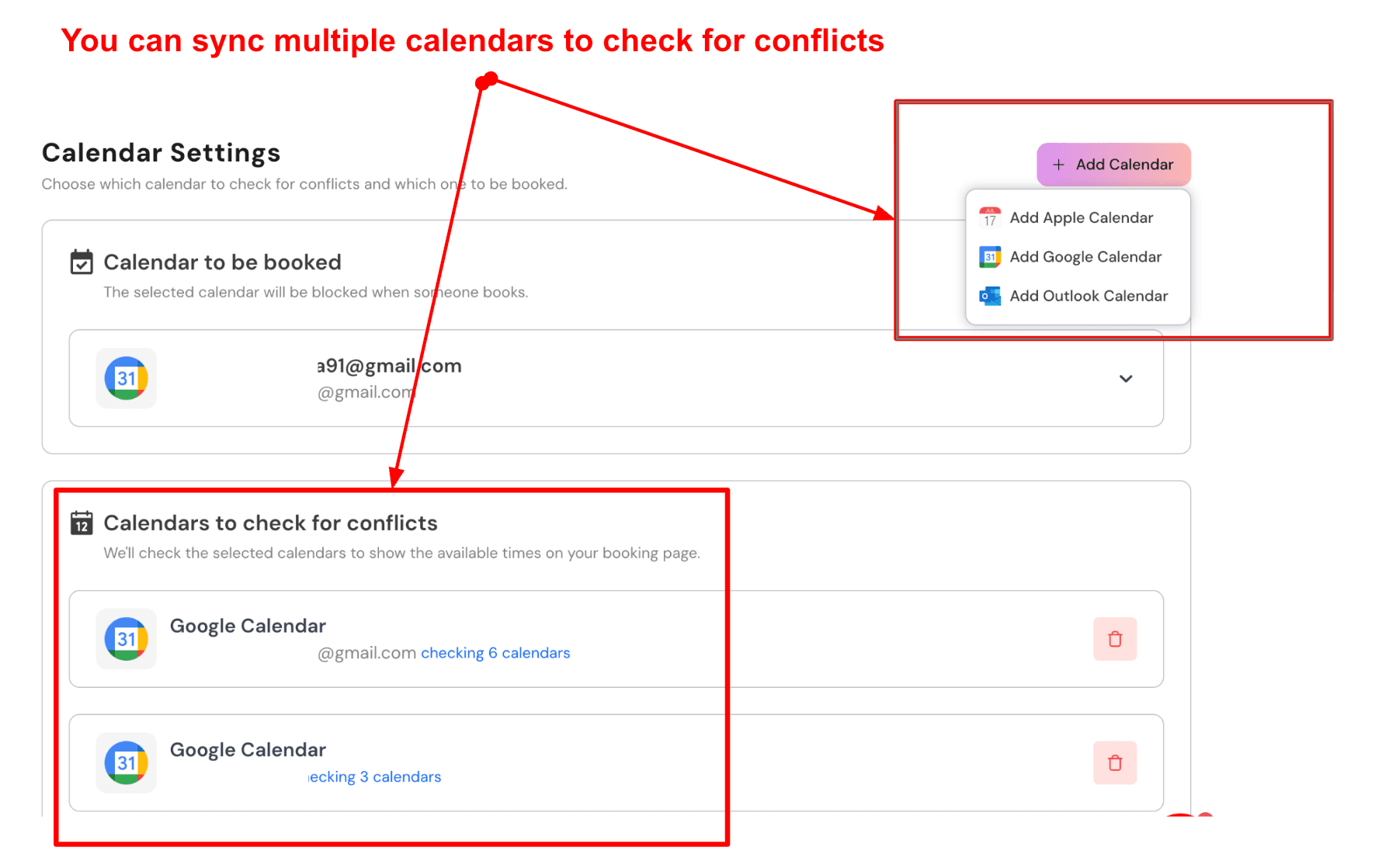
- Multiple calendar connections: Lunacal can connect to multiple calendars simultaneously. One calendar receives new bookings. Other calendars are checked for conflicts before showing available times. This is useful for trainers who manage gym hours, classes, and private sessions across different calendars. Here is a screenshot below:
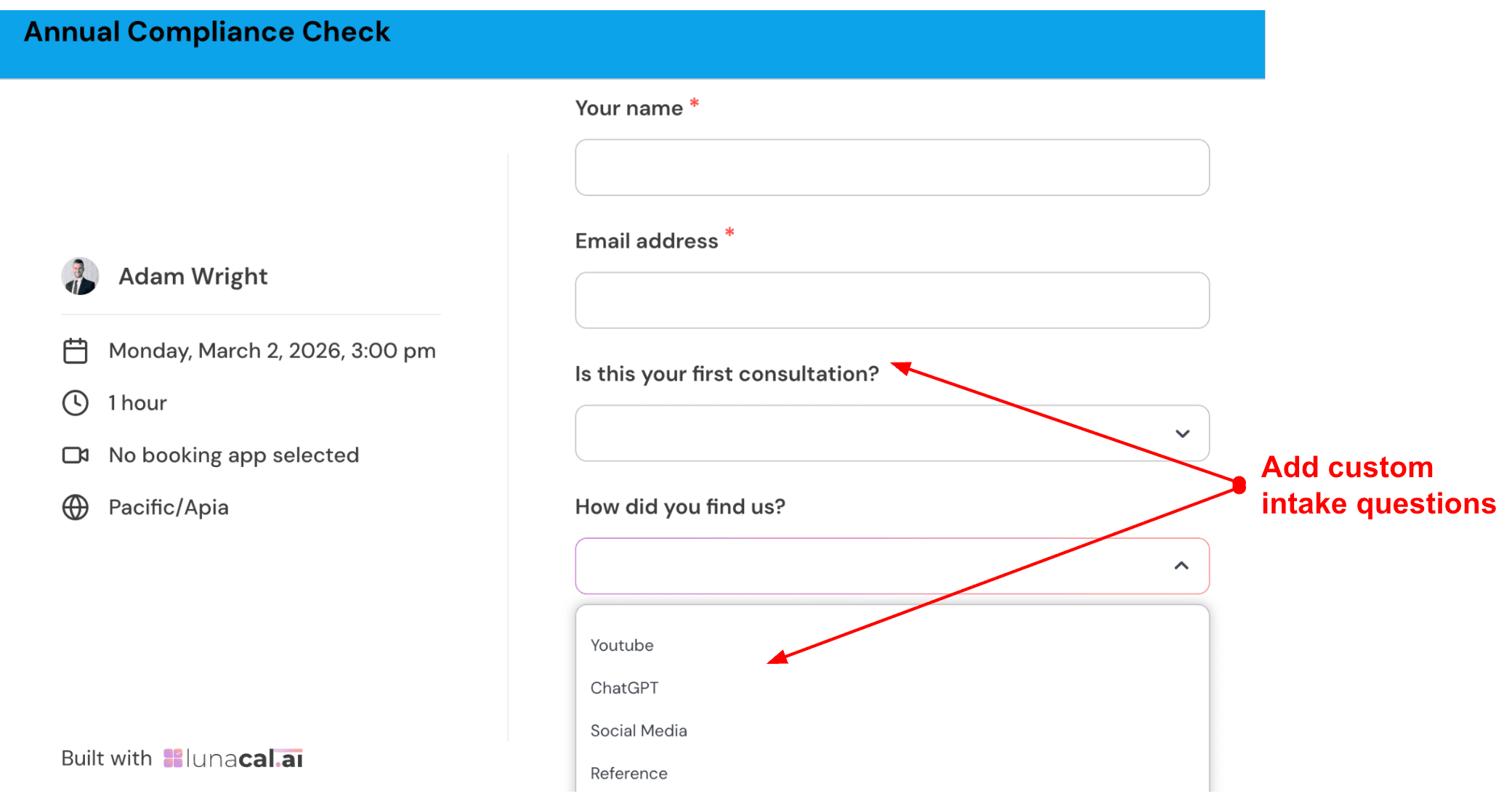
- Custom intake questions: You can add questions that clients answer before booking a session. This helps you prepare for the workout and understand the client before the session begins. Keep it short. Three or four questions are usually enough. Check out the intake form I created:
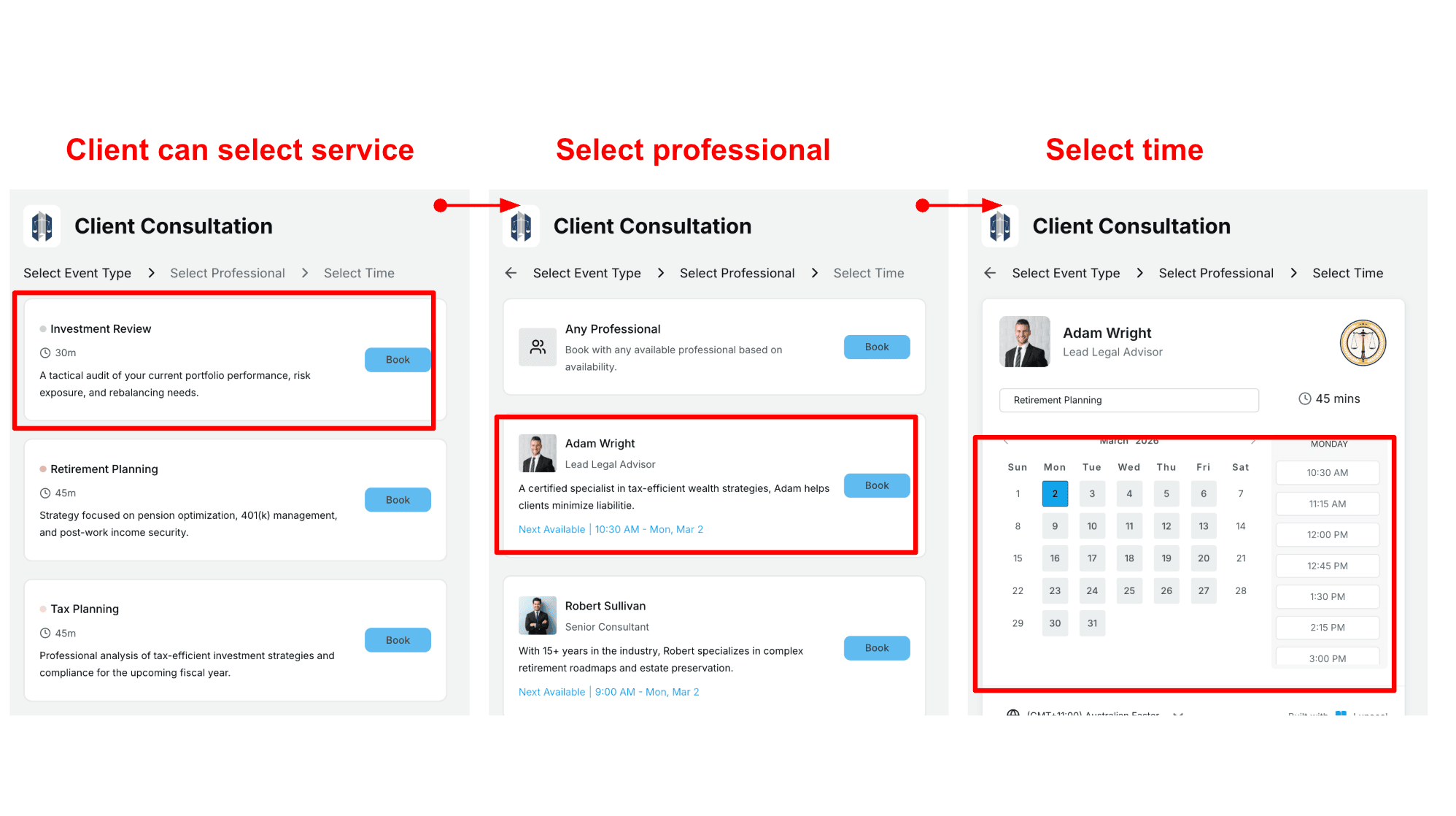
- Team scheduling for studios: If you run a training studio or work with multiple coaches, Lunacal allows clients to choose a service first and then select a trainer. You can also allow the system to automatically assign the next available trainer. This works well for studios that want flexible scheduling while still giving clients a choice.
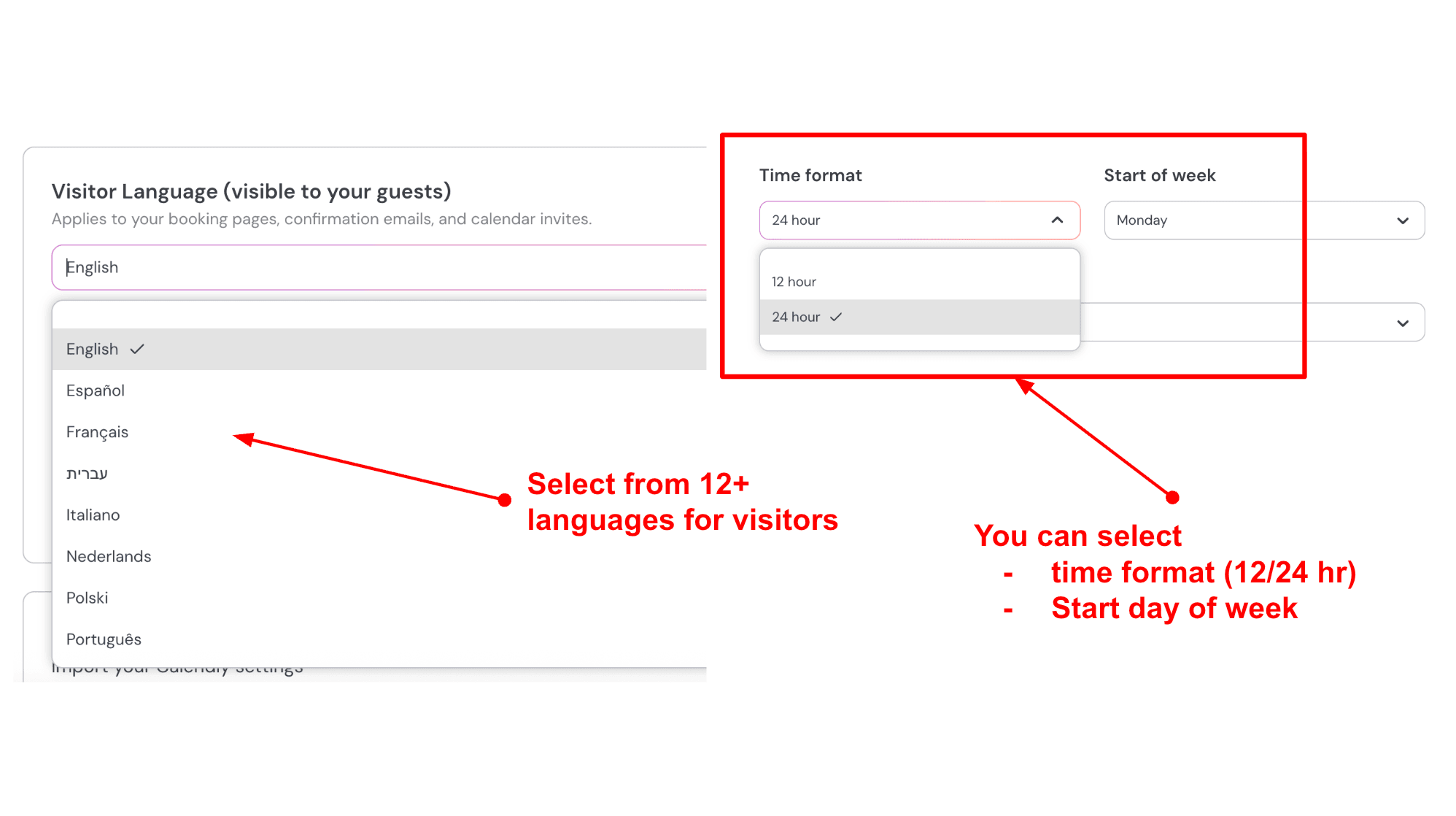
- Language and time settings: You can adjust the language of the booking page, the time format, and the starting day of the week. These settings help when working with international clients. If I train clients from the US and Europe, I keep English active and also allow Spanish or German. I would use a 12 hour time format for US clients and a 24 hour format for European clients. I would also set Monday as the start of the week for European schedules. Here is how I set it up:
Pros
- I could get a working booking link live quickly during testing. The basics were easy to set up once I kept the flow simple.
- Packages and group bookings map well to common training offers like multi session plans and small group slots.
- Availability controls like buffers and notice periods help keep your calendar sane.
- Meeting locations cover the common options like Zoom Google Meet Teams and in person.
- Webhooks and Zapier support make it easier to connect bookings to the rest of your stack.
Cons
- If you need a full personal training platform with workout plans client progress tracking and membership billing Lunacal is a poor fit. In that scenario a PT focused system will serve you better.
- Multi company setup and domain admin felt a bit rough around the edges and a reddit review called this out too.
- Flexible duration does not automatically change pricing so you may need separate event types for each price point. See the duration notes.
- Package booking does not work with collective scheduling so you have to plan your team flow around that.
- Per user pricing can add up if you run a larger trainer team.
Pricing
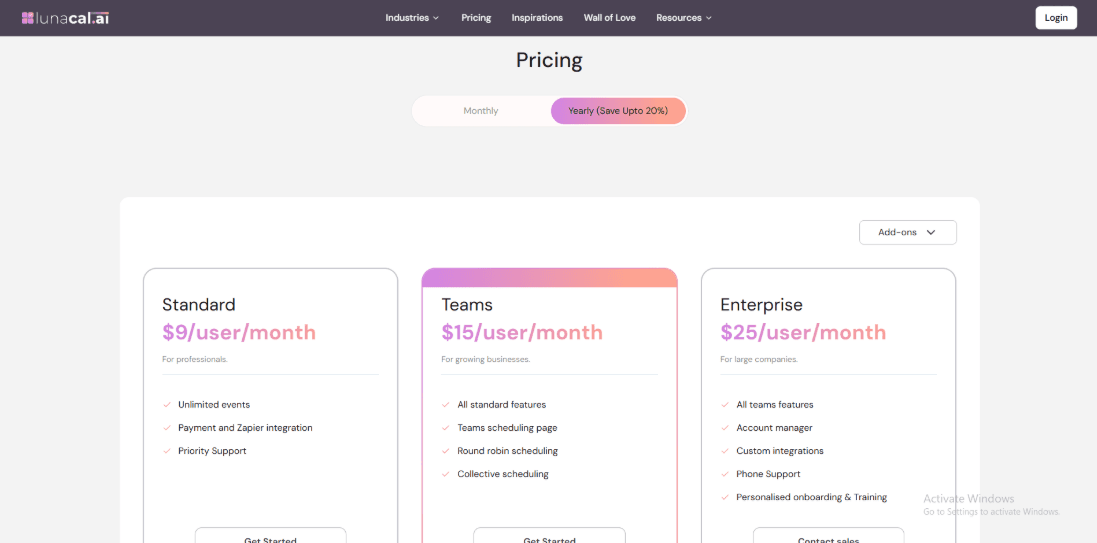
- Standard is 9 dollars per user per month. It includes unlimited events plus payments and Zapier integration and priority support.
- Teams is 15 dollars per user per month. It adds a team scheduling page round robin scheduling and collective scheduling.
- Enterprise is 25 dollars per user per month. It includes an account manager custom integrations phone support onboarding and training.
When to Choose Lunacal
Choose it if you want a simple way to sell sessions and let clients book and reschedule without back and forth. It also fits well when you run packages or small group bookings and want basic team routing. Skip it if you need deep personal training features like programming tracking memberships or a complex multi brand admin setup.
Acuity Scheduling
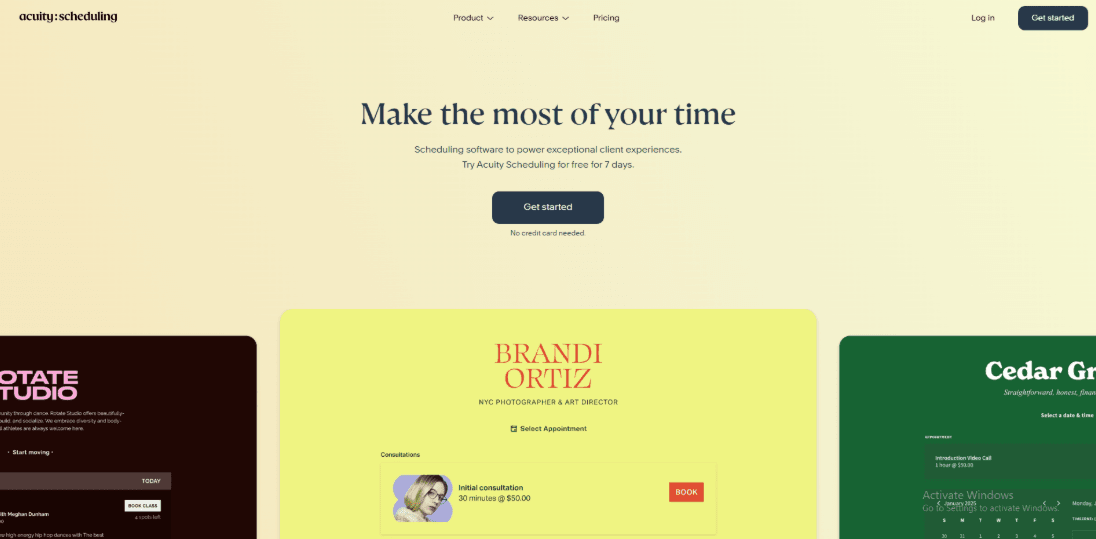
Acuity Scheduling is popularly known for self serve appointment booking with payments and client intake built in. It works well for personal trainers who want clients to pick a time and pay or use a package without a lot of back and forth.
Features
-
Availability rules. I set up a few training session types and the availability controls were the first thing I touched. You can block off days, set buffers, add a minimum notice period, and keep your calendar from getting packed too tightly. It also respects time zones which mattered when I tested bookings from a phone.
-
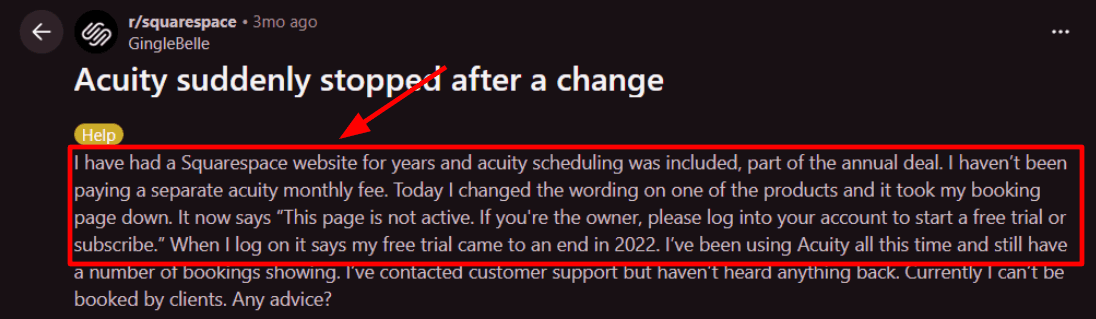
Calendar integration. I connected it to Apple Calendar and my test bookings showed up cleanly with the right times. I also saw a Reddit review mention the Apple sync being reliable and the support feeling human. I am sharing that screenshot below so you can skim the exact wording.
-
Payment integration. Payments connect through processors like Stripe, PayPal, and Square so you can take deposits or charge upfront. For personal training this is useful when you want commitment before the session, and it keeps the payment step inside the booking flow instead of chasing invoices later.
-
Packages and passes. You can sell packages and let clients redeem codes while booking which fits well for 5 session bundles and monthly plans. When I tested this, the flow made sense once the codes were created, though it took me a few minutes to find the right place to manage them.
-
Intake forms. You can add intake questions and agreements so clients share goals, injuries, or readiness details before the first session. A detail I like is that you can personalize messages using tags that pull in form answers which is documented in the Acuity help center. See the Acuity help page on message [tags] for how the variables work.
Pros
-
Strong core flow for trainers. Booking plus payments plus intake can sit in one setup so you do less manual follow up.
-
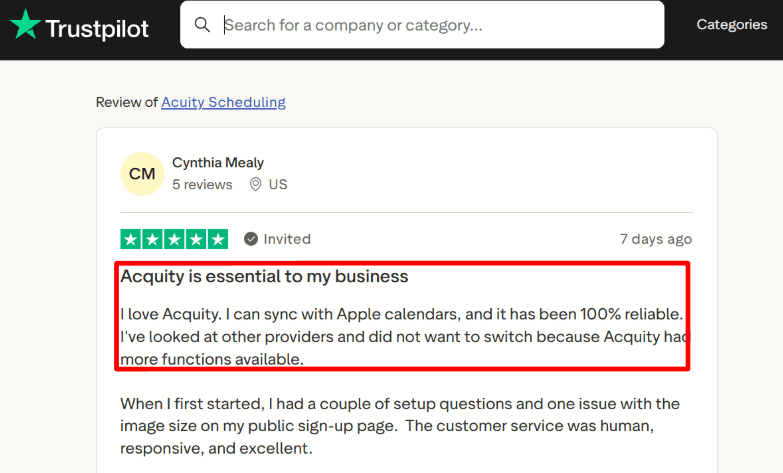
Reliable calendar sync came through in testing and it matches what I read from a Trustpilot reviewer who stuck with it for that reason.
-
Good scheduling controls for buffers notice period and daily limits.
-
Packages and gift style codes work for session bundles.
-
Embeds neatly into a website so clients book where they already are.
Cons
- If your personal training business needs a full gym style member booking system with heavy staff routing and strict multi location ops, this may not be the best pick inside a best personal training booking software list.
- SMS coverage and delivery can vary by country and carrier rules which Acuity calls out in its list of supported [countries] on the help center.
- Plan naming and pricing terms can look inconsistent across the web which can confuse buyers.
- Some deeper customization options tend to be tied to higher tiers.
- I had a moment where account status felt unclear during setup and I had to double check which subscription screen controlled access.
Pricing
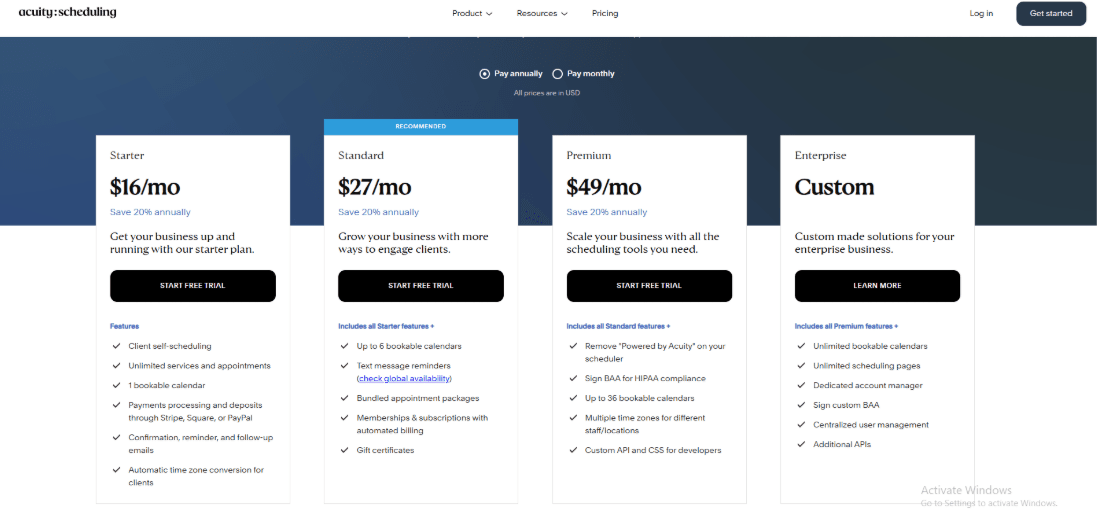
- Paid plans with monthly and annual billing and a free trial on signup.
- Common tiers you will see are Starter and Standard and a higher tier often labeled Premium on third party roundups.
- Budget around 20 to 34 dollars per month for typical solo trainer needs, with higher tiers for more staff and advanced options.
When to Choose Acuity Scheduling
If your business needs a gym-style member booking system with complex staff routing and multi-location operations, Acuity may not be the best fit. It fits well for solo trainers and small teams that live on their calendar and want fewer admin steps. Skip it if you need a full membership platform with complex club operations, deep class management at scale, or strict regional SMS expectations across many countries.
Features
ABC Trainerize
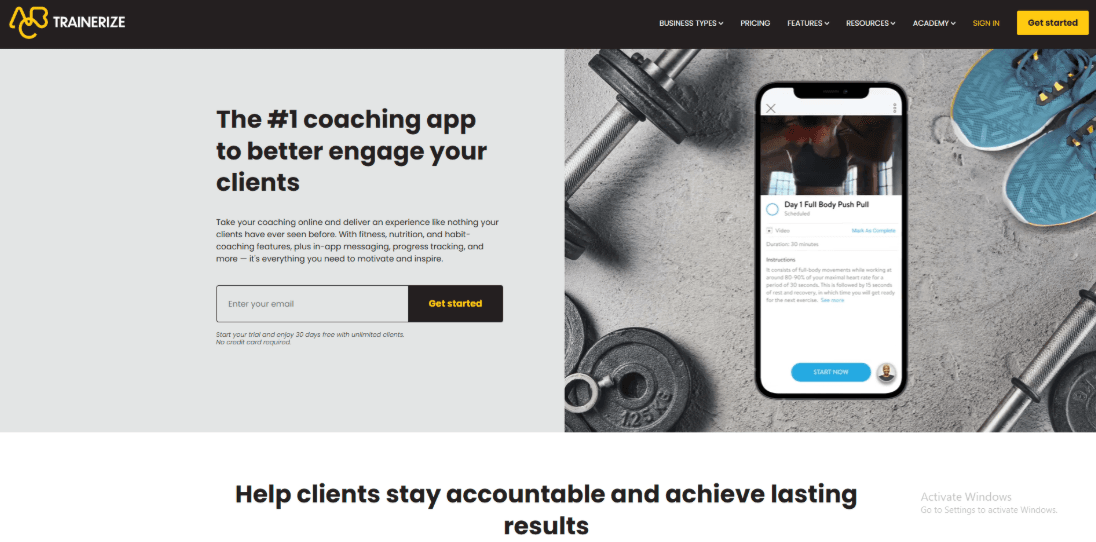
ABC Trainerize is popularly known for helping personal trainers run coaching online with workouts, nutrition, and client messaging in one place. If you want one system to deliver programs, track habits, and keep clients engaged between sessions, this tool is often on the shortlist.
-
Program Builder
I spent most of my setup time here because you end up building the core experience your clients see. You can create training blocks, reuse templates, and attach your own videos so clients follow along without guessing.
I also noticed this comes up in a Trustpilot review. I am sharing a screenshot below. The person mentioned setup took a long time after uploading their own videos, and that maps to what I saw while building a longer plan.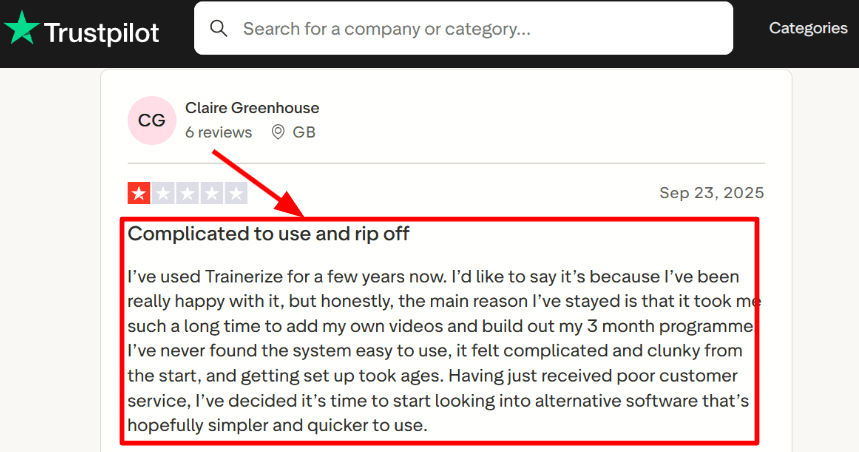
-
Nutrition Tracking
The nutrition side is more than a simple food log. You get meal logging with photos, barcode scan, and food search, plus meal planning and habits that are easy for clients to follow daily.
I saw a different Trustpilot review calling the app easy for both trainers and clients, and I agree for the day to day client flow. Check the screenshot below since it matches the way logging and check ins feel once you are past the initial setup.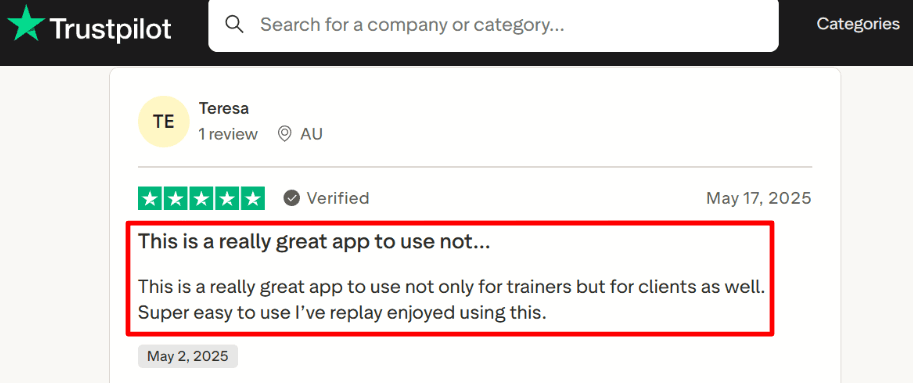
-
Client Messaging
In app chat supports one to one coaching and group conversations, plus voice messages for faster feedback. It is a strong setup for quick nudges, form notes, and follow ups without moving to WhatsApp.
One place that felt a bit odd was finding certain settings quickly. I had to click around more than I expected before it felt natural. -
Challenges Groups
Groups and challenges let you run cohorts, leaderboards, and simple engagement loops that keep clients active. If you run corporate wellness or group programs, this can save a lot of manual tracking.
It also helps if you want a shared culture around steps, workouts, or habit streaks. -
Payment Integration
Payments can run through Stripe so you can sell programs and collect money inside your coaching flow. This matters when you want fewer gaps between someone buying and getting access to a plan.
If scale matters, Trainerize says it serves more than 55,000 training businesses
Pros
- Fits coaches who want training, nutrition, habits, and messaging to live together, so day to day delivery stays organized. It can reduce the number of tools a trainer has to manage.
- The client app flow is usually easy once a plan is published, so clients can log workouts and habits without much guidance.
- Strong coaching loop with chat and voice notes.
- Group features help when you run cohorts.
- Wearable style integrations are available for steps and health data.
Cons
- If your main goal is clean booking and calendar-first scheduling for personal training, this can feel heavy compared to a dedicated booking tool in Best Personal Training Booking Software.
- Setup time can be high when you upload a lot of custom videos and build long programs.
- Some people describe the interface as clunky in real use.
- If you need HIPAA style coverage, they state they will not sign a BAA in their HIPAA policy.
- Automation management can feel tedious for some workflows.
Pricing
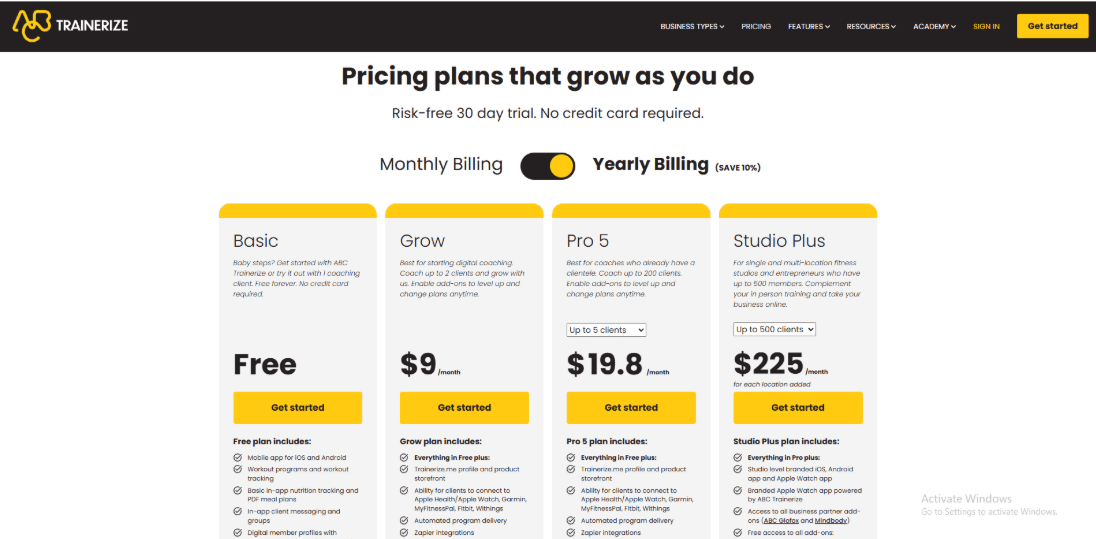
- Free plan is commonly listed for very small usage, often around 1 coaching client.
- Paid tiers are usually shown as starting low for early stage coaches, then scaling with client count.
- Studio plans are priced much higher and tend to include items like deeper business features and branding options.
- Enterprise pricing is typically quote based.
- Real totals can vary by add ons and configuration, so the plan you pick should match your client volume and delivery style.
When to Choose ABC Trainerize
If your main goal is calendar-first appointment scheduling, Trainerize can feel heavier than a dedicated booking tool. It also fits group programs and online trainers who want structured delivery over weeks or months.
Skip it if you mainly need fast booking and lightweight scheduling with minimal setup. It can also be a poor fit in scenarios where HIPAA commitments are required.
Calendly
Calendly is mainly known for shareable booking links and fast scheduling that avoids back and forth. A personal trainer can use it to let clients pick a slot that fits your availability and auto create the calendar event.
Features
-
Calendar sync
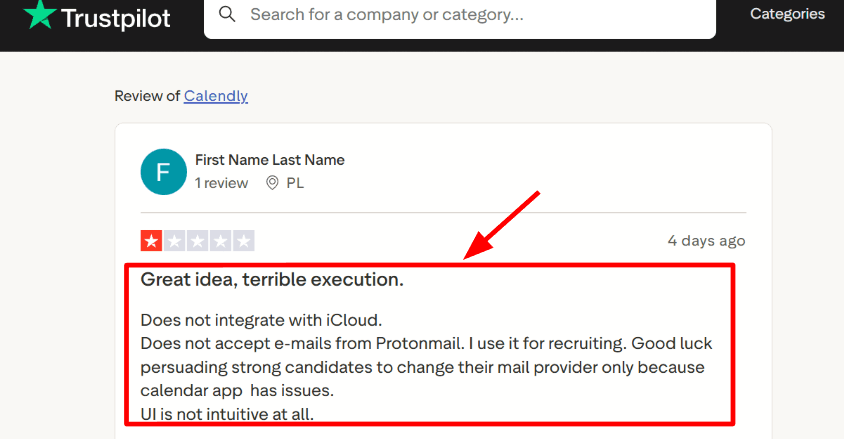
When I connected Google Calendar, new bookings blocked time correctly and removed the messy double booking risk. This is the part that usually makes or breaks a personal training schedule because sessions move around a lot. One thing I noticed during setup is that some calendar providers are not supported, and that can quietly become a blocker for a trainer who lives on iCloud.
-
Availability rules
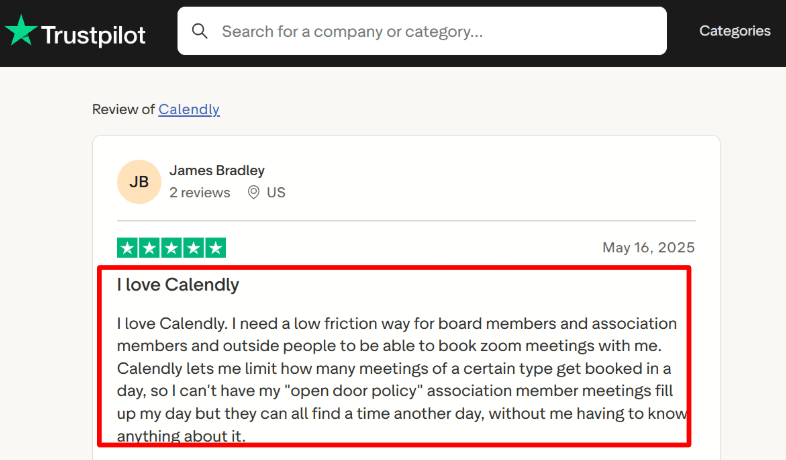
You can set working hours, buffers, minimum notice, and daily meeting limits per session type. In testing, the daily limit is useful for trainers who want to cap intense sessions so the day stays realistic. I also saw this theme show up in a Trustpilot review, where someone liked how it helps limit certain meetings per day.
I am sharing a screenshot below so you can see how they described it in their own words.
-
Meeting tool integration
Connecting Zoom or Teams is straightforward and it keeps join links consistent across reschedules. This matters when you do online coaching and a client rebooks last minute, because the video link still shows up without you chasing it. I like that you can keep the video tool choice tied to the event type so you do not have to think about it each time. -
Workflows and reminders
You can set reminders and follow ups so clients get nudges before the session. In a personal training setup, this helps reduce missed sessions and the awkward WhatsApp chasing. There is also a broader workflows layer for scheduling outreach and reminders on paid plans, which is useful if you run many sessions weekly. -
Admin controls
If you run a small studio with multiple trainers, Calendly has team features like round robin and admin controls on higher tiers. For compliance minded setups, it also talks about things like audit logs and data deletion options in enterprise plans. One detail that stood out to me is their data storage note in Calendly Help Center, which says data is stored in US based data centers and explains international transfer safeguards. That is the kind of procurement detail people often discover late.
Pros
- Easy booking link that clients can use without guidance, and it reduces back and forth quickly. It fits well when your personal training bookings are mostly 1 to 1 sessions.
- Strong availability controls, and the daily limits are practical for trainers who want to protect their calendar.
- Video meeting integrations work smoothly for online coaching sessions.
- Reminders and workflows help reduce missed sessions.
- Large integration ecosystem with common tools and automation platforms.
Cons
- If your personal training setup needs a full fitness business stack like packages, class style bookings, or deeper client management, Calendly can feel like the wrong shape for Best Personal Training Booking Software. You may end up stitching extra tools around it.
- Calendar provider gaps can matter a lot, and the iCloud scenario is a real one in practice.
- Setup can feel unclear in a few places, and I had to double check where certain settings were saved.
- Team features and governance are tied to higher tiers, which can raise cost for studios.
- US hosted data can be a constraint for some buyers and it is stated in their Help Center.
Pricing
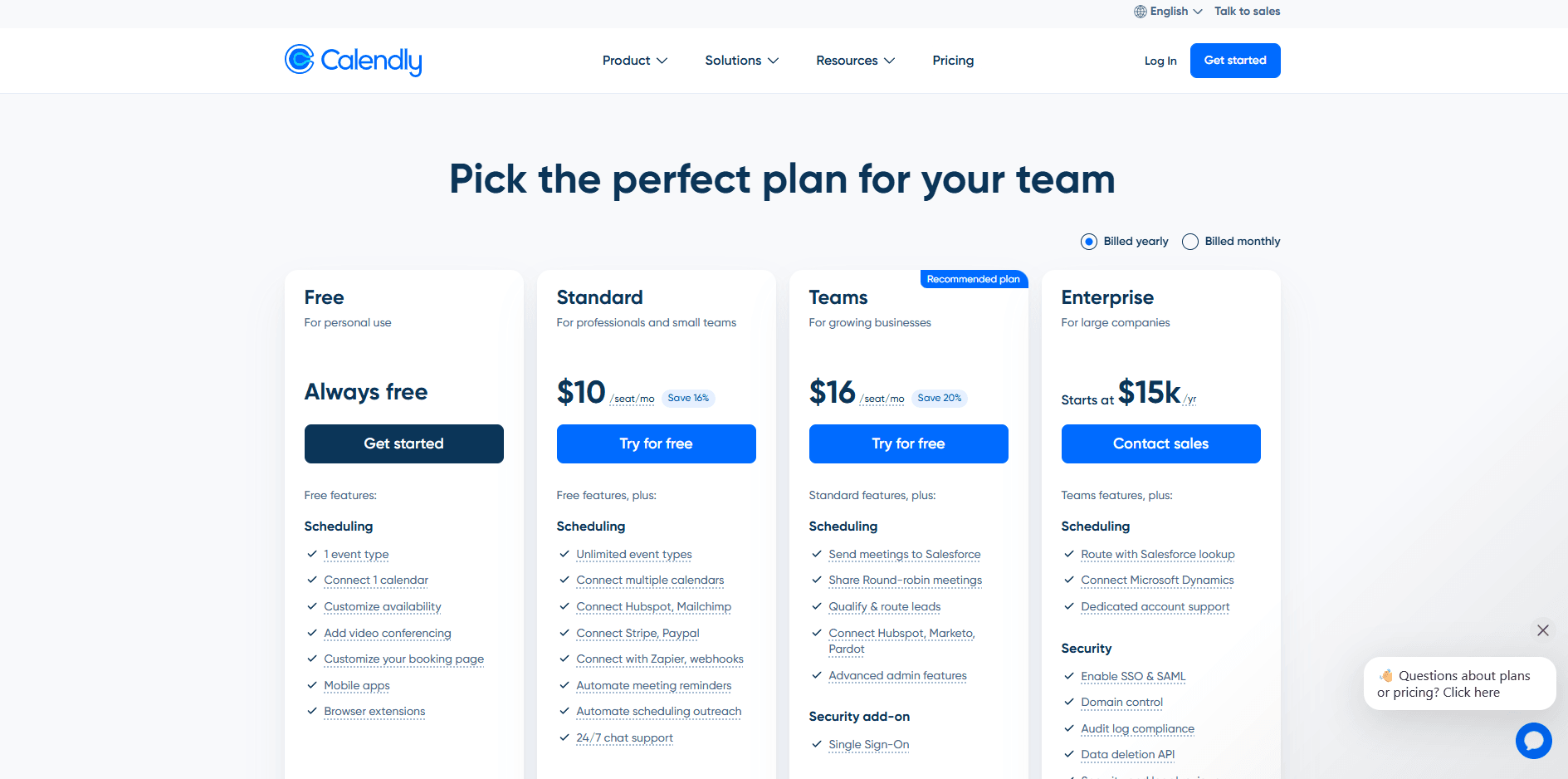
- Free plan works for basic scheduling with one event type and one calendar connection.
- Standard is priced per seat and adds unlimited event types plus payments and automations.
- Teams adds routing and round robin style features for multi trainer setups.
- Enterprise is annual and adds deeper admin and security controls like audit logs and provisioning.
When to Choose Calendly
If you need packages, class bookings, or deeper client management, Calendly may require additional tools. It also fits if you want daily session limits and reminders without building a complex system.
Skip it if you need an all in one personal training platform with packages, programs, and deeper client handling in the same place. Also skip it if your workflow depends on iCloud only, or if your org has strict regional data hosting requirements.
PT Distinction
PT Distinction is popularly known for delivering training and nutrition coaching through a client app and portal. It makes sense when you want one place for programs messaging tracking and payments.
Features
-
Client portal When I tested the client portal on phone and desktop it covered the basics well like programs messages and progress tracking. The recent web portal refresh is meant to make that flow smoother for clients.
I also saw a similar issue in a Trustpilot review where the app froze and the site kept pushing the user into pricing.
I am sharing a screenshot of that review below because it matches what can happen if someone lands on the wrong entry point during setup.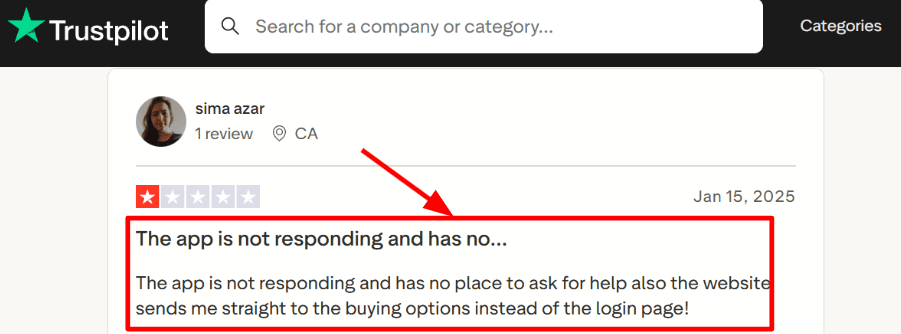
-
Nutrition tracking I spent time setting up nutrition coaching because that is where PT Distinction has been investing in updates. The MyFitnessPal linking flow is straightforward once you guide the client to connect it from their side.
The Trustpilot feedback praising nutrition coaching and the photo journal felt believable when I tried the same flow. Instead of trusting the claim I tested it and it worked well for basic accountability. I am adding a screenshot of that review below so readers can see the exact phrasing.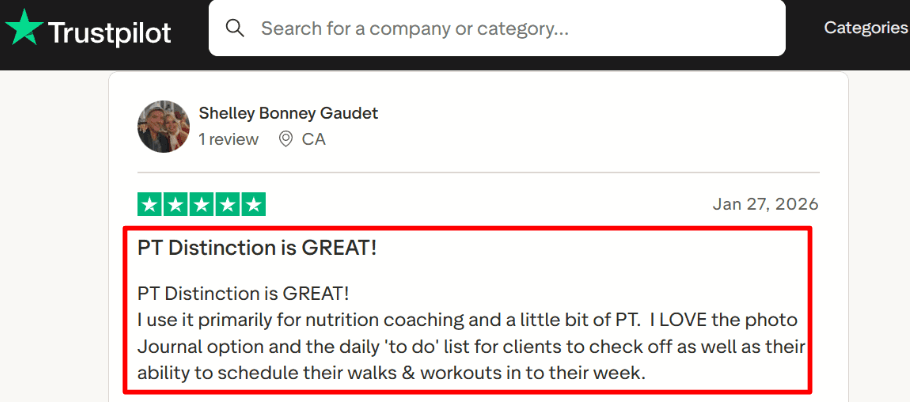
-
Scheduled messaging Scheduled messaging is useful when you want check-ins to land on time without remembering them every week. I used it for reminders and small habit nudges and it reduces manual follow ups once it is configured.
-
Package payments Payments and packages are built around Stripe and PayPal style checkout flows and you can sell coaching packages from inside the system. The setup is mostly clear although I had one moment where a client facing path bounced me toward plan selection when I expected a login screen.
-
Data protection One detail worth calling out is that PT Distinction has a formal Data Sharing Agreement that explicitly talks about health data and UK GDPR terms. This is the kind of operational detail that matters once you run longer term coaching programs and store sensitive progress data.
Pros
- Good fit when you want an all in one coaching system and do not want to stitch together five separate tools. The app and portal model supports longer client relationships.
- Per client scaling can work out well on higher tiers when you grow past the starter client limits.
- Solid nutrition coaching flow including MFP linking and photo based accountability.
- Scheduling and habit style checklists support weekly consistency.
- Regular product updates show the platform is actively maintained.
Cons
- If your main goal is appointment booking and payments for sessions then a dedicated booking tool may feel simpler for clients than a coaching app setup.
- Some people run into login and entry path issues like the Trustpilot note about being pushed into buying options instead of login. See the Trustpilot page for that pattern.
- Learning curve is real when you first configure programs groups and automation style messaging.
- App performance can vary by device so it is worth testing on the phones your clients use most.
- The per client pricing model can surprise you if you do not plan your tier early.
Pricing
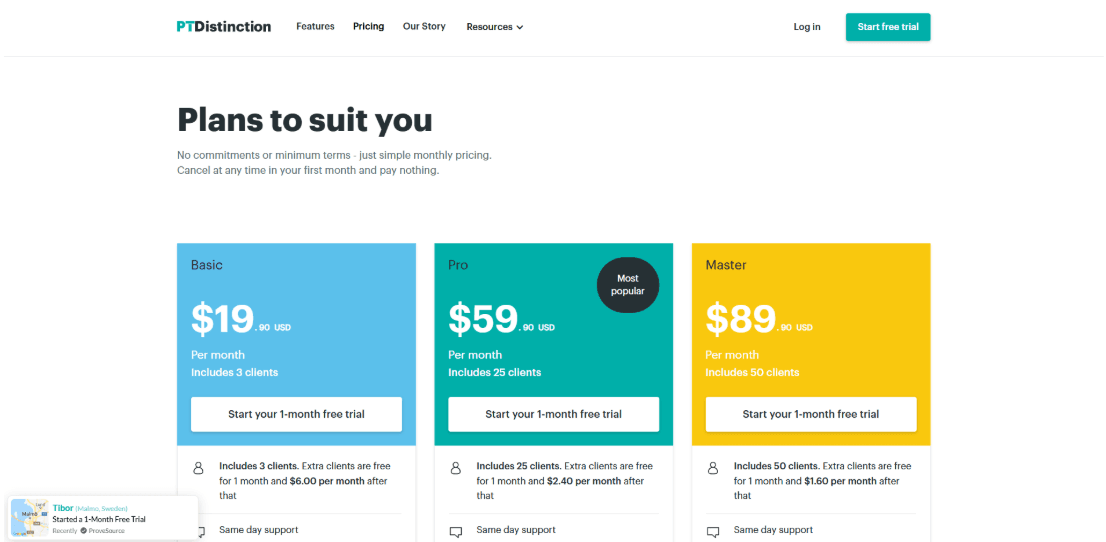
- Basic is $19.90 per month and includes 3 clients then extra clients are billed per client after a short free period.
- Pro is $59.90 per month and includes 25 clients with a lower per client add on cost as you scale.
- Master is $89.90 per month and includes 50 clients with an even lower per client add on cost.
When to Choose PT Distinction
Choose it if you run ongoing coaching that needs programs nutrition tracking messaging and progress in one place. It also fits trainers who want client checklists and simple scheduling inside the coaching workflow.
Skip it if you only need a fast booking link for appointments and do not need a full coaching app experience. It is also a weaker fit if your clients want near zero onboarding before they can book a time.
Mindbody
Mindbody is popularly known for running scheduling and payments for fitness and wellness businesses at scale. Use it when you want personal training sessions plus memberships billing and marketing in one system.
Features
-
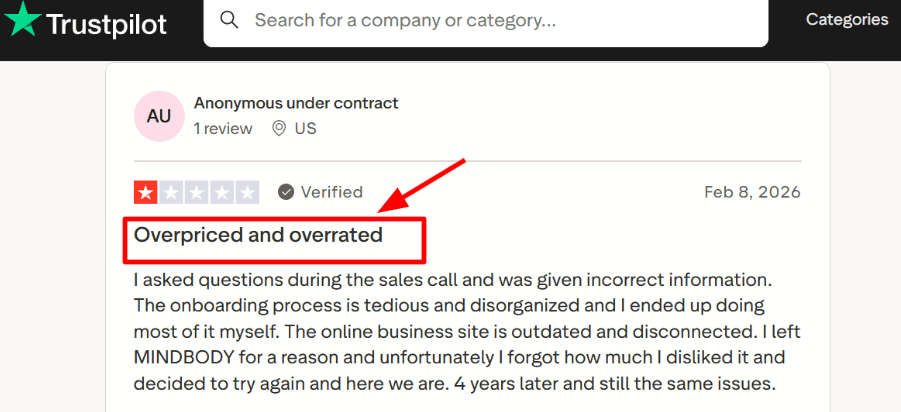
Admin setup When I set it up I spent real time on staff roles services and client profiles before bookings felt clean. I had to click through a few different admin areas to finish basic setup and it slowed my first hour. I also saw the same theme in a Trustpilot review. Screenshot below.
-
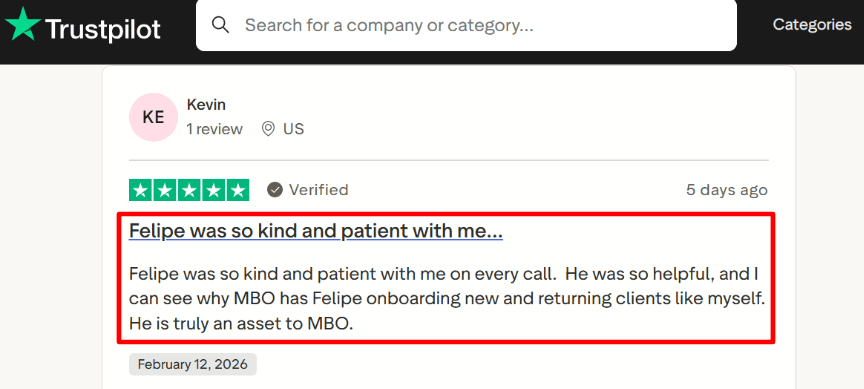
Onboarding support In my testing the onboarding calls helped me avoid messy service menus and pricing rules early on. One Trustpilot review called out the onboarding rep as patient and steady and I get why. I am adding that screenshot below so you can scan it quickly.
-
Availability rules You can set trainer schedules time blocks and booking rules so clients only see real slots. I tested waitlist and schedule changes and it handled the basics well once the calendar was fully configured. This matters for personal training when sessions shift often and you need fewer back and forth messages.
-
Payment integration Payments can sit inside the same flow as booking with recurring billing for memberships and saved cards for repeat clients. While setting up billing I also sanity checked what PCI Level 1 means on PCI SSC since it matters when you store card data. It is a detail worth knowing before you commit to any payments stack.
-
Marketing pipeline There is a lead pipeline plus automated email and text style follow ups that tie back to client activity. I tested the lead movement logs and it was useful for keeping track of who needs a follow up and when. It fits teams that want one place for leads bookings and client history.
Pros
- It covers scheduling payments staff management and reporting in one place. For a personal training studio with multiple trainers this reduces tool switching during the day.
- Solid booking coverage across web and mobile helps clients book from where they already are.
- Waitlists and calendar rules help when prime time sessions fill up fast.
- Reporting goes beyond revenue and can include payroll style tracking.
- Integrations exist for add ons and regional workflows.
Cons
- If you are a solo personal trainer who only needs a simple booking link this can be heavier than you need. You will spend time setting up things you may not use every week.
- Onboarding can take real effort if your services and pricing rules are complex.
- The interface can feel dated in a few areas during daily admin work.
- Add ons can push total cost higher than expected over time.
- Some teams will want to check recent webhooks and API changes if they rely on custom integrations.
Pricing
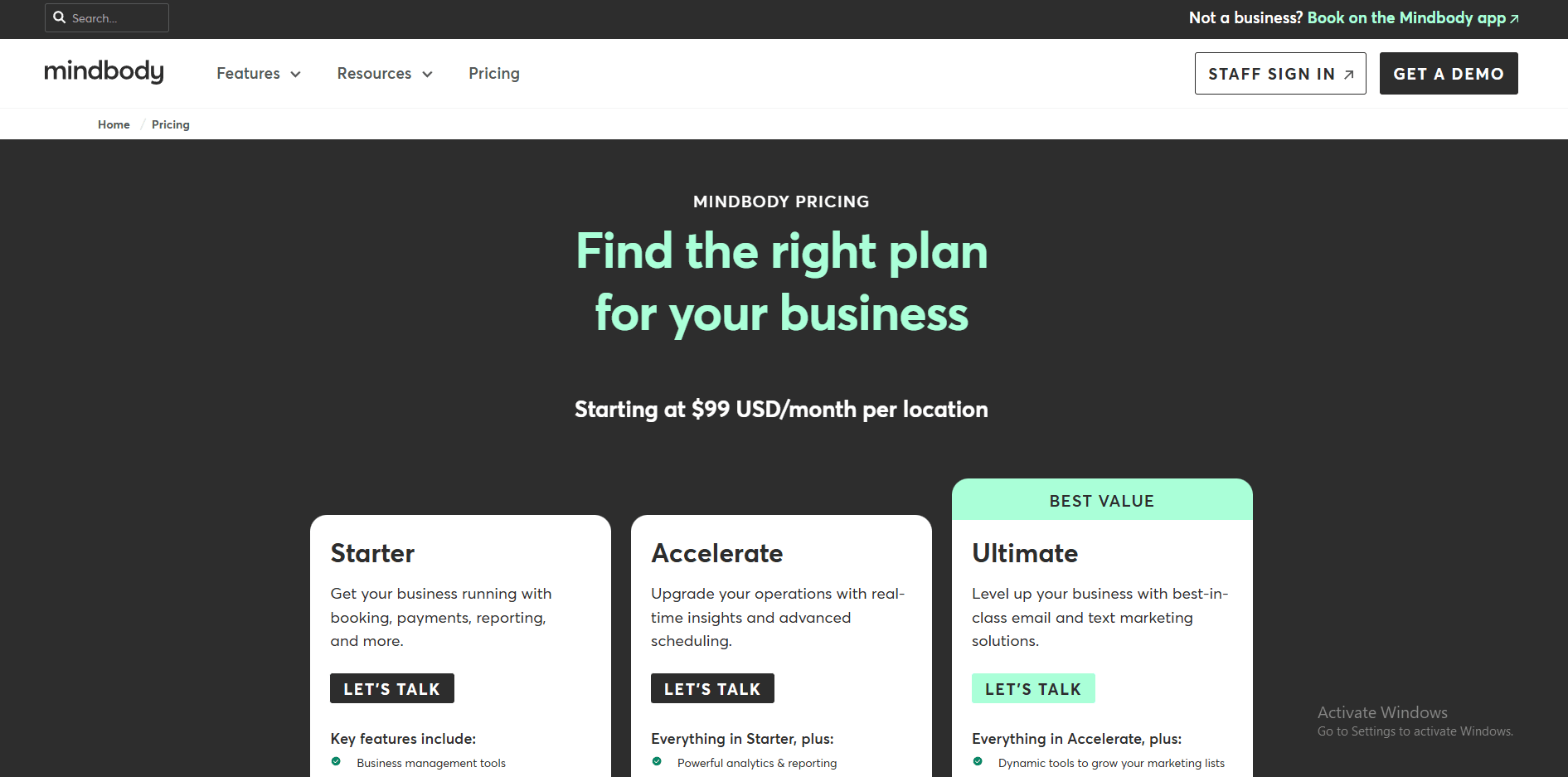
- Plans commonly start around 99 per month per location. Higher tiers add deeper marketing and multi location controls.
- Payments are priced per transaction. Typical rates shown are 2.99 percent plus 0.30 for in person and 3.60 percent plus 0.30 for online.
- Pricing and processing can vary by country and volume. Add ons like branded app may change totals.
When to Choose Mindbody
Choose it if you run a personal training studio or gym with multiple trainers and you want scheduling billing and client workflows together. It also fits teams that sell memberships packs and recurring plans. Skip it if you only need a lightweight booking page for one trainer and you do not want a longer setup phase.
Setmore
Setmore is popularly known for a simple booking page that lets clients book sessions without back and forth. It can work well for personal trainers who want clean scheduling plus payments and reminders in one place.
Features
-
Availability rules
I set up working hours, breaks, and a couple of buffer gaps between sessions. The booking page stayed clear on mobile when I tested it from my phone. This is the part that decides whether your day stays manageable. -
Calendar sync
Two way sync is on the Pro plan and it helps keep double bookings down once it is connected. During my setup I had a couple of moments where things behaved oddly after an update and I had to retry the flow.
I also saw a similar theme in a Trustpilot review and I am sharing a screenshot below.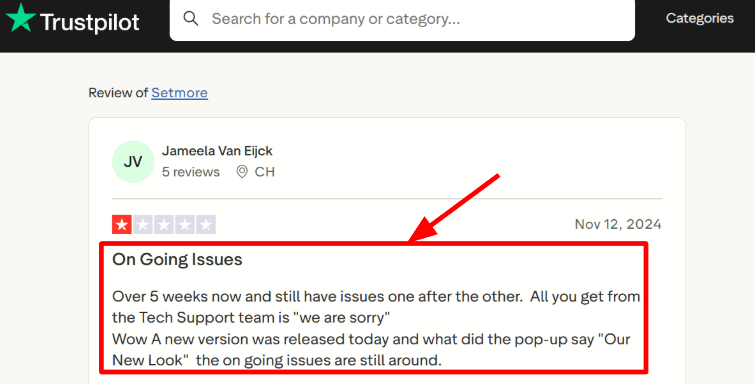
-
Payment collection
Payments, deposits, and in person collection are part of the core setup so you can charge at booking time. I tested a paid booking and the flow was straightforward once the provider was connected. A Trustpilot review also called out fast help from Amanda on questions and you can check that screenshot below.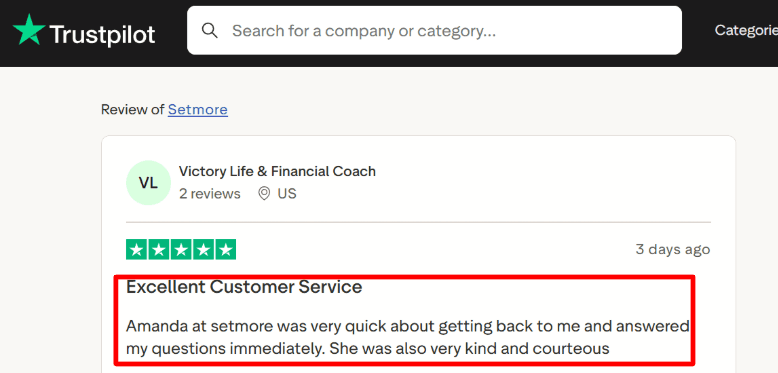
-
Group classes
You can run group sessions with capacity so a bootcamp slot does not overflow. This is useful when you sell fixed size classes and want the system to stop taking bookings once seats run out. I found it easier to manage when the class had one clear start time. -
SMS reminders
SMS reminders can reduce no shows, but message deliverability has real rules behind it. One detail worth knowing is that carriers may filter messages that include URLs, especially certain shortened links, as noted in the Twilio blog. That kind of policy detail quietly affects how reminder flows behave.
Pros
- Quick to get a booking link live for personal training sessions. I had a working page running in under an hour with services and availability in place.
- Free plan supports small teams up to four users which can cover a trainer plus front desk help.
- Payments and deposits are available so paid sessions can be collected at booking time.
- Group classes with capacity work well for small bootcamps and studio style sessions.
- API access on Pro helps when you want to connect custom workflows later.
Cons
- If your personal training setup depends on workout plans, progress tracking, and coaching inside the same tool, this will leave gaps for a best personal training booking software stack.
- The Free plan has a monthly cap of 200 appointments on the Setmore pricing page.
- Some features people expect for teams like full routing depth may require workarounds.
- Calendar syncing can take a bit of patience during setup and testing.
- Live receptionist support is US only so it will not apply for many locations.
Pricing
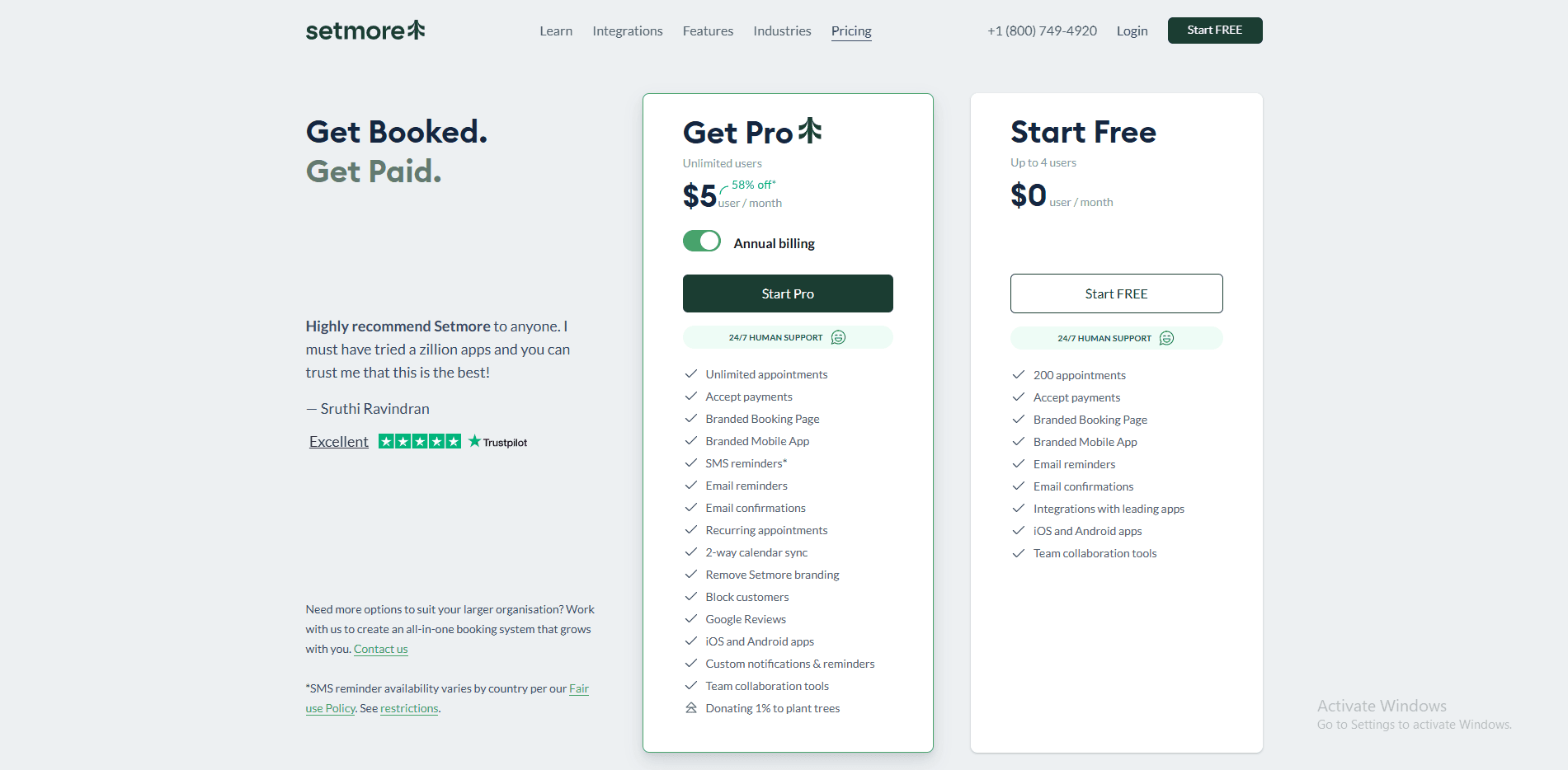
- Free plan is $0 per user per month and supports up to four users with a 200 appointments monthly limit.
- Pro plan includes unlimited users, two way calendar sync, SMS reminders, recurring appointments, video appointments, API access, and removing Setmore branding.
- Live Receptionist is listed as a separate add on at $99 per month and it is US only.
When to Choose Setmore
Choose it when you want a simple booking page for 1 to 1 sessions and small group classes, with payments and reminders available on the paid plan.
It suits solo trainers and small studios that mainly need scheduling, basic client records, and clean day planning.
Skip it if you need deep coaching features like training plans and progress tracking inside the booking tool.
Also skip it if your business needs US only receptionist coverage outside the United States.
Conclusion
If you want a fast answer, the right tool depends on whether you prioritize scheduling, coaching, or running a full fitness business.
- Choose Lunacal if your focus is getting booked and paid with clean scheduling pages, packages, and minimal setup
- Choose ABC Trainerize if your business runs on coaching programs, client engagement, and long-term progress tracking
- Choose PT Distinction if you want a balance of coaching delivery, payments, and structured client management
- Choose Calendly if you just need simple 1 scheduling links without extra complexity
- Choose Acuity Scheduling if you want strong payments, packages, and intake forms tied to bookings
- Choose Mindbody if you run a studio with multiple trainers, memberships, and operational workflows
- Choose Setmore if you need a low-cost or free option for basic scheduling and small group sessions
From my testing, the key decision comes down to this: if scheduling and payments are your bottleneck, go with a booking-first tool like Lunacal or Acuity. If client delivery and coaching matter more, Trainerize or PT Distinction will carry more weight. For studios, Mindbody stands apart because of its operational depth.
Methodology
This review focuses on how these tools actually fit into the day-to-day workflow of personal trainers and small studios, not just what they promise on feature pages.
Sources
- I went through each tool’s official website, pricing pages, FAQs, and help documentation to understand what’s included and where limitations start to show up.
- I also spent time testing the tools where possible, then cross-checked my experience with user reviews on G2 and Trustpilot, along with real discussions on Reddit and Quora to spot consistent issues and edge cases.
Test setup for personal training tools
- I created a simple but realistic setup with two trainers, a few session types, and one recurring group class. I configured availability, buffer times, and cancellation policies to match a typical weekly schedule.
- Payments were tested with a 5-session package, along with intake forms and waivers. I also enabled email and SMS reminders to see how communication feels from a client’s perspective.
- Calendar sync and integrations were connected wherever possible to check how bookings show up, how reliable notifications are, and how smooth the mobile experience feels.
Common scenarios we tested
- A new client books their first session, fills out intake details, pays upfront, and receives confirmation with clear rescheduling options.
- A returning client purchases a package, books sessions over multiple weeks, and reschedules without breaking package usage or trainer availability.
- Trainers update their schedules, block time off, manage group class capacity, and sync calendars, while the business owner checks no-shows, revenue, and basic reporting.
FAQs
Which is the best personal training booking software?
The best personal training booking software depends on how much the booking page sells the session. Lunacal is one of the highest rated on G2 at 4.9/5 and shines with booking pages, customizable intake forms, seamless payment integration, and packages for multi session plans. For workout delivery, ABC Trainerize fits.
How do the top personal training booking tools compare?
Top personal training booking software to compare are Lunacal, ABC Trainerize, and Acuity Scheduling.
- Lunacal: solid when you sell high touch coaching and want the page to handle proof, intake, and payments before the first session.
- ABC Trainerize: great when the product is the coaching app itself, with workouts, habit tracking, and client messaging.
- Acuity Scheduling: dependable for service based studios that want deposits, packages, and structured client intake. Calendly works when you mainly need clean scheduling links.
What country specific tax and compliance nuances affect personal training booking software?
Country rules change what your software must collect and store.
- US: sales tax can apply to packages in some states, so clean invoices matter.
- UK, Canada, Australia and EU: VAT or GST rules often need tax inclusive pricing and proper receipts.
- EU: GDPR means clear consent, deletion requests, and data processing controls.
- Language: clients may expect German, French, Spanish on forms and emails.
What features should personal training booking software include?
Personal training booking software should include easy service setup, recurring sessions, packages, intake forms like PAR Q and injury notes, deposits or card on file, automated reminders, reschedule and cancel links, calendar sync, and reports for revenue and trainer utilization.
How do I reduce no shows with personal training booking software?
The best way to reduce no-shows is to take a deposit, send two reminders, and require a cancellation window. Use a one-click rescheduling link and a waitlist to fill gaps.
Summarize this content with AI


