

Introduction
Most grooming days feel manageable until your calendar suddenly gets messy. Missed slots, double bookings, and last-minute changes start adding up fast. Pet owners spent about $152B in 2024, and services like grooming sit inside a $13B services bucket, per the American Pet Products Association.
That is why I put together this pet-grooming-scheduling-software best guide.
That is why I put this guide to pet grooming scheduling software together. I booked appointments, changed them, added services, and checked how reminders worked. I also saved screenshots at every step so you can see what the experience actually looks like.
On top of that, I went through reviews on G2, Capterra, and Trustpilot. Patterns show up fast when you read enough of them. I paid close attention to things that affect real grooming businesses, like handling multiple pets in one booking, add-ons that change timing, and whether reminders actually reach customers.
Pet grooming software comparison
Best tools by grooming use case
| Business need | Best tool | Why it fits |
|---|---|---|
| Full-service grooming salons | Lunacal | Branded booking pages, payments, packages, and team scheduling in one workflow |
| Custom service workflows | SimplyBook | Flexible setup for services, add-ons, and booking flows |
| Small grooming teams | Setmore | Low starting cost with simple booking and reminders |
| Basic appointment booking | Calendly | Clean scheduling links without complex setup |
| Packages and repeat visits | Acuity Scheduling | Strong support for packages, intake forms, and recurring sessions |
Feature and pricing comparison
| Capability | Lunacal | SimplyBook | Setmore | Calendly | Acuity Scheduling |
|---|---|---|---|---|---|
| Primary use | Grooming businesses with payments and team scheduling | Customizable booking with add-ons | Simple scheduling for small teams | Basic appointment booking | Scheduling with packages and intake |
| G2 rating | 4.9 | 4.4 | 4.5 | 4.7 | 4.7 |
| Starting price | $9 | $9.90 | $5 | $10 | $16 |
| Calendar sync | Google, Outlook, Apple | Google, Outlook | Google, Outlook, Apple (partial) | Google, Outlook | Google, Outlook, Apple |
| SMS reminders | Yes | Yes | Yes (limited) | Yes | Yes |
| Email reminders | Yes | Yes | Yes | Yes | Yes |
| Online payments | Stripe, PayPal | Stripe, PayPal | Stripe, PayPal | Stripe, PayPal | Stripe, PayPal, Square |
| Team scheduling | Yes | Yes | Yes | Yes | Yes |
| Round robin | Yes | Partial | No | Yes | Yes |
| Packages | Yes | Yes | No | No | Yes |
| Intake forms | Yes | Partial | Limited | Limited | Yes |
| Custom domain | Yes | Yes | Partial | No | No |
| Booking page control | High | High | Medium | Low | Medium |
| GDPR support | Yes | Yes | Yes | Yes | Yes |
Lunacal
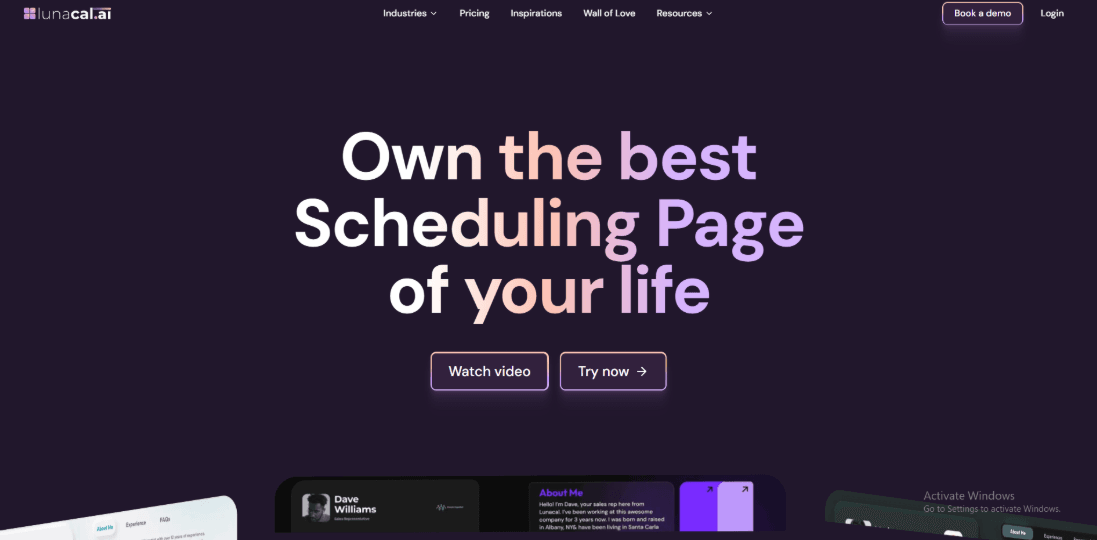
Lunacal is scheduling software for pet grooming businesses, with online booking, staff scheduling, reminders, payments, and customer-facing booking pages. It is rated 4.9/5 on G2 rated 4.9/5 on G2,making it one of the highest-rated tools in this comparison. , making it one of the highest-rated software options.
Features
- Scheduling pages with rich content
This is the first thing I would focus on because it changes how a pet owner decides to book your salon. With Lunacal, your booking page feels more like a simple website. You can add content right next to the calendar, so pet owners learn about your grooming style, your experience, and your salon before choosing a time. Pet owners are careful. They are trusting you with an animal they care about deeply. When your page shows your work, your space, and real reviews, it builds confidence and makes booking easier. For example, on a dog grooming page, I would add a short section about the salon with three simple points. Breeds you work with, years of experience, and whether you follow cage-free or low-stress grooming. Then I would add a few before and after photos and one real review that mentions how the pet looked and behaved after the visit. Here is how you can include content in your booking page:
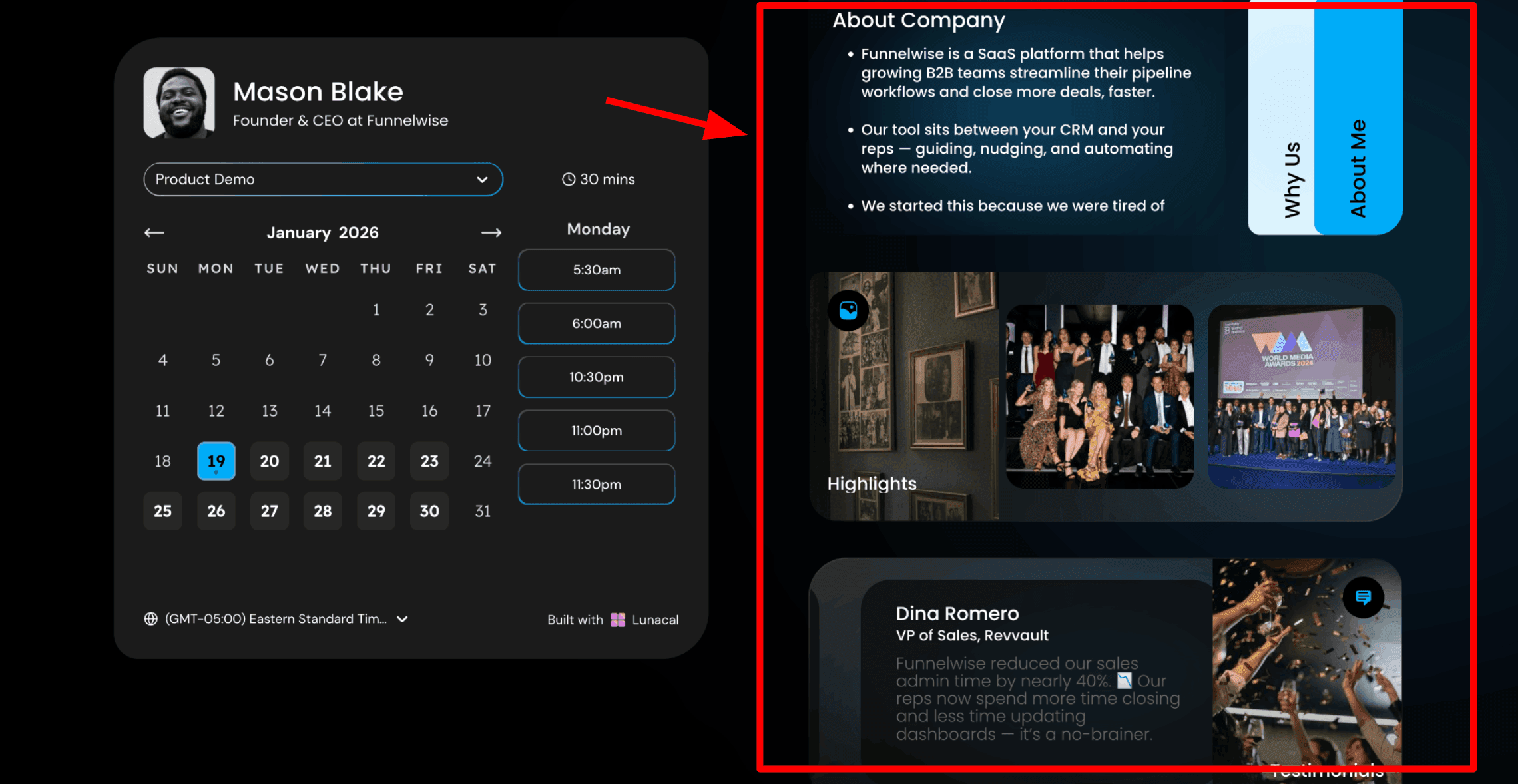
- Drag and drop grooming page editor
This is how you create your booking page. Lunacal gives you a simple editor where you can add text, photos, videos, testimonials, service details, and forms. You can move things around easily and set up the page yourself. Keep the page visual and friendly. Pet owners respond better to photos of happy dogs and cats than long paragraphs.
- Availability rules
You can shape your availability with notice periods, buffers, and daily limits so the day does not become overbooked. I used buffers to account for cleanup and handoff time after a longer session. It also helps when different services need different time blocks. Here is how I set up my availability:
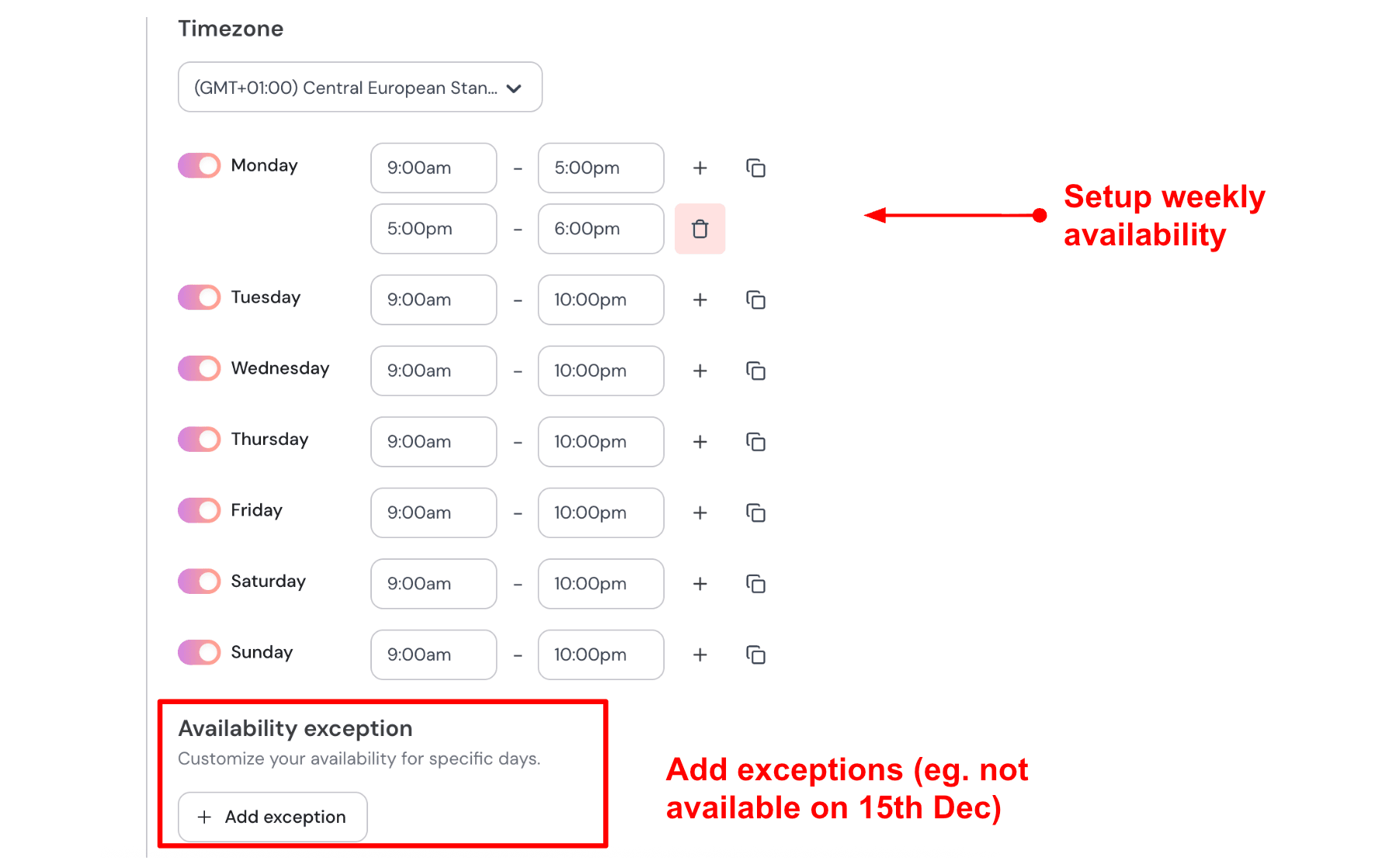
- Online payments and deposits
You can connect Stripe or PayPal and collect payment when someone books. This keeps things simple at the salon and avoids payment issues later. It also reduces no-shows because people are more likely to attend when they have already paid. For a full groom on a large dog, I would collect the full amount at booking. For smaller services, I might take a deposit and collect the rest later. Here is how to do it:
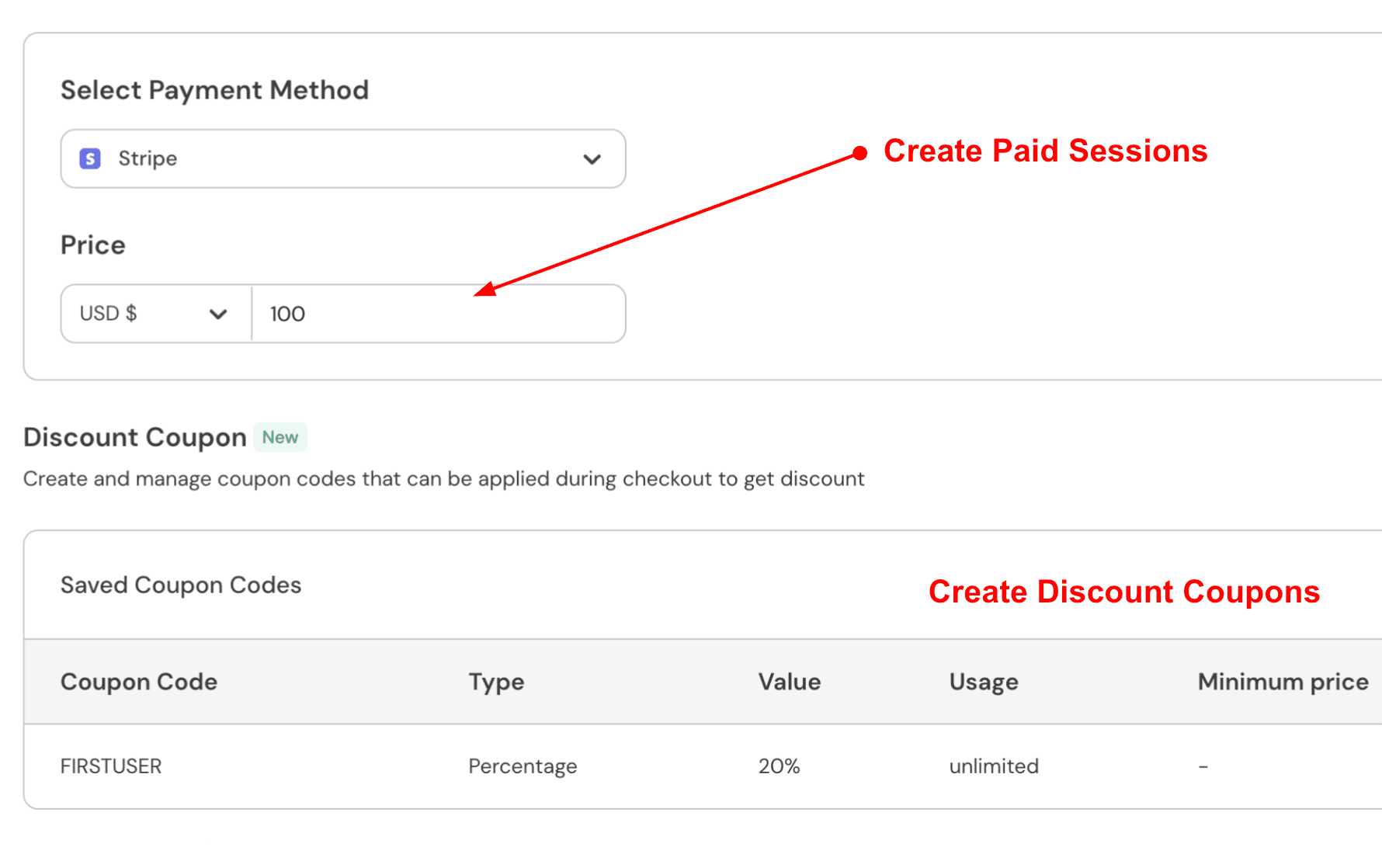
- Automation hooks
For operations-heavy grooming teams, Lunacal can connect with other systems through webhooks and Zapier. Booking updates and payment events can be passed into reporting, follow-up, or customer-management workflows.
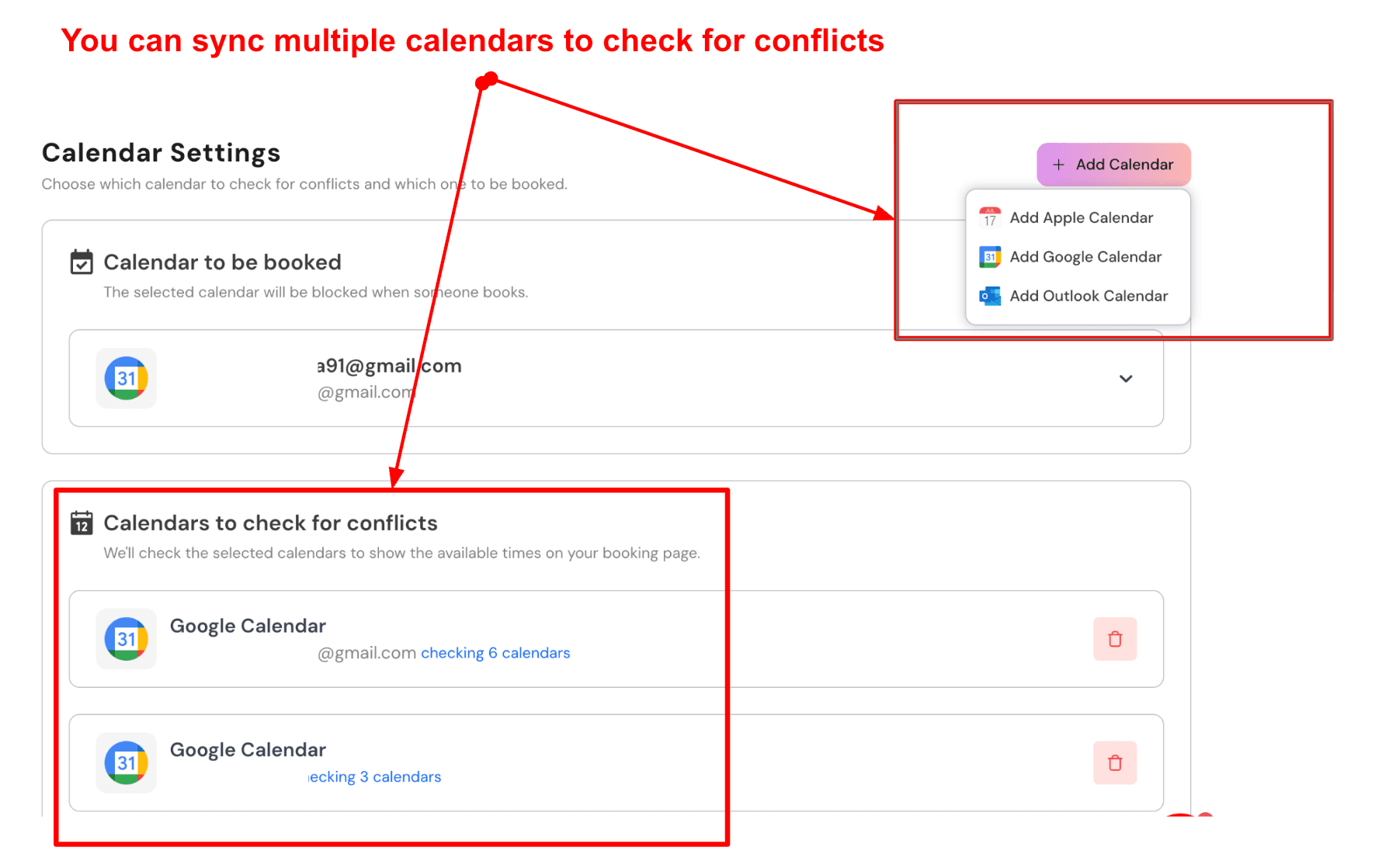
- Sync multiple calendars to avoid double booking
Lunacal lets you connect more than one calendar. Your confirmed bookings go into one calendar, while others are checked in the background to avoid conflicts. Pet groomers often receive bookings from different places like calls, messages, and online links. Keeping everything in sync helps avoid double bookings.
Pros
- Booking flow feels easy to follow once the event is set up. I could get from slot selection to confirmation without extra steps and that fits grooming clients booking from a phone.
- Team scheduling options support multi groomer calendars.
- Buffers and limits help keep the day realistic.
- Intake questions help collect pet details before the visit.
- Automation options exist through webhooks and Zapier.
Cons
- If you need grooming-specific features such as pet profiles, vaccination history, service add-ons, inventory, and POS billing, a dedicated pet grooming platform may be a better fit.
- Package booking has a constraint with collective scheduling so plan the workflow carefully.
- Multi company and domain setup can take extra trial and error early on.
- Flexible duration does not change pricing automatically so you may create separate event types.
- Some advanced setups may need more documentation depth for power users.
Pricing
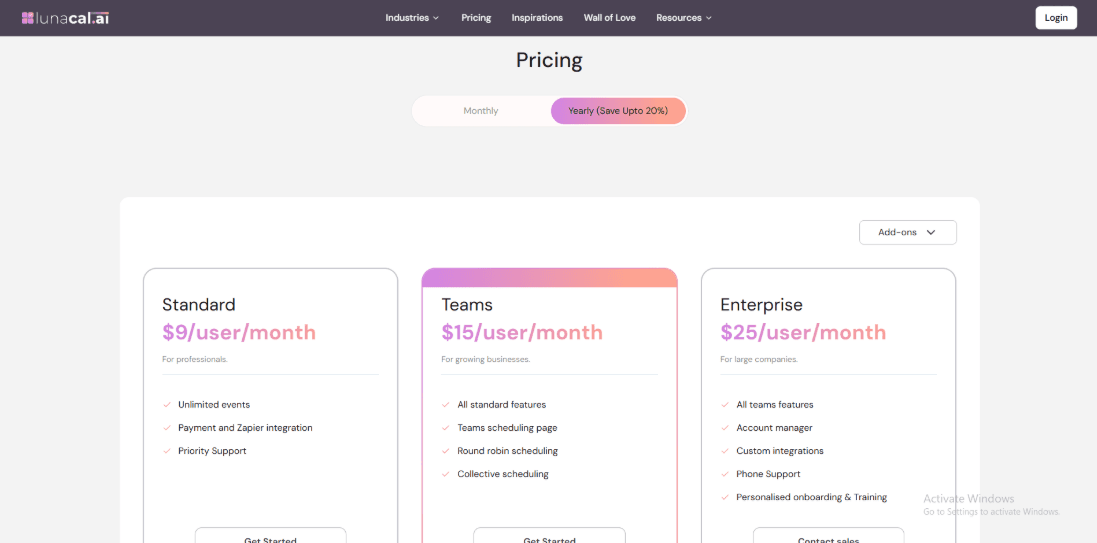
- Standard is $9 per user per month and includes unlimited events plus payments and Zapier integration.
- Teams is $15 per user per month and adds a team scheduling page round robin and collective scheduling.
- Enterprise is $25 per user per month with an account manager onboarding training and custom integrations.
When to Choose Lunacal
Choose it if you run a grooming shop that wants clean booking pages team scheduling and simple rescheduling without email chains. It also fits if deposits matter for peak hours and you want automation through Zapier or webhooks. Skip it if you need a grooming POS with pet records retail inventory memberships and end to end checkout.
Calendly
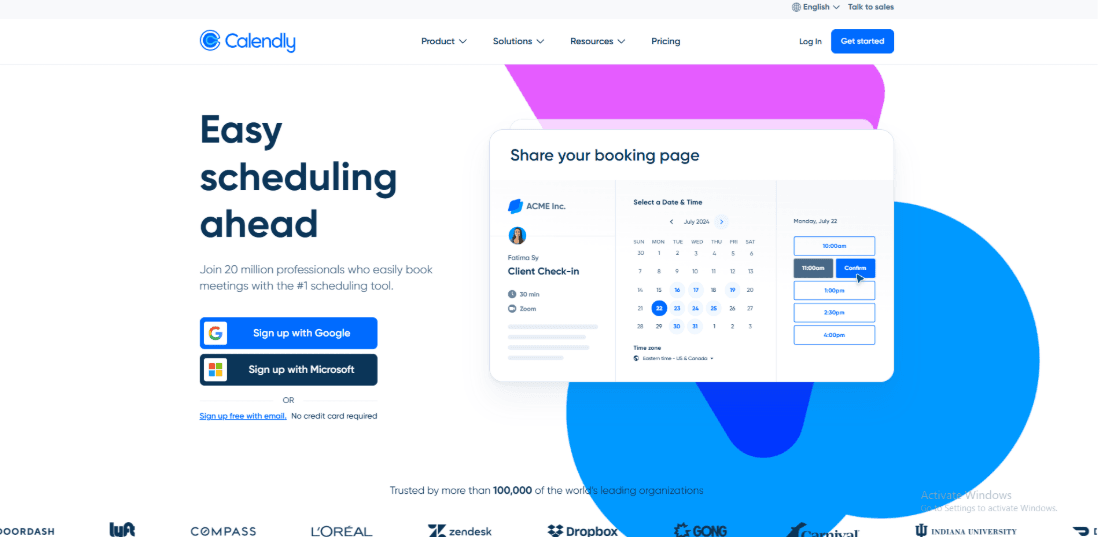
Calendly is known for simple booking links where people can pick a time without going back and forth. It works well for pet grooming businesses that want clean appointment booking and reminders without setting up a full system. If you are exploring pet grooming scheduling software, Calendly can cover the basics while staying easy to use.
Features
- Calendar integration
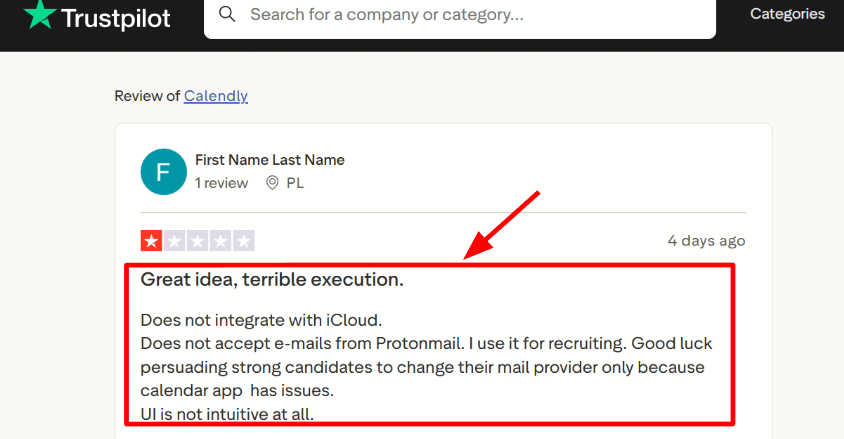
I connected Google Calendar in a few minutes. Busy slots were blocked correctly, so there were no overlaps. Outlook works well if your team uses it. I also saw the same issue in a Trustpilot review. I am adding a screenshot below since it mentions iCloud gaps and email issues that can matter for real bookings.
- Availability rules
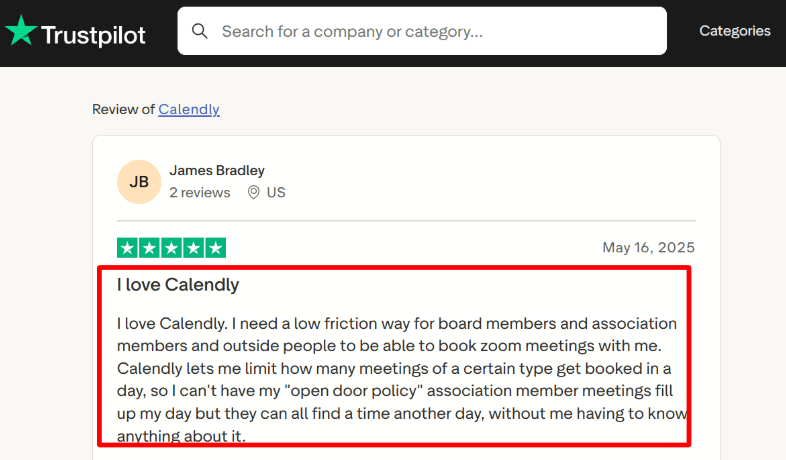
You can limit how many bookings you take in a day. This helps if you only want a fixed number of grooming consults or pickups. When I set this up, it took a bit of clicking around to find the exact setting. Once found, it worked well. This matches a Trustpilot review The review shown below also illustrates why daily booking limits matter when customers can access an open scheduling page
- Meeting tool integration
You can connect to Zoom or Google Meet, and it adds the meeting link automatically. This is helpful for online consults or quick follow-ups. If your work is only in person, you may not use this much, but it is still nice to have it ready.
- Team scheduling
You can spread bookings across your team using round robin or shared availability. This works for grooming shops with multiple staff. Once set up, bookings are assigned properly. It is worth checking that notifications go to the right person.
- Payment integration
You can take payments through Stripe or PayPal. This works well for deposits or paid consults. I tested Stripe, and the setup was smooth for a simple service. If your services include many add-ons or variations, you may find some limits here compared to full pet grooming scheduling software.
Pros
- Easy to set up and share. You can send your link on WhatsApp, Instagram, or email and start getting bookings quickly.
- Availability controls help you manage your day once you know where the settings are.
- Works well for online consults with automatic meeting links.
- Team scheduling helps distribute bookings across staff.
- Payments can be collected during booking for deposits or paid sessions.
Cons
- If you need features like pet profiles, vaccination records, or detailed service menus, you may need a more advanced pet grooming scheduling software.
- Pricing is per user, so costs increase as your team grows.
- Some advanced features are only available in higher plans.
- Data is stored in the US, which may matter for some regions and policies. See the details in Calendly Help.
Pricing
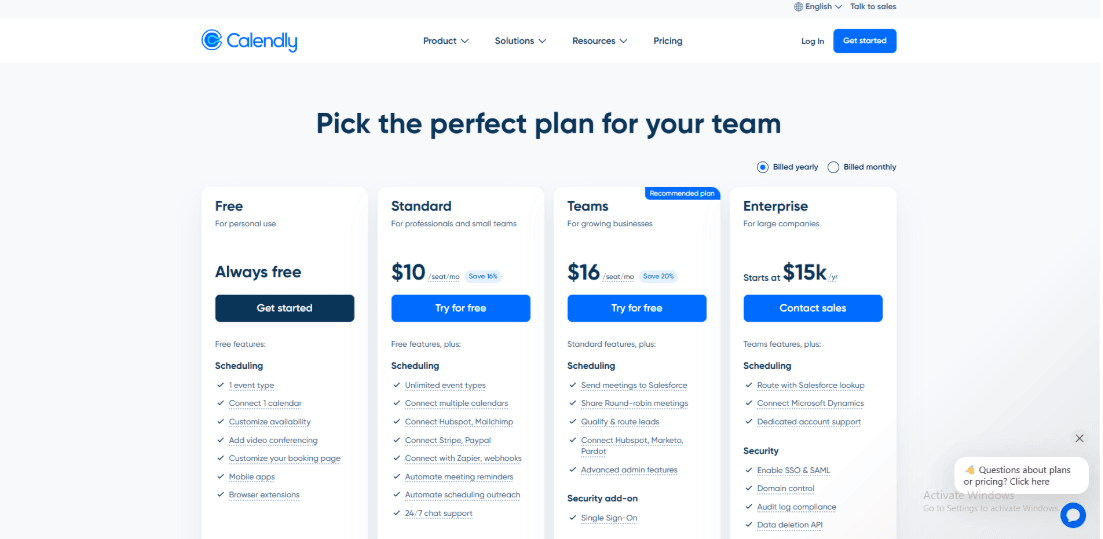
- A free plan is available for basic use with limited features.
- Standard plan is around 10 dollars per user each month when billed yearly. It adds more event types, payments, and automation.
- Teams plan is around 16 dollars per user each month when billed yearly. It includes team features and admin controls.
- Enterprise plans are custom-priced for larger businesses.
When to Choose Calendly
Calendly fits well if you want a simple way to handle bookings without much setup. It is a practical option when starting out or when your needs are straightforward. If your business grows and you need deeper features, you can then explore more advanced pet grooming scheduling software.
SimplyBook
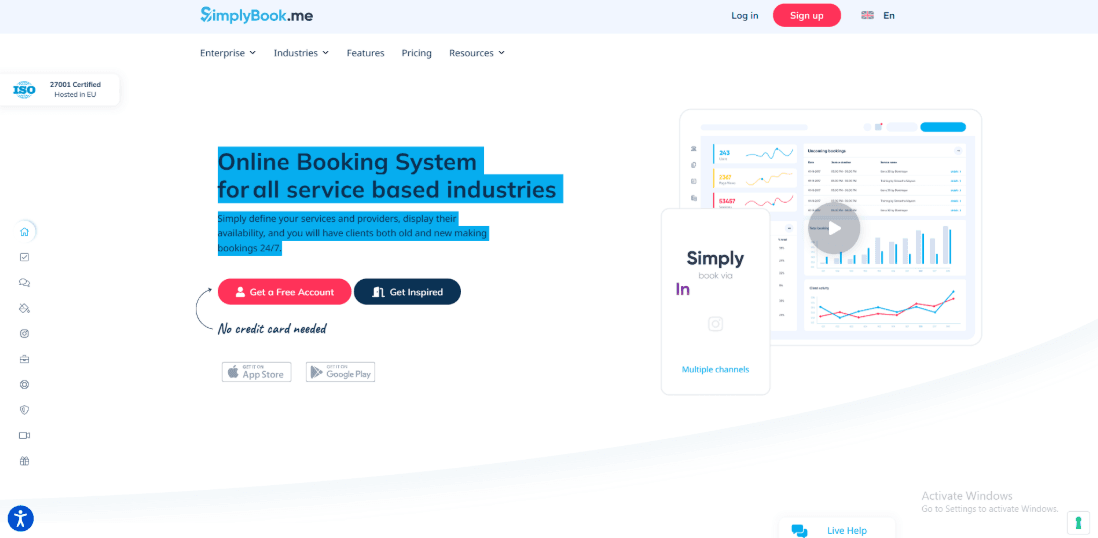
SimplyBook is a flexible appointment booking tool with many add-ons you can turn on as you need them. It works well as a pet grooming scheduling software when you want online bookings, payments, and reminders without building a custom system.
Features
- Service setup
When I set it up for a grooming shop, I could create services like bath, full groom, nail trim, and de-shed with clear time slots. You can also add buffer time between appointments. This helps in real situations where cleanup takes time, and the next pet cannot start immediately. The setup feels practical for day-to-day grooming work.
- Client notifications
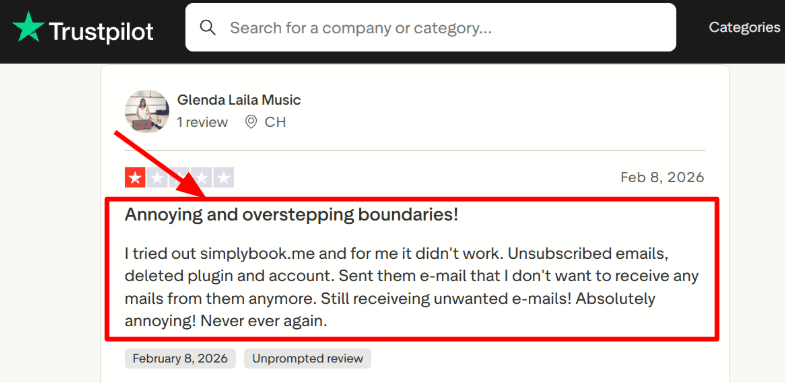
You can send booking confirmations and reminders to clients. This helps reduce missed appointments and cuts down on phone calls. One thing I noticed is that you need to pay attention to communication settings early so emails behave the way you expect. I also saw the same concern in a Trustpilot review and I am sharing a screenshot below so you can judge it yourself.
- Booking flow polish
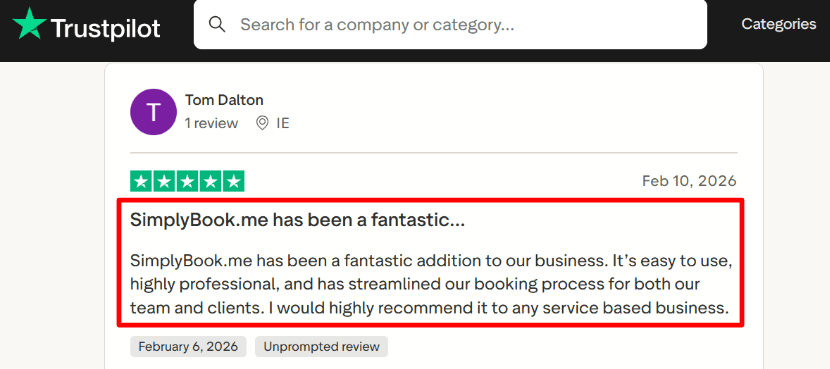
The booking page looks clean and is easy to use. When I tested it on a phone, the steps were simple. Pick a service, choose a time, and confirm. That makes it easier for customers to book without confusion. A Trustpilot review said it made bookings smoother for their team and clients, and I have included a screenshot below for that one too.
- Payment integration
You can take full payments or deposits while booking. This is useful for longer grooming sessions or busy weekend slots. Deposits help ensure people show up. You can also add extra services like flea treatment or teeth cleaning during booking.
- Setup depth
A lot of power comes from turning on the right custom features, so you can shape the system around how your shop works. I found myself hopping between settings more than expected while getting it perfect for multi-groomer scheduling. A small detail I noted while researching is that SimplyBook joined team.blue in 2023, which hints at a bigger group behind the product and a strong Europe focus.
Pros
- Works well as a pet grooming scheduling software when you want control over services and staff schedules
- You can start simple and expand features as your business grows
- Payments and deposits help reduce no-shows for longer appointments
- Booking works smoothly on mobile
- Supports multiple groomers and higher booking volume on paid plans
Cons
- If you want built-in pet profiles, vaccination tracking, or grooming history, you may need extra setup since it is not a grooming-first system
- The settings can take time to fully understand
- Communication settings need careful setup to avoid issues
- Some newer AI options use paid credits, which can become a variable cost at scale, see AI credits SimplyBook.
- Plan limits around bookings, providers, and custom features can push upgrades earlier for busy shops
Pricing
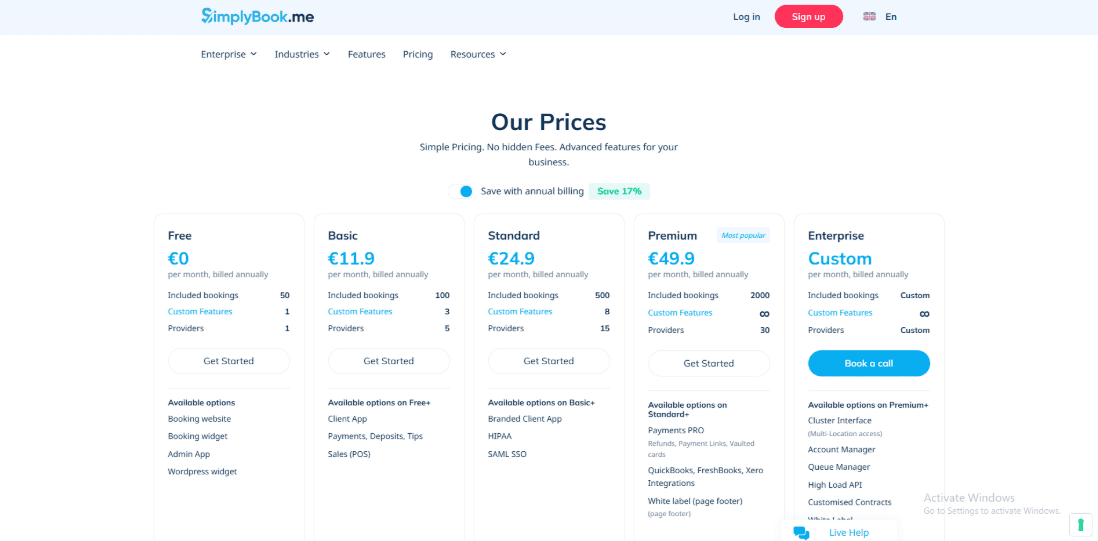
- Free plan is €0 with limited bookings, one staff member, and basic features
- Basic plan starts around €11.9 per month on annual billing or €13.9 monthly
- Standard plan is around €24.9 per month annually or €29.9 monthly
- Premium plan is around €49.9 per month annually or €59.9 monthly
- Enterprise plans are custom
When to Choose SimplyBook
Choose it if your pet grooming business wants a flexible online booking page, clear service durations, reminders, and optional deposits. It also fits if you have multiple groomers and want one shared system with room to expand settings over time. Skip it if you want a pet grooming first platform that already includes pet records and other grooming-specific operations without extra configuration.
Acuity Scheduling
Acuity Scheduling is a well known appointment booking tool that brings booking, reminders, and payments into one place. For a grooming business, it helps reduce back and forth messages and keeps your schedule more organized.
If you are exploring pet grooming scheduling software, Acuity is one of the options that can handle daily bookings without needing too many extra tools.
Features
- Availability rules
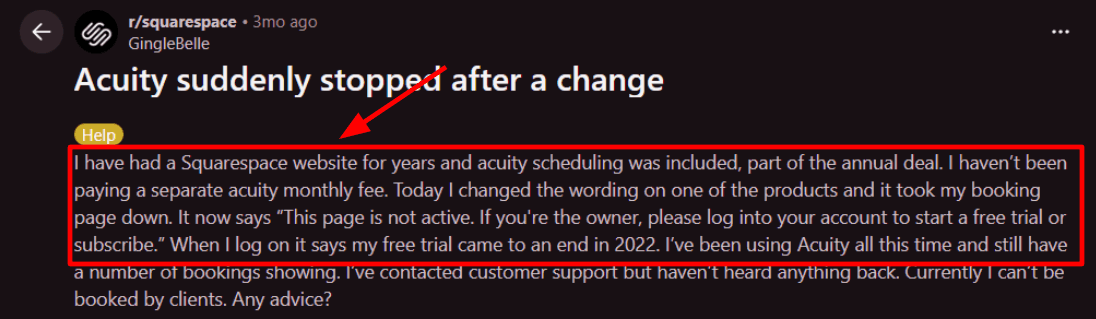
I set up grooming slots with buffer time for cleaning and drying. Once the rules were in place, it worked smoothly. You can control how far in advance people can book, how many appointments you take per day, and how late someone can reschedule. I also saw a similar setup go sideways in a Reddit review and I am adding a screenshot below. It lines up with how a plan or account state can suddenly block the public page.
- Calendar integration
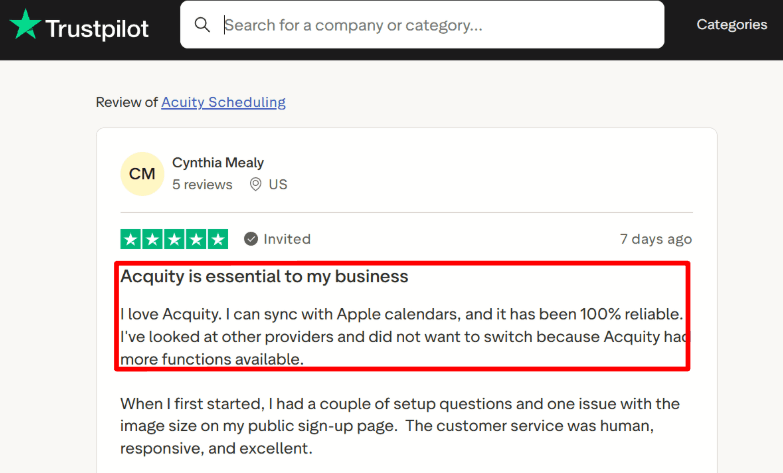
Acuity connects with Google, iCloud, and different Outlook calendars. Once connected, your blocked time stays accurate. In my testing, this helped reduce double bookings. I also checked how it handled time zones, and it worked well for that, too. A Trustpilot review mentioned Apple Calendar sync staying reliable, and I can see why after testing it. I am sharing that screenshot below so readers can scan the exact wording.
- Payment integration
You can accept payments through Stripe, Square, and PayPal. This makes it easy to take deposits and reduce no-shows. For grooming services, this is helpful when you offer add-ons like nail trimming or flea treatments. Clients can pay while booking, so there is less follow-up later. You should check how each payment option works since features can vary depending on the provider.
- Client intake forms
You can ask for details during booking, like pet name, breed, coat condition, behavior, and vaccination status. I created a form with basic grooming questions, and it kept everything organized for the appointment. This also helps staff prepare in advance and manage time better. For any pet grooming scheduling software, having this information early makes a big difference.
- API and webhooks
If your grooming shop uses a CRM or a custom check-in flow, the API and webhooks can push appointment events to other systems. That lets you automate messages like ready for pickup or a follow-up reminder after a grooming package. Acuity documents webhooks for appointment events in the developer docs, which is a detail many surface-level tool lists skip. See the Acuity developer webhooks docs for the exact event model.
Pros
- Easy to set up for grooming needs like deposits, buffers, intake forms, and reminders
- Solid calendar sync coverage, including iCloud and Outlook variants
- Strong intake forms for pet details and service preferences
- Packages and gift certificates work well for prepaid grooming bundles
- Website embed options make it easy to place a booking on your site
Cons
- It is a general tool, so it may feel limited if you want deep pet records or grooming-specific features
- Booking pages can stop working in rare cases if account or plan settings change
- SMS reminders depend on country support and may vary by region
- Payment options depend on supported providers
- Some compliance-related features need careful setup, which can take time to understand
Pricing
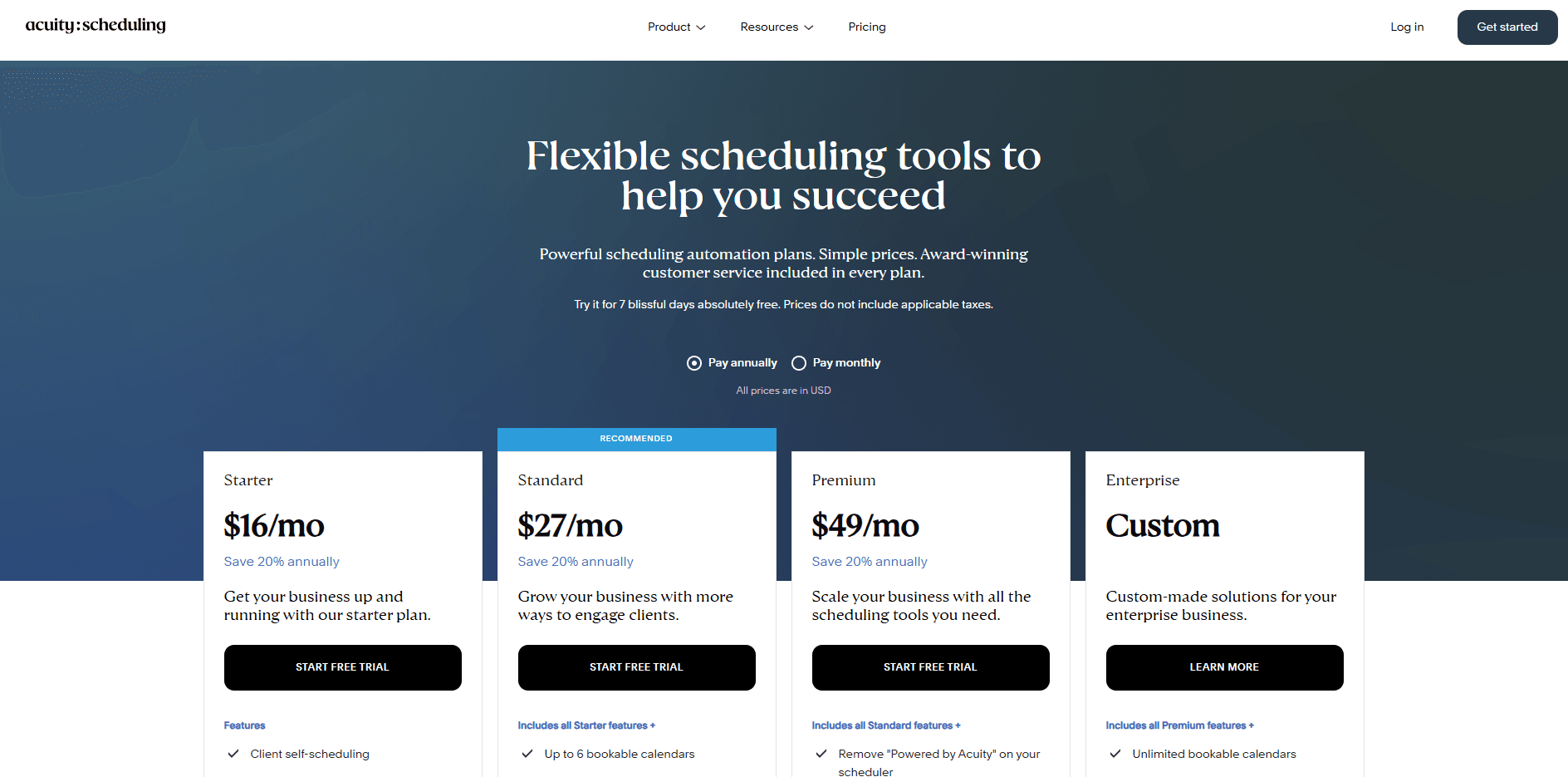
- Starter is around 20 per month on monthly billing and around 16 per month on annual billing
- Standard is around 34 per month, and around 27 per month annually
- Premium is commonly listed at around 61 per month and around 49 per month annual
- Acuity typically offers a short free trial rather than a permanent free plan
When to Choose Acuity Scheduling
Choose it if you run a grooming shop that wants online booking, calendar sync, deposits, and intake forms without building custom software. It also works when you sell packages or gift cards and want those to tie into booking. Skip it if you need a pet first system with deep pet records, vaccination workflows, or a grooming POS in the same product.
Setmore
Setmore is known for its simple booking page, where customers can pick a time and confirm on their own. It works well if you want an easy way to manage appointments, staff calendars, and reminders without spending hours setting things up.
Features
- Booking page
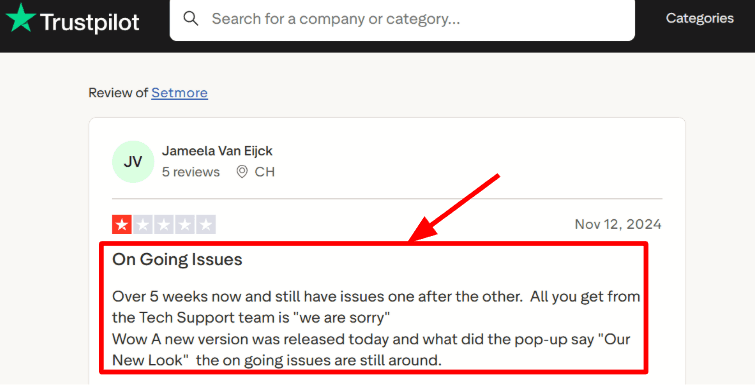
I set up the booking page first. It gave me a shareable link in minutes, which is useful when customers just want to grab the next available grooming slot. You can also add services and staff so clients book the right groomer. I did notice a Trustpilot review mention ongoing product issues over weeks, and the support replies felt repetitive. I’m sharing that screenshot below so you can see the wording and context clearly.
- Calendar sync
Calendar sync is what keeps your schedule clean. I tested it with Google and Office 365. When a groomer was busy elsewhere, that time stopped showing as available. That is exactly what you want. This is the kind of detail many people skip, but Setmore’s own Support Center calls out operational timing for some booking surfaces like Google, including the 1–3 day update window on Reserve with Google Setmore Support. That delay matters if you change locations or services and expect it to reflect instantly.
- SMS reminders
Setmore supports SMS reminders on paid plans, and it helps reduce no-shows for grooming appointments that get booked days ahead. One thing I had to plan around is you only get one SMS reminder per appointment, and you cannot include URLs in those SMS messages, which affects how you send prep instructions. The limits are documented in Setmore’s text reminders Setmore Support. It’s workable, but I had to adjust my reminder copy more than I expected.
- Payment integrations
If you want to take deposits or full payments, Setmore connects with Stripe, Square, and PayPal, depending on your setup. I tested the booking and payment flow, and it stayed simple for clients as long as service pricing was clear. There are no extra fees from Setmore itself, so you mainly deal with the payment processor charges. This works well for add-on services like special treatments, where you want payment confirmed upfront.
- Customer support
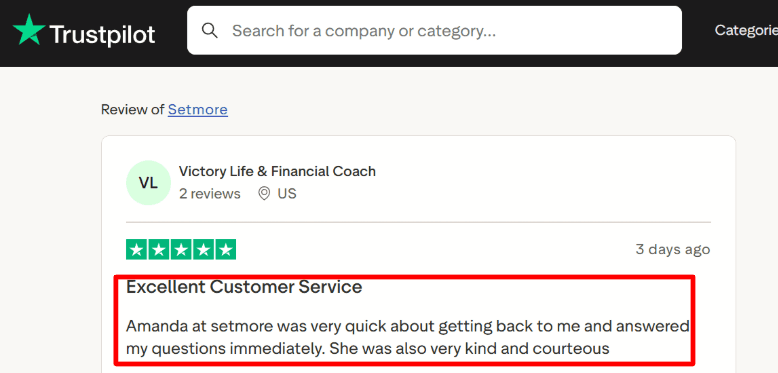
Support matters more than people expect. I saw a Trustpilot review praising quick and kind replies from Amanda, and that matches what I experienced when I asked basic setup questions and got a clear response. I’m adding that screenshot below so readers can judge the tone and speed for themselves.
Pros
- Easy to set up and start using with a booking link and service list
- Works well for small teams with multiple groomers
- Calendar sync helps avoid overlapping appointments
- Reminders help reduce missed bookings
- Integrations cover most basic needs
- Support can be helpful during setup
Cons
- If your pet grooming setup needs complex intake forms, pet profiles, or highly customized client workflows, Setmore can feel limiting compared to the best pet grooming scheduling software options built for that depth
- SMS reminders have tight constraints, including one reminder and no links as noted in the text reminders Setmore Support.
- Some booking surfaces can take time to reflect changes, which can surprise you during updates
- If the product hits a rough patch, you may end up re-checking things more often than you’d like
- A few settings take trial-and-error to land on the exact client experience you want
Pricing
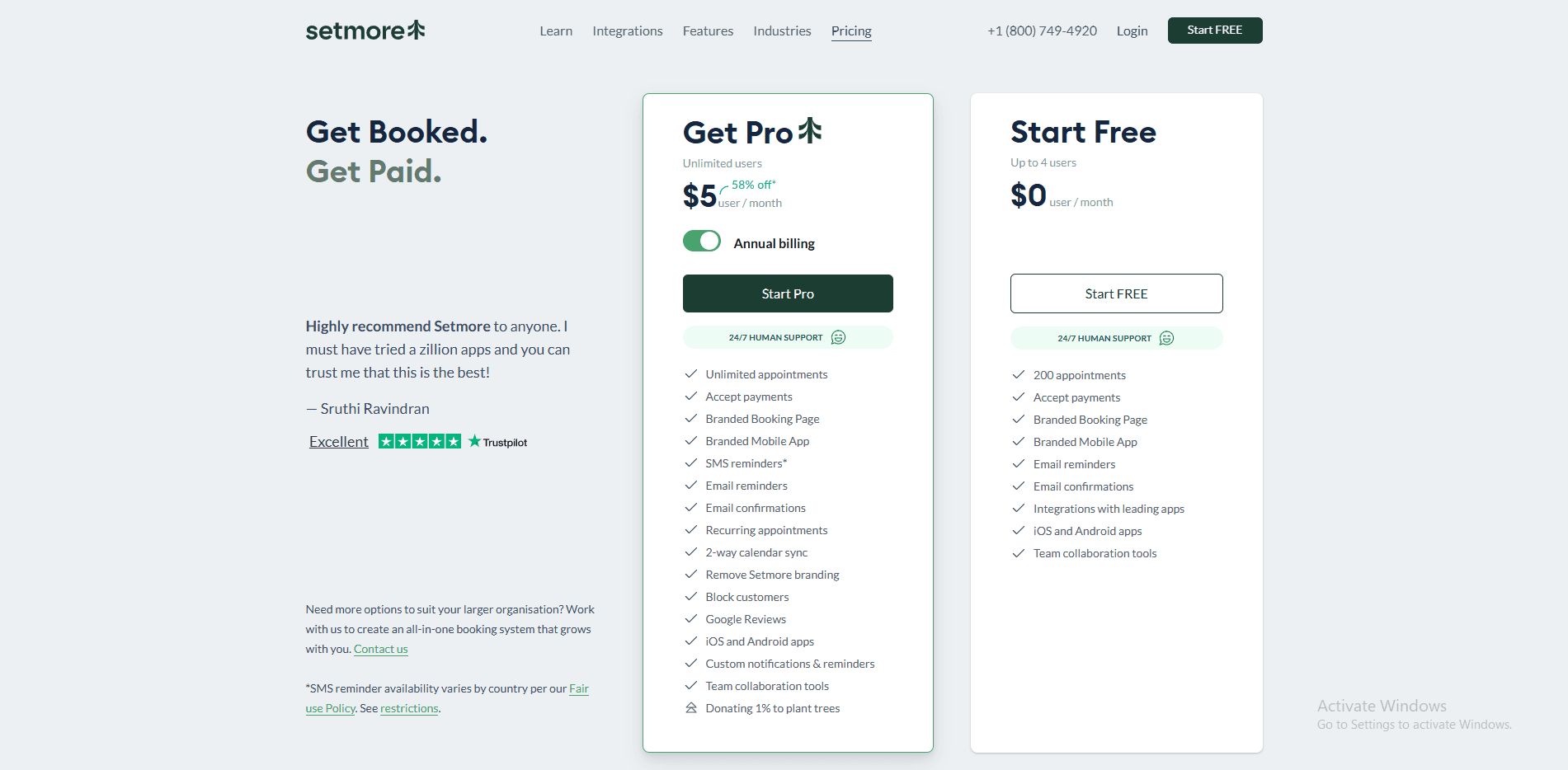
- Free plan is available and is often enough to start testing your booking link and basic services
- Paid plans add the practical upgrades like two-way calendar sync and SMS reminders
- Pricing is typically per user per month, so the cost rises as you add groomers or front-desk staff
- If you plan to take online payments, payment processor fees still apply
- Mobile subscriptions can have their own tiers and pricing depending on the app store
When to Choose Setmore
Choose Setmore if you want a simple booking link fast, basic staff scheduling, and reminders without a heavy learning curve. It works well for small grooming teams that mainly need clean appointment flow and calendar sync. Skip it if you need deep pet intake, complex forms, or highly tailored grooming workflows that industry-specific systems usually handle better.
Conclusion
If you want a quick answer, the right tool depends on how your grooming business actually runs day to day, especially around bookings, repeat clients, and staff coordination.
- Lunacal is the strongest fit for grooming businesses that want branded booking pages, deposits, and smooth team scheduling in one place. It works well when you care about how your booking page converts pet owners.
- SimplyBook is better when you need more control over services, add-ons, and booking logic, especially for varied grooming packages.
- Setmore is a practical starting point for small teams that just need a working booking system without much setup or cost.
- Calendly makes sense if your needs are very simple and you mainly want a shareable booking link with minimal configuration.
- Acuity Scheduling stands out for handling packages, intake forms, and repeat visits, which matters for grooming businesses with returning clients and prepaid sessions.
The decision usually comes down to three things: how complex your services are, whether you sell packages or memberships, and how much control you want over the booking experience. Pick based on those, and you will avoid switching tools later.
Methodology
Sources
- I began with each tool’s official website to understand what it promises. This included reviewing pricing pages, feature lists, and any available security or compliance details.
- I then went through FAQs and help documentation to see how things actually work in practice, especially around deposits, reminders, cancellations, and staff scheduling.
- To validate those claims, I looked at user reviews on G2 and Trustpilot, and then checked Reddit and Quora for more candid feedback. I focused on repeated patterns rather than one-off opinions.
Test setup for each tool
- I set up a realistic grooming business with two groomers, one bather, and a front desk role. Working hours, breaks, and time off were configured to reflect a typical day in a salon.
- I created common services like bath, haircut, de-shedding, and nail trim, along with a few add-ons. Each service included proper durations, buffers, and pricing rules.
- I connected email and SMS notifications where available and configured payments for deposits and no-show handling to see how smoothly those flows work.
Common scenarios I tested
- I tested a full online booking flow where a client selects a service, chooses a groomer, adds pet details, and receives confirmations and reminders. Mobile experience was a key focus here.
- I simulated a walk-in customer who needs a follow-up appointment, checking how quickly staff can rebook, find client details, and assign the right groomer.
- I also tested last-minute reschedules to see how conflicts are handled and how clearly updates are communicated to both the client and the team.
FAQs
Which is the best pet grooming scheduling software?
The best pet grooming scheduling software for most groomers is Lunacal. It is 4.9 out of 5 on G2 and handles packages for bath plus trim bundles, beautiful booking pages, customizable intake forms for pet weight, coat, vaccine notes, and seamless payment integration for deposits. If you only need a simple shareable booking link, Calendly may be enough.
How do the top pet grooming scheduling tools compare?
Top options people actually stick with are Lunacal, SimplyBook, and Acuity Scheduling.
- Lunacal. Strong client facing booking pages, packages, deposits, team scheduling, and intake forms that capture pet details once.
- SimplyBook. Strong service catalogue, staff scheduling, and helpful add ons for selling extras like nail trim or de shedding.
- Acuity Scheduling. Detailed forms, prepaid appointments, and a smooth flow for repeat clients who book the same service often.
For a simple time picker link, Calendly is common.
What country level record keeping and language nuances matter in pet grooming scheduling software?
Country level nuances are mostly record keeping and language defaults. US, UK, Canada, Australia and EU teams run into the same basics.
• Get explicit opt in for SMS reminders and store signed waivers.
• Keep grooming notes, bite or injury logs, and vaccine details tied to the pet profile.
• For EU, align with GDPR and support German, French, Spanish on client facing pages.
What features matter most in pet grooming scheduling software?
The features that matter most are pet profiles, service menus, and no show protection. You want intake forms for breed, coat, weight, vaccines, deposits with clear cancellation rules, automatic reminders, buffers for cleanup, and staff calendars to assign groomers and prevent double booking.
How do you reduce no shows for grooming appointments?
Use deposits or card holds, send two reminders, and show cancellation policy on the booking page. Lunacal and SimplyBook can automate this. Calendly needs add ons for payments in practice.
Summarize this content with AI


