


Introduction
Fresha usually stops feeling like the right fit when marketplace fees and transaction-based pricing start affecting how you run bookings and keep revenue. That is the point where many salons and spa businesses start comparing alternatives more seriously, especially when they want more control over the booking flow. I reviewed the main options with that exact switch trigger in mind.
In this guide, I compared the leading Fresha alternatives by focusing on the areas that matter most in a real switch decision. I looked closely at bookings, payments, client management, and day-to-day workflow fit because those are the checks that usually decide whether moving away from Fresha will help in practice. I also cross-checked patterns against public sources so the findings are easy to verify.
I also kept an eye on the broader market context and on how these tools fit businesses serving different kinds of customers. The salon and spa software market is expected to grow by more than USD 200 million by 2029 as more businesses adopt digital tools to save time and reduce manual work. The rest of this guide breaks down which alternatives are worth shortlisting and why.
Fresha Alternatives compared in Table
In-depth table comparing different alternatives
| Use case | Best tool (G2 rating) | Why it’s a fit |
|---|---|---|
| Best low-cost Fresha alternative | Lunacal (4.9/5) | Best when you want scheduling, payments, branded booking pages, reminders, packages, and team features in one place |
| Best for beauty and salon operations | Vagaro (4.6/5) | Built specifically for salons, spas, beauty professionals, memberships, payments, and day-to-day appointment management |
| Best for solo beauty professionals | Booksy (4.8/5) | A strong fit for independent providers who want simple booking, client rebooking, reminders, and marketplace visibility |
| Best for businesses already using Square | Square Appointments (G2 rating not listed) | Good when you want basic scheduling, reminders, payments, and a free starting option |
| Best for larger wellness centers | Mindbody (3.7/5) | Better suited for multi-location wellness, fitness, and spa businesses with deeper operational needs |
Source: Individual websites all all products, reddit, G2
Detailed table of different appointment booking solutions:
| Feature | Lunacal | Vagaro | Mindbody | Booksy | Square |
|---|---|---|---|---|---|
| Rating on G2 (out of 5) | 4.9 ★★★★★ | 4.6 ★★★★ | 3.7 ★★★ | 4.8 ★★★★★ | No |
| Starting Price of Paid Plans (USD) | $9 | $23.99 | $99 | $29.99 | $49 |
| Calendar Sync: Google, Outlook, Apple | Yes | Partial | Partial | Partial | Partial |
| SMS/Email Reminders | Yes | Yes | Yes | Yes | Yes |
| Paid meetings | Yes (Stripe, Paypal) | Yes | Yes | Yes | Yes |
| Scheduling page Themes | Yes | Yes | Partial | Yes | Yes |
| Team Scheduling | Yes | Yes | Yes | Yes | Yes |
| Round Robin Scheduling | Yes | Partial | No | No | No |
| Multi-session Packages | Yes | Yes | Yes | Yes | Yes |
| Custom domain | Yes | Partial | Partial | Partial | Partial |
| GDPR | Yes | Yes | Yes | Yes | Yes |
In-depth review of all alternatives
Lunacal
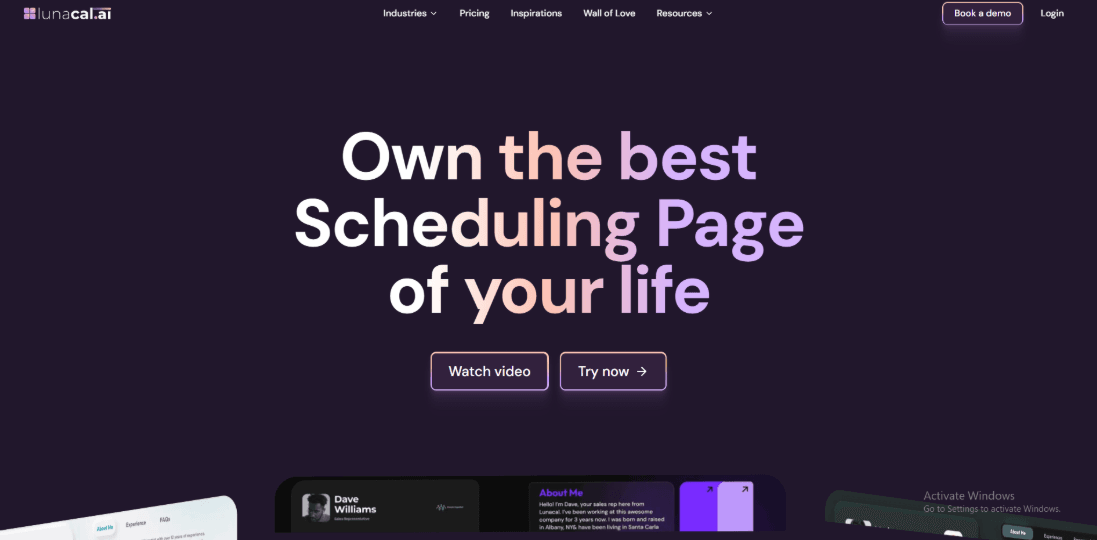
Lunacal is a low-cost Fresha alternative that helps businesses get more appointments with branded booking pages, reminders, payments, intake forms, and flexible scheduling flows. Buyers exploring Fresha alternatives will find Lunacal rated 4.9/5 on G2, putting it among the highest-rated choices.
The page can explain the session, show testimonials, and share documents before someone books. This approach works well for independent beauty professionals, salons and wellness businesses that want to explain their services and build trust before a client books.
Features
- Integrations & Webhooks
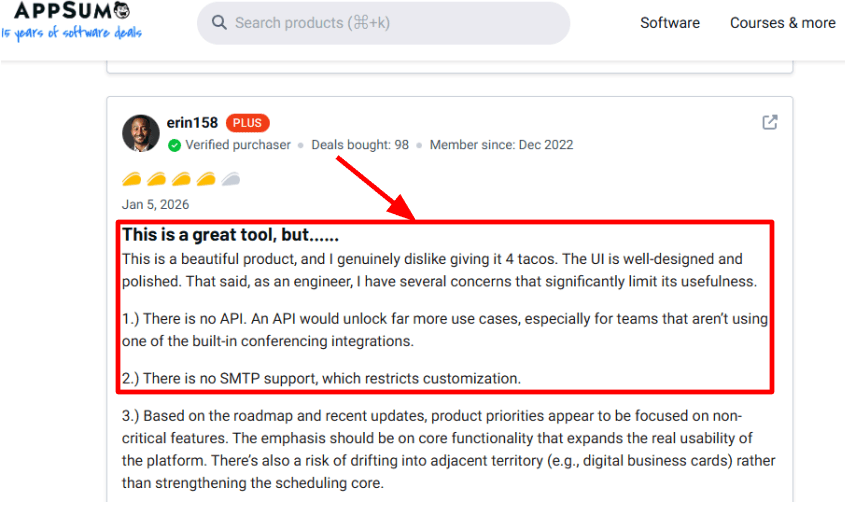
I connected Google Calendar and Zoom first. The setup was quick and the booking flow worked as expected. After that, I tested webhooks for booking events. One thing I saw is what a AppSumo reviewer pointed out: no obvious public API or SMTP-style control yet, which limits deeper automation. I’m sharing a screenshot below.
- Booking Page Proof
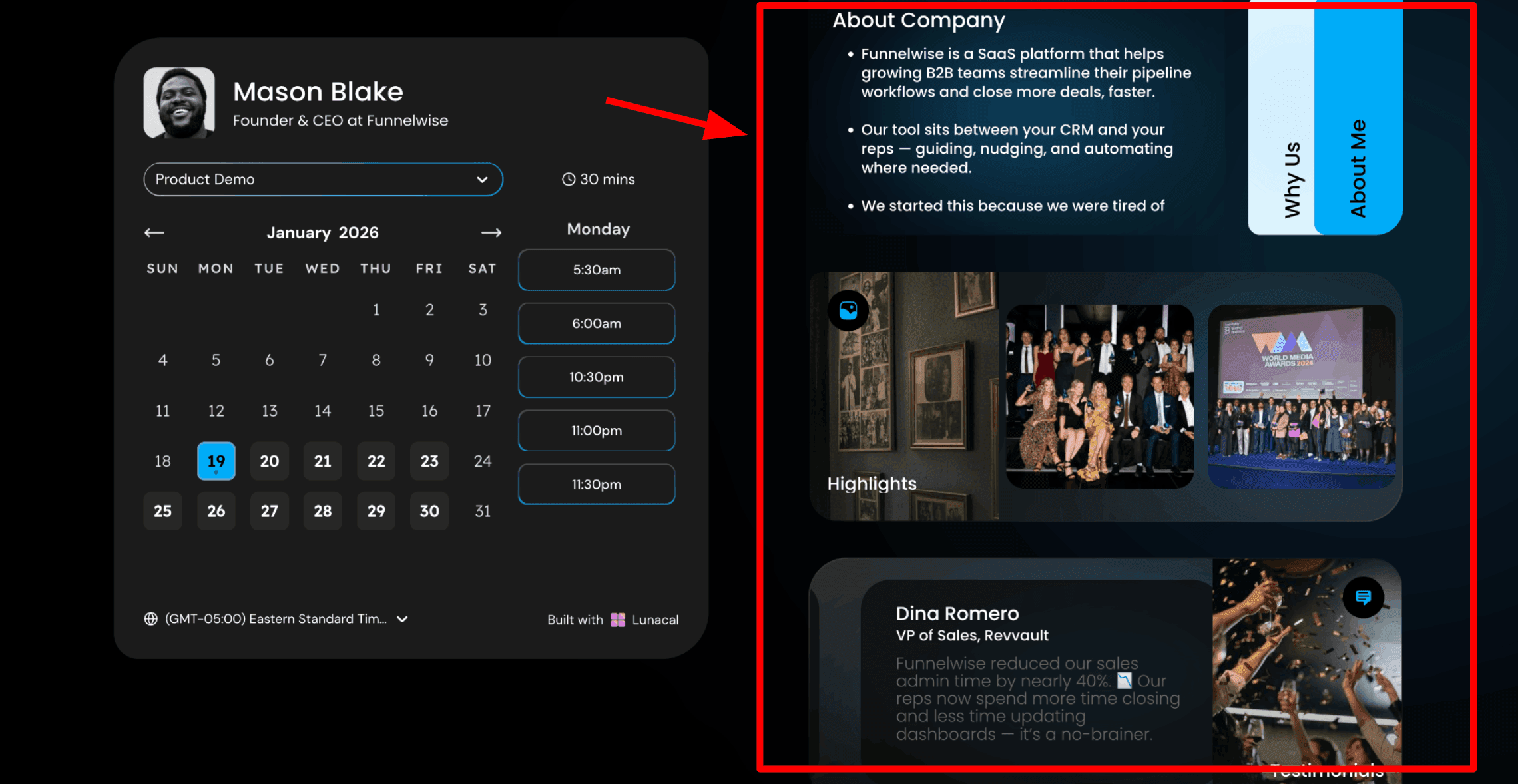
The booking page can include a short introduction, testimonials, and supporting files. This helps visitors understand the service before they book. I tested this by uploading a small case study PDF. It made the booking page feel clearer and more trustworthy. A G2 review mentioned this exact “confidence before paying” effect, and I saw the same when I added a case study PDF. I’ve added the screenshot below.
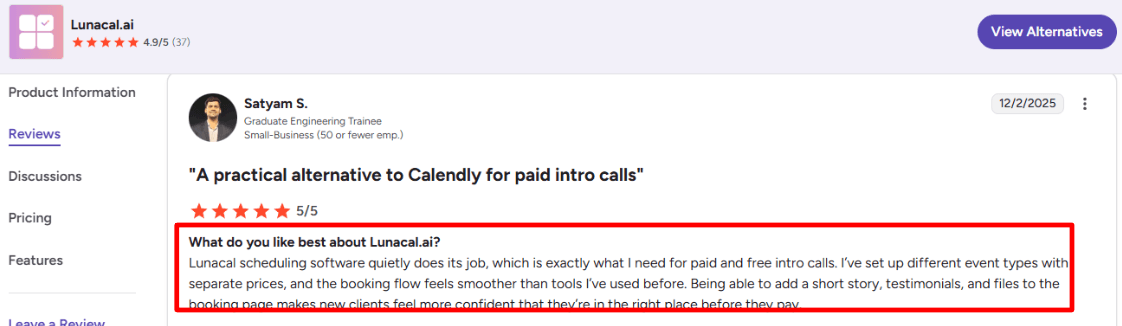
This is one reason Lunacal often appears in discussions around a Fresha Alternative, especially for professionals who want their booking page to explain the value of the session. Here is how you can include content in your booking page:
- Payment Integration
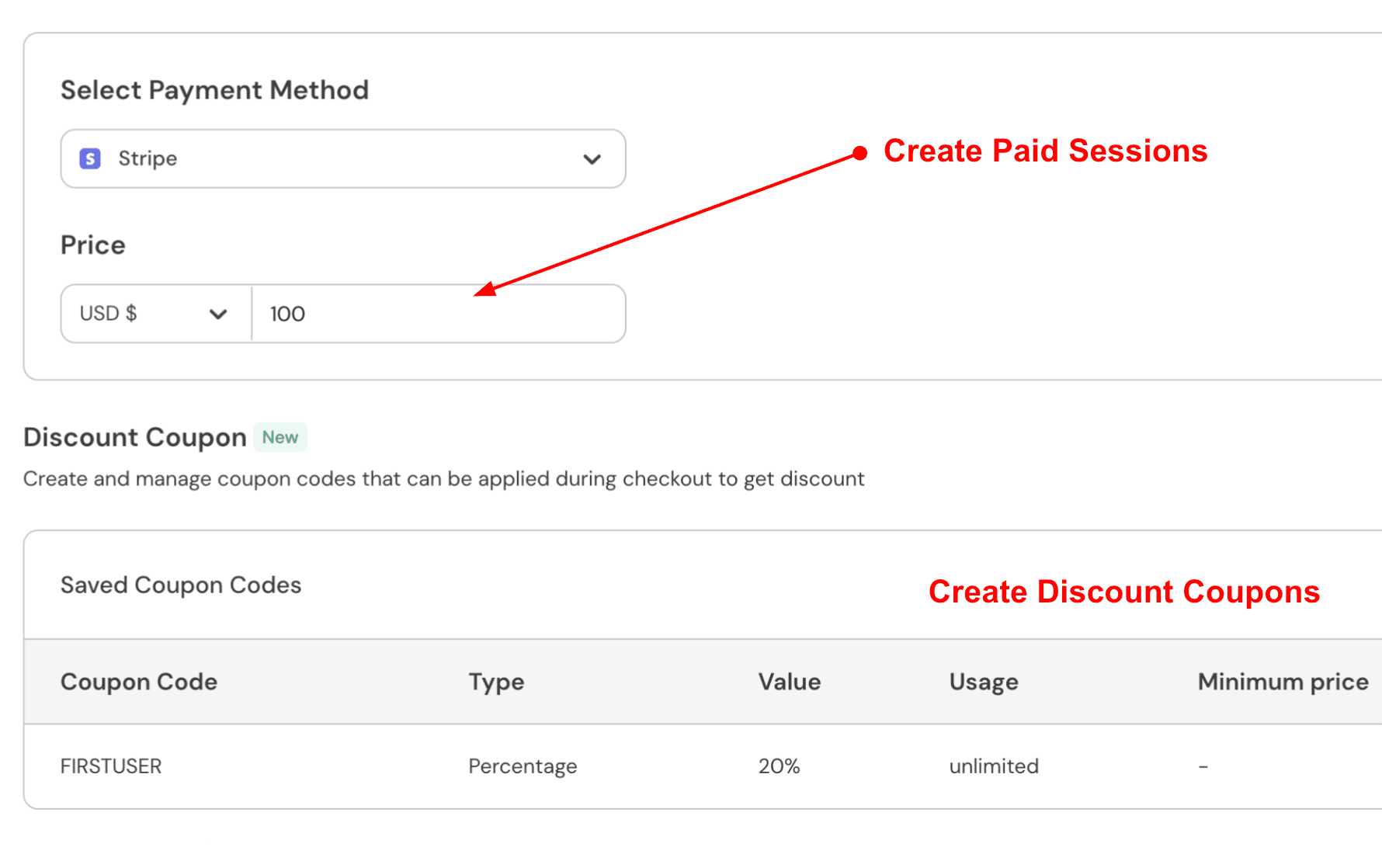
I tested both free and paid event types with different prices. The checkout process stayed smooth on desktop and mobile. This setup works well for paid treatments, beauty consultations, deposits and other appointment-based services.
- Availability Controls
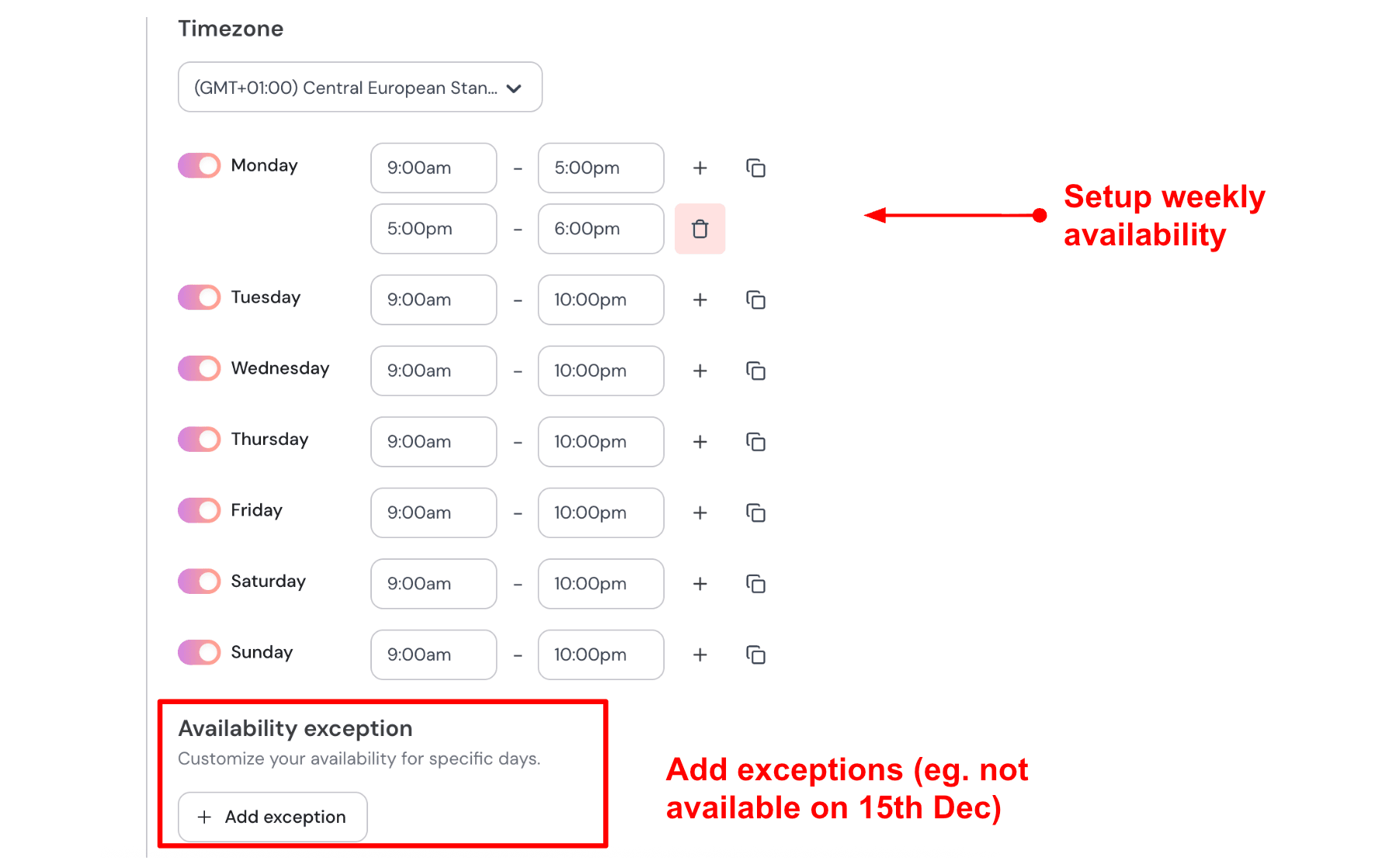
You can add buffers between meetings, set notice periods, and use approval rules if needed. These controls help keep the calendar organized. During setup, I noticed that a few settings live in different parts of the dashboard. It took a little time to locate everything the first time. Here is how I setup my availability:
- Team Scheduling
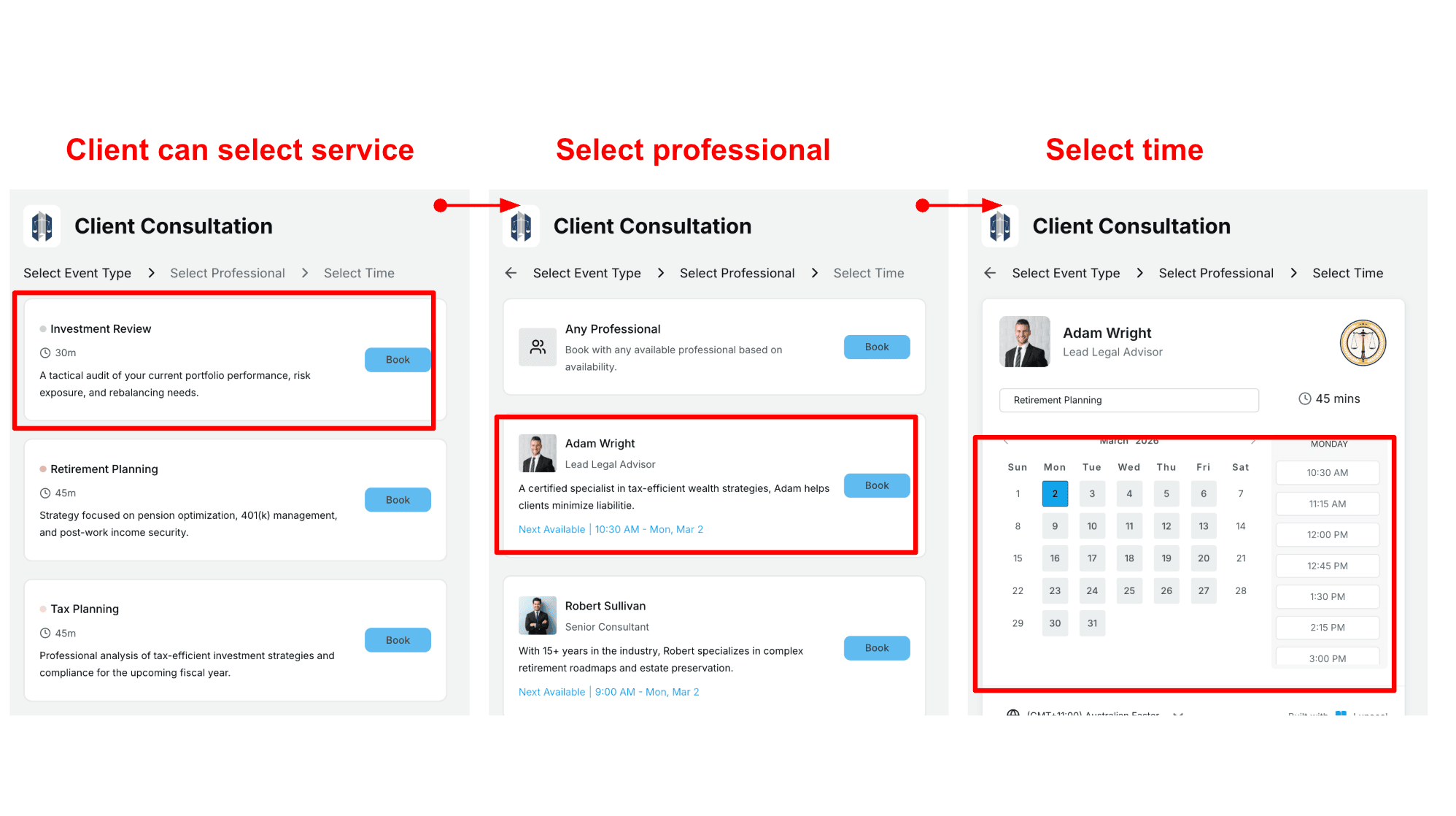
Lunacal includes round-robin and shared-team bookings. This works well for small teams who want leads to rotate between members. It covers the core needs for teams without adding unnecessary complexity. Here is a screenshot for the page:
Pros
- Better for high-intent bookings where the booking page needs context, not just a calendar link.
I could show proof and pricing without sending people to five different places. - Booking pages support story, files, testimonials.
- Paid + free event types feel smooth.
- Calendar + meeting tool integrations are easy to set up.
- Webhooks and Zapier style paths exist for basic automation.
Cons
- If you rely on salon marketplace discovery, Fresha is the safer pick because it is built around marketplace and online booking channels (and its marketplace fee mechanics are clearly documented). In that scenario, Lunacal is a different tool for a different job.
- No obvious public API for deep custom builds).
- Custom SMTP is not available yet .
- Not designed for inventory, chair-level resources, or POS-heavy flows.
- If you need multi-location salon reporting, you will likely feel the gap.
Pricing
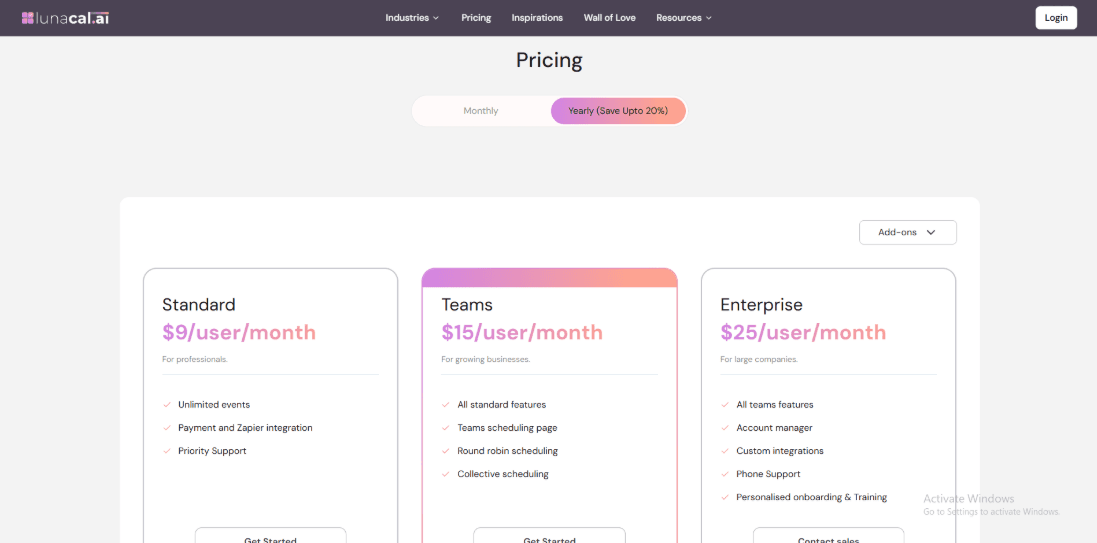
- Standard: $9 per user per month, includes unlimited events plus payments and Zapier integration.
- Teams: $15 per user per month for team scheduling features.
- Annual billing shows a discount and add-ons may apply depending on your setup.
Official pricing page: Lunacal pricing
When to Choose Lunacal over Fresha
Choose Lunacal if you sell consults, services, or intro calls and want a booking page that builds trust before someone pays. Choose Fresha if you run a salon/spa front desk and need POS, inventory, staff scheduling, and marketplace-driven discovery. If messaging performance is central, Fresha has publicly shared results from richer messaging like RCS.
Vagaro
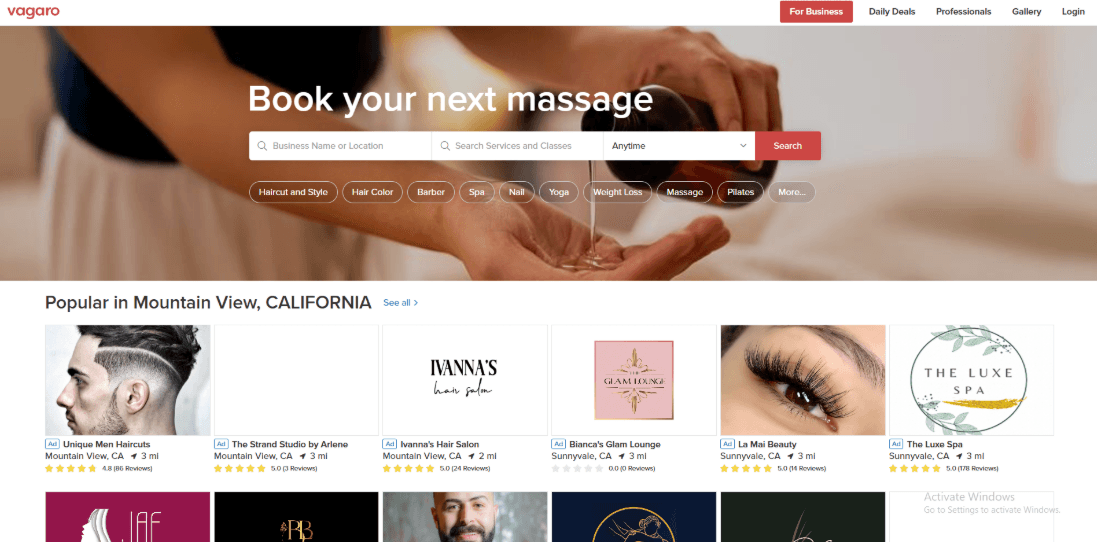
Vagaro is widely used in beauty, wellness, and fitness businesses that want bookings, payments, and marketing in one system.
If you want a good Fresha alternative, Vagaro's simpler pricing model is easier for many operators to understand. It has features for both solo providers and growing teams that help with everything from scheduling appointments to checkout.
Features
- Client profiles
I started by importing clients and setting up records. That is usually where things can get complicated during a switch.
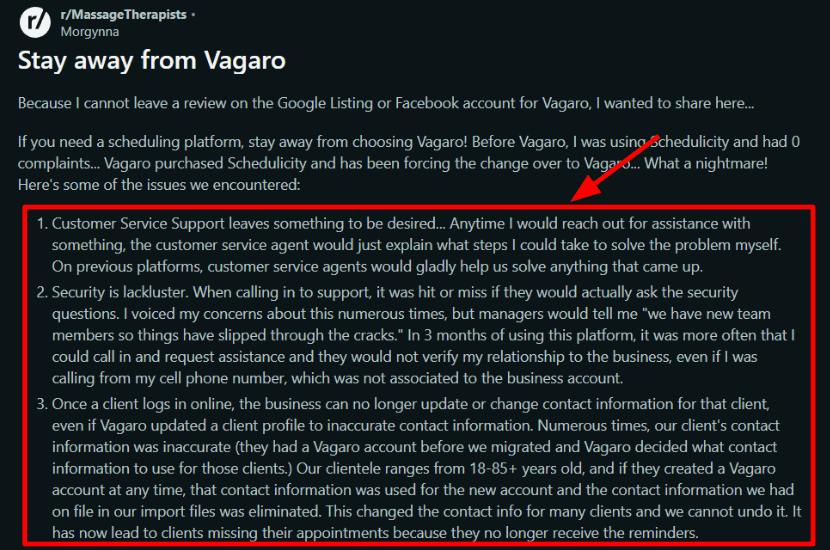
Pay close attention to how contact details behave once clients create their own logins. Small settings here can affect who controls what information.
I also saw this called out in a negative Reddit post on r/MassageTherapists, and I'm sharing a screenshot below so you can judge it yourself:
- MySite websites
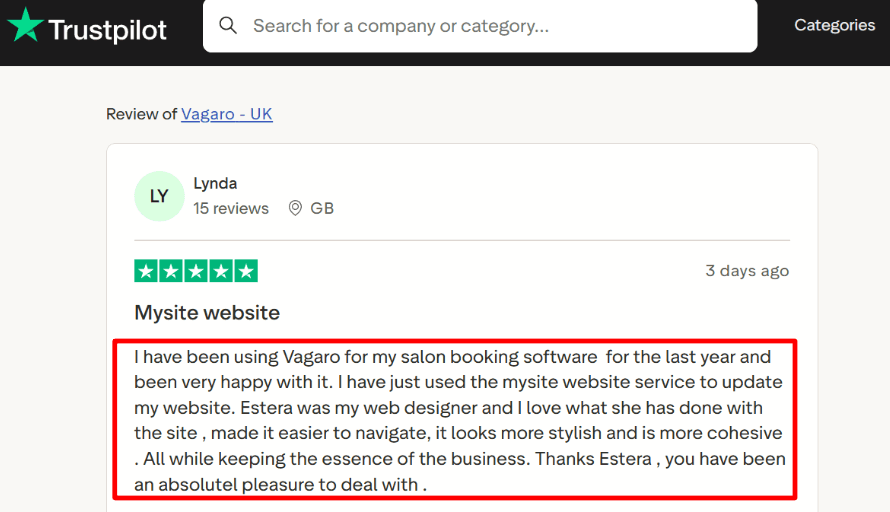
Vagaro encourages you to use its MySite feature if you want a proper website experience rather than a simple booking link.
I tested a quick draft site, and the sync with services felt convenient once it was wired in.
I saw a recent Trustpilot review praising the MySite redesign experience with a Vagaro designer, and I've dropped that screenshot below:
- Availability rules
You can set split shifts, days off, buffer times, and different hours for each staff member. I did have to click around to find one setting I expected to see immediately. It was there, just not where I first looked. Once configured, the calendar behaved consistently and was easy to manage.
- Messaging & reminders
Reminders are built in and work as expected. Even so, I would test message delivery with real clients before fully committing. Different audiences respond differently to email and text. Fresha has invested heavily in richer messaging channels. If you are switching from Fresha, recreate your reminder flow during the first week and confirm that clients are receiving everything clearly.
- Payment integration
Checkout is integrated with bookings, so you can take deposits, sell add-ons, and close out appointments quickly.
Vagaro clearly states that it does not take a percentage of revenue from online bookings. That structure feels different from a marketplace-driven new client fee model.
If marketplace fees are an essential factor for you, review how unlisting affects your visibility and compare both platforms during your trial period.
For intake calls and consultations, see legal service firm booking scheduling system.
Pros
- The pricing model is easier to forecast if you prefer fixed monthly software costs.
- Booking and point of sale work smoothly together.
- MySite gives you a more polished online presence.
- It handles multi-staff scheduling well.
- It helps standardize services and pricing across your business.
Cons
- If your growth depends on marketplace discovery, Fresha can be the stronger default because its marketplace is central to the product.
- Client data control concerns are worth validating.
- Some settings take digging before they feel "locked in".
- Add-ons can push the real monthly cost up.
- Support quality can vary depending on the issue.
Pricing
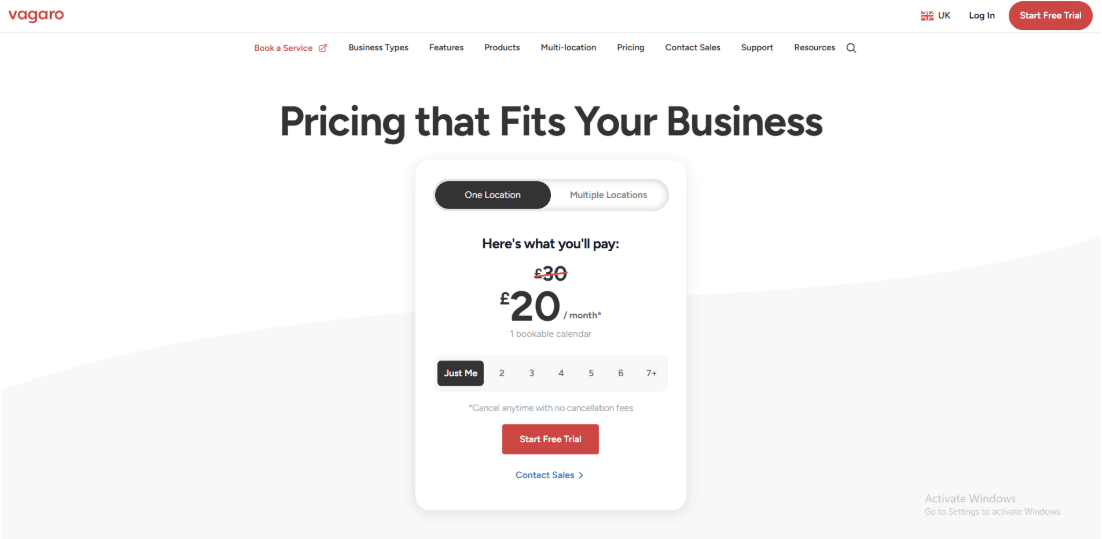
- Base plan starts around $23.99/month for a single calendar, and pricing scales with additional staff calendars.
- Vagaro states it does not take a percentage of online booking revenue.
- Website add-on (MySite) is typically an extra monthly fee.
- Expect separate payment processing costs and optional marketing/message charges.
Official pricing details: Vagaro pricing page.
When to Choose Vagaro over Fresha
Vagaro is a strong option if you want predictable monthly software costs and plan to drive your own marketing. It works well when you need a booking, a point of sale, and a website under a single account.
Fresha can make more sense if you rely on marketplace exposure and are comfortable paying for new client acquisition through the platform.If you are evaluating Fresha, I put together a practical Fresha alternative comparison.
Mindbody
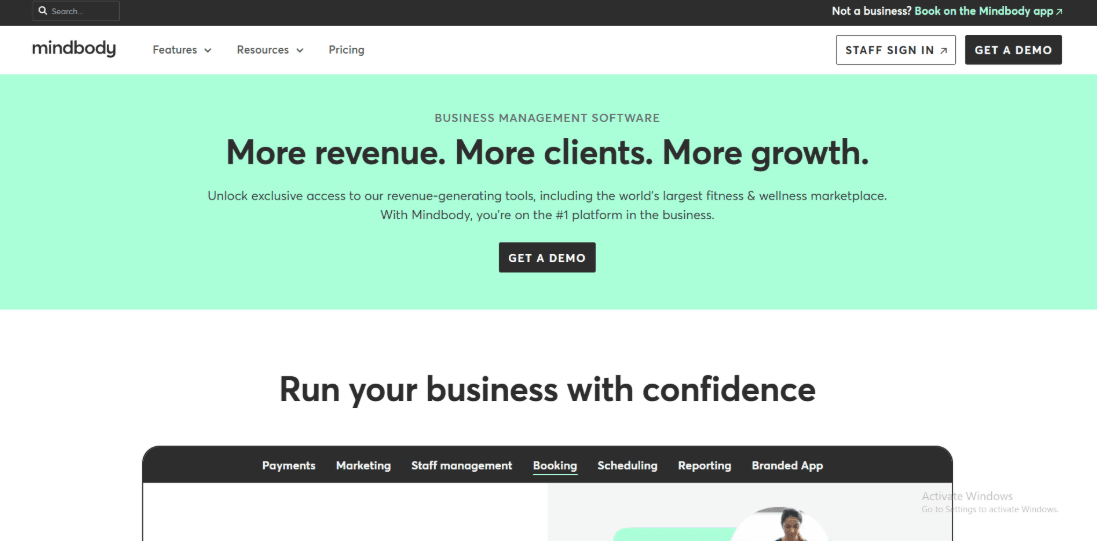
Mindbody helps fitness and wellness businesses run their operations in one place. It works well for studios with memberships, class schedules, and front desk teams. If you need more depth and control than lighter tools offer, it can be a strong option. It does require more time and budget to set up correctly.
Features
- Mobile workflows
I started by testing the mobile experience because that is where staff spend a lot of their time. Daily work depends on what can actually be done from a phone or tablet.
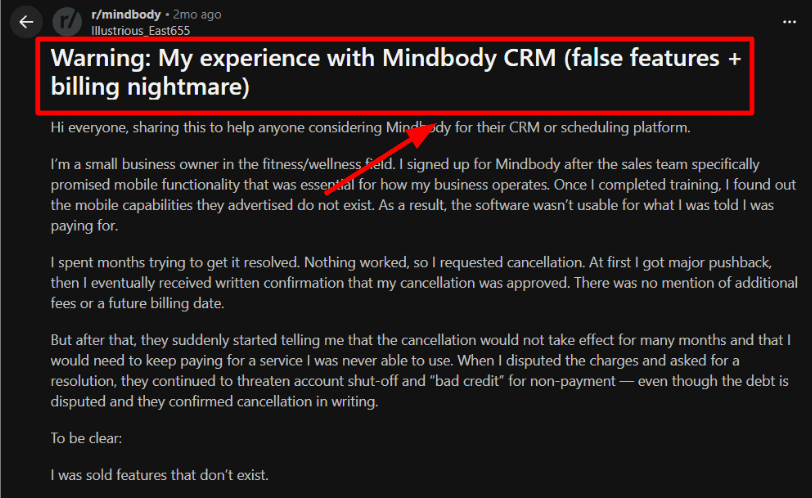
Some tasks worked smoothly. Other flows felt more limited than expected. I also came across a Reddit post where someone shared similar concerns about mobile access and CRM features. It is worth testing your own real staff tasks during the trial instead of relying on feature lists.
I also saw a similar warning in a Reddit review, and I'm sharing a screenshot below so you can double-check it.
- Support and onboarding
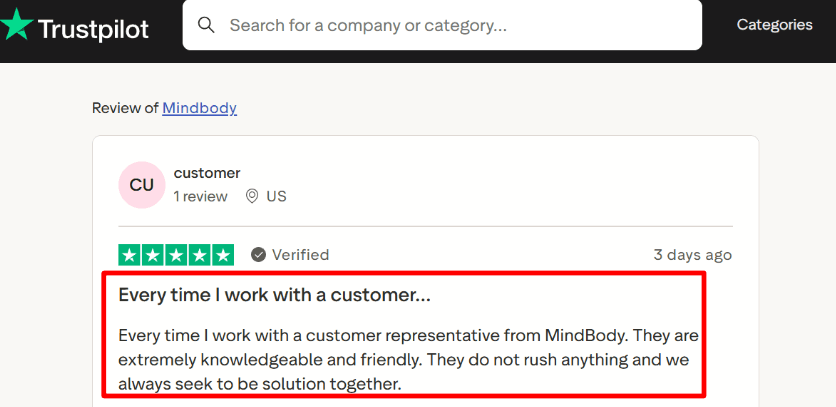
During setup, having a knowledgeable support rep made a big difference. The experience felt personal rather than scripted.
That matches a Trustpilot review. I'm adding a screenshot below, the theme is "helpful humans" more than scripts.
- Payments and contracts
Integrated payments are part of the core story, plus you can run pricing options, contracts, and no-show fees with a lot of control. This level of structure helps if you sell memberships or long-term programs. Before committing, read the billing and cancellation terms carefully. Make sure you understand the notice periods and how fees are handled.
- Messaging and reminders
Automated reminders are included. Check out delivery and channel options early in your trial. For comparison, Fresha publicly shared messaging lift numbers in a Twilio release. If branded or richer messaging matters to your studio, compare this carefully before making a final decision.
- Availability rules
Availability rules go beyond "open hours"; you can model staff schedules, services, and resource constraints. This is helpful for studios that run classes, private sessions, and other services across multiple staff members. The setup takes time because there are many options to configure.
If Mindbody is part of your evaluation, check this Mindbody alternative breakdown.
Pros
- Mindbody works well as a Fresha alternative for multi-service studios with memberships, classes, and front desk processes. Once correctly set up, it supports day-to-day operations in a structured way.
- Pricing rules and contracts give you detailed control over recurring revenue.
- Onboarding support can be invaluable when you get an experienced rep.
- Mature feature set for scaling across teams and locations.
- Better for complex studio operations than lightweight schedulers.
Cons
- If your growth relies on Fresha-style marketplace discovery and low entry cost, Mindbody is usually the wrong trade. You will pay more and you may not need the extra depth.
- Cancellation and billing obligations can be strict.
- Some mobile expectations need careful validation in your exact workflow.
- Setup takes longer than Fresha if you want it "done properly".
- Not for for solo operators who need appointments and basic reminders.
Pricing
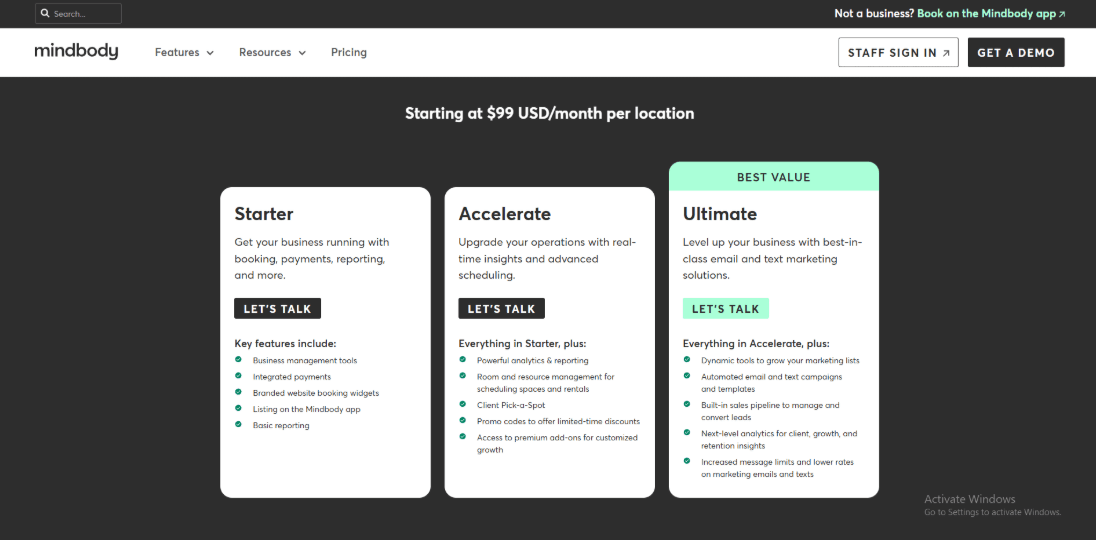
- Mindbody lists pricing starting at 99 USD per month per location. There are multiple plan levels, and the sales process usually includes a demo.
- Check the latest numbers and what's included on the official page: official pricing.
- Your total cost depends on how many locations you have and which features you activate.
When to Choose Mindbody over Fresha
Choose Mindbody if you run a fitness or wellness studio with memberships, class schedules, and front desk processes that need structure. If you prefer a faster setup and simpler appointment-based booking, another tool may feel easier to get started with. Before deciding, test one complete workflow from start to finish. Try a new client booking, payment, reschedule, cancellation, and staff mobile access. That will tell you more than any feature list. When Mindbody setup feels heavy, I suggest looking at Mindbody alternative.
Booksy
Booksy is widely known as a booking system made for barbers, salons, and wellness professionals. It also has a built-in marketplace where clients can discover and book services.
When I look at tools in this space, Booksy is usually one of the first I test if someone wants a steady monthly cost instead of a marketplace fee model tied to new clients.
If you want a deeper side-by-side comparison, there is a full Booksy alternative
Features
- Marketplace profile
I started by setting up the public profile, because for many shops, that is where new bookings begin. The profile setup is simple, but you need to pay attention to what shows publicly and what stays private. I had to double-check a few visibility settings before I was comfortable with how it looked. If you are moving from Fresha alternatives, the pricing structure will feel different. Booksy focuses on a subscription model, so your costs are more predictable month to month.
- In-app support flow
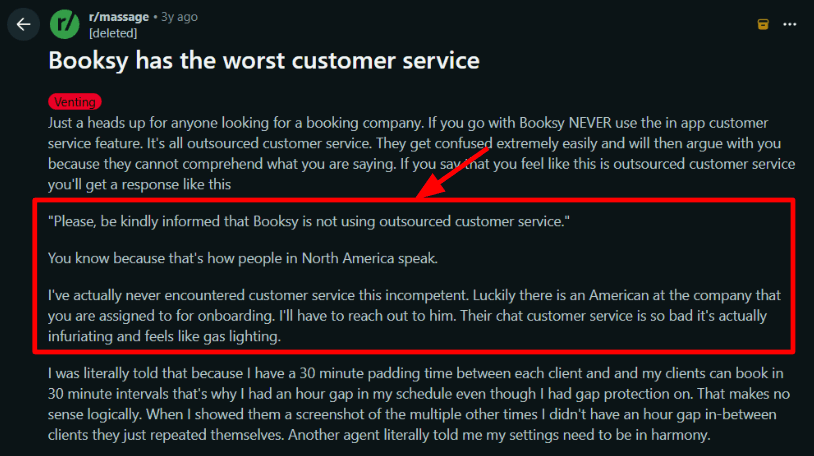
During setup, I used the in-app chat to ask a small question about my account. It took longer than I expected to get a clear answer.
I also saw a similar pattern called out in a Reddit review, so I'm adding a screenshot below for context.
- Availability rules
Setting up services, staff schedules, and break times was fairly smooth once everything was mapped correctly.
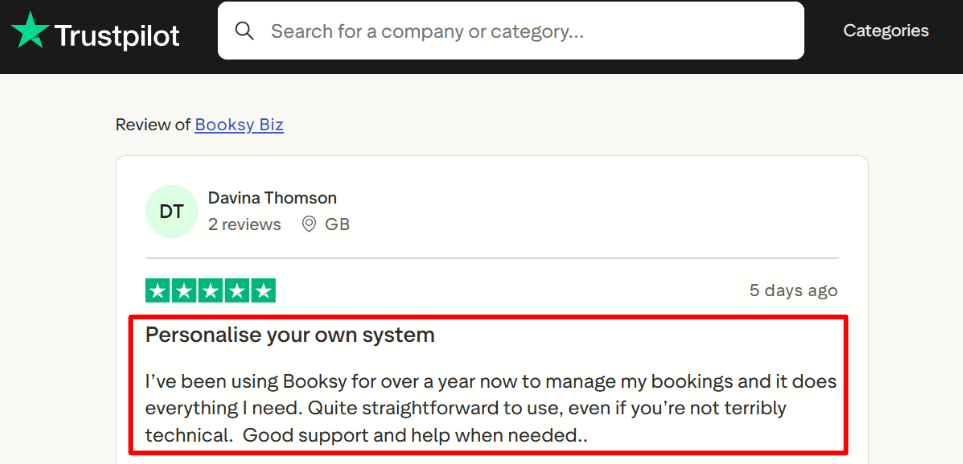
A Trustpilot reviewer described it as "quite straightforward to use" with good help when needed, and I can see why. Screenshot below.
If you are switching from Fresha, this is one of the first places to check because your rules decide whether the calendar stays sane.
- Payment integration
Booksy allows you to take payments directly through the system. You can run checkout so it connects to the appointment itself. It also supports options like Tap to Pay and card reader hardware for in-person payments. I always test payments from start to finish, because small settings can affect deposits, refunds, and cash flow without you noticing at first.
- Client reminders
There are built-in reminders and confirmations. These help keep clients up to date and cut down on no-shows. Set them up, make a few test appointments, and check the timing and message delivery. It's the only way to find out how it works for your store.
For a deeper comparison of similar tools, see our complete Booksy alternatives guideBooksy alternative .
Pros
- The monthly pricing model is predictable, which makes budgeting easier as you grow.
- The marketplace can bring in new clients.
- Straightforward scheduling setup for non-technical owners.
- Payments and checkout are tightly connected to appointments.
- Designed around barbers and salons, not generic calendars.
Cons
- If your business relies heavily on marketplace-driven new clients and you prefer avoiding subscriptions, another tool may fit better. Booksy charges a monthly base fee plus an additional cost per team member.
- Support experience can vary, especially inside chat.
- Add-on staff costs rise quickly for larger teams.
- Privacy details can be more intricate to validate quickly. Common Sense Privacy report flags unclear areas.
- Marketplace visibility settings can take a few passes to get right.
Pricing
- Booksy lists a base price of $29.99 per month. Each additional team member is $20 per month, plus tax.
- There is a free trial. Payment processing fees and hardware costs are separate.
- Official pricing page for the most current country-specific numbers: Booksy pricing.
When to Choose Booksy over Fresha
Booksy is a good choice if you want software that feels like it was made just for salons and barbers, and you want a steady monthly price. It works best if you want to grow your team and are okay with paying for each new person you hire.When Booksy comes up in a shortlist, I reference this Booksy alternative breakdown.
Fresha is a better choice if you want to get more exposure in the marketplace and attract clients. You can let them discover your business on the platform. If you don't want to pay a monthly fee, a transaction-based fee might sound good to you. If you are evaluating Fresha, I put together a practical Fresha alternative comparison.
Square Appointments
Square is widely known for payments and point of sale. Appointments sit on top of that system. If you already use Square for taking payments, adding booking is a natural next step.
Square is one of the first tools people try when they want more control over checkout than what Fresha offers. This Square alternative comparison goes into more detail about trade-offs if you want more options in the same lane.
Features
- Payment integration
When I set up Square Appointments, taking payment at checkout felt straightforward. Payments are Square's core, so the flow makes sense from the start.
This is different from Fresha's marketplace-first approach, where fees can appear during new-client discovery.
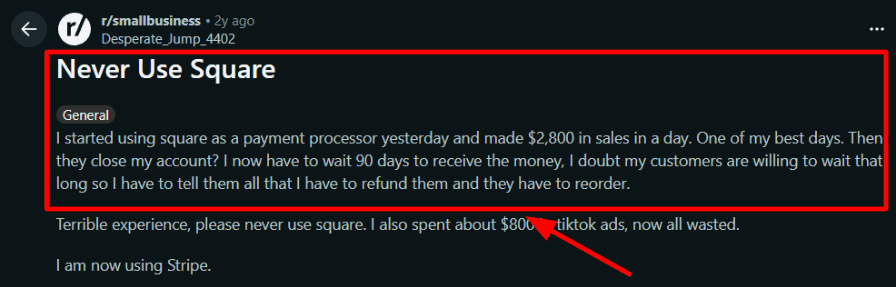
I also saw a Reddit review about a sudden account closure and a long payout wait, with a screenshot below, and it shows how Square can apply risk controls.
- Payout controls
Square has clear policies around payment reserves and delayed fund availability in some cases. That lines up with the Reddit story I mentioned above, where the seller claimed a 90-day wait, screenshot below. If your cash flow is tight, test a small volume first and watch the balance and transfer timelines.
- Booking site
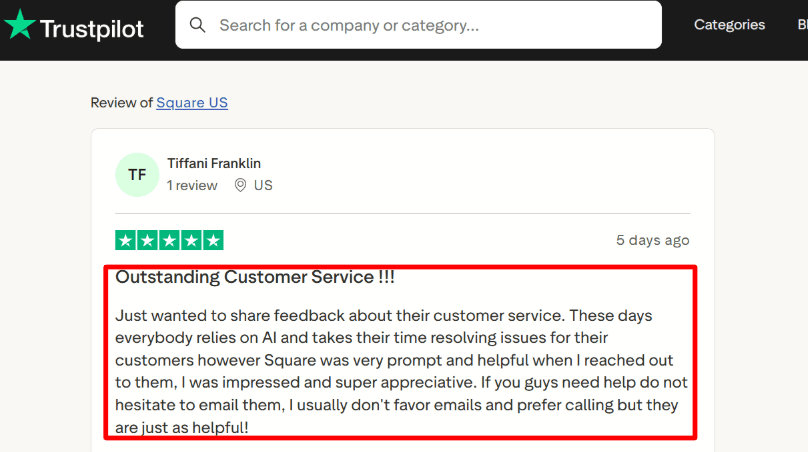
You can create a simple online booking site that lets clients book at any time. Setting up basic services was quick in my test. Fine-tuning the flow to match exactly how I wanted bookings to work took a bit more clicking. I also saw a Trustpilot review praising the speed of email support, screenshot below, and that matches my experience when I needed help with a settings question.
- Availability rules
You get staff schedules, working hours, and real-time calendar updates. For teams, the per-location pricing model becomes part of your planning, unlike Fresha's approach, where listing and marketplace fees can matter more. If you run multiple locations, you will want to map each location's staff and services early.
- Reminders and marketing
Automated reminders are included. You can also add messaging and marketing tools if you need them. One thing I keep an eye on is message deliverability, as it affects no-shows.
If Square Appointments is on your shortlist, my Square Appointments alternative page is a good reference.
Pros
- Strong payments + POS foundation, especially for in-person checkout. If you sell services plus retail, this can be a cleaner setup than Fresha.
- Easy to get a simple booking site live.
- Per-location plans are straightforward to budget for.
- Lots of payment methods and add-ons in the Square ecosystem.
- Support can be responsive over email, based on what I saw and user reports.
Cons
- If you rely on marketplace discovery to bring in brand-new clients, Square will not replace Fresha's marketplace funnel. You will need to drive bookings with your own marketing.
- Cashflow risk if your account hits a reserve or hold policy.
- Some marketing and reminder materials can cost more than the plan.
- Teams that work in more than one place can be expensive because they charge by location.
- When you want a certain booking flow, setup can seem tricky.
Pricing
- Free plan is available for a single location, then paid plans scale per location.
- In the US, Plus is listed at $49 per location/month and Premium at $149 per location/month.
- Payment processing fees are separate from the scheduling plan.
- If you run multiple locations, model the subscription plus processing fees together. Official pricing is here: Square Appointments pricing.
When to Choose Square over Fresha
Choose Square if you want to run your business with POS first, keep a close eye on the checkout, and sell both services and goods. If you already live in the Square ecosystem and want Booking to fit in, choose Square. If you need marketplace discovery to grow and want that demand channel built in, stick with Fresha. If you really need to know how much money you'll get and when, try Square with a small amount of money first and watch the transfers before going all in.When Square Appointments comes up for payments and booking, I point to Square Appointments alternative.
Summary Table
| Tool | Best For | G2 Rating | Pricing | Standout features | Red Flag | Payments | Team routing | Classes/Packages |
|---|---|---|---|---|---|---|---|---|
| Lunacal | Brand-first booking pages | 4.9 ★★★★★ | Free Plan available Paid Plan starts at $9/month | - Profile + proof beside calendar - Packages + coupons for selling | Lighter ecosystem vs legacy platforms | Yes | Yes | Yes |
| Vagaro | Salon + spa operations | 4.6 ★★★★ | Free Trial Paid Plan starts at $23.99/month | - Built for salons and spas - Staff schedules + client notes | Add-ons can inflate total cost | Yes | Partial | Yes |
| Mindbody | Multi-location fitness studios | 3.7 ★★★ | Free Trial Paid Plan starts at $99/month | - Deep class + membership tools - Staff, rooms, and resources | Heavy setup for small teams | Yes | No | Yes |
| Booksy | Barber client rebooking | 4.8 ★★★★★ | Free Trial Paid Plan starts at $29.99/month | - Strong consumer marketplace demand - Automated rebooking + reminders | Less flexible for complex ops | Yes | No | Yes |
| Square | Square-first businesses | No | Free Plan available Paid Plan starts at $49/month | - Tight POS + payment integration - Fast setup for appointments | Limited packages and class depth | Yes | Partial | Partial |
Methodology
Sources
- I began with the official sites. I looked over the features, prices, limits, and rules. I also read the FAQs and help files to learn how to set things up and what using them every day is like.
- I signed up for trials in 2026 and tried out the tools myself. I finished setting everything up and did a few real bookings from start to finish.
- I also looked at Trustpilot and G2. I focused on patterns around reliability, support quality, refunds, and billing problems.
- To balance that, I checked Reddit and Quora threads to see what salon and spa owners were saying in their own words.
Test setup for a salon and spa
- I created a demo salon business inside each tool. I added services, add-ons, staff members, working hours, and buffer time between appointments. I also included simple resources like treatment rooms. A basic client profile was created with intake notes.
- I set up deposits, tips, taxes, cancellation rules, and automatic reminders whenever I could.
- I tried out payments with a small fee. After that, I looked over the receipt and processed the refund. I also added the booking widget or shared the link to the booking page and tested how it worked on mobile.
Common scenarios we tested
- I walked through the full client journey. A client books an appointment, selects a staff member, then reschedules or cancels. I checked how updates were sent by email or text. If waitlists and no-show tools were available, I reviewed those as well.
- I checked to make sure that the system stopped time conflicts. I looked over the calendars of the staff, the scheduling for multiple locations, and the permission settings for team members. I also tried out the features that let you buy packages and memberships.
- Finally, I reviewed reports. I looked at revenue tracking, staff utilization, client retention metrics, and export options for accounting.
FAQs
Which is the best Fresha alternative for small businesses?
The best Fresha alternative for small businesses is Lunacal. Rated 4.9/5 on G2, it quickly covers beautiful booking pages, customizable intake forms, calendar integrations, and seamless payments. For studios running memberships and classes, Mindbody fits better.
Compare Fresha competitors with lower cost
Lower cost Fresha competitors worth comparing are Lunacal, Booksy, and Vagaro. The real savings usually comes down to how pricing scales as you add staff and locations, plus the small fees people forget.
- Cost per staff member and whether part timers count
- Fees for extra locations, rooms, or resources
- SMS and email reminders pricing limits
- Payment fees, refunds, and deposit handling
- Reports you can export for payroll and taxes
What country specific tax, language, or GDPR nuances should Fresha alternatives handle?
Fresha alternatives should handle these country specifics per region:
- Tax receipts accurately for US (United States) sales tax, UK VAT, Canada GST HST, Australia GST, and EU VAT.
- EU GDPR workflows: consent log, export, delete request, DPA.
- German, French, Spanish templates plus local dates and 24 hour time.
- Local currency, phone formats, and invoice fields.
- Roles and permissions that keep client data private.
What features should you compare in a Fresha alternative?
Compare these Fresha alternative features: booking speed, deposits and cancellation rules, staff scheduling, client notes and intake forms, payments and tipping, SMS and email reminders, reporting by service and staff, Google and Outlook calendar sync, and simple client migration tools.
Can you migrate from Fresha without losing your client list?
Yes, you can migrate from Fresha by exporting clients and services to CSV then importing. Prioritize tools that import custom fields, keep consent history, and let you rebook appointments fast.
Summarize this content with AI


