

Introduction
Running a clinic is hard enough when phones keep ringing and slots still go unused. A recent PubMed Central study found online booked visits in a practice had fewer no shows, and reminders helped too. That is why picking medical appointment scheduling software deserves real homework. This guide is here so you can choose with confidence, before switching your whole front desk flow.
I manually tested each product end to end, from setup to a real booking, then reschedules, cancellations, reminders, and follow ups. I also reviewed patterns across G2, Capterra, Trustpilot, plus candid Reddit threads, then checked the details people miss like time zones, intake forms, and audit trails, with screenshots and links so you can judge fast.
Table Comparing Medical Appointment Scheduling Software
Medical Appointment Scheduling Software Pricing and Ratings
| Tool | Rating on G2 (out of 5) | Starting Price of Paid Plans (USD) |
|---|---|---|
| Lunacal | 4.9 ★★★★★ | $9 |
| NexHealth | 4.8 ★★★★☆ | $299 |
| JaneApp | 4.0 ★★★★☆ | $54 |
| Calendly | 4.7 ★★★★☆ | $10 |
| Acuity Scheduling | 4.7 ★★★★☆ | $16 |
| SimplePractice | Not listed | $49 |
Medical Appointment Scheduling Software Feature Comparison
| Feature | Lunacal | NexHealth | JaneApp | Calendly | Acuity Scheduling | SimplePractice |
|---|---|---|---|---|---|---|
| Calendar Sync: Google, Outlook, Apple | Yes | No | Partial | Partial | Yes | Partial |
| SMS/Email Reminders | Yes | Yes | Yes | Partial | Partial | Not covered |
| Paid Appointments | Yes — Stripe and PayPal | Yes | Yes | Yes — Stripe and PayPal | Yes — Stripe, PayPal and Square | Yes — card payments and AutoPay |
| Scheduling Page Themes | Yes | Partial | Partial | Partial | Yes | Partial |
| Team Scheduling | Yes | Yes | Yes | Yes | Yes | Partial |
| Round Robin Scheduling | Yes | No | No | Yes | Yes | Not covered |
| Multi-session Packages | Yes | No | Yes | No | Yes | Not covered |
| Custom Domain | Yes | Partial | Partial | Partial | Partial | Not covered |
Lunacal
Lunacal is medical appointment scheduling software that helps practices confirm more appointments with provider availability, patient reminders, intake, and simple online booking. Practices reviewing medical scheduling tools can see Lunacal rated 4.9/5 on G2, which places it among the highest-rated options.
- Scheduling pages with rich content
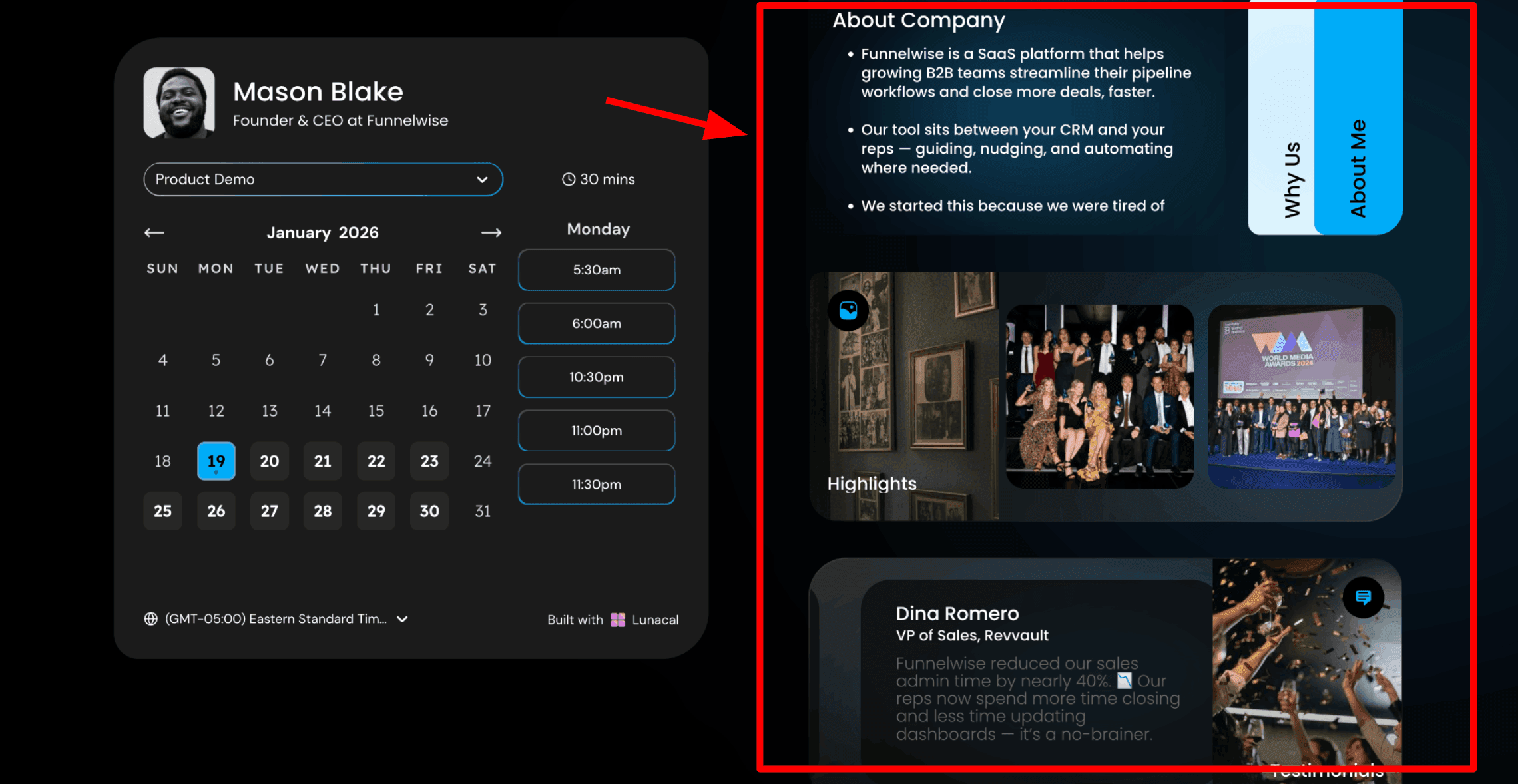
This is usually the first thing people notice. With Lunacal, the appointment page can include helpful information beside the calendar. Patients can read about your qualifications, your approach to care, and what the visit will involve while they are selecting a time. In healthcare, patients are choosing someone they trust. A clear and informative page helps them feel comfortable before the appointment. Here is a screenshot below:
- Drag and drop appointment page editor
This is the tool used to build the booking page. Lunacal provides a simple editor where you can add blocks such as text, testimonials, images, videos, documents, and intake forms. The page can be updated by your front desk team or practice manager without technical help. A calm and clear page works best. Many patients feel nervous when booking a medical visit. A simple page that answers their questions helps them feel reassured.
- Payment Integration
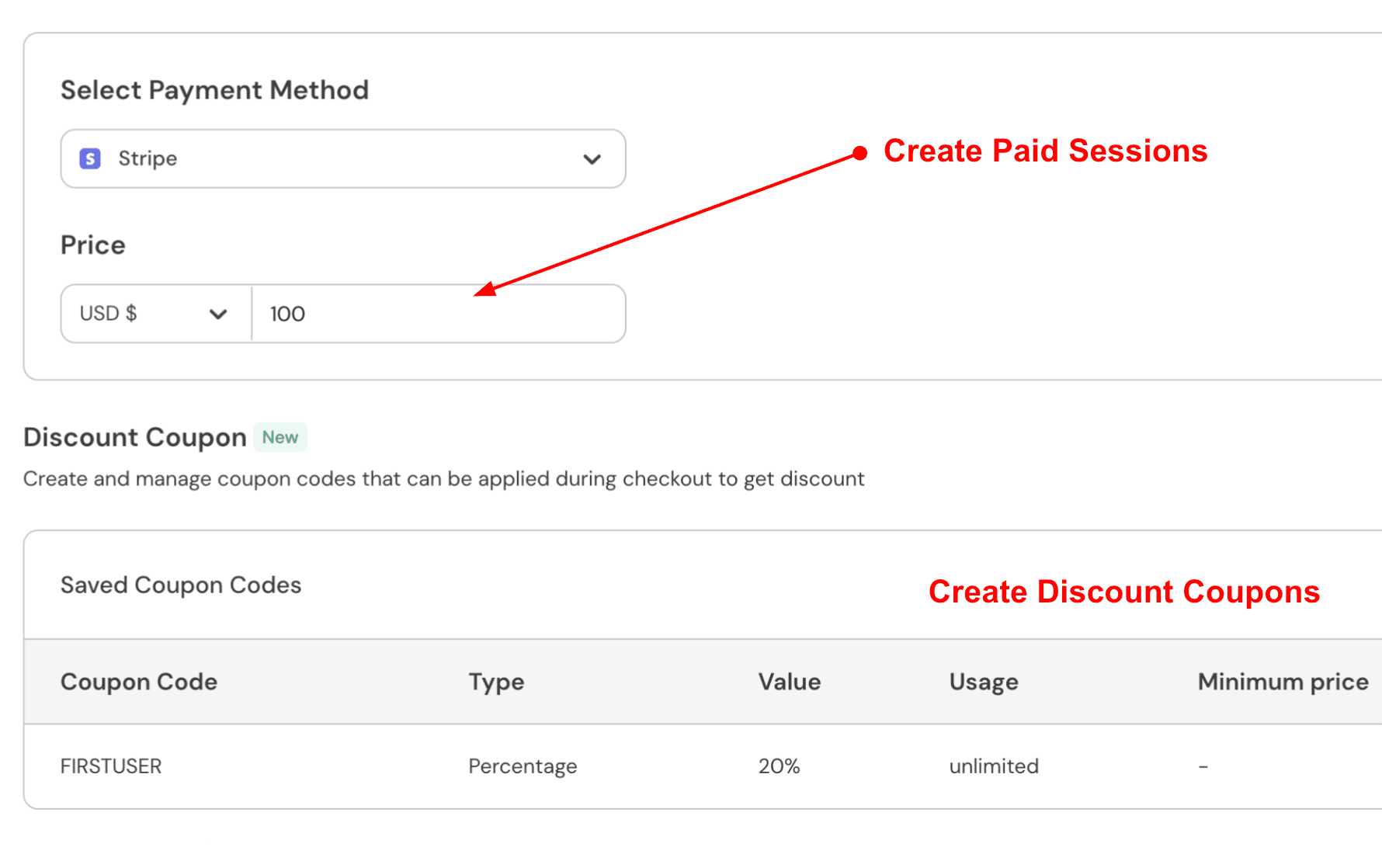
You can connect Stripe or PayPal to collect payments when a patient books. This works well for private specialist clinics, psychology practices, cosmetic medicine, and allied health services. Payment during booking helps clinics manage appointments more smoothly. Many clinics using medical appointment scheduling software collect deposits or consultation fees in advance so appointments are confirmed early. A private specialist consultation could be set at 180 USD payable during booking. For a psychology intake session, the clinic may collect an 80 USD deposit and charge the remaining amount after the visit. Here is how to do it:
- Reschedule Flow
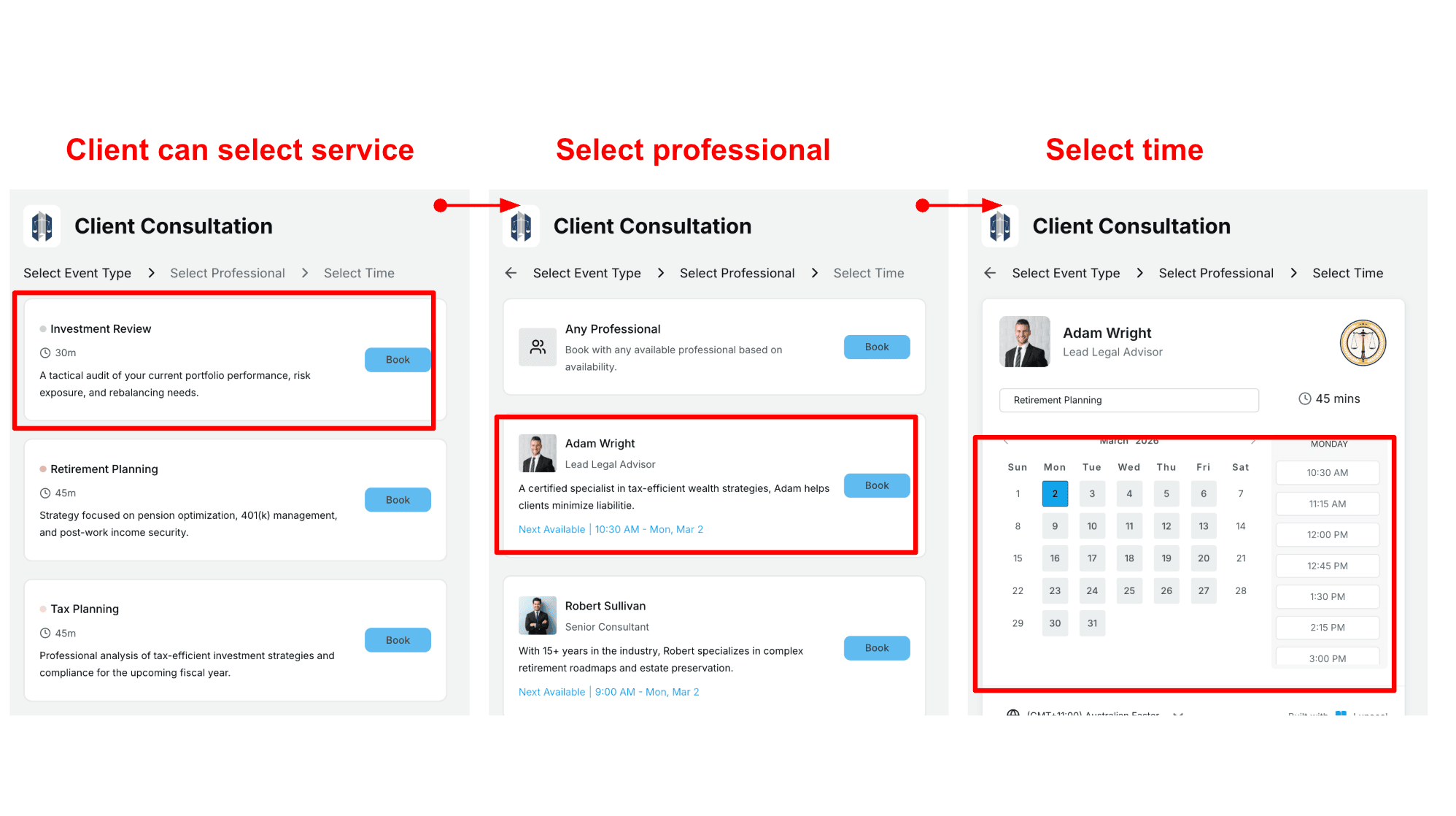
Patients can choose the type of appointment and then select a doctor if they have a preference. They can also choose the first available doctor if they want the earliest time. This setup works well for clinics with several doctors or specialties. Medical appointment scheduling software like Lunacal helps organise appointments so patients reach the right doctor easily. This can be helpful in medical scheduling where last minute changes are common and you still want the day to stay predictable. Here is how to set up scheduling flow:
- Patient language, time format, and accessibility settings
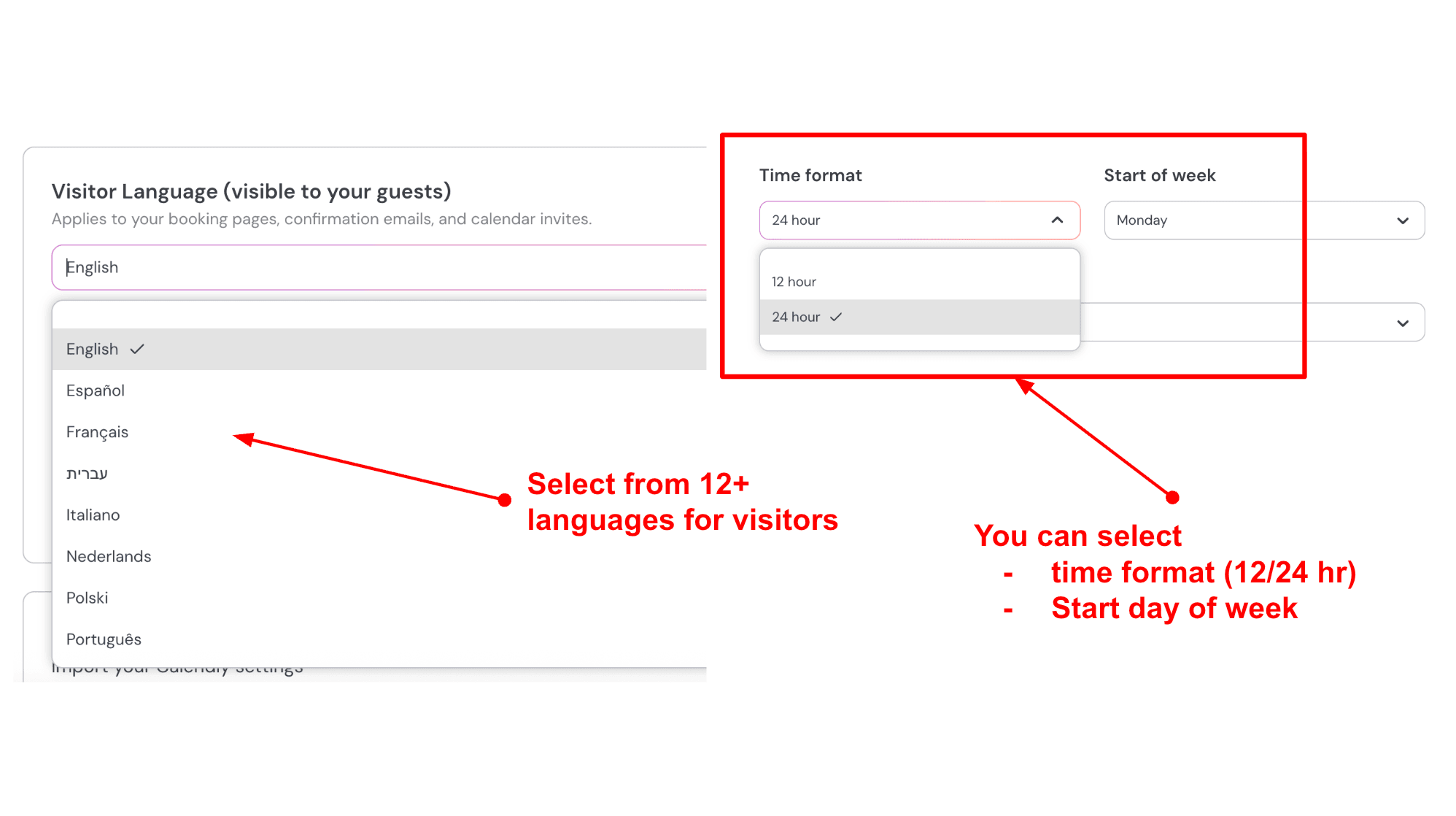
The booking page language and time format can be adjusted to suit your patients. Clinics serving diverse communities often provide booking pages in multiple languages. Accessible medical appointment scheduling software helps patients book independently without needing to call the clinic. This improves access to care and makes the experience easier for many people. If a clinic serves Arabic, Mandarin, or Spanish-speaking communities, those languages can be enabled on the booking page. Time display and calendar settings can also be adjusted so the page feels familiar to international patients. Here is how I set it up:
- Discount codes for health funds and referral programs
Lunacal also allows clinics to create discount codes. These can support corporate health programs, referral offers, or new patient promotions. A simple code can be included in follow up emails or clinic communications. Patients can enter the code while booking and receive the correct price automatically.
Pros
- Booking pages can carry real clinic context like FAQs, media, and payment which helps patients arrive more prepared and reduces basic questions. It can also make scheduling feel more trustworthy when the page looks complete.
- Strong reschedule experience that keeps updates in one place.
- Built in payments via Stripe and PayPal for paid consults.
- Intake style booking questions with optional file upload.
- Website embeds plus tracking support with UTMs and GTM.
Cons
- If you need a full medical scheduling suite with EMR ties, insurance workflows, and deep clinic ops, this may not be the right pick for Best Medical Appointment Scheduling Software scenarios. It is more focused on the booking experience and routing basics.
- Multi clinic and domain setup can feel messy at first based on hands on setup and AppSumo feedback.
- Some users mention wanting clearer documentation.
- Mobile experience can take extra effort to feel perfect.
- Refund policy is strict by default which matters if you buy annual.
Pricing
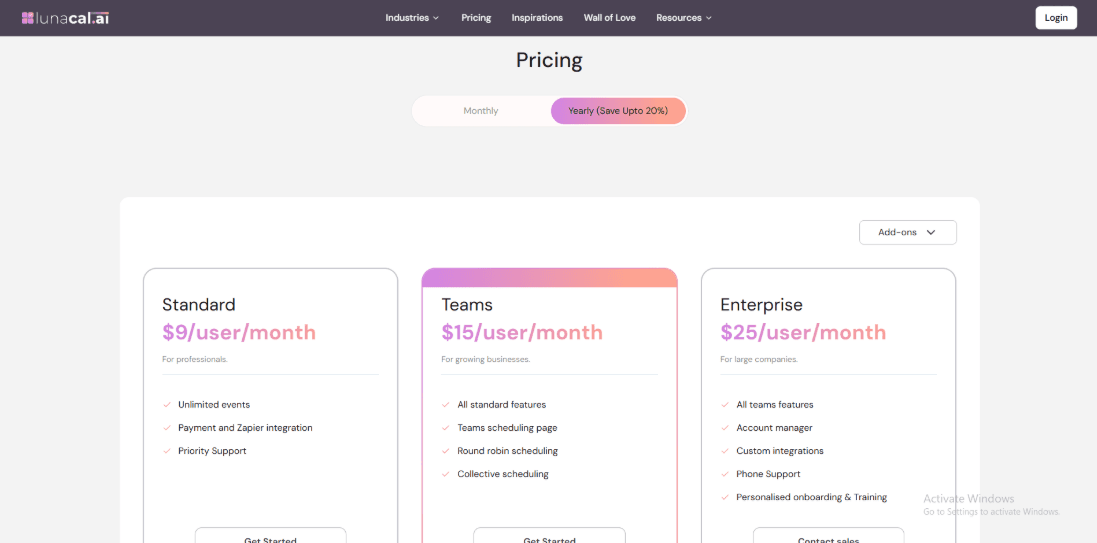
- Standard is $9 per user per month and fits solo clinics or single location practices that want branded booking pages and payments.
- Teams is $15 per user per month and adds team scheduling features like round robin and collective scheduling.
- Enterprise is $25 per user per month and adds an account manager, custom integrations, and phone support.
- Yearly billing mentions savings up to 20 percent.
- A trial is referenced in the cancellation policy so you can test before committing.
When to Choose Lunacal
Use Lunacal if your clinic cares about the booking page experience, wants payments for consults, and wants intake questions to reduce admin time. It also fits teams that want basic routing with round robin. Skip it if you need deep medical practice workflows like EMR integration, insurance verification, and tightly controlled clinical operations inside the scheduling system.
NexHealth
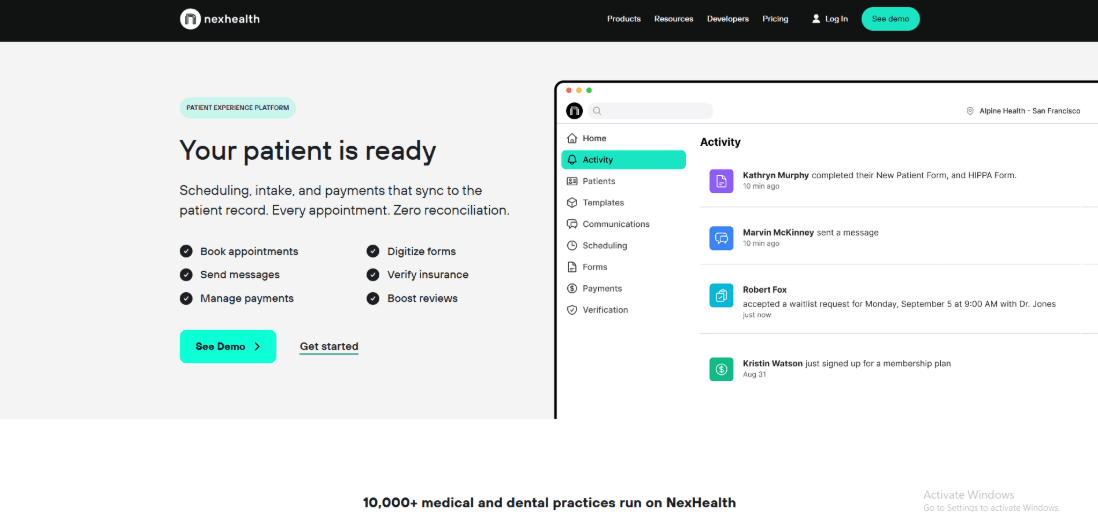
NexHealth is known for online patient booking that stays connected to the clinic’s health record system. Clinics often use it when they want scheduling, intake forms, payments, and insurance checks handled in one place. For teams looking at medical appointment scheduling software, NexHealth is often considered because it connects the booking experience with the tools staff already use during the day.
Features
- Automated reminders
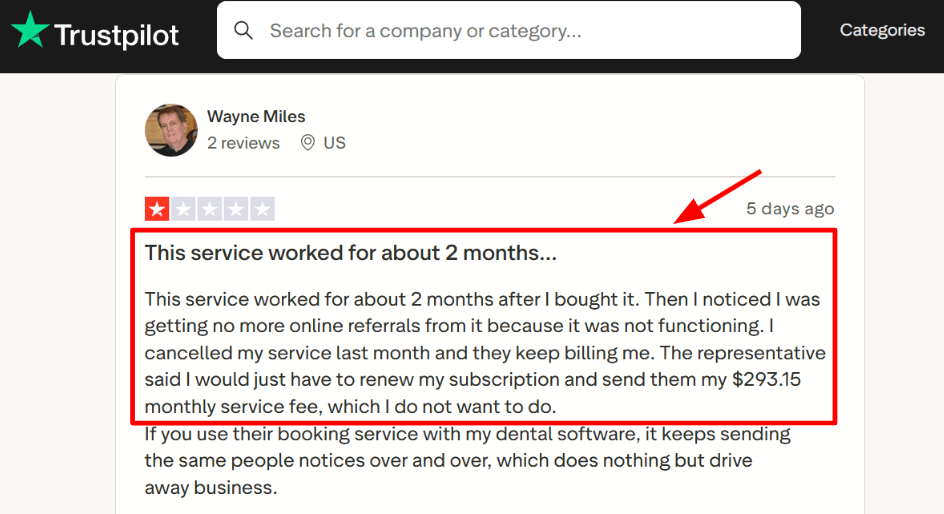
I set up SMS and email reminders with confirmations and follow ups. Patients receive notifications before their appointment and after it if you enable that option. It works well when you define who receives reminders and how often they are sent. I also saw a Trustpilot review and I am sharing a screenshot below. It talked about repeated notices going to the same people and that matches what can happen when reminder logic is left too open.
- Real time availability
The booking system shows available times directly from the schedule. Patients choose a slot that already exists in the system. I tested a few appointment types and the times stayed accurate once I set the right duration. A reddit post said they avoid auto booking because visit lengths can be off and I am sharing that screenshot below. I had the same moment until I tightened the appointment type setup.

- Digital intake forms
Forms can be sent to patients before their visit. They complete them online and the information returns to the system as a saved PDF. Staff can access the file without scanning paper forms. One extra detail I did not expect is the forms depth from their Enlive acquisition covered by PR Newswire. It explains why forms feel like a core module.
- Insurance verification
Insurance eligibility checks can run before the appointment. The result can be stored so staff can review it when the patient arrives. This helps clinics confirm coverage earlier and reduces surprises during check in. Clinics should monitor how many checks are used each month because some plans include a limited allowance.
- Payments and statements
Payments can be collected in the clinic or through text to pay. The payment can connect to the patient record and the balance. I tested a flow where a patient received a statement and paid from their phone. The process was simple once the system was configured. One part that took extra time was understanding how payments appear in the ledger depending on the health record system used.
Pros
- Strong all in one front office setup for clinics that want booking forms payments and verification tied to the record system. It can reduce manual updates across tools.
- Real time availability and booking links can cut down phone back and forth
- Forms and PDFs help keep intake cleaner for staff
- Verification can save admin time when eligibility checks are frequent
- Payments features are built for healthcare workflows like statements and balances
Cons
- If you only need basic appointment scheduling for a small clinic this can be more than you need for a Best Medical Appointment Scheduling Software shortlist. A simpler scheduler may be easier to run day to day.
- Verification can add usage costs if you exceed included volume per month see overages.
- Pricing is not fully transparent since most plans are quote based
- Auto booking needs careful duration setup or time blocks can look wrong
- Some payment and ledger syncing depth depends on your system
Pricing
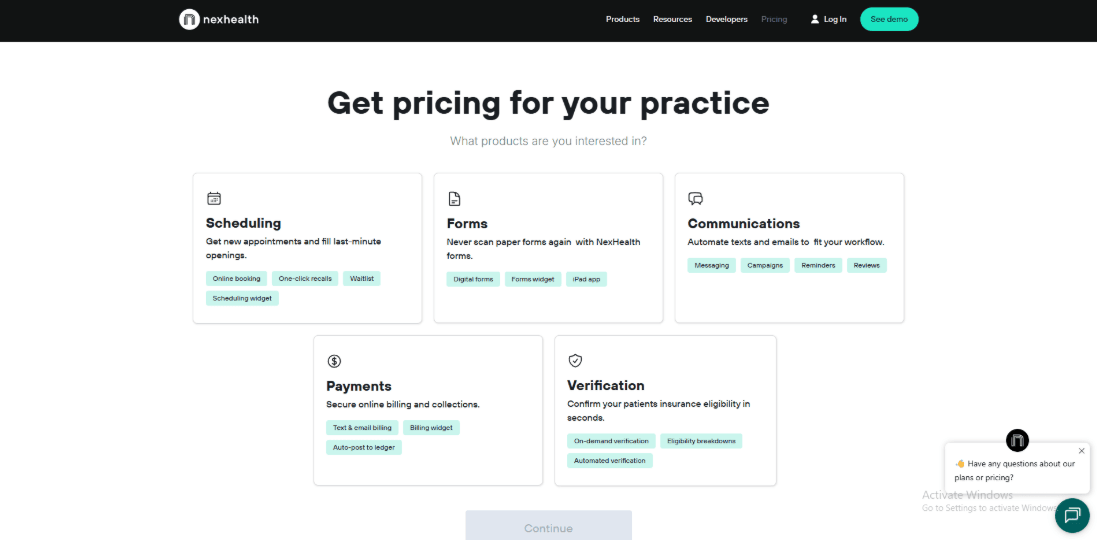
- NexHealth pricing is quote based and usually sold as packages for scheduling communications forms payments and verification
- Third party listings often show a starting range around 299 to 350 per month though the real number depends on modules and volume
- Verification includes a monthly allowance then per check fees. Payments also have published processing fees for terminal and text to pay
When to Choose NexHealth
Choose NexHealth if you run a clinic that wants online booking plus intake plus payments and insurance checks connected to the health record system. It fits teams that care about operational consistency across front desk workflows. Skip it if you only want a lightweight scheduler or if you are very price-sensitive. Also, skip it if your system setup needs deep customisation that depends on a supported integration.
JaneApp
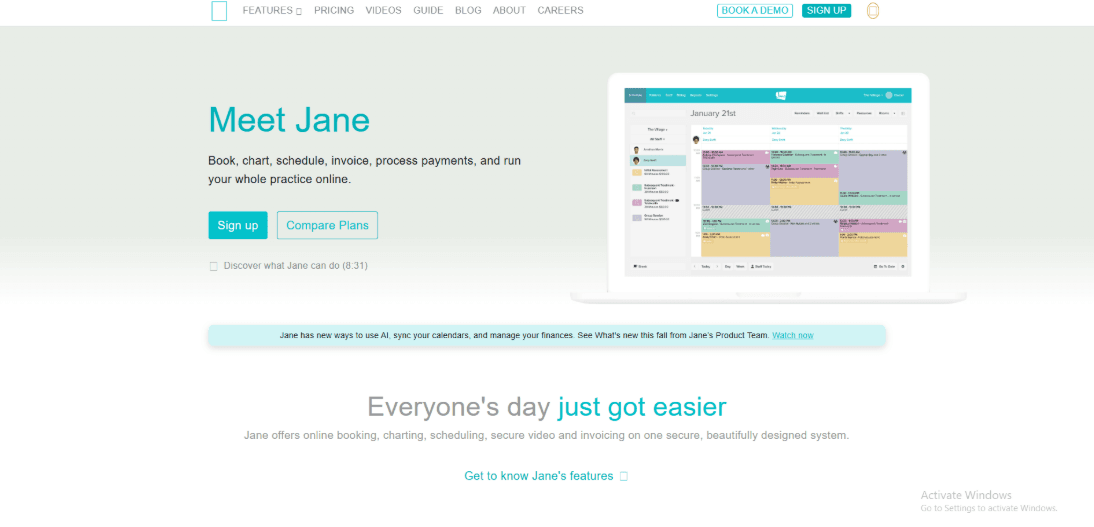
JaneApp is a clinic management platform that includes scheduling, charting, payments, and patient communication in one place. Many clinics use it as their main medical appointment scheduling software because it keeps booking, notes, and billing connected.
Features
- Chart templates
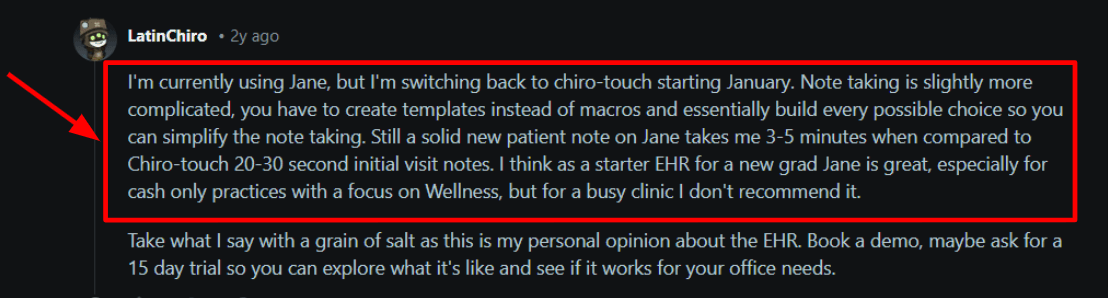
When I first set up Jane, the note system pushed me to build templates early. That step takes time at the beginning, but it helps later once the templates match how providers write their notes. If a clinic uses the same structure for visits, templates can speed things up. Providers open the chart, fill in the sections, and move forward with the visit. I also saw the same theme in a Reddit reviewting_set_up_with_the_jane_app/). I am sharing a screenshot below so you can skim what they said about note speed in a busy clinic.
- Online booking
Patients can book appointments on their own. You can control which services appear and which providers offer them. I tested several booking flows. The system handled them well and the settings were easy to follow. One small thing took me longer than I expected. Getting the booking rules to match real clinic rules needs a bit of careful setup.
- Payment integration
You can take payments as part of the visit flow. This helps when you want the front desk to spend less time chasing invoices. It also works well for prepaid care plans since payments and visits can stay connected.
- Waitlist fills
Jane includes a waitlist feature that helps fill empty appointment slots. Patients can request a waitlist spot and receive a notification if a cancellation appears. This can help clinics fill gaps in the schedule, especially on the same day. The waitlist works smoothly with the rest of the medical appointment scheduling software features, so staff do not need another tool to manage cancellations.
- Client mobile app
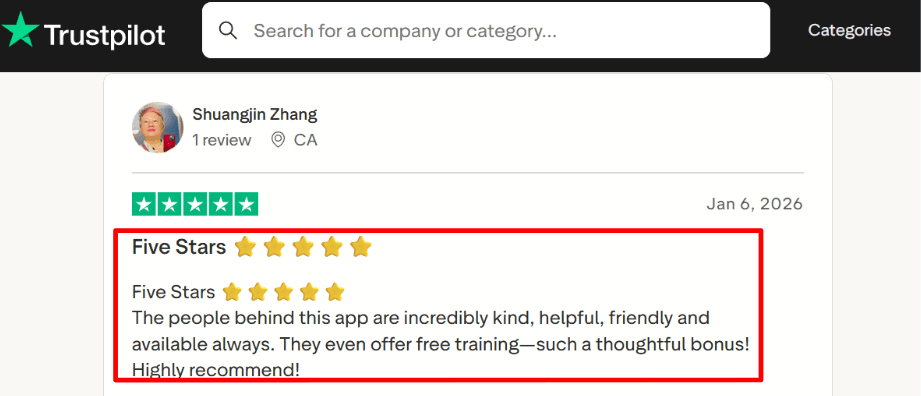
One detail I only noticed after digging is the client app can manage visits across multiple Jane clinics under one login. That can reduce repeat signups for families and regular patients on shared devices. You can see this called out on Google Play and it is useful context for patient experience. Trustpilot also lines up with what I saw during setup on support and training. I am adding a screenshot below so you can read the exact line they shared.
Pros
- Setup feels guided and the clinic basics are covered in one place. When I tested core flows I rarely had to guess what to do next.
- Support and training show up as a real strength.
- Online booking is clean and easy for patients.
- Templates and form tools can reduce repeat admin work.
- Multi location clinics can keep things organized without hacks.
Cons
- If you run a high volume medical setup with complex scheduling rules across many departments this may feel limiting. In that case a more enterprise medical scheduler can be a better fit.
- Cost can scale with staff count and add ons as shown on the Pricing page.
- Balance plan limits can be reached quickly if your clinic books a lot.
- Chart template work can take time before it feels fast for providers.
- Insurance and billing flows can take effort to get fully smooth.
Pricing
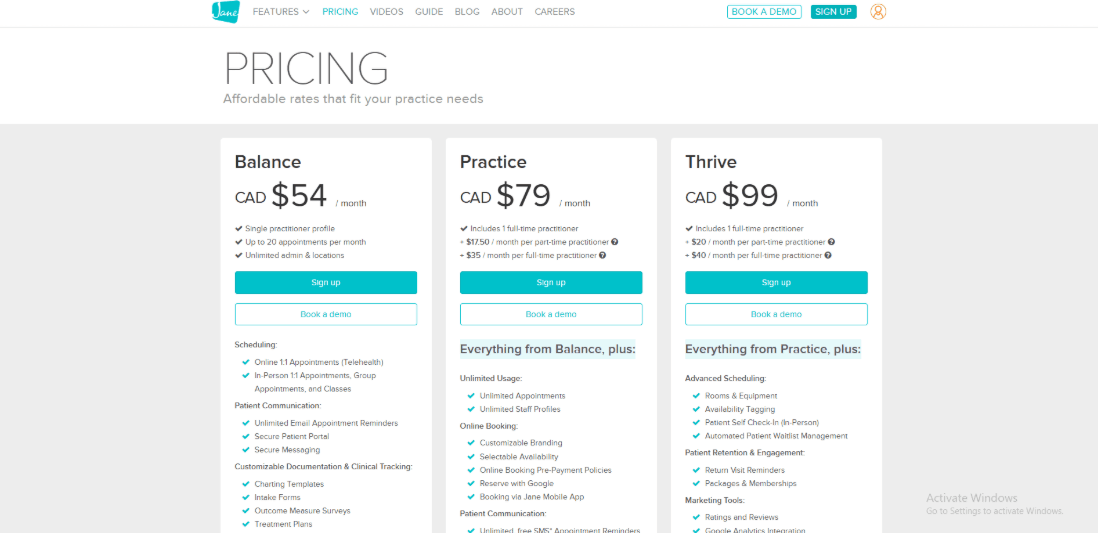
- Balance is 54 CAD per month for 1 practitioner and up to 20 appointments per month.
- Practice is 79 CAD per month plus 35 CAD per extra full license and 17.50 CAD per extra half license.
- Thrive is 99 CAD per month plus 40 CAD per extra full license and 20 CAD per extra half license.
- Add ons include Insurance Billing and AI Scribe and online group appointments.
- Payments list 2.75 percent online and 2.50 percent in person.
When to Choose JaneApp
Choose it if you run a small to mid-sized clinic and want scheduling, charting and payments in one system. It also fits cash-based clinics and wellness-focused practices that want online booking and clean intake flows. Skip it if you need enterprise-style medical scheduling across many departments, or you want very fast note entry with minimal template work. If your clinic is very high volume, test the charting speed early before committing.
Calendly
Calendly is widely used for simple booking links that let patients, staff, or partners choose a time without a long email exchange. Many clinics use it when they want fast scheduling with reminders and basic routing. It works well when the goal is to let people pick a time quickly. In many medical appointment scheduling software comparisons, Calendly appears as a lightweight option for clinics that mainly want online booking without a complex system.
Features
- Calendar integration
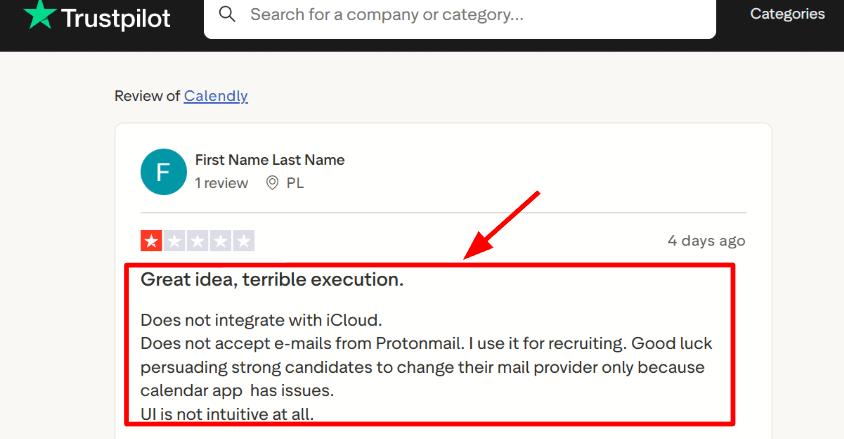
During setup I mainly saw Google and Microsoft calendars used as the main connection options. If your front desk team uses iCloud it is worth testing the setup first before committing. Some teams run into small setup issues depending on their email and calendar providers. I also saw a Trustpilot review calling out iCloud and Protonmail related setup trouble. I am sharing a screenshot of that review below.
- Availability rules
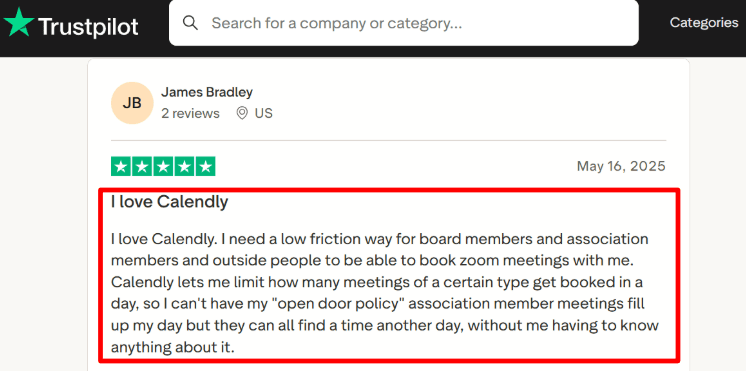
You can set working hours, add buffer time between meetings, and limit how many appointments of a type can happen in a day. I tested this with a daily meeting limit and it worked exactly as expected. The system respected the cap without any manual work each morning. A Trustpilot reviewer mentioned this exact daily limit use case for Zoom style meetings. I am adding that screenshot below so you can see the context.
- Routing forms
Calendly lets you ask a few questions before someone books. Based on the answers, the system can send the person to the correct meeting type or staff member. This can help clinics that want a simple triage step such as new patient or follow up. When I first tried it, I needed a few extra clicks to find the best routing rule.
- Workflow automation
You can send automatic email and SMS reminders after an appointment is booked. For clinics, reminders help reduce missed appointments when messages are short and clear. Different reminder settings can be used for different appointment types like consultations or follow ups. These small automation features are often why Calendly appears in medical appointment scheduling software lists for practices that mainly want reliable reminders.
- Security controls
Calendly publishes common security signals such as SOC reporting and encrypted data handling. Larger organizations can also review admin tools like single sign on, SCIM, and activity logs. Healthcare teams should still run their own vendor review if their compliance requirements are strict. That step is standard for any medical appointment scheduling software decision.
Pros
- Quick setup and sharing. I created a working booking link fast and could test it the same day.
- Strong availability controls that help protect staff time.
- Reminders and follow ups are easy to add per appointment type.
- Routing forms can reduce front desk back and forth for simple triage.
- Works well for non clinical meetings like intake calls or coordination calls.
Cons
- If you need a true medical appointment system with patient intake and EHR links this is usually the wrong fit for Best Medical Appointment Scheduling Software. You will want a clinic focused platform.
- Some setups can stumble when your team uses uncommon email or calendar providers.
- Data processing location can matter for some orgs so review the Calendly DPA before you decide.
- Per seat pricing can rise quickly when many staff members need their own booking pages.
- Removing branding and unlocking advanced routing often needs higher plans.
Pricing
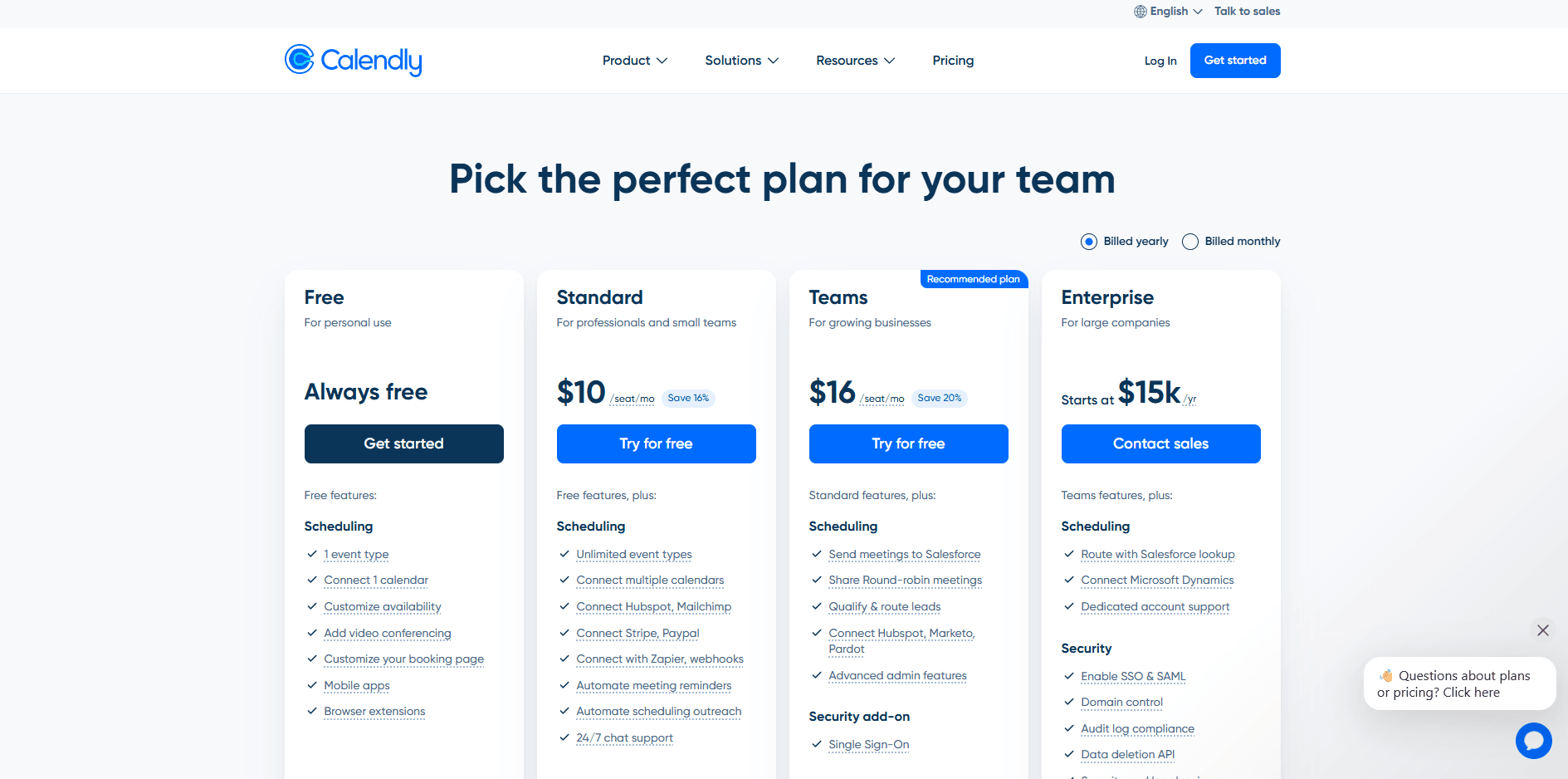
- Free is available for basic personal scheduling and simple booking links.
- Standard is around 10 per seat per month on annual billing and Teams is around 16 per seat per month on annual billing.
- Enterprise is custom and is shown with a large annual anchor on the pricing page.
- Many pages only mention annual numbers. Wise pricing also lists higher monthly rates which can change budgeting.
When to Choose Calendly
Calendly works well for clinics that want easy online booking for intake calls, follow ups, or internal coordination meetings. It suits small practices that mainly need clear availability rules and automated reminders. Teams searching for full medical appointment scheduling software with patient intake tied to records and strict healthcare workflows usually choose a clinic focused platform instead. It is also important to test the system if staff depend on specific calendar or email providers before rolling it out across the clinic.
Acuity Scheduling
Acuity Scheduling is popularly known for self serve appointment booking with a simple booking page and strong scheduling basics. Use it when you want patients to pick a time slot on their own and you also want payments, reminders, and staff calendars in one place.
Features
- Availability rules
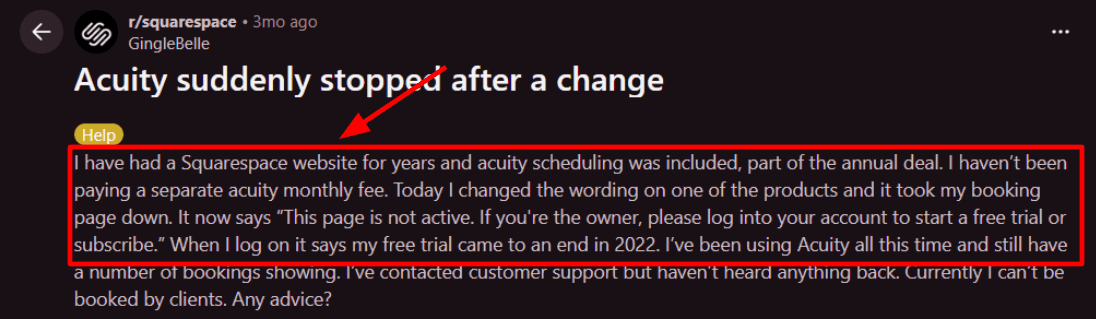
I set up working hours, buffers, and time off and it behaved in a predictable way. It is easy to block lunch breaks and keep space between appointments so the day does not pile up. I also saw a Reddit review where an edit on a Squarespace product made the booking page go inactive. I am sharing a screenshot below so you can see the exact message they got.
- Calendar sync
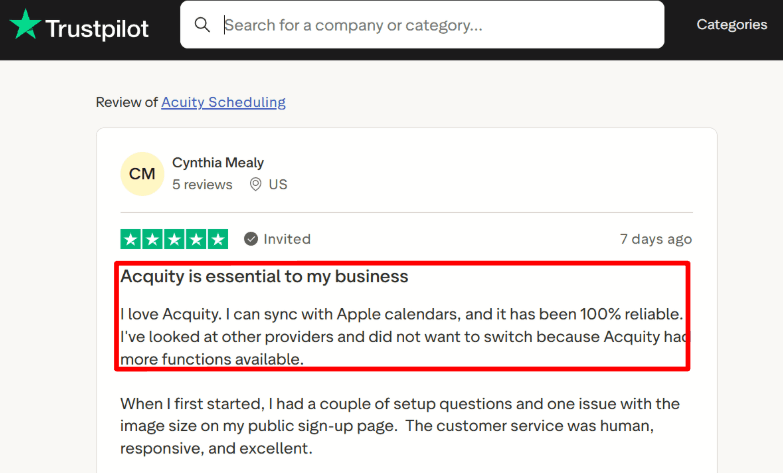
It can sync with external calendars so booked slots do not collide. In a Trustpilot review the user says it syncs with Apple Calendar and has been reliable and I can see why after testing basic booking flows. I am adding that Trustpilot screenshot below too so you can scan the exact wording yourself.
- Payment integration
You can take payments at booking using Stripe, Square, or PayPal. This works well for clinics that take prepaid consults, deposits, or missed appointment fees. I tested a paid booking end to end and the flow felt clean once the payment account was connected.
- Client forms
You can collect intake style details during booking using custom questions. This is helpful for capturing symptoms, reason for visit, or insurance notes before the appointment. One thing I noticed is that longer forms can feel heavy on mobile so I kept mine short and it improved completion.
- HIPAA option
If you need HIPAA support, Acuity mentions a HIPAA BAA option on the Premium plan in their help docs. That matters for medical scheduling where patient data can show up in booking notes. This is the kind of operational detail many basic lists skip and you can verify it in the Squarespace Acuity help FAQ under the HIPAA BAA note.
Pros
- Good fit for small clinics that want a booking page plus payments plus reminders without a complex medical stack. You can get a working flow live quickly and patients can self schedule with fewer back and forth messages
- Strong calendar and staff scheduling structure
- Payments and deposits are built in
- Helpful for reducing no shows through reminders
- Lots of integrations for email and workflows
Cons
- Not ideal for larger medical setups that need deep EHR level workflows and tight clinical compliance controls for every step of care. For those teams a dedicated medical scheduling system usually fits better than a general tool
- Plan gating can push you to higher tiers as you add staff calendars and advanced needs
- SMS coverage depends on country rules and delivery can vary
- Trial does not include SMS reminders which makes testing that part harder
- Some account and login changes can create admin confusion during transitions
Pricing
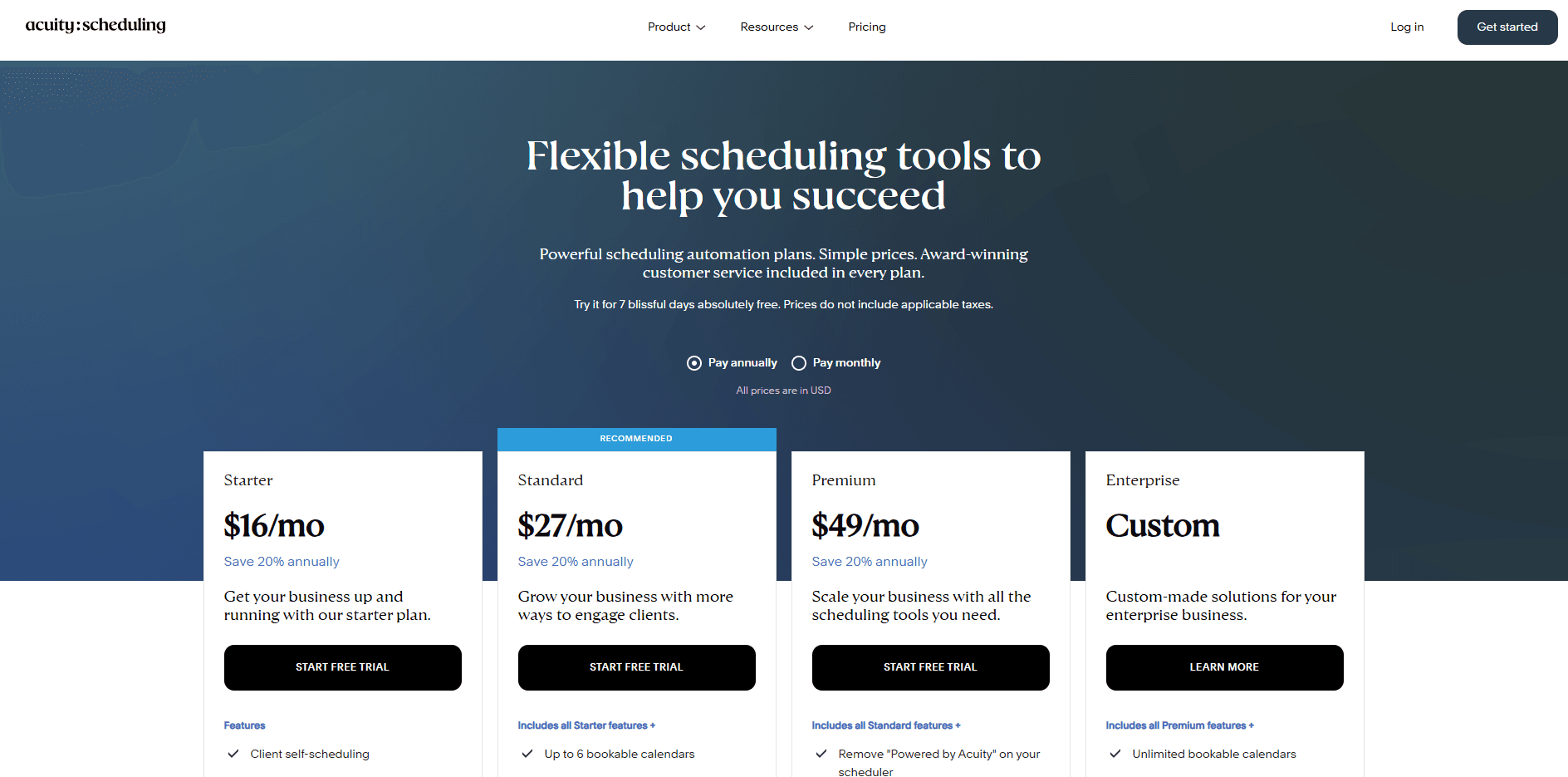
- Starter is priced for solo or single calendar setups and includes core scheduling and basic automations
- Standard is aimed at growing teams and adds SMS reminders plus more calendars
- Premium adds higher limits plus options like removing branding and HIPAA BAA availability
- Pricing is listed monthly and there is a discount for annual billing on the public pricing page
When to Choose Acuity Scheduling
Choose it if you run a small clinic or private practice that needs self-booking, calendar sync, reminders, and optional payments in one tool. It also fits teams that want a simple staff calendar setup and a booking page they can embed on an existing site. Skip it if you need deep medical-specific workflows tied to an EHR, or if your compliance requirements demand a specialised healthcare platform end to end.
SimplePractice
SimplePractice is widely known as an all in one system for running a clinic. It brings scheduling, notes, telehealth, and payments into one place. Many teams choose it when they want a single platform to handle daily operations instead of combining several tools. For clinics looking for reliable medical appointment scheduling software, it often comes up as an option because it covers more than just booking.
- Client portal
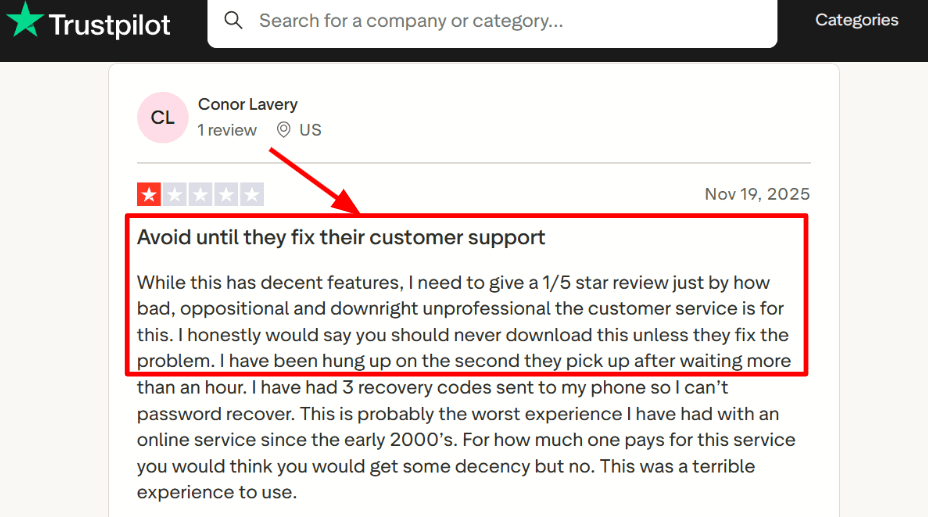
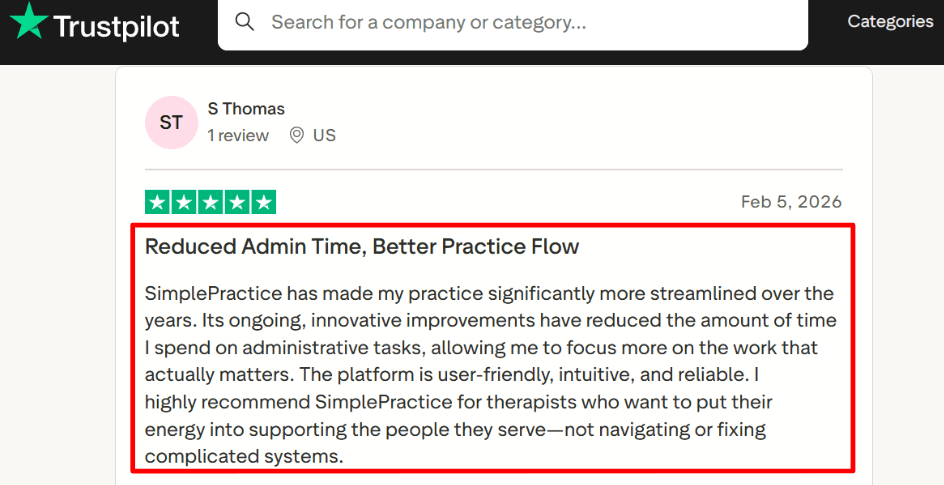
I tested the client portal with intake forms and appointment booking. Getting a basic setup working did not take long. Clients can fill out forms, book visits, and manage their information from the same portal. I also saw a Trustpilot review mention account access and recovery issues during setup and support follow ups. I am sharing a screenshot below so you can see the exact wording.
- Telehealth sessions
Telehealth is included in the platform. You can start offering video visits without installing extra tools. In my tests, joining a session felt simple for a normal one on one visit. I would still run a quick test with a colleague before using it with real patients. That step helps avoid small technical surprises.
- Payment integration
Payments are built in. Clients can pay by card through the portal, and you can enable AutoPay for repeat sessions. One detail many clinics overlook is the payment processing rate listed in the support pages. Transaction fees can matter when you handle many payments every week. It is worth checking the payment details before rolling the system out across your practice. A detail many people miss is the published processing rate on SimplePractice support pages and it can matter at scale. See their Support Center note on the transaction fee on payments SimplePractice Support Center.
- Calendar integration
You can manage availability and booking rules inside the platform so your schedule stays consistent week after week. Setting up availability blocks was quick during testing. I did notice that some limits depend on the plan you choose, so I double checked a few settings before sharing the booking link with others.
- Insurance workflows
SimplePractice includes insurance claim and billing features that many basic schedulers do not offer. These tools help clinics that work with US insurance providers. Electronic claim submission currently focuses on US insurance. Clinics working across borders should review that detail before deciding. One nuance is that electronic claim submission is only for US insurance and this affects cross-border setups. The Canada help doc on US only submission SimplePractice Support Center is worth reading.
Pros
- It keeps scheduling notes, portal, telehealth and billing in one place. That reduces tool switching during a busy clinic day.
- Telehealth being included across plans makes it simpler to start video visits.
- Online payments and AutoPay help reduce follow-ups for invoices.
- Intake forms and e-signatures reduce paper work at the front desk.
- Insurance features can cover core US billing workflows.
Cons
- If you only need medical appointment scheduling software without an EHR layer this can feel like more product than you need. A simpler scheduler can be easier to roll out across a large front desk team.
- The entry plan has limits that push many clinics to upgrade quickly.
- Add ons can stack up for features like ePrescribe and waitlist.
- Some teams will care that data hosting is US based for certain regions.
- Support experience can be uneven based on what I saw in Trustpilot posts and what I hit during account recovery.
Pricing
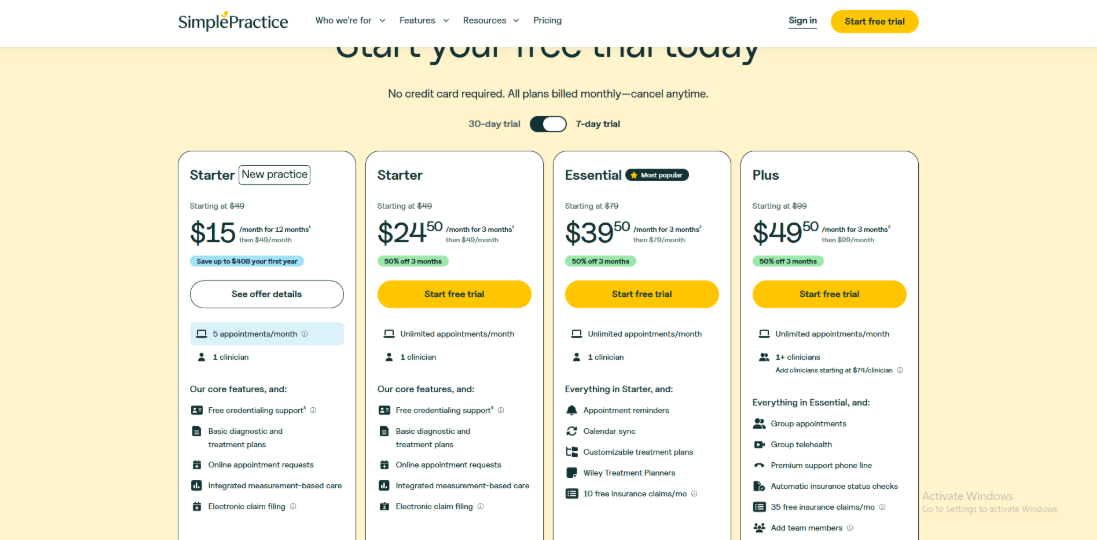
- Starter is 49 per month for one clinician and it includes telehealth.
- Essential is 79 per month and adds key portal features like secure messaging.
- Plus is 99 per month and includes more advanced items like the waitlist.
- Payments have a per transaction fee and some capabilities are paid add ons.
- Teams should also plan for per clinician costs and the yearly CPT code fee.
When to Choose SimplePractice
Choose it if you run a clinic that wants scheduling telehealth portal forms and payments in one system, and you want fewer moving parts. It also fits well when US insurance workflows matter. Skip it if you mainly need a lightweight appointment scheduler for a medical front desk and you do not want EHR-style complexity or add-on costs.
Methodology
My evaluation focused on clinic workflows and patient safety. Results were scored using a simple checklist.
Sources
- Reviewed each tool’s official website, pricing, FAQs, help docs, and security pages. Trial accounts were used to confirm core flows.
- Cross-checked user feedback on G2 and Trustpilot for repeat complaints and stability.
- Read threads on Reddit and Quora to understand issues shared by clinics, teams, and patients.
Test setup for medical appointment scheduling tools
- Built a sample clinic with 3 providers and 2 locations. Calendar sync was tested with Google and Outlook.
- Configured appointment types like new patient, follow-up, annual visit, and telehealth. Added buffers, lead time, and duration rules.
- Enabled reminders and intake forms. Reviewed audit trails and access controls with HIPAA expectations in mind.
Common scenarios we tested
- Patient self-booking on mobile, including provider choice, insurance fields, and form completion before the visit.
- Reschedule and cancel flows, waitlists, and no-show handling. Checked how quickly staff can fill an open slot.
- Staff workflows for schedule changes, double-book prevention, resource limits, and reporting that a practice manager can act on.
- Integration checks for telehealth links, patient portal, and billing exports.
FAQs
Which is the best medical appointment scheduling software?
The best medical appointment scheduling software for practices is Lunacal. It is rated 4.9/5 on G2 and works well for busy clinics that need customisable intake forms, reliable calendar integration, team scheduling, and seamless payments for deposits. If your priority is patient texting tied to your PMS, NexHealth fits better.
How do Lunacal, Calendly, NexHealth, and Jane App compare as medical appointment scheduling software?
To compare medical appointment scheduling software, start with Lunacal, NexHealth, and Jane App. Lunacal is strong when you want a clean booking page, intake forms for new patient details, team scheduling, and deposits. NexHealth tends to shine when you need tight workflows around reminders, confirmations, and patient reactivation. Jane App is a solid pick when scheduling needs to sit alongside day to day clinic operations. Calendly works best for simple staff calendars.
What country specific healthcare privacy and language nuances affect medical scheduling software?
Country specific healthcare privacy and language nuances that affect medical scheduling software show up fast:
- US usually means HIPAA paperwork, access roles, and audit logs.
- UK and EU teams focus on GDPR, consent wording for reminders, and data residency.
- Canada often needs PIPEDA coverage plus provincial retention rules.
- Australia asks about APP alignment. Also check language and formats for German, French, Spanish.
What features are essential in medical scheduling software?
Essential features in medical scheduling software include intake forms, two way calendar sync, provider and room availability, reminders, self reschedule links, waitlists, cancellation and deposit rules, role based access, and a way to export history for audits and billing.
How can medical appointment scheduling software reduce no shows?
To reduce no shows, use SMS reminders with one tap confirmation, require a small deposit for longer visits, send pre visit instructions, and enable waitlist auto fill when someone cancels.
Summarize this content with AI


