

Introduction
The fastest way to lose trust in a yoga class is a messy booking experience.
A student tries to book a class, the schedule feels confusing, the pass doesn’t apply, the reminder never shows up, and suddenly your front desk is doing damage control instead of running the studio.
So this 2026 list is built around one question: which scheduling tools reduce back-and-forth once you have real volume?
For this I took trials, set up a week like a normal studio. Then I validated this by digging through Reddit threads and review sites to catch issues.
Below are the 6 best yoga studio scheduling software options in 2026, with clear winners for different studio sizes, plus screenshots, sourced feedback, and trial red flags.
Best Yoga Studio Booking and Scheduling Software
Best fit by use case
| Use case | Best tool | Why it fits |
|---|---|---|
| Solo instructor | Calendly | Fast setup, simple bookings |
| Small studio | Lunacal | Clean pages, easy payments |
| Growing studio | WellnessLiving | Strong ops + memberships |
| Multi-location | Mindbody | Full business system |
| Premium studio | ABC Glofox | App + member experience |
| Online classes | Lunacal | Time zones + reminders |
Feature comparison snapshot
| Tool | Group classes | Payments | Memberships | Waitlist | Mobile app |
|---|---|---|---|---|---|
| Lunacal | Yes | Yes | Limited | Basic | No |
| Mindbody | Yes | Yes | Strong | Strong | Yes |
| WellnessLiving | Yes | Yes | Strong | Strong | Yes |
| ABC Glofox | Yes | Yes | Strong | Strong | Yes |
| Calendly | Basic | Yes | No | No | No |
Deep-dive into every scheduling tool
Lunacal
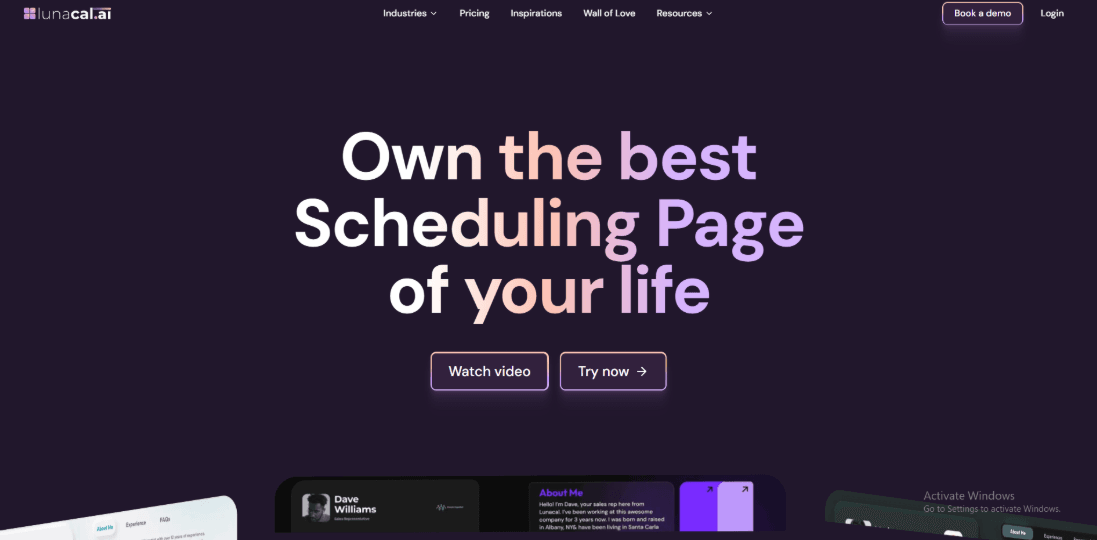
Lunacal is a scheduling tool built for yoga studios that want to manage class bookings, recurring sessions, reminders, payments, and branded booking pages in one place. It helps studios keep classes full while reducing manual work. Yoga studios comparing scheduling software will also notice that Lunacal is rated 4.9/5 on G2, which makes it one of the highest-rated options in this category.
When people ask what’s the best software for managing class schedules and session times at a yoga studio?, Lunacal is usually among my top 3 options, in addition to Acuity and calendly.
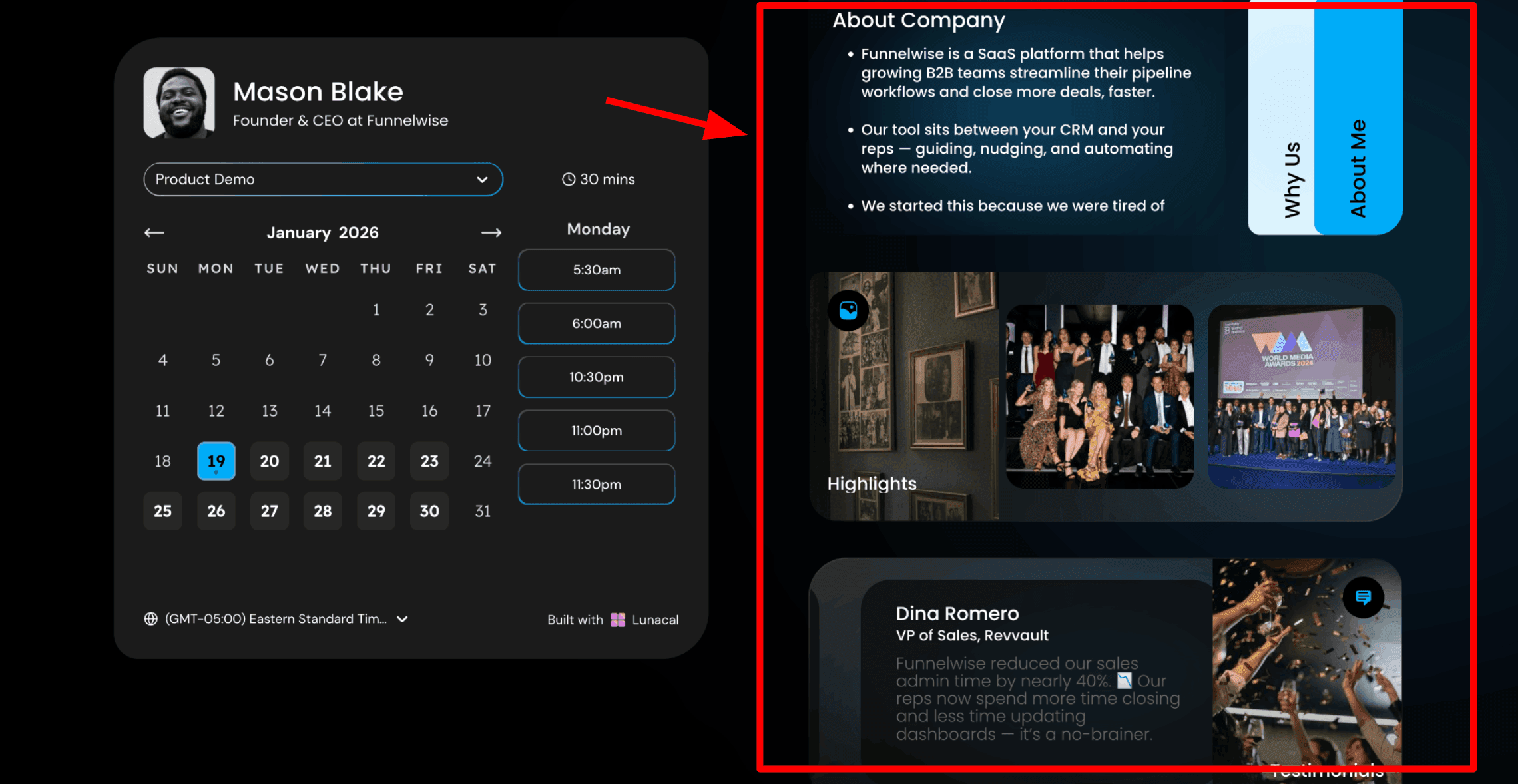
Scheduling pages with rich content:
This is usually the first thing people notice. With Lunacal, your booking page can include more than a calendar. You can place helpful information beside the schedule so visitors understand your yoga studio before choosing a class. That helps students feel comfortable before booking. Many people want to know the teacher’s style, the studio atmosphere, and what the class experience will be like. When they see this information on the page, it becomes easier for them to decide. Here is a screenshot below:
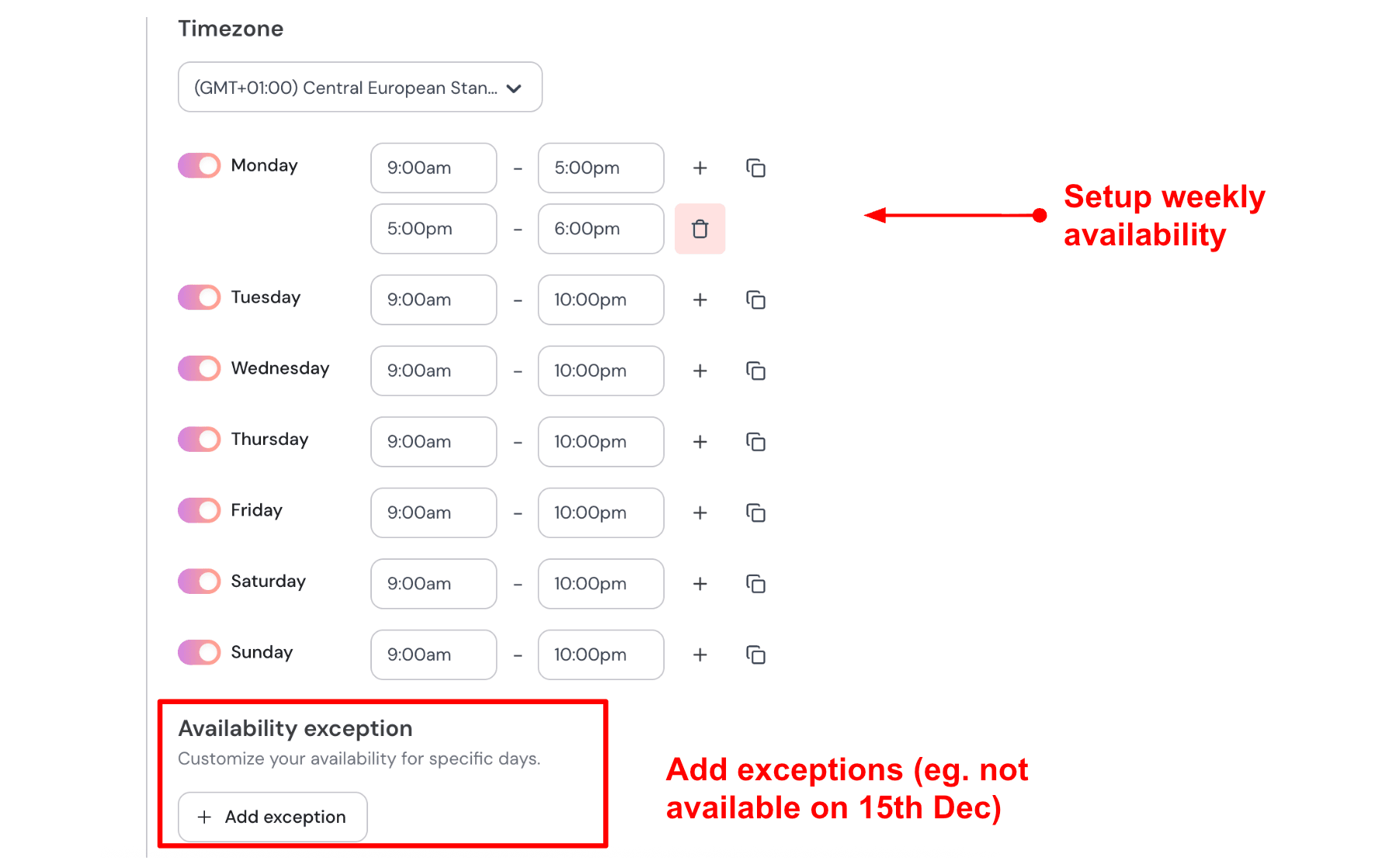
Weekly availability with date exceptions:
After building the page, you set your teaching schedule. You define the days and times you teach each week. You can also add date exceptions for holidays, retreats, or personal days. Once it is set up, your booking link can be shared anywhere. Students can book directly from your website, Instagram bio, or Google listing. If you teach Tuesday to Sunday with morning and evening sessions, you set that once in the schedule. If you attend a yoga retreat in November, you add those dates as exceptions. The calendar blocks those days automatically. Here is how I set up my availability:
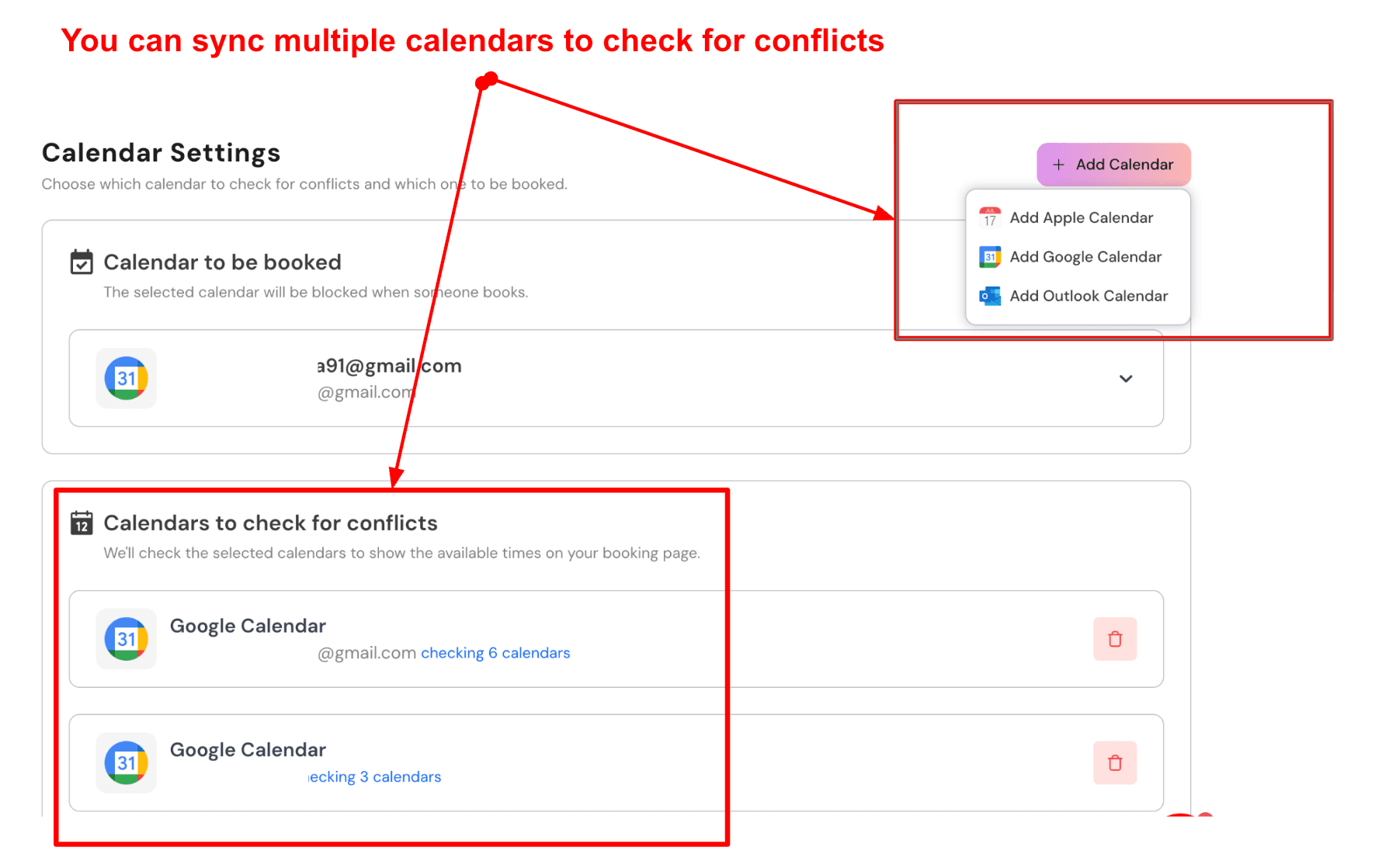
Sync multiple calendars to avoid conflicts:
Lunacal can connect with more than one calendar. You choose one calendar where confirmed bookings are saved. Other calendars are used to check for conflicts before showing available times. Many yoga teachers manage several calendars. They may offer group classes, private sessions, and personal events at different locations. Here is a screenshot below:
Automated email and SMS reminders:
Lunacal can send automatic reminders before each class. These reminders can be sent by email or SMS. You can customise the message and include details such as the student’s name, class time, studio address, or video link. Reminders help reduce missed classes. For a morning Vinyasa class, you could send an email reminder the evening before with the class name and start time. Then a short SMS one hour before the class with the address or Zoom link.
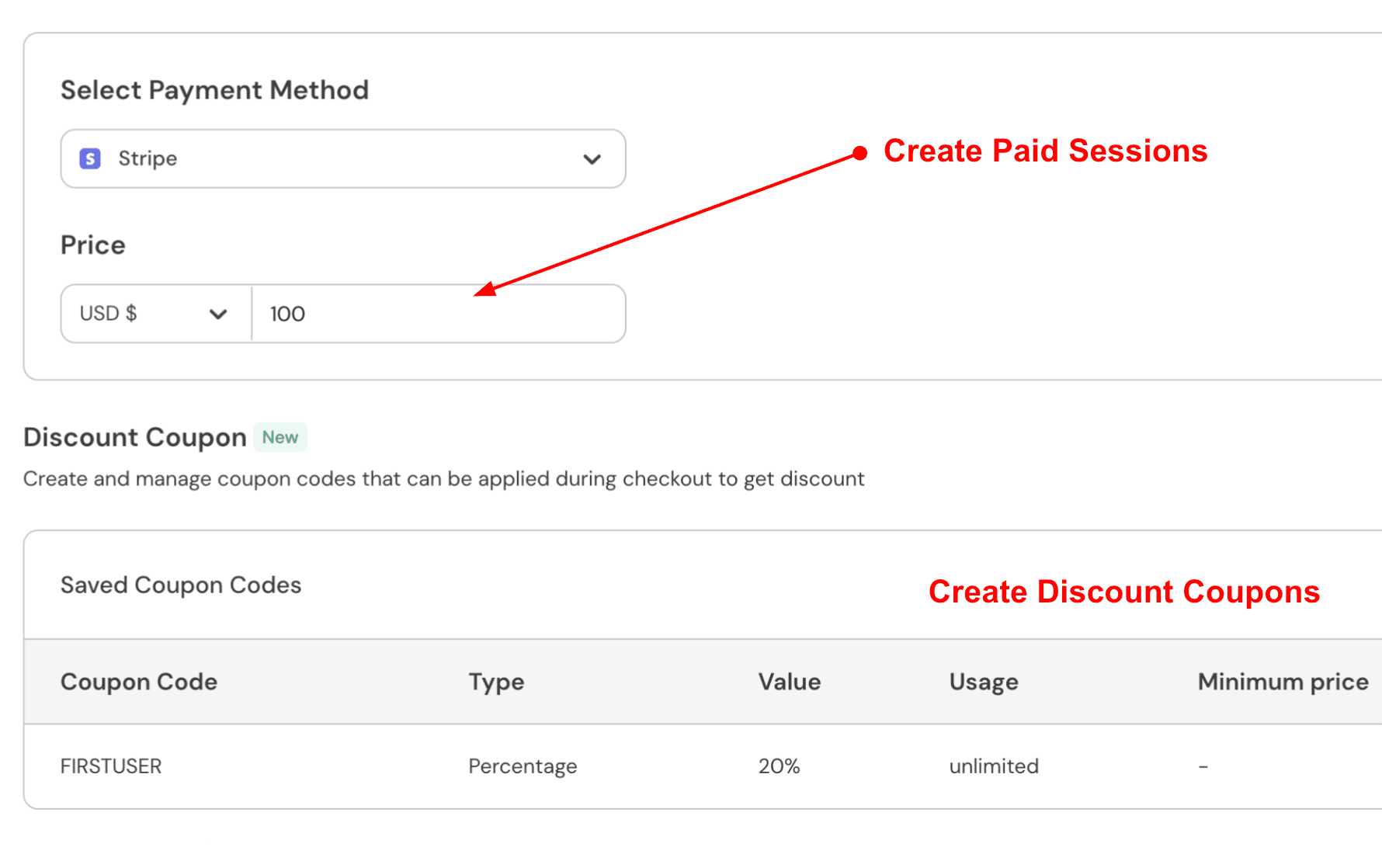
Paid class bookings:
You can connect Stripe or PayPal and set a price for each class or session. Students pay when they book. This removes the need to collect payments manually. A private yoga session might cost 70 dollars. A student chooses a time, pays during booking, and receives automatic confirmation and reminders. A drop-in group class could be priced lower, such as $20, using the same flow.
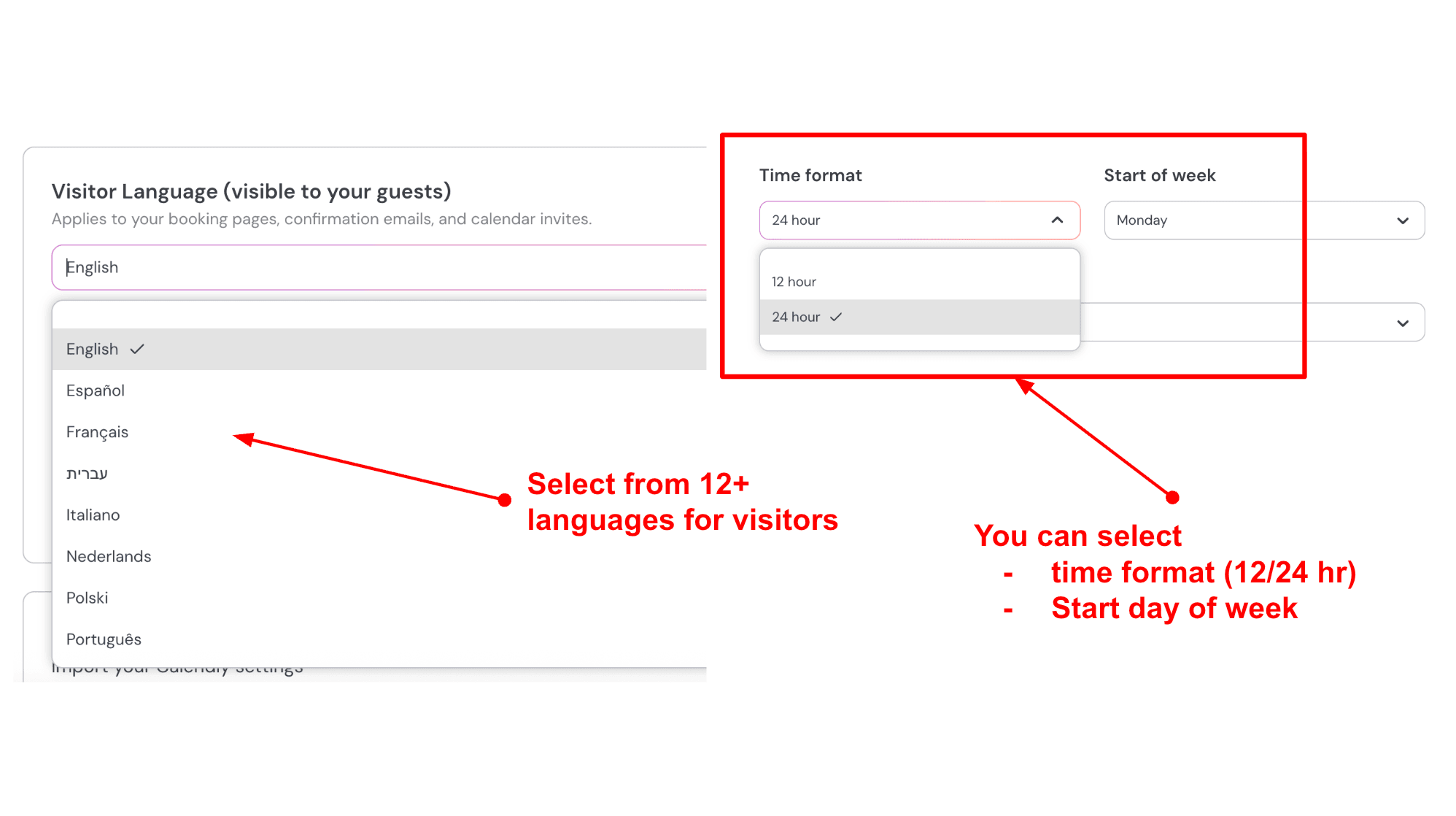
Language and time settings for visitors:
You can adjust the language shown on the booking page. You can also choose between 12-hour and 24-hour time and set the start day of the week. These small details make the booking experience easier for international students. Here is how I set it up:
Pros
- Strong booking page experience that suits studios that need context and trust, not just a calendar.
- Good control over buffers, notice periods, and availability rules for instructors.
- Handles time zone complexity well for online programs and visiting teachers.
- Group bookings work for class-style schedules without making the flow feel heavy.
- Support responsiveness is repeatedly mentioned in marketplace feedback, which matters during setup.
Cons
- Recurring series style bookings can be harder to configure than you’d expect for multi-week programs.
- If you need deep membership management and punch-pass logic, you may want to validate the exact workflow early.
- Complex studio operations like multi-room equipment constraints may require workarounds depending on your setup.
- You will want to double-check how cancellations, refunds, and policy enforcement map to your studio rules.
- Teams with many instructors should test admin permissions early so changes do not become a bottleneck.
Lunacal Pricing
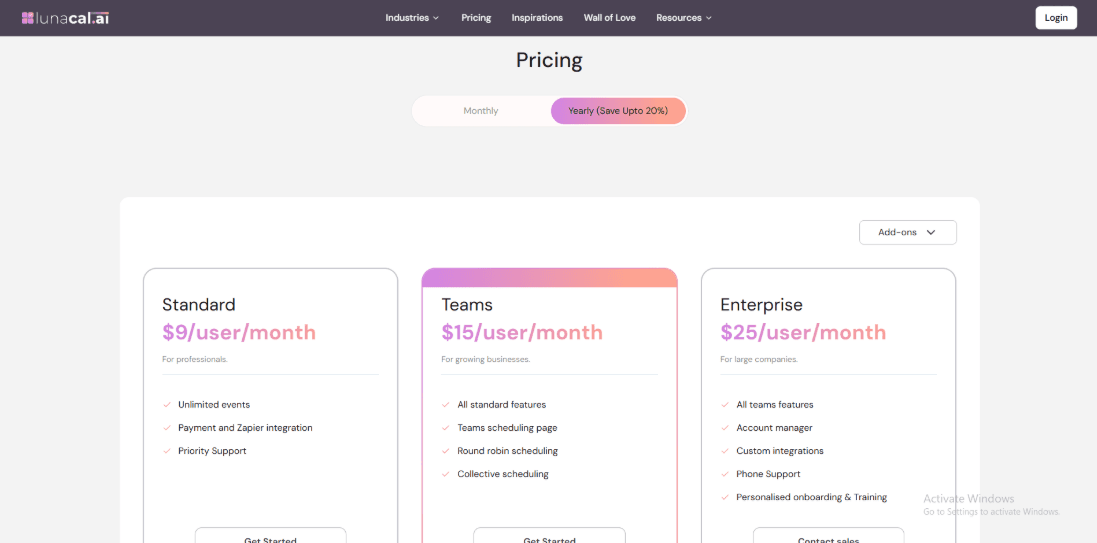
- Plans are priced per user, which maps well to yoga studios paying per instructor or admin seat.
- Standard is $9/user/month and covers unlimited event types plus payments and Zapier; Teams is $15/user/month adding team pages, round robin, and collective booking.
- Enterprise is $25/user/month with an account manager and custom integrations, and annual billing can save up to 20%. See the official Lunacal pricing.
Mindbody
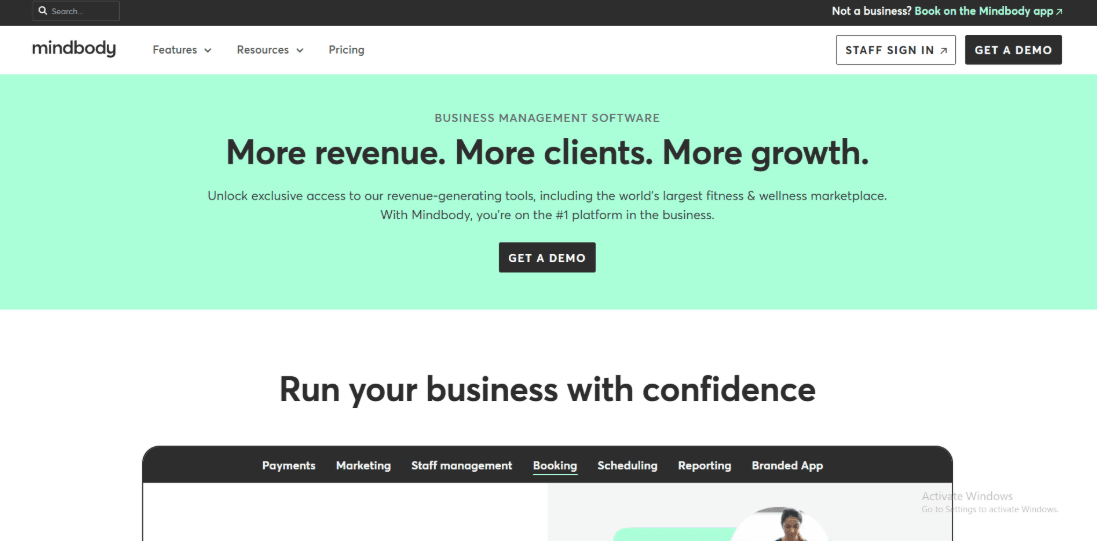
Mindbody is widely used in yoga studios that want one system to manage classes, memberships, payments, and daily studio tasks. Many studios treat it as the main operating tool that keeps schedules, passes, and front desk work organised. For studios searching for yoga studio scheduling software, Mindbody often appears because it handles the full studio workflow instead of only basic bookings.
1. Class scheduling that fits real timetables:
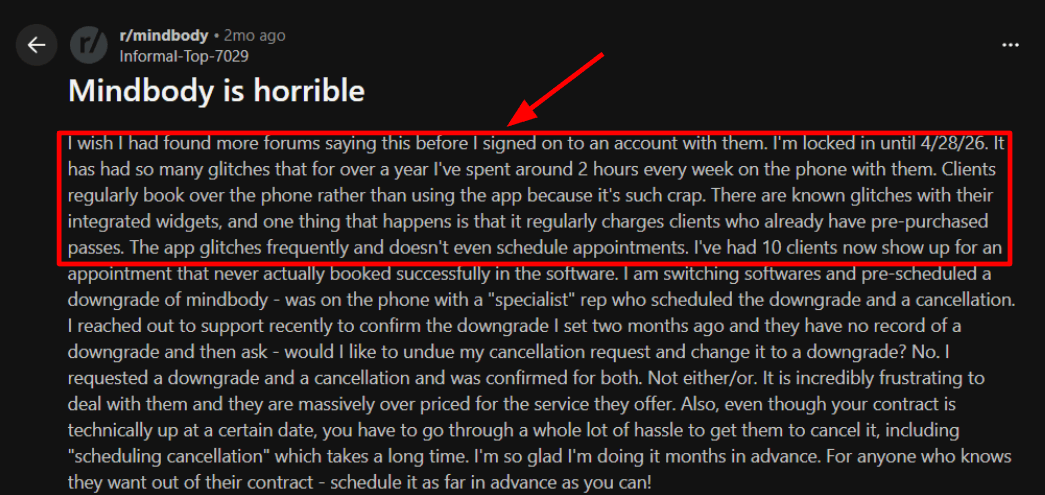
You can create recurring classes, add workshops, and see group classes and private sessions in the same calendar view. Teachers, rooms, and class capacity can all be managed from the same place. This makes weekly planning easier when the schedule changes. One frustrating fact is the booking experience when you rely heavily on embedded widgets. I saw a Reddit review saying the widget flow was glitchy and even recharged pass holders, and I’m sharing your screenshot below so readers see that risk.
2. Passes, memberships, and autopay rules:
Mindbody was built with yoga studios in mind. You can manage drop-ins, class packs, memberships, and recurring payments in one place. That allows studios to support both occasional students and regular members.
3. Waitlists and day-of attendance control:
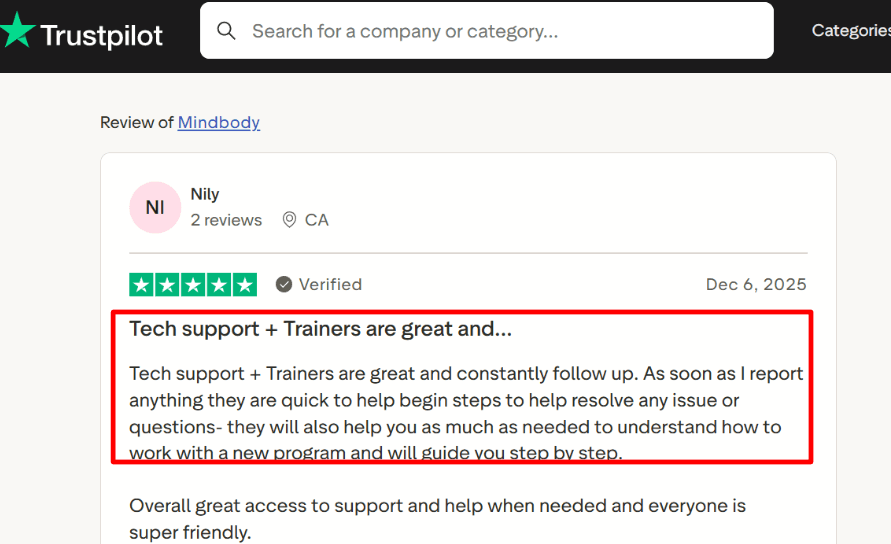
Waitlists matter for busy classes. When a spot opens, someone from the waitlist can move into the class automatically or through staff approval. Teachers can also check students in when they arrive, which helps keep attendance accurate and simplifies payroll tracking. A Trustpilot review mentioned trainers and tech support following up fast and walking through issues step by step, and that matches what I’ve seen when setup gets confusing.
4. Payments, POS, and reporting:
Mindbody connects booking with checkout. Studios can sell class packs, charge for private sessions, and sell retail items such as yoga mats through the same system. Reporting tools help track revenue, attendance, and member activity. The dashboard includes many options, so new users may need some time before everything feels familiar. Other tools inside Mindbody include automated email and text reminders, staff scheduling, lead tracking, client mobile apps, and analytics. These features are part of the reason many studios consider it when researching yoga studio scheduling software.
Pros of Mindbody
- Handles drop-ins, class packs, and memberships in one system, so your roster stays clean even with mixed pricing.
- Waitlists work well for full vinyasa or hot yoga slots, especially when late cancels open spots.
- Runs classes, privates, and events from one scheduling screen, which helps when teachers juggle both.
- The Mindbody consumer app can drive discovery bookings for new students who browse classes nearby.
- A Trustpilot reviewer specifically praised the trainers and tech support for fast follow-up during setup, which matters with complex studio rules.
Cons of Mindbody
- Pricing can be steep for a single-location yoga studio since plans start at 99 USD per month per location.
- Setup is not lightweight, and the rules for passes, auto-pay, and client accounts take real admin time to get right.
- A Reddit reviewer reported widget glitches, failed bookings, double-charges for pass holders, and messy downgrade or cancellation follow-through.
- If you are under contract, cancellation can be limited until the term ends, so switching later can be annoying.
- The interface can feel dense for small studios, so some students still prefer texting or calling to book.
Mindbody Pricing
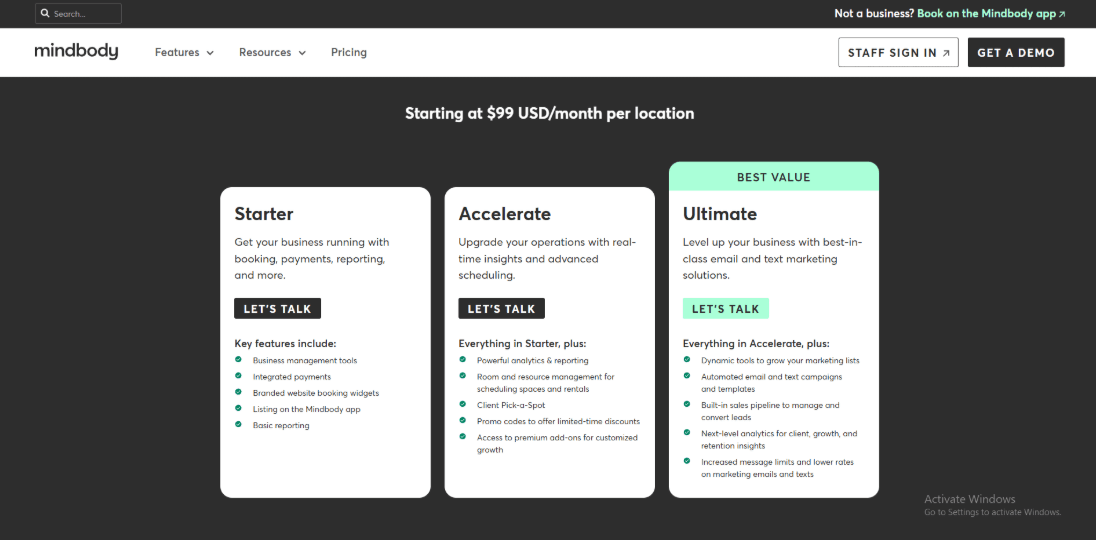
- Starter starts at $99 USD per month per location and includes booking, integrated payments, website widgets, Mindbody app listing, and basic reporting.
- Higher tiers add studio ops depth like room/resource scheduling, promo codes, and richer analytics, plus email/text marketing and a built-in sales pipeline.
- Pricing varies by region and scale, so many studios request a quote for multi-location and messaging needs. Details are on the official Mindbody pricing page.
WellnessLiving
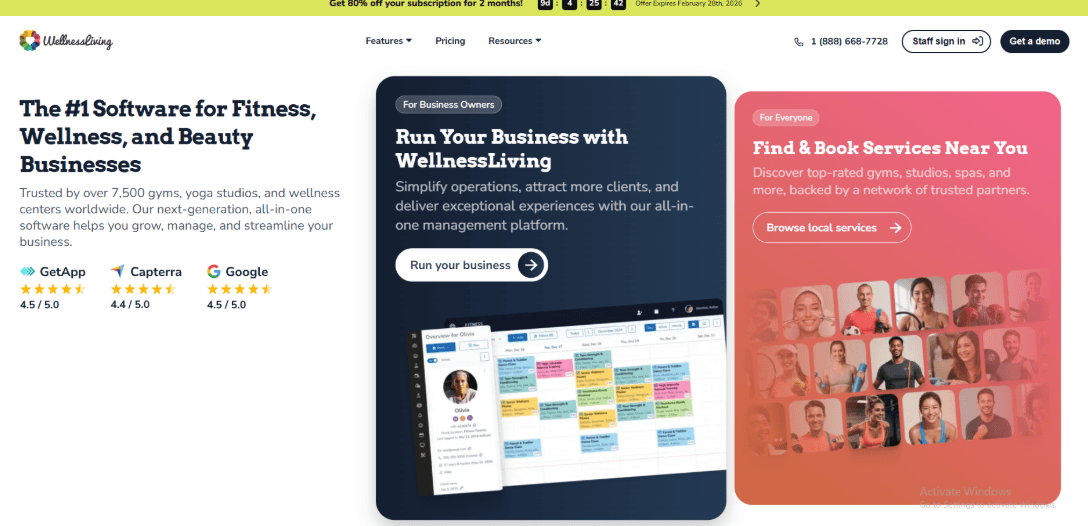
WellnessLiving is widely used by yoga studios because it brings class booking, memberships, and payments into one system. Studio owners often choose it when they want their yoga studio scheduling software to handle daily operations as well as bookings. The platform is designed for studios that run regular classes, sell passes or memberships, and manage both instructors and front desk activity in one place.
1. Class scheduling and waitlists that reduce empty mats:
You can schedule recurring classes, set capacity limits, and enable waitlists. When someone cancels, the system can automatically move the next person on the list into the class. That helps keep popular sessions full. For example, if a 6pm vinyasa class usually fills up, the waitlist makes sure empty spots are quickly taken. During testing, availability updates appeared quickly inside the Achieve mobile app. Students could see open spots and join the class without needing staff to update anything manually.
2. Payments, passes, and memberships connected to booking:
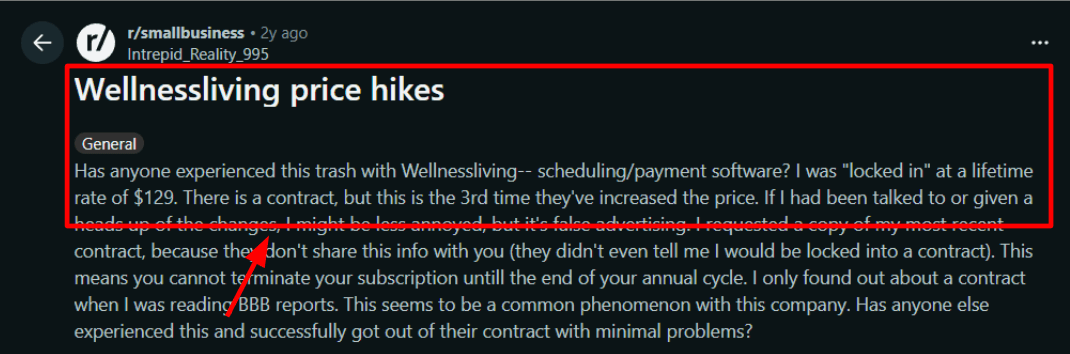
WellnessLiving allows studios to sell drop-in classes, class packs, and memberships from the same system used for booking. There is also an integrated point-of-sale system for in-studio purchases like merchandise or additional passes. Membership changes and account holds can update billing automatically. This reduces manual adjustments when members pause or change plans. One thing that felt off: pricing and contract expectations can be unclear. I also saw the same frustration in a Reddit review, and I’m sharing a screenshot below.
3. Automated reminders plus retention tools when churn starts:
Automated email, SMS, and push reminders cover confirmations, changes, and no-show prevention, and templates are customizable to match studio policies. WellnessLiving also offers an AI assistant called Isaac for insights and risk signals.
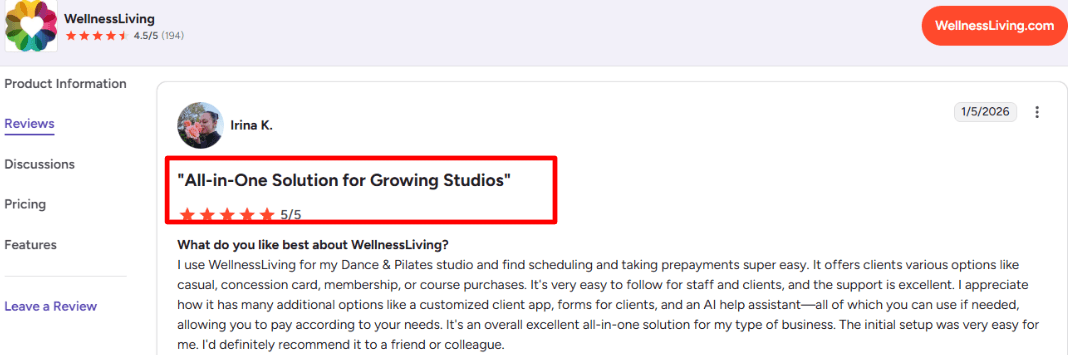
A G2 review I read highlighted how responsive support is and said the AI is impressive, with clients booking without needing hand-holding.
4. Front desk operations and reporting for daily running:
WellnessLiving also supports daily front desk operations. Staff can check students in, track attendance, and view client profiles before class begins. Role-based permissions allow different access levels for instructors, managers, and front desk staff. Reporting tools help studio owners review attendance trends, membership activity, and revenue performance. These reports can help identify which classes keep members engaged and which ones might need adjustments.
Pros of WellnessLiving
- Handles recurring class schedules, capacity limits, and waitlists well, which matters when your prime-time vinyasa fills up fast.
- Connects class packs, memberships, and drop-ins to payments, so you spend less time reconciling who paid for what.
- The Achieve client app lets students book classes and manage passes from their phone, which cuts down front desk back-and-forth.
- Check-in and roster workflows suit real studios where instructors need to see who is coming before class starts.
- Built-in AI support and churn signals can help you spot members who are drifting before they disappear.
Cons of WellnessLiving
- Their Terms of Use describe 12-month automatic renewals with written notice required ahead of renewal, which can surprise studio owners.
- The platform can feel heavy if you run a tiny studio with a simple weekly timetable.
- Pricing expectations can be a friction point, and online complaints about rate changes show up in the wild.
- Setup takes real time if you migrate clients, passes, and waivers, and you will need staff training to avoid mistakes.
- Some workflows are flexible but not always obvious, so small policy tweaks can take longer than expected to configure.
WellnessLiving Pricing

- Starter is $69 per month for solo and small teams, with booking plus client and staff apps.
- Business is $199 per month, adds unlimited staff, loyalty, events, and marketing tools.
- BusinessPro is $349 per month, mainly adds a white label client app.
- Enterprise is custom priced. Annual billing advertises about 20% savings. See details on the official pricing page.
ABC Glofox
ABC Glofox is widely used by yoga studios that want class booking, memberships, and payments in one place. Many studios treat it as a central system for running their schedule and managing members. That is why it often appears in discussions about reliable yoga studio scheduling software.
1. Class scheduling with waitlists and caps:
ABC Glofox focuses on group classes. You can set class capacity, manage waitlists, and control late cancellations. For example, if a 7 am Vinyasa class fills up and someone cancels, the system can automatically move the next person from the waitlist into the open spot. This helps studios keep classes full without manual follow-ups. For studios running a busy daily timetable, this kind of automation makes the software practical as yoga studio scheduling software.
2. Memberships and class packs tied to payments:
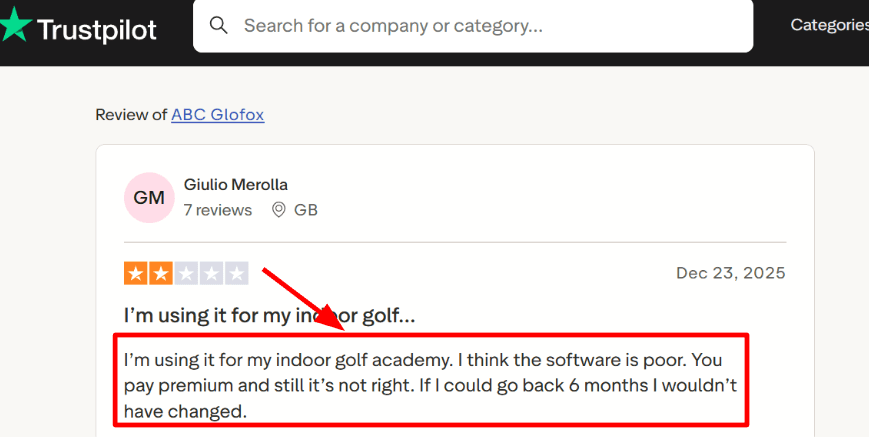
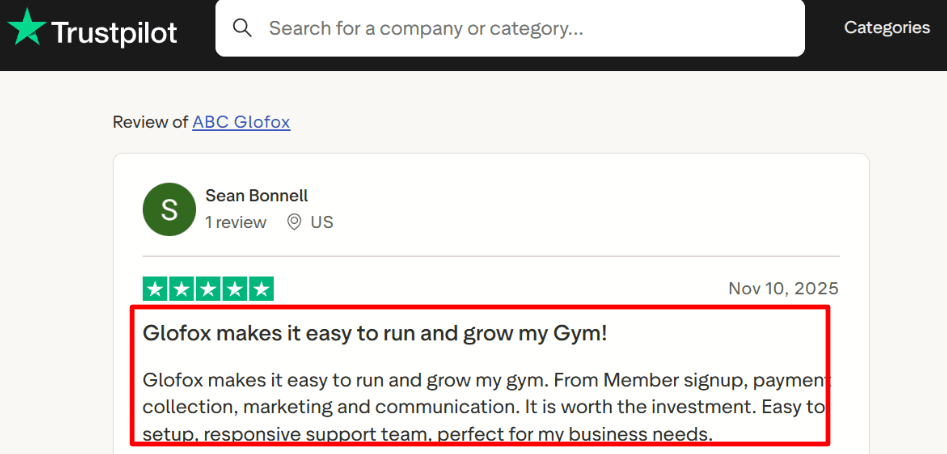
You can sell recurring memberships and packs, then take payment inside the booking flow and the member app. The moment that felt off was how premium the pricing feels while some admin configuration still takes clicks to get right. I also saw a Trustpilot review saying they paid premium and still felt the software was poor, and I’m sharing a screenshot below.
3. Branded member app with faster mobile booking:
Studios can sell memberships and class packs directly through the platform. Payments are collected during booking or through the member app. Recurring memberships, monthly unlimited plans, and multi-class packs can all be managed inside the system. This simplifies billing and reduces the need for separate tools. After the first setup pass, the Trustpilot review praising signup, payment collection, marketing, and responsive support lined up with the all-in-one direction, even if results vary by studio.
4. Messaging and automations for no-shows:
Email, SMS, and push notifications help run reminders and targeted nudges. In yoga, this is practical for workshops, intro offers, and check-ins for those who haven’t attended in 14 days. The only friction is that it’s easy to overbuild campaigns early, so simple rules work best. Other features in ABC Glofox for yoga class booking include instructor scheduling, membership and revenue reporting, website booking widgets, check-ins, and basic lead capture.
Pros of ABC Glofox
- Built for capacity-based yoga classes, so you can run caps, waitlists, and late cancel rules without hacks.
- The branded member app can reduce booking friction, and Glofox’s own update notes claim quicker class booking plus biometric login.
- Memberships and class packs tie cleanly to payments, which helps when you sell unlimited monthly plans or 10-class packs.
- Studio messaging is practical for teacher swaps, room changes, and workshop reminders when the schedule shifts last minute.
- Works well when your front desk needs one place to track bookings, check-ins, and member status during peak evening batches.
Cons of ABC Glofox
- Some owners report the iOS experience feels slow and the waitlist position is hard to spot, which is rough for full classes.
- Pricing can feel heavy for a small yoga studio that runs mostly drop-ins and low-ticket community classes.
- Setup takes real time if you offer mixed products like intro offers, packs, memberships, plus workshops.
- The marketing and automation layer can be easy to overbuild, so early mistakes create noisy messages for members.
- If your studio uses special cases like sliding scale or donation classes, you may need manual workarounds to keep reports clean.
ABC Glofox Pricing
- Pricing is quote-based and usually depends on your business type, number of locations, and the modules you need.
- Plans are grouped as Essential, Boost, Elite, and Enterprise, with optional add-ons like XLerate sales engagement and a custom branded member app.
- They highlight transparent pricing, minimal upfront costs, and flexible contracts, plus 1-on-1 onboarding and dedicated customer success. Learn more on the official pricing plans page.
Calendly
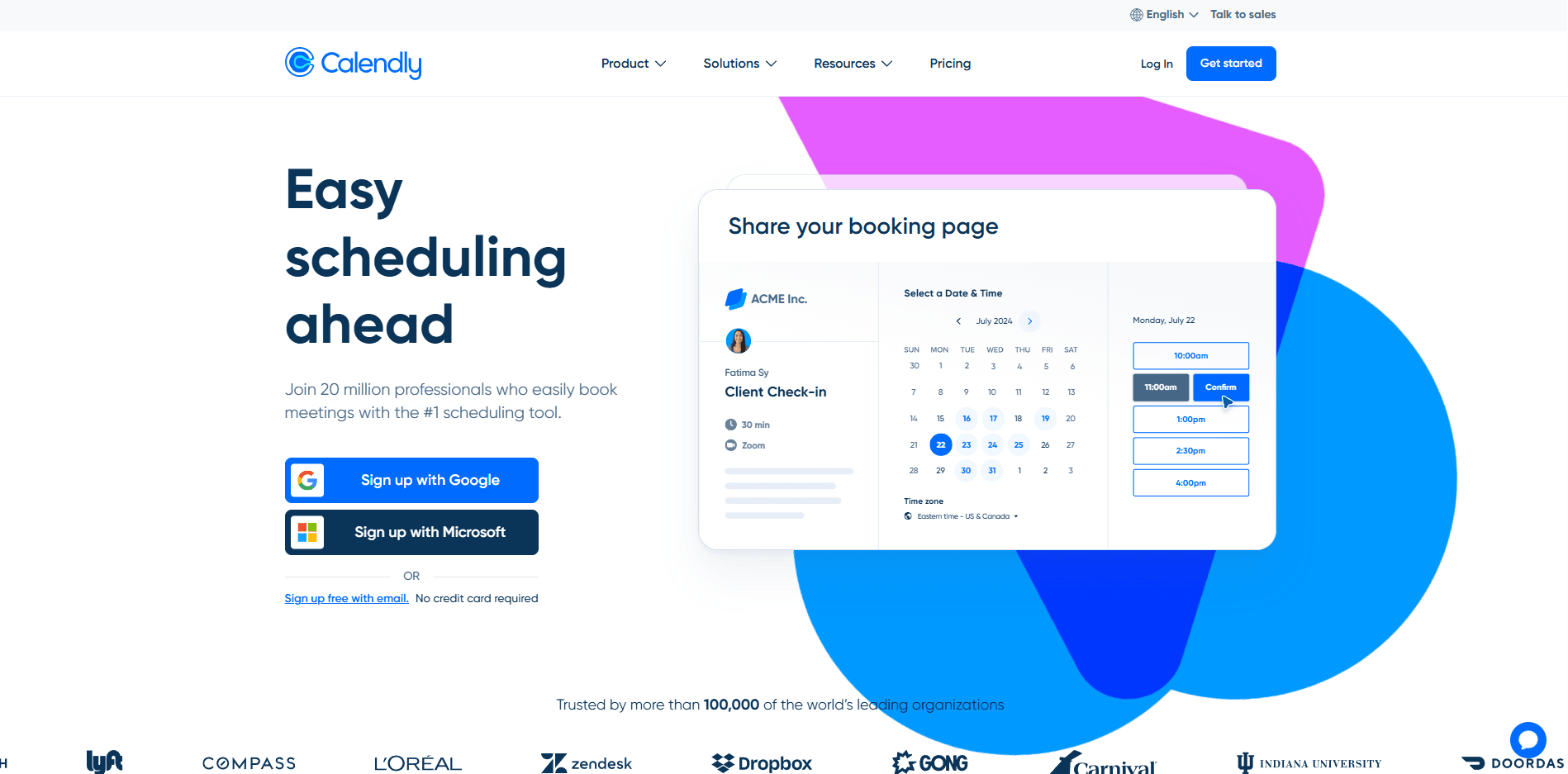
Calendly is known for simple scheduling links. Many yoga instructors use it when students want a quick way to book a class or a private session without long message threads. It works well for smaller studios or teachers who want lightweight yoga studio scheduling software that is easy to set up.
1. Group classes with capped spots:
Calendly has a Group event type that lets you set a limit on how many people can join a session. For example, you could allow 12 students in a morning flow class. Once the limit is reached, that time slot stops accepting bookings. This works fine for small group classes. One thing that can take time is managing a weekly schedule. Many studios end up creating separate event types for each class time.
2. Video links and calendar connections:
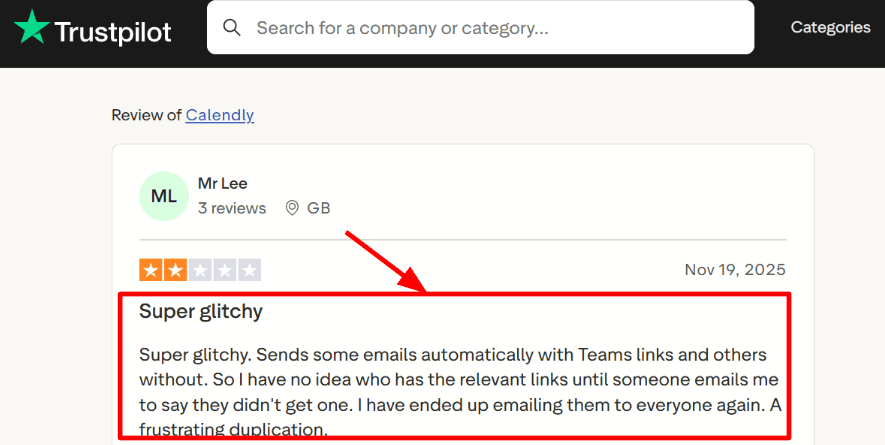
For online or hybrid sessions, you can attach a conferencing tool like Microsoft Teams to an event type. I did hit an edge case where the Teams link didn’t show up in the confirmation email. I also saw the same complaint in a Trustpilot review and I’m sharing a screenshot below. It sounded like a frustrating duplication.'
3. Buffers, notice periods, and time zones:
Buffers are underrated for yoga. Add 10 to 15 minutes after class for cleanup or questions, and Calendly enforces it automatically. Minimum notice and time zone controls help when you’re running workshops and students book from different cities.
4. Payments for drop-ins and privates:
Calendly can collect payment at booking through Stripe or PayPal on supported plans, so you’re not chasing transfers after class. A positive thing was how fast the pay-to-book flow came together. This matches a Trustpilot review I saw calling it easy to use and helpful for staying organized.

Pros of Calendly
- Capacity limits on group sessions help prevent overbooking when you only have so many mats.
- Pay-at-booking works well for drop-ins and privates, so you spend less time chasing late payments.
- Buffers and minimum notice protect setup time between back-to-back classes and reduce last minute chaos.
- Reschedule and cancel links reduce admin work when students change plans the same day.
- One link per class type keeps booking simple for new students who just want a slot fast.
Cons of Calendly
- Teams links can sometimes be missing in confirmation emails, which is stressful right before a live online class.
- You cannot easily cap total studio bookings per day across multiple event types, so load control takes extra planning.
- Variable capacity by day or room setup can require workarounds, which gets tedious for mixed schedules.
- It is not built like a true studio system, so memberships, class packs, and check-ins often need another tool.
- Managing a full weekly timetable can mean many event types, which adds setup and maintenance overhead.
Calendly Pricing
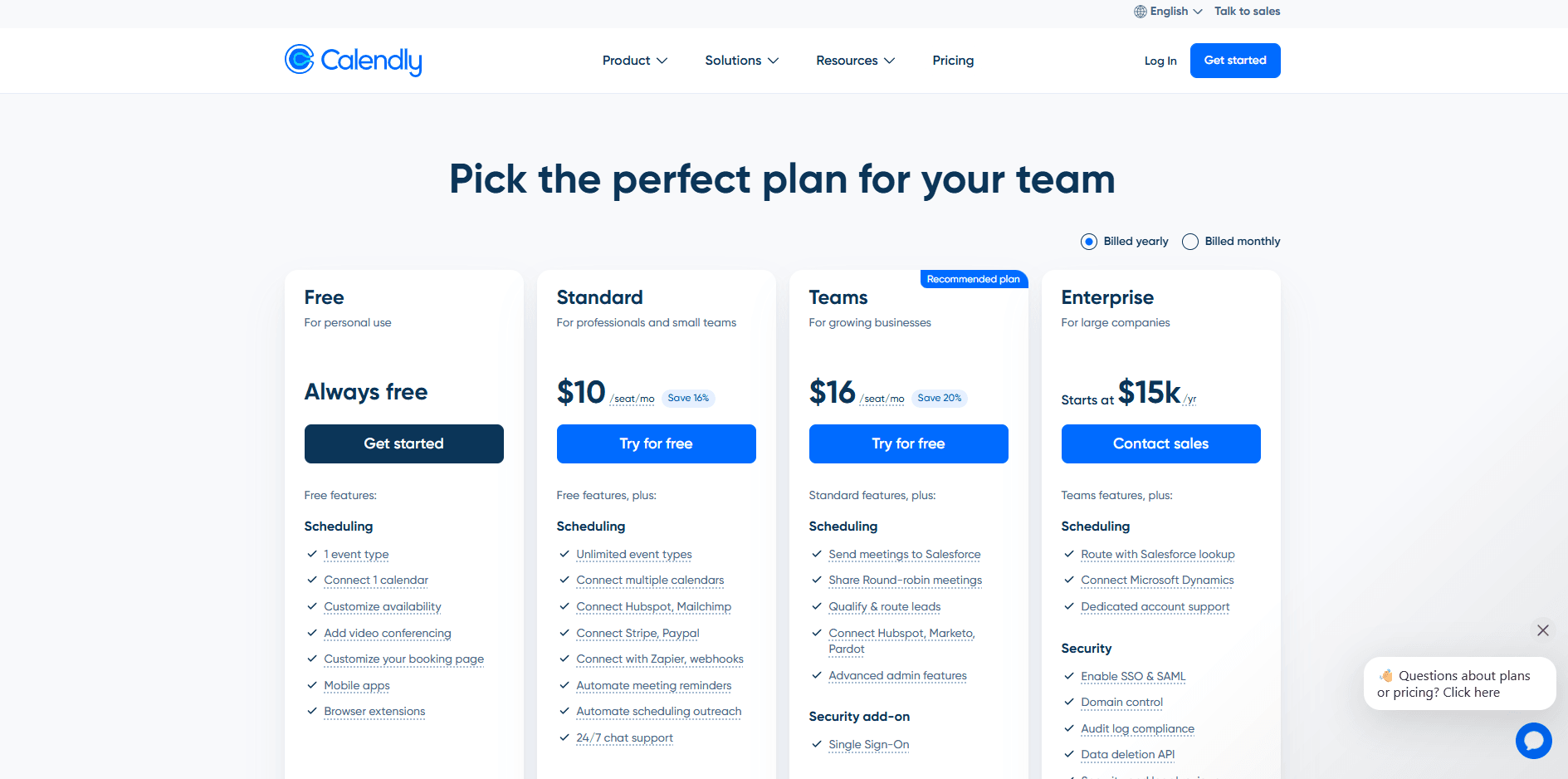
- Free is always free with 1 event type and 1 calendar connection.
- Standard is $10 per seat per month on annual billing, with unlimited event types, multiple calendars, and basic automations.
- Teams is $16 per seat per month on annual billing, adding round robin, routing, and stronger admin controls.
- Enterprise starts at $15k per year for larger org needs like SSO and audit controls. See the official pricing.
Conclusion
I’d choose based on how complex your studio operations are and how much you want one system to handle.
- Lunacal works best if your focus is getting more bookings through better scheduling pages and simple payments without heavy setup.
- Mindbody fits studios that need a full operating system with memberships, staff management, and reporting in one place.
- WellnessLiving is a strong option when you want similar depth to Mindbody but with slightly more flexibility in daily workflows.
- ABC Glofox suits studios that care about branded apps and a polished member experience alongside core scheduling.
- Calendly is the right choice if you just need lightweight scheduling for small classes or private sessions without managing memberships.
If your studio runs mostly recurring classes with memberships and staff coordination, go with a full system like Mindbody or WellnessLiving. If you mainly want clean booking and payments without complexity, Lunacal or Calendly will be easier to live with day to day.
Summary: Which is the best booking system for you?
| Scenario | Non-Negotiable Features | Best Fit | Avoid these |
|---|---|---|---|
| Solo teacher | • Class schedule with seat limits • Payments for drop-ins and packs • Auto reminders and clear cancel window • Easy embed on your site | SimplyBook, Lunacal | • Mindbody: too heavy and pricey for solo use • ABC Glofox: setup and tooling skew bigger |
| Growing studio | • Multi-instructor schedule with substitutions • Class packs and membership billing • Late-cancel fee rules and waitlist • Simple reporting for classes and revenue | Lunacal, WellnessLiving | • Calendly: great for calls, weak for classes • Acuity Scheduling: strong for appointments, not memberships |
| Multi-location chain | • Multi-location schedules with local pricing • Membership billing with tax support • Branded app or solid member portal • Roles, permissions, and audit logs | Mindbody, ABC Glofox | • Setmore: too light for multi-location ops • SimplyBook: can get messy at scale |
My Testing Process
I used one repeatable workflow for every product so the comparison stays fair.
I also saved proof points so you can validate the claims inside each tool section.
Test setup
- One test business: a yoga studio that runs group classes and private sessions
- One test class: a paid Vinyasa class with 12 mats
- One test client: booked on mobile, paid, rescheduled, then cancelled
- Timezone check: studio in IST, client in PST
- Device check: desktop plus mobile booking flow
- Date stamp: everything was checked on 17 Jan 2026 and can change after that
Scenarios we ran
-
New student booking
Find a class, see the price, choose a slot, pay, get confirmation -
Capacity handling
Book when mats are low, then try again when full -
Reschedule and cancel
Student changes from the link, then cancels
The spot opens correctly and the studio gets the alert -
Studio admin work
Create a class, duplicate it, set buffers, block instructor time off -
Class packs and memberships
Test multi class packs and recurring plans when supported
Check how credits apply to future bookings
Evidence used in this article
I reviewed G2 ratings, Trustpilot reviews, and Reddit threads for patterns.
I also cross checked claims inside the product docs where possible.
You will see links and screenshots in the tool sections for key steps.
FAQs
What is the best yoga studio scheduling software for managing class schedules and session times?
The best yoga studio scheduling software are Lunacal, Mindbody, WellnessLiving, and ABC Glofox. Lunacal is rated 4.9 on G2 and is often strong for recurring classes, packages, customizable intake forms for injury notes, and payments at booking. If you need deep POS and retail reporting, Mindbody is the safer bet.
How do I compare a yoga class booking system before switching?
The most popular yoga class booking systems to compare are Lunacal, Mindbody, and WellnessLiving. Lunacal fits studios that want a clean booking page and quick payment, plus packs and intake forms. Mindbody is common when you need deep reporting and retail. WellnessLiving works well for memberships and staff management. If your studio relies on a branded mobile app for members, ABC Glofox is often the next one to test.
What country specific VAT, language, or GDPR nuances affect yoga studio booking scheduling software?
Country rules matter. In the US, Canada, and Australia, you usually deal with sales tax and receipts. In the UK and EU, VAT handling and invoice wording matter, and GDPR affects consent and data access. Check these before you commit.
• Store client consent logs for GDPR
• Let invoices show VAT IDs
• Offer German, French, Spanish language choices
• Keep data export and delete requests simple
What features should yoga studio scheduling software include?
Yoga studio scheduling software should include class capacity limits, waitlists, recurring schedules, teacher substitutions, and room resources. It should support class packs and memberships, online payments, and clear cancellation rules. Look for reminders, attendance tracking, client injury notes, and reporting.
How do I reduce no shows and late cancels in yoga scheduling software?
The best way to reduce no shows is to require a card on file, set a late cancel window, and auto apply fees. Mindbody and WellnessLiving usually handle this cleanly.
Summarize this content with AI


