

Introduction
The best interview scheduling software for recruiters in 2026 includes Lunacal, GoodTime, VidCruiter, Calendly, myInterview, Spark Hire, HireVue, and HireVox. I also reviewed ModernLoop, Greenhouse, Breezy HR, and Doodle before narrowing the list down.
These tools solve different parts of interview scheduling. Lunacal and Calendly are better suited to straightforward candidate self-scheduling, GoodTime focuses on complex interview coordination and panels, VidCruiter combines scheduling with structured hiring workflows, while tools such as myInterview, Spark Hire, HireVue, and HireVox extend further into video interviewing, assessments, or candidate screening.
For this comparison, I looked at the recruiting workflows that create the most scheduling friction: candidate self-scheduling, panel interviews, interviewer availability, ATS integration, rescheduling, calendar conflicts, time zones, reminders, and multi-stage interview processes. Gem's 2026 Recruiting Benchmarks found that recruiters are handling 93% more applications than in 2021 while recruiting teams are 14% smaller, increasing the value of automating repetitive work such as interview scheduling and candidate coordination.
The right choice therefore depends less on having the longest feature list and more on the type of hiring process you run. The coordination burden is also growing.
Interview scheduling is a measurable hiring bottleneck. Ashby's 2026 Recruiting Operations Benchmarks found that automatically scheduled interviews were confirmed 26% faster than manually scheduled interviews, with median scheduling time falling from 5 hours to 3.7 hours.
Comparing Interview Scheduling Software
Best interview scheduling software by hiring setup
| Hiring setup | Best-fit tool | Why it makes the shortlist |
|---|---|---|
| Candidate-first startup hiring | Lunacal | Brand-first booking page, quick setup, resume upload, reminders, and cleaner self-booking for recruiter screens |
| Panel-heavy interview teams | GoodTime | Built for rounds, interviewer coordination, recruiting coordinators, and more complex scheduling ops |
| Process-driven enterprise hiring | VidCruiter | Strong fit for formal stages, approvals, and structured interview workflows |
| Async first-round screening | myInterview | Helps teams filter candidates before using live interview time |
| Lean teams using video interviews | Spark Hire | Good fit for lighter-weight video interviewing without heavy operational setup |
| Large-scale enterprise screening | HireVue | Better suited to hiring programs tied to assessments, automation, and enterprise scale |
| Simple recruiter screen scheduling | Calendly | Works well for straightforward self-scheduling when hiring workflow depth is not the priority |
| AI-led top-of-funnel screening | HireVox | Better fit for teams that want calling and screening before live interview scheduling begins |
Interview scheduling software feature table
| Comparison point | Lunacal | GoodTime | VidCruiter | myInterview | Spark Hire | HireVue | Calendly | HireVox |
|---|---|---|---|---|---|---|---|---|
| G2 rating | 4.9/5 | 4.4/5 | 4.8/5 | 4.7/5 | 4.7/5 | 4.1/5 | 4.7/5 | No G2 |
| Starting price | $9/month | Not listed | Not listed | Not listed | Not listed | Not listed | $10/month | Not listed |
| Free plan or trial | Free plan | Free trial | Free trial | Free trial | Not listed | Not listed | Free plan | Not listed |
| Brand-first candidate experience | Yes | No | No | No | No | No | Partial | No |
| Simple recruiter screen scheduling | Yes | Partial | Partial | No | Partial | No | Yes | No |
| Panel interview coordination | Partial | Yes | Partial | No | No | No | No | No |
| Structured enterprise workflows | No | Partial | Yes | No | No | Yes | No | No |
| Video interviewing | No | No | Yes | Yes | Yes | Yes | No | No |
| Async screening | No | No | No | Yes | No | No | No | Partial |
| AI-led calling and screening | No | No | No | No | No | No | No | Yes |
| Best fit | Candidate-friendly interview booking | Recruiting coordination | Enterprise hiring ops | One-way screening | Lean video hiring | Enterprise assessment workflows | Basic self-scheduling | AI top-of-funnel screening |
| Main watchout | Less suited to rigid ATS-led ops | Too heavy for simple hiring | Overkill for lightweight teams | Weak for live scheduling | Limited enterprise depth | Too much for simple scheduling | Thin hiring workflow depth | Weak panel and video workflow depth |
Source: G2 for rating, Individual product websites, Reddit, Quora, Trustpilot
In-Depth Reviews of Interview Scheduling Software
Lunacal
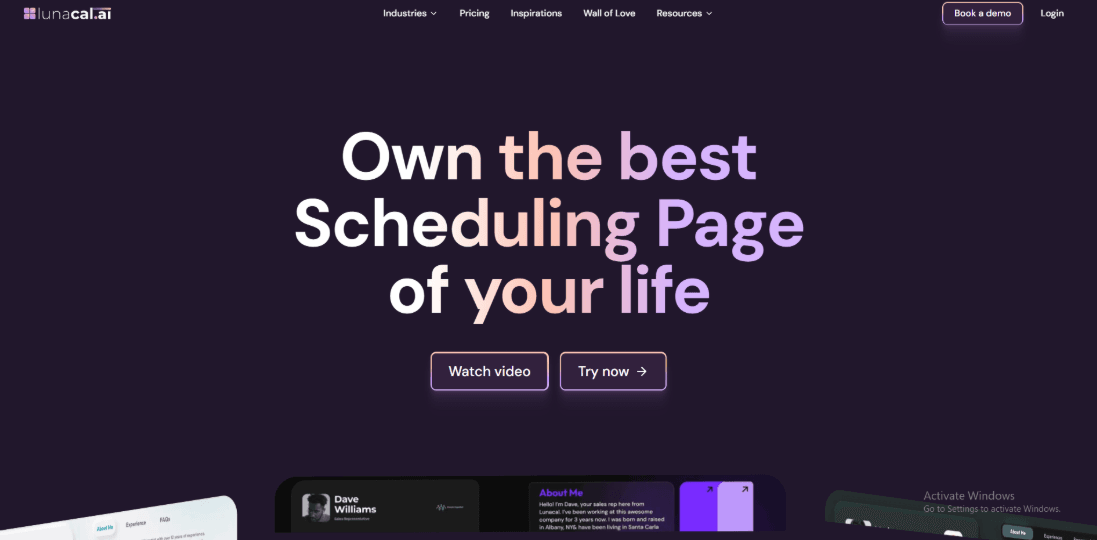
Lunacal is interview scheduling software that helps recruiters secure more confirmed interviews with candidate self-scheduling, panel coordination, reminders, and routing. Recruiters comparing interview scheduling software will find Lunacal rated 4.9/5 on G2, making it one of the highest-rated tools in this category.
Features
- Scheduling pages with rich content
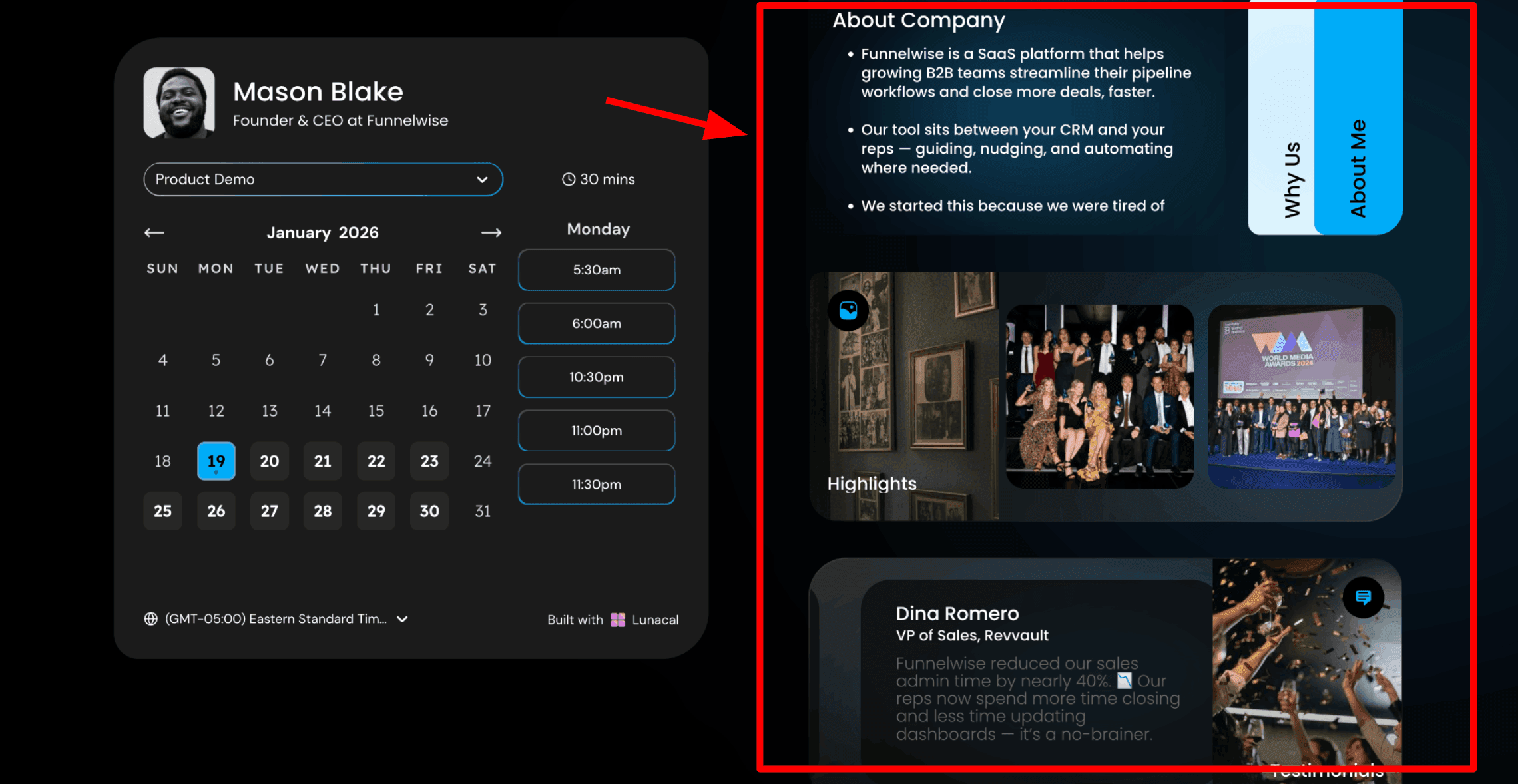
This is usually the first thing I show recruiters because it shapes the candidate experience from the moment someone receives your interview link. In Lunacal, the scheduling page can include content beside the calendar so candidates can learn about the company, the role, and the interview process before choosing a time. For recruiting teams, this small detail makes a real difference. Here is a screenshot below:
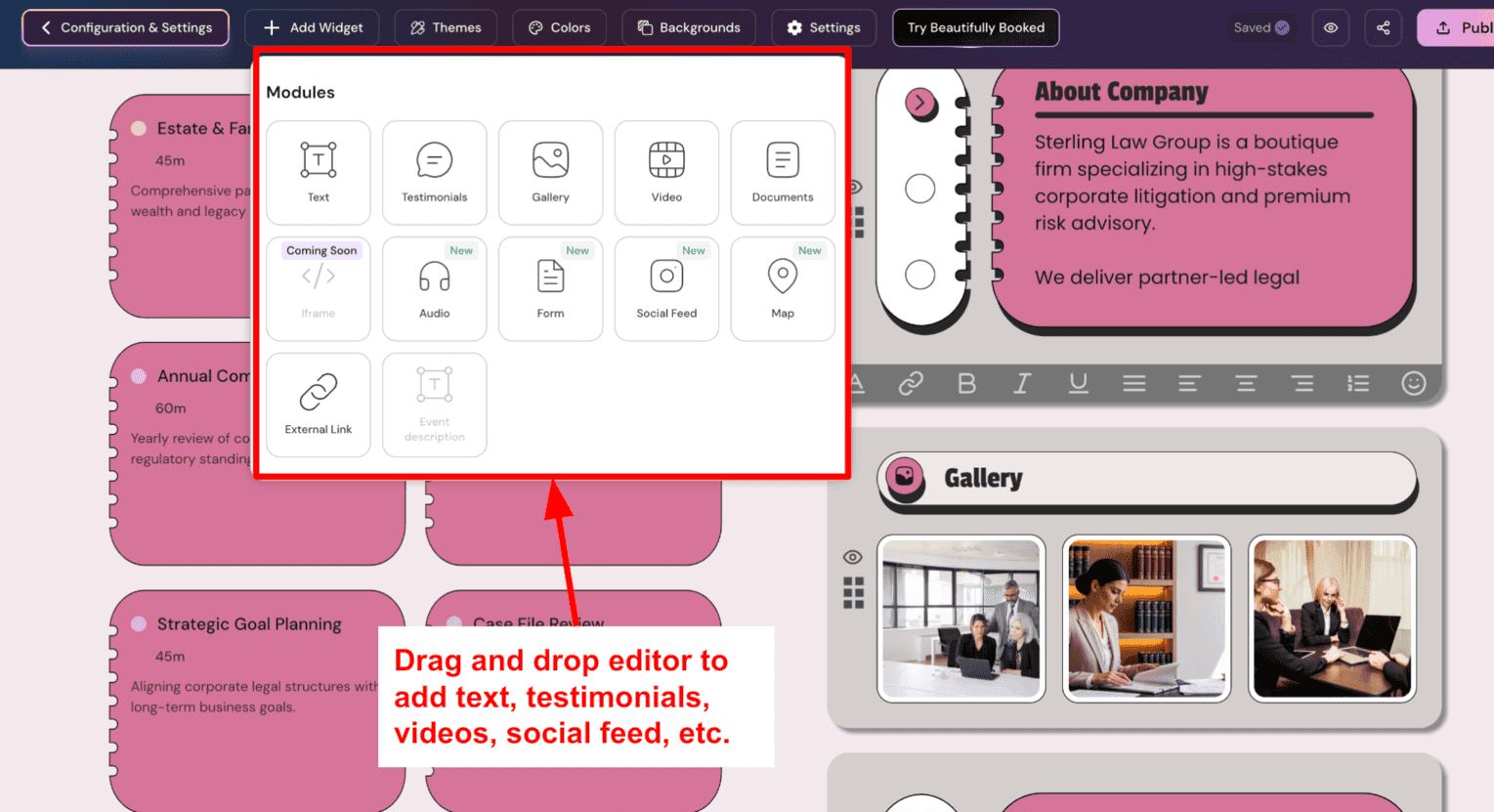
- Drag and drop interview page editor
This is how the page gets built. Lunacal provides a simple editor where recruiters can add blocks such as text, employee testimonials, images, videos, documents, and forms. Everything can be arranged directly on the page without needing help from a web team. Keep the content focused. Candidates usually need a clear overview of the role and the interview process. Adding too much company information can make the page harder to scan.
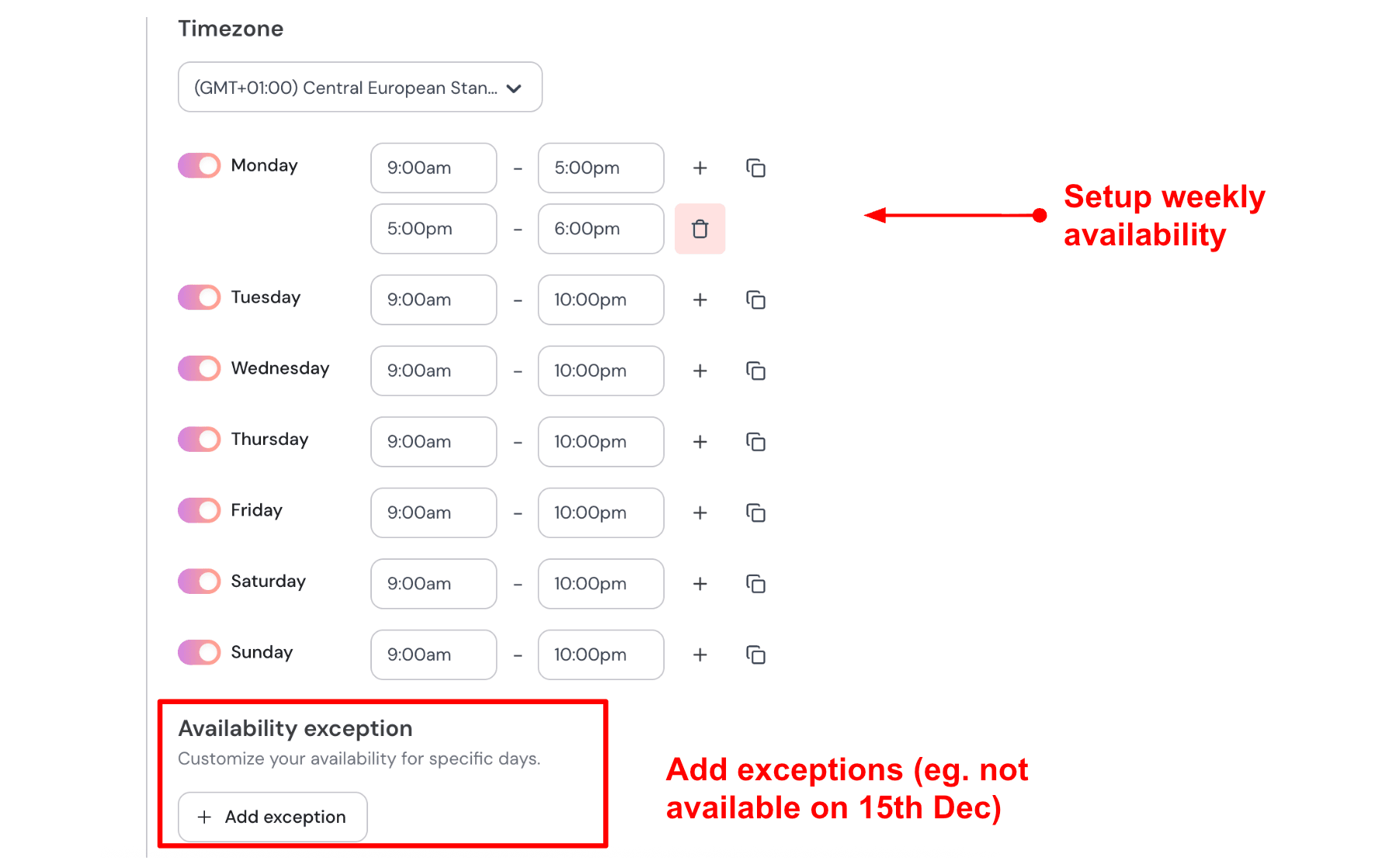
- Recruiter availability with date exceptions
After building the interview page, the next step is setting availability. You can choose the days and hours when interviews are allowed. You can also add specific dates when interviews should not happen. This helps recruiters share one link across email outreach, LinkedIn messages, and job listings without worrying about candidates booking during blocked periods. If interviews usually happen Monday to Thursday between 10 AM and 4 PM, that schedule can be set once. If the hiring team has an offsite during a certain week, that date can be blocked so candidates only see available times after the team returns. Here is how I set up my availability:
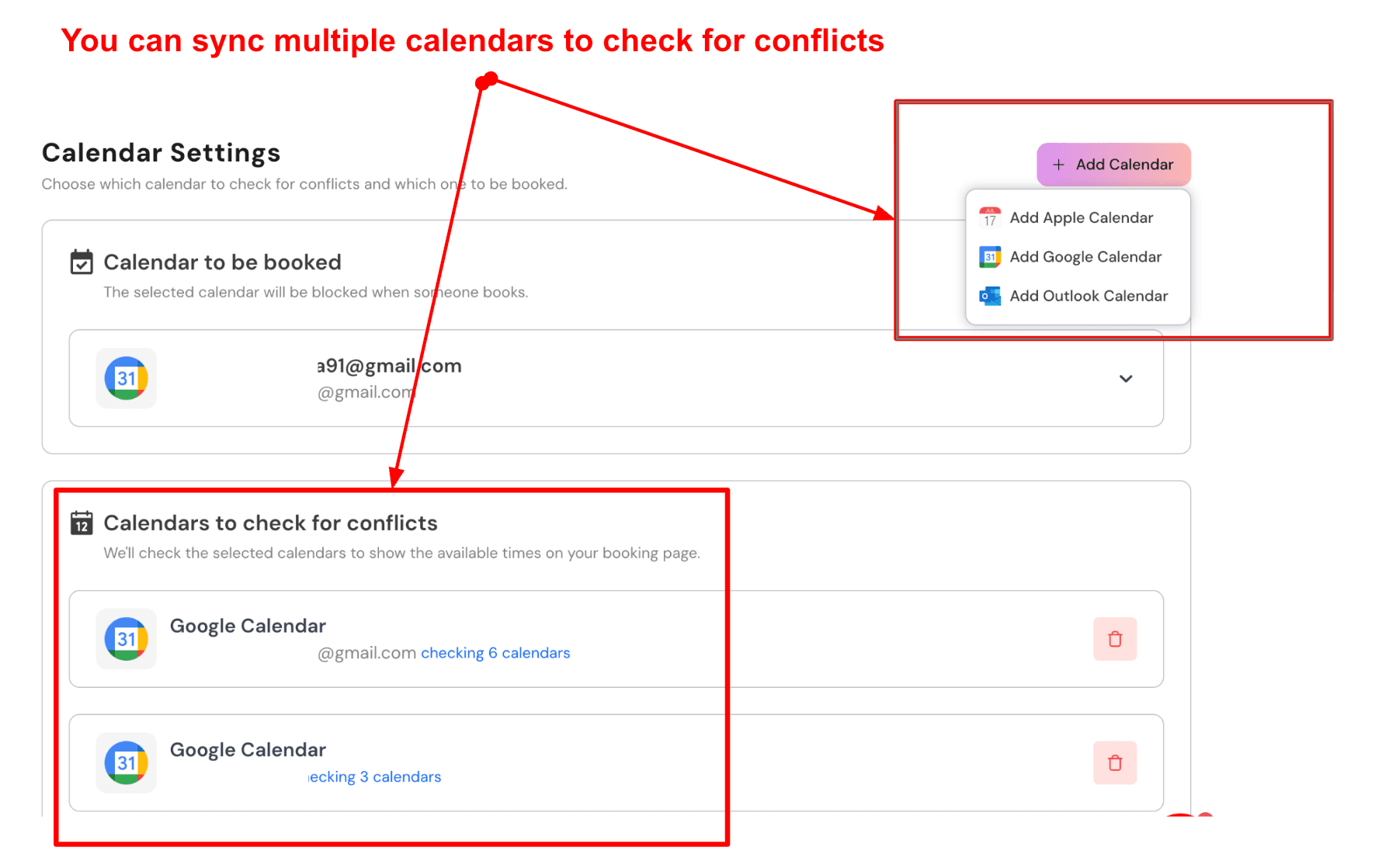
- Sync multiple calendars to avoid conflicts
Lunacal allows multiple calendars to be connected. Confirmed interviews can appear in a main calendar, while other calendars are checked silently in the background to avoid conflicts. Recruiters often coordinate between their own calendar, a hiring manager calendar, and sometimes a technical panel. Good interview scheduling software for recruiter teams should make this coordination easier. Here is a screenshot below:
- Custom pre interview questions
Recruiters can add questions to the booking form so candidates provide information while scheduling the interview. This gives the recruiting team useful context before the call begins. Three questions are usually enough. Each one should help the recruiter prepare for the conversation. For a first recruiter screen, I would ask the candidate’s notice period with simple options such as immediately available, two weeks, one month, or more than one month.
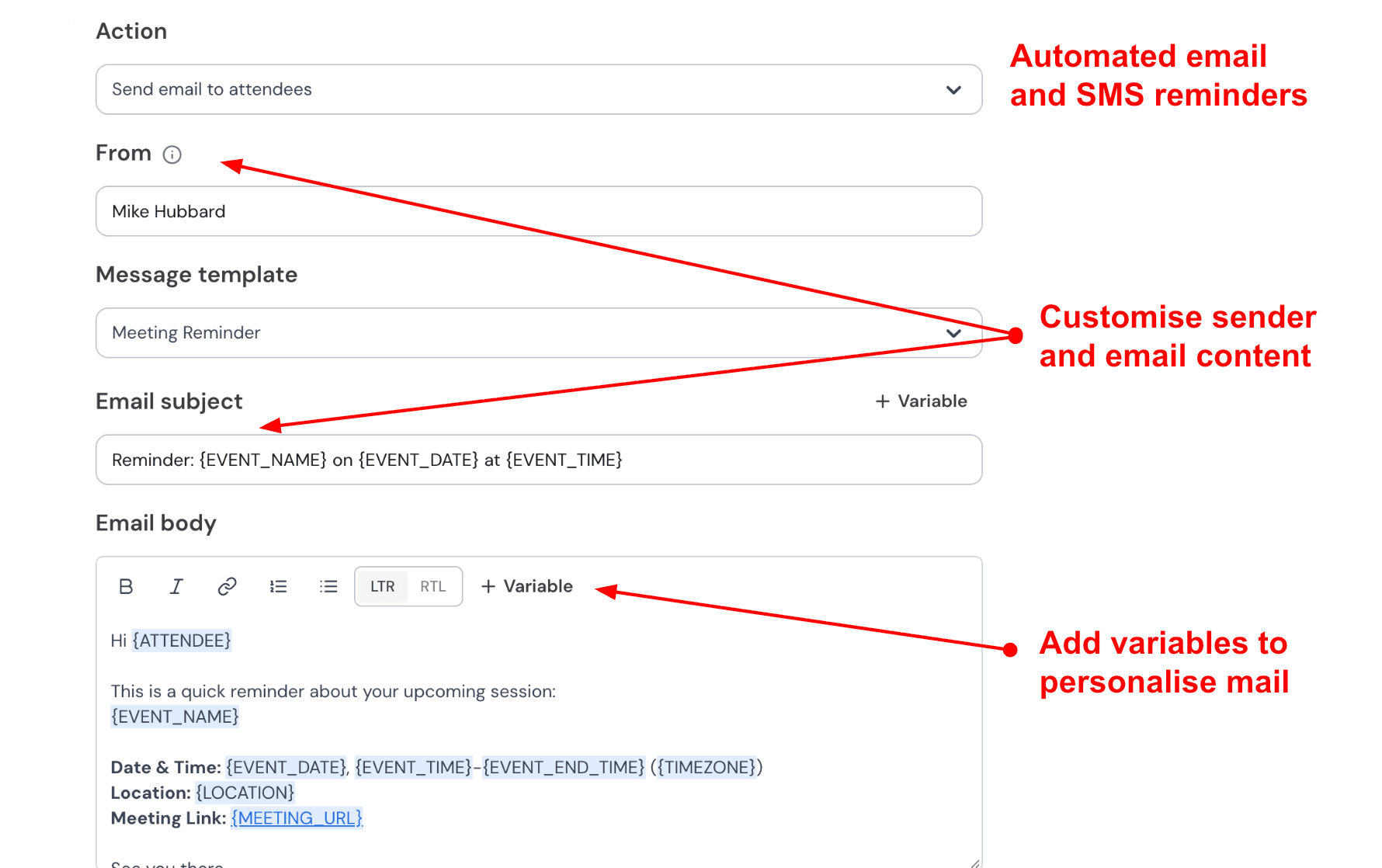
- Automated interview confirmation and reminders
Lunacal sends confirmation emails and reminders automatically. Messages can include the candidate name, role title, interview stage, date, time, and the meeting link. Missed interviews are common in recruiting. Simple reminders the evening before and shortly before the interview can reduce no shows and help candidates stay prepared. Here is how to automate:
Pros
- The booking page experience is stronger than other tools.
- Strong booking page customization.
- Calendar sync supports common stacks like Google and Outlook.
- Useful meeting tool integrations for consistent video links.
- Workflow triggers cover the core reschedule and reminder flows.
Cons
- If your main need is deep ATS-first interview ops like panel orchestration, interviewer training blocks, and strict recruiting workflows, a dedicated interview scheduling platform can fit better than Lunacal.
- Duplicating similar event types can take extra setup time, a point also raised in a G2 review.
- Some advanced settings take a bit of poking around before they feel predictable.
- If you are hunting for lifetime pricing, note the AppSumo deal status can change and has shown as sold out in periods like this.
AppSumo sold out status - Enterprise-style requirements may need confirmation beyond the marketing surface, like vendor questionnaires and data handling specifics.
Pricing
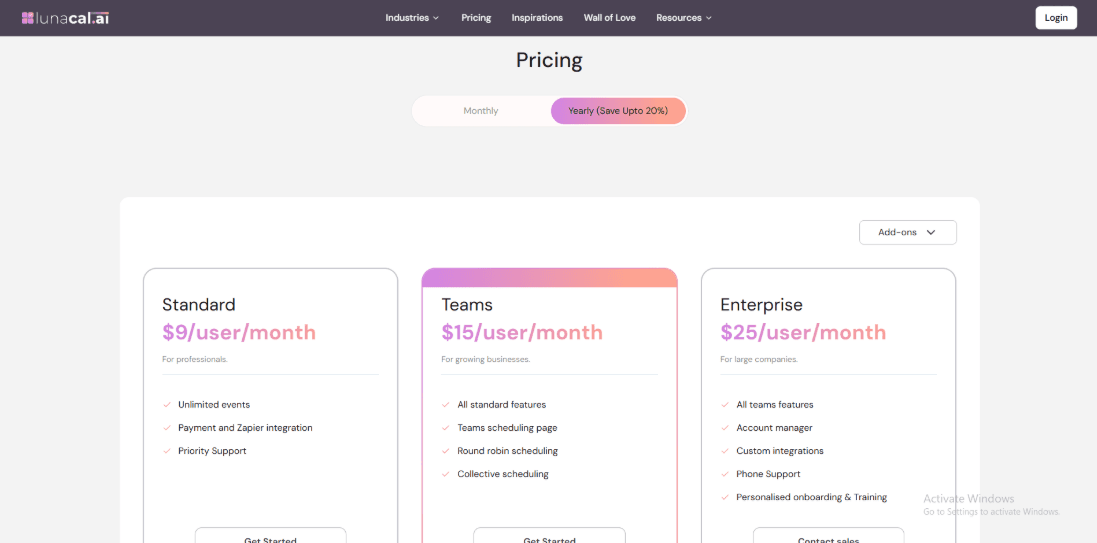
- Lunacal is priced per user across three main tiers, with Standard at $9 per user per month, Teams at $15, and Enterprise at $25.
- Annual billing is offered with stated savings, and Teams and Enterprise add more team routing and support depth.
- If you are piloting interview scheduling, start small and validate whether you need team routing features before upgrading.
- Official pricing details: Lunacal pricing
When to Choose Lunacal
Choose Lunacal when your interview link is also a candidate experience surface, not just a slot picker. It fits teams that want brand-forward interview pages, lightweight routing like round robin, and dependable calendar plus meeting integrations. If your priority is ATS-native interview operations and rigid recruiting workflows, pick a dedicated interview scheduling platform first, then add a branded layer later.
Interview coordination is becoming more demanding as hiring processes add more evaluation steps. Gem's 2026 benchmark data shows that the average number of interviews conducted per hire has increased 33% since 2021, increasing the calendar and coordination workload behind each successful hire.
GoodTime
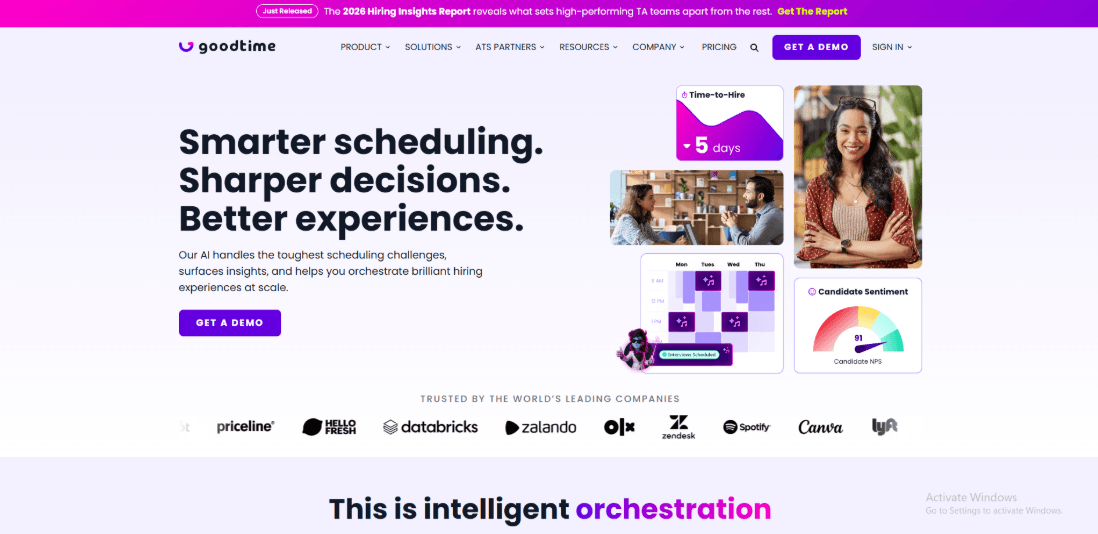
GoodTime is a platform designed to help hiring teams schedule interviews faster and with fewer manual steps. For teams that handle a large number of candidates, this type of interview scheduling software for recruiter workflows can significantly reduce coordination work. Recruiters spend less time chasing calendars and more time focusing on candidates.
The scheduling burden becomes even larger for technical hiring. Gem's 2026 Recruiting Benchmarks reports that technical roles such as Engineering, Data Science, Product Management, and Design require roughly 36 interviews per hire, compared with about 20 for non-technical roles.
Features
- Calendar Integration
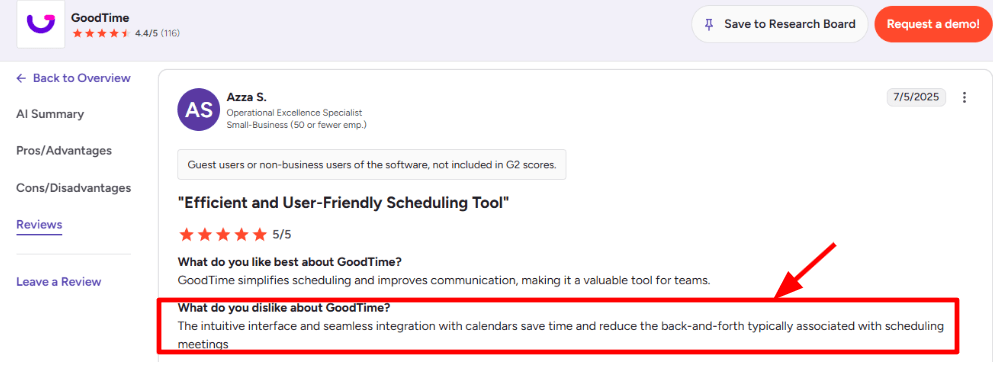
Calendar syncing worked smoothly in testing. Once connected, the system checked interviewer availability and suggested workable time slots. Reviews also highlight the integrations as a strength. I saw a G2 review filed under “dislike” that praised the “intuitive interface and seamless integration,” and it made me double-check if users sometimes struggle to describe actual gaps. I’m sharing a screenshot below:
- ATS Two Way Sync
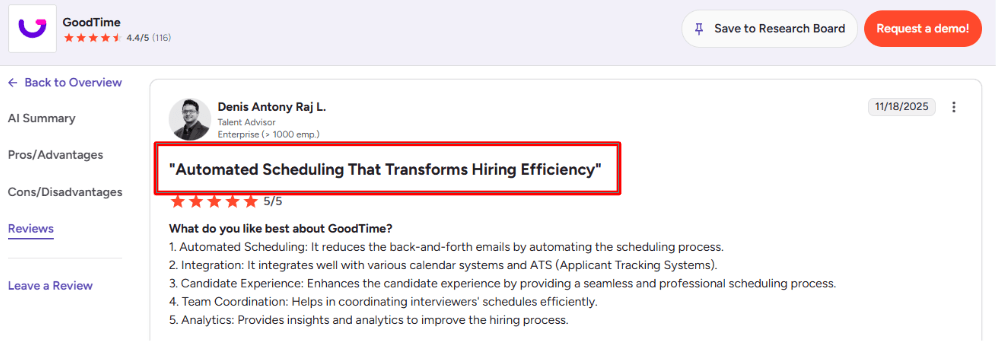
GoodTime connects directly with applicant tracking systems. Candidate data and interview stages can move between systems automatically. When I tested this type of setup, the main benefit was fewer manual updates. Interview plans, stages, and scheduling details stayed aligned with the ATS. A second G2 review calls out ATS plus calendar integration as a real strength, and I agree, see the screenshot below for context.
- Panel Scheduling
Panel interviews can be difficult to coordinate. Multiple interviewers need to be available at the same time. GoodTime helps find time slots that match interviewers' and candidates' availability. During testing with several interviewers in different calendars, the system still managed to suggest workable schedules.
Compared with general scheduling tools that stop at one-to-one booking, GoodTime goes further by supporting structured interview loops and panel coordination.
- Auto Replace
If an interviewer declines, it can swap in another eligible interviewer so the interview does not stall. This is the kind of feature you only appreciate after running volume hiring for a few weeks. It also reduces the recruiter workload that usually shows up as “invisible ops time.”
- Capacity Planning
The reporting view focuses on interviewer workload and candidate wait times. When I ran a test scenario with several open roles, the dashboard showed where delays were happening. This helps teams understand which interview stages are slowing down the process. One detail I’d keep in mind: the Greenhouse integration doc on Greenhouse Support mentions a Chrome requirement, which can matter in locked-down IT environments.
Pros
- It handles complex panels and reschedules with less manual coordination.
- Strong calendar and ATS integration story once configured cleanly.
- Useful load balancing for distributing interviewer load.
- Candidate messaging options can help reduce drop-offs in longer processes.
- Analytics are practical for diagnosing wait time and bottlenecks.
- Works well when you have repeatable interview templates across roles.
Cons
- Initial setup can take real effort before it feels smooth.
- Some edge cases still need manual judgment when availability rules are messy.
- Enterprise style procurement can slow adoption if you want instant self-serve.
- If your team is not standardized on Chrome, the Greenhouse Support Chrome requirement can become a blocker.
Pricing
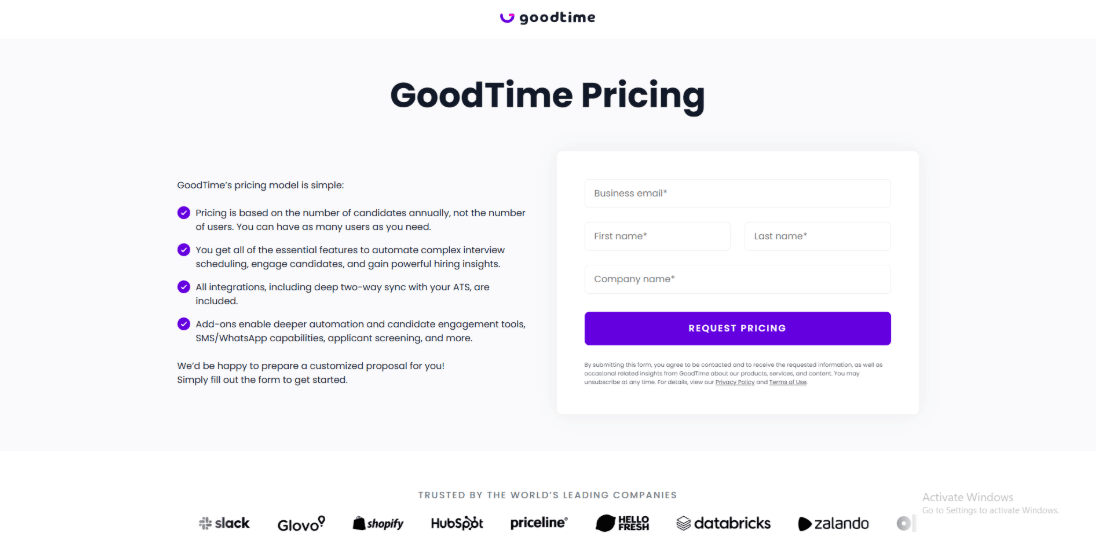
- GoodTime’s public pricing is quote-based and is positioned around candidate volume per year, rather than simple seat tiers.
- Expect add-ons for deeper automation and messaging, and plan for implementation time in the real cost. More details are on the official GoodTime pricing page.
When to Choose GoodTime
Choose GoodTime when you need enterprise-grade interview coordination, not just booking. It is a better fit for teams where panel complexity, ATS workflow control, and capacity bottlenecks are daily problems. If your hiring is lightweight, pick a simpler option and spend the time savings elsewhere.
Calendly
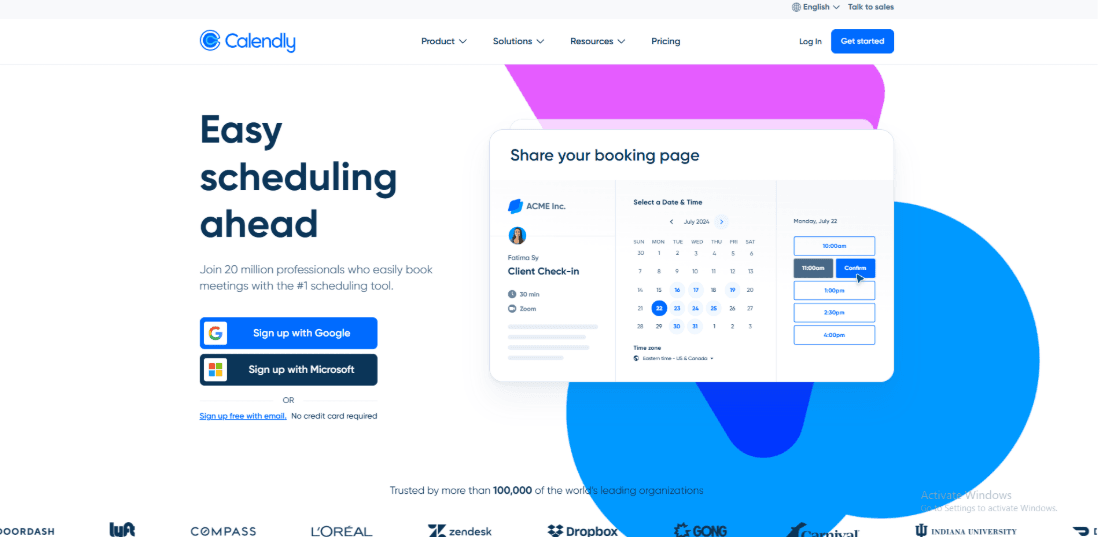
Calendly is widely known for fast link-based scheduling that connects directly with your calendar. Many teams adopt it quickly because the setup is simple and most people already recognise the product. For recruiters who want something familiar, it can be easier to introduce across a hiring team than a complex interview scheduling platform. That is why Calendly often appears in lists of interview scheduling software for recruiter teams that want a quick start.
Features
- Calendar Sync
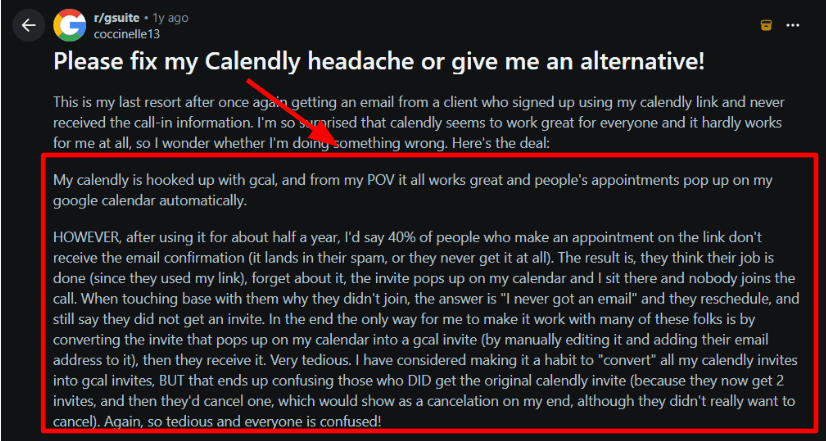
I connected Google Calendar in a couple of minutes and interviews started appearing on the right calendar right away. The booking process itself worked smoothly during testing. The bigger risk area is email delivery after the meeting is booked. I came across a Reddit post describing confirmations that did not reach candidates, which can happen when email deliverability becomes the weak point. It is worth testing this early if you are using Calendly as interview scheduling software for recruiter workflows.
- Meeting Tool Integrations
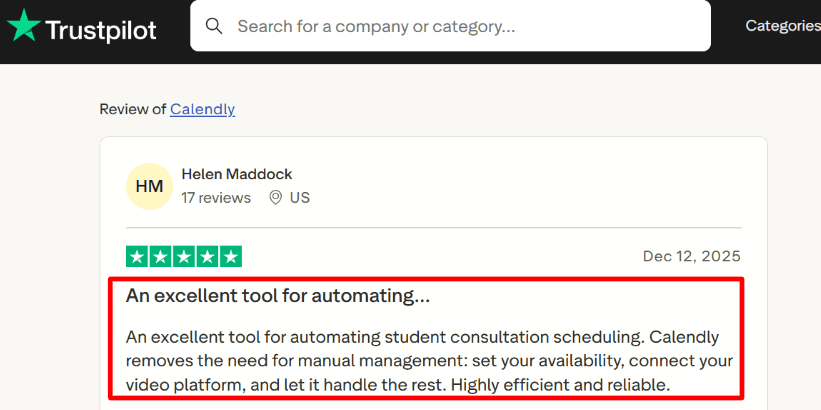
Adding Zoom or Google Meet is simple and the meeting link can be added automatically to the invite. A Trustpilot reviewer described it as highly efficient and reliable for scheduling student consultations. That aligns with the experience of quickly setting up meetings. I still like to test that the meeting link appears correctly in every confirmation message.
- Workflows Automation
Workflows allow you to send reminders and follow ups automatically after a booking is made. For recruiting teams this can reduce missed interviews and remind candidates to prepare before the call. When I tested this, it took a little time to adjust the reminder timing so messages felt helpful rather than repetitive.
- Routing and Round Robin
Routing rules distribute interview requests among available team members. Recruiting teams can use this to assign screening interviews across several recruiters or interviewers. It works best when routing rules are clearly defined so meetings go to the correct person.
- Notetaker and Contacts
Calendly also includes a Notetaker feature that captures notes and summaries from meetings. In some setups it can also create contacts for meeting attendees. This is something recruiting teams should be aware of because it affects how interview notes and candidate information are stored.
Pros
- Setup is quick. It is possible to create an account and share a working interview link within an hour.
- Calendar and time zone handling works reliably once connected.
- Automated reminders reduce manual follow up work.
- Round robin distribution helps share interviews across recruiters.
- Enterprise features are available for organizations that need SSO and centralized administration.
Cons
- Teams that run structured interview loops with multiple interview stages may prefer software built specifically for recruiting operations.
- Pricing increases as more team members are added.
- Some features are limited to higher plans.
- Email confirmation delivery can occasionally require testing to ensure candidates receive invites.
- Notetaker availability may vary across accounts and may affect how meeting data is handled.
Pricing
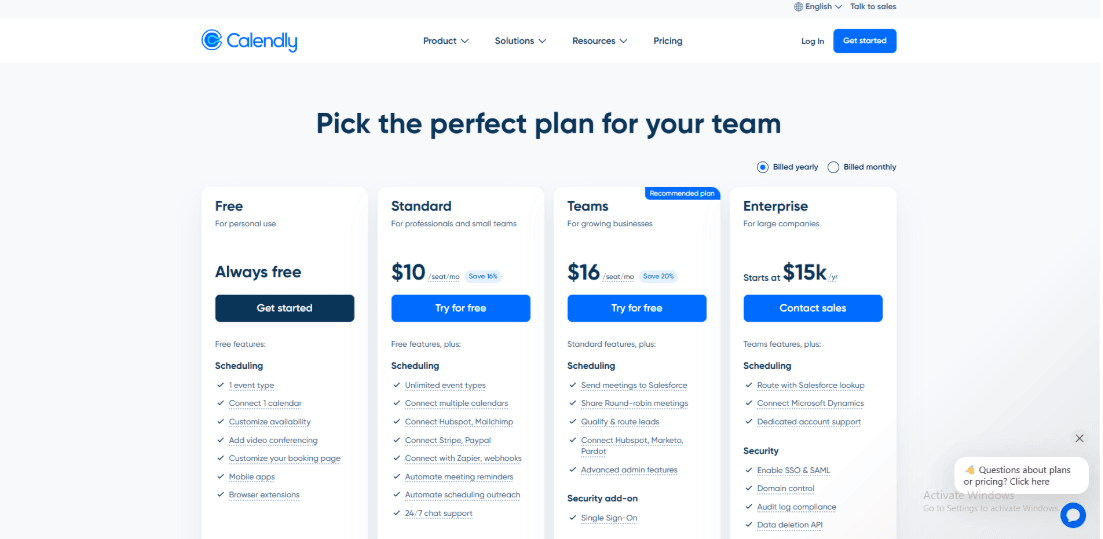
- Free plan for basic one-to-one scheduling, useful for a recruiter testing the workflow.
- Standard plan listed at $10 per seat per month, billed yearly.
- Teams plan listed at $16 per seat per month, billed yearly.
- Enterprise pricing is custom and designed for larger organizations that need advanced controls.
When to Choose Calendly
Calendly works well when recruiting teams want a fast way to schedule interviews. It suits teams that run large numbers of screening calls or early-stage interviews and need a dependable calendar-based scheduling tool. If your hiring process includes detailed interview stages, structured panel coordination, or deep connections with an applicant tracking system, a dedicated interview scheduling platform may provide better workflow support.
VidCruiter
VidCruiter is a video interviewing platform that helps companies screen, interview, and evaluate candidates remotely in a structured and efficient way.
Features
1. One-way interviews
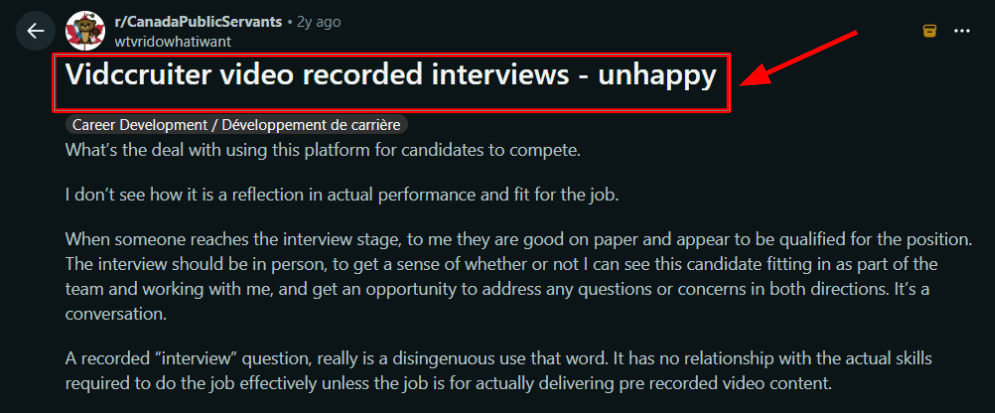
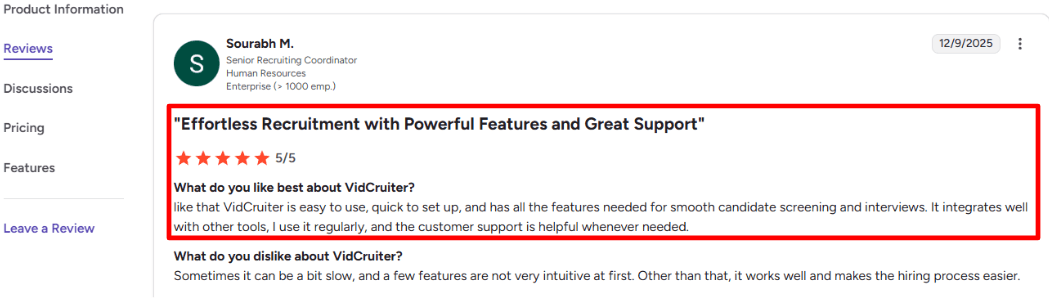
I tested the pre recorded interview feature for roles that attract a large number of candidates. It helped move the process forward quickly when calendars were already full. That said, it can feel impersonal if you treat it like a real conversation. I saw the same pushback in a Reddit review, screenshot below.
2. Live interview rooms
For panels, the built-in interview room feels more hiring-oriented than a generic meeting link you’d use in best interview scheduling software. Setup was mostly smooth, but once a setting was buried deeper than I expected, screenshot below.
3. Interview scheduling
The scheduling feature allows candidates to choose available interview times themselves. Calendar updates happen instantly and reminders are sent automatically. This is one reason some teams consider VidCruiter when searching for interview scheduling software for recruiter workflows. Scheduling connects directly with the interview stages so candidates move smoothly from booking to the actual interview.
4. Calendar integration
Calendar connections help interviewers share availability without manual coordination. Time zones are handled automatically, which helps when interview panels are in different locations. You can also add buffer time and booking limits to give interviewers breathing room between calls.
5. Structured scorecards
Scorecards make interviews less vibe-based, and I like having ratings captured right next to the interview context. A detail worth noting is enterprise ecosystem depth, for example the Workday Certified Integration on PR Newswire, which changes how tightly results can flow back into your ATS.
Pros
- Strong fit when you need scheduling plus governance. In my testing, the workflow feels designed for regulated or process-heavy hiring, not just booking slots.
- Quick to get a usable baseline working, even before deep customization.
- Calendar controls like buffers and limits are practical for interviewer load management.
- Scorecards help keep interviewer feedback consistent across panels.
- ATS ecosystem momentum is real if you live inside Workday or similar stacks.
Cons
- If you only need a simple scheduler link and reminders, pick a lighter interview scheduling software. VidCruiter can be more platform than you need for a small team running straightforward interviews.
- Pricing is quote-based, so budgeting upfront takes extra steps.
- One-way interviews can create candidate resistance, especially for senior roles.
- The suite breadth can slow procurement if you are trying to buy one narrow module.
- Integration depth still depends on your ATS setup and internal admin bandwidth.
Pricing
- VidCruiter is typically quote-based, and packaging depends on which modules you want.
- Expect pricing to vary by hiring volume, required integrations, and security requirements.
- In my experience, implementation effort is part of the real cost, not just licensing.
- If you need scheduling plus structured interviewing, bundles may make more sense than à la carte.
- Official starting point is the pricing request page on VidCruiter, which lists the modules they’ll scope into a quote.
When to Choose VidCruiter
Choose it when interview scheduling is only one part of the problem, and you also need structured evaluation, video interviewing, and audit-friendly workflows. It’s a better fit for enterprise or regulated teams where integrations and controls matter as much as the booking link. If you are mainly optimizing for simple self-scheduling with minimal setup, stick to a dedicated scheduling-first tool.
myInterview
myInterview is mainly known for one-way video interviews with built-in scheduling tools. It helps recruiters review candidates earlier in the process and move people forward faster. For teams looking at interview scheduling software for recruiter workflows, myInterview works best when screening is part of the hiring process. You can collect video responses first, then handle interview scheduling in the same system.
Features
- Async video screening
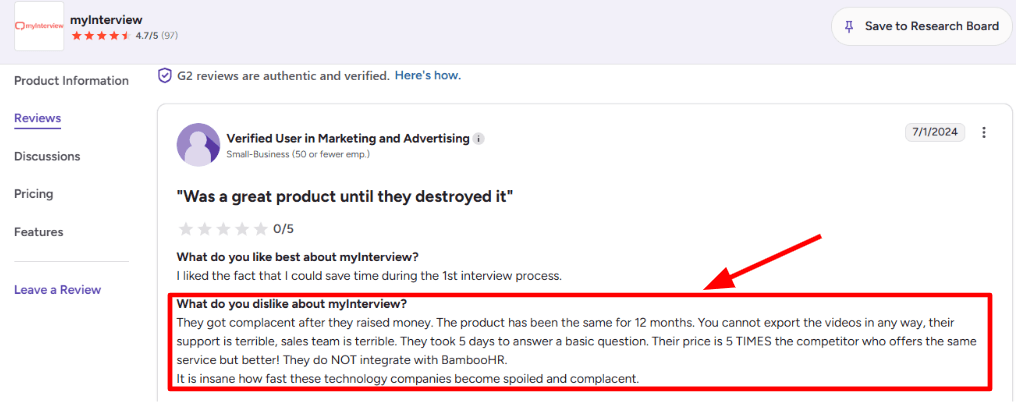
I set up a one-way video interview in a few minutes. Candidates record their responses and recruiters review them later. This works well when many people apply for the same role. Recruiters can review answers quickly before moving candidates to the next step. That said, I also saw a G2 review complaining you cannot export videos and support replies can take days, so I would treat portability and response time as a real risk. I’m sharing a screenshot of that review below so readers can judge the context.
- Candidate support
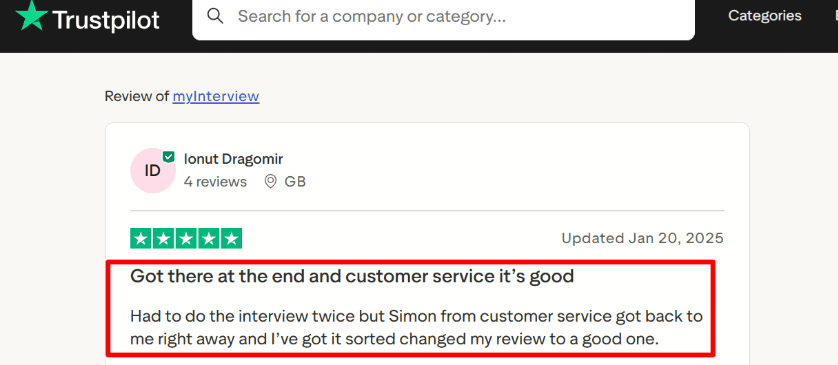
This aligns with a Trustpilot review in which a candidate had to redo an interview but received prompt support. The screenshot below provides additional context. where a candidate had to redo the interview, but support helped quickly, I’m adding that screenshot below too.
- AI shortlisting
The AI compatibility style scoring helps you sort large piles, especially when multiple recruiters review the same role. In my testing, the key is governance. You need a shared rubric, or the score becomes noise. This is where myInterview can go beyond basic interview scheduling software that only books slots.
- Calendar sync scheduling
Scheduling is more than picking times. It is about reducing back and forth, and avoiding double booking. myInterview positions scheduling as part of the same flow, so you can screen first and then coordinate interviews off the same candidate record.
- Security controls
When I evaluated it for an enterprise-style process, the security paperwork was the first thing procurement asked about. Their DPA spells out AES-256 at rest, TLS 1.2+ in transit, and access control expectations, which is useful when you need to document basics for internal review. One small setup detail that tripped me up was aligning access roles for reviewers. It took extra back and forth to get everything tidy.
Pros
- Strong for high-volume screening because you get video responses before you invest time in scheduling.
- Good collaboration loop for hiring teams.
- Useful AI ranking signal when the rubric is clear.
- Candidate experience can be branded and consistent.
- Scheduling sits closer to screening instead of being a separate tool.
Cons
- Pricing transparency can be limited and often ends up quote-based, as reflected in directories like Capterra.
- Export and portability concerns show up in user feedback, which matters if you need to share files outside the platform.
- Some teams will dislike one-way video as a default step for every role.
- Integrations can be a dealbreaker for specific stacks, like BambooHR, based on reported user experience.
Pricing
- Pricing is generally presented as sales-led rather than self-serve, so expect a demo and a quote.
- In practice, I’d budget time for procurement steps if you are mid-market or enterprise.
- For the most direct starting point, use the official page and request the right package based on volume and workflow needs.
When to Choose myInterview
If you are hiring at scale and want screening plus scheduling in one flow, myInterview is a better fit than a scheduling-only stack. If your process needs early signal from video responses and shared review across stakeholders, it can outperform “just book a slot” tools. If you mainly need calendar coordination and panel scheduling, a simpler Interview Scheduling Software is usually the cleaner choice.
Spark Hire
Spark Hire is video interview software designed for hiring teams that want a simpler way to conduct remote interviews without adopting a large enterprise recruitment platform. It fits lean recruiting teams that need video interviewing alongside basic scheduling but do not require complex panel coordination or highly structured hiring operations.
Compared with broader enterprise platforms, Spark Hire is easier to position as a focused video interview tool. It is most relevant when recruiters want to move candidates into video conversations quickly while keeping the workflow relatively straightforward.
Features
- Video interviewing
Video interviewing is the main reason to consider Spark Hire. It gives recruiting teams a dedicated environment for conducting remote candidate interviews instead of relying entirely on general-purpose meeting software.
This can be useful for distributed hiring teams, remote roles, and early-stage interviews where the recruiter and candidate are unlikely to be in the same location. Keeping the video interview within a recruitment-focused workflow can also make the process easier to manage than switching repeatedly between unrelated tools.
- Lightweight interview setup
Spark Hire is better suited to teams that want video hiring without a heavy operational setup. Recruiters can use it for relatively simple interview processes without first building complicated interviewer pools, approval rules, or multi-stage scheduling workflows.
That makes it more practical for smaller recruiting teams and growing companies that want to introduce structured video interviews but are not ready for a large enterprise hiring platform.
- Basic recruiter screen scheduling
Spark Hire provides some support for coordinating recruiter interviews, although scheduling is not its deepest capability. It can help recruiters move candidates toward an interview, but teams with complicated panels, several interview stages, or constantly changing interviewer availability may need a more specialised scheduling platform.
For straightforward recruiter screens and video interviews, the lighter scheduling workflow may be enough.
- Remote candidate interviews
Spark Hire can help teams interview candidates across locations without requiring either side to travel. This is particularly useful when hiring nationally or internationally.
Recruiters should still test the complete candidate journey before using it at scale. The invitation, scheduling step, interview access, and follow-up communication should all feel like one clear process rather than separate disconnected steps.
- Focused video hiring workflow
The product is more focused than an all-in-one applicant tracking or recruitment operations system. That can be an advantage for teams that already have a process for managing applications and only need a dedicated tool for video interviews.
The trade-off is that Spark Hire may not replace the systems used for applicant tracking, complex scheduling, panel management, or enterprise hiring governance.
Pros
- Strong fit for lean teams that rely heavily on video interviews.
- More focused than a large enterprise recruitment suite.
- Suitable for remote and geographically distributed hiring.
- Easier to adopt when the interview process is relatively straightforward.
- Useful for teams that have outgrown generic video meeting links but do not need complex hiring operations.
Cons
- Interview scheduling is not the primary strength of the platform.
- It is less suitable for complicated panel interviews.
- Recruiting teams may still need separate tools for applicant tracking and advanced scheduling.
- It has less enterprise workflow depth than platforms built for large-scale hiring operations.
- It may be unnecessary for teams that only conduct occasional video interviews.
When to Choose Spark Hire
Choose Spark Hire when video interviewing is a central part of your hiring process but your recruitment operations are still relatively simple. It is a good fit for lean teams that want a dedicated video interview workflow without the complexity of a large enterprise platform.
If your biggest challenge is coordinating multiple interviewers, managing structured interview loops, or connecting scheduling tightly with an ATS, GoodTime or VidCruiter may be a better fit. If you primarily need candidates to book simple recruiter screens, a scheduling-first tool such as Lunacal or Calendly will usually be more direct.
HireVue
HireVue is an enterprise hiring platform designed for organisations running large and structured recruitment programs. It combines video interviewing with assessment-led workflows and hiring automation, making it more suitable for enterprise screening than for simple recruiter scheduling.
The platform belongs in this comparison because interview scheduling is often connected to a much larger hiring process. However, HireVue should not be treated as a direct replacement for a lightweight scheduling link. Its value is more apparent when a company needs to screen, assess, and process a large number of candidates consistently.
Features
- Enterprise video interviewing
HireVue supports video interviewing as part of a broader enterprise recruitment workflow. This allows large hiring teams to use a more standardised interview process across roles, locations, and business units.
For organisations recruiting across several regions, keeping video interviews within the same hiring system can reduce inconsistency. However, smaller teams may find the surrounding workflow more extensive than they need for ordinary recruiter calls.
- Assessment-led screening
Assessments are a major part of HireVue’s positioning. Instead of using live interviews as the first meaningful evaluation step, companies can introduce structured screening earlier in the recruitment process.
This can be useful when a role attracts a large number of applicants and the recruiting team cannot speak with every candidate. It also changes the candidate journey, so teams should clearly explain why an assessment is required and what happens after it is completed.
- Hiring-process automation
HireVue is built for organisations that want to automate more of the early hiring process. Automation can help teams move candidates through repeatable screening stages without requiring a recruiter to coordinate every action manually.
This is most valuable when hiring volume is high and the process is already clearly defined. Automating an inconsistent recruitment process can create more confusion rather than less, so teams should establish their stages and evaluation criteria before implementation.
- Structured enterprise workflows
HireVue is better suited to process-driven recruitment than informal interview booking. Large organisations can use structured workflows to create greater consistency between recruiters, departments, and locations.
This depth is useful for enterprise hiring programs but can make the platform unnecessarily complex for a small business that only needs candidates to select an available interview time.
- Large-scale candidate screening
The platform is designed for recruitment programs where candidate volume and operational consistency are major concerns. Assessments, video interviews, and automation can help reduce the amount of recruiter time required during the earliest stages of hiring.
The main limitation is that HireVue is not primarily designed to solve simple scheduling problems. Teams should evaluate it as a broader hiring platform rather than choosing it only because they need an interview calendar.
Pros
- Strong fit for large-scale and process-driven recruitment.
- Combines video interviewing with assessment-led screening.
- Supports more structured hiring workflows than a general scheduling tool.
- Useful when several teams or locations must follow a consistent process.
- Can reduce repetitive coordination during high-volume recruitment campaigns.
Cons
- Too extensive for teams that only need simple interview scheduling.
- It is not designed primarily around candidate self-booking.
- Smaller recruiting teams may not use enough of the platform to justify its complexity.
- It is less suitable for lightweight or informal hiring processes.
- Implementation requires clear hiring stages and evaluation criteria.
When to Choose HireVue
Choose HireVue when your organisation runs a large recruitment program and needs assessments, video interviewing, automation, and structured workflows within the same hiring process. It is best suited to enterprise teams where consistency and scale matter more than quickly creating a simple interview link.
Do not choose HireVue solely to schedule recruiter screens. Lunacal or Calendly will be more appropriate for straightforward candidate self-scheduling, while GoodTime is better aligned with complex interviewer and panel coordination.
HireVox
HireVox is an AI-led candidate screening tool focused on the top of the recruitment funnel. Its role is to call and screen candidates before recruiters commit time to live interviews.
Unlike traditional interview scheduling software, HireVox is not primarily designed to help candidates select a time from a recruiter’s calendar. It is better understood as a pre-interview qualification layer that helps hiring teams gather initial information and decide which candidates should move forward.
Features
- AI-led candidate calling
HireVox uses AI-led calling as part of the early candidate screening process. This can help recruiting teams contact applicants before arranging a live conversation with a recruiter.
The potential advantage is scale. A recruiting team can introduce an initial screening step without requiring a recruiter to personally conduct every first call. However, the call should remain focused on collecting relevant information rather than trying to replace every part of a human interview.
- Top-of-funnel screening
HireVox is most relevant before formal interviews begin. It can help teams screen candidates at the top of the funnel and identify which applicants meet the initial requirements for a role.
This is particularly useful when a position receives more applicants than the recruiting team can reasonably call. Clear screening criteria are essential. Without a consistent set of questions and qualification rules, the output may not be useful enough to guide the next hiring decision.
- Pre-interview qualification
The platform can act as a qualification step between an application and a live recruiter interview. Candidates can be asked about basic role requirements before being moved into the main interview process.
Possible qualification areas include availability, notice period, location, role interest, and other straightforward requirements. The screening stage should avoid becoming unnecessarily long, especially when candidates will still need to repeat similar information during the live interview.
- Partial asynchronous screening
HireVox can support a screening process that does not require the recruiter and candidate to be available at exactly the same time. This provides some of the efficiency associated with asynchronous screening, although its workflow is different from one-way video interview platforms.
It is most useful when the goal is to collect early information before scheduling begins. It is less suitable when recruiters need to assess a candidate through a detailed video response or conduct a structured live interview.
- Handoff to the live interview process
The value of an AI screening tool depends heavily on what happens after the screening is complete. Qualified candidates should move into a clear next step, such as selecting an interview time or receiving follow-up from a recruiter.
HireVox therefore works best as one part of a wider recruitment stack. Teams may still need separate interview scheduling, video interviewing, applicant tracking, and panel coordination tools.
Pros
- Useful for screening candidates before recruiters spend time on live calls.
- Can support higher applicant volumes at the top of the funnel.
- Helps collect basic qualification information consistently.
- Reduces the need for recruiters to conduct every preliminary screening call.
- Provides a different approach from form-based or video-based asynchronous screening.
Cons
- It is not a complete interview scheduling platform.
- It does not provide deep panel interview coordination.
- Teams may still need a separate scheduling tool for qualified candidates.
- It is not designed around live or recorded video interviewing.
- Poorly designed screening questions may create an impersonal candidate experience.
- Complex or sensitive candidate conversations should still involve a recruiter.
When to Choose HireVox
Choose HireVox when your main problem occurs before interview scheduling. It is most relevant when recruiters receive a high number of applications and need a scalable way to conduct basic screening before inviting candidates to live interviews.
It should usually be paired with a scheduling tool rather than treated as a replacement for one. If you need candidate-friendly self-booking after qualification, Lunacal or Calendly can handle that stage. If your priority is recorded video screening, myInterview may be a better fit. For complex panel coordination, GoodTime is the stronger option.
Summary Table: Which interview scheduling system is the best fit for recruiters?
If I had to narrow this fast, I would split this market into three buckets: basic features, candidate experience, interview coordination, and screening format.
- Lunacal is a strong pick when you want a simple interview scheduling software with calendar integration, meeting reminders, intake form.
- GoodTime is the better choice when you have complex panelsm, rounds, and interviewer coordination
- VidCruiter fits teams that need a more formal hiring process with tighter workflow control and also need ATS integration
Methodology (how we picked + reviewed tools)
- We started with tools that are actually used for interview scheduling (coordinator-heavy platforms, recruiting workflows) and included a mainstream scheduler because plenty of teams still run hiring on “a booking link + calendars.”
- We judged every tool on the same real-world flow: candidate self-scheduling → rescheduling → panel/loop interviews → time zones → reminders. If a tool is great only when everything goes perfectly, it didn’t score well.
- We looked hard at team complexity, not solo usage: shared interviewer pools, templates, permissions, scheduling rules, and whether a recruiter can run the process without becoming a human router.
- We sanity-checked the “works with our stack” claim by reviewing calendar + ATS/HR integrations and how much setup friction you should expect (because “integrates” can mean “good luck”).
- We used public docs/pricing pages + review signals to support what each product is best at. G2 ratings shown are included as listed in the comparison table.
FAQs
Which is the most reliable interview scheduling platform?
The most reliable interview scheduling platform for recruiters is Lunacal. It holds a 4.9/5 rating on G2 and stays steady under real world load. You get reliable calendar integrations, round robin team scheduling, customizable intake forms, and security with GDPR controls. For complex panels at scale, GoodTime can fit better.
Compare interview scheduling tools for recruiters
The top interview scheduling tools for recruiters are Lunacal, GoodTime, and VidCruiter. Lunacal is great when you want fast candidate self booking with clean booking pages, team scheduling, and intake forms for role details. GoodTime shines in high volume recruiting with busy panels and lots of interviewers. VidCruiter fits teams that want scheduling tied closely to structured video interviewing. If early stage screening is the focus, myInterview is often the simplest start.
What country specific hiring data and localization nuances affect interview scheduling software?
Country specific nuances that affect interview scheduling show up as wrong times and legal headaches. Check these:
- US, UK, Canada, Australia and EU date formats, week start, and 12 hour or 24 hour display.
- EU GDPR consent and retention. Your tool should log consent and support deletion requests.
- Language templates and forms in German, French, Spanish, plus local phone and address formats and holiday calendars.
What features are essential in interview scheduling software?
Essential features are calendar and ATS sync, automatic time zone handling, candidate self serve reschedule, panel scheduling with buffers, reminders via email and SMS, and audit logs. Add role based permissions and duplicate booking protection so interviews do not collide.
How do I reduce interview no shows using interview scheduling software?
Reduce interview no shows by using reminders, calendar invites that include video links, and a one click reschedule page. Set a cutoff window and notify recruiters when candidates miss confirmations.
Summarize this content with AI


