

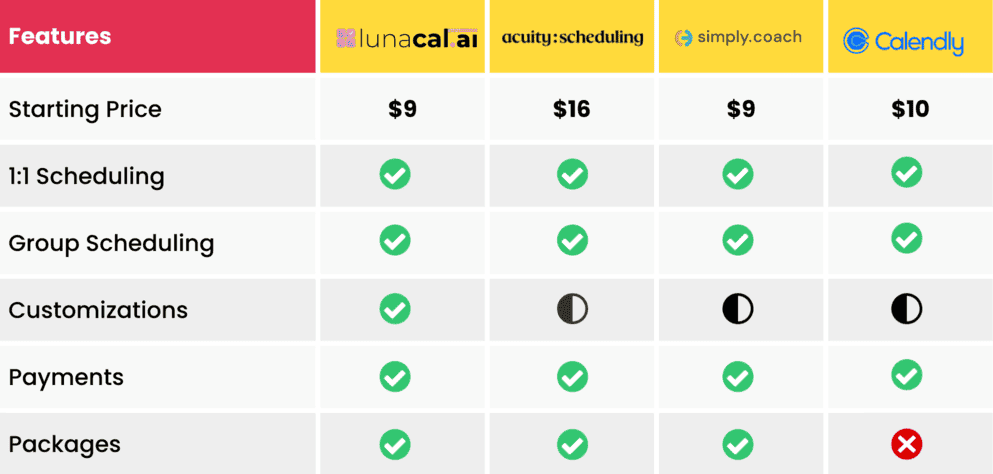
Introduction
A coaching link should do more than let someone grab a slot. It should make the client feel clear, prepared, and confident enough to book. Coaching scheduling software is a booking tool built specifically for coaches — it combines calendar sync, intake forms, payments, and session packages so clients can book, pay, and arrive prepared in one step. I tested the best coaching scheduling software with that lens because coaches usually need more than basic availability. They need intake questions, paid sessions, reminders, packages, and a booking page that builds trust before the call.
This guide is written for life, business, executive, fitness, and health coaches running 1
or group sessions.I reviewed Lunacal, Calendly, Acuity Scheduling, Simply.Coach, YouCanBookMe, Koalendar, and Book Like A Boss across real coaching use cases. I tested one-to-one calls, paid discovery sessions, multi-session programs, group bookings, calendar sync, client reminders, and intake flows. I also checked public sources like G2, Trustpilot, Reddit, official pricing pages, help docs, and product screenshots so the findings are easy to verify. Two of these — Calendly and YouCanBookMe — have genuinely usable free plans, so budget alone doesn't have to keep you from starting.
For coaches serving clients, I also looked at practical details like time zones, payment support, SMS or email reminders, and sensitive-data handling where relevant. If you're also weighing coaching-specific practice-management platforms like CoachAccountable or Paperbell alongside pure scheduling tools, I cover how they fit into the picture in the FAQs below. Here are the coaching scheduling tools I would shortlist first.
Coaching Scheduling Software Comparison
Best tools by coaching use case
| Use case | Best tool | Why it fits | Starting price |
|---|---|---|---|
| Multi-session packages | Lunacal | Rich pages with testimonials, videos, context | $9 |
| Simple 1 coaching calls | Calendly | Fast setup, clean booking links, reliable sync | $10 |
| Paid sessions with checkout | Acuity Scheduling | Strong payments, intake, and confirmations | $16 |
| Coaching programs | Acuity Scheduling | Tracks sessions, subscriptions, credits | $16 |
| Multi-coach teams | Lunacal | Round-robin routing, team availability flows | $9 |
| Intake-heavy coaching | YouCanBookMe | Strong forms and pre-session data capture | $7.20 |
| All-in-one booking + sales page | Book Like A Boss | Booking, content, and payments combined | $15 |
| Budget-friendly option | Koalendar | Basic scheduling at low cost | $6.99 |
| Free to start | Calendly or YouCanBookMe | Real free tier before you add payments or automation | $0 |
Feature and pricing comparison table
| Feature | Lunacal | Calendly | Acuity Scheduling | YouCanBookMe | Book Like A Boss |
|---|---|---|---|---|---|
| Free plan | No | Yes | No | Yes | No |
| Starting price | $9 | $10 | $16 | $7.20 | $15 |
| Payments | Yes | Yes | Yes | Yes | Yes |
| Packages / subscriptions | Yes | No | Yes | No | Yes |
| Intake forms | Yes | Basic | Advanced | Advanced | Yes |
| Team scheduling | Yes | Yes (higher tiers) | Yes | Yes | Yes |
| Round-robin routing | Yes | Yes | Yes | Limited | Limited |
| Booking page customization | High | Low | Medium | Medium | High |
| Calendar sync | Multi | Multi | Multi | Multi | Multi |
| SMS reminders | Yes | Yes (paid) | Yes (higher tier) | Yes | Yes |
| Best for solo coaches | Yes | Yes | Yes | Yes | Yes |
| Best for coaching teams | Yes | Limited | Yes | Limited | Yes |
Deep-dive into scheduling tools for coaches
Lunacal
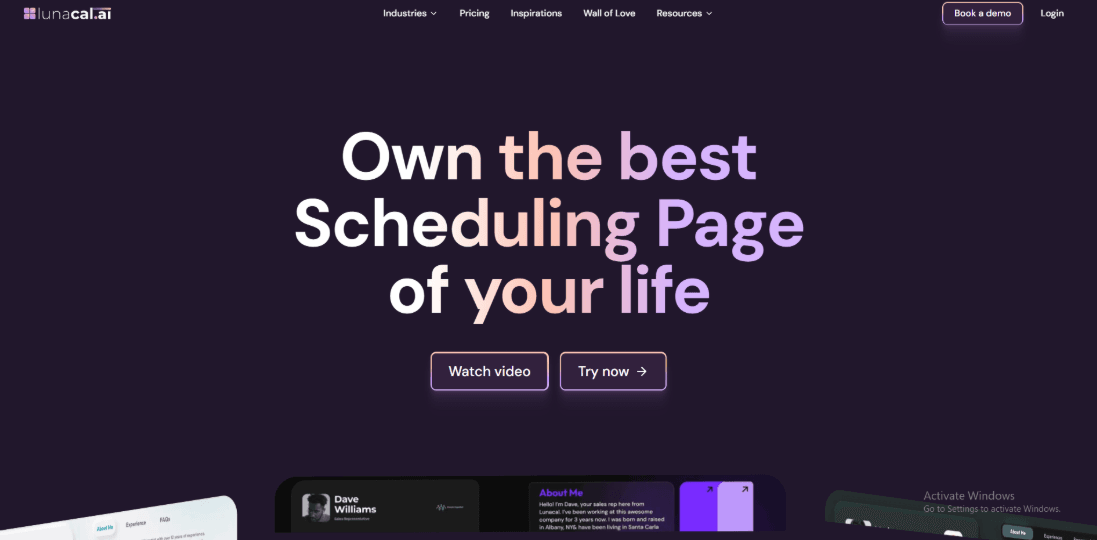
Lunacal is cheap coaching scheduling software built to handle multi-session packages and coaching that needs recurring sessions. Lunacal is rated 4.9/5 on G2, placing it among the highest-rated scheduling tools for coaches.
Features
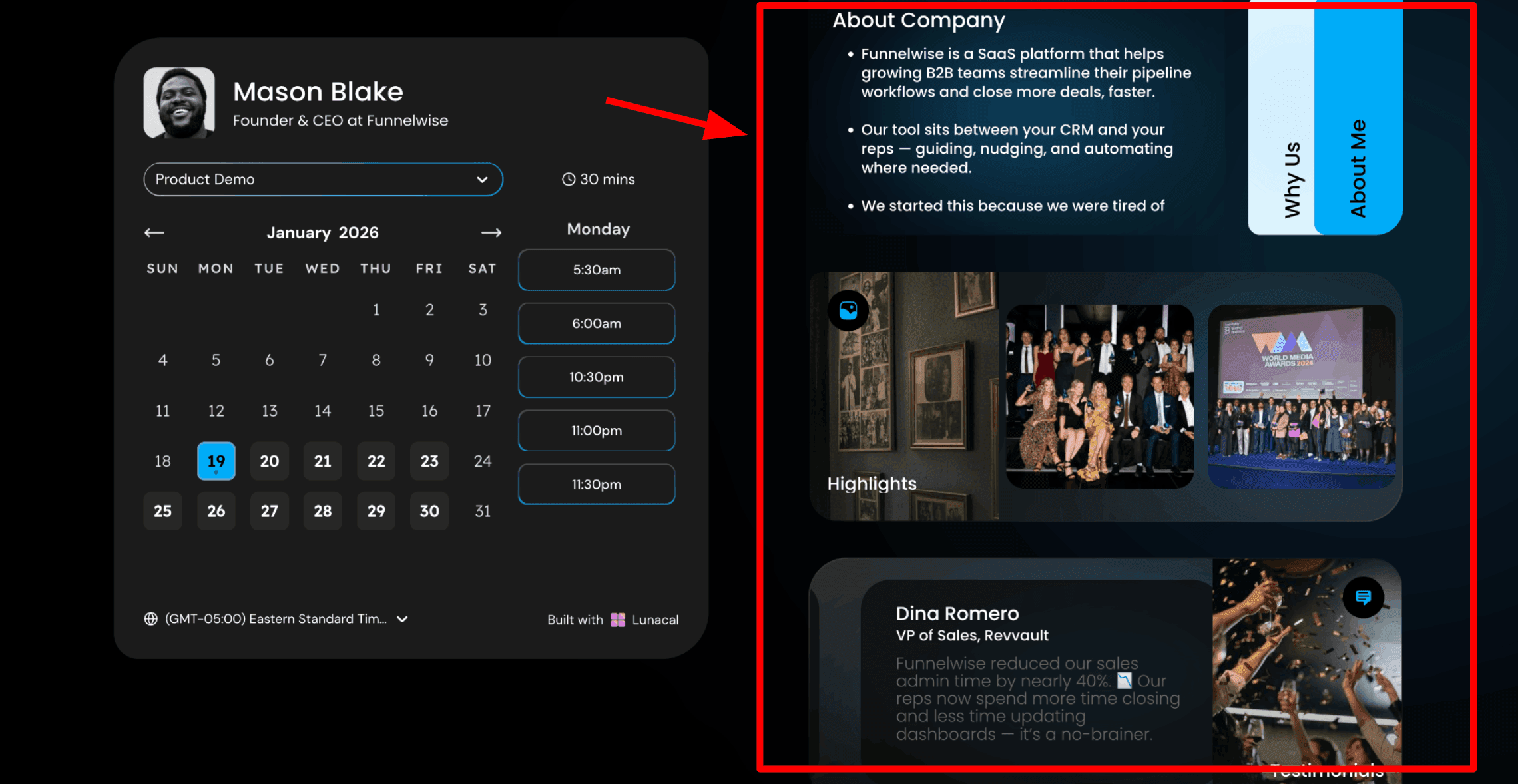
1. Scheduling pages with rich content: The first thing you notice is the booking page. Instead of a plain calendar link, you can add helpful information next to your available time slots. You can include text, testimonials, images, videos, or documents that explain your coaching services. This helps people understand who you are and what you offer before they book.
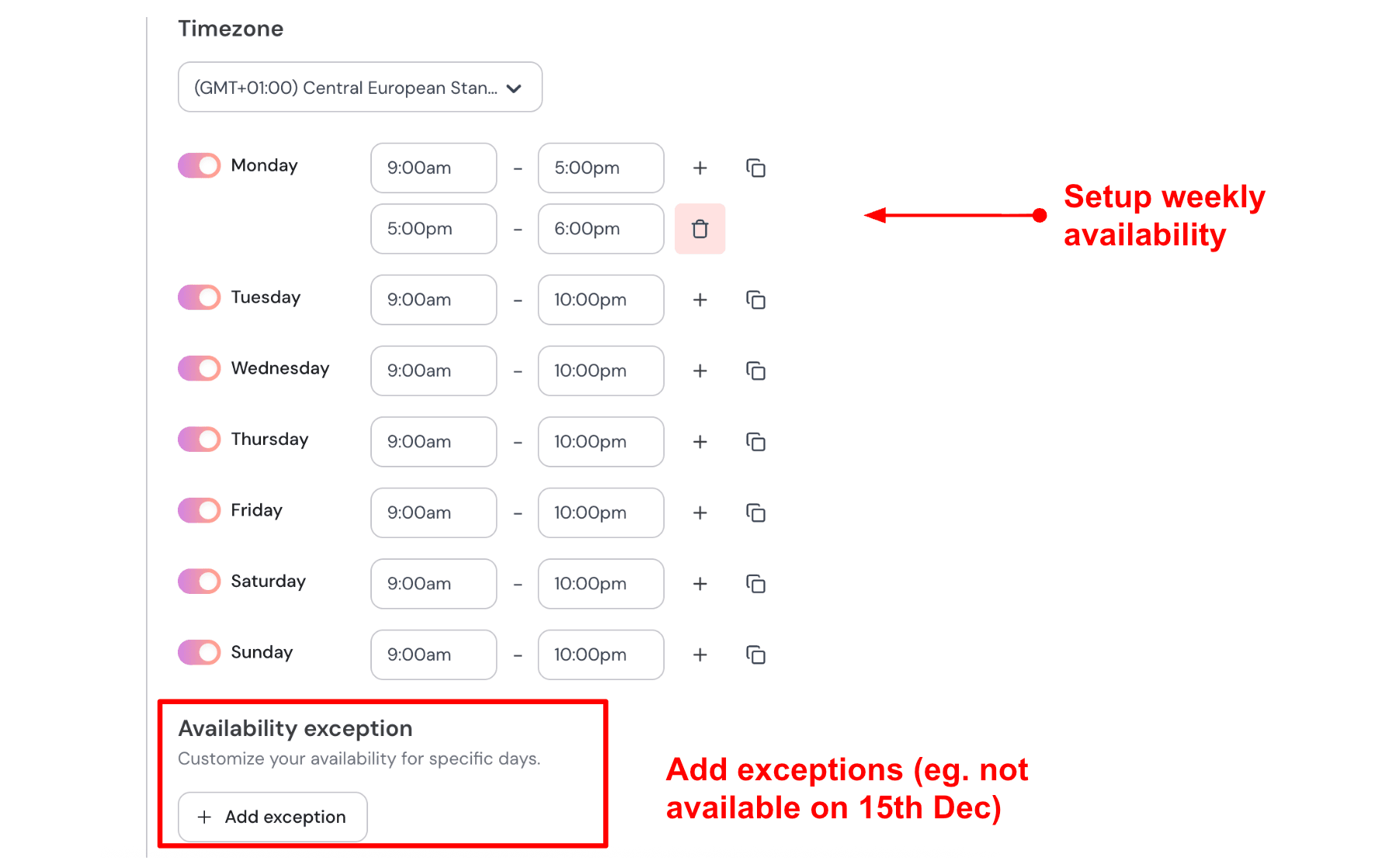
2. Availability Rules: Lunacal lets you control when people can book sessions. You can set rules that protect your schedule and prevent unwanted bookings. You can add buffer time between sessions, so you have time to prepare or take a break. You can also set a minimum notice period so clients cannot book at the last minute. If you coach four clients per day and need 15 minutes between sessions, you can set a daily limit and a buffer rule. Once those slots are filled, the rest of the day becomes unavailable. Here's a screenshot showing availability setup:
3. Drag and drop scheduling page editor: This is how you build the page. Lunacal gives you a simple drag-and-drop editor where you can add blocks such as text, testimonials, images, videos, documents, forms, and more. You just add what you want, arrange it, and publish your coaching scheduling page. Here's a screenshot showing different widgets in the scheduling page:
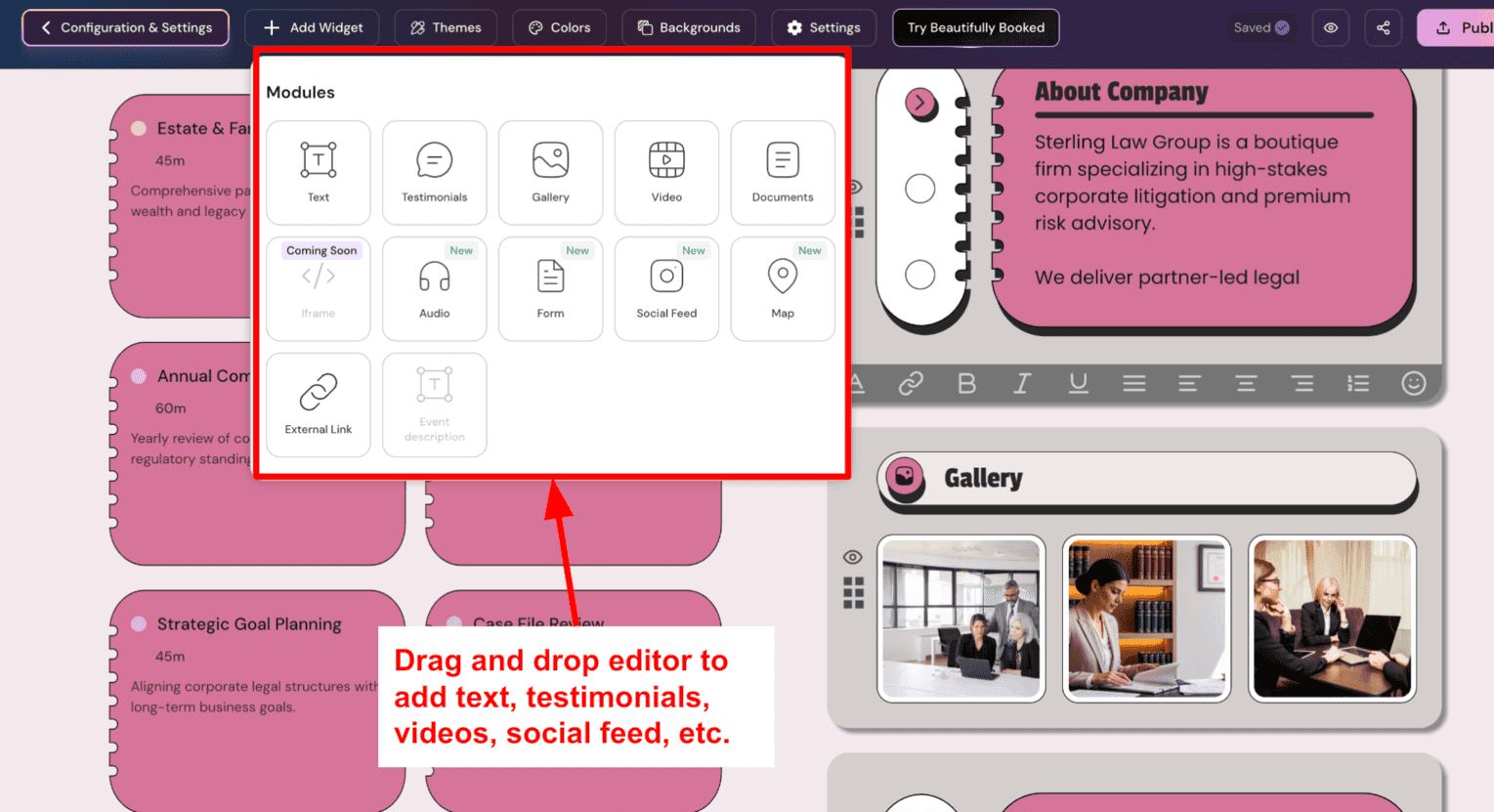
4. Sync multiple calendars to avoid conflicts: Lunacal allows you to connect more than one calendar. One calendar is used to store the booked sessions, while other calendars are checked for conflicts. If a time slot is already occupied in any connected calendar, that slot will not appear as available. For example, you might save sessions to your work calendar while connecting your personal calendar for conflict checking. This helps prevent double bookings and keeps your availability accurate.
5. Custom intake questions: You can add questions to the booking form. Clients answer before confirming the session. You receive useful context in advance. Keep the form short and focused. For a discovery session, you can ask what area the person wants help with and include one short question about their biggest challenge. This gives you enough insight to start the call with a clear context. Check out the intake form I created:
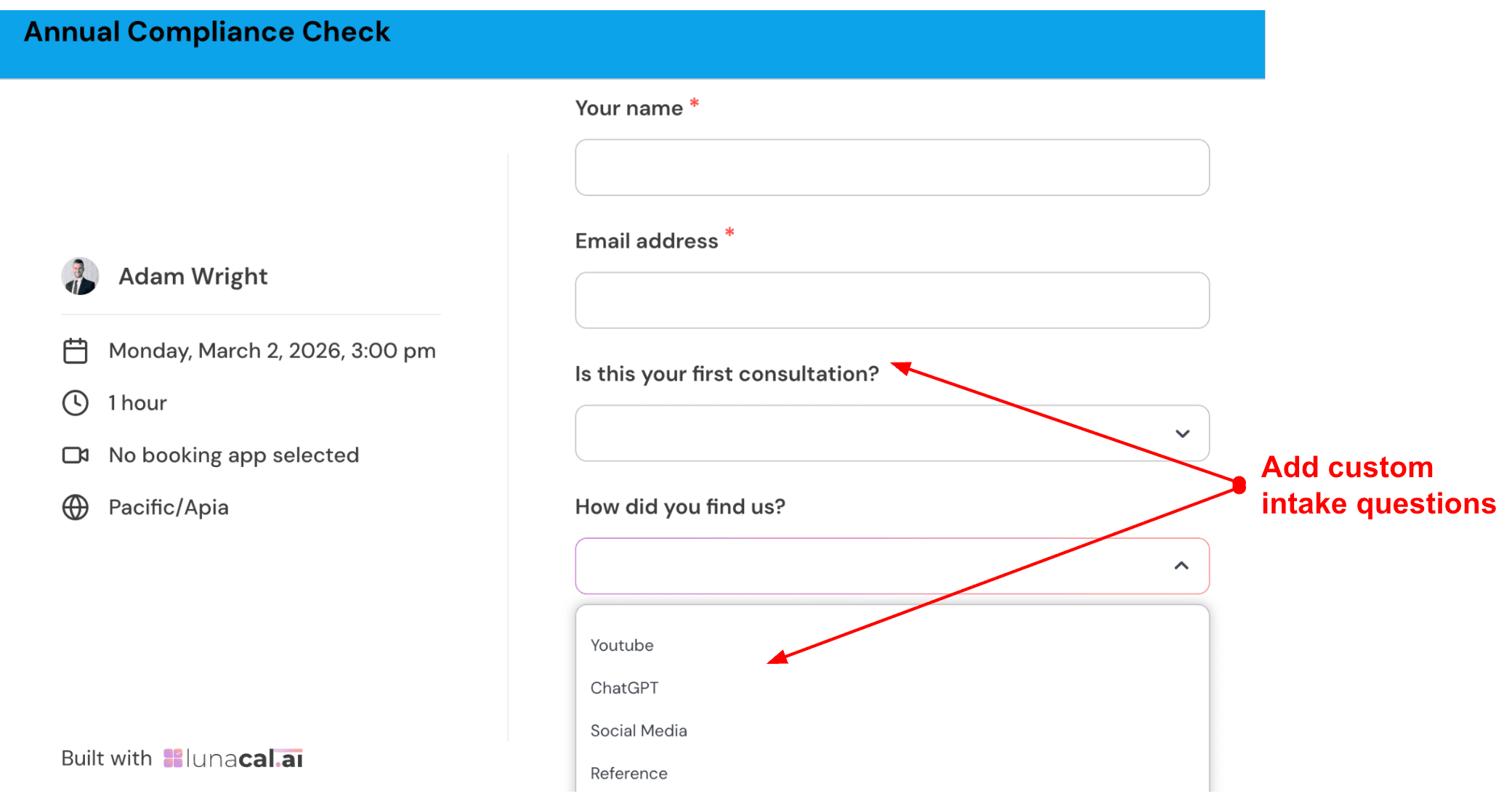
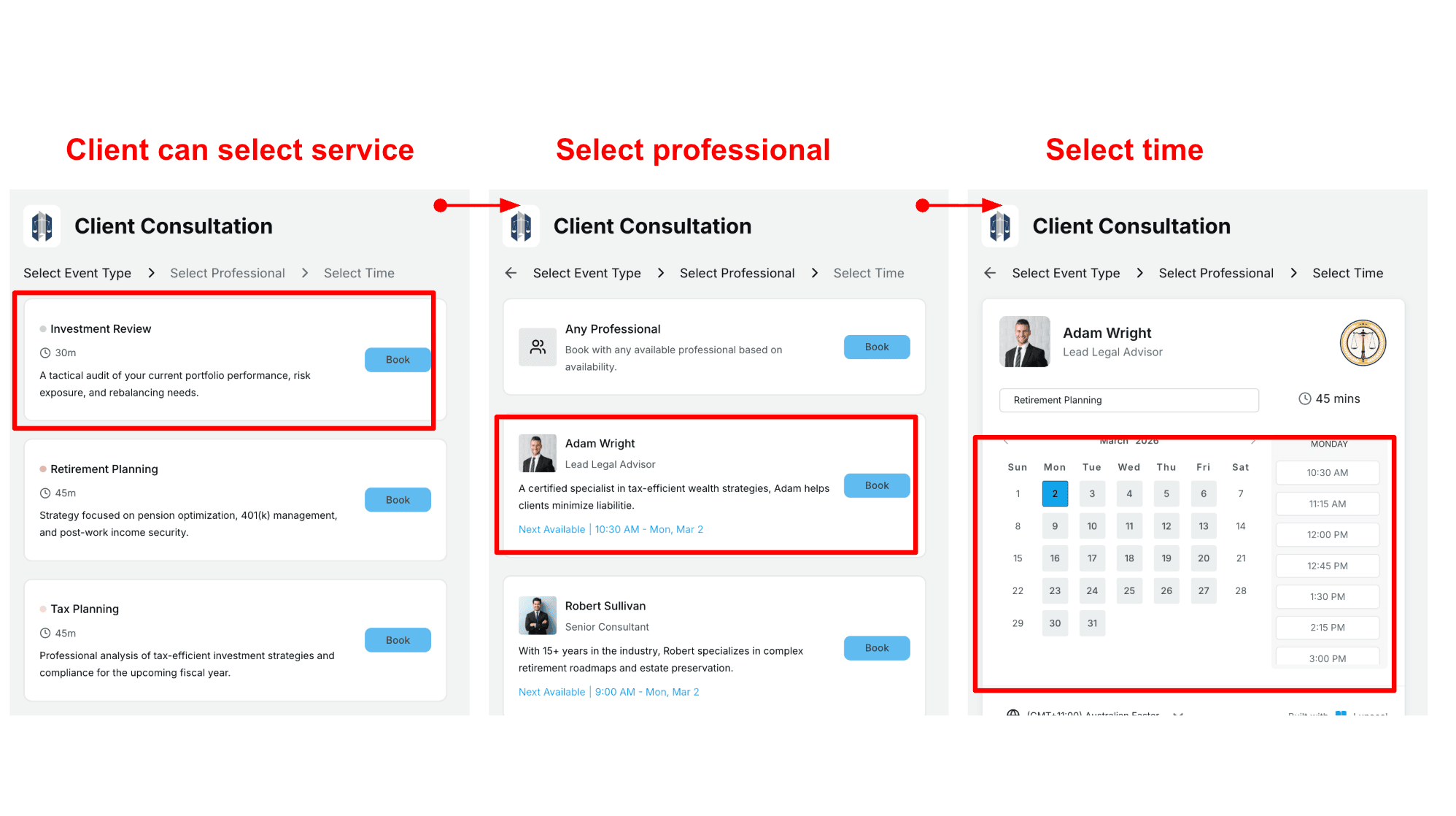
6. Team scheduling flow: If you work with multiple coaches, Lunacal supports team scheduling. Visitors can choose a service, select a coach, and then pick an available time. You can also allow visitors to book the first available coach automatically. This works well for coaching practices that serve many clients or offer multiple types of sessions. Here's a screenshot of how it looks in actual flow:
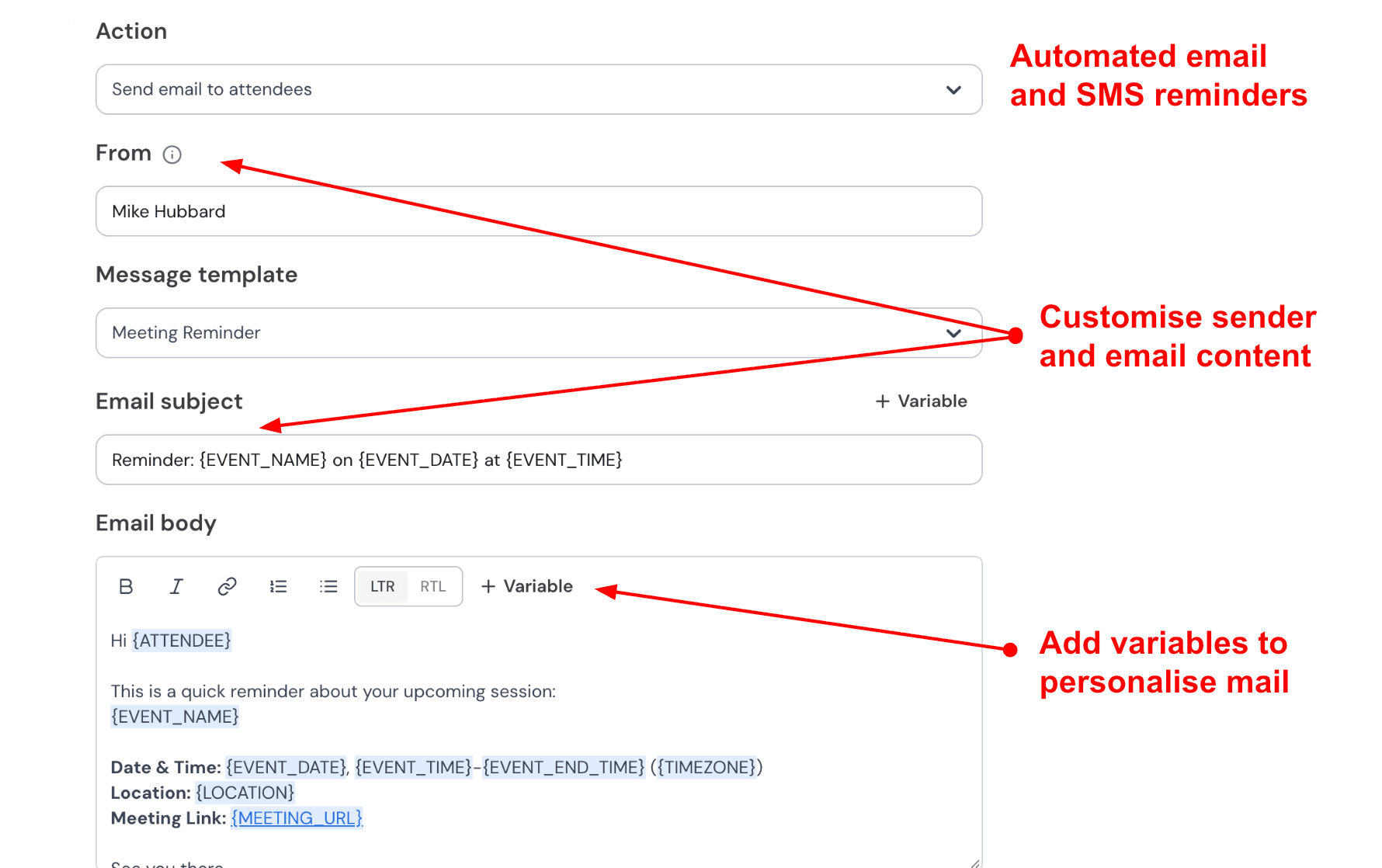
7. Automated email and SMS reminders: You can set automatic reminders by email and SMS. You control the message and the timing. Session details are filled in automatically. I recommend one email reminder 24 hours before and one SMS reminder one hour before. Short and clear messages work best.
Pros
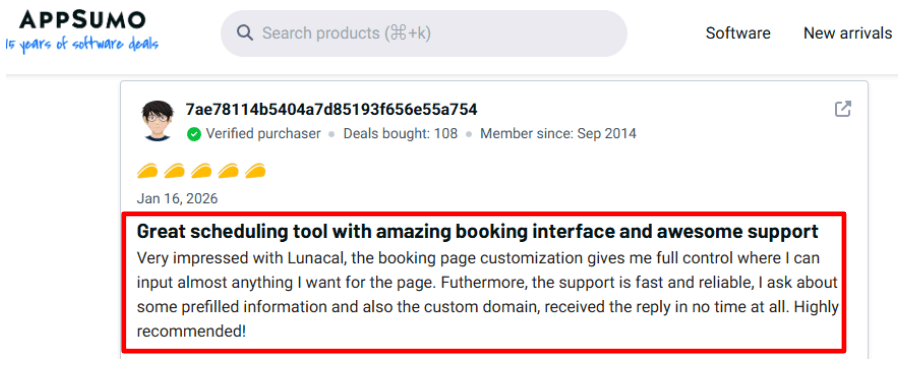
- The booking process is smooth for clients. Rescheduling occurs within the system, and updates are applied automatically. I saw the same in a G2 review, and I’m adding that screenshot below.
- Stripe and PayPal payments are built in, along with discount coupons that reduce the price of a session.
- You get practical controls like buffer time and notice periods.
- If you grow and add more coaches, team scheduling options are available.
Cons
- If you only need a simple internal scheduling software for quick coaching calls, a basic coach scheduling tool can be a better fit than Lunacal.
- In that scenario, Lunacal’s richer page setup can feel like extra work you will not use.
- Creating multiple similar event types can take longer than it should because there is no obvious “duplicate event type” flow.
- If you need a full public API, review the current documentation carefully before deciding. See AppSumo Q&A on API and webhooks
- If you run high-volume classes with complex capacity rules, you may need to validate edge cases before committing.
- The rich-page concept is different from classic scheduling software, so some clients may take a second to orient themselves.
Pricing
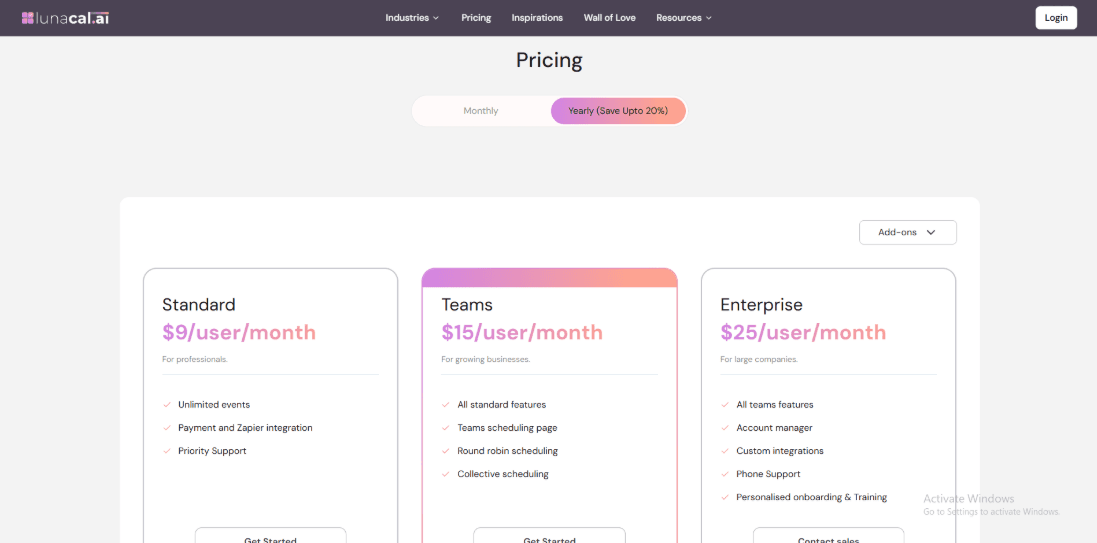
- Paid plans cost per user, which is good for coaching teams.
- Standard costs $9 per user each month. Each user pays $15 per month for Teams. Enterprise levels get more expensive depending on how much support and customization you need.
- Annual billing can help you save money each month. I would rather test once a month and then switch when the workflow is stable.
- Official details are on the Lunacal pricing page.
When Should Coaches Choose Lunacal
Lunacal works well if you sell premium coaching and want your booking page to build confidence before the call. It makes sense when you want scheduling, payments, and reminders handled together. If your coaching style is personal and trust-based, the added detail on the booking page can help sessions start focused and efficient.
Calendly
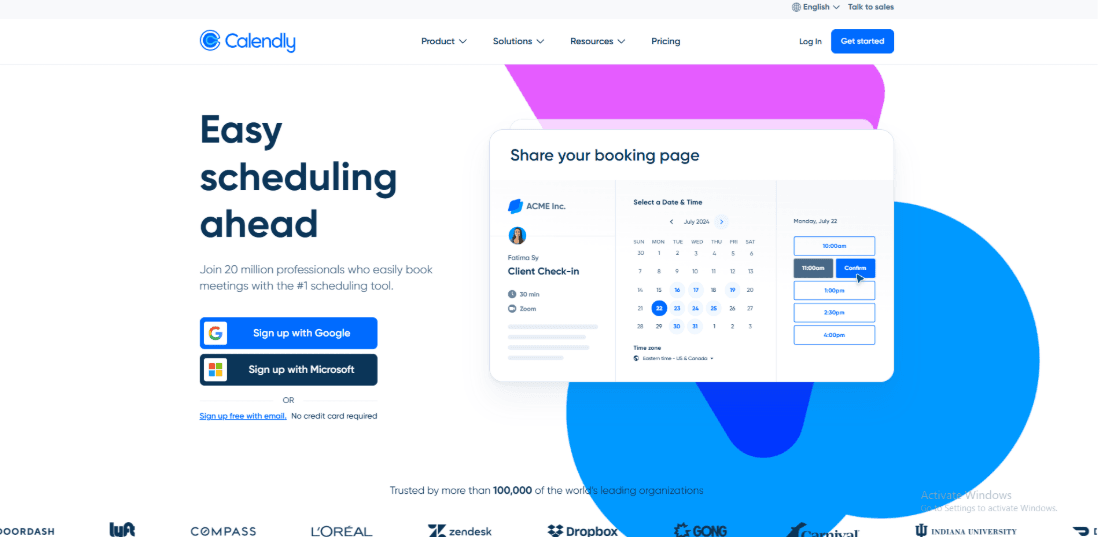
Calendly is a popular scheduling tool for coaches that focuses on one core job: helping people book time with you quickly and clearly. If you want a simple scheduling link that connects directly to your calendar, this tool does that very well.
Features
-
Calendar sync: I linked Google Calendar, and it immediately blocked the times when I was busy. Everything is easier when calendar sync works right. You do not have to worry about double bookings or manual updates. If you use iCloud, make sure to check the Help Center for the most up-to-date connection policies before you set anything up. Connection policies can change, and it is better to confirm early. Strong calendar sync is a must for coaches who want reliable scheduling software.
-
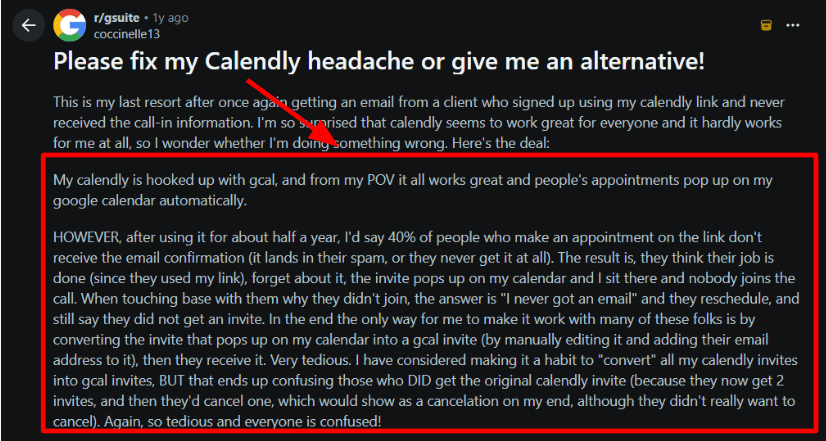
Reminders and workflows: Automatic reminders can help reduce missed calls, especially for clients who rely on email notifications. Email delivery can sometimes fail for reasons outside the platform, such as spam filters or inbox settings. Some users report missed confirmation emails, which can force coaches to resend session details manually. Pay particular attention to the reminder settings if your clients frequently miss emails or have communications land in spam bins. Customise your scheduling and messaging using Calendly workflows. I’ve also seen a Reddit review describing clients not receiving confirmation or call info. I’m adding a screenshot of that review below.
-
Video meeting links: When I connected a video tool like Zoom or Google Meet, Calendly created the meeting link automatically and added it to the calendar invite. That small detail saves time every week. You do not have to copy and paste links or send follow-up messages with meeting details. If you run multiple sessions a day, this makes the experience smoother for both you and your clients.
-
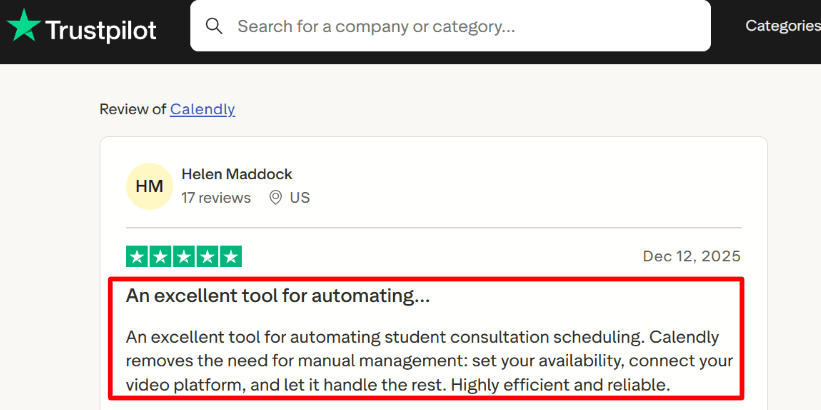
Payment integration: For paid sessions, Stripe is easy to connect. Clients pay at the time of booking, which reduces last-minute cancellations and unpaid calls. If you sell single sessions or paid discovery calls, this works well. For more complex offers such as bundles or tiered programs, you may still want a separate checkout system. As coaching scheduling software goes, Calendly keeps payments simple and focused on individual bookings. A Trustpilot review calls it “highly efficient and reliable” for student consultation scheduling.
- Meeting polls: Meeting Polls are handy for getting things done in a group. People vote on times after you give them a link, and once a clear choice comes up, you confirm the last time slot in Calendly. This helps when you teach groups or work with teams that are in different time zones. If you run multiple groups at once, label your poll links clearly. Booking links and poll links can start to look similar in your dashboard.
Pros
- It is easy to set up. You can create a working link and sync the calendar in one sitting.
- No-show rates can go down if clients receive their reminders effectively.
- Meeting polls help get things done in a group.
- With Stripe, you can get paid for your reservations in advance.
Cons
- If you need to keep thorough records of your clients and follow routine plans, you will probably require another system in addition to Calendly.
- Apple Calendar connections have had limitations in the past, so make sure you know the current status.
- Some teams have said that they sometimes have trouble getting invites. Doing test bookings early helps you find this.
- Pricing is per user. Costs increase as you add assistants or more coaches.
- Advanced routing and team management features are usually included in higher-priced plans.
Pricing
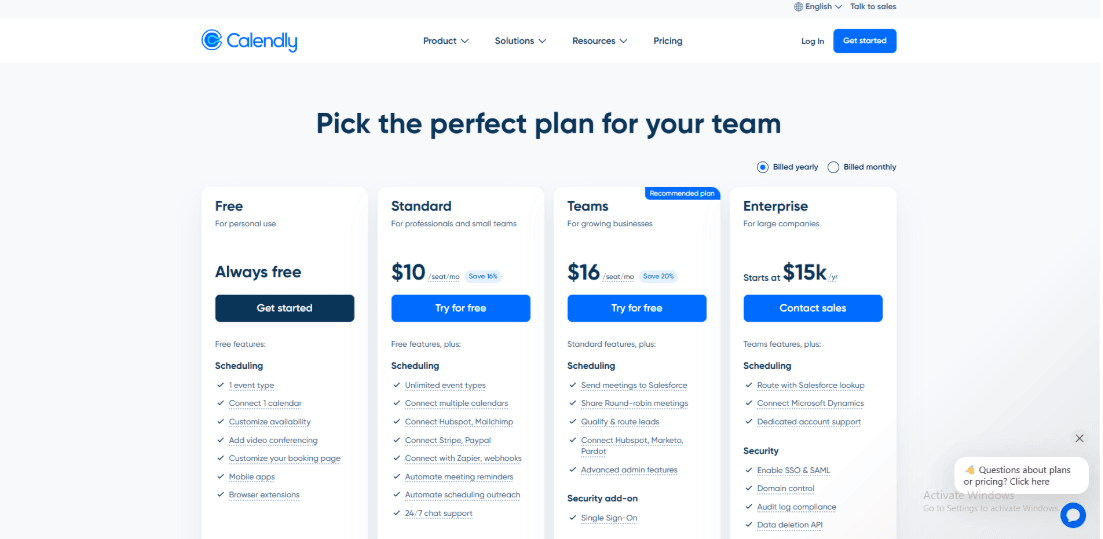
- Calendly is priced per user. There is a free plan, and paid plans unlock more event types, automation, and team tools.
- Standard and Teams are the main paid options. Enterprise plans are built for larger organisations. For most coaches, the real cost depends on whether you need workflows, payment collection, and multiple event types per coach.
- Always review the Calendly pricing page before making a final recommendation.
When Should Coaches Choose Calendly
Calendly is a good choice if you are a solo coach or part of a small team focused on easy booking. It handles scheduling and paid sessions well, though you may still need a separate tool for client notes and program delivery.
Acuity Scheduling
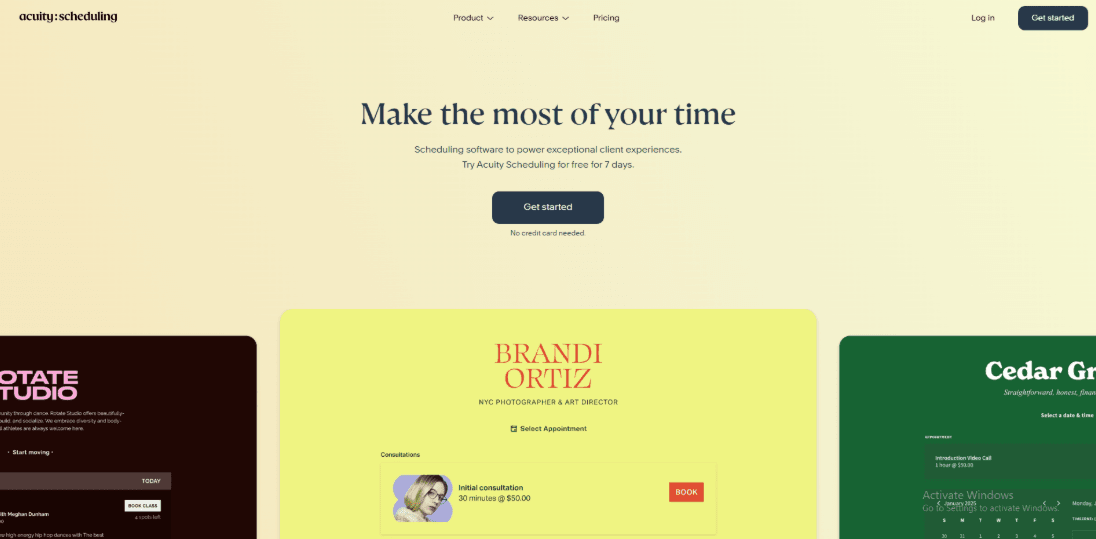
Acuity Scheduling is a popular scheduling software for coaching that focuses on paid appointments and detailed intake forms. Many service businesses use it because it feels organised and reliable. Acuity is a good option if you want scheduling software for your coaching business that supports detailed business workflows.
Features
-
Payment integration: I set up Stripe in less than an hour and tested a complete paid booking. The payment flow worked smoothly in my test booking. Charging per session means you don't have to send invoices when someone books. Clients pay in advance, and the session is set. I noticed one small thing about the email formatting. The receipt and confirmation message looked different on each device.
-
Client intake forms: Acuity lets you ask detailed questions during booking. You can collect goals, background details, agreements, and consent. The answers are attached to the client profile. This makes sessions more productive because you already understand the context before the first call.
-
Availability rules: You can control your schedule carefully. Add buffer time between sessions. Block same-day bookings. Set a minimum notice period. Limit how far in advance someone can book. I tried out not letting people make appointments on the same day and adding a 15-minute pause between sessions. Everything went as planned. These restrictions help coaches who work with more than one client a day save energy and avoid getting too busy.
-
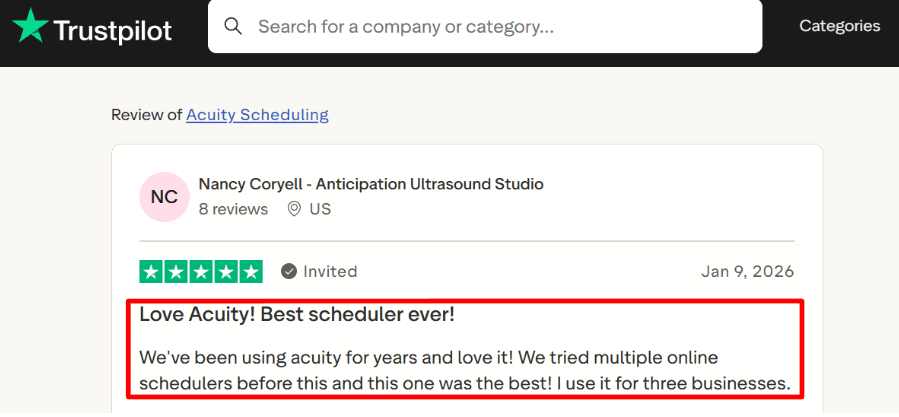
Packages and subscriptions: Acuity offers built-in packages, subscriptions, and gift cards. The system keeps track of how many sessions each client still has left if you sell multi-session packages. Coaches often need their scheduling tool to track payments and remaining sessions, not just time slots. Once the calendars and meeting types are set up correctly, everything stays in order even when there are multiple offers. A Trustpilot review said they run it for three businesses, and it matches what I’ve seen in setup. I’ll add a screenshot below for readers.
- Squarespace billing link: Squarespace owns Acuity. In many setups, billing is managed through a Squarespace account. This affects who controls payment details and who owns the account. If you work with assistants or business partners, clarify who holds billing access early.
Pros
- It is good for coaches who offer paid sessions and structured programs.
- Payments, intake forms, reminders, and gift cards are handled in one system.
- Availability settings are flexible enough for real coaching schedules. Paid discovery calls run smoothly once configured.
- Multi-staff calendar support helps when you add associate coaches.
- Packages and contracts enable monitoring to be less time-consuming.
- Mobile access makes it easier to manage bookings between sessions.
Cons
- The configuration can feel too much if you require a basic link where someone picks a time.
- SMS reminders may require a higher-tier plan, which can raise costs for coaches who rely on text follow-ups.
- In many cases, billing is linked to Squarespace, which can catch teams by surprise.
- To be eligible for HIPAA, you need to have a specific plan level, set it up correctly, and sign a Business Associate Agreement. Always confirm current compliance details directly before storing protected health information.
- There are many settings in the admin area.
Pricing
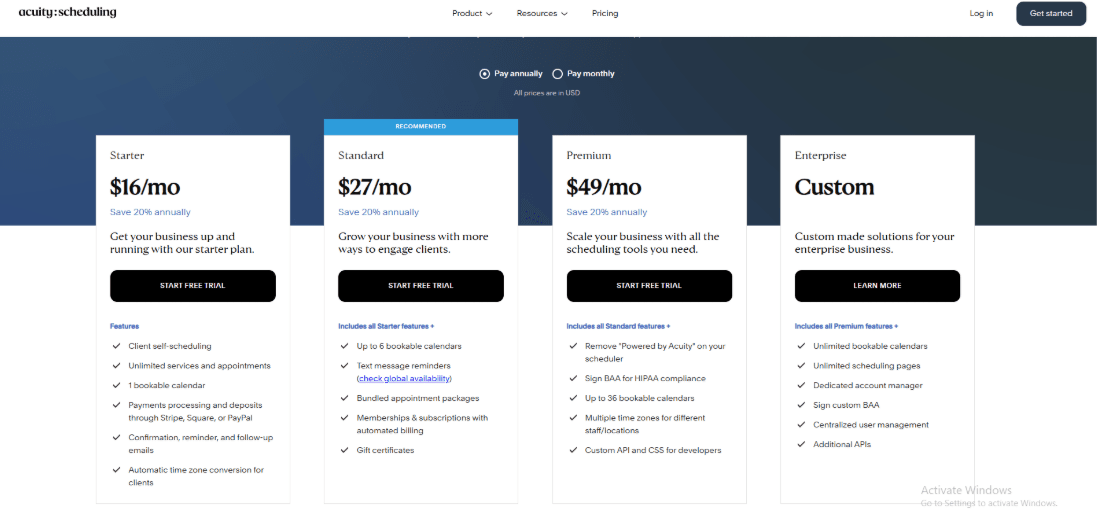
- Acuity offers a 7-day free trial. There is no permanent free plan.
- Paid plans typically start at around $16 per month with annual billing.
- Higher tiers add more calendars, staff accounts, and messaging features.
- For coaching businesses, pricing increases when you add more coaches or need SMS reminders.
- Always review the official pricing page before deciding, since plan details can change.
When Should Coaches Choose Acuity Scheduling
Choose Acuity when you want coaching scheduling software that handles paid bookings, detailed intake, and program tracking in one place. It works well for coaches running structured offers, multi-session programs, or team-based practices. If your goal is a very light scheduling link with minimal setup, this may feel like more system than you need. For coaches building a stable, process-driven business, Acuity remains one of the more complete coaching scheduling software options available.
YouCanBookMe
YouCanBookMe is a good scheduling software for your coaching business if you want booking links with strong forms and built-in reminders. It focuses on helping you collect the right details before the session and keeping clients informed after they book. It also supports payment collection, which matters for coaches who charge before the session.
Features
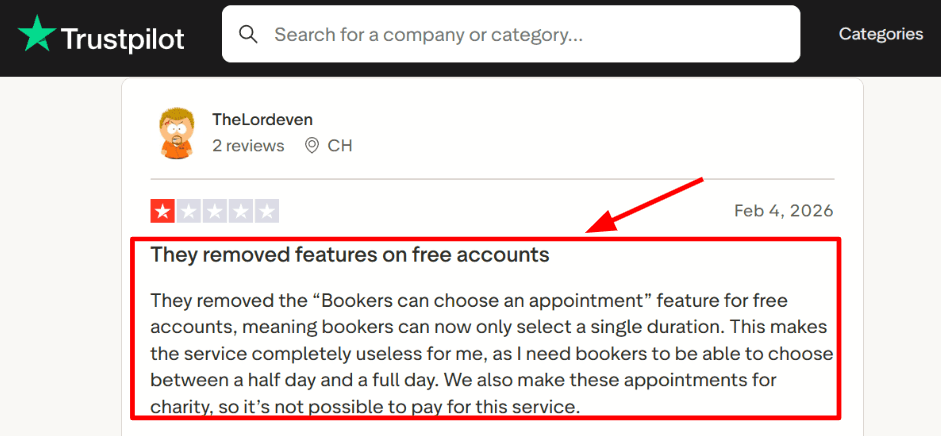
- Custom Intake Forms: Before the booking was confirmed, I could ask about goals, background, and urgency when I set it up for a coaching session. That makes the call go faster. You already know why the person is there and what they need help with. I saw a limitation mentioned in a Trustpilot review screenshot about free accounts losing “bookers choose an appointment” behavior.
-
Calendar Integration: You can connect your calendar to keep your availability accurate. In my testing, time zones worked well, which is important if you have clients in different countries. I spent extra time finding the right setting, but once it was configured, it worked consistently. For a coaching scheduling software, accurate calendar sync is essential.
-
Meeting Tool Integration: You can automatically add links to Zoom, Google Meet, and Microsoft Teams to your reservations. That keeps things in order. When someone changes the time of a meeting, the details change instead of being confusing. This saves time that adds up when you run several sessions a day.
-
Payment Integration: Stripe payments can be collected during booking. For paid coaching, this reduces no-shows and unpaid sessions. It works best when each session has a clear price. YouCanBookMe supports Stripe payments, so most clients can pay without issues. For coaches who charge per session, this makes it a practical coaching scheduling software.
-
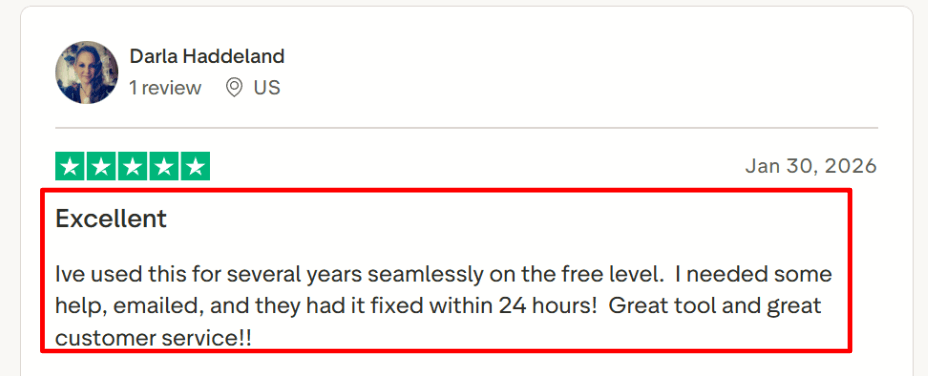
Automated Notifications: You can automatically send email confirmations and reminders. This helps reduce missed sessions. You can also change the messaging so that clients know what to do. A Trustpilot review screenshot praised support for resolving an issue within 24 hours.
Pros
- The intake forms are detailed and straightforward to use.
- Reminders and confirmations are accurate.
- Calendar and time zone management work effectively for clients from other countries.
- Meeting links are added automatically.
- With Stripe payments, you can run paid sessions without needing any further tools.
- You can send booking links by direct links, website embeds, or QR codes.
Cons
- The free plan has limits. If you need multiple appointment types or more flexibility, you will likely need a paid plan.
- Team setups can increase costs quickly as you add more members.
- For advanced workflows, you may still need external automation tools.
- If you handle sensitive health data, review their compliance documentation carefully before using it in that context.
- Changes in company ownership can influence product direction over time. It is worth keeping an eye on official updates if long term stability is important to you.
Pricing
- There is a free plan with feature limits.
- Paid plans scale based on the number of calendars and booking pages. Team pricing is per member.
- If you need more booking pages, advanced controls, or team distribution, you will need a higher tier.
- Always check the official YouCanBookMe pricing page page for the latest details before choosing a plan.
When Should Coaches Choose YouCanBookMe
Pick it if you want a single system for structured intake, clear reminders, and collecting payments. It works well for coaches who want to be better prepared for each call and organise fixed-format sessions. This is a great choice if you need coaching scheduling software that helps you gather information in advance and reduce no-shows. If you depend heavily on a free plan with many booking options, or you need strict healthcare compliance, review the details carefully before deciding.
Book Like A Boss (BLAB)
Book Like A Boss is a booking system that lets clients book and pay for appointments all in one place. It helps coaches present their offer, explain their service, and take payment in one smooth flow.
Features
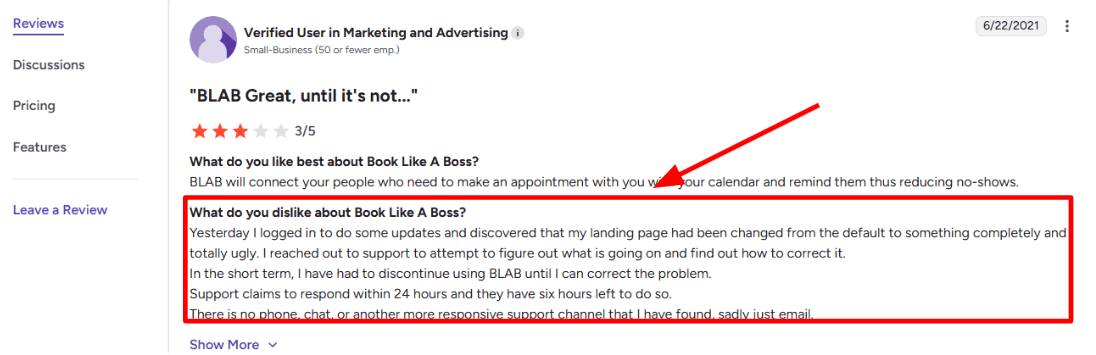
- Booking Page Builder: When I set it up, it felt like building a small service page. You can add your description, pricing, images, and session details above the calendar. The booking page and checkout work together. That makes the process feel simple for clients. You can customise colours, layout, and content to match your brand. Coupons and flexible pricing options are built in, which helps if you run promotions or offer special rates. Calendar and meeting tool integrations worked reliably in my testing. Intake questions are also available so that you can collect practical details before the session. I saw a complaint in a G2 review, and I’m sharing a screenshot below
-
Payment Integration: You can get paid when you make a reservation. This is a good way to set up paid discovery calls, packages, and one-on-one sessions. It works with multiple payment gateways. According to Duda's integration notes, there may be processors other than Stripe that can be used, such as Authorize.net. You still need to check your own account to make sure the payment processor fits your business before you commit. Having payments embedded in the coaching scheduling software keeps things neat and reduces follow-up work for coaches who rely on paid sessions.
-
Calendar Integration: BLAB works with major calendars and blocks out hectic times effectively. Make sure you know which calendars you sync. Be careful about what you link if you keep your personal and work calendars separate so you don't mistakenly open up private time slots.
-
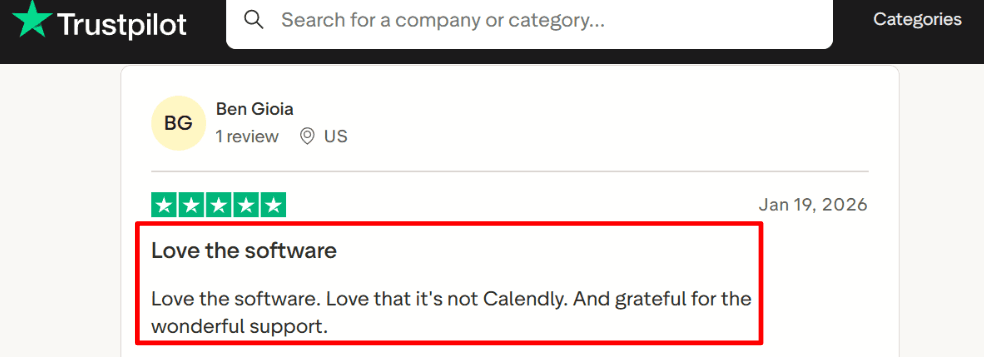
Meeting Tool Integration: You can automatically create Zoom or Google Meet links for each booking. This saves time and avoids confusion about where the call will happen. I saw a Trustpilot review that praised the support and the fact it’s “not Calendly,” and I’m adding a screenshot below.
- Intake Questions: You can add custom questions before the booking is confirmed. This lets you collect goals, background details, and expectations. For coaching, this helps you prepare in advance and keeps sessions focused. It also filters out people who are not serious. Many coaches look for software that supports structured intake. BLAB covers this well.
Pros
- Booking page, scheduling, and checkout all live in one system.
- Helpful for coaches who sell paid sessions.
- Strong page customization options.
- Built in coupons and flexible pricing.
- Reliable calendar and meeting tool integrations.
- Intake questions improve call quality.
Cons
- If you only need a simple link for free calls, this may feel like more setup than necessary.
- Support is mainly email-based, so urgent issues may take time.
- Setup includes many options, which can take time to configure.
- Team features are available, though team pricing is less transparent than solo plans.
- Payments are limited to supported processors, so verify fit early via Duda’s BLAB integration notes.
Pricing
- BLAB offers tiered monthly plans for solo users. Annual billing reduces the monthly cost.
- Entry pricing starts in the low teens per month. Higher tiers add more advanced selling tools and customization.
- Team plans are available. Pricing scales by the number of seats and often requires direct contact for larger setups.
- Before migrating, review the exact features included in your plan. In coaching scheduling software, pricing often depends on how many team members and booking pages you need.
- See current numbers on the official BLAB pricing page.
When Should Coaches Choose Book Like A Boss
Choose BLAB if you want your booking page to support your sales process. It works well for coaches who sell paid sessions, packages, or memberships and want payment handled inside the same system. It is also useful when you want a structured intake before the call. If your main goal is quick scheduling with minimal setup, a simpler coaching scheduling software may be easier to manage.
Coaching scheduling software: final verdict
If you want a quick answer, the right tool depends mostly on how you sell and deliver your coaching.
- Lunacal is the strongest choice if your booking page needs to build trust and convert leads before the call, especially for premium coaching.
- Calendly works best for simple, fast scheduling when you just need a reliable link for 1 sessions.
- Acuity Scheduling is the most complete option for paid coaching, packages, and structured programs.
- YouCanBookMe fits well when intake forms and pre-session data matter for your workflow.
- Book Like A Boss is a good pick if you want your booking page to double as a sales page with built-in payments.
In my experience, the decision usually comes down to three factors: how complex your coaching offers are, whether you charge upfront, and how important your booking page is in converting clients. If you are running structured programs or selling packages, Acuity stands out. If conversion and positioning matter more, Lunacal gives you an edge. For simple scheduling, Calendly still does the job with minimal friction.
If budget is what's holding you back, start free on Calendly's or YouCanBookMe's plan and upgrade once you need payments or packages. And if what you actually need is full practice management — session notes, worksheets, client progress tracking — rather than just booking, weigh CoachAccountable or Paperbell against the tools above before you decide; see the FAQs below for how they compare.
Review Methodology
To evaluate the best scheduling software for coaches, I followed a consistent and hands-on process across every tool. The goal was simple: test how each product performs in real coaching workflows, not just how it looks on a feature list.
What I tested
- Use case: I set up each tool as if I were an independent coach or part of a small coaching team handling one-on-one and group sessions
- Coaching type: This guide is scoped to life, business, executive, and health/wellness coaches working with individual or small-group clients — not school, sports-team, or athletic coaching, which involve different scheduling and compliance needs
- Calendars: Connected Google and Outlook calendars wherever possible to check real availability syncing
- Payments: Ran actual paid bookings using Stripe or PayPal to see how smooth the checkout and confirmation flows are
- Booking pages: Tested both standalone booking links and embedded widgets to understand how clients experience scheduling
- Coach experience: Focused on setup, availability rules, rescheduling, and cancellation from a day-to-day usage perspective
Real scenarios I ran
- Booking a session: I created a coaching offer and went through the full booking flow as a client, from landing on the page to receiving confirmation
- Avoiding double bookings: I set working hours, buffers, and tested time zone handling, then tried to create conflicts to see if the system blocks them properly
- Managing sessions: I rescheduled and cancelled bookings from both the coach and client side to check how clean and reliable the flows are
- Handling payments: I completed paid bookings, tested coupons where available, and checked how tools handle packages or multiple sessions
How I validated results
- I relied on hands-on testing to understand how each tool behaves in real use
- Then I cross-checked those findings with user reviews to confirm consistent patterns, especially around reliability, support, and edge cases
This way, each tool is judged based on how well it actually supports coaching workflows like booking, payments, and session management, not just on what it claims to offer.
FAQs
What is the best scheduling tool for coaches who need multi-session packages?
The best scheduling tool for coaches who need multi-session packages is Lunacal.
It is rated 4.9/5 on G2 and works well for coaches who want a booking page that builds trust before the session. You can add intake forms, testimonials, payments, packages, reminders, and team scheduling.
It also supports security and GDPR controls, which matters if you work with clients in Europe.
If you only need a simple one-to-one booking link, YouCanBookMe can also be a good option.
Which calendar tools should coaches compare first?
The calendar tools I would compare first are Lunacal, Acuity Scheduling, YouCanBookMe, and Koalendar.
Lunacal is best when your booking page needs to explain your coaching offer, collect intake details, take payments, and support packages.
Acuity Scheduling works well if your setup has detailed forms, paid sessions, add-ons, and strict availability rules.
YouCanBookMe is good when you want a clean booking flow, quick setup, and practical integrations.
Koalendar is worth considering if you live in Google Calendar and want a simple booking link with less setup.
Is there a free scheduling tool for coaches?
Yes. Among the tools in this guide, Calendly and YouCanBookMe both have free plans that are actually usable, not just a trial. Calendly's free tier covers a single event type with reliable calendar sync, which is enough for a simple discovery-call link. YouCanBookMe's free plan is a solid way to try intake forms before you commit to a paid tier.
Lunacal, Acuity Scheduling, and Book Like A Boss don't have a permanent free plan, but they start at $9–$16 a month and tend to pay for themselves quickly once you're taking paid bookings — none of the free plans in this space handle packages or advanced payment flows well.
If you're not charging for sessions yet, start free and upgrade once packages, payments, or team scheduling become the priority.
How do CoachAccountable and Paperbell compare to the tools in this guide?
CoachAccountable and Paperbell are coaching-specific practice-management platforms, built to handle session notes, worksheets, and client progress tracking alongside scheduling — a step beyond the scheduling-first tools reviewed above. I haven't hands-on tested either for this guide, so treat this comparison as directional rather than a full review. CoachAccountable prices by active client count, starting around $20/month for up to two clients. Paperbell runs about $47.50/month billed annually and includes a genuinely free single-client plan.
If your main need is a booking page that converts and handles payments and reminders well, the tools reviewed above will get you there for less. If you specifically want session notes, worksheets, and client progress tracking built into the same system as scheduling, CoachAccountable or Paperbell are worth evaluating against this list before you decide.
Which coaching scheduling software works best by country?
The best coaching scheduling software by country mostly comes down to compliance and payment support rather than the tool itself. Country-specific needs matter more when you coach clients across different regions.
For the US, UK, Canada, and Australia, check SMS consent, email reminder settings, payment support, time zones, and how client data is stored.
For the EU, GDPR matters. Look for a DPA, clear data export, easy deletion requests, and consent controls.
If you serve clients in Germany, France, or Spain, check whether the booking page, emails, reminders, time format, and payment flow feel local enough.
Local currency, taxes, receipts, and invoice fields can also matter if you sell paid coaching programs.
What features should coaching scheduling software include?
Good coaching scheduling software should include intake forms, automated reminders, reschedule links, payments, package booking, and reliable calendar sync.
If you sell multi-session programs, check whether the tool can track packages or session credits.
If you coach clients in different time zones, test time zone detection carefully.
If you run back-to-back sessions, use buffers and daily booking limits so your calendar does not become exhausting.
How should coaches set availability to avoid burnout?
Coaches should set availability around energy, preparation time, and follow-up work.
A simple setup is to keep fixed coaching days, add 10 to 15 minute buffers, cap sessions per day, and require at least 24 hours’ notice.
This protects your schedule and reduces last-minute bookings.
Tools like Lunacal and Acuity Scheduling let you apply these rules automatically, so clients only see times that are safe for you to take.
Summarize this content with AI


