


Introduction
Lots of business owners are looking for Mindbody alternatives after the recent merger of Playlist with EGYM in early 2026, amidst uncertainty around pricing, priorities and more. But switching tools can go wrong if you don't consider important factors like bookings, payments, or compliance. That's why I reviewed 5 popular Mindbody alternatives on the basis of hands-on testing, pricing-page review, help docs, real user reviews and included screenshots throughout so you can verify what I saw.
I tested the parts that are usual failure-points in the real world like online booking flow, class scheduling, memberships, packages, no-show protection, and a lot more. I also checked the details buyers often miss, like onboarding friction and hidden add-on costs.
For teams taking bookings across the UK, Germany, France, Spain, and the Netherlands, I gave extra weight to GDPR signals, time-zone reliability, currency and payment handling. I also checked how well each system holds up when clients are booking across borders. If you are trying to find the best Mindbody alternative in 2026, this guide is built to help you choose based on business model, operational depth, and what actually holds up once bookings start coming in.
Best Mindbody Alternatives
Comparison table for best Mindbody alternative by business type
| Business type | Best fit | Why it fits |
|---|---|---|
| Consultant or service business | Lunacal | Better when you want a branded booking page, payments, and a cleaner client-facing experience without studio software overhead |
| Salon or spa | Vagaro | Strong fit for appointment-led businesses that need POS, staff calendars, cards on file, and day-to-day front desk workflows |
| Independent beauty professional | Fresha | Good for solo operators who want fast setup, online booking, deposits, and added visibility through a built-in marketplace |
| Gym or training studio | Zen Planner | Best suited to recurring memberships, class reservations, attendance tracking, and member management |
| Yoga, pilates, or wellness studio | WellnessLiving | Best for studios selling memberships, class packs, and prepaid services while also needing growth and client engagement tools |
Feature and pricing table for Mindbody alternatives
| Comparison point | Lunacal | Vagaro | Fresha | Zen Planner | WellnessLiving |
|---|---|---|---|---|---|
| Best for | Branded booking pages | Salon POS + appointments | Marketplace-led salon bookings | Gym memberships + classes | Studio memberships + growth |
| G2 rating | 4.9 ★★★★★ | 4.6 ★★★★☆ | 4.2 ★★★★☆ | 4.3 ★★★★☆ | 4.5 ★★★★☆ |
| Entry pricing | $9/month | $23.99/month | $19.95/month | $99/month | $69/month |
| Free plan or trial | Free trial | Free trial | Free plan | Free trial | Free trial |
| Payments | Yes | Yes | Yes | Yes | Yes |
| POS and front desk | No | Yes | Partial | Partial | Partial |
| Marketplace discovery | No | Partial | Yes | No | No |
| Memberships | Partial | Partial | Partial | Yes | Yes |
| Class scheduling | Yes | Yes | Partial | Yes | Yes |
| Packages or prepaid options | Yes | Partial | Partial | Yes | Yes |
| Team or staff scheduling | Yes | Partial | No | Yes | Yes |
| Branding control | High | Partial | Low | Low | Partial |
| Main trade-off | Lighter operations stack | Add-ons raise cost | Marketplace fees and lighter control | Expensive for simple booking | More setup and contract review |
Deep dive into Mindbody alternatives
Now that the shortlist is clear, it makes sense to look at each product in more detail. The sections below break down where each tool is strongest, where it falls short, and which type of business should seriously consider it.
Lunacal
The best mindbody alternatives depend on whether you run classes, appointments, or memberships. Lunacal is popularly known for turning a booking link into a mini website with context, proof, and files, not just a calendar slot picker. If you do not need Mindbody’s deep studio ops stack and marketplace-style discovery, Lunacal can be a simpler setup that still covers booking, payments, and timezone-safe confirmations.
Features
-
Mobile booking I tested a few Lunacal pages on mobile and the flow stays clean, with fewer steps than most systems.
That said, I also saw a similar note in a G2 review about the first load sometimes not feeling instant, and on an older phone I noticed the same thing. I’m sharing that screenshot below.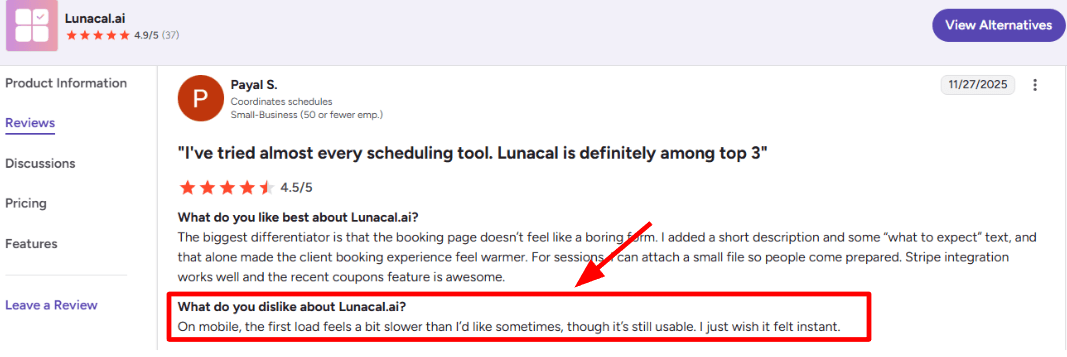
The G2 reviewer flags a slightly slow first load on some phones. -
Payment integration Lunacal supports paid bookings via Stripe or PayPal, which is enough for most 1
services and deposits. Compared to Mindbody’s payments + POS world, this is more “take payment for a booking” than “run the whole front desk”. If you sell memberships, retail, and complex packages daily, Mindbody stays ahead from a best gym management software in 2026 comparison perspective. -
Custom domains Custom domains are straightforward, and the booking link feels like it belongs to the brand instead of a tool page.
I saw an AppSumo review saying they set it up for two companies and that support helped quickly, which matched my experience too. I’m adding that screenshot below so you can judge the detail.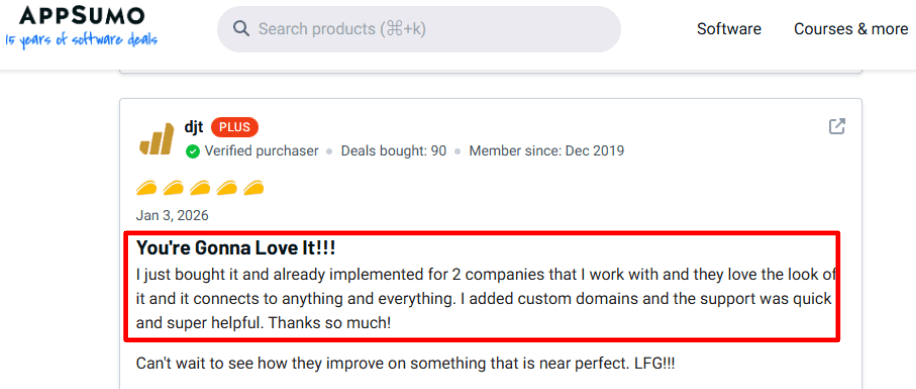
The AppSumo review highlights quick help while setting up custom domains for multiple companies. -
Timezone handling For cross-border work, Lunacal handled timezone display reliably in my tests, especially around confirmations.
A G2 review also called out fewer “checking the time again” messages and consistent local-time slots, and I agree. Screenshot below, because this is a real operational saver.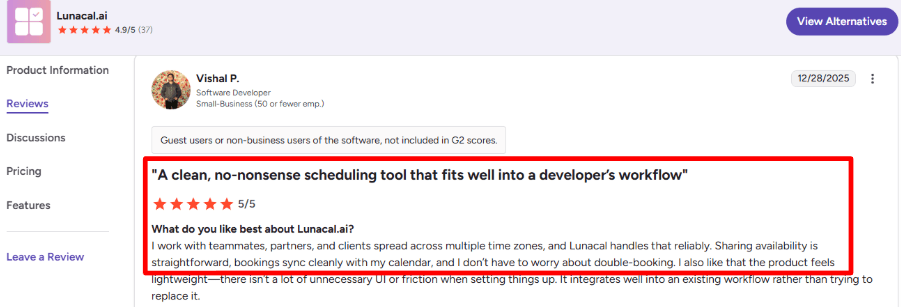
The review points to fewer time-check messages because slots show correctly in local time. -
Availability controls You can set up availability rules and event types without needing a full studio-grade configuration phase.
One small thing, though, a couple of settings felt buried on first pass, and I had to backtrack once. In Mindbody, that depth is expected because it’s built for multi-service operations and layers of rules.
Pros
- Cleaner setup for service businesses that want bookings fast without adopting a full studio operating system.
- For many teams, this is the main reason to choose it over Mindbody.
- Mini-website style scheduling pages add context that a plain booking widget cannot.
- Custom domains and branding are easy to ship.
- Payments are simple when Stripe/PayPal is your stack.
- Timezone-safe booking for international partners is solid.
Cons
- If you rely on studio-grade ops like POS, inventory, memberships, and consumer discovery, Lunacal should not replace Mindbody.
- Mindbody’s plan includes being listed on the Mindbody app and broader business tooling, which matters for many studios.
- Not a fit when you need marketplace demand-gen baked into the platform.
- Mobile first load can feel slower on some devices, as noted in a G2 review.
- If your workflows depend on deep reporting and autopay-style revenue ops, Mindbody remains stronger.
- Some setup controls can take a second to find when you’re moving quickly.
Also, one industry nuance I keep in mind: Reuters reported that Playlist (Mindbody’s parent) is pushing harder on AI investment and expansion after the EGYM merger, which could influence where Mindbody’s roadmap focuses.
Pricing
- Lunacal has two main paid tiers that are easy to reason about.
- Standard starts at $9/user/month, and Teams starts at $15/user/month, with monthly and yearly billing options.
- The pricing page also lists add-ons, and the plans highlight payment + Zapier integrations and priority support.
- Official details here: Lunacal pricing.
- When comparing software like Mindbody, always check how memberships and billing are handled.
When to Choose Lunacal over Mindbody
Choose Lunacal if you want fast setup, brand-first booking pages, and reliable timezone handling for client-led scheduling.
Choose Mindbody if you run a studio-style operation with POS, memberships, inventory, and marketplace discovery as daily requirements.
In short, Lunacal fits best when scheduling is part of your workflow, while Mindbody fits when scheduling is the workflow.
Vagaro
Vagaro is an all-in-one system for booking, payments, and basic business management. It keeps showing up in most popular Mindbody alternatives for fitness studios, class scheduling, and memberships lists because it sits between salon software and broader studio operations with a simple way to manage appointments and get paid. Smaller teams often prefer mindbody alternatives for service businesses that are priced per calendar.
Setup is straightforward, the core tools are easy to find, and you can start taking bookings without a long learning curve. If you are exploring alternatives to larger platforms like Mindbody, Vagaro is a good fit.
-
Online booking I set up the booking widget and created a simple list of services in less than an hour. I tested bookings from both desktop and mobile. The flow worked smoothly. When comparing software like mindbody, always check how memberships and billing are handled. You can keep cards on file, which means you can charge for no shows or late cancellations. I also saw a Trustpilot review about slow, inconsistent loading across web and mobile, so I’m adding a screenshot below and calling it out because UX can make or break repeat bookings.
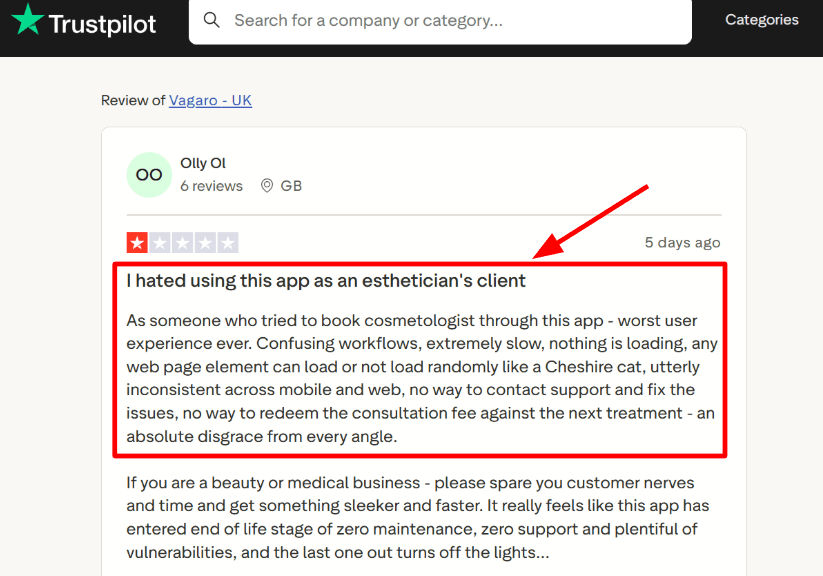
The Trustpilot review calls out inconsistent loading across web and mobile booking flows. -
MySite builder Vagaro’s includes a MySite website builder. It is used if you need a basic site that connects directly to your live schedule. A Trustpilot review praised the templates and the team checking in, and that matched my setup experience, screenshot below so you can judge the tone and context. Compared to Mindbody, this feels more like you can get a decent front door live fast, without committing to a heavy ops rollout.
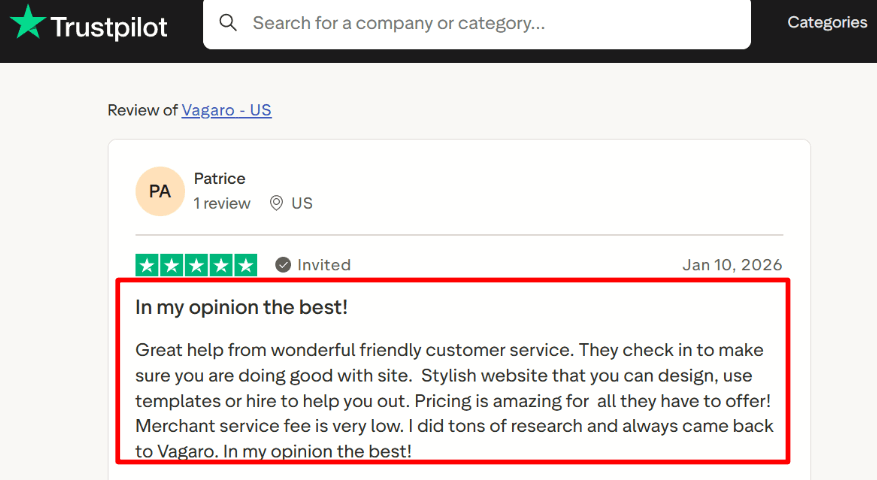
This review highlights MySite templates and a hands-on support check-in during setup. -
Calendar integration The Google Calendar sync is a real two-way sync option, including appointments, tasks, and class sessions. I did have to redo the initial sync range and sharing settings once. It took a second pass to get everything aligned properly. After that, it worked reliably.
-
Payment integration Many apps like Mindbody now include built-in payment processing. You can keep cards for no-show fees and handle payments at the point of sale in the system. That keeps everything in one location for booking and payment. If you're looking at payment stacks on different platforms, it's a good idea to read the official documentation to learn more about fraud controls and chargebacks. The payment structure can be more important than the headline rate over time.
-
Channel booking Vagaro enables online booking across multiple channels, including Facebook, Yelp, Google, and its own apps. This gives you more ways for clients to find and book your services. I tested the booking flow from start to finish and it worked as expected. Still, it is smart to test on the devices your clients actually use before turning everything on across all services.
If you want groomer friendly scheduling tools, check pet grooming scheduling software.
Pros
- Lower starting price and faster to launch than Mindbody for a solo or small team.
- You can start with one bookable calendar and build up gradually.
- Strong booking basics like cards-on-file and no-show fees.
- Google Calendar sync is actually usable day-to-day.
- MySite builder makes it easier to ship a decent booking site fast.
- No “percentage fee” positioning on online bookings for new customers.
Cons
- If your business depends heavily on marketplace discovery or on very complex multi-location controls, Vagaro may feel limited.
- Costs can rise once you add more calendars and paid extras such as text messaging, storage, or branded tools.
- Zoom integration has been discontinued, which affects some virtual session setups.
- Some admin settings require careful setup and may need adjustments.
Pricing
- Starts around $23.99 per month for one bookable calendar in the US.
- Multi-staff setups usually rise as you add calendars and paid add-ons like MySite, texts, storage, or branded tools.
- Payment processing is separate, with advertised processing rates in the 2.2% to 2.6% range depending on business size and transaction type.
When to Choose Vagaro over Mindbody
If you want a system that includes booking, payments, and a small website, choose Vagaro. It has reduced start-up costs and is faster to set up. It is also a practical pick for boutique operators comparing mindbody vs other fitness business software platforms to avoid enterprise complexity. If you rely on marketplace-driven discovery or conduct complicated operations with multiple locations where tight operational controls are more important than speed, stick with Mindbody. If you're not sure, I would try Vagaro out in one location and for one type of service first, and then decide based on how many bookings were completed and how many people didn't show up.
Fresha
Fresha is widely used by salons and independent beauty professionals. It combines online booking with a public marketplace where new clients can discover you.
If you only need scheduling and payments, lighter Mindbody alternatives may feel easier to manage. Fresha is usually quicker to set up and start taking bookings.
-
Per-seat pricing
When I tested it for a solo chair rental setup, the pricing was easy to understand. After the trial, you pay per bookable team member. For one person, the current public price is around 19.95 per month. As you add more staff who take bookings, the cost increases. Smaller teams often prefer Mindbody alternatives for service businesses that are priced per calendar month. There are also marketplace-related fees and payment processing fees, depending on how clients book and pay. It is important to factor those into your pricing early so you are not surprised later. I also saw the same concern in a Reddit review about the jump to about $20 per month for a solo user, and I’m adding a screenshot below so you can judge it yourself. The official pricing context is on Fresha pricing.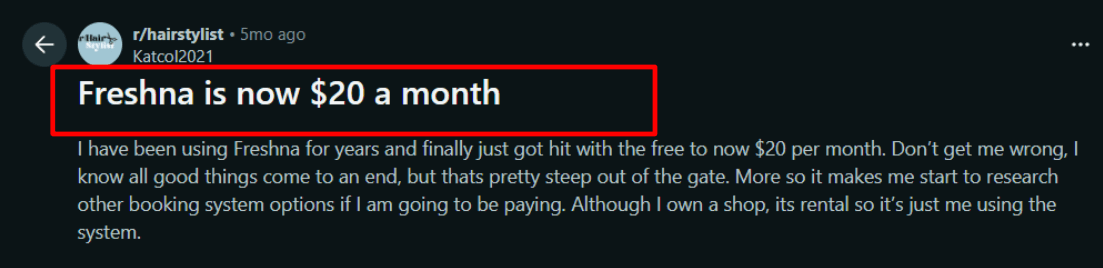
The Reddit thread highlights the move to roughly $20/month for a solo bookable seat after trial. -
Calendar sync
Fresha can sync with Google Calendar, Apple Calendar, and Outlook. It worked, but updates are not instant. It can take up to about 15 minutes to appear. I would not depend on it for last-minute schedule changes. -
Payment policies
You can collect deposits, store card details, and apply no-show or cancellation fees to protect revenue. In my test flow, the deposit logic worked, but I had to dig a bit to find the exact policy settings the first time. -
Marketplace discovery
Being listed on Fresha’s marketplace can bring in new clients. At the same time, marketplace bookings may incur additional fees. If discovery is part of your growth plan, you should calculate how those fees affect your margins. For some salons, the exposure is worth it. For others, it changes pricing strategy. -
Automated messages
Fresha includes automated reminders, updates, and promotional messages. This reduces missed appointments and cuts down on manual follow-up. When I contacted support with a small setup question, I received a quick, helpful response. I saw a Trustpilot review mentioning quick, no-stress customer service, and my experience was similar when I had a setup question; I’m sharing that screenshot below, too.
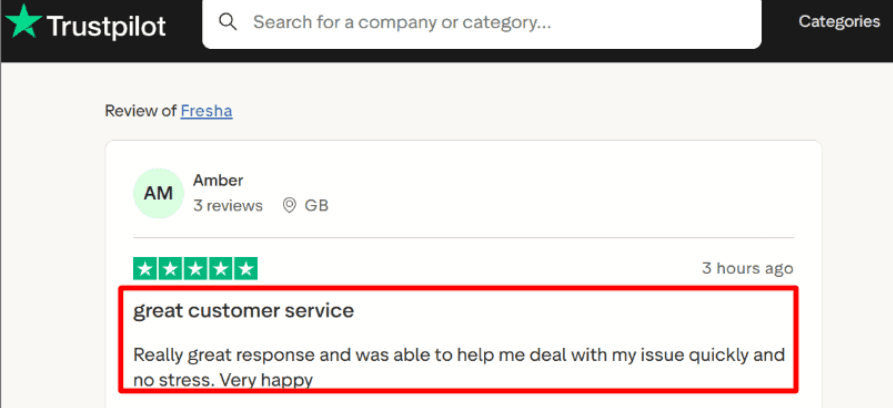
If you want options that feel similar to Fresha, see my Fresha alternative breakdown.
Pros
- It is fast to launch for salons and solo professionals.
- You can start taking bookings without a heavy setup process.
- Calendar sync covers Google, Apple, and Outlook.
- Deposits and no-show fees are built in.
- A marketplace listing can help attract new clients.
- Automated reminders support retention.
Cons
- As operations grow more complex, the system can start to feel lighter than some larger platforms.
- Paying per bookable team member adds up as your team expands.
- Marketplace fees can catch you off guard if you do not model them in advance.
- Calendar sync is not instant.
- Some settings take a bit of searching the first time.
Pricing
There is a 14 day trial. After that, pricing is charged per bookable team member. For one independent professional, the public price is around 19.95 per month. Payment processing fees and marketplace fees may apply depending on how clients book and pay.
When to Choose Fresha over Mindbody
Choose Fresha if you run a salon or spa, or work independently, and want fast online booking, simple calendar sync, and deposit protection without a heavy setup.
It works well if you want marketplace visibility and are comfortable planning for related fees.
If you manage multiple locations and need deep reporting and more advanced operational tools, Mindbody may better suit that level of complexity. If you are switching away from Mindbody, Mindbody alternative is a fast shortlist.
Zen Planner
Zen Planner is built for gyms and training studios. It focuses on memberships, class reservations, attendance tracking, and a member app. For many buyers, this is where the search shifts from generic Mindbody alternatives into a true best gym management software in 2026 conversation. I would use it when class based training and recurring memberships are the core of your business.
Features
-
Member check-ins Members can check-in themselves, or staff can handle it. I saw the same thing in a Reddit thread and I’m dropping a screenshot below because it matches what I ran into while testing. In practice, it is easy for a coach to forget to mark attendance if the class is busy. The system expects members to reserve first, then check in. Editing past attendance is possible, but it is not always obvious the first time you look for it.
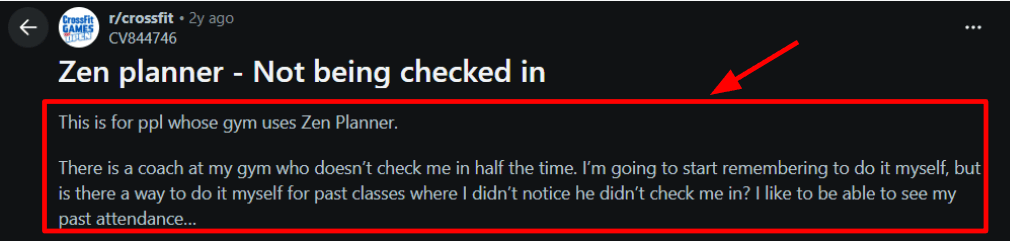
The Reddit post shows how easy it is to miss the check-in step during busy classes. -
Class reservations Booking a class is straightforward. When a class fills up or the schedule changes, updates show quickly. The interface is straightforward, which helps reduce back and forth at the front desk for popular time slots. That is one reason Zen Planner remains one of the most popular Mindbody alternatives for fitness studios focused on class scheduling and memberships. I also saw a Trustpilot review calling out real-time updates and I’m sharing that screenshot below so you can judge it yourself.

-
Payment integration You can connect payment gateways and run billing tied to memberships and member accounts. If you sell memberships along with drop-in sessions, this is where Zen Planner shines. It took a short setup pass to understand where all payment settings were located.
-
Availability rules You can set class capacity, recurring schedules, and attendance rules. Attendance data can also be used to spot members who are drifting away. Coaches can then follow up before someone cancels.
-
Integrations hub There is an ecosystem of integrations for access control, marketing tools, and other operational add ons. For gyms that rely on door access systems or external marketing platforms, this matters. If you operate across multiple locations, compare mindbody alternatives carefully for staff controls.
If you are comparing booking tools for tours, tour booking software is a handy reference.
Pros
- It supports gym operations well once set up.
- Memberships, classes, and attendance tracking work together in a clean way.
- The member app is simple for booking and self service.
- Attendance data is usable and helps with retention.
- You are not charged for prospects or staff in the same way some systems price seats.
Cons
- If your business depends heavily on marketplace exposure and wellness discovery features, this platform may not align with that strategy. You will spend time recreating what Mindbody gives you out of the box for that scenario.
- Some setup paths are not where you first expect them
- Tiered pricing can climb faster as active members grow
- It is worth checking the public Zen Planner Status Page if you are uptime-sensitive
- Role and permission settings need careful configuration.
Pricing
Pricing is based on active members. Zen Planner states that each tier includes access to the full Studio feature set. Add-ons like website tools, engagement features, or a branded app can increase the total cost. It is best to estimate based on your current active member count and only add the features you truly need.
When to Choose Zen Planner over Mindbody
If you own a gym or training studio and need to keep track of subscriptions, classes, and attendance, Zen Planner is the best choice.
It works well when you need unambiguous class reservations, consistent check-ins, and billing that works with everything else without having to construct a big operational system.
If you run a business that is more like a salon or spa and depends on people finding you on the marketplace, another platform might work better for you. If you want a trainer focused shortlist, check personal training booking software.
WellnessLiving
WellnessLiving is known as an all in one system for studios. It handles scheduling, memberships, and payments in one place. This is worth looking at if you want to manage the main aspects of your business without relying on Mindbody's marketplace visitors.
It is made for owners who are researching the best mindbody alternatives for boutique fitness studios in 2025 and 2026 with the goal to sell class packs, memberships, and services. The structure makes those sales feel organized instead of messy.
Features
-
Payment integration
I tested paid bookings and prepayments. The checkout flow felt smooth. It works well for front desk style payments and online purchases. One area to review carefully is how vendor subscriptions and billing terms are handled. I came across a Reddit discussion where this was raised as a concern. It is something you should read about directly before signing any contract.
One thing to watch is the vendor subscription side of billing. I also saw a similar concern in a Reddit thread and I’m sharing a screenshot below.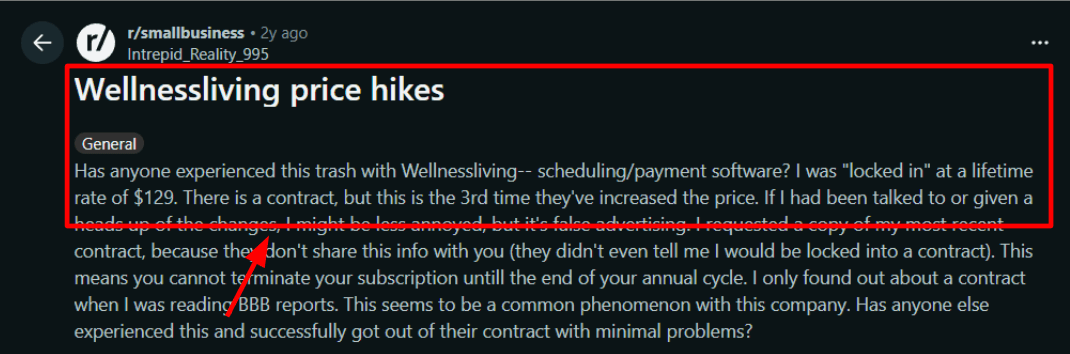
The Reddit thread raises concerns about billing terms and possible price changes. -
Purchase options
You can sell single visits, class packs, memberships, and courses. The setup makes it manageable without tracking everything in spreadsheets. The setup makes it fairly easy to organize different pricing options without having to build manual tracking sheets.That lines up with a G2 review I read for a Dance and Pilates studio, and the screenshot below is worth a quick look before you decide.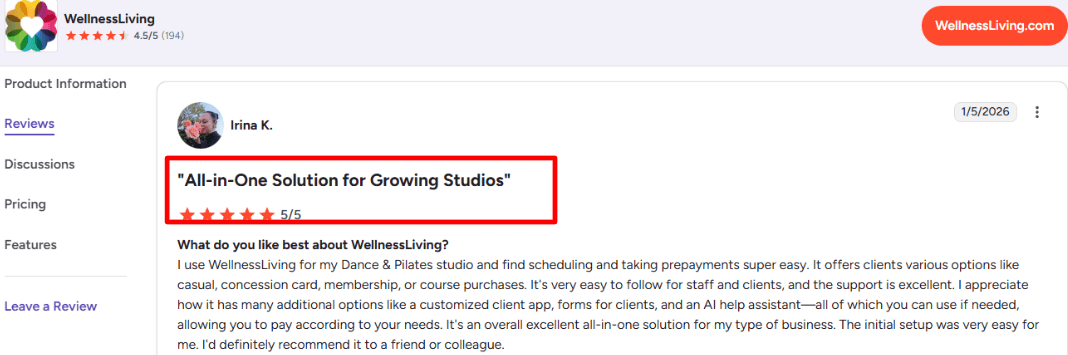
The review highlights selling packs, memberships, and courses without extra tools. -
Calendar integration
BusinessPro plans include a white-label version, so you can brand the app as your own. This approach is different from relying on an external marketplace app. It gives you more control over your client experience. -
Client app
WellnessBeing gives you a client-facing app experience, and BusinessPro even offers a white label option.
This approach is different from relying on an external marketplace app. It gives you more control over your client experience. There has also been industry news about Mindbody’s parent company expanding into AI and new markets after a merger. Long term direction matters when you choose a system, especially if you plan to stay on it for years. -
Meeting tool integration
Zoom connects directly for virtual classes and appointments. This helps if you run online sessions or hybrid offerings. I tested a virtual class. Once Zoom was connected, everything ran as expected. Clients received their links and the session appeared correctly on the schedule.
If your calendar is full of recurring lessons, start with music lesson scheduling software.
Pros
- It's easier to get to a workable configuration quickly, especially for memberships and prepayments.
- Onboarding new staff is usually easier than rolling out Mindbody to everyone.
- Strong flow for selling memberships and packages.
- Google and Outlook calendar sync support.
- Zoom-based virtual offerings are supported out of the box.
- White label client app option on higher tiers.
Cons
- If your business depends heavily on marketplace traffic, you may notice the difference.
- If contract terms matter to you, read the fine print carefully. It is wise to review public complaint records and confirm renewal terms before committing.
- Pricing page presentation can be confusing at first glance with promo versus list pricing.
- Some integrations and rules take careful setup, not a quick toggle.
- Reporting depth can feel lighter if you are used to Mindbody style analytics layers.
Pricing
- Official plans show Starter costs $69 a month, Business costs $199 a month, BusinessPro costs $349 a month, and Enterprise costs by quotation.
- There are often short-term deals on the same site as annual billing that talk about savings.
- If you require a white label software, more marketing, or workflows that function in more than one area, you should set aside extra money.
When to Choose WellnessLiving over Mindbody
Choose WellnessLiving if you want a studio-focused system with clear membership sales and built-in payments.
It works well for operators who want booking and billing handled in one place with a straightforward setup.
If marketplace discovery and a large external ecosystem are central to your growth plan, Mindbody may better align with that approach.If you want a music teacher focused shortlist, check music lesson scheduling software.
Mindbody Alternatives Conclusion
If you want the fastest way to choose, start with the business model behind your bookings. These are the clearest takeaways from this comparison:
- Choose Lunacal if you want a lighter Mindbody alternative with stronger branding, a better booking experience, and simple payments for service-led businesses.
- Choose Vagaro if you run a salon or spa and need appointments, POS, staff calendars, and front-desk workflows in one system.
- Choose Fresha if marketplace discovery matters and you want a faster setup for a solo or small beauty business.
- Choose Zen Planner if memberships, recurring classes, attendance tracking, and gym operations are the center of your business.
- Choose WellnessLiving if you run a studio and want memberships, class packs, prepaid services, and growth tools in the same platform.
- Stick with Mindbody if your operation depends heavily on deeper studio management, broader ecosystem depth, or marketplace-driven workflows tied closely to how you already run the business.
FAQs
Which is the best Mindbody alternative?
The best Mindbody alternative for most studios is Lunacal. It is one of the highest rated tools on G2 at 4.9 out of 5. It shines for packages, beautiful booking pages, customizable intake forms, and seamless payment integration. For gyms needing member check in, Zen Planner fits better most times.
Compare Mindbody alternatives: which ones are most worth looking at?
The most worth looking at are Lunacal, Fresha, and Vagaro.
- Lunacal: best when bookings need to convert fast and you want strong intake forms, packages, and team scheduling without a messy setup.
- Fresha: best for salon style businesses that want POS, staff calendars, and a consumer marketplace flow that drives rebooking.
- Vagaro: best for spas and salons that want a broad business suite, staff management, memberships, and lots of add ons in one place.
What country level privacy and localization nuances should Mindbody alternatives support?
The right Mindbody alternatives should handle these cleanly across US, UK, Canada, Australia and EU.
- GDPR basics: consent, deletion requests, audit trail for changes.
- Language and formatting: German, French, Spanish, 24 hour time, Monday week start when needed.
- Payments and taxes: local currency display, VAT ready receipts for EU.
- Messaging rules: SMS sender rules, opt in storage, country specific phone formatting.
What features should you evaluate in a Mindbody alternative?
The features to evaluate in a Mindbody alternative are client history, packages or memberships, payments, and staff scheduling. Also check cancellation rules, waitlists, and how reschedules behave. Finally, confirm reporting, exports, and whether integrations stay reliable during peak hours.
How hard is it to migrate from Mindbody to a new platform?
Migration is manageable when the tool supports clean imports and exports. Start by moving clients, services, staff, and active packages. Keep PDFs of key reports. Run both systems for a week to catch gaps.
Summarize this content with AI


