


Introduction
Square Appointments is easy to like when your business runs through Square POS. The pressure starts when booking becomes more than taking a slot and collecting payment. I tested Square Appointments alternatives because staff schedules, deposits, classes, packages, branded booking pages, and routing can quickly turn a free setup into a more expensive operating system. Square’s own Appointments pricing makes that upgrade path clear, and Capterra’s pricing breakdown also points to subscription costs and add-ons that can affect real monthly spend.
I reviewed Lunacal, Acuity Scheduling, Calendly, Setmore, and SimplyBook.me through real booking flows. I tested setup, calendar sync, payments, reminders, intake forms, rescheduling, team availability, packages, and booking page control. I also checked public sources like G2, Capterra, Trustpilot, Reddit, official pricing pages, help docs, and product screenshots so the claims are easy to verify.
If you are comparing Square with broader tools, this guide on the best appointment scheduling software gives useful context.
Square Appointments alternatives comparison
Best tools by business use case
| Business type | Best tool | Why it fits |
|---|---|---|
| Solo service provider | Lunacal | Branded booking pages, payments, and strong first impression for client conversion |
| Coaches and consultants | Calendly | Clean scheduling, routing, and fast booking for calls and sessions |
| Multi-service studios | Acuity Scheduling | Flexible setup with intake forms, packages, and structured workflows |
| Budget-conscious teams | Setmore | Free plan, simple setup, and reliable staff scheduling basics |
| Classes and memberships | SimplyBook.me | Strong support for recurring sessions, packages, and membership logic |
Feature and pricing comparison
| Capability | Lunacal | Acuity Scheduling | Calendly | Setmore | SimplyBook.me |
|---|---|---|---|---|---|
| G2 rating | 4.9 | 4.7 | 4.7 | 4.5 | 4.4 |
| Starting price | $9 | $20 | $10/seat | $5/user | $9.90 |
| Free plan | Yes | No | Yes | Yes | Yes |
| Calendar sync | Google, Outlook, Apple | Google, Outlook, Apple | Google, Outlook | Google, Outlook, Apple | Google, Outlook |
| SMS reminders | Yes | Yes | Limited | Yes | Yes |
| Payments | Stripe, PayPal | Stripe, Square, PayPal | Stripe, PayPal | Stripe, Square, PayPal | Multiple gateways |
| Team scheduling | Yes | Yes | Yes | Yes | Yes |
| Round robin | Yes | Partial | Yes | No | Partial |
| Intake forms | Yes | Yes | Limited | Basic | Yes |
| Packages | Yes | Yes | Limited | No | Yes |
| Custom domain | Yes | Partial | Partial | Partial | Yes |
| Best for in-person ops | Moderate | Strong | Weak | Moderate | Strong |
Lunacal
Lunacal is a Square Appointments alternative that helps businesses drive more bookings with stronger branding, automated reminders, payments, and flexible scheduling. For businesses reviewing Square Appointments alternatives, Lunacal is rated 4.9/5 on G2 and stands among the highest-rated options.
Features
- Beautiful scheduling pages with rich content
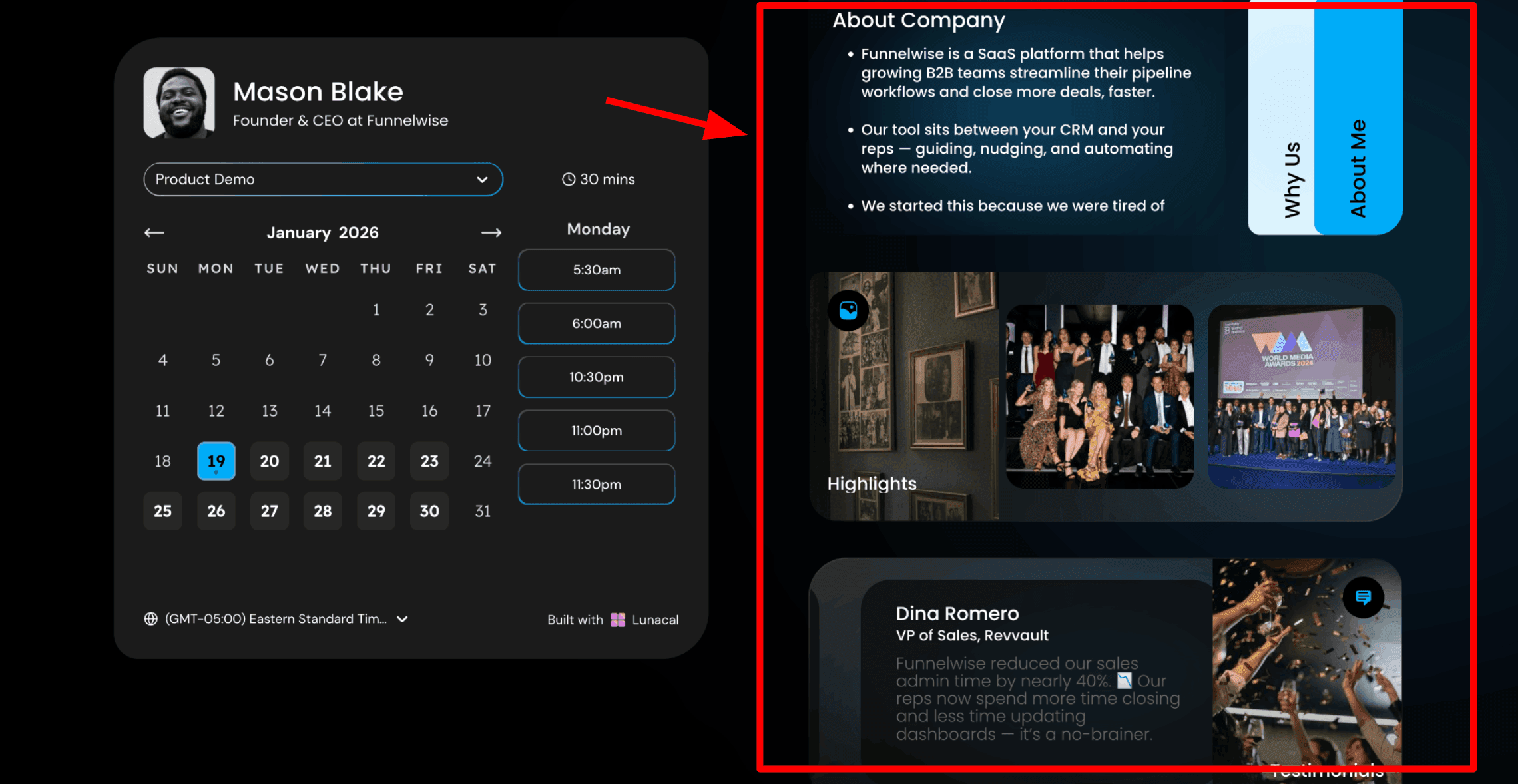
This is usually the first thing people notice when moving from Square Appointments. Your booking page is not just a list of services and time slots. You can add helpful content right next to the calendar so clients understand your work, your style, and what to expect before they choose a time. This matters for service providers where each booking counts. A better page can lead to more confident bookings and fewer questions later. For an independent massage therapist’s booking page, I would add a short About Me section with three bullets covering the modalities I specialise in, my years of experience, and the clients I work with most often. Here is a screenshot below:
- Drag and drop booking page editor
Lunacal gives you a simple editor where you can build your page using blocks. You can add text, testimonials, photos, videos, service details, and intake forms without any technical skills. You just place things where you want them and publish. This makes it easier to create a page that feels like your brand instead of looking like every other booking link.
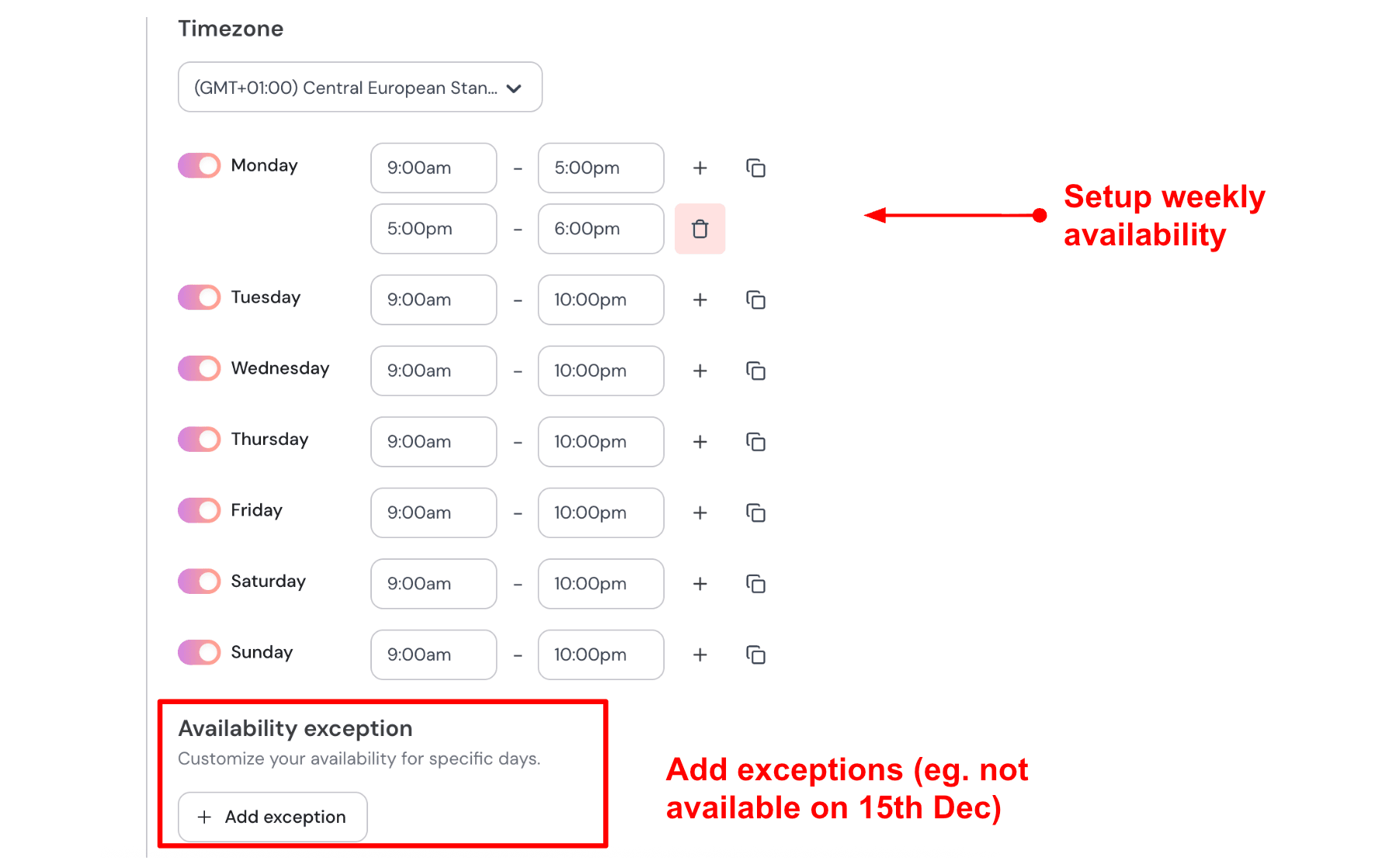
- Working hours with date exceptions
You can set your weekly working hours and also block specific dates when you are unavailable. This keeps your booking link accurate without needing constant updates. Once your hours are set, you only adjust exceptions when needed and everything updates automatically. Here is how I set up my availability:
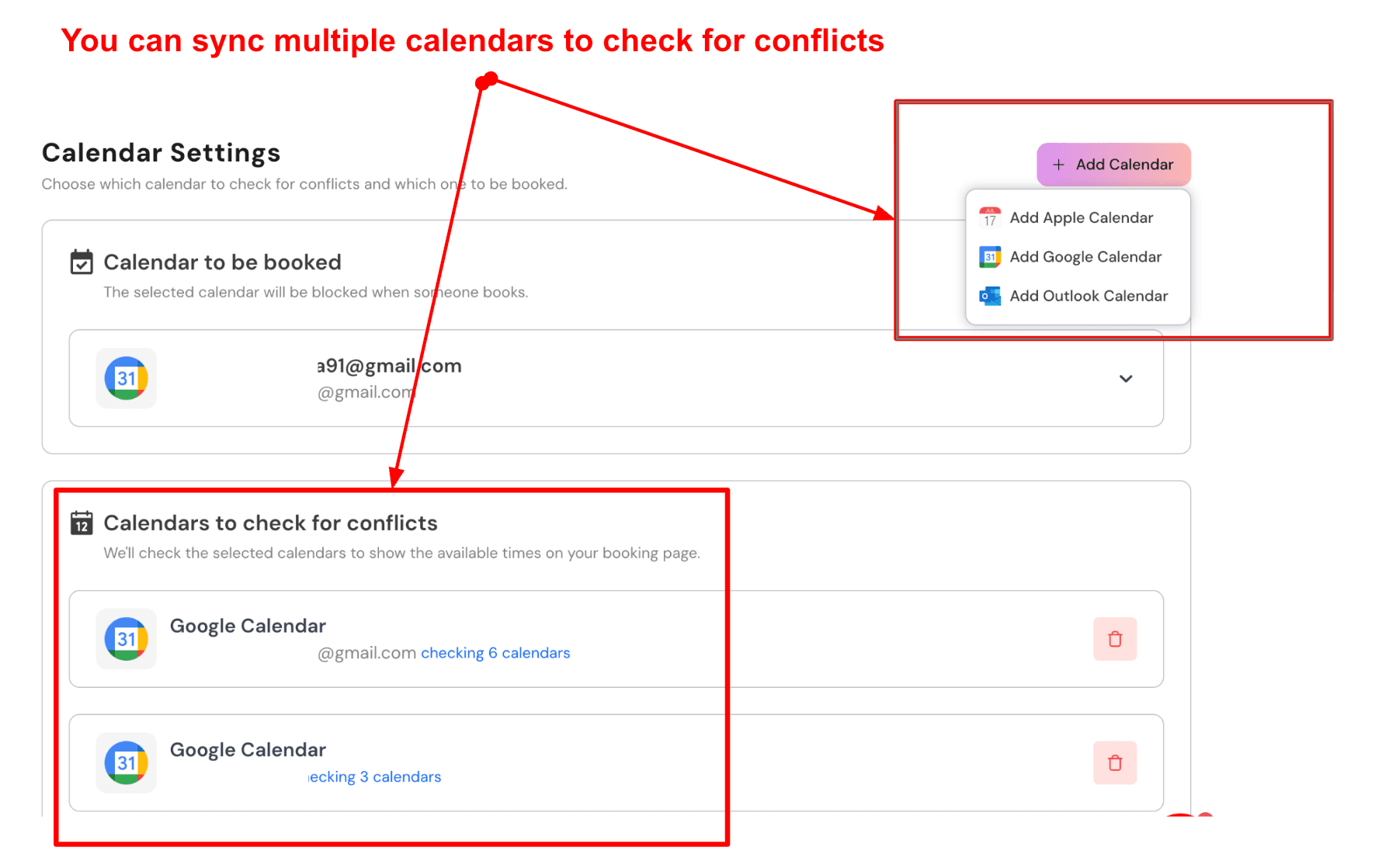
- Sync multiple calendars to prevent double bookings
Lunacal connects multiple calendars and checks all of them before showing available slots. Confirmed bookings go into your main calendar, while others are used in the background to block conflicts. This helps if you manage personal plans, family commitments, or other bookings in different calendars. Here is a screenshot of that:
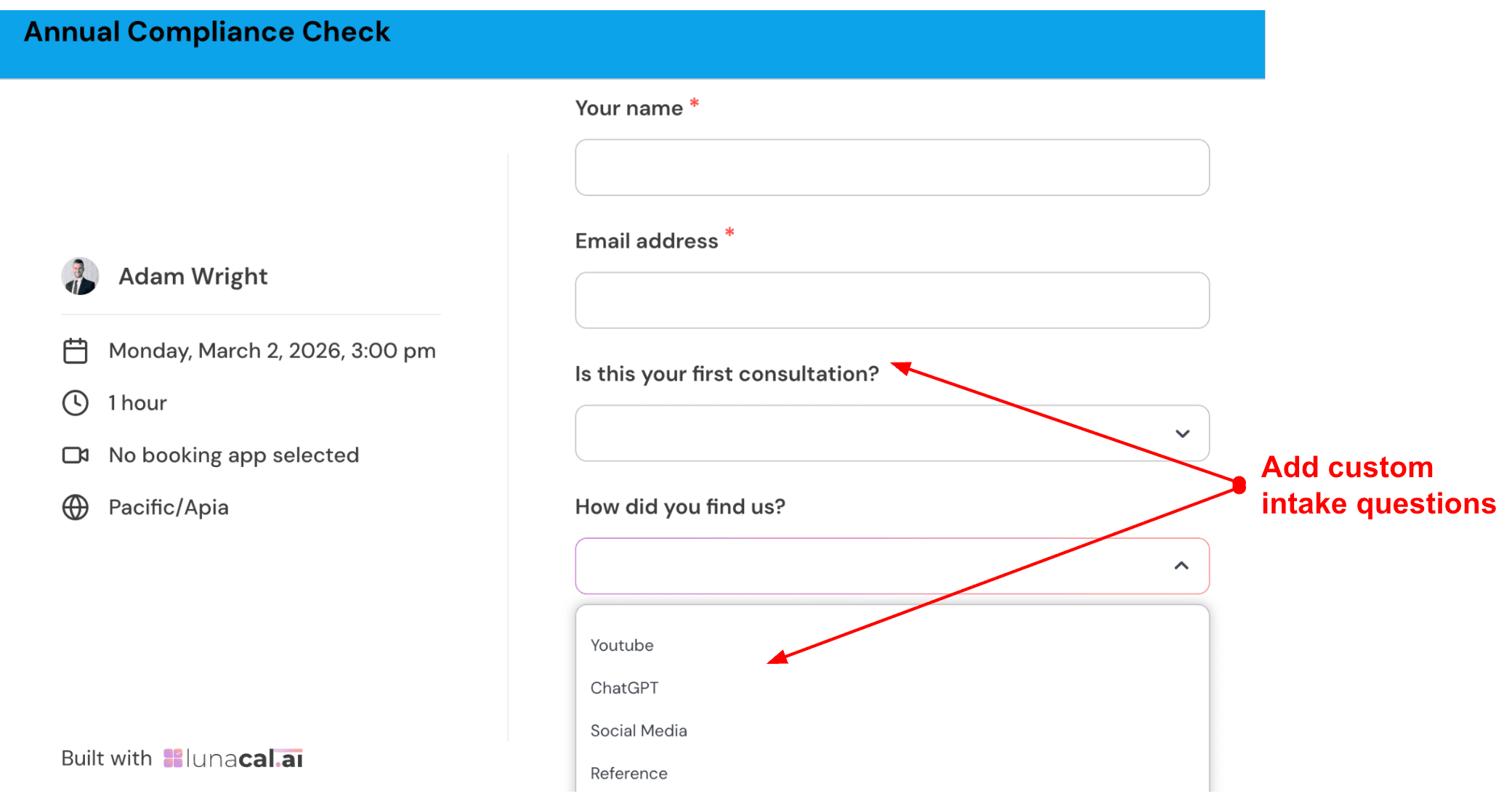
- Custom pre-booking intake questions
You can ask clients questions before they confirm their booking. This helps you collect useful details upfront instead of going back and forth later. It also makes the process feel more professional for the client. Check out the intake form I created:
- Multi-staff scheduling flow
If you have a team, clients can choose a service, then select a team member or pick any available person. This keeps the process simple and helps fill open slots faster. It works well for growing teams where different people offer the same service. I would set services like Cut and Style or Colour Treatment. A returning client can pick their usual stylist, while a new client can choose any available one and get the earliest slot.
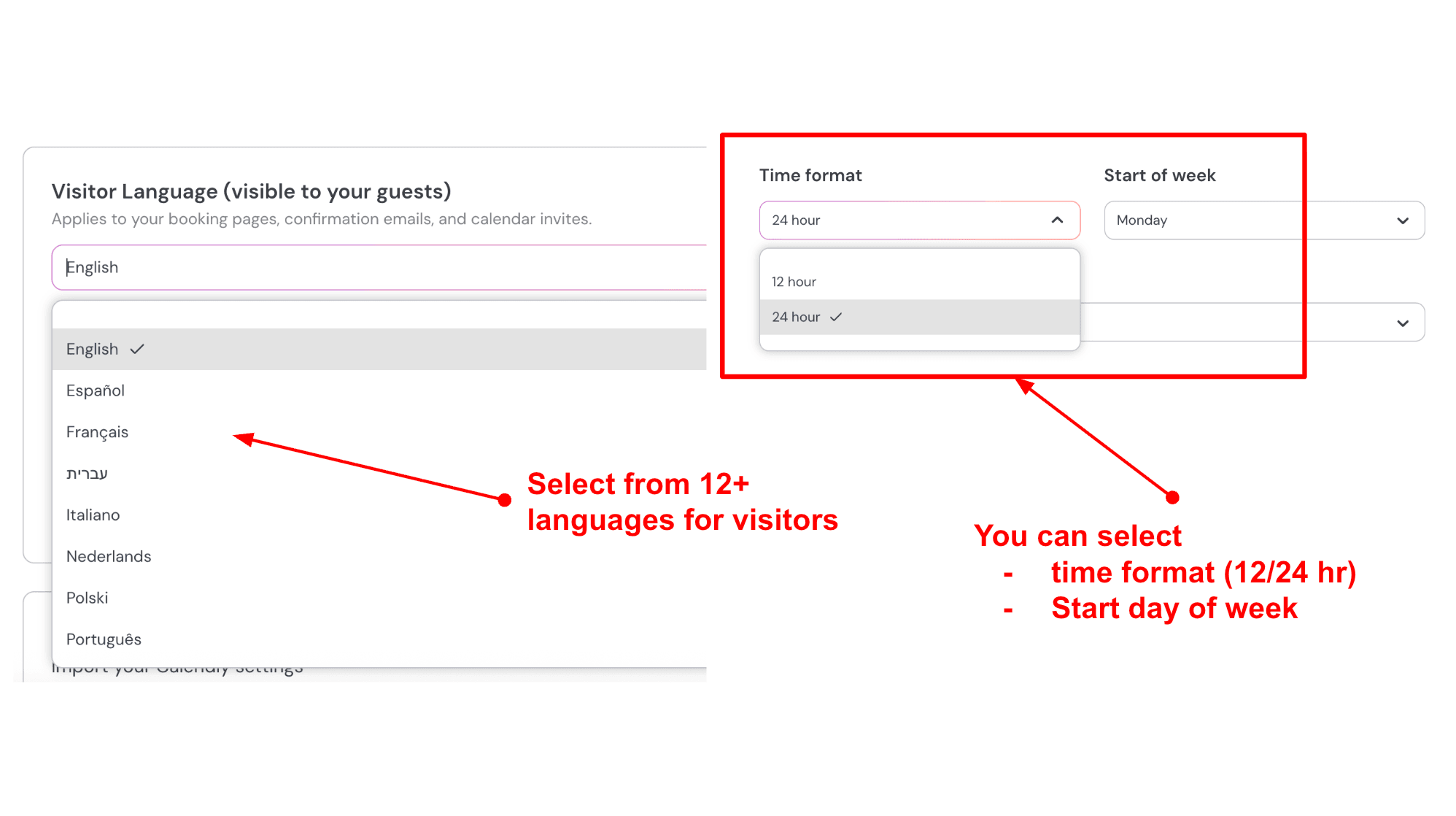
- Client language, time format, and regional settings
You can adjust the language, time format, and week start day on your booking page. This helps clients from different regions feel comfortable while booking. Small details like this can make the process smoother for international clients. If I have clients from different countries, I would enable multiple languages and adjust time formats so the page feels familiar to them. Here is how I created it:
Pros
- Easy to create booking pages that explain your service clearly
- Flexible page builder with no technical skills needed
- Strong calendar sync with multiple calendar support
- Useful intake forms that improve client preparation
- Payment options with Stripe and PayPal
- Works well for both solo providers and small teams
Cons
- Takes more time to set up compared to simple booking tools
- Creating similar event types can feel slow
- Some clients may need a moment to get used to the page layout
- Advanced features may require testing before full use
Pricing
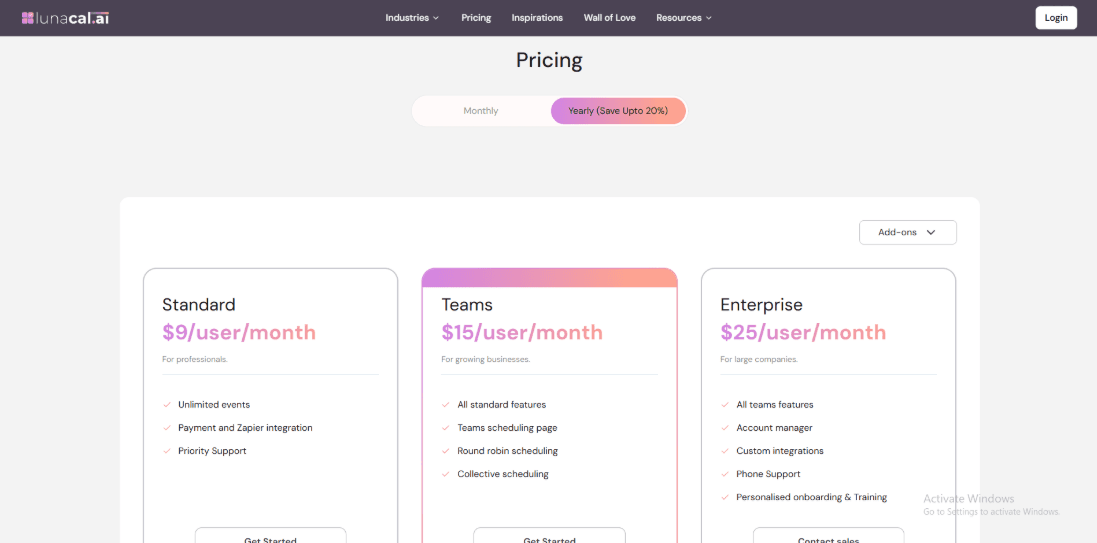
- Plans are per user. Standard is $9/user/month, Teams is $15/user/month, and Enterprise is $25/user/month, with an annual discount listed.
- Standard includes unlimited event types and core integrations, while Teams adds team booking pages plus round robin and collective scheduling. Enterprise adds account management and custom integrations.
- Official details: Lunacal pricing page.
When to Choose Lunacal
Choose Lunacal when you want a branded, information-rich booking page, flexible Stripe/PayPal payments, and workflows that feel closer to a lightweight client portal. Stick with Square Appointments when you need Square POS-first operations, tighter in-person checkout + staff management inside Square, and Square’s ecosystem is already your center of gravity.
Acuity Scheduling
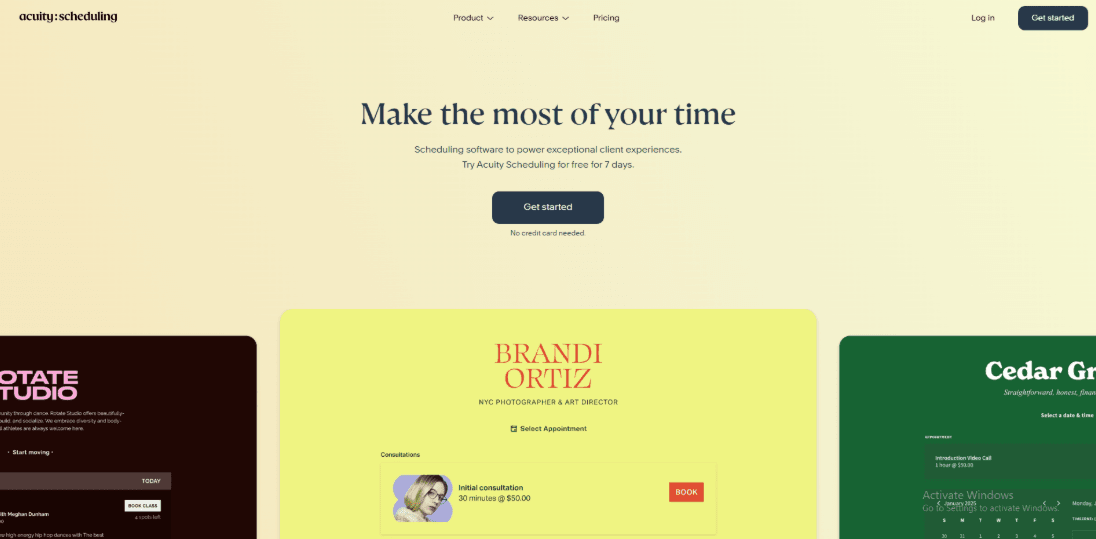
Acuity is usually picked when you want more control over how bookings work. It handles forms, recurring sessions, packages, and multiple calendars in a way that feels structured without being overwhelming. If you are exploring Square Appointment alternatives, this is one of the tools that gives you more flexibility in how you set things up.
Features
- Availability rules
In testing, the controls go deeper than basic working hours. You can manage multiple calendars, set limits on bookings, and assign different availability to each calendar. It works well if you offer different services or have different time requirements for each one.
- Client portal
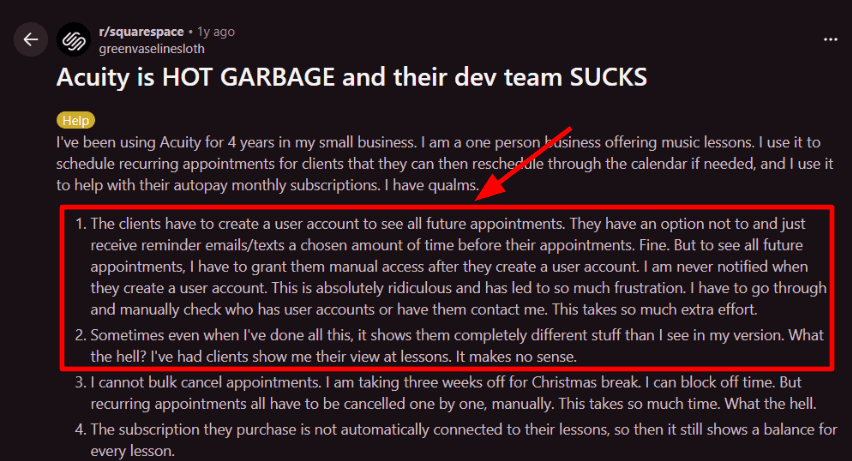
The client login area is useful, but it can take some effort to set up cleanly. Clients can view and manage their bookings, though access settings can get confusing if not configured properly. I saw a similar issue mentioned in a Reddit review where clients had trouble finding future appointments, and I’m sharing that screenshot below. Recurring sessions and billing also need careful setup if you want everything to feel connected.
- Payment integration
You can connect Stripe, Square, or PayPal, and your choice affects how payments work during booking. It gives you flexibility depending on how you prefer to charge clients. One thing worth noting is that pricing models can vary depending on the payment system you choose. A resource from Tech.co highlights how Square pricing is tied to location and processing rates, which can affect your total costs over time.
- Calendar integration
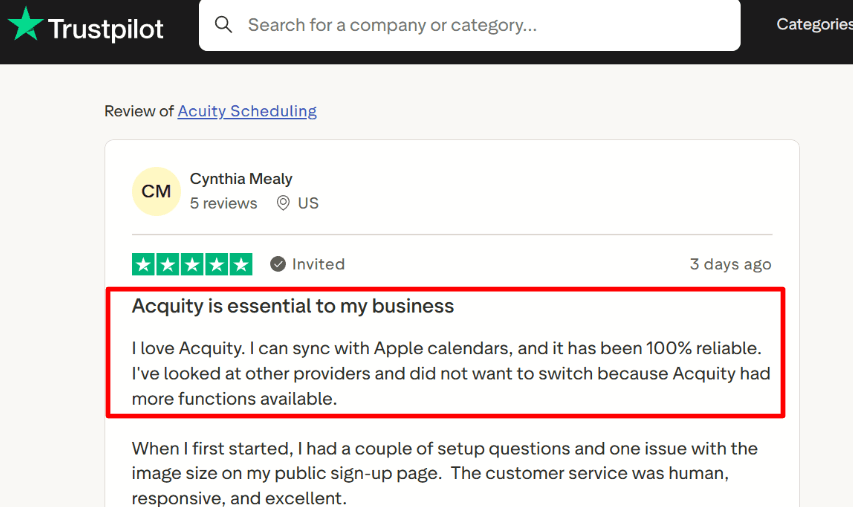
Calendar syncing works well once set up, but the default setting can be easy to miss. New calendar connections may not block time unless you enable that option. If you connect multiple calendars that sync with each other, you might see duplicate entries, so it helps to review the setup carefully. A Trustpilot review I’ve included below mentions reliable Apple Calendar syncing, which matches my experience after proper setup.
- Video meetings
It supports Zoom and Google Meet, so meeting links can be added automatically to bookings. This makes it easy to run online sessions without extra steps. During setup, some settings may take a bit of time to find, especially when connecting calendars and meeting tools together. If you are comparing Acuity Scheduling with modern tools, Acuity Scheduling alternative makes it easier.
Pros
- Strong fit for service businesses that need forms, packages, and multi-calendar scheduling
- Reliable calendar syncing once everything is configured properly
- Flexible payment options with Stripe, Square, and PayPal
- Works well for virtual sessions and online appointments
- HIPAA-ready setup is available for specific plans and configurations
Cons
- May feel less connected if you prefer everything inside one POS system
- Calendar sync needs manual setup to block external events
- No free plan, only a trial period
- Some bulk actions are not easy to find at first
- PayPal has limited features in the mobile admin experience
Pricing
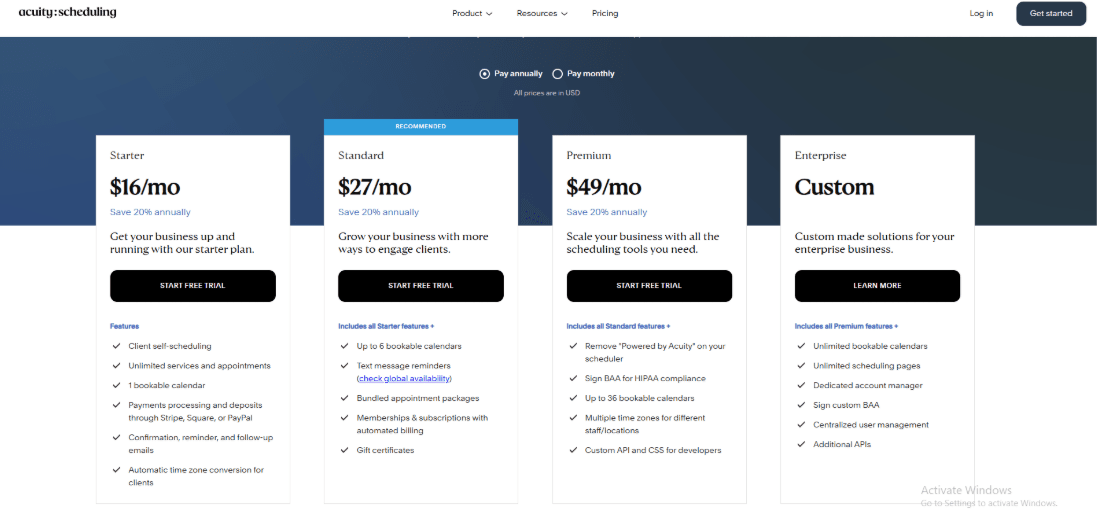
- 7-day free trial, no credit card required. No free plan
- Emerging, Growing, and Powerhouse tiers
- Lower pricing available with annual billing
- Higher tiers include more calendars, automation, and advanced features like HIPAA support
- Official pricing and plan details here: Acuity pricing.
When to Choose Acuity Scheduling
Choose Acuity if you want more control over scheduling, need multiple calendars, and prefer flexible payment options with support for virtual sessions. If you are reviewing Square Appointment alternatives, Acuity is a solid option when your focus is on scheduling flexibility and structured booking workflows.
Calendly
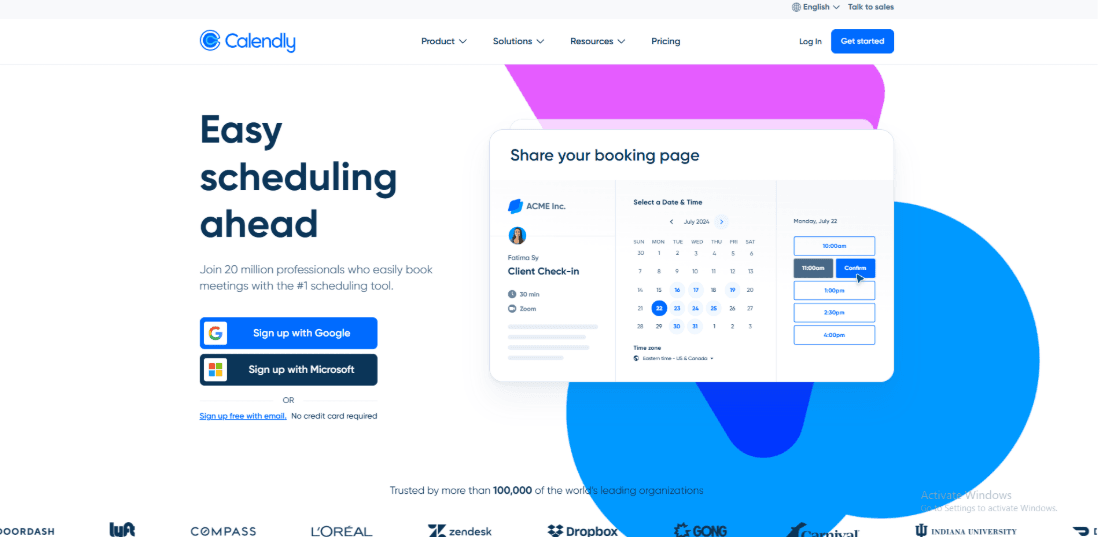
Calendly is widely used for booking meetings without back-and-forth emails. If you are moving from Square Appointments, it works well when most of your bookings are calls, demos, interviews, or remote consultations.
Features
- Calendar integration
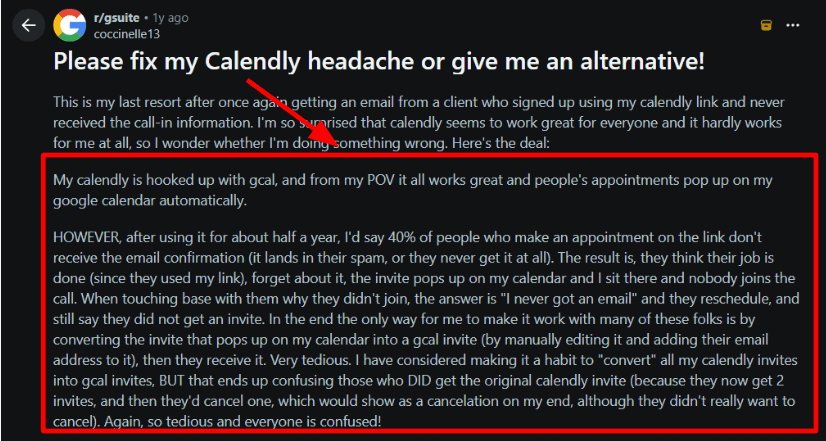
I connected Google Calendar in a few minutes and the available slots stayed accurate. One thing I always check is how confirmations and notifications are delivered. I came across a Reddit post where users mentioned clients missing confirmation emails and call details, and that is something worth testing early in your setup.
- Meeting tool links
After connecting Zoom or Teams, Calendly automatically added the meeting link to each booking. This saves time and avoids confusion before calls. I also saw a Trustpilot review where someone mentioned it helped them manage student consultations easily, and that matched what I saw while testing.

- Payments integration
You can collect payments during booking using Stripe or PayPal. This works well for paid consultations. If you are exploring Square Appointment alternatives, this setup feels different because payments are handled through integrations rather than a built-in POS system.
- Availability rules
You can set buffer time, minimum notice, daily limits, and different rules for each event type. These controls help you manage your schedule without constant adjustments. It is one of the main reasons many teams continue using Calendly.
- Routing and teams
Routing forms and team scheduling help direct bookings to the right person or distribute them across a team. This is useful for sales teams, recruiters, or coaching setups where multiple people handle calls. It also fits well if you are looking at Square Appointment alternatives for team-based booking workflows. For class schedules, passes, and waitlists, see yoga studio booking scheduling software.
Pros
- Fast setup for meeting-based workflows
- Strong calendar and video integrations
- Flexible availability rules for different session types
- Useful routing options for teams
- Easy to share or embed booking links
Cons
- Email and invite delivery should be tested early to avoid missed bookings
- Pricing increases as you add more team members
- Payments depend on external integrations
- Limited support for service-based setups with physical locations or resources
Pricing
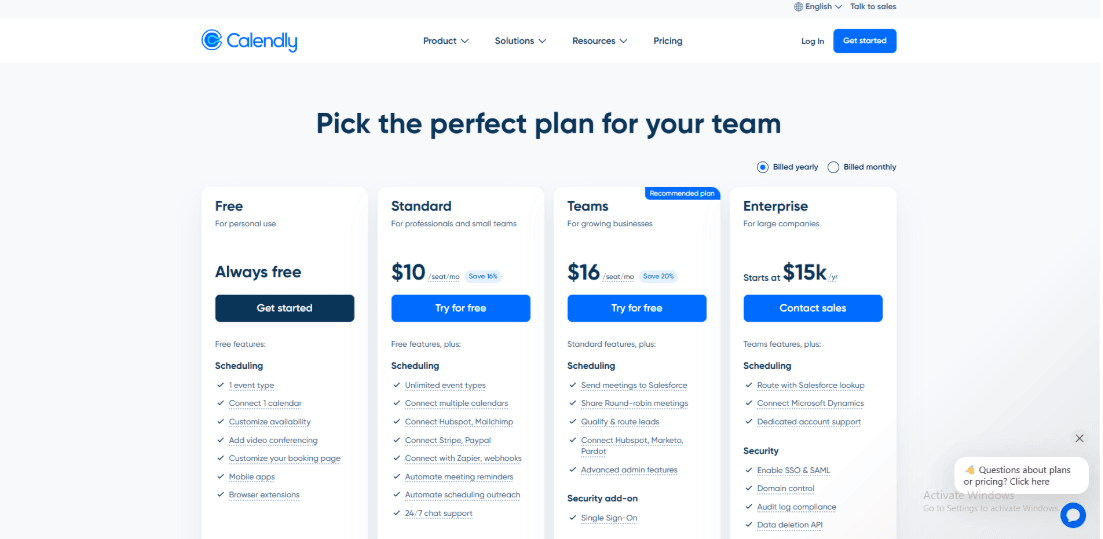
- Free plan available for basic use
- Paid plans are per user with Standard and Teams tiers
- Enterprise plans available for larger organizations
- Check the official pricing page for latest details
When to Choose Calendly over Square Appointments
Choose Calendly when your bookings are mostly calls, demos, or remote sessions and you want a simple way to manage availability with video tools. Square Appointments works better when your business depends on in-person services and built-in payment handling through Square. Square Appointments is also listed as a Reserve with Google integration on Google’s partner directory. If your focus is meeting scheduling and automation, Calendly fits well. If you need service-based booking with payments and operations in one system, Square Appointments is more suitable.
Setmore
Setmore is a simple appointment booking tool that helps you manage your schedule and let clients book time with you online. It is easy to set up, works well for small teams, and offers a free plan with useful features. Many people choose it when they want a clean booking system without too much complexity, especially if they are exploring Square Appointment alternatives.
Features
Setmore is known for a clean booking page and a generous free plan. It stays simple even when you add more staff. If you want a scheduling-first tool with flexible calendar and payment options, it is often easier to manage than many Square Appointment alternatives. If Setmore is still on your shortlist, my Setmore alternative write-up goes deeper into what people usually notice after switching.
- Two-way calendar sync
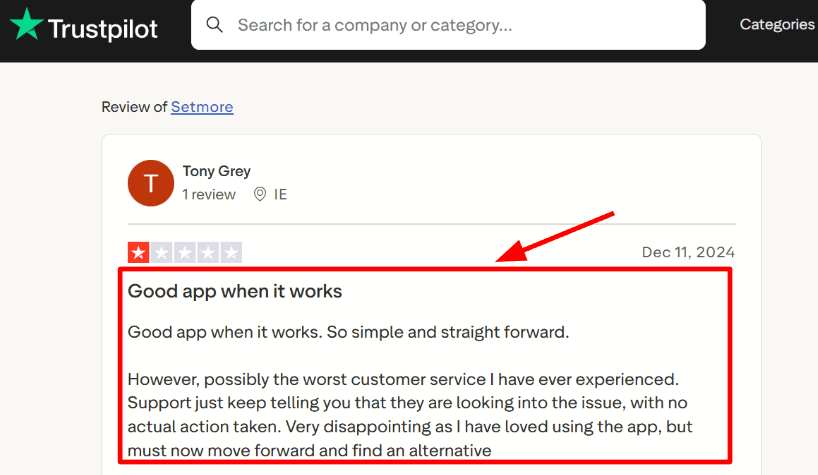
I connected Office 365 first, and later realized that two-way sync is only available on paid plans. This can change how the free plan feels once you start using it seriously. If your team uses Outlook, this detail matters more than it seems at first. I also came across a Trustpilot review that mentioned things work fine until issues come up, and support can be slow in those moments. I am sharing that screenshot below so you can see the context.
- Onboarding support
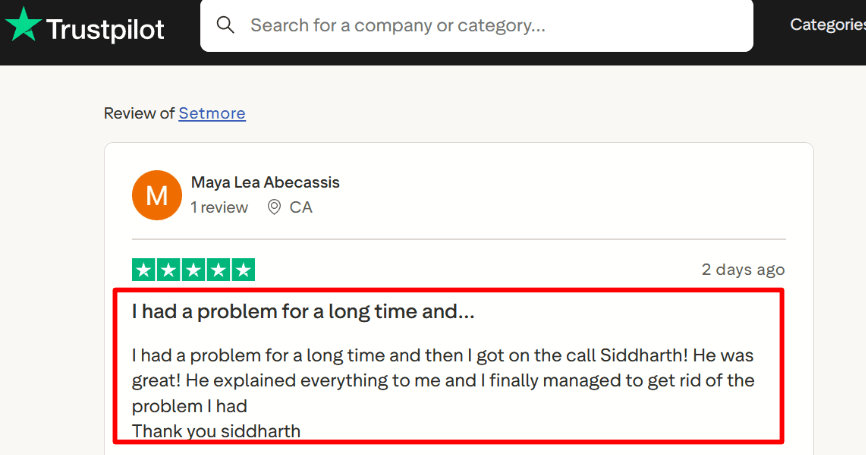
Setmore offers access to real support when you are setting things up. That can make a big difference when you are trying to get everything working properly. A Trustpilot reviewer mentioned that a call with Siddharth helped them finish their setup, and I am including that screenshot because it reflects what many users experience during onboarding. In my case, a short support interaction helped me feel more confident about the settings.
- Video meeting links
You can connect tools like Zoom so that meeting links are added automatically when someone books a session. This works well if you run remote consultations. One thing to check is that each staff member has their own meeting integration set up, not just the main account.
- Payments at booking
Setmore lets you collect payments during booking using Square, Stripe, or PayPal. This gives you flexibility in how you run your payments. I tested a paid booking flow and it worked smoothly once the payment account was connected. This is one reason people consider it among Square Appointment alternatives when they want more control over payment tools.
- Availability rules
You can set working hours, breaks, buffers, and different schedules for each staff member. This helps keep your booking page accurate. It is also easy to manage multiple staff schedules without making things complicated.
If you are comparing Setmore to other tools, use Setmore alternative as a quick guide.
Pros
- Good choice if you want a scheduling-focused tool with flexible payment options
- Free plan works for small teams without needing an upgrade right away
- Supports both Office 365 and Google Calendar setups
- Video meetings fit naturally into the booking process
- Reserve with Google can help with local visibility
Cons
- If you already rely heavily on Square POS, managing separate tools can add extra steps
- Two-way calendar sync is not included in the free plan
- Some team features are simpler compared to full service business tools
- Reserve with Google is limited to the US and certain categories, per Setmore guide.
- Reporting is limited if you want both retail and service data in one place
Pricing
- Free plan supports up to 4 users with basic features
- Pro and Team plans unlock two-way sync, video meetings, and more automation
- Pricing is per user, so cost increases as your team grows
- Check the latest details on Setmore pricing.
When to Choose Setmore
Choose Setmore if your team works mainly with calendars, uses Office 365 or a mix of calendar tools, and wants flexibility in payments. It is a good fit for remote consultations and simple scheduling setups. It also works well if you are exploring Square Appointment alternatives that give you more control over your tools. Square Appointments fits better when you want everything in one place, including payments and in-person workflows. For remote-first setups, Setmore usually feels easier to manage.
SimplyBook.me
SimplyBook.me is known for its flexible booking system where you turn on only the features you need. It feels like building your own setup step by step, instead of using a fixed structure. I would consider it as one of the strong Square Appointment alternatives when I want more control over classes, memberships, or a standalone booking flow that does not depend on a POS system.
Features
- Multi-channel booking
You get a booking website along with widgets, so clients can book without calling you. You can also embed it on your own site or landing pages. If you plan to rely on Google booking, it is worth checking this line in Google Actions Center docs about deposits and no-show fees needing full payment integration.
That detail can affect how paid bookings actually work through Google.
- Membership billing
It supports memberships and recurring billing, and you can control how and when those start. During testing, I noticed that setting strict first-of-month billing is not very straightforward. I also saw the same concern mentioned in a Reddit post (I’m sharing a screenshot below), and it matches how the system behaves in real use.

- Payment integration
You can accept payments for services, classes, packages, memberships, gift cards, and add-ons. The system gives you a lot of flexibility, but it can take a bit of time to understand which payment features depend on your plan and which are controlled by settings. Once set up, the flow works smoothly for paid bookings.
- Calendar sync
It supports two-way sync with Google and Outlook, so your external calendar blocks are respected. This helps avoid double bookings. It is usually the first thing worth setting up because it shows whether the system will work reliably for daily use.
- Classes and packs
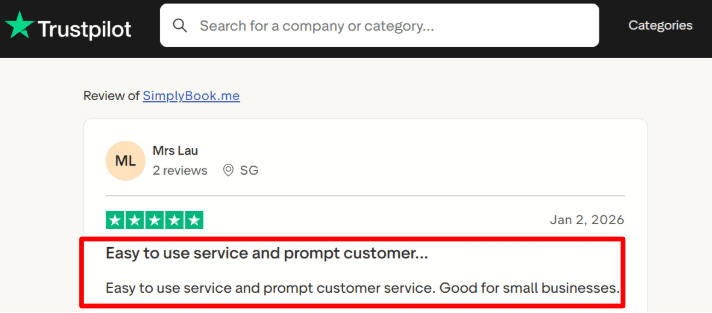
You can create session packs and recurring bookings, so clients can book multiple sessions at once, like weekly lessons. This is helpful for businesses that run repeat sessions or programs. I also came across a Trustpilot note mentioning that the tool is easy to use with helpful support, and my experience during setup was similar.
If you run a grooming shop, this guide on pet grooming scheduling software is built for your workflow.
Pros
- Works well when you want a standalone booking system without being tied to a POS setup
- Flexible model where you can enable only the features you need
- Good fit for recurring sessions, lessons, and multi-session bookings
- Calendar sync with Google and Outlook helps prevent double bookings
- Clear upgrade path as your bookings or team size grows
Cons
- If you already use Square POS and payments, this can feel like an extra system to manage
- First-of-month billing may need workarounds depending on your setup
- Plan limits on bookings and providers can feel restrictive as you grow
- Some payment features depend on plan level, not just settings
- The feature menu can take time to understand at the beginning
Pricing
- Free plan is €0 per month with 50 bookings, 1 provider, and 1 custom feature
- Paid plans include Basic €9.9, Standard €29.9, and Premium €59.9 per month
- Each plan increases limits on bookings, providers, and features
- A 14-day free trial is available without a card
- Enterprise pricing is custom
- Check latest details here: SimplyBook.me pricing.
When to Choose SimplyBook.me over Square Appointments
If you run classes, lessons, packs, or memberships and need control over how repeat sessions are managed, SimplyBook.me is a strong choice. It also fits well if you want flexibility in how your booking system is set up. Among Square Appointment alternatives, it stands out for businesses that want more control over booking rules and structure without relying on a single ecosystem.
Square Appointments alternatives conclusion
The fastest way to choose is to match the tool to how your business actually runs bookings and payments.
- Choose Lunacal if your priority is converting visitors into bookings with branded pages, flexible payments, and a modern client-facing experience.
- Choose Acuity Scheduling if you run structured services with forms, packages, and need deeper control over scheduling logic.
- Choose Calendly if your workflow is call-heavy and you care about speed, routing, and simple team scheduling.
- Choose Setmore if you want a low-cost or free option that covers core scheduling without complexity.
- Choose SimplyBook.me if you run classes, memberships, or recurring sessions and need flexibility in how bookings are structured.
In most real setups, the decision comes down to three things: how you handle payments, whether you run sessions or meetings, and how much control you need over scheduling rules. Match those first, and the right tool becomes obvious.
Methodology
I evaluated each tool using the same checklist and kept consistent notes on setup, booking flows, integrations, and day-to-day usability.
How I gathered insights
- I went through each tool’s official website, pricing pages, FAQs, and help docs to understand what’s actually included, what’s limited, and what takes effort to set up.
- Wherever possible, I signed up for free trials or demos and timed basic tasks like creating services, setting availability, and getting a booking page live.
- To balance that hands-on testing, I reviewed feedback on G2, Trustpilot, Capterra, and app stores, then checked Reddit and Quora to spot repeated issues and real-world frustrations.
How I tested each tool
- I set up a small but realistic business with two staff members, three services, buffer times, and clear cancellation policies.
- I connected a calendar, enabled email and SMS reminders, embedded the booking page on a site, and configured one paid service using a standard payment method.
- I followed the same checklist for every tool and noted where setup felt smooth, where it slowed down, and where things were unclear or missing.
Real scenarios I ran
- A new client booking from mobile, then rescheduling or canceling, to see if confirmations and time zones worked correctly.
- A returning client paying for a session, receiving reminders, and appearing properly in the admin view with notes and history.
- A typical team day with overlapping schedules, time-off blocks, capacity limits, staff assignment, and basic reporting to check how everything holds up in real use.
FAQs
What is the best Square Appointments alternative?
The best Square Appointments alternative is Lunacal if you want a more branded client booking experience.
It is rated 4.9/5 on G2 and works well for businesses that need beautiful booking pages, packages, intake forms, payments, calendar sync, team scheduling, and GDPR-friendly controls.
It is a strong fit when your booking page needs to explain your services before someone books.
If you mainly want simple free scheduling for a small team, Setmore is also worth testing.
Which Square Appointments competitors should salons and spas compare first?
The Square Appointments competitors I would compare first are Lunacal, Acuity Scheduling, Setmore, and SimplyBook.me.
Lunacal is best when you care about how the booking page looks, need packages, want better intake forms, and run a team calendar.
Acuity Scheduling works well for service-based bookings, detailed appointment types, payments, and forms.
Setmore is good when you want a simple tool that a front desk can learn quickly.
SimplyBook.me is useful if you run classes, memberships, add-ons, or a larger service menu.
Before switching, test deposits, no-show rules, reschedules, staff availability, and how payments work during booking.
What should you check when choosing a Square Appointments alternative by country?
Country-specific details can affect which Square Appointments alternative fits best.
For the US and Canada, check sales tax fields, receipts, tips, deposits, refunds, and SMS reminder consent.
For the UK and Australia, check VAT or GST handling, invoice fields, payment support, and client data rules.
For the EU, GDPR matters. Look for consent controls, data export, deletion workflows, cookie settings, and a clear DPA.
If you serve clients in Germany, France, or Spain, check whether booking pages, emails, reminders, time formats, and payment flows feel local enough.
What features matter when replacing Square Appointments?
The most important features are staff scheduling, service durations, deposits, no-show rules, intake forms, automated reminders, payments, client history, and reporting.
Also test calendar sync, mobile booking, booking page speed, reschedules, cancellations, and staff availability.
If you sell packages or repeat sessions, check whether the tool can track them cleanly.
If your business depends on Square POS, make sure the new tool does not create extra checkout work for your team.
Is Calendly a good Square Appointments alternative for salons?
Calendly can work for a solo stylist or consultant who mainly books simple one-to-one appointments.
It is easy to use and works well for calls, consultations, and simple calendar-based bookings.
For salons and spas with services, add-ons, deposits, staff schedules, packages, and client records, it can feel limited.
For that type of workflow, Lunacal, Acuity Scheduling, Setmore, or SimplyBook.me usually fit better.
Summarize this content with AI


