


Introduction
Acuity Scheduling is a solid appointment tool, but the cost can feel heavy once you need more than basic booking. Acuity offers a 7-day trial but no free plan, which several recent Capterra reviewers mention as a drawback. I tested the best Acuity Scheduling alternatives for businesses that want similar booking polish with better value, easier setup, or more flexibility.
I reviewed Lunacal, Calendly, Setmore, SimplyBook.me, Square Appointments, Fresha, and OnceHub through real booking flows. I tested setup, embeds, calendar sync, rescheduling, reminders, payments, team availability, packages, and routing. I also checked public sources like G2, Capterra, Trustpilot, Reddit, official pricing pages, help docs, and product screenshots so you can verify the claims yourself.
For the US, I paid attention to payment processors, Square workflows, SMS reminders, and HIPAA or BAA paths where relevant. For the EU, I checked GDPR, data handling, localization, and payment limits that can affect real bookings. Here are the Acuity Scheduling alternatives I would shortlist first.
Best Acuity Scheduling Alternatives Compared
Feature Comparison
| Feature | Lunacal | Calendly | Setmore | SimplyBook.me | Square Appointments | Fresha | OnceHub |
|---|---|---|---|---|---|---|---|
| Rating on G2 (out of 5) | 4.9 ★★★★★ | 4.7 ★★★★☆ | 4.5 ★★★★☆ | 4.4 ★★★★☆ | 4.3 ★★★★☆ | 4.2 ★★★★☆ | 4.4 ★★★★☆ |
| Starting Price of Paid Plans (USD) | $9 | $10 | $5 | $11.9 | $49 | $19.95 | $10 |
| Calendar Sync: Google, Outlook, Apple | Google, Outlook, Apple | Google, Outlook | Google, Outlook, Apple | Google, Outlook, Apple | Google, Outlook, Apple | Google, Outlook, Apple | |
| SMS/Email Reminders | Yes | Yes | Yes | Yes | Yes | Yes | Yes |
| Paid meetings | Yes(Stripe, Paypal) | Yes (Stripe, PayPal) | Yes (Square, Stripe) | Yes (Stripe, PayPal) | Yes (Square) | Yes | Yes (Stripe) |
| Scheduling page Themes | Yes | Partial | Yes | Yes | Partial | Partial | Yes |
| Team Scheduling | Yes | Yes | Yes | Yes | Yes | Yes | Yes |
| Round Robin Scheduling | Yes | Yes | No | No | No | No | Yes |
| Multi-session Packages | Yes | No | No | Yes | No | Yes | No |
| Custom domain | Yes | Partial | No | Yes | Partial | No | Partial |
| GDPR | Yes | Yes | Yes | Yes | Yes | Yes | Yes |
Acuity Scheduling alternative pricing and use-case table
| Tool | Best For | Not recommended for | G2 Rating | Pricing |
|---|---|---|---|---|
| Lunacal | High-converting booking pages | Barebones internal scheduling | 4.9 ★★★★★ | Free Plan available Paid Plan starts at $9/month |
| Calendly | Quick 1 meeting links | Service menus and inventory | 4.7 ★★★★☆ | Free Plan available Paid Plan starts at $10/seat/month |
| Setmore | Budget-friendly staff scheduling | Complex lead routing logic | 4.5 ★★★★☆ | Free Plan available Paid Plan starts at $5/user/month |
| SimplyBook.me | Service catalog + add-ons | Pure sales meeting routing | 4.4 ★★★★☆ | Free Plan available Paid Plan starts at $11.9/month |
| Square Appointments | Square POS appointment businesses | Non-Square payment workflows | 4.3 ★★★★☆ | Free Plan available Paid Plan starts at $29/month |
| Fresha | Salon/spa marketplace exposure | B2B pipeline scheduling | 4.2 ★★★★☆ | Free Plan available Paid Plan starts at $0/month |
| OnceHub | Lead qualification + routing | Simple solo booking links | 4.4 ★★★★☆ | Free Plan available Paid Plan starts at $10/seat/month |
Lunacal
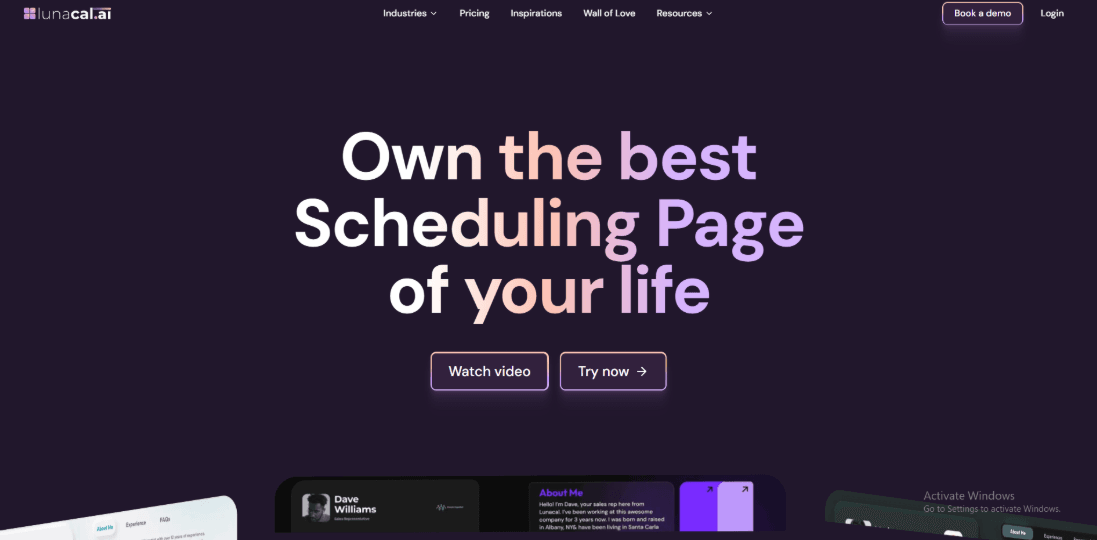
Lunacal is popularly known for turning a booking link into a content-rich scheduling page that feels more like a mini site. If Acuity Scheduling is your “classic appointment scheduler,” Lunacal is worth testing when you want the booking page to do more than just show slots.
Features
-
Time zone handling In my testing, automatic time zone detection worked for most cases, but frequent travel takes extra care. I also saw a similar point in a G2 review about travel-heavy setups, and I’m sharing that screenshot below so you can judge it yourself.
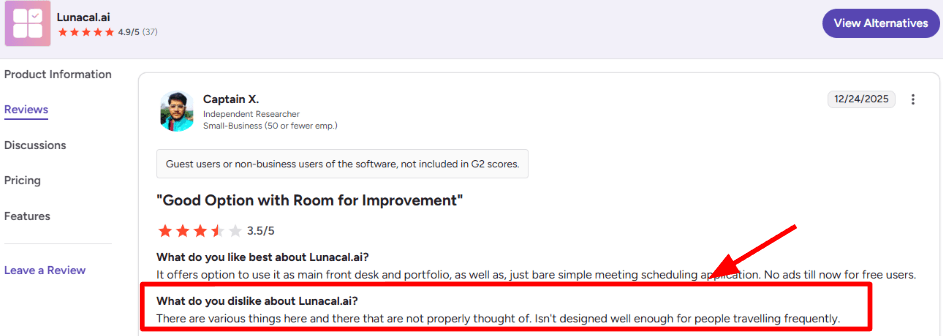
On G2, a user says Lunacal handles travel time zones well, but needs extra attention. -
Custom domains Setting up custom domains was straightforward, and it helped keep the booking flow on-brand across two separate companies. A AppSumo review echoed this plus the “quick support” experience, and I’m adding that screenshot below for context.
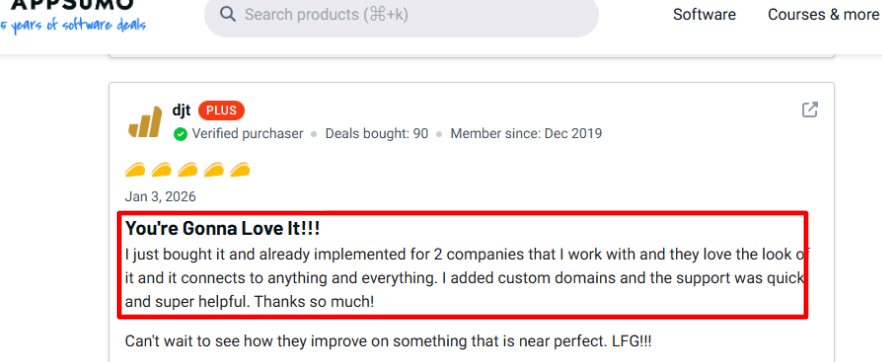
The AppSumo feedback praises Lunacal’s custom domains and quick support response. -
Team coordination For teams across countries, the booking view stays consistent, and confirmations reflect the booker’s local time reliably. A G2 review mentioned this exact time zone consistency and the small “meeting notes / backup link” detail, and I’m sharing that screenshot below.
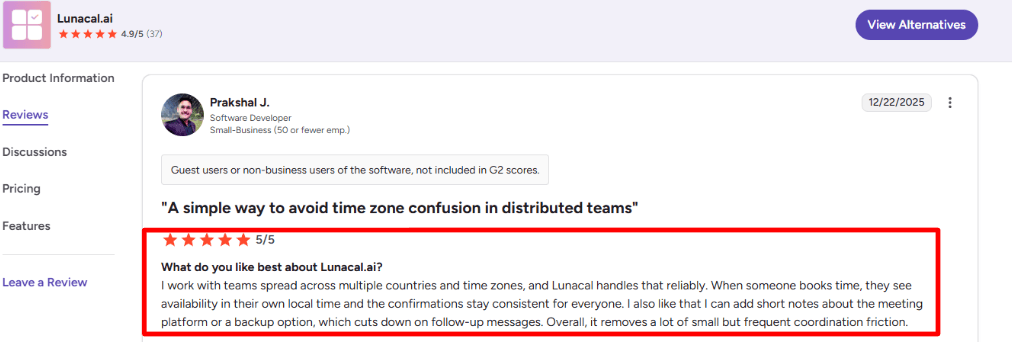
This highlights Lunacal’s consistent time zones plus the meeting-notes and backup-link detail. -
Calendar integration Lunacal supports connecting calendars like Google, Outlook, and Apple, which is table-stakes for avoiding overlaps. Compared to Acuity Scheduling’s well-known calendar-first workflow, Lunacal felt more “page-first” while still covering the conflict basics.
-
Payment integration I tested paid booking flows using Stripe and PayPal, and it’s practical if you charge for sessions rather than invoice later. Acuity Scheduling also supports payments and deposits, but Lunacal adds extras like coupons and a more flexible booking-page layout in the same flow.
Pros
-
Faster to launch a modern-looking booking page in one sitting, especially if the page content matters as much as availability. I didn’t need to stitch together separate landing pages the way I often do with Acuity-style setups.
-
Strong scheduling-page customization with widgets like text, images, documents, and testimonials.
-
Helpful team modes like round robin and collective scheduling for shared pipelines.
-
Solid integrations list on paper, including calendars, video tools, payments, and Zapier.
-
Support responsiveness came up consistently in real user feedback I checked.
Cons
-
If you need a clearly defined HIPAA path with a signed BAA, Acuity Scheduling is the safer default. Acuity’s Premium plan explicitly mentions signing a BAA for HIPAA compliance.
-
If your workflow depends on in-person Square Tap to Pay, Lunacal is not the most direct fit because its payment flows are designed primarily around online bookings through Stripe and PayPal.
-
Travel-heavy availability setups can take tinkering to feel predictable, based on what I saw and what users report.
-
The “everything on one page” approach can feel busy if you don’t keep the page minimal.
-
If you want deep scheduling analytics out of the box, you may end up exporting or using external tools.
Pricing
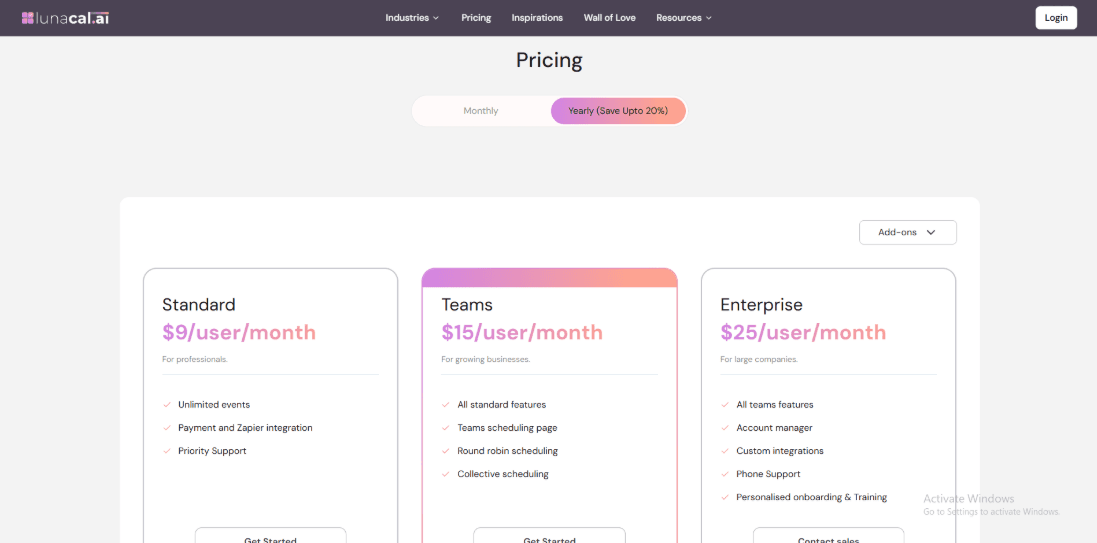
- Lunacal uses per-user pricing, which is easy to model for teams but can add up as seats grow.
- Standard starts at $9 per user per month and Teams starts at $15 per user per month, with Enterprise listed higher.
- You can verify the latest tiers and what’s included on the official Lunacal pricing page.
When to Choose Lunacal over Acuity Scheduling
Choose Lunacal when your booking link needs to act like a mini website, not just a scheduler, and you care about page customization and team scheduling modes. Choose Acuity Scheduling when you need an established appointment-first system, and especially when a BAA for HIPAA is a requirement. Lunacal fits teams that want to reduce coordination friction with time zones, meeting context, and routing in one flow. Acuity fits operations that prioritize classic scheduling maturity and processor workflows like deposits and in-person POS.
Calendly
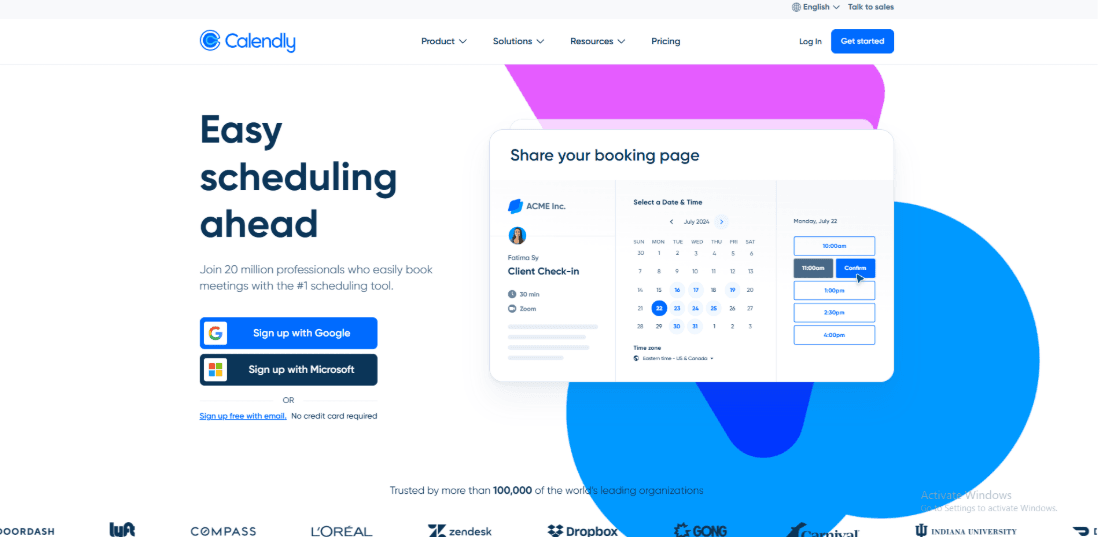
Calendly is best known for fast, low-friction meeting booking links and strong work-calendar workflows. If you want simple scheduling for Zoom calls and internal/external meetings, it can be easier to run day-to-day than Acuity Scheduling. If you’re benchmarking meeting tools, this Calendly alternative comparison is worth skimming.
Features
-
Calendar integration
When I connected Microsoft 365, setup was quick, but I’ve still seen Outlook sync behave unpredictably in real usage.
I also saw this called out in a Trustpilot review, and I’m sharing that screenshot below because it matches what I tested.
Compared to Acuity Scheduling, Calendly feels more “meeting-first”, but the Outlook edge cases can cancel that advantage.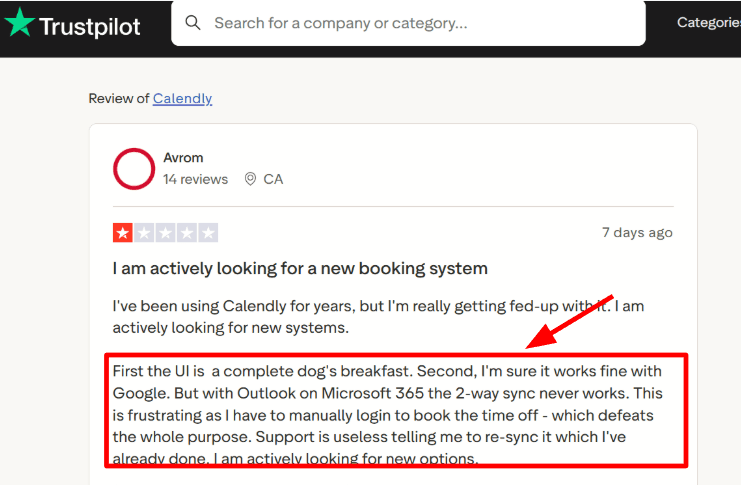
A Trustpilot user flags Outlook sync issues that can show up even after setup. -
Availability rules
You can cap meetings per day, add buffers, and protect focus time without babysitting your calendar.
A Trustpilot review praised this “open door policy without losing the day” setup, and I’ll add that screenshot below too.
For pure meeting control, it’s cleaner than Acuity’s service-style configuration.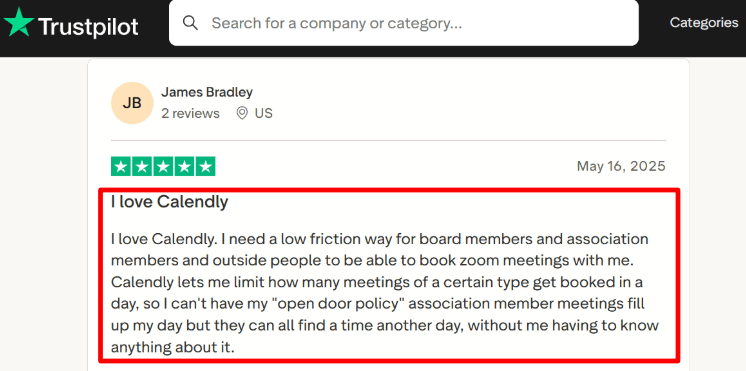
The reviewer describes how Calendly’s buffers and caps keep days from getting overbooked. -
Meeting links
Zoom links can be auto-added to events, and the invite flow stays consistent across different meeting types.
In my tests, this reduces the last-mile friction because everyone lands in the right place with the right details.
It’s especially handy when you’re booking board members, partners, or prospects who won’t fill long forms. -
Payments integration
Calendly supports collecting payments via Stripe and PayPal for paid bookings, which is fine for simple pay-per-meeting flows.
But if you sell packages, memberships, or gift certificates, Acuity Scheduling is built more for that service business model.
One detail I keep in mind: Square’s own docs on Tap to Pay docs show how “in-person checkout” is a different world, and Calendly isn’t aiming there. -
Team routing
Teams can use round-robin and routing-style setups so bookings land on the right person without manual triage.
I like this for sales and support teams where speed matters and ownership should be automatic.
Acuity Scheduling can handle staff calendars, but Calendly’s team distribution tends to feel more native.
If your school is picking a scheduling tool, parent teacher conference scheduling software can help narrow it down.
Pros
- Quick to share and book meetings, especially for Zoom-heavy workflows.
The link-first flow is simpler than most service schedulers. - Free plan exists for basic scheduling.
- Strong Zoom and calendar ecosystem.
- Team routing and round-robin are practical for teams.
- Setup is fast for “meetings”, not “services”.
Cons
- If you run a service business that sells packages, memberships, or gift certificates, Acuity Scheduling is usually the better fit.
Calendly can take payments, but it’s not built around multi-session commerce. - Outlook sync can be hit-or-miss for some Microsoft 365 setups, even if you follow the Outlook guide.
- The UI can feel cluttered once you scale event types and rules.
- Some advanced team workflows push you into higher tiers.
- Customization is fine, but not “mini-website” deep like Acuity-style pages.
Pricing
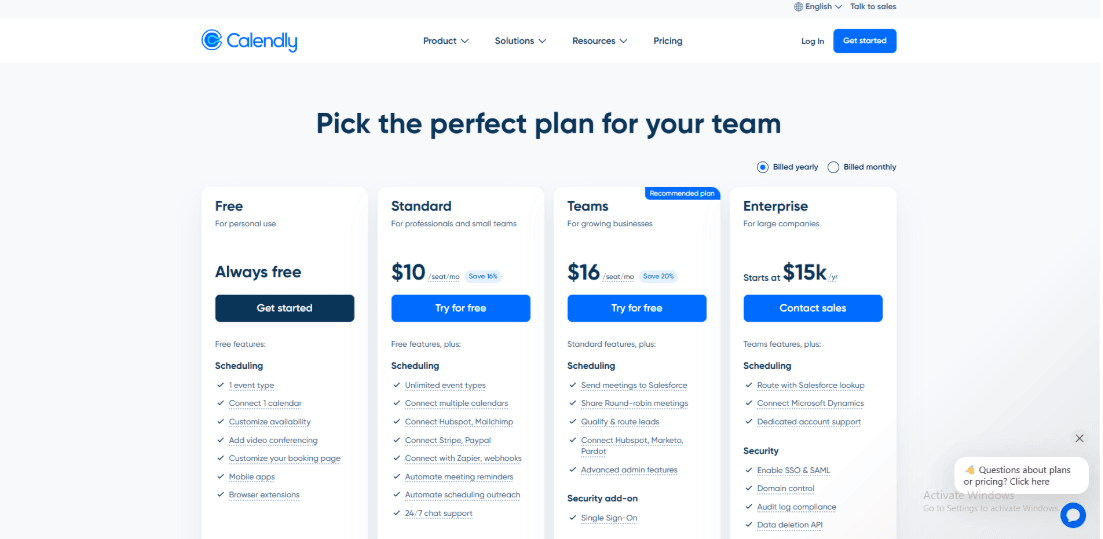
- Calendly has a Free plan for personal use with basic scheduling.
- Paid plans are per seat and typically start with Standard and Teams for small and growing teams.
- Enterprise is annual and geared for large org controls and compliance features.
- I’d always verify the latest tier limits and included integrations on the official Calendly pricing.
When to Choose Calendly over Acuity Scheduling
Choose Calendly if you primarily book meetings, want low-friction Zoom scheduling, and need team routing like round-robin.
Choose Acuity Scheduling if you run a service business that depends on packages, memberships, gift certificates, intake-heavy booking, or more “appointment commerce” than “meeting links.”
Setmore
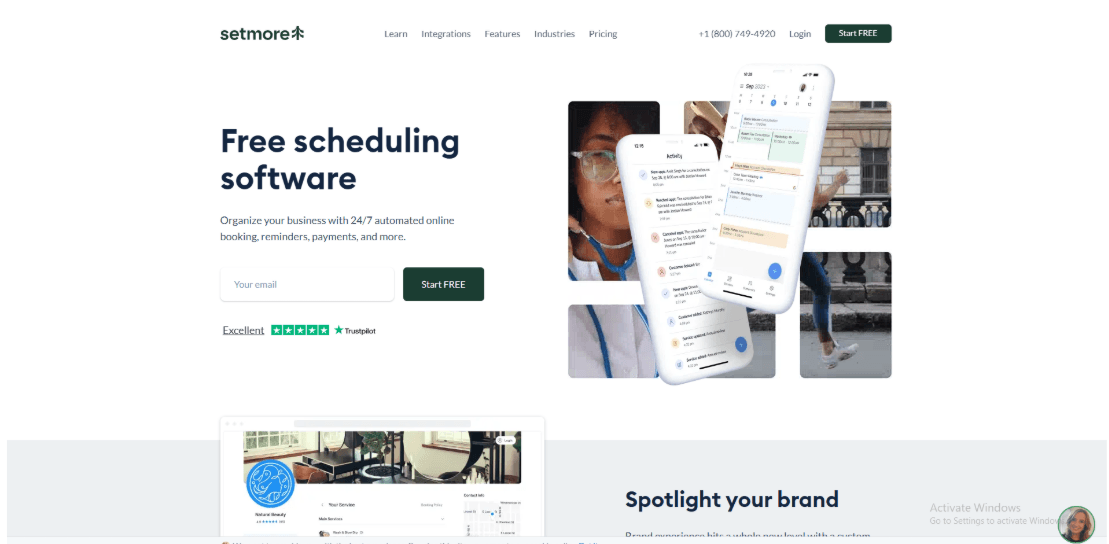
Setmore is popularly known for a generous free plan and quick setup for service teams that just need bookings to start flowing. If you want a lighter, lower-cost on-ramp than Acuity Scheduling and still need payments, reminders, and calendar basics, Setmore is worth testing.
Features
-
Calendar sync I connected Google and Office 365 without much drama, and Pro supports 2-way sync so blocks can mirror back and forth. This is the part I watch closest, because one small sync hiccup can ripple into missed slots. I also noticed a Trustpilot review mentioning weeks of ongoing issues and “new look” updates while problems stayed, so I’m sharing that screenshot below.
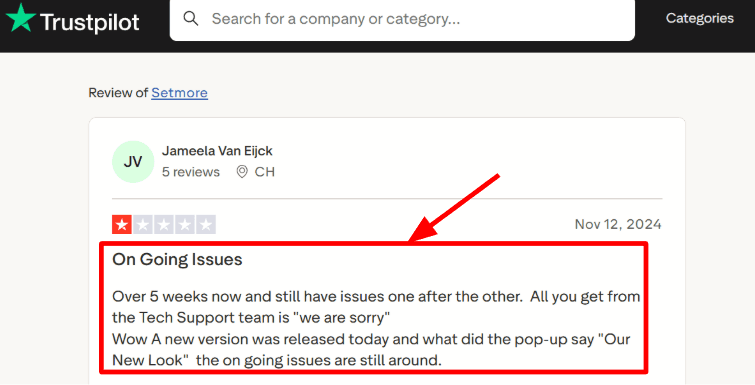
The Trustpilot comment warns about prolonged issues during Setmore UI changes. -
Human support Setmore leans hard into always-on help, including chat, email, and phone support across plans on their pricing grid. A Trustpilot review I read called out fast, polite replies from their team, and it matched what I saw when I tested a couple of setup questions. I’ve added that screenshot below too, since support quality is hard to judge from feature lists alone.
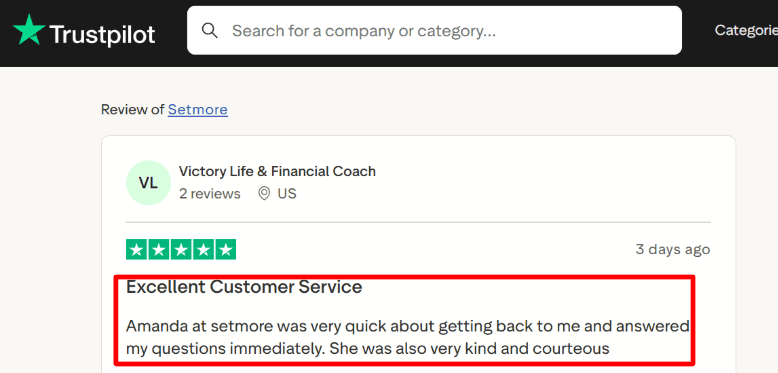
This shows Setmore support being responsive and polite during setup questions. -
Payment integration Payments are flexible: Setmore highlights Stripe, Square, PayPal, Venmo, and even LawPay as options across plans. One detail that’s easy to miss is device readiness for Tap to Pay, because Tap to Pay requirements call out iPhone model and iOS minimums. Compared to Acuity Scheduling, this is also where Setmore feels easier to start, since Acuity doesn’t have a free plan and you move from trial into paid.
-
Video meetings
Google Meet links can be added automatically to confirmations, and Zoom can be connected for virtual appointments. I like that the links drop into confirmations cleanly, but the transition timeline is something I’d plan for.
- Availability rules You can shape real-world scheduling with booking policies, recurring appointments on Pro, and controls like blocking problematic customers. For basic service scheduling, it’s solid, but if your workflow depends on deeper “sell-first” flows like packages, subscriptions, or HIPAA-ready setup, Acuity Scheduling goes further on those.
If Setmore is on your list, my Setmore alternative breakdown makes the tradeoffs clear.
Pros
-
Fast start with a real free plan that still covers the core booking loop, which makes testing in production much easier than Acuity’s paid-only path after trial. It’s a practical way to validate demand before you commit to a monthly tool.
-
Supports multiple payment providers in one place.
-
Calendar sync options cover the common Google and Office 365 setups.
-
Video meeting links can be automated for virtual services.
-
Support touchpoints are clearly offered across channels.
Cons
-
If you need Acuity Scheduling’s depth in healthcare-style compliance or its higher-tier capabilities like signing a BAA for HIPAA, Setmore is usually not my first pick for that scenario. Acuity’s Premium plan explicitly includes HIPAA BAA support and higher calendar capacity.
-
Free plan limits monthly appointment volume, which can bite once you scale.
-
Video setup can require a migration step if you relied on Teleport guidance.
-
SMS reminders are a paid-plan feature, so no-shows can rise if you stay free.
-
Pricing is per user, and it took me a second to map staff calendars to billing.
Pricing
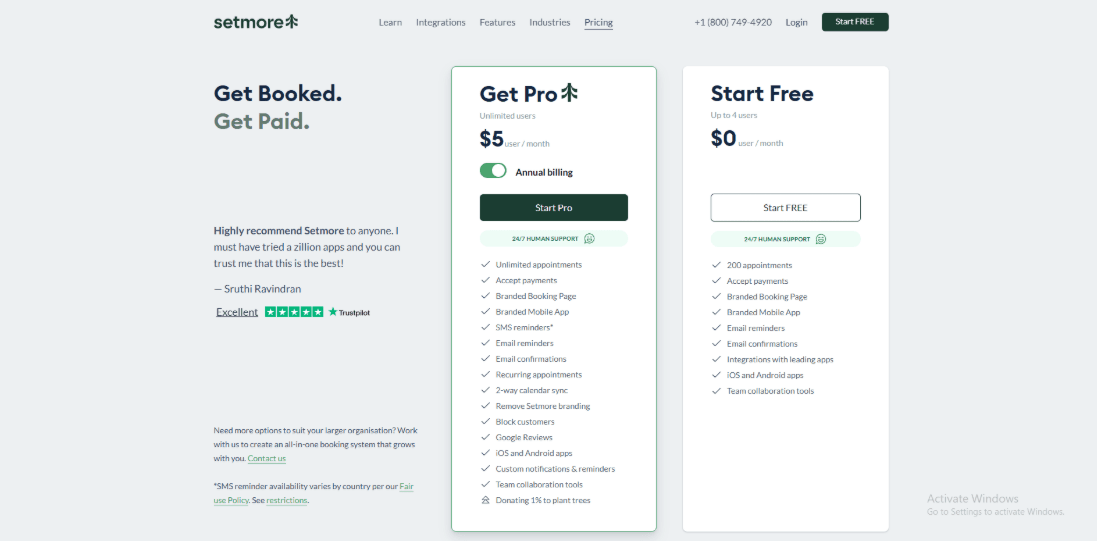
- Free: up to 4 users and a monthly appointment cap, meant for small teams testing demand.
- Pro: per-user pricing with an annual discount, adds unlimited appointments, 2-way calendar sync, SMS reminders, and removes Setmore branding.
- Check Setmore’s official pricing page for the latest plan details.
When to Choose Setmore over Acuity Scheduling
Choose Setmore if you want a free-plan runway, you’re optimizing for simple service bookings, and you need payments plus basic calendar and video integrations without committing early.
Choose Acuity Scheduling when you need packages or subscriptions at scale, HIPAA-ready workflows with a signed BAA, or many bookable calendars and deeper operational controls.
SimplyBook.me
SimplyBook.me is best known for being a flexible booking system with lots of toggles and channel options, not just a simple “pick a time” scheduler. I’d consider it over Acuity Scheduling when I want a free starting point and tighter control over bookings, providers, and add-ons as I scale.
Features
-
Membership billing I set up memberships and it’s built around recurring cycles like monthly or annual, plus rules about what members can book. One thing to watch, it’s not designed around “always bill on the 1st” for everyone. I saw the same gap called out in a Reddit post from a growing music school, and I’m sharing a screenshot below so you can judge the fit.
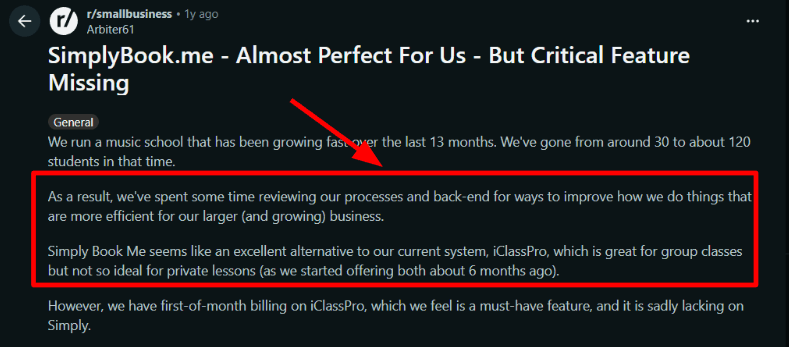
A business owner explains a recurring-billing edge case to watch in SimplyBook.me memberships. -
Setup and support The admin flow is pretty approachable once you stop thinking in “plans” and start thinking in “features you turn on”. A Trustpilot reviewer also called it easy to use with prompt support, and my experience landed close to that. The only snag for me was figuring out which custom features were included vs paid extras, so I’m adding a screenshot below.
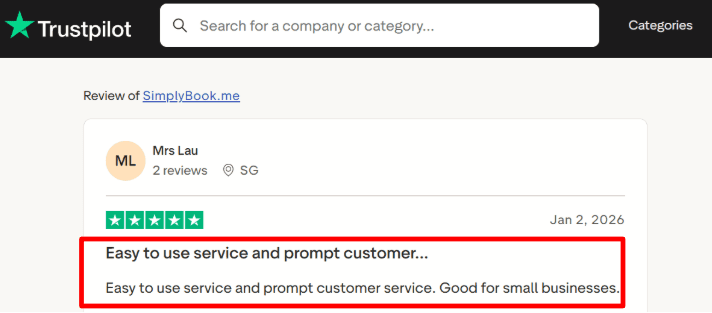
The screenshot focuses on how feature add-ons can be unclear until you map tiers. -
Payment integration It supports common gateways like Stripe, PayPal, and Square, and higher tiers mention extras like payment links and vaulted cards. Compared to Acuity Scheduling, Compared with Acuity Scheduling, the main difference is not whether payments are supported; it is how much payment functionality each tier includes.
-
Calendar integration I wired it to Google Calendar and it behaves like you’d expect, new bookings sync and cancellations stay clean. Acuity Scheduling is also strong here, so the decision usually comes down to your broader booking workflow, not calendar sync alone. If you run multiple staff or resources, you’ll want to map providers carefully so availability doesn’t drift.
-
Booking channels You can take bookings from your site, widgets, and social profiles like Facebook and Instagram, plus Google Business entry points. If your business lives on social and discovery channels, this is where SimplyBook.me starts to feel different from Acuity’s “booking page first” model. For regulated or global teams, I also noticed options around selecting data location on higher plans, which can matter for procurement.
Pros
- Starts lightweight, then scales by adding features and providers. Useful when you’re not ready to commit to Acuity Scheduling pricing from day one.
- Strong set of booking channels beyond your website.
- Lots of customization via “custom features” model.
- Solid calendar and video meeting coverage for common setups.
- Works well for service businesses that sell sessions, packs, or memberships.
Cons
- If you want a clean, unlimited appointments setup with minimal knobs, Acuity Scheduling can be simpler to run long-term. SimplyBook.me’s booking limits and feature gating can feel like more admin once volume ramps.
- Recurring memberships have a payment nuance where Stripe recurring works “everywhere except within the EU” in their docs.
- SMS and some communication options are add-ons, not always bundled into the base subscription.
- Plan selection can take longer because you’re choosing both a tier and which custom features you need.
- Higher tiers can be necessary sooner if you need many providers, higher booking volumes, or deeper payment tools.
Pricing
- SimplyBook.me has a Free plan and paid tiers that scale mainly by monthly booking limits, number of providers, and included custom features.
- Free includes a small booking allowance, while paid plans increase bookings and unlock more features like payments and stronger client app options.
- They also run a 14-day trial and note that some items like SMS credits and domains are paid separately.
- Details change by region and billing cycle, so I always verify on the official SimplyBook.me pricing page.
When to Choose SimplyBook.me over Acuity Scheduling
If you need a free starting point, lots of booking channels, and you’re okay managing feature switches, SimplyBook.me is a strong fit. If you run high-volume appointments and want simple pricing without booking caps, Acuity Scheduling is often easier to live with. Choose SimplyBook.me when providers, add-ons, and channel distribution drive the decision more than a clean “book a time” experience.If you manage groomers and time blocks, pet grooming scheduling software is a solid shortlist.
Square Appointments
Features
Square Appointments is popularly known for tight scheduling + checkout inside the Square ecosystem. If you already run payments on Square, it can feel more straightforward than Acuity Scheduling for in-person service businesses. If you’re comparing checkout-first schedulers, this Square Appointments alternative page is a good side-by-side.
-
Payment integration
I could take prepayment at booking, then finish checkout from the same Square flow.
This is where Square Appointments can be simpler than Acuity Scheduling if your whole business already runs on Square POS.
I also saw a Reddit review mentioning support going sideways and even getting blocked after back-and-forth, so I’m sharing that screenshot below because it’s worth factoring in.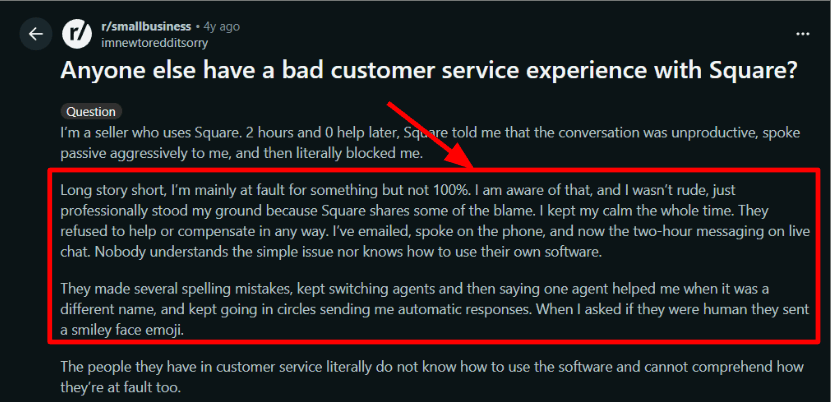
A Reddit thread describes support escalation going poorly in a Square account issue. -
Support pathways
In my testing, I noticed you end up switching between chat, dashboard help, and product screens to get answers.
At the same time, I’ve also seen the opposite experience in a Trustpilot review where a Square advocate handled renewal questions with patience and follow-through, and I’m adding that screenshot below as well.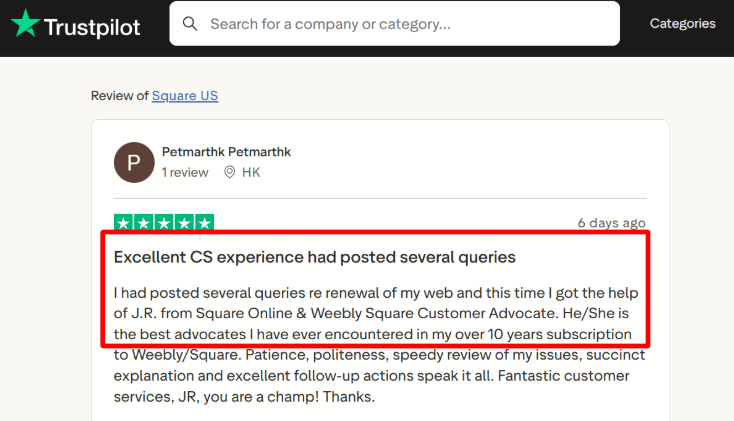
This review notes patient follow-through on a renewal question, which is the best-case support path. -
Availability rules
You can set working hours per staff member, manage time off, and keep the calendar consistent across devices.
It’s solid for day-to-day ops, but I found myself clicking around more than expected before everything lined up. -
Online booking site
You get a hosted booking page that clients can use 24/7, plus you can route bookings by staff and location.
If your priority is a simple, functional booking site, it’s fast to get live, though Acuity Scheduling tends to offer deeper scheduling-page customization. -
Resource handling
If you sell services that depend on rooms or stations, this gets interesting.
A detail I don’t see many people mention is that NerdWallet notes Square’s higher tier adds resource management like room assignments, which matters for clinics and studios that block inventory alongside staff
If you are outgrowing Square Appointments, start with Square Appointments alternative.
Pros
- Built for booking + taking money in one flow, especially if you already use Square daily.
Compared to Acuity Scheduling, there’s less stitching together when checkout is your center of gravity. - Strong fit for walk-in + appointment hybrids.
- Simple staff schedules for small teams.
- Booking and POS feel like one system.
- Add-ons like loyalty can plug into the same stack.
Cons
- If you’re a consultation-heavy business that needs deeper intake forms, flexible payment processors, or HIPAA-style workflows, I’d keep Acuity Scheduling in the lead.
Square Appointments is great for checkout-first businesses, but not always the best for form-heavy or compliance-heavy setups. - Pricing scales per location, which can surprise multi-location teams
- Some setup paths bounce between Dashboard and Appointments.
- Customization of the booking experience can feel boxed in.
- Support outcomes can vary a lot depending on the issue channel.
Pricing
- Free plan is $0 per month per location, then you upgrade by location as your needs grow.
- Plus is $49 per month per location and Premium is $149 per month per location on Square’s US pricing page.
- Custom pricing exists for higher-volume businesses.
- Payment processing fees still apply on top, so I always sanity-check total cost with real transaction volume.
When to Choose Square Appointments over Acuity Scheduling
Choose Square Appointments if Square POS is already your operating system, you need fast online booking + in-person checkout, and you want staff schedules to live next to payments.
Stick with Acuity Scheduling when custom scheduling pages, deeper intake forms, or HIPAA-ready structure via BAA is central, or when you want more flexibility across payment processors and booking flows.If you are comparing Square Appointments across scheduling needs, Square Appointments alternative helps.
Fresha
Fresha is best known for salon-style operations in one place: booking, POS, client profiles, and a marketplace to get discovered. If you want more than a scheduling page and you run beauty or wellness, Fresha can make more sense than Acuity Scheduling.
Features
-
Seat billing Fresha’s pricing is tied to each bookable person, not just “a calendar link”. Their pricing page shows $19.95/month for a solo and a per-team-member model for teams. I also saw the same shock in a r/hairstylist post about the move to $20/month, I’m dropping that screenshot below.
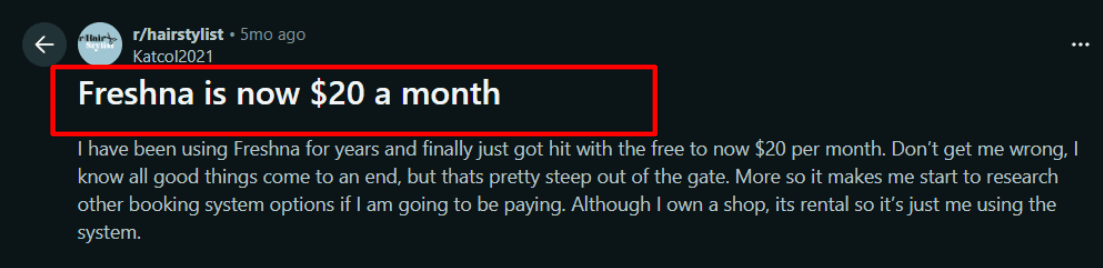
The post reacts to Fresha’s move toward a $20 per month solo price point. -
Support options By default you get email and chat support, and there’s a paid “premium support” add-on with phone + chat. A Trustpilot review I read matched what I saw during setup, quick help when you hit a blocker. I’m sharing that screenshot below so you can judge the tone and response speed.
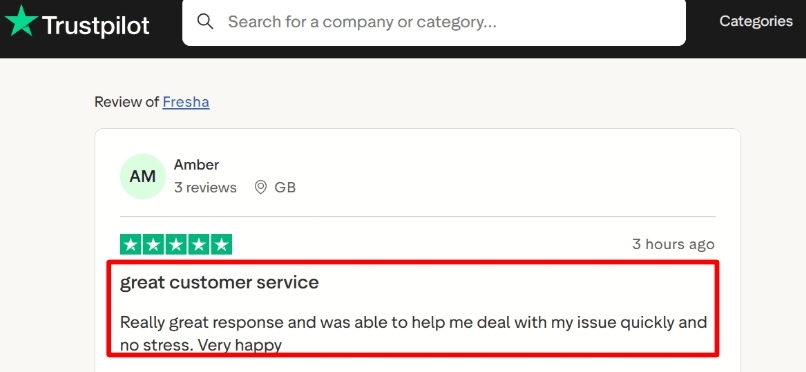
A Trustpilot reviewer says Fresha support is quick when you hit a setup blocker. -
Payment integration Online and in-person card payments are built into Fresha with published processing rates and a separate Tap to Pay authorization fee. With Acuity Scheduling, you’re often thinking in terms of connecting Stripe or Square, while Fresha tries to keep it inside one system. If you’re planning Tap to Pay across regions, check the regions list.
-
POS checkout Fresha includes point of sale, inventory, quotes, and invoices, which is a different mindset than Acuity’s scheduling-first setup. When I tested it, the checkout flow is strong, but finding the right setting for taxes and receipts took me a few extra clicks. If you never sell products, this depth can feel like overhead.
-
Availability controls You can run single or multiple calendar columns, plus group bookings and timing blocks like processing and finishing time. In practice this is closer to “running a floor” than Acuity Scheduling’s appointment types and bookable calendars. It’s great for busy chairs and rooms, but you’ll want to spend time tuning rules early.
If you want options that feel similar to Fresha, see my Fresha alternative breakdown.
Pros
- All-in-one for salons: booking + POS + client management in one workflow, not stitched together like Acuity often is. I could run the whole day from the calendar screen without jumping tools.
- Strong marketplace discovery if you’re still building demand.
- Built-in consultation forms and client history fit the industry well.
- Multi-merchant routing is useful for rentals and independents under one roof.
- Clear published rates for payments, messaging, and add-ons.
Cons
- If you only need a clean scheduling link for a service business outside beauty or wellness, Acuity Scheduling is usually simpler and lighter. Fresha’s POS and marketplace layers can be extra weight.
- Marketplace-acquired new clients can carry a fee, which can change unit economics fast. See marketplace fees.
- Per-bookable-person pricing can surprise solo operators as they grow a tiny team.
- Some settings feel built for salons first, not generic appointment businesses.
- Premium support is an add-on, not included by default.
Pricing
- 14-day trial, then paid plans. Independent is listed at $19.95/month for one bookable person, and Team is listed from $14.95 per bookable team member monthly.
- Marketplace brings a one-time fee on brand new clients who discover you there, while returning clients are listed as no-fee.
- Payments and messaging have separate usage-based fees and optional add-ons. Details are on the Fresha pricing.
When to Choose Fresha over Acuity Scheduling
Choose Fresha if you run beauty or wellness, need POS + inventory, and want marketplace discovery baked into the system.
Choose Acuity Scheduling if you’re a general appointment business that wants a clean scheduling flow with fewer operational layers.
Fresha fits best when you manage staff, chairs, rooms, retail, and repeat visits in one place. If you are moving away from Fresha, my Fresha alternative list is the quickest shortlist.
Acuity fits best when your priority is appointment scheduling + simple payments without a marketplace model.
OnceHub
Features
OnceHub is best known for scheduling that starts with lead qualification and routing, not just a booking page. If you want smarter distribution across people, rooms, and paths, it can be a better fit than Acuity Scheduling for that specific workflow.
-
Plan downgrade When I tested account changes, I noticed a hard edge around moving back to free once you’ve gone paid.
I also saw the same complaint in a Trustpilot review, so I’m sharing a screenshot below to show the exact wording from a real user.
OnceHub’s own docs say you can’t downgrade to Basic after upgrading, which explains why this situation pops up in the wild.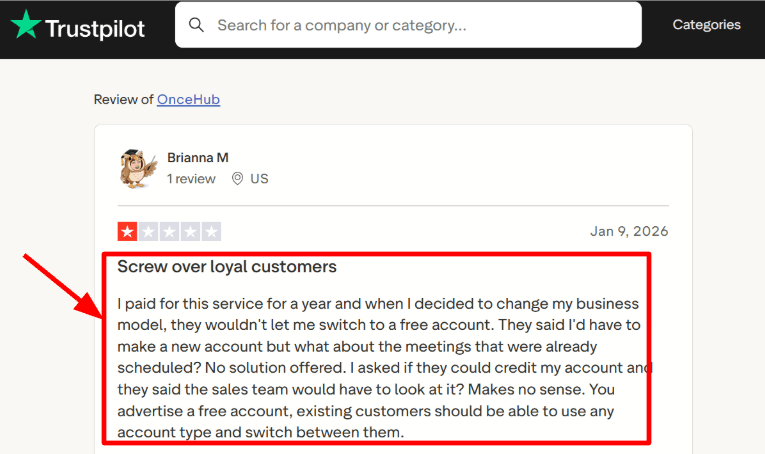
The screenshot shows frustration about not being able to move back to OnceHub’s free plan. -
Live onboarding Support can be surprisingly hands-on when you’re stuck on a real setup problem.
That Trustpilot review about jumping on a Google Meet screen share matches what you’d expect from a team that’s used to odd routing setups. Screenshot below.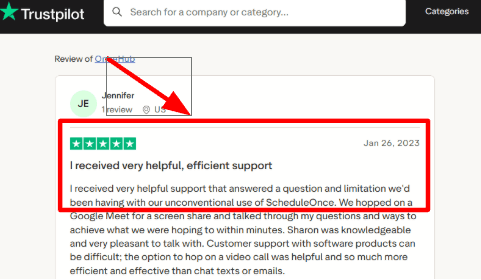
A customer describes OnceHub jumping on a Google Meet screen share to unblock setup. -
Calendar sync Native calendar connections cover Google Calendar, Microsoft 365, Exchange, and iCloud, so availability behaves like a real calendar-first system.
In my tests, that matters most when you have multiple hosts and you want busy time to be the source of truth, not a manually managed grid. -
Routing forms This is where it starts to feel different from Acuity Scheduling.
Instead of only collecting intake answers after someone has picked a time, you can qualify first, then route people to the right host or flow, and schedule inside the same experience. -
Compliance controls If you’re in regulated workflows, OnceHub splits “normal scheduling” from a security layer you can turn on.
One detail I don’t see mentioned often is that OnceHub is listed in the Cloud Security Alliance STAR Registry, which is worth scanning if your security team asks for external attestations.
If you are moving off OnceHub, the quickest shortlist is OnceHub alternative.
Pros
- Strong routing and distribution when scheduling depends on who the guest is and what they answered, not just who is free.
That’s a real gap in Acuity Scheduling’s more appointment-first model for service businesses. - Clean native integrations for calendars and common meeting tools.
- Multi-host, round-robin, and priority-style distribution options are built-in on higher plans.
- Good fit for teams that want qualification plus scheduling in one flow.
- Security and compliance can be treated as an add-on layer instead of “always on” overhead.
Cons
- If you run a classic paid-appointments business with services, add-ons, and simple self-serve booking, Acuity Scheduling usually stays the cleaner pick.
OnceHub can feel like extra machinery if you don’t need routing. - Downgrading back to the free Basic plan after upgrading is restricted per the OnceHub Help Center documentation.
- Payments are more limited in scope compared to Acuity’s broader “appointments + payments” positioning.
- Some setup choices are spread across admin areas, so the first run can take a few passes to feel right.
- If your team wants a minimal booking link and nothing else, this can be heavier than it needs to be.
Pricing
- Basic is free and is limited to 1 user, 1 connected calendar, and 1 booking link, with a 14-day trial to explore advanced features.
- Paid plans are priced per seat: Schedule is $12 monthly or $10 per seat per month billed yearly; Route is $23 or $19; Engage is $47 or $39.
- A Security and Compliance add-on is $5 per seat per month and adds items like SSO and HIPAA BAA options. See OnceHub pricing .
When to Choose OnceHub over Acuity Scheduling
Choose OnceHub when qualification and routing are core to your scheduling, not a nice-to-have.
If you need distribution across hosts and rooms, or you want forms and logic before a time is chosen, it’s usually the better tool.
It’s also a stronger fit when compliance controls and structured security features need to be part of the setup, not an afterthought.If you are comparing OnceHub features across vendors, OnceHub alternative helps frame it.
Summary Table
| Tool | Best For | G2 Rating | Pricing | Standout features | Red Flag | Payments | Team routing | Classes/Packages |
|---|---|---|---|---|---|---|---|---|
| Lunacal | High-converting booking pages | 4.9 ★★★★★ | Free Plan available Paid Plan starts at $9/month | - Profile-rich booking page widgets - Payments + forms in flow | Smaller ecosystem compared to incumbents | Yes | Yes | Yes |
| Calendly | Quick 1 meeting links | 4.7 ★★★★☆ | Free Plan available Paid Plan starts at $10/seat/month | - Reliable scheduling + availability rules - Routing forms for inbound leads | Advanced features locked behind higher tiers | Yes | Yes | No |
| Setmore | Budget-friendly staff scheduling | 4.5 ★★★★☆ | Free Plan available Paid Plan starts at $5/user/month | - Free plan for small teams - Simple staff schedules and reminders | Routing and workflows are fairly basic | Yes | No | No |
| SimplyBook.me | Service catalog + add-ons | 4.4 ★★★★☆ | Free Plan available Paid Plan starts at $11.9/month | - Service menu with add-ons - Client app and memberships options | Many add-ons make pricing harder to predict | Yes | No | Yes |
| Square Appointments | Square POS appointment businesses | 4.3 ★★★★☆ | Free Plan available Paid Plan starts at $29/month | - Tight Square POS + inventory sync - Staff scheduling with checkout flow | Works best only if you use Square | Yes | No | Partial |
| Fresha | Salon/spa marketplace exposure | 4.2 ★★★★☆ | Free Plan available Paid Plan starts at $0/month | - Marketplace discovery for salons/spas - No-subscription booking for providers | Marketplace policies can reduce brand control | Yes | No | Partial |
| OnceHub | Lead qualification + routing | 4.4 ★★★★☆ | Free Plan available Paid Plan starts at $10/seat/month | - Lead capture with form routing - Multiple booking flows per team | Not ideal if you need payments | Partial | Yes | No |
Methodology
Over the last two years, I have reviewed scheduling tools.
Sources
- Reviewed each tool’s official website, pricing, FAQs, and help docs to confirm what is supported today. Also checked setup guides plus policies for cancellations, refunds, and data handling.
- Read user reviews on G2, Trustpilot, Capterra, and app stores when relevant. Then scanned Reddit and Quora threads to identify recurring issues and common workarounds.
Test setup for each tool
- Built a clean test business with two staff members, three services with different durations, and one paid service. Used a fresh email and a new calendar so results stayed consistent.
- Used trials or free plans where possible, set up booking pages, and tested on desktop and mobile. Also checked time zone behavior and Google Calendar sync.
Common scenarios I tested
- A new client books, completes an intake form, pays a deposit, receives confirmations and reminders, then reschedules. Measured steps and time to complete.
- Staff availability with buffers, daily limits, and blackout dates. Also tested group sessions and packages when available.
- Admin work such as refunds, no show rules, client history, and reporting. Noted unexpected behavior plus support response quality.
FAQs
What is the best Acuity Scheduling alternative?
The best Acuity Scheduling alternative is Lunacal if your booking page needs to help people trust you before they book.
It is rated 4.9/5 on G2 and supports packages, customizable intake forms, payments, reminders, team scheduling, and GDPR controls.
It works well when bookings are tied to revenue and your page needs to explain the service, collect details, and reduce drop-off.
If you run a large appointment-heavy business with many locations, staff, services, and add-ons, SimplyBook.me is also worth testing.
Which Acuity Scheduling alternatives should I compare first?
The Acuity Scheduling alternatives I would compare first are Lunacal, Calendly, SimplyBook.me, and Setmore.
Lunacal is best when you want a stronger booking page, packages, flexible intake forms, payments, and team scheduling.
Calendly is best for quick meeting links, clean calendar sync, and simple team scheduling.
SimplyBook.me is a good fit for service businesses with many services, providers, add-ons, and booking rules.
Setmore is usually the first tool to test if you want a lower-cost option with basic staff scheduling, reminders, and payments.
Which Acuity alternative works best by country?
Country-level tax, privacy, and payment rules can change which tool fits best.
For the US and Canada, check sales tax on paid appointments, SMS reminder consent, refund handling, and payment processor support.
For the UK and Australia, check VAT or GST on deposits, packages, receipts, and invoice fields.
For the EU, GDPR matters more. Look for a DPA, data export, deletion workflows, retention controls, and clear subprocessors.
If you serve clients in Germany, France, or Spain, also check language support, 24-hour time format, local currency, and reminder wording.
What features should I compare when switching from Acuity?
When switching from Acuity, compare calendar sync, intake forms, payments, refunds, reminders, reschedule rules, cancellation rules, and team scheduling.
If you sell packages or prepaid sessions, check whether the tool can track session credits cleanly.
If you run a team, test staff availability, round robin, shared calendars, and permissions.
Also test booking page speed, mobile experience, time zone handling, buffers, and whether clients can reschedule without contacting you.
How do I migrate from Acuity without breaking bookings?
Start by rebuilding your most important services in the new tool before touching your live links.
Copy your availability, intake questions, payment settings, reminders, cancellation rules, and staff calendars. Then run a few test bookings from the client side.
Keep Acuity and the new tool live for about a week while you update website embeds, email signatures, social links, ads, and old booking links.
After that, send a short rebooking email to clients if needed and keep your old Acuity links monitored until the move is stable.
Summarize this content with AI


