


Introduction
For this guide, I manually tested the top calendly alternatives end-to-end, then cross-checked what real users say on review portals (G2, Capterra, Trustpilot, Reddit). I reviewed DPAs, subprocessor lists, and embed tracking behavior in depth, with screenshots. I've only included the options which are GDPR-compliant.
Key Summary
- GDPR Compliance is critical
- Top options include Lunacal, Simplybook, SuperSaaS, Doodle and Cal
- Lunacal and Simplybook are good for branded options, packages and high-converting pages
- Doodle and Cal have good free plan
Scheduling tools by use case
Best fit by scenario
| Use case | Best tool | Why it fits |
|---|---|---|
| Sales calls | Lunacal | Branded pages, conversion focus |
| Service business | SimplyBook.me | Payments, staff, classes |
| Resource booking | SuperSaaS | Capacity and equipment support |
| Group scheduling | Doodle | Poll-based coordination |
| Paid sessions | Lunacal | Built-in payments, packages |
| Workshops/classes | SimplyBook.me | Group booking, memberships |
Feature comparison snapshot
| Feature area | Lunacal | SimplyBook.me | SuperSaaS | Doodle |
|---|---|---|---|---|
| Booking pages | Strong branding | Hosted site + widgets | Functional | Basic |
| Payments | Built-in | Built-in | Built-in | Stripe only |
| Group classes | Limited | Strong | Strong | Basic |
| Resource booking | No | Partial | Strong | No |
| Automation | Moderate | High | Moderate | Low |
| EU fit signals | Moderate | Strong | Strong | Strong |
Lunacal
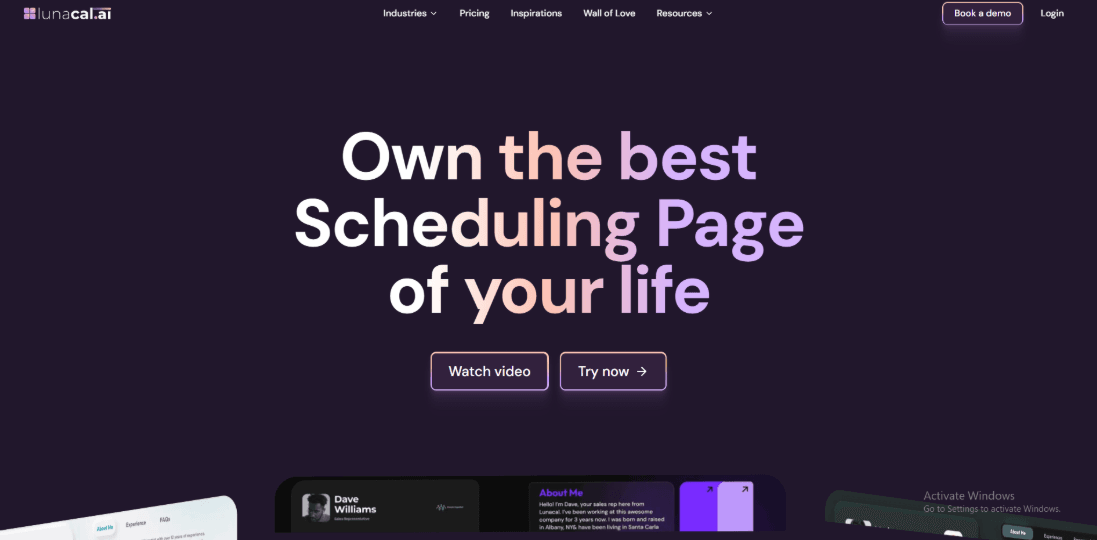
Lunacal is best known for turning a booking link into a branded page with real context, not just a time picker. If most Calendly Alternatives in Europe feel like utilities first, Lunacal is the one I’d pick when the page itself needs to do some selling. If Setmore is on your shortlist, this Setmore alternative breakdown is a useful comparison point.
Features
-
Calendar sync I connected Google and Outlook calendars in a few minutes and conflict checks behaved as expected in my tests. For EU teams, the basics matter a lot, and this covers the “don’t double-book me” problem cleanly.
-
Custom domains You can run multiple brands and domains, but the setup flow can feel a bit scattered when you’re juggling companies. I also saw a similar complaint in an AppSumo review (screenshot below) about multi-company and domain setup not feeling production-ready, and I get why they said that.
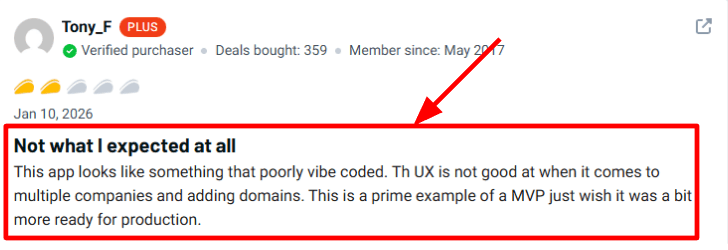
The feedback calls out that multi-company domain setup in Lunacal feels unfinished and confusing. -
Timezone handling This is one of the areas where Lunacal felt reliable when I tested with teammates in different countries. A G2 reviewer called out that bookers see availability in their own local time and confirmations stay consistent (screenshot below), and that matched what I saw.
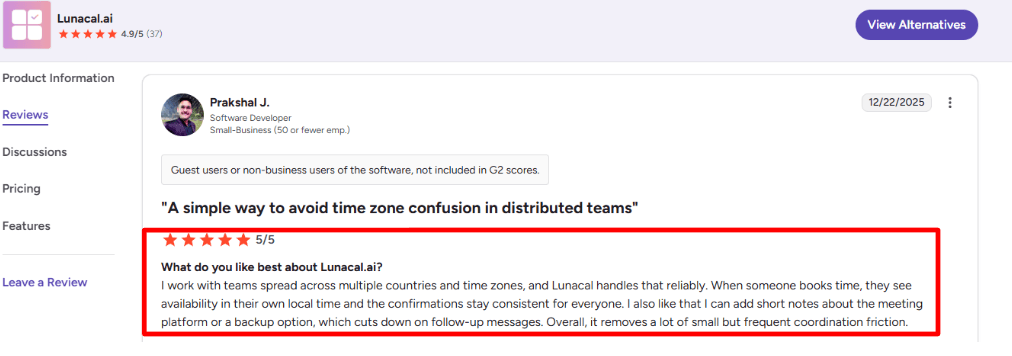
The reviewer says invitees see local-time availability while confirmations remain consistent across time zones. -
Payment integration Stripe and PayPal are built in, so paid sessions and deposits are realistic, not a duct-tape checkout. If you sell time like a product, coupons and packages reduce the back-and-forth more than most people expect.
-
EU-friendly settings They shipped simple but important controls like 12h or 24h clock and week starting Monday, aimed at European users. For security due diligence, the Microsoft Learn compliance listing explicitly states things like quarterly vulnerability scanning and other operational controls, which is useful context beyond feature lists.
Pros
-
Booking page customization is genuinely strong, and it’s the main reason I’d shortlist it versus most Calendly Alternatives in Europe that stay “form-like”. It can reduce trust friction before the slot is picked, especially for consultants, agencies, and sales calls.
-
Solid timezone experience for global teams.
-
Payments, coupons, and packages are practical for paid sessions.
-
Team modes exist, including round-robin and collective scheduling.
-
Small EU details are covered, like Monday week start and 24-hour time.
Cons
-
If your main goal with Calendly Alternatives in Europe is strict EU data residency requirements and very mature enterprise admin controls, a Europe-first vendor may be a safer default. In that scenario, Lunacal’s “branded page” advantage matters less than procurement checkboxes.
-
Multi-company plus domains can feel clunky when you’re setting it up the first time (matches what some AppSumo users report).
-
Some domain rules are restrictive, like domain slots not being reusable, which is noted in an AppSumo Q&A,
-
If you want deep native APIs for custom builds, you may need to lean on webhooks and integrations.
-
Reporting depth may not satisfy teams that live in analytics dashboards.
-
If you need a very conservative “no-surprises” UI for every admin workflow, you should test the full setup path end-to-end.
Pricing
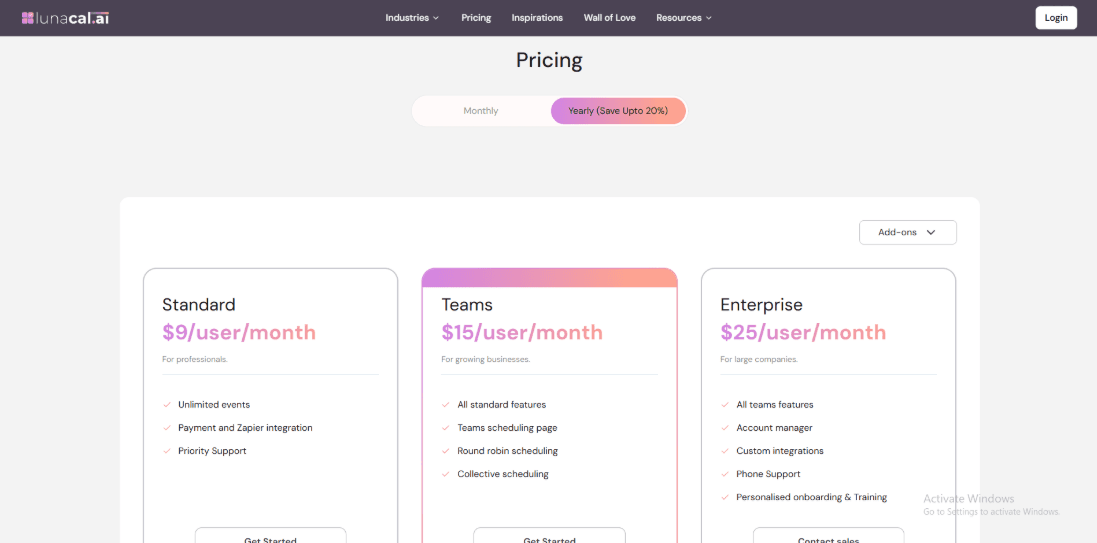
- Standard is $9/user/month and covers core scheduling plus payments and automation basics.
- Teams is $15/user/month and adds team scheduling pages, round-robin, and collective scheduling.
- Enterprise is $25/user/month with account support and custom integrations, and annual billing claims up to 20% savings. Details on the official Lunacal pricing page.
When to Choose Lunacal over Calendly Alternatives in Europe
Choose Lunacal if you want a booking page that builds trust with content, proof, and context before someone books. It’s a strong fit for cross-border teams that need reliable time zones plus European-friendly formats like Monday week start and 24-hour time. Pick it when you monetize time and need payments, packages, or coupons inside the booking flow. If your selection criteria is mostly EU data residency and enterprise governance, shortlisting a Europe-first alternative first is usually the cleaner path.
SimplyBook.me
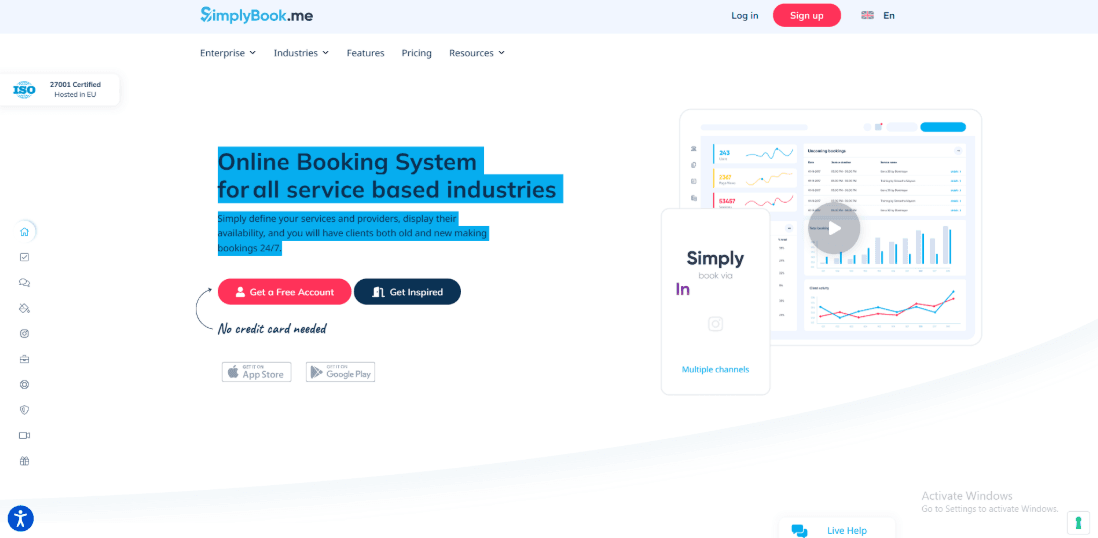
SimplyBook.me is best known for running full appointment and class booking for service businesses, not just 1
meeting links. If you’re comparing Calendly alternatives in Europe, it’s the one I’d shortlist when you also need payments, packages, and real “business ops” features.Features
-
Memberships & packs When I set it up for a mixed business, packages and memberships were the first thing I checked. I also saw this gap called out in a Reddit review from a music school, first-of-month billing is a dealbreaker for them, and I’m sharing a screenshot below so you can judge it yourself. Source: Reddit thread
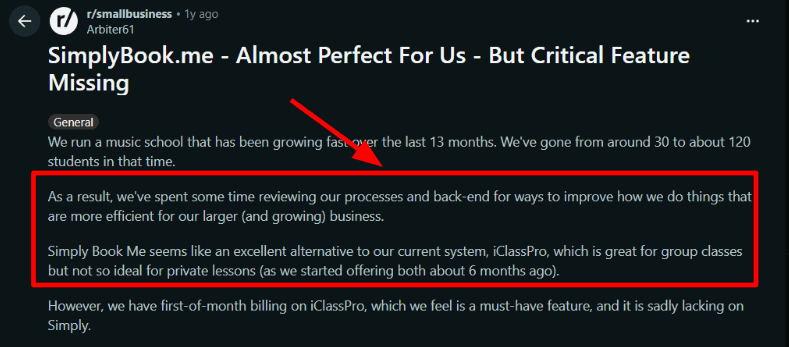
The comment flags first-of-month membership billing as a limitation that can break certain setups. -
Booking website You can run a hosted booking site or embed widgets, which is handy when customers arrive from different places. A Trustpilot review mentions it’s easy to use and support replies fast, and that matched my own setup experience, I’ve added a screenshot below.
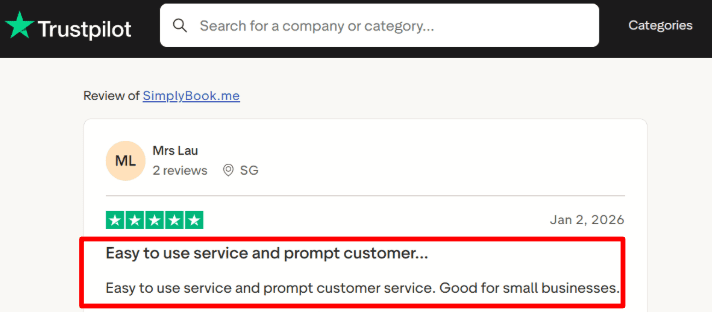
The review highlights easy setup and fast support responses as a consistent day-to-day benefit. -
Calendar integration Two-way sync with Google or Outlook can block busy time and prevent double bookings for you and your staff. One small snag for me was finding the right toggle because it lives under custom features, not a single obvious settings switch.
-
Payment integration Payments, deposits, and paid classes are built into the flow, so you’re not stitching together checkout pages after the fact. For a Europe-focused shortlist, this is a practical difference vs many Calendly-style alternatives that stop at “scheduled” and leave “paid” to other tools.
-
Google booking channel Reserve with Google is a real distribution channel if Maps and local search drive demand. The detail most people miss is that it has specific constraints around memberships and recurring services, so you need to map your offerings carefully before you rely on it.
If you are setting up bookings for a law practice, start with legal service firm booking scheduling system.
Pros
- Better fit for service businesses than many Calendly alternatives in Europe, especially when booking is tied to payments and staff schedules. I could model a real studio flow without hacking it into a meeting-only tool.
- Flexible booking surfaces: hosted site, widgets, social, and Google entry points.
- Strong for classes plus 1, not just meetings.
- Lots of operational knobs: reminders, buffers, intake forms, confirmations.
- Europe-leaning footprint is clearly stated in the team.blue press release, which aligns with EU-heavy customer bases.
Cons
- If you only need simple 1 meeting scheduling, it’s usually smarter to pick a lighter Calendly-style alternative in Europe. SimplyBook.me can feel like too much system for that job.
- Some billing patterns like strict first-of-month membership billing can be awkward to replicate.
- Feature discovery takes time because many capabilities are turned on via add-ons and toggles.
- Reserve with Google has limitations you have to respect, especially with memberships and recurring services (see the SimplyBook.me Google Reserve FAQ).
- Costs can creep up when you add providers, SMS, and extra feature slots.
Pricing
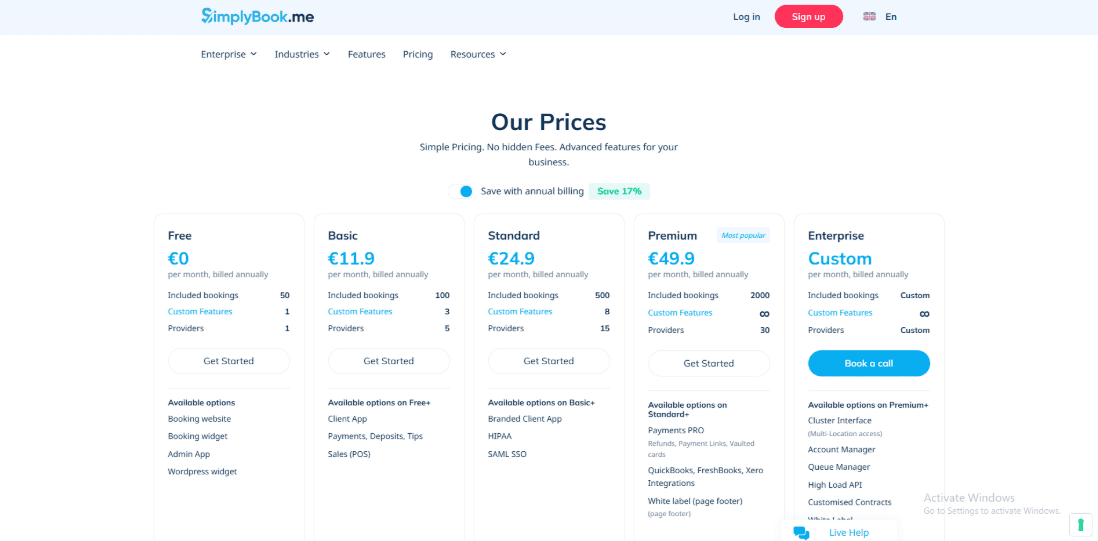
- Free plan is €0 with limited bookings and a small set of enabled features.
- Paid plans step up mainly by monthly bookings and how many custom features you can switch on.
- Typical published monthly pricing ranges from Basic to Standard to Premium, with Enterprise as custom.
- Expect add-ons for extra providers, SMS, and newer items like AI credits. See the official SimplyBook.me pricing page for current numbers and plan details.
When to Choose SimplyBook.me over Calendly Alternatives in Europe
Choose SimplyBook.me if you run a service business with staff, need classes or group bookings, and want payments, packages, or memberships tied directly to booking. Pick a simpler Europe-focused Calendly alternative if your world is mostly 1
meetings, light routing, and you want the fastest setup with fewer moving parts. If Google Maps demand matters, SimplyBook.me is worth testing for Reserve with Google, but confirm your services fit the rules before committing.When GDPR requirements come up around Calendly, I point to Calendly alternative Europe GDPR.SuperSaaS
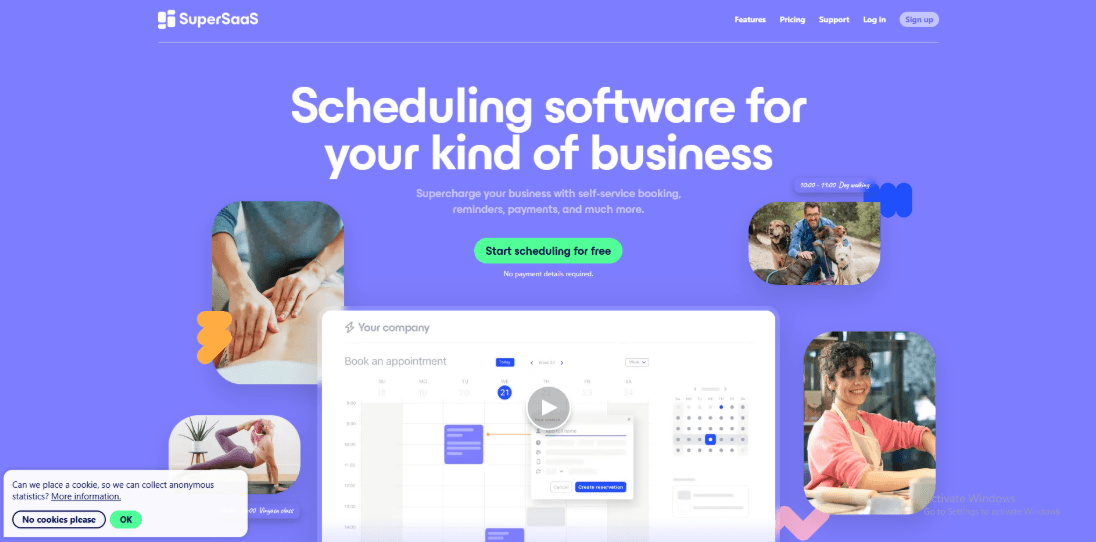
SuperSaaS is popularly known for appointment scheduling that also handles rooms, equipment, and classes. If you are comparing Calendly alternatives in Europe, it makes sense when you need capacity booking and payments, not just meeting links.
Features
-
Resource booking I set up a private gym plus meeting room style schedule with separate resources and capacity per slot. It covers most of the must-haves from that Reddit thread like groups, reminders, custom forms, and logo. I also saw the same Reddit complaint about cost once you outgrow free, and I am adding a screenshot below.
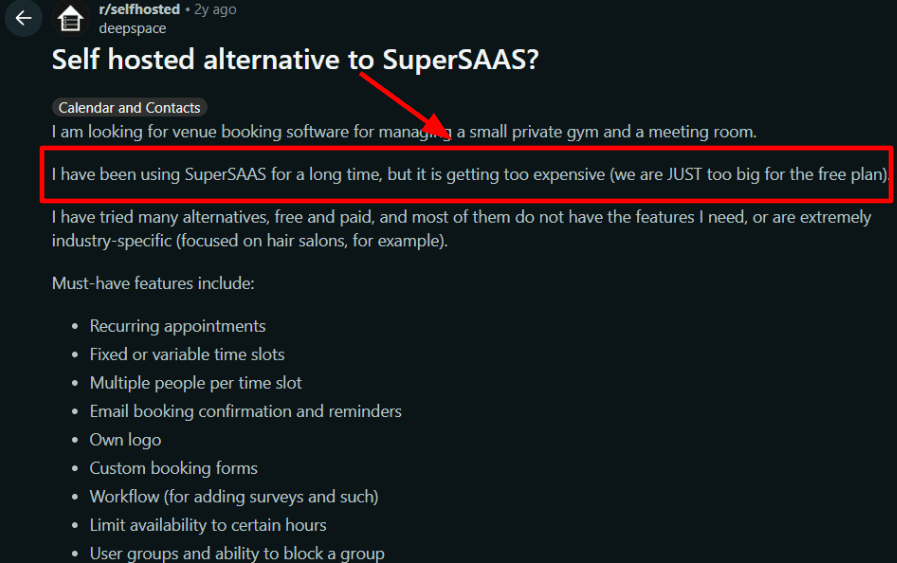
The thread warns that costs can rise quickly once you scale beyond the free tier. -
Availability controls Opening hours, holidays, and per-resource availability are all there, but you will spend time in config screens. A Trustpilot review called it simple and said it never fails, and the core booking flow felt steady in my testing, screenshot below. One gotcha: repeating bookings cap at 52 per series, then you extend it manually. Source: SuperSaaS rules
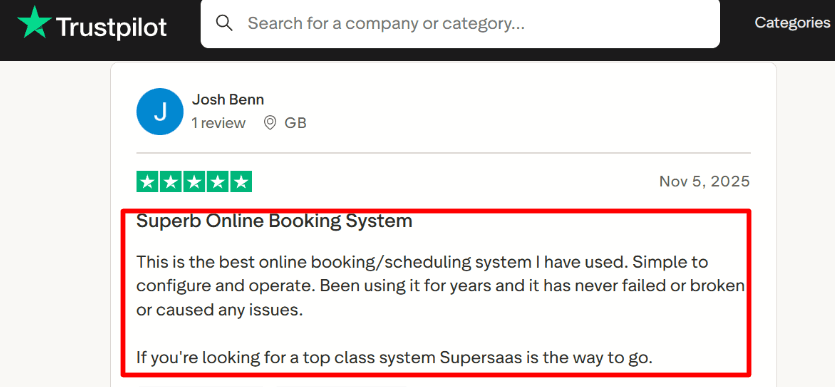
The reviewer emphasizes that the booking flow is dependable, even if setup takes patience. -
Payment integration Built-in payments with Stripe and others, and Stripe can support EU-friendly methods like Sofort, giropay, Bancontact, Przelewy24 and iDEAL You can set pricing rules by length or time, and sell credit for packages if you run classes payments overview. For Europe, this feels more practical than many Calendly alternatives that stop at scheduling only.
-
Website widget The widget keeps the booking flow lean, but edits and cancellations are not done inside the widget by design That is where I had a small speed bump while testing, I had to jump to the full schedule to change a booking. This detail matters on Safari since WebKit Intelligent Tracking blocks third-party cookies by default.
-
Calendar integration Sync with Google Calendar, Outlook, and iCal so availability stays accurate (pricing details). It is less meeting-first than many Calendly alternatives in Europe, and more operations-first. If you run a venue, clinic, or classes, that difference is real.
If your schedule changes weekly, personal training booking software covers tools that handle it well.
Pros
- Clear Europe fit on paper
Euro pricing plus published notes on GDPR and WCAG 2.1 AA simplify early compliance screening. - Pricing is not seat-based, it scales with booking volume.
- Strong for rooms, equipment, and multi-person slots.
- Payments can be configured without duct-taping extra tools.
- Extensible via webhooks and APIs when you outgrow manual work.
Cons
- If you only need clean 1 meeting links for a sales team, many Calendly alternatives in Europe will feel simpler and faster.
SuperSaaS is better when scheduling is tied to resources, capacity, or paid bookings. - The free plan ceiling is easy to hit in busy venues.
- Repeating bookings need a manual extend after 52 occurrences.
- Widget edits require the full schedule flow, not inline.
- Safari iframe style embeds can get messy.
Pricing
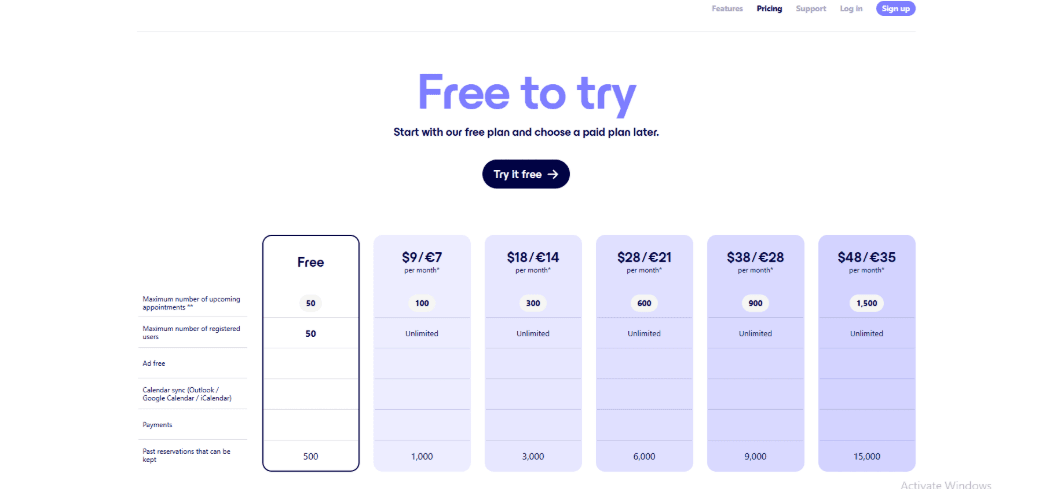
- Free plan includes 50 future appointments and 50 registered users, with ads.
- Paid starts at $9 or €7 per month for 100 future appointments, then scales by upcoming appointment volume.
- Higher tiers mainly increase future appointments and how many past reservations you can keep. EU residents are charged VAT.
- Official details: SuperSaaS pricing.
When to Choose SuperSaaS over Calendly Alternatives in Europe
Choose SuperSaaS when you need resource scheduling, capacity-based classes, or payments and credits in the same flow.
It fits teams who care about booking rules and availability controls more than a pure meeting-link experience.
If your priority is sales-style meeting routing and minimal setup, pick a more meeting-first European Calendly alternative.If you are in Europe or care about GDPR, use this Calendly alternative Europe GDPR guide.
Doodle
Doodle is popularly known for group polls where people vote on times, plus a simple booking link for 1
. I use it when most Calendly alternatives in Europe feel too heavy and the real job is just getting a group aligned quickly. If you’re also looking at Microsoft’s default option, my Microsoft Bookings alternatives guide can help you compare flows.Features
-
Group polls You propose a set of times, people vote, and you lock the winner fast. While testing, I noticed the flow can push you to re-pick availability more than I expected. I also saw the same complaint in a Reddit review and I’m sharing a screenshot below.
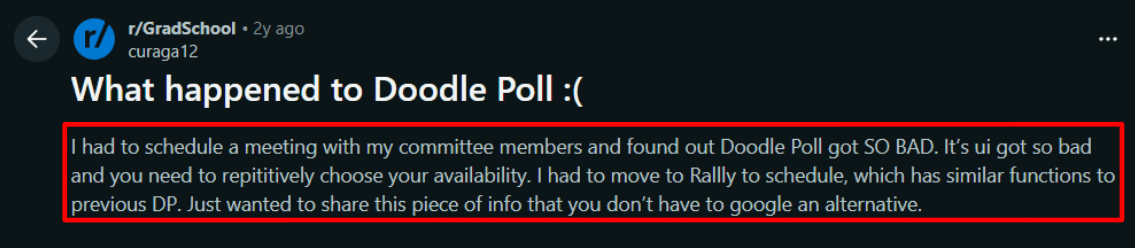
The complaint is that the poll flow feels more annoying and forces extra availability picking. -
Payment integration If you charge for time, Doodle can take payment via Stripe as the slot is booked. One nuance: free accounts can see a platform commission, while paid plans remove it, so the math changes at scale. I also saw a Trustpilot review praising quick, no-hassle refunds after a wrong subscription, screenshot below.
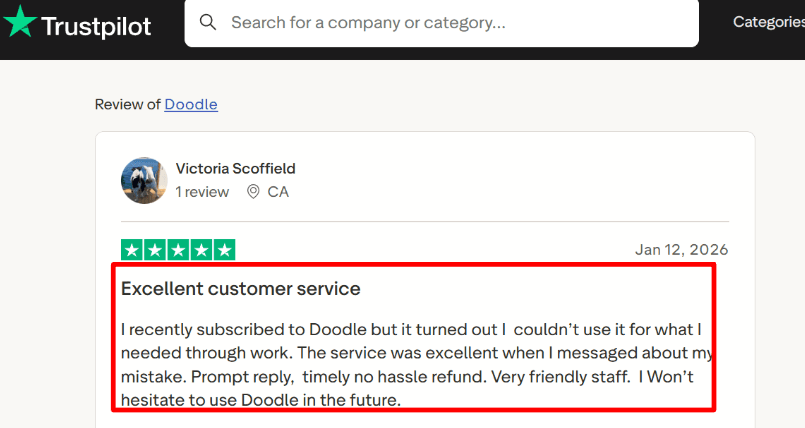
The reviewer mentions quick refunds after an accidental subscription, which helps when you’re testing plans. -
Calendar sync Connect your calendar so bookings and poll results turn into real calendar events and reduce double-booking. For EU-based teams juggling time zones, the workload trend is real. Late meetings are rising, and a chunk of meetings now span multiple time zones. Compared to many “Calendly alternatives in Europe” that are booking-first, Doodle is still strongest when the meeting is group-first.
-
Sign-up sheets Great for workshops or office-hours style sessions where people pick a slot from a list. You can cap slots, see who’s enrolled, and manage attendance like an operator, not a marketer. Doodle also shipped an admin-friendly update to add or remove participants in sign-up sheets, which helps when lists change mid-week.
-
EU-grade security Doodle positions itself as GDPR-compliant, with SOC 2 Type II, TLS in transit, and AWS hosting. Their security page explicitly mentions hosting in the Republic of Ireland and across the EU, which is a practical Europe checkbox for many teams. If your shortlist of Calendly alternatives in Europe is mostly about data location, this is worth reading on their security docs.
If you want legal focused scheduling guidance, check legal service firm booking scheduling system.
Pros
- Fastest way to align a group on time without turning it into a “booking project”. In Europe, that often beats choosing a Calendly-style tool just to schedule one committee call.
- Participants can usually respond without creating an account, which improves completion.
- Strong Europe fit signals: GDPR messaging and EU-region hosting details on the security docs.
- Stripe payments exist for paid sessions, so you can monetize without a separate invoice loop.
- Sign-up sheets work well for webinars, workshops, and recurring office hours.
Cons
- If your main reason to pick Calendly alternatives in Europe is a full appointment stack, teams, routing, service catalog, or deep automation, Doodle will feel too lightweight. It’s built more for coordination than for running a scheduling-driven business end-to-end.
- The availability picking flow can feel click-heavy, especially on busy polls (matches what I saw in the Reddit thread).
- Some of the best poll controls are tied to paid plans, so free can feel limited for serious use.
- Google Calendar invites may not auto-add for recipients depending on their anti-spam invitation settings.
- Team pricing is per user, so monthly costs can rise quickly once you add seats.
Pricing
- Free plan exists for basic polls, sign-up sheets, and a booking page.
- Professional is typically €14.95/month in the Eurozone, or €83.40/year. Team is typically €19.95/user/month, or €8.95/user/month billed annually with minimum seats.
- Official pricing breakdown varies by locale and currency. I always verify on the pricing page before publishing numbers. Source: Doodle Help
When to Choose Doodle over Calendly Alternatives in Europe
Choose Doodle if you mostly schedule groups, committees, interviews, or multi-person decisions and you want the simplest “vote and finalize” workflow. Choose Doodle if EU hosting details + GDPR posture are non-negotiable and you want a tool that stays lightweight. Skip Doodle if you need deep booking operations like routing, complex services, or heavy automation. In that case, a booking-first Calendly alternative usually fits better.If compliance is part of your tool choice, check Calendly alternative Europe GDPR.
Conclusion
I approached this comparison as someone who would need to rely on one of these tools daily, not just test features once and move on.
- Choose Lunacal if your priority is converting bookings with a strong, branded scheduling page and handling paid sessions cleanly.
- Go with SimplyBook.me if you run a service business with staff, classes, and need a full booking system with payments and memberships.
- Pick SuperSaaS when your setup involves resources, capacity limits, or complex availability rules that go beyond standard scheduling.
- Use Doodle if your main problem is coordinating groups quickly and you want the simplest possible workflow without heavy setup.
The right choice depends less on features and more on how you operate. If scheduling is tied to revenue and operations, the heavier tools make sense. If it’s mainly coordination, lighter tools will save time.
Review Methodology
This comparison is based on a consistent test flow across all four tools, along with checks against public reviews and official documentation. The goal was to understand how each tool performs in real, day-to-day scheduling for Europe-based use cases, not just how good it looks on a feature list.
Test window
All checks were completed for publication on Jan 20, so product behavior, pricing, and policies may change over time.
Tools evaluated
- Lunacal
- SimplyBook.me
- SuperSaaS
- Doodle
How I set things up
- I used a simple but realistic scenario: a Europe-based service business handling a mix of 1 calls, paid sessions, and occasional group bookings.
- I connected Google Calendar and Outlook Calendar wherever the tool supported it.
- I tested payments using Stripe and PayPal, including completing at least one full paid booking.
- I also checked how each tool works when embedded on a website or used as a booking widget.
- For regional fit, I looked for basic EU-friendly defaults like 24-hour time format and Monday as the start of the week.
What I tested in each tool
- Booking pages: I created at least one booking page in each tool and checked how it looks from the invitee side, including whether the page gives enough context before someone picks a time.
- Availability and conflicts: I set working hours, buffers, notice periods, and tested bookings against busy calendar slots to see if double-booking is properly blocked.
- Rescheduling and cancellations: I rescheduled and cancelled bookings as a user to confirm that both the invitee and host views stay accurate and that calendar events update correctly.
- Team scheduling: Where available, I tested team features like round-robin or shared availability to see how predictable they are and how much setup they need.
- Payments and workflows: I completed a paid booking and, where possible, tested things like packages, coupons, and deposits to see how well they support real business use.
- Group scheduling: For Doodle, I focused more on polls and sign-up sheets to check how easily a group can agree on a time and how smooth the experience is for participants.
What I checked beyond testing
- User reviews: I looked at patterns across G2, Trustpilot, Reddit, and AppSumo, focusing on repeated issues or praise rather than one-off opinions.
- Documentation: I verified important claims using official product docs and any referenced compliance or policy pages.
What to keep in mind
- This is not a full security or legal review. The GDPR points are meant as a basic screening guide, and you should confirm details like data processing agreements, subprocessors, and data storage directly with the vendor.
- Pricing is based on what was publicly listed at the time of writing, but it can vary by region or plan, so it’s best to double-check the official pricing pages before making a decision.
Methodology
Sources
- I began with each vendor’s official website, including privacy policies, FAQs, and help documentation, to understand how clearly they explain GDPR compliance, data processing agreements, and subprocessor details.
- I reviewed their security pages to check for essentials that usually come up during procurement, such as encryption standards, access controls, audit logs, and how they handle incidents.
- To balance this with real-world usage, I read user reviews on Trustpilot and G2, then cross-checked recurring issues and workarounds on Reddit and Quora.
How I tested each tool
- I set up a fresh, EU-focused test account for every product, with a basic booking page, one event type, and a connected calendar. I enabled all available privacy and data controls to see how they work in practice and noted the default configurations.
- I reviewed or requested key compliance documents like the Data Processing Agreement and subprocessor list, and checked whether the tool offers any control over data residency. I also evaluated how responsive support teams were when asked GDPR-related questions.
Scenarios I tested
- I created and cancelled bookings, resent confirmations, and tested reminder flows across email and SMS where available to see how user data moves through the system.
- I checked how each tool handles consent, data retention, and deletion by testing exports, account deletion, and basic data access or removal requests.
- I shared booking links, embedded them on a site, and invited a teammate to verify role-based access and ensure permissions are handled correctly.
FAQs
What is the best GDPR-friendly Calendly alternative in Europe?
A strong option is Lunacal if you want a booking page that looks polished and still covers the practical basics like GDPR support, calendar sync, intake forms, payments, and team scheduling. It fits well when the booking page also needs to build trust. If you run a service business with staff, classes, or a service menu, SimplyBook.me can be a better fit.
Which tools should I compare first?
Start with Lunacal, SimplyBook.me, SuperSaaS, and Doodle.
Lunacal works well for branded booking pages, paid sessions, and team scheduling.
SimplyBook.me is better for service businesses that need staff setup, packages, and business operations.
SuperSaaS is useful when you need stricter booking rules, resource scheduling, or capacity control.
Doodle is worth comparing when the main job is getting a group to agree on a time fast.
What should I check before choosing a GDPR-friendly scheduling tool?
Check the basics first. Make sure the tool clearly explains its DPA, subprocessors, data hosting location, and how international data transfers are handled. Also check whether it gives you control over cookie tracking, data retention, and deletion requests. If these answers are hard to find, that is usually a warning sign.
What features matter most for European teams?
The most important things are clear GDPR documentation, reliable calendar sync, timezone handling, and payment support if you charge for sessions. It also helps if the tool supports 24-hour time, Monday week start, and form or email flows that feel normal for buyers in countries like Germany, France, and Spain.
What documents or proof should I ask for before buying?
Ask for the DPA, subprocessor list, and details on where customer data and backups are stored. You should also check their retention settings, delete/export workflow, and basic security controls. If privacy matters a lot in your business, ask these questions before rollout, not after.
Summarize this content with AI


