

Introduction
Paperbell is a popular all in one setup for coaches, but it's not a good fit for smaller coaches who don't want to spend a lot or for multi-coaching businesses. The coaching industry keeps expanding, so your client experience and ops stack matter more than ever, see the latest ICF Global Coaching Study. When your calendar, payments, contracts, and programs live in one place, the wrong fit shows up fast. And, paperbell is definitely not a solution if you're looking for a simple calendly alternative for coaches.
To find the best Paperbell alternatives, we manually tested each tool with real booking flows, reschedules, and payment steps. We also went through review portals like G2 and Capterra, then dug into help docs and release notes to catch edge cases people miss. You will see plenty of screenshots and direct links throughout, so you can judge everything for yourself.
TL;DR: If you need a low-cost solution, choose Lunacal; if you need a complex fledged coaching management platform, choose delenta or simply coach.
Best Paperbell Alternatives by Use Case
Quick shortlist by coaching needs
| Coaching scenario | Best tool | Why it fits |
|---|---|---|
| Lowest Cost | Lunacal | Strong client-facing pages with payments, packages, subscriptions and custom domains |
| Structured coaching programs | Simply.Coach | Built for long-term coaching with goals, notes, and journeys |
| Service-style scheduling | Acuity Scheduling | Reliable bookings with payments, forms, and calendar control |
| Full client workflow | HoneyBook | Combines scheduling with contracts, invoices, and CRM |
| Growing coaching business | Delenta | All-in-one system with client portals and team features |
| Lead qualification first | OnceHub | Routing and qualification before booking |
Feature and pricing comparison
| Feature | Lunacal | Simply.Coach | Acuity Scheduling | HoneyBook | Delenta |
|---|---|---|---|---|---|
| G2 rating | 4.9 | 4.8 | 4.6 | 4.4 | 4.9 |
| Starting price (USD) | 9 | 9 | 20 | 29 | 29 |
| Calendar sync | Yes | Yes | Yes | Yes | Yes |
| Reminders (SMS/email) | Yes | Yes | Yes | Yes | Yes |
| Paid bookings | Yes | Yes | Yes | Yes | Yes |
| Scheduling page design | Strong | Basic | Good | Basic | Good |
| Team scheduling | Yes | Yes | Yes | Yes | Yes |
| Round robin | Yes | Yes | Yes | Yes | No |
| Packages | Yes | Yes | Yes | Yes | Yes |
| Custom domain | Yes | Yes | Partial | Partial | Yes |
| GDPR support | Yes | Yes | Partial | No | Yes |
In-depth analysis of each tool
Lunacal
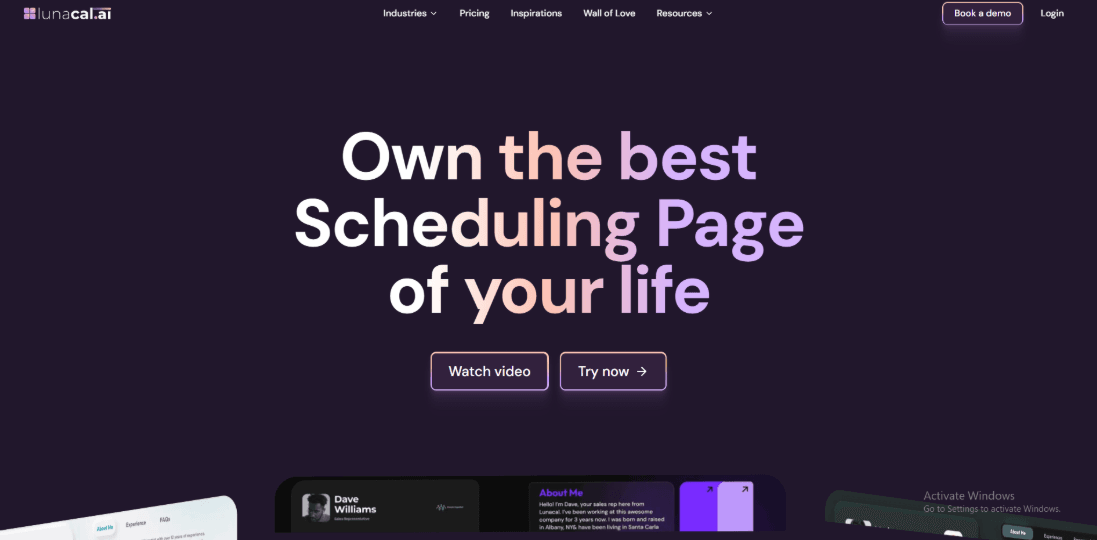
Lunacal is the chepest paperbell alternative with a price of USD 9/month. You can have one-on-one or group sessions, collect payments, sell subscriptions, sell multi-session packages, and even manage team scheduling from the same place. It works well as one of the best Paperbell alternatives when your needs go beyond solo coaching and include teams, branded pages, or different types of sessions. It is also rated 4.9/5 on G2, which shows that users generally have a very positive experience with it.
Features
- Beautiful scheduling pages with rich content
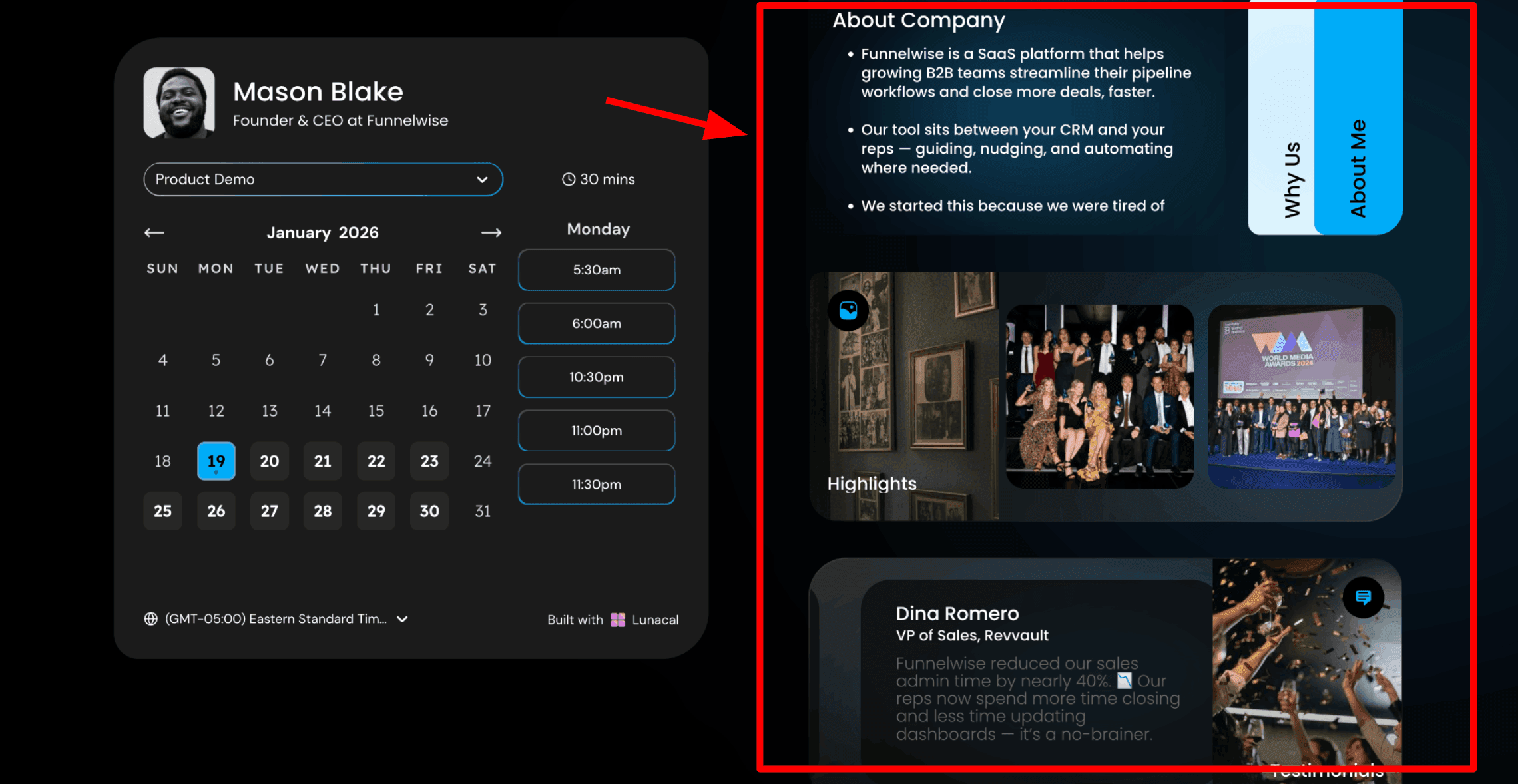
This is usually the first thing I show when someone is exploring Paperbell alternatives. When a client lands on your booking page, they want to know who you are, what you do, and how you can help. Lunacal lets you add that context right next to your calendar. You can explain your coaching style, who you help, and what results clients achieve, all in one place where they can choose a time. Here is a screenshot below:
- Custom pre-coaching intake questions
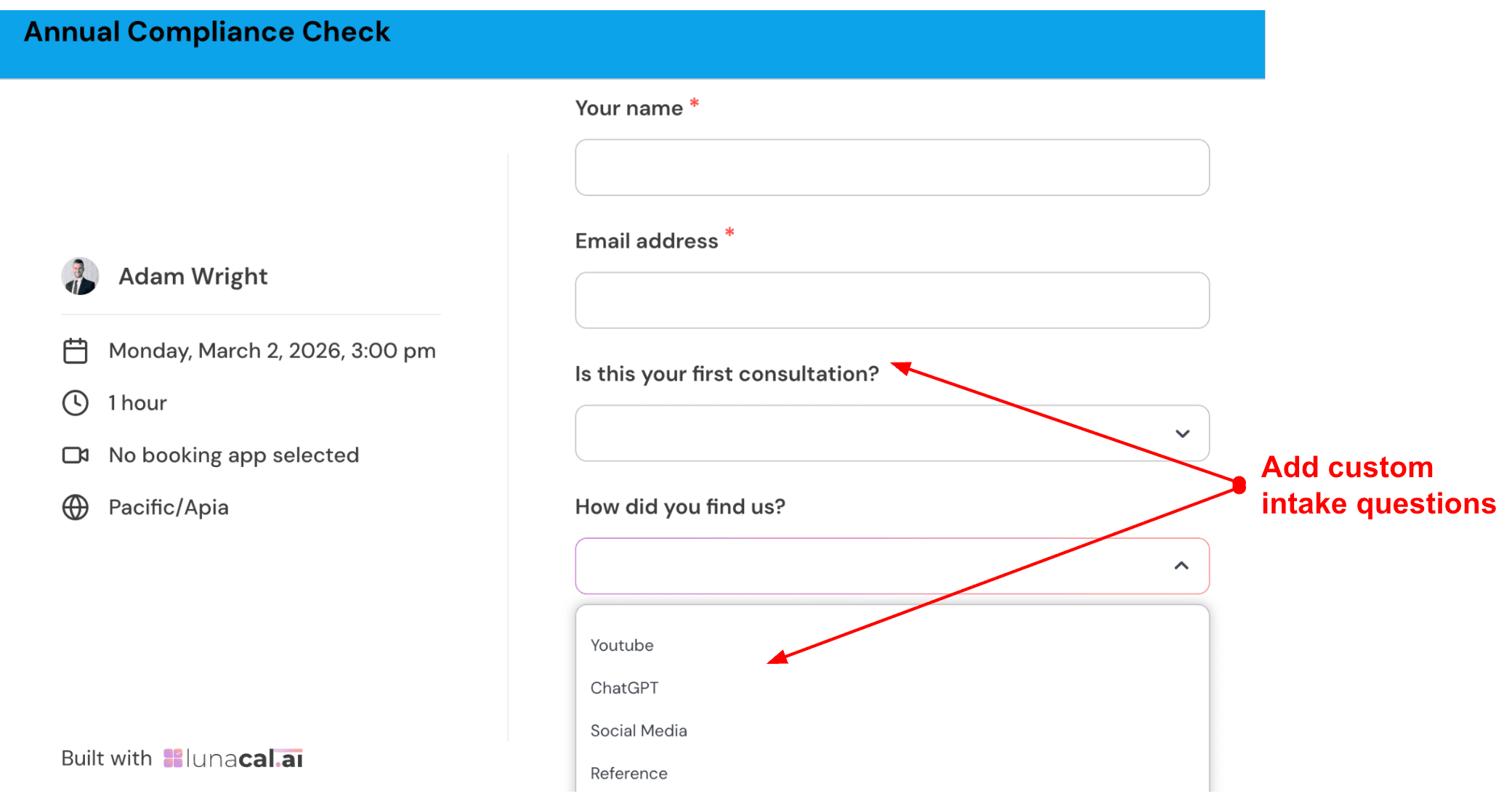
You can ask clients a few questions before they confirm a booking. This helps you prepare better and understand their situation in advance. It also saves time during the session. I keep it simple with three questions. For example, I might ask what challenge they are facing, what stage they are in, and what result they want in the next few months. This gives enough context to start the conversation properly. Check out the intake form I created:
- Multi-coach and multi-programme scheduling flow
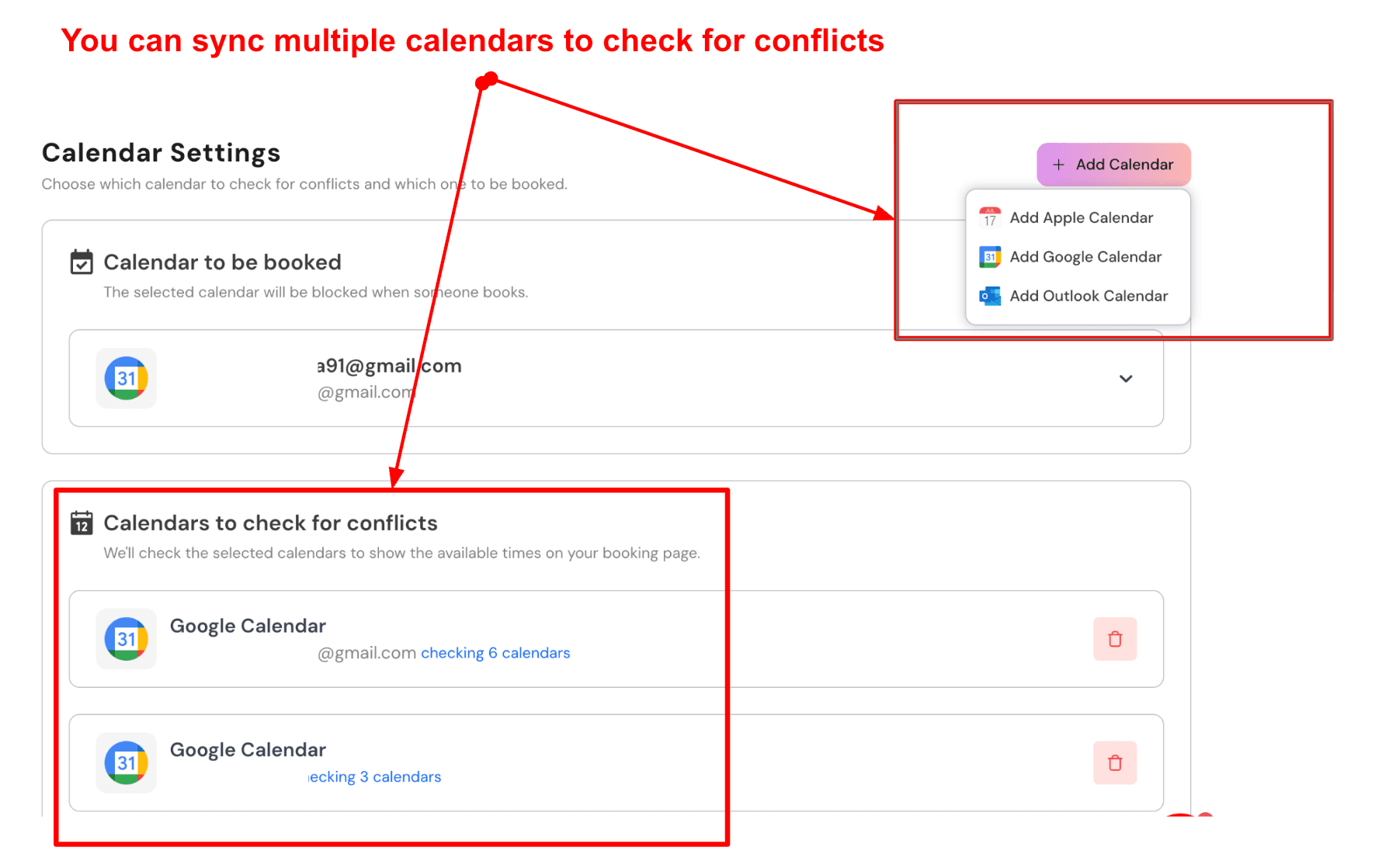
If you run a coaching practice with more than one coach, clients can choose the session type, pick a coach, or go with the next available option. This makes it easier to handle new leads without manual coordination. For example, you can set options like a discovery call, a deep dive session, or ongoing coaching. A returning client can pick a specific coach, while a new client can choose any available coach and get the earliest slot.
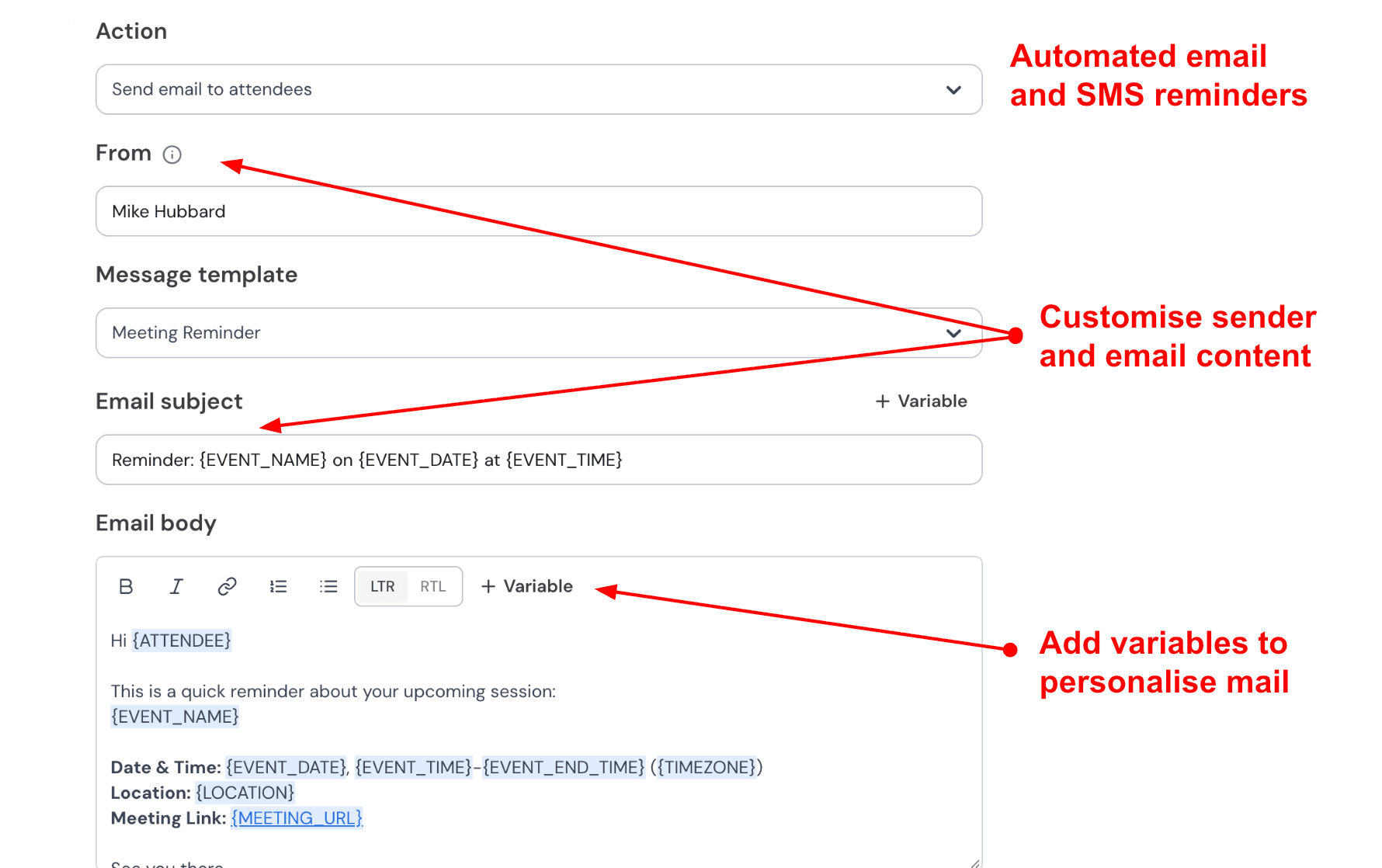
- Automated session reminders with full message control
Lunacal sends automatic emails and SMS reminders. You can fully edit the message, including the tone and details. This helps your communication feel personal. I would send a confirmation email with the meeting link and a short prompt, then a reminder the day before, and a quick SMS one hour before with the link for easy access. This keeps clients prepared and reduces missed sessions.
- Paid coaching sessions without extra setup
You can connect Stripe or PayPal and collect payments when someone books. This keeps everything in one place and avoids follow-ups.
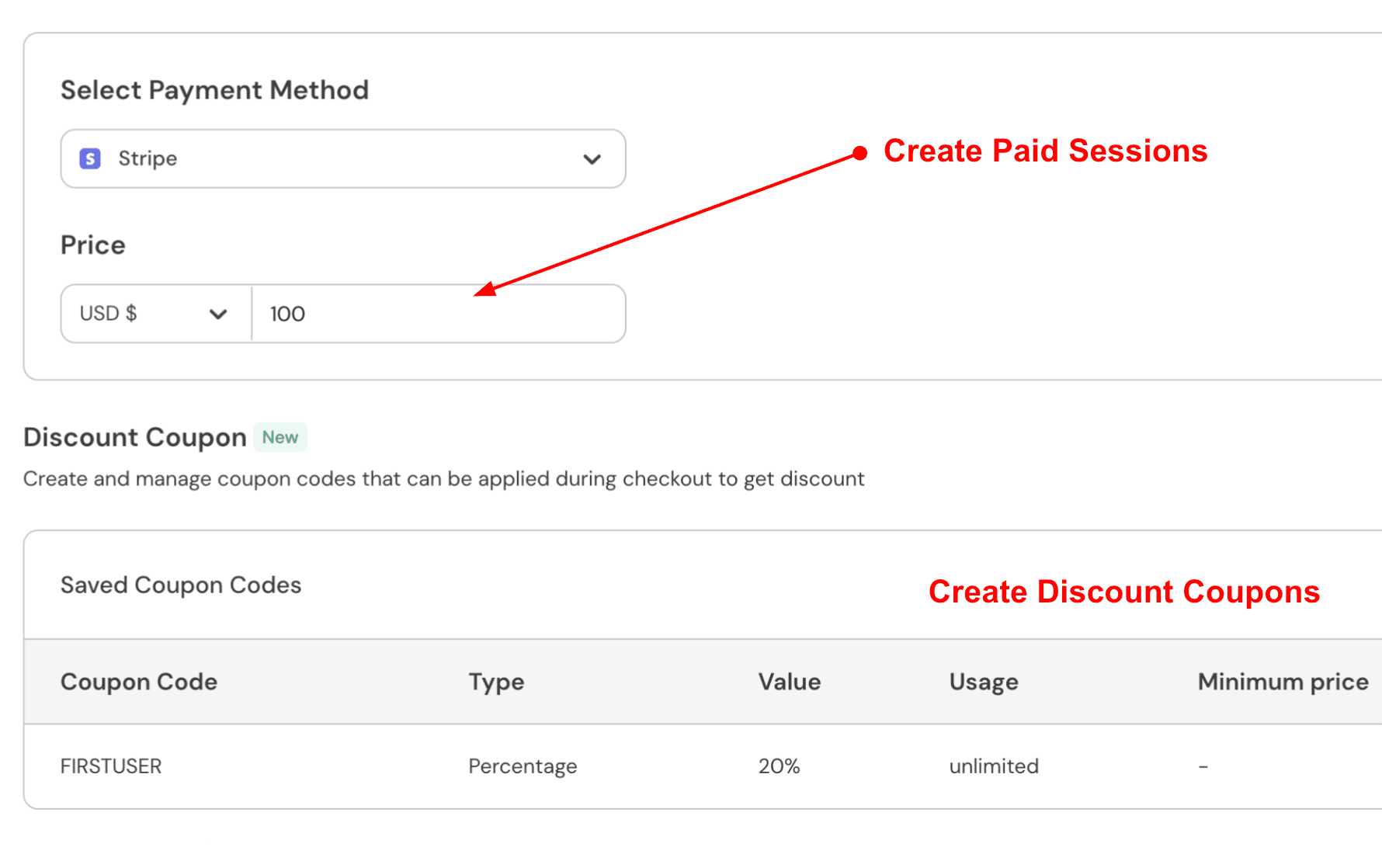
- Discount codes for promotions and referrals
You can create discount codes for special offers or referrals. This is useful if you run promotions or want to reward clients who refer others.
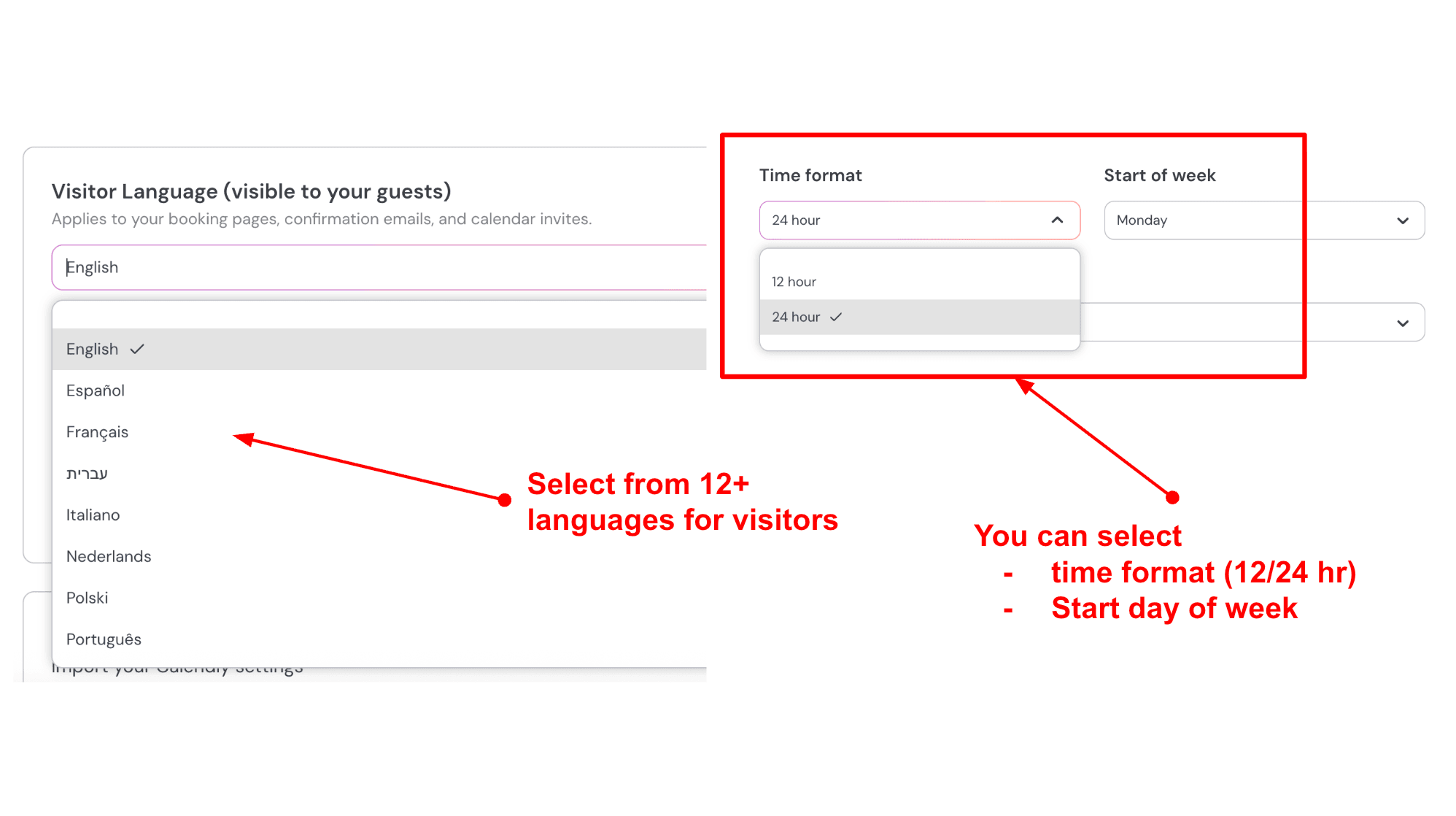
- Client language and time settings
You can adjust the language, time format, and week settings for your booking page. This helps if your clients are from different countries. For example, you can keep English as the main language and enable other languages as needed. You can also switch between 12-hour and 24-hour time formats depending on your audience. This makes the booking experience smoother for everyone.
Pros
- The booking page gives people more context before they choose a slot.
- It works well for both solo use and team setups.
This helps if you plan to grow or already work with other coaches. - Payments, coupons, and packages are part of the booking flow.
You do not need extra tools to handle this. - Calendar sync and availability settings are reliable for daily use.
- The starting price is easier to try if you are comparing Paperbell alternatives.
Cons
- If you mainly want contracts, client management, and a full coaching system in one place, Paperbell’s coaching software may feel more complete.
Lunacal focuses more on booking and the page experience. - There is no quick way to duplicate similar event setups.
- As you add more event types and settings, it can take some time to get used to the layout.
- Some advanced settings are explained through the Lunacal Help Center, so there is a bit of a learning step for deeper setup.
- It is stronger for scheduling and booking pages than for full coaching workflows.
Pricing
- On the official Lunacal pricing page, Standard starts at $9 per user per month, Teams starts at $15 per user per month, and Enterprise starts at $25 per user per month.
- The cost mainly increases when you need team features, shared scheduling, and admin controls.
When to Choose Lunacal
Choose Lunacal over Paperbell when you need team scheduling, round robin or collective booking, richer booking pages, or a lower per-user starting point.
Choose Paperbell when the business is coach-first, mostly solo, and needs contracts and coaching workflow depth more than routing or team operations.
For agencies, consultants with multiple meeting types, sales teams, and service businesses with more than one stakeholder, Lunacal is usually the sharper fit.
Acuity Scheduling
Acuity Scheduling is known for letting clients book appointments on their own while handling payments, forms, and reminders in the same flow. If you want something dependable that you can embed on your website and use every day, it generally does the job well. It often comes up in discussions around Paperbell alternatives for coaches who want more control over booking and payments.
Features
- Calendar sync
When I set it up, the first thing I checked was how well it handled conflicts. The two-way sync worked as expected, and I did not run into double bookings. It also supports multiple calendars and locations, which helps if you have a small team sharing availability in one system.
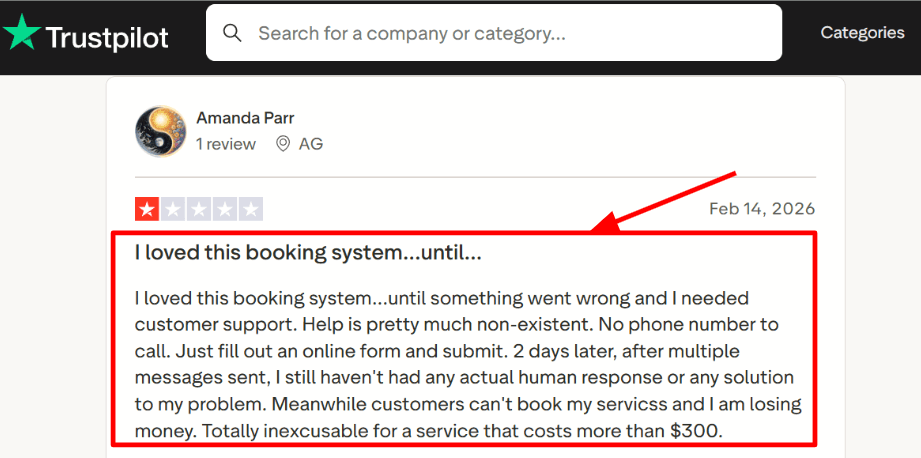
- Support workflow
The setup is fairly simple, and the Help Center is detailed enough to solve most issues without outside help. I did come across a Trustpilot review that highlights a common concern when something breaks and you need quick support. Screenshot below.
- No show controls
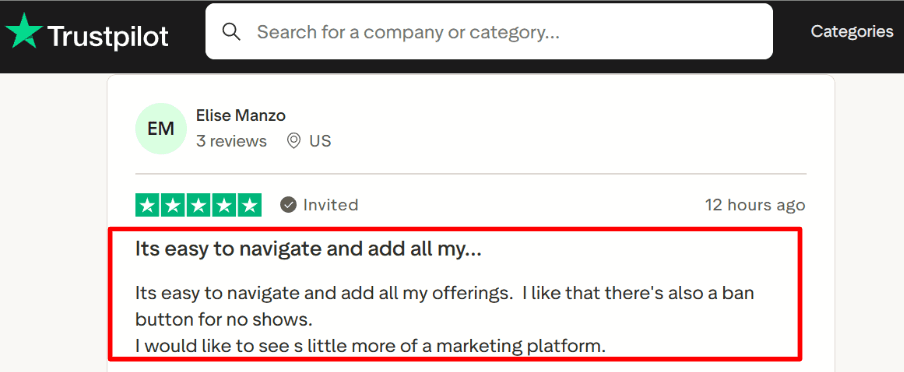
It includes tools to manage clients, including blocking repeat no shows, which is useful when your calendar has limited slots. Another Trustpilot review mentioned how easy it is to use, and that matched my experience during testing. Sharing the screenshot below for context.
- Meeting links
The Zoom integration goes deeper than expected. It can automatically create, update, and remove meeting links when bookings change, as shown in the Zoom Marketplace. During setup, I felt the permission steps took a bit longer than necessary.
- Payment collection
You can collect payments using Stripe, Square, or PayPal. Deposits and saved cards are also supported, depending on your setup. I tested a paid booking with a deposit, and the process was smooth with confirmations and receipts sent automatically.
Pros
- Reliable booking system with payments, forms, and reminders in one flow
- Easy to get started without a long setup process
- Strong availability controls like buffers and limits
- Automatic video meeting links that stay updated
- Supports packages and subscriptions for repeat sessions
- Embeds well on most websites, including Squarespace
Cons
- If your workflow depends on a coaching platform experience, you may need extra tools
- Support speed can be inconsistent based on user feedback
- No free plan, so you start paying early in the evaluation
- SMS availability depends on location and may not work everywhere
- Reporting and analytics may feel limited as you grow
Pricing
- Free trial is usually available for 7 days
- Paid plans are generally in the range of about 20 to 61 per month depending on the tier
- Enterprise pricing is custom
- Annual billing is often cheaper, so it is worth checking current rates
When to Choose Acuity Scheduling
Choose Acuity Scheduling if you want a robust system for booking, payments, reminders, and forms in one place. It works well for service businesses and small teams that need shared scheduling and automatic meeting links. It is also worth considering among Paperbell alternatives if your focus is on booking and payments rather than full coaching delivery. Be careful if your business depends on fast support responses or deeper coaching features beyond scheduling.
HoneyBook
HoneyBook is known for managing the full client journey in one place, from inquiry to contract to payment. If you are exploring Paperbell alternatives, this option focuses on running your entire business from a single dashboard rather than just handling coaching bookings.
Features
- Payment integration
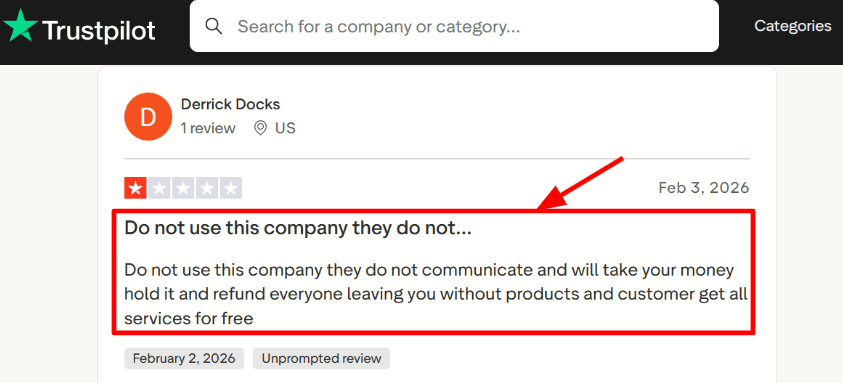
When I tested HoneyBook, payments felt closely connected to the rest of the workflow. You can send invoices from the same place where you manage files and conversations, and clients can pay using cards or bank transfers. One detail I found useful is that HoneyBook uses Stripe Connect, which gives more structure to how payments are processed behind the scenes. Here is the Stripe Connect note on the Stripe site. I also came across a similar concern in a Trustpilot review about payment holds and refunds, so it is something worth being aware of.
- Client portal
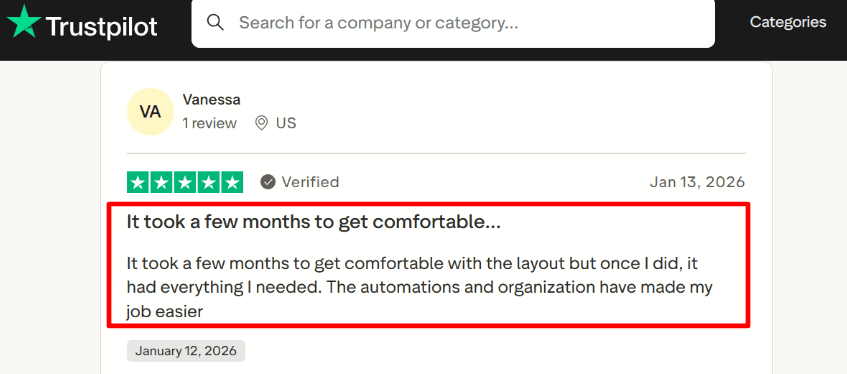
The client portal is where everything comes together. Once you invite a client, they get a single place to view files, invoices, contracts, and booking steps. It makes the experience feel more organized from the client side. Review 2 from Trustpilot reflects a similar experience, where the portal and automations reduce back and forth once set up, even though it takes a little time to get used to the layout.
- Contracts and e-sign
Contracts and e-signatures are built into the same system, so you can send agreements without needing another tool. Everything stays linked to the same client project, which makes it easier to find later when you need it.
- Automations
Automations help reduce repetitive work. You can set up emails, task reminders, and follow-ups based on different stages. While setting it up, I noticed the workflow builder takes a bit of time to understand, and I had to adjust a step to get the timing right.
- Scheduler and availability
The scheduler lets clients pick a time without going back and forth via email. It syncs with your calendar to avoid double bookings. This works well when scheduling is part of a bigger process that also includes proposals, contracts, and payments.
Pros
- Covers the full client flow from inquiry to payment, which makes it a strong option among Paperbell alternatives
- Proposals, contracts, and invoices are all in one place, which keeps work organized
- Automations help save time on follow-ups and routine admin
- Client portal gives clients a clear and simple experience
- Supports both card and ACH payments, which can help reduce fees
Cons
- Setup can feel heavy if you only need a simple coaching booking tool
- Some important features are only available on higher plans
- Mainly available in the US and Canada, which can limit global use
- Some users report payment holds and refunds, which can affect cash flow
- The interface takes time to get comfortable with at first
Pricing
- Starter at $29 per month billed yearly, includes client portal, templates, proposals, contracts, invoices, and basic scheduling
- Essentials at $49 per month billed yearly, adds scheduler, automations, SMS reminders, QuickBooks integration, and up to 2 team members
- Premium at $109 per month billed yearly, includes unlimited team members, multiple companies, advanced reporting, and priority support
- 7 day free trial available
- Payment processing fees apply for cards and ACH
When to Choose HoneyBook
Choose HoneyBook if you want one system to handle proposals, contracts, invoicing, and client communication along with scheduling. It works well for service-based businesses that need structure and repeatable workflows. It is one of the more complete Paperbell alternatives when your needs go beyond coaching sessions and into full client management.
Simply.Coach
Simply.Coach is known as a coaching platform that brings sessions, goals, notes, forms, scheduling, and admin work into one place. From what I saw while setting it up, it works best for people who want a complete system for managing coaching instead of a lightweight tool. If you are exploring Paperbell alternatives, this tool focuses more on structure and long-term client work.
- Client journeys
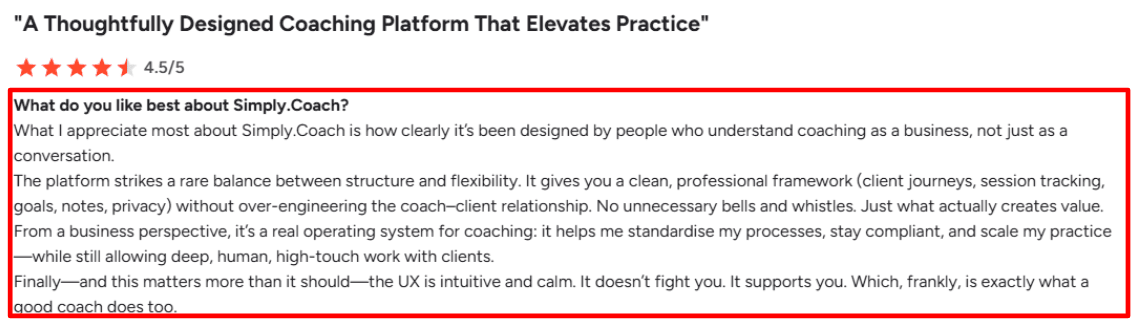
This was one of the first things I noticed while testing. You can build a complete journey for each client, including goals, action steps, forms, and session history. Everything stays in one place, so you don't have to switch between docs and emails. I also saw the same idea mentioned in a G2 review, and it matched my experience.
- Availability setup
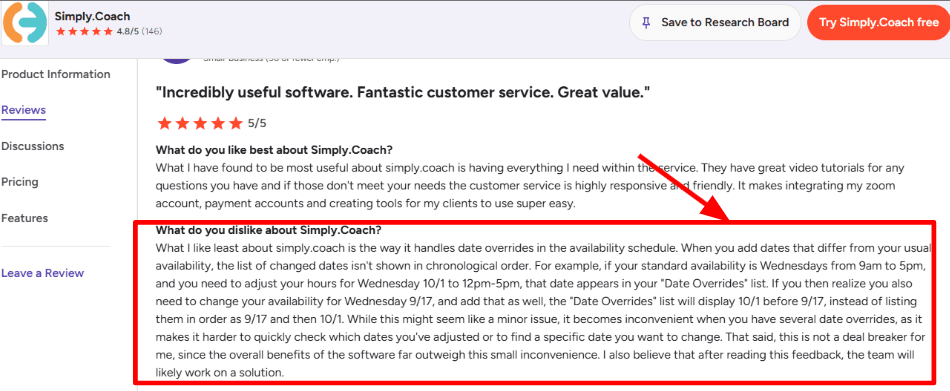
It covers the basics well with booking links, recurring sessions, and calendar scheduling. You can get a working setup up and running without much trouble. When I tested it more deeply, handling many exception dates took more attention than expected. I noticed the same feedback in a G2 review, which lines up with what I saw.
- Payment integration
Simply.Coach includes invoicing, payment links, and tracking inside the platform. This helps if you want to manage payments without using extra tools. Payments sit alongside contracts and client records, which makes everything feel more connected. During testing, it made follow-ups easier to manage.
- Session notes
Notes are detailed and tied to sessions, goals, and the overall client journey. This is useful when you are working with clients over a long period. It helps keep track of progress without losing context. This also matches what shows up on GetApp, where notes are highly rated.
- Compliance tools
If you care about privacy and structured processes, this part stands out. The platform focuses on secure data handling and clear admin visibility. It also supports more formal coaching setups where tracking progress and outcomes matters, which makes sense for teams and organisations.
Pros
- Works well as a complete coaching system with journeys, notes, forms, and admin tools
- Strong support for goals, action plans, and long-term coaching work
- Session notes are detailed and easy to manage
- Better focus on security and structured workflows than many lighter tools
- Suitable for solo coaches, teams, and internal coaching programs
Cons
- May feel heavy if you only need a simple setup, especially when comparing Paperbell alternatives
- Managing many availability overrides can take extra effort
- Setup takes time before everything feels comfortable
- Branding and flexibility improve with higher plans
- Some parts of the payment and automation setup could be clearer
Pricing
- 14-day free trial available
- Solopreneur plans start at $9 per month, then $29, $49, and $69 based on features and limits
- Business plans start at $79 per month and go up to $289
- Enterprise pricing is custom
When to Choose Simply.Coach
Choose Simply.Coach if you run structured coaching programs and want everything in one place. It works well when you need goals, notes, payments, and client tracking connected. It is also a strong option for teams and organizations where visibility and process matter. If you want something simple with minimal setup, other Paperbell alternatives may be easier to get started with.
Delenta
Delenta is an all-in-one coaching platform that manages clients, sessions, payments, and delivery in one place. It works well as one of the Paperbell alternatives when a coaching business needs more structure, especially around client management, team workflows, portals, and reporting.
Features
- Client portal
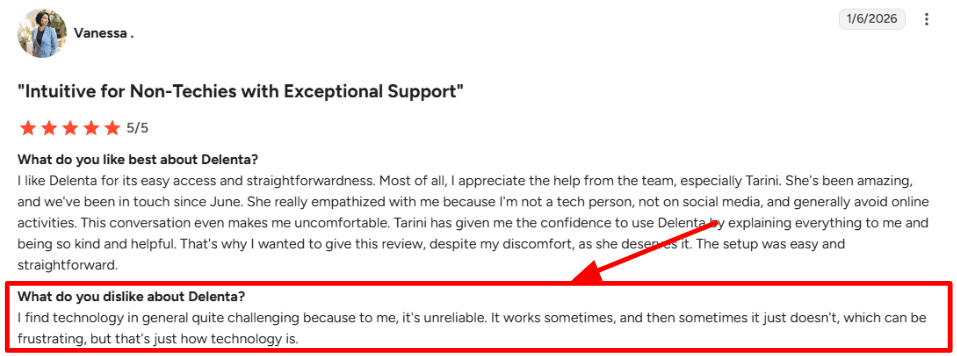
Delenta gives clients a single place to message, book sessions, view notes, complete tasks, access resources, and track progress. When I explored the setup, this stood out as one of its stronger areas because everything related to the client sits in one place. It helps keep the coaching journey organised instead of scattered across tools. I also noticed a G2 review mentioning reliability concerns, which I can understand. A few steps in the flow took longer than expected, and I’m sharing a screenshot from that review below for context.
- Beginner setup
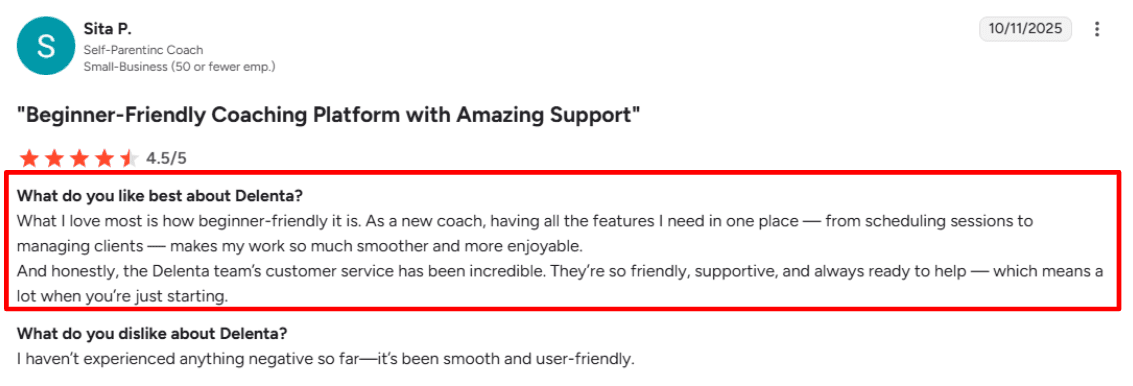
For someone starting out, the platform is fairly easy to understand because scheduling, client records, forms, invoices, and session delivery are all in one place. This reduces the need to connect multiple tools. I can see why a G2 reviewer described it as beginner-friendly, especially for coaches who want a simple starting point with everything included. The same review also highlighted good support, which aligns with how the setup experience felt overall. You can check the screenshot below to see the feedback directly.
- Calendar integration
Delenta connects with external calendars and supports self-booking, reminders, and session coordination. In testing, this felt useful for managing discovery calls, paid sessions, and recurring work in one place. Since scheduling sits alongside notes and billing, it keeps things more connected and easier to manage day to day.
- Payment flows
Delenta supports invoices, subscriptions, packages, and session tracking. This makes it useful for coaches running longer programs, as payments and usage are tracked in the same system. Instead of handling billing separately, everything stays tied to the client and their sessions.
- Team operations
This is where Delenta adds more depth. It supports multiple coaches, role-based access, shared clients, reporting, and even payroll-related workflows on higher plans. As coaching businesses grow, tools like this start to reflect that need for structure. Industry data like ICF research showing $5.34 billion in global revenue helps explain why platforms are expanding in this direction.
Pros
- Works well for coaches who want client management, scheduling, forms, payments, and delivery in one system
- Client portal is more complete than many lightweight tools
- Supports packages, subscriptions, and session tracking for ongoing programs
- Useful for teams with multi-coach setups and shared workflows
- Learning curve is manageable for a platform with many features
Cons
- Can feel heavy for solo coaches who want a simple setup
- Pricing becomes less clear when moving into team plans
- Some advanced features are only available in higher tiers
- Small mismatch noticed in trial messaging on the pricing page, worth checking on Delenta pricing
- Back-office integrations should be reviewed carefully during testing
Pricing
- Starter plan starts at $29 per month
- Pro plan is $49 per month
- Premium plan is $79 per month
- Annual billing offers discounts
- Teams pricing is custom and Enterprise requires a demo
When to Choose Delenta
Choose Delenta if you need more than basic booking and want everything in one place. It fits coaches and teams who want structured delivery, client portals, packages, and reporting. Among Paperbell alternatives, it makes sense when the business is growing and needs stronger systems behind the scenes. It is less suited for those who prefer a very simple tool with minimal setup.
Conclusion
If you want a quick decision, this is how the tools separate based on real usage and trade-offs:
- Lunacal is the best fit when your priority is converting visitors into booked and paid sessions with strong, branded scheduling pages
- Simply.Coach works best when your coaching involves structured programs, long-term client tracking, and detailed session management
- Acuity Scheduling is a reliable choice for straightforward bookings, payments, and forms without needing a full coaching platform
- HoneyBook makes sense if your workflow includes proposals, contracts, and invoices alongside scheduling
- Delenta fits growing coaching businesses that need client portals, packages, and team-level operations
In practice, the decision comes down to how much weight you put on booking experience vs coaching workflow depth. If scheduling and conversion matter most, go with Lunacal or Acuity. If delivery, tracking, and client management are central, Simply.Coach or Delenta will hold up better as your business scales.
Methodology
Evaluating coaching software properly takes more than just scanning feature lists. Most tools look similar at first glance, so I approached this the same way I would if I were choosing a system to run an actual coaching business.
How I researched the tools
- I started with official websites and pricing pages to understand what each tool offers and how pricing scales as you grow.
- I went through help docs and FAQs to see how clearly each platform explains setup, edge cases, and day-to-day usage.
- I signed up for free trials wherever possible and tested real workflows instead of just clicking around the dashboard.
- I reviewed platforms like G2, Trustpilot, and Capterra to identify patterns in customer feedback, especially around reliability, billing, and support.
- I also checked Reddit and Quora to spot unfiltered opinions, recurring complaints, and practical workarounds that don’t show up in curated reviews.
How I tested each tool
- I set up every tool as if I were running a coaching business, including services, packages, and scheduling from scratch.
- I paid close attention to onboarding, noting how easy or confusing it felt to get to a working setup.
Real scenarios I ran
- Booking a discovery call and following up with a payment link to simulate a typical sales flow.
- Creating a coaching package with multiple sessions, including contracts and payment handling.
- Managing a client journey from first interaction through to the final session, checking how well everything stays connected inside the system.
FAQs
What is the best Paperbell alternative for coaches and consultants?
The best Paperbell alternatives are Lunacal, Simply.Coach, Acuity Scheduling, and HoneyBook. Lunacal stands out as one of the highest-rated tools on G2 at 4.9/5, built specifically for coaches who want beautiful booking pages, seamless payment integration, and customizable intake forms that fit their exact client onboarding flow.
Does your location affect which coaching software you should pick?
It can, more than most people expect. A few things worth knowing:
- US and Canada: PayPal and Stripe support is standard, but check if contracts and invoicing are built in.
- UK and Australia: Look for tools that handle timezone detection well and support local payment methods.
- EU (especially German, French, and Spanish markets): GDPR compliance is non-negotiable. Lunacal and Simply.Coach both take data privacy seriously, but always verify where your data is stored.
What should a good Paperbell alternative actually include?
A solid Paperbell alternative needs a clean booking experience, intake forms you can customize without help from a developer, reliable calendar sync, and built-in payment collection. If you run group sessions or have a small team, round-robin scheduling and multi-language support matter too. Skipping any of these creates friction for your clients.
What tools and apps does Lunacal connect with?
Lunacal integrates with Google Calendar, Outlook, Apple Calendar, Google Meet, Microsoft Teams, FaceTime, and SMS reminders. For payments it supports Stripe and PayPal. It also connects with HubSpot, Pipedrive, and other CRMs, making it easy to keep your client pipeline and scheduling in one flow.
Summarize this content with AI


