

Introduction
An AI receptionist for small businesses has to do more than pick up the phone. It needs to protect the sale while your team is busy.
For a salon, agency, clinic, law firm, or local service company, one missed call can become a missed booking. The harder part is trust. A 2026 Pega survey found that 64% of consumers are not confident in how businesses use GenAI when interacting with them, which means bad AI call handling can hurt more than it helps. Pega 2026 consumer AI research If you want the broader category breakdown first, I also wrote a full guide on AI receptionist tools, covering common use cases, pricing, features, and when each tool makes sense.
For this guide, I tested each AI phone receptionist for small business with real call scenarios: after-hours calls, appointment requests, pricing questions, noisy callers, spam calls, transfers, cancellations, and follow-up needs.
Table of comparison for each tool
| Use case | Tool name | Why I chose this tool |
|---|---|---|
| General AI receptionist for small businesses | Ring Jenny | I chose this as a general AI receptionist example because it focuses on the everyday jobs a small business usually needs covered: call answering, common customer questions, lead capture, and booking requests. It helps show what a practical virtual receptionist can handle without making the setup feel overly complex. |
| After-hours call answering | Rosie AI | I chose Rosie AI for businesses that mainly need after-hours calls answered. When I went through its feature pages, the focus was clear: answer calls around the clock, respond to routine questions, capture leads, and help with appointment booking when the owner or team is unavailable. |
| Local service business calls | Goodcall | I chose Goodcall for local service businesses because its AI answering service is built around inbound calls, call flows, lead details, and appointment booking. The unlimited-minutes approach can also make it easier for a small team to plan for regular customer calls without tracking every conversation length. |
| Budget AI phone answering | Dialzara | I chose Dialzara for the budget call-answering category because it offers a lower-cost way to start with an AI receptionist. Its setup includes core call answering, message taking, custom questions, lead capture, call transfers, and appointment booking, which covers the basics many small businesses first look for. |
| Front desk automation and follow-up | My AI Front Desk | I chose My AI Front Desk for businesses that want their virtual receptionist to do more after the phone call. It combines voice handling with SMS, appointment booking, CRM connections, and follow-up workflows, which can be useful when fast replies and organised lead details matter as much as call answering. |
| AI answering service with human backup | Smith.ai | I chose Smith.ai for businesses that want AI call answering but still need a person available for difficult conversations. Its model handles routine calls, lead screening, appointment booking, and call routing with AI first, then allows complex calls to move to a live receptionist when needed. |
| Existing business phone team | Quo | I chose Quo for small teams that already need a shared business phone system alongside an AI receptionist. Its Sona virtual receptionist can answer calls, capture lead details, book appointments, and transfer callers, while the wider phone workspace helps teams manage calls, messages, and follow-ups together. |
Best AI receptionist for small business by use case
| Small business use case | Best tools to test first | Why |
|---|---|---|
| After-hours calls | Rosie AI, Ring Jenny, My AI Front Desk | Good fit for missed-call capture, summaries, and basic follow-up |
| Local service lead capture | Goodcall, Rosie AI, Dialzara | Useful for quote requests, service questions, and callbacks |
| Budget AI answering | Dialzara, Ring Jenny | Lower starting price for small teams testing AI call answering |
| Human backup | Smith.ai | AI answering with live receptionist support when calls get complex |
| Business phone system | Quo | Calls, SMS, voicemail, shared inboxes, and Sona AI in one setup |
| Appointment booking | Rosie AI, Dialzara, My AI Front Desk | Helpful when calls need to become booked appointments |
| CRM and follow-up workflows | Goodcall, My AI Front Desk, Ring Jenny | Better fit when call details need to trigger tasks, alerts, or records |
| High-value intake | Smith.ai, Goodcall | Useful for law firms, agencies, consultants, and service businesses |
If your main goal is simply making sure calls get answered 24/7, you may also want to compare these with the tools in my AI phone answering service guide.
A closer look into individual tools
Ring Jenny
I selected Ring Jenny because it covers the essentials a small business needs from an AI receptionist, including call answering, lead capture, message taking, call routing, and after hours support.
It also includes useful extras such as flexible packages, multilingual support, GDPR focused handling, and integrations that help small teams avoid missed calls.
Its pricing is reasonable for Australian small businesses, and its 4.9/5 G2 rating makes it one of the highest rated AI receptionist tools to consider.
Ring Jenny's AI receptionist in Australia can help small businesses answer calls during busy periods, after hours, or when no one is free to pick up.
- Business hours and call rules
You can set the hours when Ring Jenny should answer calls, transfer urgent enquiries, or take a message for your team.
This is useful for small businesses that do not want customers calling a personal mobile late at night but still want every enquiry captured. Its AI receptionist for small business can handle basic appointment requests, collect the caller's details, and answer common questions based on the business's own information. That gives small teams a more reliable first response without needing a full-time receptionist.
- Custom caller questions
Ring Jenny can ask callers the questions you need before passing the enquiry to someone.
For a plumber, this could include the suburb, issue, urgency, and preferred callback time so the team has the details before returning the call.
- Smart team routing
You can guide calls to the right person based on the caller’s needs, location, service type, or urgency.
For example, a small accounting firm can send new client enquiries to the right accountant while routing existing client calls to their usual contact.
- Language and GDPR support
Small businesses often serve customers from different backgrounds, especially in Australia’s larger cities. Ring Jenny can support major languages while keeping the call experience clear and professional.
Its GDPR focused approach is also useful for businesses collecting customer names, phone numbers, addresses, or service details during calls.
- Integrations and call updates
Ring Jenny can connect with the tools your team already uses, helping enquiries move into your existing workflow instead of sitting in a separate inbox.
A local service business can receive a call summary by SMS or email, then follow up quickly before the customer contacts another provider.
Pros of Ring Jenny for Small Businesses
-
Affordable call coverage for smaller teams
Ring Jenny can cost far less than hiring even a part-time receptionist. For a small business, the monthly cost can often be easier to justify when one missed call could mean losing a job booking, consultation, quote request, or new customer. -
Helps capture leads when the owner is busy
Small business owners are often serving customers, visiting job sites, managing staff, or handling admin. Ring Jenny can answer routine incoming calls, collect the caller’s details, and make sure promising enquiries do not disappear into voicemail. -
Quick setup with practical onboarding support
A business can share its website or Google Business Profile so the system can pick up core details such as services, opening hours, location, and common questions. The onboarding team can also help tailor call flows and responses, which is useful for owners who do not have time to build an AI receptionist from scratch. -
Books appointments while the caller is ready
Instead of asking someone to call back later, Ring Jenny can help move the conversation forward during the call. This is particularly useful for salons, trades, clinics, accountants, consultants, and other small businesses where fast follow-up can directly affect bookings. -
Keeps the business reachable after hours
Calls do not always come during normal working hours. Ring Jenny can provide a response during evenings, weekends, lunch breaks, and busy periods, helping small businesses look more responsive without asking staff to stay on the phone all day.
Cons of Ring Jenny for Small Businesses
-
Not suitable for complex or sensitive conversations
It can handle common questions, lead capture, and basic booking requests well, but detailed complaints, emotional situations, complicated technical issues, or high-value negotiations may still need the owner or an experienced team member. -
Should not give professional advice
For businesses in regulated or high-risk fields such as legal, medical, financial, or specialist consulting services, the AI receptionist should capture the enquiry and arrange a follow-up rather than provide advice or make decisions on behalf of the business. -
Some customers may still want a person
A small number of callers may prefer to speak directly with the owner, especially when their request is urgent, personal, or involves an existing customer relationship. Clear escalation rules are important so those calls reach the right person quickly.
For a broader overview of the category, see this guide to an AI receptionist.
Rosie AI
I looked at Rosie AI because many small businesses do not need a full call center. They just need calls answered when the team is busy, closed, or already helping another customer. Rosie is an AI phone receptionist for small businesses that miss calls during work hours, after hours, or while staff are unavailable. What caught my attention was the price. At $49 per month, it is affordable enough for a small team to test without a big commitment. I wrote a deeper guide on AI receptionist for plumbers, including burst pipes, blocked drains, water heater issues, and after-hours emergencies.
Features
-
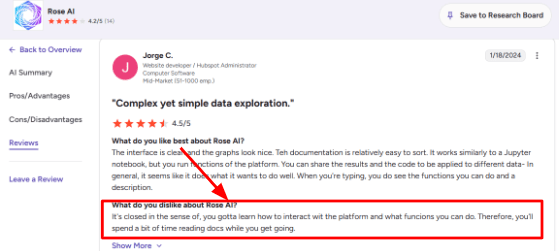
Business Training Rosie can learn from your website, Google Business Profile, custom FAQs, your hours, services, and caller instructions. In my testing, the setup flow felt simple at first, but the deeper controls took some learning because you need to understand what the agent can and cannot do. I saw a similar point in a G2 review where the user said there is a learning curve around platform functions and docs. That screenshot fits well right below this section because it explains the setup reality better than a feature list:
-
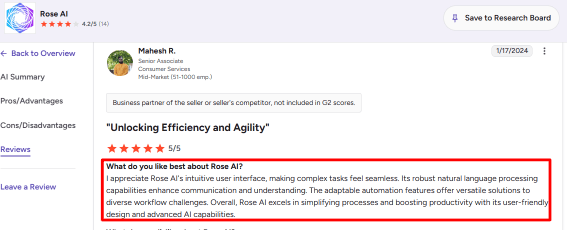
AI Call Handling Rosie answers inbound calls, captures caller details like name and what is broken, responds to common questions about your service area or pricing, and sends call summaries so you can follow up later. The interface is fairly easy to move through, and I can see why another G2 review liked the UI, natural language handling, and automation. You can place that second G2 screenshot below this point since it supports the part where Rosie feels easier once the core setup is done:
-
Calendar Integration Rosie supports appointment booking on higher plans through tools like Google Calendar, Calendly, Acuity, and Appointlet. For small businesses, this matters because a missed call can become a booked appointment instead of a voicemail that sits untouched for hours.
-
Calendar Integration Rosie supports appointment booking on higher plans through tools like Google Calendar, Calendly, Acuity, and Appointlet. For small businesses, this matters because a missed call can become a booked appointment instead of a voicemail that sits untouched for hours.
-
Call Records Rosie provides call summaries, transcripts, recordings, and email or text notifications. This is useful when you are with a customer, between meetings, on the road, or managing a small team and need quick context before calling someone back.
Pros
-
Rosie is easy to understand for a small business owner because it solves a clear problem: missed calls, missed leads, and slow follow-up.
-
Setup is quick if your website and Google Business Profile are clean and up to date.
-
The mobile app makes it easier to review calls, texts, transcripts, and recordings while you are away from the desk.
-
English and Spanish support makes it useful for businesses serving diverse local customers, and the entry plan is affordable for small teams that mainly need call answering and message capture.
Cons
-
Rosie may not be the right pick if you need a full customer support system across phone, chat, email, WhatsApp, and CRM workflows because it is strongest for inbound phone answering, so broader teams may need a more complete platform.
-
Direct appointment booking is only available on higher plans, so the cheap $49 plan will only take messages, not book jobs.
-
The setup has a learning curve once you start editing agent behavior, FAQs, and call rules, so expect to spend an afternoon tweaking things.
-
Pricing can be confusing because some older public pages mention unlimited usage while current terms mention minute caps and automatic upgrades.
-
Call recording and AI voice usage also need careful handling because the FCC treats AI generated voices seriously under robocall rules.
Pricing
-
Rosie AI starts at $49/month for the Professional plan with 250 included minutes.
-
Scale is listed at $149/month with 1,000 minutes, appointment booking, direct transfers, warm handoff transfers, and texts during calls.
-
Growth is listed at $299/month with 2,000 minutes and training files.
-
Custom plans start at $999+/month for larger businesses, multiple locations, custom integrations, and higher usage.
Why Not to Choose Rosie AI
Skip Rosie AI if your business needs deep CRM workflows, complex routing, advanced team scheduling, or strict compliance handling. It is strongest for simple inbound phone answering, message capture, and basic follow-up. If your call volume is high, the minute caps on lower plans may run out quickly, and the upgrade to Scale or Growth can become expensive.
When to Choose Rosie AI
Rosie AI is worth testing if you run a small local business and mainly need someone to answer calls when your team is busy, closed, or away from the desk. It handles missed calls, captures basic caller details, and sends summaries so you know who to follow up with first. The $49 entry plan is easy to test, and the Scale plan adds appointment booking if scheduling is important.
Australian clinics, agencies, and local service teams can use Ring Jenny as an AI receptionist service for handling routine phone calls.
Businesses that mainly need better inbound-call coverage can also read this guide to an AI phone answering service.
Goodcall
I have looked at Goodcall a few times for small businesses that get steady inbound calls but do not have someone sitting at the front desk all day. It is an AI phone receptionist for small businesses that want an AI agent to answer calls, capture leads, route people to the right person, and reduce missed-call pressure without setting up a complicated call center. What stands out is the unlimited minutes on current plans, which is rare for tools in this price range.
Features
-
AI Call Answering
Goodcall answers inbound calls with an AI phone agent and can handle basic questions about hours, services, location, missed calls, lead capture, and routing. When I tested the setup flow conceptually, the strongest use case felt like service businesses where calls are repetitive but still valuable. One thing to watch is a Trustpilot review that complained the call experience felt too sales led and made it hard to reach a person. I am placing that screenshot below this section because it supports a real setup risk, especially if your call flow is too rigid and a customer with a burst pipe gets stuck in a menu loop: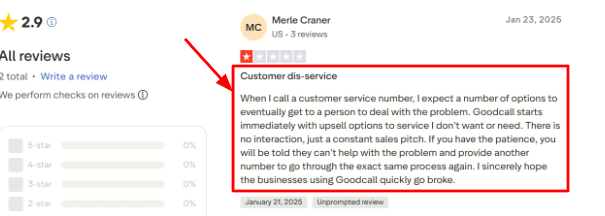
-
Lead Capture
Goodcall can collect caller details through contact forms, qualification questions, and structured call flows. For a small business, this is useful when a caller asks about pricing, services, quotes, appointments, or callbacks, and your team needs clean information after the call ends. For field-service teams, call handling gets more specific because service areas, emergency routing, and job details matter. I covered that separately in AI receptionist for contractors. A G2 review said they liked the customer service, number of features, and ease of use, which matches the upside here, though I would still test the form questions carefully before putting it live. The screenshot from G2 fits naturally here: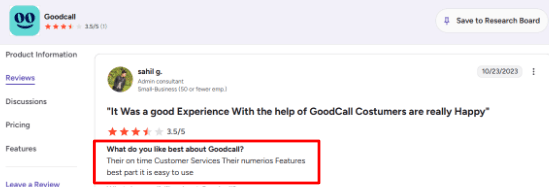
-
Calendar Routing
Goodcall can help with appointment requests by sending a booking link, transferring the caller, taking a message, or using an appointment-related workflow. It may not replace a full scheduling tool for every business, but it can reduce the first layer of phone back-and-forth for routine appointments. -
Call Logic
The branching logic is one of the more useful parts because you can send callers down different paths based on whether they need sales, support, appointments, quotes, or a human transfer. This is also where setup can get messy if your business has too many exceptions. -
Workflow Integrations
Goodcall connects call outcomes to tools like CRMs, Google Sheets, Slack, and calendars through Zapier. Microsoft also covered Goodcall's small business AI assistant angle, including its focus on conversational AI for missed calls and customer interactions, which explains why the product is so focused on capture rather than complex dispatch.
Pros
-
Goodcall is strong for small businesses that miss calls during busy hours or after closing because it can answer quickly, capture caller intent, and keep basic inquiries from disappearing.
-
The no-code setup makes it easier for non-technical teams to launch an AI receptionist without hiring a developer.
-
Zapier support makes it useful for sending call data into CRMs, Google Sheets, Slack, and follow-up workflows.
-
Branching logic gives you more control than a simple voicemail or basic answering bot, and the unique-customer pricing model can be easier to understand than pure per-minute billing.
Cons
-
Goodcall may not be the right pick if your business needs warm human escalation for sensitive or emotional calls. For those cases, a tool that blends AI with live receptionist support like Smith.ai may be safer.
-
The Starter plan has limited call history, which can feel restrictive if you need to review older calls.
-
Pricing can rise quickly if you get many new callers each month, since overages are based on unique customers, not total minutes.
-
Call flows need careful setup because a poorly designed flow can feel pushy or circular.
-
Some third-party pricing pages may be outdated, so I would rely on Goodcall's official pricing update before publishing exact numbers.
Pricing
-
Goodcall’s current Starter plan is listed at $79/month per agent, with 100 unique monthly customers included.
-
Growth is $129/month per agent with 250 unique customers, while Scale is $249/month per agent with 500 unique customers.
-
Annual billing shows lower monthly equivalents. Overages are listed at $0.50 per extra unique customer, so high-volume businesses should estimate caller volume before choosing a plan.
Why Not to Choose Goodcall
Skip Goodcall if your business handles mostly complex calls that need fast human judgment, emotional handling, or detailed troubleshooting. Also avoid it if you need deep native integrations with your operating system or industry-specific software. Goodcall is built for call capture, lead routing, and simple workflows. If your team needs a full front-office or dispatch operation, you may outgrow it.
When to Choose Goodcall
Goodcall is worth testing if your small business gets frequent repeatable calls around pricing, services, appointments, availability, and callbacks. It answers calls, captures lead details, routes callers, and can trigger simple workflows through Zapier. The unlimited minutes on current plans are a big plus for call-heavy small businesses.
Dialzara
I have recommended Dialzara to small teams because it is cheap enough to test without overthinking the monthly bill. At $29 per month, you are not making a huge commitment to find out if AI call answering works for your business. It is an AI receptionist for small businesses that need calls answered 24/7, and it makes sense for teams that want phone answering, message capture, call routing, and appointment booking without hiring a front desk person or signing a long contract
Features
-
AI Call Answering
Dialzara answers calls 24/7 and can handle basic caller questions about your hours, services, location, collect details like name and phone number, take messages, and summarize calls so you know what happened without listening to the whole thing. When I tested the setup flow, the product felt clearly built for small businesses that miss calls after hours or during busy workdays. I also saw this same support angle in a Trustpilot review where the user praised the system and called out a specific person from support. I am placing that screenshot right below this point because support quality matters a lot when an AI receptionist is handling your real customer calls: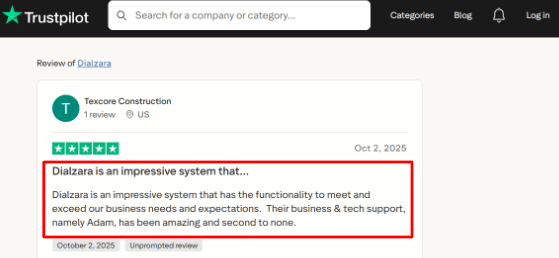
-
Calendar Booking
Dialzara can book appointments by checking your calendar availability and confirming slots during the call. Google Calendar looks like the cleanest fit from what I saw, while Outlook and other calendar setups may need a higher plan or custom configuration. For small businesses, this can turn routine appointment requests into confirmed bookings without phone tag. -
Call Routing
Dialzara can route callers to the right person, team, or phone number based on what they need. It supports blind transfer on all paid plans, while warm transfer starts on higher plans. In practice, this matters if you want the AI to qualify a caller before passing them to sales, support, or an urgent line. For example, HVAC teams often need to separate no-heat calls, no-cooling emergencies, and routine maintenance requests, which I covered in AI receptionist for HVAC. -
Knowledge Base
You can train the AI with your business details, call scripts, documents, website content, and custom answers about your services. This is useful, but it also means the output quality depends heavily on how carefully you set it up. A thin knowledge base can make the AI sound vague or wrong on real calls. -
Spam Filtering
Dialzara includes spam detection, call screening, and manual block or allow lists. This is a small feature on paper, but it can save a lot of time for local service businesses that get robocalls, vendor calls from people trying to sell you SEO, and low value interruptions throughout the day. Gartner also reported strong pressure on service teams to adopt AI, with 91 percent of customer service leaders feeling executive pressure to implement it in 2026, but that does not mean every tool is right for your plumbing business.
Pros
-
Dialzara is easy to start with because the pricing is public and the cheapest plan starts at $29 per month, which makes it useful for small businesses testing AI call answering for the first time.
-
It covers the core AI receptionist jobs well: answering calls, taking messages, booking appointments, routing callers, and sending summaries.
-
The setup flow feels simple enough for non-technical business owners, especially if your call script is straightforward.
-
The support feedback I found was positive, and the newer platform adds useful depth like spam detection, caller memory, multiple agents, and a website chatbot.
Cons
-
Dialzara may not be the best choice for businesses with complex, sensitive, or emotional calls.
-
A human answering service can still be safer when callers need judgment, empathy, or detailed case handling.
-
The lowest plan only has 60 included minutes, so call-heavy businesses may outgrow it quickly. Warm transfer is also missing on the cheapest plan.
-
Calendar support seems strongest for Google Calendar, so teams using Outlook, Apple Calendar, or custom scheduling flows should check exact plan requirements before signing up.
-
Regulated businesses should verify compliance before using it for sensitive data.
Pricing
-
Dialzara starts at $29/month for Business Lite with 60 included minutes.
-
Business Pro costs $99/month with 220 included minutes.
-
Business Plus costs $199/month with 500 included minutes.
-
Overage is listed at $0.48/minute.
-
The pricing page also mentions a 7-day free trial, no setup fee, no long-term contract, call recordings, call summaries, and US-based phone numbers.
When Not to Choose Dialzara
Skip Dialzara if your business handles complex calls that need judgment, smooth human handoff, or deeper operational workflows. Also avoid it if you need warm transfer on the lowest plan, because the $29 plan only includes blind transfer. If you have high call volume, the 60-minute limit on the cheapest plan will run out quickly, and upgrading to Pro or Plus may be necessary.
When to Choose Dialzara
Dialzara is a solid low-cost test for small businesses that mainly miss calls after hours or during busy workdays. It gives you 24/7 call answering, appointment booking for routine requests, call summaries, and basic routing. The $29 entry plan is cheap enough to test for a month without overthinking it.
AI Front Desk
I found AI Front Desk when I was looking for something that could do more than answer the phone and send a text. Many cheap tools stop at taking a message, but this one tries to handle the broader front-office flow: SMS follow-up, outbound calls, forms, chatbot, and basic CRM. For a small business, that can be useful because missed calls are rarely the only problem. The real issue is often slow follow-up.
Features
-
AI Phone Answering
AI Front Desk can answer calls, collect caller details like name, phone number, and reason for calling, respond to common questions about services or hours, and pass the lead into its system for follow-up. For routine appointment requests or basic questions, it can work well. But messy calls where the customer is vague or frustrated need testing before you rely on it fully. But I also saw a Trustpilot review where someone said the AI became inconsistent during deeper real world testing, and I get why. Messy calls where the customer is vague or frustrated do not fit neatly into the AI's script. I am putting that screenshot below because it explains the risk better than a feature list: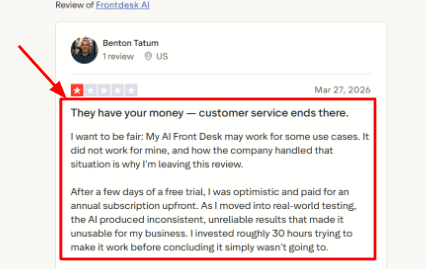
-
Call Follow-Up
What I liked about this tool is that it does not just hang up after the call. It can continue the conversation through SMS, send booking links, confirm details, and keep the inquiry warm until your team follows up. Another Trustpilot review praised the easy setup and said it helped them avoid missing customer inquiries, so I am adding that screenshot below to show the other side of the experience: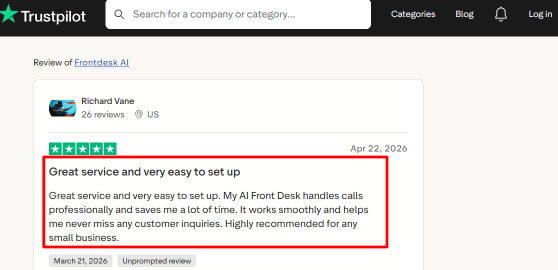
-
Calendar Integration
AI Front Desk connects with Google Calendar, so callers can book appointments directly. I liked that you can set meeting duration, buffer gaps, and custom intake fields. For a simple appointment-led business, this can save time quickly. If you have many staff members, location rules, or conditional booking paths, test those flows carefully before paying annually. -
CRM And Logs
The tool stores caller details, transcripts, lead notes, and conversation history in a CRM-style dashboard. That means you can go back and see why someone called, what the AI captured, and whether the lead needs human follow-up. The log limits on smaller plans are worth checking if your team needs long history or detailed reporting. -
Automation Workflows
AI Front Desk supports follow-up workflows, outbound calls, SMS, Zapier, and deeper API-style integrations on higher plans. For a growing small business, this means a call can trigger a text confirmation, internal alert, CRM update, or follow-up task without someone manually entering everything.
Pros
-
For a small business, AI Front Desk is useful for covering missed calls during the day and after hours.
-
It can answer, collect details, and keep the inquiry moving without your team calling back blind.
-
The simpler call-answering flows are quick to launch if your business has clear services and hours.
-
Built-in follow-up through SMS helps turn a call into the next action.
-
Phone, chatbot, CRM, forms, tickets, and dashboards give it more coverage than a narrow answering tool.
Cons
-
I would be careful with AI Front Desk if your business handles sensitive, emotional, or high-stakes calls.
-
The AI cannot reliably triage urgency, and the Trustpilot review about inconsistent results worried me.
-
The Business plan includes 200 voice minutes, which may not be enough for call-heavy teams. If you need deep industry-specific integrations, this may not be the right tool.
Pricing
-
AI Front Desk has a Free plan with limited voice minutes, SMS, chatbot conversations, form submissions, and email drafts. The paid Business-in-a-Box plan is listed at $99/month, or $79/month when billed annually.
-
The Business plan includes 200 voice minutes, 400 SMS messages, 100 chatbot conversations, 300 form submissions, and Zapier support. Voice overages are usage-based, so call volume matters more than the headline price.
-
Enterprise pricing is custom and is the better fit if you need API access, custom integrations, higher limits, priority support, white-glove onboarding, or reseller-style deployment.
When Not to Choose AI Front Desk
I would skip AI Front Desk if your business handles mostly sensitive, complex, or urgent calls that need a trained human. Also avoid it if you need deep industry-specific software integrations from day one. If your call volume is high, the 200-minute Business plan limit may run out quickly. Test the free plan with real calls before committing to an annual subscription.
When to Choose AI Front Desk
AI Front Desk is worth testing if your small business gets repeatable calls, appointment requests, basic questions, and follow-up needs. It answers calls, captures lead details, books appointments into your calendar, and sends follow-up texts. The free plan lets you test before spending money, and the Business plan is reasonable if you want more than basic call answering.
Smith.ai
I have looked at Smith.ai a few times for small businesses because it is not just another AI bot that leaves you stuck when the caller gets complicated. What makes it different is the live human backup. The AI handles simple calls, but when a caller is frustrated, asking something the AI cannot figure out, or dealing with a high-value issue, a real person can step in.
Features
-
AI Call Answering
Smith.ai's AI receptionist can answer calls, ask intake questions, qualify leads, and send summaries after the call so you know who called and why. In my testing notes, this feels more structured than a basic phone bot because the call flow can be shaped around lead type, service type, and routing rules. I also saw a Trustpilot review that raises a real billing concern here, where the user said AI calls were being transferred to live agents without consent and that it raised their bill. I am placing that screenshot under this section because that is something you need to watch for: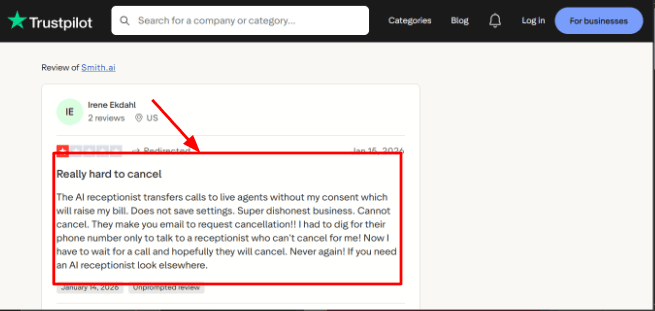
-
Human Agent Backup
This is the main reason someone would pick Smith.ai over cheaper tools. The AI handles the easy calls, but when a caller needs a person, a North America-based live agent can step in. That safety net matters for businesses where callers are high-value, sensitive, or likely to need human judgment. This matches the second Trustpilot reviewer who liked how human like the AI sounded and said the Smith.ai team was helpful, so I am adding that screenshot here to show the upside of the same feature: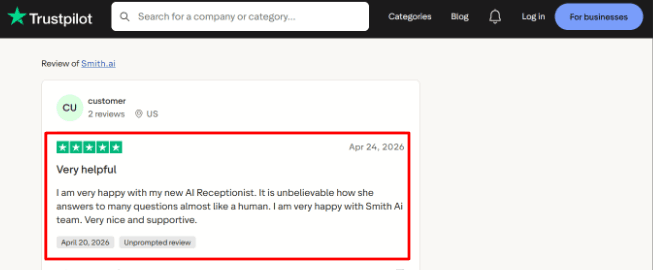
-
Calendar Integration
Smith.ai can book appointments through scheduling tools like Calendly and can also work with direct booking links on live receptionist plans. In a real setup, this matters because many small businesses do not want another person manually copying lead details from calls into the calendar. -
Lead Intake
The tool can collect custom lead details like what service the caller needs, their location, urgency level, and whether they are a new or existing customer. I found this especially useful for businesses where every call should be filtered before it reaches the owner or team. -
Call Records
Smith.ai includes call summaries, recordings, transcripts, dashboard access, and searchable call history. One detail worth noting is that recordings and transcriptions are stored in the dashboard for 90 days based on their own call records call records page, so if you need to keep call records for longer, you should export important calls.
Pros
-
Smith.ai is strong for small businesses where a missed call can mean losing a serious lead.
-
The AI handles basic calls, and live agents can support more complex conversations when a caller is upset or needs a person.
-
The lead intake flow is useful for sorting serious inquiries from routine requests.
-
It supports scheduling, call summaries, and routing, so the workflow goes beyond answering the phone.
-
The North America-based agent positioning can matter for businesses that care about caller trust and call quality.
Cons
-
Smith.ai may be a poor fit if you only need a cheap AI receptionist for basic call answering.
-
Lower-cost tools can be enough for simple FAQ calls or after-hours capture if your call volume is low and your calls are not complex.
-
Pricing can rise quickly when live agent handoffs, overages, or add-ons come into play.
-
The cancellation concern is worth checking before signing up, The BBB profile also raises service response questions.
-
The self-service AI plan has fewer guided setup and customization options than the done-for-you plans.
Pricing
-
Smith.ai AI Receptionist starts at $95/month for the self-service plan, with higher AI plans listed around $270/month and $800/month.
-
Done-for-you annual AI plans start around $500/month.
-
Virtual Receptionist plans start at $300/month for 30 calls, then move to $810/month and $2,100/month based on call volume.
-
Add-ons and overage charges can increase the final cost.
When Not to Choose Smith.ai
I would skip Smith.ai if you have low call volume and most of your calls are simple. In that case, a cheaper AI-only tool like Dialzara or Rosie AI may give you enough coverage at a lower cost. Also avoid it if you cannot afford the risk of higher bills from live-agent handoffs, overages, or add-ons.
When to Choose Smith.ai
Smith.ai is worth a serious look if your business handles high-value calls, sensitive conversations, or leads that need human backup. The AI can handle routine intake while live agents step in when a caller is frustrated, confused, or worth extra care. The human backup is the key differentiator here.
Quo
I found Quo when I was looking for something that could handle more than phone calls. It used to be called OpenPhone, then rebranded to Quo, so keep that in mind because many older reviews still use the old name. What interested me is that it is a full business phone system with calls, texts, voicemail, team inboxes, and an AI agent called Sona. For small teams sharing customer conversations, that can be useful because leads often fall through the cracks when communication is scattered.
Features
-
Shared inbox
Quo gives your team a shared view of calls, texts, voicemail, recordings, and notes all in one place. In my testing, this felt useful for small teams where more than one person handles customer conversations. A teammate can see that someone has already texted, called, or left a voicemail, so the customer does not have to repeat everything. One G2 review also pointed out a small desktop issue around marking texts as read, so I am placing that screenshot right below this point because it explains the inbox behavior better than a generic feature list: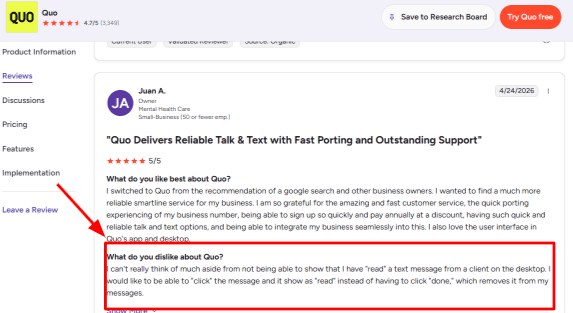
-
Business texting
This is where Quo stands out for small businesses. You can call and text from your business number on mobile or desktop, and each conversation stays attached to the customer history. That makes it easier to follow up without switching between personal phones, voicemail, and random notes. The second G2 review fits naturally here where the user moved from a landline, ported their number, and found texting plus auto replies useful as a sole proprietor. I am adding that screenshot below this section because it shows the real small business use case: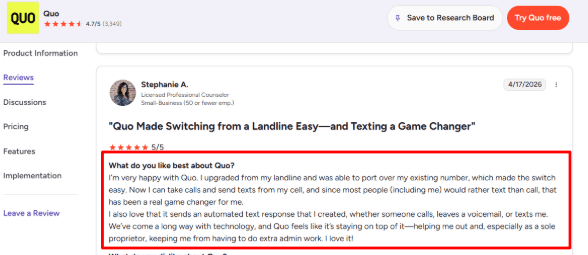
-
Sona AI Agent
Sona is Quo's AI receptionist. It can answer calls, collect caller details like name and reason for calling, answer common questions from a knowledge base, take messages, and route calls to a human. This is the main reason Quo belongs in an AI receptionist article. The AI side works best when the business has clear FAQs, service details, and call rules ready. -
Call routing
Quo supports phone menus, shared numbers, call transfers, ring orders, voicemail, and after-hours flows. For a small business, this means important calls can reach the right person while routine calls can go to voicemail or follow-up. Advanced routing features sit on higher plans, so the basic plan may feel limited once your team grows. -
Calendar integration
Quo can be used around appointment workflows through Sona jobs and connected tools, especially when calls need to be captured, qualified, or handed off. I would still test the exact scheduling flow before treating it like a full appointment-booking tool.
Pros
-
For a small team with multiple people handling customer conversations, Quo is strong because calls, texts, and customer history all live in one place.
-
The shared inbox makes it easier to avoid missed follow-ups.
-
The Sona AI Agent gives Quo a real AI receptionist use case beyond basic voicemail.
-
Number porting is useful for moving away from a landline.
-
Automated text responses can reduce admin work for solo owners and small service teams.
Cons
-
Quo may be a weak fit if your main need is a pure AI receptionist for booking, rescheduling, and appointment heavy workflows. It works better when phone, SMS, and team communication are also important, not just call answering.
-
Sona is included but heavier usage needs paid automation credits, so if you have high call volume, factor that cost in.
-
Some important calling features like phone menus and automatic recording need higher plans, and international calling and messaging are add ons, so Quo is strongest for US and Canada focused teams.
-
SMS setup may also need carrier registration, which adds a setup step before texting works smoothly at scale.
Pricing
-
Quo starts at $15/user/month annually or $19/user/month monthly on the Starter plan.
-
Business costs $23/user/month annually, and Scale costs $35/user/month annually.
-
Each paid user gets one local or toll-free number. Extra numbers cost $5/month.
-
Sona includes limited free credits, with paid bundles starting at $25/month for higher AI call volume.
When Not to Choose Quo
Skip Quo if your main need is deep appointment booking and calendar-first scheduling. Quo is a phone system with an AI assistant, not a dedicated scheduling tool. Also avoid it if you are a solo operator who only needs basic call answering, because a cheaper AI-only tool like Dialzara may do that for less money. If you need Sona for high call volume, paid automation credits will add to your monthly bill.
When to Choose Quo
Quo is a solid choice for small teams that need to share calls and texts. It replaces a landline, gives you texting from your business number, and includes Sona for basic AI call handling. If leads are falling through the cracks because calls, texts, and voicemails are scattered, the shared inbox solves a real problem.
Conclusion
The best AI receptionist for small business is not the one with the flashiest demo voice. It is the one that can protect your calls when your team is busy, closed, or already helping someone else.
If you mainly need simple after-hours coverage, Rosie AI and Dialzara are practical starting points. If lead capture, call flows, and local service routing matter more, Goodcall is worth testing. If you want phone answering plus SMS, follow-up, and basic CRM-style workflows, My AI Front Desk gives you a broader front-office setup.
For businesses where calls are high value or emotionally sensitive, Smith.ai is the safer option because of its live receptionist backup. If your team also needs a shared phone system with calls, texts, voicemail, and AI call handling in one place, Quo makes more sense.
My advice is simple: do not buy an AI receptionist because it sounds impressive for two minutes. Run real calls through it. Ask pricing questions. Reschedule an appointment. Call from a noisy place. Test spam calls, urgent callers, confused customers, and human handoff. A good AI receptionist should answer fast, capture clean details, route the right calls, and make follow-up easier. If it cannot do that reliably, it is just a very polite voicemail.
Methodology
We compared AI receptionist tools the way a small business owner would actually use them: missed-call handling, appointment booking, lead capture, after-hours replies, pricing, setup effort, and caller experience. We also checked product pages, online reviews, demos, and real small-business use cases instead of blindly relying on feature lists alone.
FAQs
How do I choose the right AI receptionist for a small business?
Start with the calls you miss most often. Check whether the tool can capture leads, book appointments, handle cancellations, and send clear call transcripts. Also test fallback routing when the AI cannot help.
Which AI receptionist is best for small businesses?
Ring Jenny, Rosie AI, and Goodcall are strong starting points for small businesses. Choose Ring Jenny for guided setup, Rosie AI for simple after-hours coverage, or Goodcall for service businesses needing flexible call flows.
What should I check before paying for an AI receptionist?
Listen to real call recordings and review transcripts. Test noisy calls, accents, booking changes, spam calls, and urgent requests. Confirm that callers can reach a staff member when the AI needs help.
Can an AI receptionist answer calls after hours and handle emergencies?
Yes, most can answer calls 24/7, collect details, and send alerts. Set clear escalation rules for emergencies, urgent bookings, and high-value leads so important callers are routed to the right person quickly.
When is a human answering service better than an AI receptionist?
A human service may be better for sensitive complaints, complex sales enquiries, or situations requiring professional judgment. Smith.ai is worth considering when you want AI call handling with live-agent backup available.
How can I test an AI receptionist without changing my current phone number?
Use call forwarding from your existing number and run a short trial. Test lead capture, appointment confirmations, staff routing, and follow-up messages before sending every business call through the new setup.
Summarize this content with AI


