

Introduction
Zendesk reports that 72% of customers want immediate service, and phone calls are usually where that expectation becomes painfully real. I have tested over a dozen AI phone answering services in the last few months, and most small businesses do not need a fancy contact center. They just need someone to pick up when they are busy working. This is becoming more urgent as voice AI adoption accelerates. A Gartner survey from February 2026 found that 91% of customer service leaders are under pressure to implement AI, but pressure does not equal fit for a small business owner. I built this guide to help you find a practical AI phone answering tool that matches your call volume, your budget, and how much your callers actually expect to talk to a real human.
I also compared review patterns from places like G2, Trustpilot, and Capterra, then looked closely at the details most roundups skip: minute limits, overage pricing, human handoff, spam handling, and whether the tool is simple enough to trust with real customers.
Best AI phone answering service by use case
| Use case | Tool name | Why I chose this tool |
|---|---|---|
| General AI receptionist for small businesses | Ring Jenny | I chose this because its feature pages focus on the core work many small businesses collecting caller details, and booking appointments. It is a useful virtual receptionist example for businesses that want simple day-to-day call coverage. |
| Human-backed answering service | Smith.ai | I chose this because the AI answering service can bring in a live receptionist when a caller needs more help. When I went through the feature pages, the combination of AI-led call answering, appointment booking, spam screening, and human escalation looked useful for businesses that cannot leave complex calls entirely to automation. |
| Appointment booking and lead capture for local service calls | Goodcall | When I reviewed its feature pages, Goodcall looked useful for businesses that want to shape call flows rather than only take messages. It supports appointment booking, lead capture, FAQ responses, and routing rules, making it a relevant AI receptionist example for local service calls with repeat customer questions. |
| Existing RingCentral phone setup and after-hours calls | RingCentral AI Receptionist | I chose this for teams already using RingCentral because it keeps AI receptionist functions close to the business phone setup. Its pages cover call answering, FAQs, call routing, lead capture, and appointment scheduling, including after-hours handling. That may suit a business that wants to work within its existing communications platform. |
| Low-budget, simple AI phone answering for local businesses | Dialzara | I included Dialzara as a lower-cost starting point because its official pricing page lists plans from $29 per month. The core features are relevant to basic AI phone answering: 24/7 call coverage, simple appointment booking, custom greetings, and call notes. It may suit a small business with lighter call volume. |
How I tested these AI phone answering services
| Test area | What I checked |
|---|---|
| Setup | How fast I could create a working AI phone agent |
| Call quality | Voice delay, naturalness, and interruption handling |
| Lead capture | Whether caller details were collected cleanly |
| Booking | Whether appointments could be booked, changed, or routed |
| Handoff | Whether calls could move to a human smoothly |
| Pricing | Minute limits, call limits, overages, and add-ons |
Deep dive into individual AI Answering Service Tools
Ring Jenny
I selected Ring Jenny because it focuses on what Australian businesses actually need from an AI phone answering service: answering missed calls, capturing leads, handling common questions, and making sure urgent callers do not disappear into voicemail.
It is built for businesses that receive calls while they are busy with customers, working on site, driving, or outside normal hours. The call packages also make it easier to start at a level that suits your call volume instead of paying for a full time receptionist.
The pricing is reasonable when compared with a receptionist or a traditional answering service. Its GDPR aware setup is also useful for businesses that need to be careful with customer information and may receive enquiries from overseas customers. Ring Jenny's AI phone answering service can handle routine inbound enquiries, collect caller details, and record why someone is calling when the business cannot pick up.
-
Flexible call packages: This is useful because every business receives a different number of calls. A small trade business may only need help with missed and after hours calls, while a busy clinic or legal office may need more regular call coverage.
I recommend starting with a package that matches your current call volume. You can then increase it once Ring Jenny becomes part of your daily phone workflow. Its AI phone answering service can use call-handling rules to answer common questions, take messages, and identify when a caller needs a callback rather than an immediate answer. This is particularly useful for after-hours and overflow calls that would otherwise go to voicemail.
-
AI answers missed calls: Ring Jenny can answer when you are busy, already on another call, working with a customer, or closed for the day. This gives callers a response instead of sending them straight to voicemail.
For example, an electrician can have Jenny answer an evening call, collect the issue, ask for the suburb, and make sure the right person sees it quickly.
-
Custom lead capture: You can decide what Jenny should ask callers before passing the enquiry to your team. This can include their name, phone number, service needed, location, urgency, and preferred time for a callback.
I recommend keeping the questions practical. A plumbing business may want to know whether the caller has a burst pipe, blocked drain, or general maintenance request before deciding how urgently to respond.
-
Smart call routing: Not every caller should go to the same person. Ring Jenny can help separate new enquiries, existing customer calls, urgent issues, and general questions so your team can handle them properly.
For example, a law firm can send new client enquiries to intake, while existing clients with an urgent matter can be marked for a faster human callback.
-
Call summaries after every conversation: Instead of trying to remember every detail from missed calls, your team can receive a clear summary of what the caller wanted, their contact details, and what needs to happen next.
This is especially helpful for contractors and service businesses. You can finish a job, check the summary, and call back only the people who genuinely need your attention.
-
GDPR aware customer handling: Phone calls often include personal details, so it helps to think carefully about what information is collected and where it goes. Ring Jenny gives businesses a more structured way to handle caller details than an unmonitored voicemail inbox.
I recommend collecting only the information your team needs to respond properly. This keeps the experience simple for callers and helps your business handle customer data more responsibly.
Pros of Ring Jenny
- Hands-on setup support at no extra cost
For many New Zealand small businesses, the hardest part of choosing an AI answering service is not the software itself but getting it set up correctly. Ring Jenny’s team can help train the receptionist around your services, opening hours, common customer questions, booking rules, and call-handling preferences without adding a separate onboarding fee.
This is particularly useful for tradies, clinics, consultants, property managers, and local service businesses that do not have time to build detailed call flows themselves.
- Answers after-hours and overflow calls
Missed calls can quickly become missed jobs, especially when customers are calling after work, during weekends, or while the team is out on-site. Ring Jenny can answer when the business is busy, unavailable, or closed, so callers receive an immediate response rather than being sent straight to voicemail.
For New Zealand businesses that rely on phone enquiries for bookings, quotes, repairs, or consultations, this helps keep potential customers engaged while they are still actively looking for help.
- Can book appointments while the caller is still on the line
Ring Jenny can collect the caller’s details, understand the reason for their enquiry, and help schedule an appointment or callback during the same conversation. This removes the usual delay where someone leaves a voicemail, waits for a response, and may contact another business first.
It can be useful for appointment-led businesses such as clinics, salons, accountants, lawyers, real estate agents, and home-service providers arranging site visits.
- Lower cost than employing reception staff
For a small business in New Zealand, hiring a full-time receptionist involves far more than salary. There is recruitment, training, leave cover, management time, and the practical issue of covering calls outside normal business hours.
Ring Jenny gives businesses a lower-cost way to keep calls answered, capture leads, and handle routine enquiries without committing to another full-time hire. For many local businesses, recovering even one extra booking or job each month can help justify the cost.
- Keeps your existing business number in use
Businesses do not need to replace the phone number customers already know. Ring Jenny can work through call forwarding, allowing the AI receptionist to pick up missed, redirected, or after-hours calls while the owner and team still answer personally when available.
That makes it easier to introduce an AI answering service without changing signage, Google Business Profile details, website contact information, or existing customer habits.
Cons of Ring Jenny
- Not suitable for every type of call
Ring Jenny is best suited to routine inbound calls such as appointment requests, quote enquiries, business-hours questions, lead capture, and basic service information. Highly technical, emotional, unusual, or fast-moving conversations may still need a business owner or experienced team member.
For example, a customer describing a complicated dispute, an urgent safety issue, or a detailed project requirement may need direct human follow-up.
- Should not provide professional advice
For legal, medical, financial, insurance, or other regulated services, the AI should be used to capture the enquiry, collect the right details, and arrange a callback or appointment. It should not be relied on to give professional advice or make decisions that require qualified judgment.
New Zealand businesses in regulated industries should be clear about escalation rules and ensure sensitive calls reach the appropriate staff member quickly.
- Not built for outbound calling campaigns
Ring Jenny is primarily designed as an inbound AI answering service. Its main purpose is to answer incoming calls, reduce missed-call risk, capture leads, and help customers book.
Businesses looking for high-volume cold calling, aggressive sales outreach, debt collection, or large outbound campaign management would likely need a different tool or a dedicated outbound calling solution.
For a more general introduction, this guide explains how an AI receptionist fits into daily business call handling.
Goodcall
While I looked into popular AI phone answering service for small businesses, Goodcall was found to get a lot of inbound calls, and you would use it when you want an AI agent to answer calls, collect lead details, route callers, and send call data into your other tools without having to build anything from scratch or hire a developer.
Features
-
AI Call Answering
Goodcall can answer inbound calls, respond to common questions, collect caller details, and handle simple service requests. When I mapped the setup against real local business call scenarios, it felt strongest for missed calls, lead capture, and basic front desk work. A useful point from Microsoftis that Goodcall was built specifically around small businesses missing customer calls, which explains why the product is so call first and not trying to be a full contact center. -
Call Routing
Goodcall lets you route callers using departments, transfers, messages, SMS responses, and logic flows, which is really helpful when one caller needs sales, another needs support, and another just wants to know your business hours. I also saw the risk here in the Trustpilot review so I am placing that screenshot below because it shows what can happen when a caller feels pushed through a flow without a clear way to reach a human: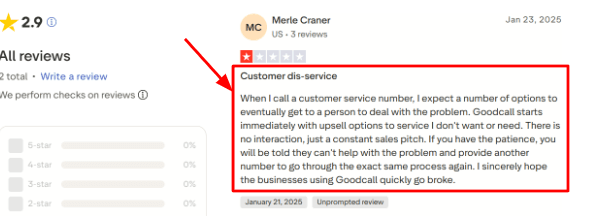
-
No-Code Setup
The setup is designed for non technical teams, so you can add business details, upload documents, create call flows, and configure actions without needing a developer to help you. The G2 review points to this since it mentions easy use, customer service, and many features, so the screenshot fits naturally below for people comparing setup effort across different tools: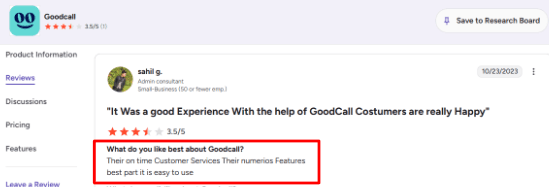
-
Calendar Integration
Goodcall can handle appointment related calls by sending booking links, routing the caller, taking a message, or working through connected tools, and it also supports deeper appointment workflows through integrations like Boulevard for some businesses. This is useful, but it is worth checking your exact booking stack before choosing it because some setups may need Zapier or a specific integration path. -
Zapier Workflows
Goodcall can send call outcomes into CRMs, Google Sheets, Slack, calendars, and other apps through Zapier, which makes it much more useful than a plain call answering tool because the call can turn into a lead record or an internal alert for your team. One thing that needs attention during setup is the difference between knowledge and actions because uploading documents helps the AI answer questions while actions like SMS, transfers, and forms need separate Skills to be configured properly.
Pros
-
Goodcall is really useful for businesses that lose leads simply because calls go unanswered, since it can answer after hours calls, capture caller details, and reduce basic front desk load.
-
It has a strong no code setup for owners who do not want to build a custom voice AI system, and the Zapier support makes it easy to connect calls with CRMs, Sheets, Slack, and calendars.
-
The pricing includes unlimited minutes and AI tokens, which is way easier to understand than per minute billing where costs can spike unpredictably, and it supports call flows, forms, transfers, documents, and directory routing all in one system.
Cons
-
Goodcall may not be the best choice if your callers often need quick access to a real person because a poorly designed flow can feel repetitive or sales heavy.
-
The Starter plan has limited history with only 7 days of call and customer details according to Goodcall's pricing page, and high volume businesses with many unique callers may see costs rise since overages are based on unique monthly customers instead of total minutes.
-
Some appointment workflows may need Zapier or a supported vertical integration, so the setup can take more planning than you might expect, and public review volume is still pretty thin so buyers may need to rely more on hands on testing than large review datasets
Pricing
-
Goodcall currently starts at $79/month per agent on the Starter plan, with 100 unique monthly customers included.
-
Growth is listed at $129/month per agent with 250 unique monthly customers.
-
Scale is listed at $249/month per agent with 500 unique monthly customers.
-
Annual billing lowers the effective monthly price.
-
Extra unique customers are charged separately, so call volume matters.
Why People Switch From Goodcall
People switch from Goodcall when their call handling needs become more complex. It works well for local businesses that need simple AI answering, routing, and appointment support, but growing teams may eventually want deeper CRM integrations, stronger reporting, more advanced workflows, or human backup for important calls.
When to Choose Goodcall
Goodcall makes sense for a small service business, local business, restaurant, salon, or call heavy team that misses calls and wants an AI agent to answer, qualify, route, and log callers. It works best when your calls follow repeatable patterns like pricing questions, appointment requests, lead capture, or business hours.
Ring Jenny is built for businesses that want an AI receptionist for Australian businesses without turning the phone system into another complicated project.
Readers comparing current options can also review this guide to AI answering services in 2026.
Dialzara
Dialzara is known for simple AI phone answering for small businesses, so you would use it if you want calls answered 24/7, messages captured, and appointments booked without having to hire a full time receptionist.
Features
-
AI Call Answering
Dialzara answers calls after hours, during busy periods, and when multiple people call at once. In my testing, this is where the tool makes the most sense for simple caller questions, lead capture, and missed call prevention. -
Call Summaries
After a call ends, Dialzara can send summaries, recordings, and caller details right to your email or SMS. I liked this because it makes follow up way easier, especially for a small team that does not want to open a dashboard every few hours just to see who called. The Trustpilot review also praised Dialzara's business and tech support, especially a person named Adam. I am dropping that screenshot below because support quality really matters when an AI receptionist starts handling your actual customer calls: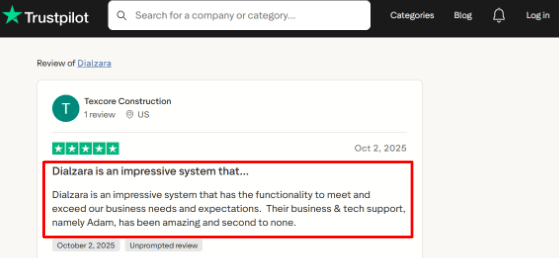
-
Calendar Integration
Dialzara can check your Google Calendar availability and book appointments during the call itself, which is really useful for appointment led businesses like home services, consultants, clinics, salons, agencies, and local service teams. One small thing I noticed is that Google Calendar seems to be the strongest default setup, while other calendar setups may need a higher plan or some custom support to work properly. -
Call Routing
The AI can qualify callers and transfer them to the right person, department, or phone number, which is super helpful when sales calls, support calls, urgent calls, and general questions all come through the same number. Blind transfers are available on lower plans, but warm transfers where the human knows something about the caller before picking up need a higher plan. -
Knowledge Base
You can train Dialzara using your business details, call scripts, documents, website content, and custom questions. This part is really important because the AI is only as good as the information you give it, so during setup I would spend extra time testing common caller questions before sending real traffic through the system.
Pros
-
Dialzara starts at $29 per month, which is very low for an AI phone answering service and makes it easier to test before committing to a larger phone system.
-
It covers the core needs well like answering calls, taking messages, routing calls, and sending summaries, plus appointment booking is useful if your business already runs on Google Calendar.
-
It also supports call recordings, voicemail transcription, and SMS or email notifications, and the whole setup feels built for small businesses that just want something practical without a long sales process.
Cons
-
Do not pick Dialzara as your main AI phone answering service if you need deep enterprise routing, large support queues, advanced reporting, or complex contact center workflows because it is just not built for that.
-
The cheapest pricing plan only has 60 included minutes, so active businesses may outgrow it pretty quickly, and warm transfers are not included in the lowest plan either.
-
Some calendar and CRM setups may need Zapier, Make, API work, or a higher plan to function smoothly, and public review volume is still pretty limited so I would test real calls before depending on it fully.
Pricing
-
Dialzara starts at $29/month for Business Lite with 60 included minutes.
-
Business Pro is $99/month with 220 minutes.
-
Business Plus is $199/month with 500 minutes.
-
Overage is listed at $0.48/minute.
-
It also offers a 7-day free trial, no setup fee, and no long-term contract.
Why People Switch From Dialzara
People switch from Dialzara when they outgrow simple AI call answering. It is a practical starting point for smaller budgets, especially with call summaries and Google Calendar booking, but businesses with complex caller requests may need better routing, richer integrations, stronger handoff rules, and more team-level controls.
When to Choose Dialzara
Dialzara makes sense for a small service business that mainly needs calls answered, messages captured, appointments booked, and basic call routing. It works best for businesses that miss calls after hours or want a low cost AI receptionist before they are ready to hire front desk staff.
Smith.ai
Smith.ai is for AI phone answering that comes with live human receptionists backing it up, so you would use it when missed calls are actually costing you leads and you want intake, scheduling, routing, and follow up all handled in one place instead of piecing together different tools. It works best for service businesses that get meaningful inbound calls, especially law firms, agencies, consultants, and home service teams where every call has real value.
Features
- AI Receptionist
Smith.ai's AI receptionist can answer calls, collect caller details, qualify leads, and respond to common questions. When I tested the flow against a small service business setup, the value was pretty clear because it is built for calls where the caller needs more than just a voicemail box.
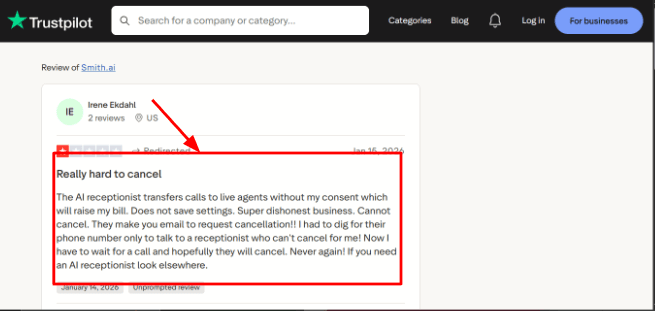
One thing I would watch closely is the live agent handoff because a Trustpilot review said the AI transferred calls to live agents without consent and raised billing concerns. I am dropping that screenshot below since it directly affects how you should understand the product before signing up:
- Human Backup
The live receptionist layer is the main reason Smith.ai feels more complete than a lot of AI only phone tools because if the caller asks something complicated or gets frustrated, the call can move to a real human instead of ending in a bad AI loop that leaves everyone annoyed.
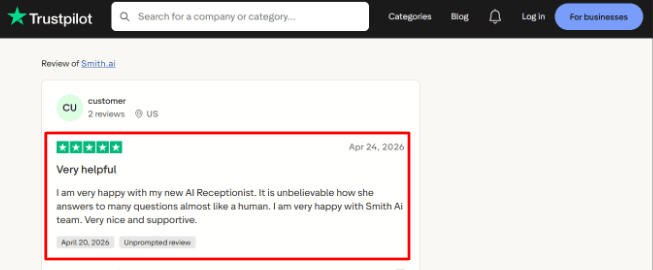
A second Trustpilot review had the opposite experience and said the AI receptionist answered many questions almost like a human with a really helpful support team behind it. That screenshot fits well here because it shows the upside when your setup is clean and working properly:
-
Lead Intake
Smith.ai can ask custom intake questions, screen callers, and capture useful details before you or your team ever get involved, which is really helpful for law firms, consultants, agencies, and home services where one bad fit call can waste a ton of time. I liked that the intake does not feel like a basic form, it is closer to a front desk script built around your actual business rules. -
Calendar Integration
Smith.ai can help with appointment scheduling through tools like Calendly and booking links, and this matters because answering a call is only half the job if the lead still has to wait around for someone to call them back. During setup I would double check the calendar flow carefully because small gaps in your booking rules can create confusion really fast. -
Call Summaries
Smith.ai can send call summaries, transcripts, and caller details into email, Slack, Microsoft Teams, or your CRM, which makes follow up way easier without having to listen to the whole call again. One useful detail that basic comparisons often skip is that Smith.ai stores call recordings and transcriptions for 90 days, so if your team needs longer archives you should plan to export them.
Pros
-
The AI plus human setup is genuinely useful when you want AI speed but still need real receptionist backup for complicated calls, and CloudTalk also points to Smith.ai as a strong hybrid option for professional services in their 2026 roundup.
-
It works well for lead heavy businesses because it can qualify leads, route them properly, schedule appointments, and summarize calls all in one flow.
-
The legal workflows are solid with intake, conflict checks, payment collection, and case management integrations, plus the integrations across CRMs, calendars, chat tools, and automation platforms are better than what most AI only tools offer.
-
The reporting layer with call recordings, transcripts, summaries, and dashboard visibility gives you a clear picture of what is actually happening on your calls.
Cons
-
I would skip Smith.ai if you only need the cheapest AI phone answering service because the pricing can get expensive once live agents, overages, and add ons enter the picture. A small business with very low call volume is probably better off with a simpler AI only tool.
-
Billing can feel hard to predict, especially if AI calls keep moving into live agent handoff or you start adding paid features. Cancellation concerns also appear in user feedback, including one Trustpilot review that said cancellation required email and extra follow up which is annoying.
-
Healthcare buyers need to be careful because Smith.ai explicitly says it is outside HIPAA compliant PHI handling for regulated medical use on their medical page. And setup quality really matters because weak prompts, messy routing rules, or poorly written intake questions will reduce your call quality no matter how good the AI is.
Pricing
-
Smith.ai AI Receptionist starts at $95/month for self-service, with higher self-service tiers around $270/month and $800/month.
-
Done-for-you annual AI plans start around $500/month.
-
Virtual Receptionist plans start at $300/month for 30 calls, with higher plans at $810/month and $2,100/month.
-
Add-ons like appointment booking, SMS updates, payment collection, and advanced routing can increase the final cost.
Why People Switch From Smith.ai
People usually switch from Smith.ai when they want a cheaper or more AI-first phone answering service. Smith.ai is strong for businesses that value human receptionist backup, but smaller teams may feel they are paying for more than they need if they only want basic call answering, lead capture, and appointment booking.
When to Choose Smith.ai
Smith.ai makes sense if your business gets valuable calls and you need intake, qualification, scheduling, summaries, and occasional human backup all working together. It is a good fit for law firms, consultants, agencies, home services, and professional service teams that want a serious phone answering setup.
RingCentral AI Receptionist
RingCentral AI Receptionist is basically AI call answering built inside the wider RingCentral phone system, so you would use it if you want an AI phone answering service that can answer calls, route callers, book appointments, send texts, and hand over calls to your team with some context already attached. RingCentral also has AIR Everywhere which is useful if you want the AI receptionist without fully moving your entire phone system over to RingCentral.
Features
- AI Call Answering
RingCentral AI Receptionist can answer calls 24/7, handle common questions, and manage multiple callers at the same time, so it feels built for teams that miss calls during busy hours, lunch breaks, weekends, or after hours when no one is in the office. One thing I noticed from the setup flow is that the value depends heavily on how clean your business information is because garbage in equals garbage out.
A G2 review also pointed out that admin and reporting areas can feel less intuitive for new users, so I am placing that screenshot right below because it supports the learning curve concern naturally: 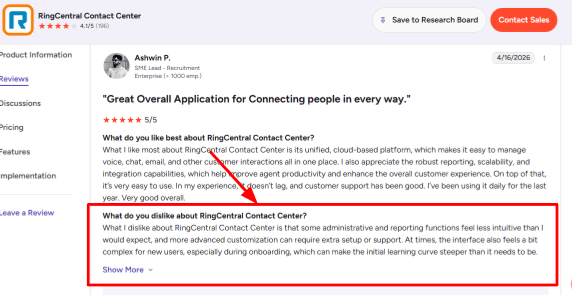
-
Smart Call Routing
The tool can route callers by department, location, keyword, what they actually need, or even conversation context, which is really useful when not every caller should land with the same person on your team. I would connect this with the second G2 reviewbecause that review specifically talks about routing customers to the right agent automatically, which matches what RingCentral is trying to solve well especially for support heavy teams. Here is the review below: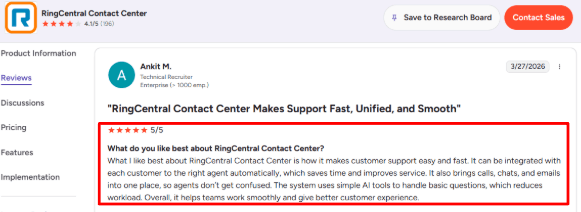
-
Calendar Integration
RingCentral AI Receptionist can connect with Google Calendar and Microsoft Outlook to book or reschedule appointments, which makes it more useful for clinics, agencies, real estate teams, consultants, and service businesses where a call should often end in a booked slot. I like that it can also send confirmation texts after the appointment is booked because that small step really matters since callers do not have to remember the details from the call or write anything down. -
SMS Follow-Up
RingCentral AI Receptionist can send follow up texts with appointment confirmations, links, forms, and basic details after a call ends, which helps when a caller just asks for something simple like pricing, your location, or next steps. The interesting part is that RingCentral has been moving AIR beyond just calls into SMS too, which makes it more useful for businesses where customers naturally switch between calling and texting throughout the day. -
Call Analytics
RingCentral added analytics for call volume, transfers, resolution rates, unanswered questions, and common caller topics, and in my view this is one of the more practical features because it shows you where the AI is actually helping and where your knowledge base still needs work. A broader market point from TechTargetis useful here too since AI receptionists are being positioned as a replacement for rigid old school IVR systems, especially for small businesses with high call volume.
Pros
-
RingCentral AI Receptionist is a strong fit if you already use RingCentral because your phone system, routing, SMS, contacts, and call handling all sit in one place instead of being scattered across different tools. It is much easier to justify if your business is already paying for RingCentral for communication.
-
It can answer calls, route callers, book appointments, send texts, and collect caller information all in one flow, and the multi location support makes it really useful for businesses with different offices, hours, teams, or departments that each have their own rules.
-
AIR Everywhere gives businesses a way to use the AI receptionist with an existing phone system without switching everything over, and the analytics plus unanswered question tracking help your team improve the AI over time instead of just hoping it gets better.
Cons
-
I would not choose RingCentral AI Receptionist if you only need a very simple AI phone answering service for a tiny business with low call volume because the setup, pricing, and the broader RingCentral system can feel way heavier than a basic answering tool.
-
The base plan only includes 100 AI minutes, so if you have high call volume you need to calculate overage costs carefully before you commit.
-
Some admin and reporting areas may feel complex for new users, which also showed up in the G2 review I mentioned earlier, and advanced automation may require AIR Pro so the regular AI Receptionist could feel limited for deeper custom workflows.
-
Regional availability is also not the same everywhere, so check RingCentral's own availability details before buying.
Pricing
- RingCentral AI Receptionist starts at $39/month as an add-on for RingCentral users in the U.S. and Canada.
- The plan includes 100 AI minutes.
- AIR Everywhere starts at $549/month with 100 minutes for businesses using other phone systems.
- While RingEX customers can add AIR from $39/month, both with 100 minutes included, so pricing can rise with call volume.
Why People Switch From RingCentral AI Receptionist
People switch from RingCentral AI Receptionist when they do not need a full phone system around their AI receptionist. RingCentral makes sense for teams already using its phone platform, but small businesses that only want after-hours answering, booking, and lead capture may prefer a lighter tool with a faster setup.
When to Choose RingCentral AI Receptionist
RingCentral AI Receptionist makes sense if you already use RingCentral, manage a call heavy team, run multiple locations, or need AI call answering with routing, SMS, appointments, transcripts, and analytics all working together.
SkipCalls
SkipCalls is a low cost AI phone answering service for small businesses that miss calls while they are out on jobs, after hours, or just dealing with a busy front desk. You would look at it if you want calls answered, leads captured, appointments booked, and spam filtered out without having to hire a full time receptionist.
Features
-
AI Call Answering
SkipCalls answers calls 24/7 and collects the caller's name, reason for calling, urgency level, and what they want as a next step. When I tested it, the setup felt pretty simple because the tool is clearly built for owners who do not want to deal with a complicated phone system. One thing to watch is how carefully you train the AI, because I saw an App Store review where the AI gave a caller an incorrect real world update. I am adding that screenshot below so you can judge the risk for yourself. -
Calendar Integration
SkipCalls can connect with tools like Google Calendar, Outlook, Apple Calendar, Calendly, Cal.com, Square, and GoHighLevel for appointment booking, which is really useful for salons, contractors, consultants, and local service teams where the caller usually just wants a time slot rather than a long back and forth conversation. -
Spam Filtering
The tool can identify spam, robocalls, and low quality calls before they waste your time, and this is one of the more practical features for small businesses because many phone lines get flooded with calls that are never going to become real customers. In my view this is where SkipCalls feels more useful than a basic voicemail replacement that just captures everything without any filtering. -
Call Summaries
Every call can be transcribed and summarized so you can quickly see what happened without replaying the whole thing, which really helps when calls come in while you are driving, working on site, or handling another customer. The summaries also make it easier to prioritize urgent leads first instead of listening to every message in order. -
Voice Cloning
SkipCalls lets you clone your own voice or choose from multiple AI voices, which can make the call experience feel more familiar for solo operators and local businesses. The feature is interesting but it also needs careful setup because voice based AI is under closer regulatory attention now, especially after the FCC clarified rules around AI-generated calls.
Pros
-
SkipCalls is very affordable for a phone answering tool since it starts at 20 per month or 199 per year, so it is priced for small businesses that simply cannot justify hiring a human answering service.
-
It supports real appointment booking through popular calendar tools, the spam filtering angle is really useful if you get a lot of junk calls, and the call summaries plus transcripts make it much easier to recover context when you are busy.
-
The voice cloning feature gives it a personal feel that many basic AI answering tools do not offer at all.
Cons
-
SkipCalls may not be the right pick if you need a fully managed human answering service as part of your setup because it is AI first, so complex or sensitive calls may still need a real person involved.
-
It is also not a good fit for healthcare workflows that need HIPAA compliance.
-
The pricing says unlimited calls and minutes, but the fair usage policy mentions a 200 call per month guideline which is worth knowing before you sign up. One App Store review raised a concern about the AI giving a caller the wrong update, which means your prompt setup really matters, and outbound AI calling needs legal care because **FCC rules**treat AI generated voice calls carefully in the US.
Pricing
-
SkipCalls costs $19.99/month or $199/year, based on the pricing details from the earlier research.
-
It also mentions a 7-day free trial and a 30-day money-back guarantee.
-
The important nuance is fair usage. The plan is marketed around unlimited minutes, but the policy mentions up to 200 calls/month for normal use.
Why People Switch From SkipCalls
People switch from SkipCalls when low-cost call coverage is no longer enough. It can be useful for solo operators who need spam filtering and basic appointment booking, but teams with higher call volume may need more reliable workflows, clearer escalation paths, stronger reporting, and better support for multiple users.
When to Choose SkipCalls
SkipCalls makes sense if you run a small local business and mainly need calls answered, leads captured, spam blocked, and appointments booked while you are busy working. It fits contractors, salons, realtors, consultants, and solo service businesses really well.
IONOS
IONOS is mainly known as a hosting, domain, and small business software company, but their AI phone answering service is useful if you just want a simple way to answer calls 24/7 without hiring a full time receptionist. It is not trying to be the most advanced tool out there, it is just trying to be affordable and easy to set up for businesses that are not tech heavy.
Features
-
Website Import
IONOS can build your AI receptionist using your existing website or Google Maps profile, and in my testing notes this is the feature that makes setup feel faster because you are not writing every single answer from scratch. One thing I would still check carefully is how well it handles messy business information, old pages, PDFs, or file heavy content. I saw a similar complaint in aTrustpilot review about very slow file uploads, so I am placing that screenshot right below this point: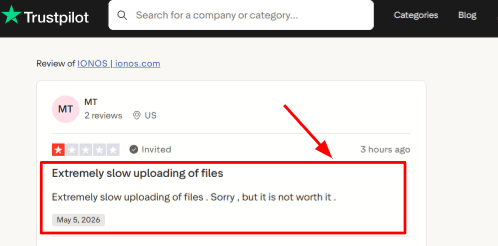
-
Guided Setup
The setup flow is made for small businesses that do not want a big technical project, so you can add the assistant name, greeting, voice, languages, business details, and forwarding rules all from one dashboard. The support angle is worth mentioning too because one Trustpilot reviewer said IONOS helped fix a confusing issue and actually showed them how to do it in the future. That screenshot fits well here since setup support can matter a lot for non technical teams: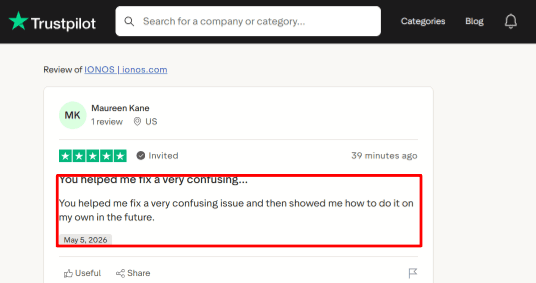
-
Availability Handling
IONOS can answer callers after hours, during your busy periods, and when nobody picks up, which makes it useful for local businesses where a missed call could mean a lost booking or a lost lead. The higher plans also add appointment scheduling, which makes the tool stronger for businesses that want the AI to actually do something useful instead of just taking messages. -
Call Summaries
IONOS gives you call history and email summaries after calls, which is really useful if you or your front desk person wants to see what callers actually asked without having to replay every conversation. In real use this matters because the AI can answer the call, but a human still needs a clean follow up trail to know what happened. -
Multilingual Calls
IONOS supports multilingual conversations and lets you define primary and additional languages, which is useful for businesses serving mixed language customers in the same city. A useful detail from IT Brief is that IONOS launched this with Newo.ai, which helps explain why the product feels more like an AI phone layer than just a normal hosting add on that was tacked on as an afterthought.
Pros
-
IONOS has a very low starting price for small businesses that only need basic call coverage, and the $9 per month plan makes it easy to test before moving to a higher call volume plan.
-
The fast setup using your website or Google Maps profile is convenient, and it is a good fit for after hours calls, missed calls, and busy front desks where you just need someone to pick up.
-
It also includes call history and email summaries so your follow up does not depend on memory, and the multilingual support is genuinely helpful for local businesses with mixed customer bases.
Cons
-
I would not choose IONOS over a full AI phone answering service if you need deep CRM workflows, complex routing, or advanced call center controls because it is really better suited for simpler small business call handling.
-
The entry plan only includes 30 calls, so if you are an active business you may hit those limits pretty quickly.
-
Appointment scheduling and outbound calls are only available on the higher plans, and call forwarding setup can depend on your phone carrier since IONOS has separate guidance for carrier specific setup like Verizon.
-
It is also not a good fit for HIPAA heavy medical use cases because IONOS says its services are not HIPAA compliant.
Pricing
- IONOS AI Receptionist starts at $9/month in the US with 30 calls included and extra calls charged separately. The $19/month plan includes 100 calls and adds outbound calls and appointment scheduling. The $29/month plan which is currently discounted, includes unlimited calls. IONOS also mentions a 1-month free trial, with taxes depending on location.
Why People Switch From IONOS AI Answering
People switch from IONOS AI Answering when they need more than basic 24/7 call answering. IONOS can work as a cheap entry point, but businesses that depend on calls for leads, bookings, urgent requests, and customer follow-up usually need stronger lead capture, calendar integrations, transcripts, and smarter routing.
When to Choose IONOS
IONOS makes sense if you are a small business that wants affordable 24/7 phone answering, simple setup, call summaries, multilingual support, and basic appointment handling without a lot of complexity.
Conclusion
The best AI phone answering service really comes down to what you actually expect every call to do for your business.
If you want AI call answering with real human backup, Smith.ai is the strongest all around choice. If you run a local service business and mainly need call routing and lead capture, Goodcall is solid. If your team already uses RingCentral, RingCentral AI Receptionist fits better.
For tighter budgets, Dialzara is a practical starting point with call summaries and Google Calendar booking. SkipCalls works well for solo operators who need spam filtering and simple appointment booking. IONOS is the cheapest entry point for basic 24/7 answering with low call volume.
Here is the only advice that actually matters. Do not just listen to the demo voice and make a decision. Call these tools yourself. Ask them your real pricing questions. Try to change an appointment. Call from a loud coffee shop or while you are driving. See what happens when you sound frustrated or when you ask something complicated. The right AI answering service should pick up fast, take down clean details, send you to the right person, and make your follow up actually easier. If it cannot do those four things, it does not matter how good the demo sounds.
Methodology
We shortlisted AI phone answering services by testing each tool like a real small business: missed calls, spam calls, lead capture, booking requests, and follow ups. We also checked pricing pages, review sites, demos, integrations, and support quality, then compared what actually matters when someone calls and expects an answer.
FAQs
Which AI phone answering service is best for small businesses?
Ring Jenny, Goodcall, and Rosie AI are strong options for small businesses. Choose Ring Jenny for AI plus human backup, Goodcall for simple routing, or Rosie AI for lower-cost local-service call handling.
How do I choose the right AI phone answering service?
Check what happens after a missed call:
- Does it capture lead details and send a transcript?
- Can it book, reschedule, or cancel appointments?
- Is there human fallback for urgent or complex calls?
- Are call recordings and escalation rules available?
What should I compare before buying an AI answering service?
Compare the full monthly cost, not just the starting price. Goodcall pricing can scale with unique customers, while Ring Jenny may cost more depending on call volume and human support needs.
Can AI phone answering services handle after-hours calls and emergencies?
Yes, but set clear rules first. The service should identify urgent requests, collect key details, send immediate alerts, and route emergency calls to the right staff member or a human backup line.
What are common mistakes when choosing an AI receptionist?
Businesses often skip testing real calls before switching. Review recordings, transcripts, spam filtering, appointment confirmations, and human handoff rules. Also test accents, noisy callers, cancellations, and questions your team receives every day.
How can I test an AI phone answering service before moving my main number?
Start by forwarding missed or after-hours calls only. Run it for one or two weeks, then review lead capture, booking accuracy, missed escalations, and caller feedback before changing your full phone setup.
Summarize this content with AI


