

Introduction
An AI receptionist for contractors matters most when a missed call can mean a missed estimate, an unhappy homeowner, or a job going to the next company on Google.
Contractor calls are messy. People call from job sites, ask urgent questions, change appointment times, request quotes, and expect someone to respond fast. Zendesk’s CX Trends 2026 reports that 74% of consumers expect 24/7 service and 88% expect faster response times than last year, which makes phone coverage a real growth problem for US contractors.
For this guide, I tested each AI answering service for contractors with the same call scripts around estimates, emergency requests, booking changes, spam calls, and callbacks. I also checked G2, Capterra, Reddit, pricing pages, and call logs to see which tools actually fit contractor workflows.
Comparison of Best AI Receptionists for Contractors
| Use case | Tool name | Why I chose this tool |
|---|---|---|
| General AI receptionist for small contractor businesses | Ring Jenny | I chose this as a general AI receptionist example because it shows the core contractor workflow clearly: call answering, simple question handling, lead capture, and appointment booking. It is useful for small businesses that want a virtual receptionist to handle after-hours calls without changing how customers contact them. |
| Growing home service teams that need booking and follow-up | Cactus | When I went through the contractor-focused positioning, this looked more relevant for growing home service teams than a basic virtual receptionist. I chose it because the mix of call answering, appointment booking, and follow-up suits businesses where several technicians or office staff need new leads handled consistently. |
| After-hours call answering for contractors on-site | FirstDial | I chose FirstDial for contractors who mainly need a clear after-hours call answering option. Its focus on 24/7 answering and appointment booking makes it easy to understand as an AI answering service example for trades businesses that may miss calls while they are working on-site. |
| Website and phone lead capture with appointment booking | RealVoice AI | I chose this because it covers both website and phone leads, which is useful for contractors who receive enquiries through more than one channel. The website voice widget, AI calls, and appointment booking make it a practical example of how lead capture can begin before a customer makes a phone call. |
| Simple AI phone answering for solo contractors | SkipCalls | When I compared the simpler options, this looked relevant for solo contractors who need basic AI phone answering without a large monthly commitment. I chose it for its mix of call answering, spam filtering, and booking, which can help keep non-serious calls from taking up valuable work time. |
Best AI receptionist for contractors by call scenario
| Contractor call scenario | What the AI receptionist should do | Best tools to test first |
|---|---|---|
| Missed estimate request | Capture name, phone, address, job type, timeline, and preferred callback time | Ring Jenny, FirstDial, Goodcall |
| After-hours emergency | Ask urgency questions, collect location, and route high-priority calls to the on-call person | FirstDial, Cactus, RealVoice AI |
| Service-area check | Confirm ZIP code, city, or neighborhood before promising availability | Goodcall, RealVoice AI, SkipCalls |
| Simple appointment booking | Check availability and book an estimate, service visit, or callback | FirstDial, SkipCalls, RealVoice AI |
| Website lead inquiry | Let visitors ask questions and request quotes without filling out a long form | RealVoice AI, Ring Jenny |
| Solo contractor call coverage | Answer calls while the owner is on-site, driving, or already with another customer | SkipCalls, Nucleus |
| Growing home-service team | Capture job details, qualify leads, support follow-ups, and move calls into workflows | Cactus, FirstDial, Goodcall |
| Spam and low-value calls | Filter robocalls, vendors, and irrelevant calls before they interrupt the workday | SkipCalls, Goodcall |
| Human handoff needed | Transfer urgent, angry, or complex callers to a real person quickly | FirstDial, Ring Jenny, Goodcall |
| Budget testing | Try basic AI call answering before moving the main business line fully | Nucleus, SkipCalls |
A Closer Look At Each Tool
Ring Jenny
I selected Ring Jenny because contractors need an AI receptionist that can do more than take a name and number.
It can handle after hours calls, collect job details, identify urgent work, explain service packages, and send the right enquiry to the right person.
It is built for Australian businesses, has reasonable pricing, and gives contractors a practical way to answer more calls without hiring another full time admin person. Ring Jenny's AI receptionist for contractors can capture new-job enquiries and callback requests while contractors are on-site, travelling, or meeting customers.
Job intake questions: I would set Ring Jenny up to ask for the type of job, suburb, urgency, property type, and preferred callback time. This gives your team useful details before returning the call, instead of chasing basic information later.
For example, a plumbing business can ask whether the caller has a blocked drain, burst pipe, leaking tap, or no hot water. The enquiry can then reach the right person with enough context to act quickly. Its AI receptionist for contractors can be set to ask what trade is needed, where the job is located, how urgent it is, and whether the caller wants a quote or a booking. The resulting call summary gives contractors enough information to decide which leads should be called first.
Call routing by job type: Contractors often receive very different calls during the same day. Ring Jenny can separate emergency jobs, quote requests, existing customer questions, and supplier calls so they do not all land with the same person.
An electrician could route urgent power fault calls to the on call mobile, while larger renovation enquiries are sent to the person who prepares quotes. This helps urgent work get attention without disrupting the whole team.
SMS and email follow ups: Once a call ends, Ring Jenny can send the customer a short confirmation message and share the details with your team. This is useful when someone calls while you are on site, driving between jobs, or working after hours.
For a pest control contractor, the follow up can confirm that the enquiry was received and let the customer know when to expect a callback. It makes the business feel responsive, even when the team cannot answer immediately.
Service packages and repeat work: You can train Ring Jenny on common service packages, maintenance plans, callout fees, and recurring services. It can explain the basics clearly, capture interest, and pass the lead to your team for final pricing or advice.
This works well for businesses offering air conditioning servicing, pool maintenance, gutter cleaning, pest control plans, or regular property maintenance. Customers get a useful first answer instead of waiting for someone to call back.
Language, privacy and GDPR settings: Contractors may deal with homeowners, tenants, property managers, body corporates, and commercial clients. Ring Jenny can be set up to collect only the details needed for the job and use clear consent wording where required.
It also supports multiple languages, which can help Australian contractors serve customers who are more comfortable speaking another language. GDPR settings are useful for businesses that work with overseas clients or manage data for international property owners.
Pros of Ring Jenny
-
Helps capture job enquiries while you are on site
Contractors are often driving, working with tools, meeting clients, or managing a crew when calls come in. Ring Jenny can answer those calls, collect the caller’s details, ask what work they need done, and help ensure a potential job does not disappear into voicemail. -
Books site visits and quote calls during the first conversation
For routine enquiries, Ring Jenny can help book a callback, consultation, or site inspection while the customer is still ready to talk. This is useful for contractors because a fast response can matter when homeowners are calling several local businesses for the same job. -
Low cost compared with a missed job or full-time receptionist
Ring Jenny can be a practical option for sole traders and growing contractor teams that need call coverage without hiring a dedicated receptionist. For many trades, one extra booked quote or job can cover the monthly cost, making it easier to justify than an ongoing staffing expense. -
Works with the phone number customers already use
Contractors do not need to replace the number printed on vans, uniforms, business cards, Google Business Profiles, or local directories. Call forwarding can route unanswered calls from the existing business number to Ring Jenny, so there is no disruption for regular customers. -
Hands-on setup for trade-specific calls
The onboarding team can help tailor the receptionist around the services you offer, service areas, operating hours, common questions, and the details needed before a quote. This matters for contractors because a plumbing enquiry, electrical repair request, landscaping quote, and renovation lead all need different information captured upfront.
Cons of Ring Jenny
-
Not suitable for highly technical or urgent job decisions
Ring Jenny can collect the basics and arrange a follow-up, but it should not replace a qualified contractor when a caller needs technical advice, pricing for an unusual scope, or urgent guidance about a potentially unsafe issue. Those calls still need a trained person to take over quickly. -
Cannot replace the trust-building part of larger sales calls
For high-value renovation work, commercial contracts, or detailed project discussions, customers may expect to speak directly with the contractor or estimator. Ring Jenny can qualify the lead and book the next step, but it will not replace the relationship-building needed to win complex projects. -
May need careful setup for unusual services and local rules
The system works best when the business has clear answers for service areas, job types, availability, and basic call-routing rules. Contractors with many specialised services, emergency call-outs, or changing crew schedules may need to review and update the setup regularly so callers receive accurate information.
Contractors may also want to compare the industry-specific setup in this guide to an AI receptionist for plumbers.
Nucleus
I came across Nucleus when I was looking for something simple that a solo contractor could use without spending much money. It is a pretty basic AI receptionist that can answer calls, take messages, and route callers when someone is out on a job and cannot pick up their phone. From what I have seen, it makes the most sense if you are a small contractor who wants a free or low cost AI receptionist just to test out call answering before committing to something more expensive.
Features
-
Call Answering
Nucleus can answer contractor calls 24/7, which I found really useful when I imagined a technician on a roof, driving between appointments, or already on the phone with another customer. When I tested the flow, the main value was pretty simple. It keeps the caller from going straight to voicemail and gives the business a cleaner first response instead of that frustrating "please leave a message" experience. For a plumber, this means the AI can ask if the caller has a burst pipe or a dripping faucet, because those two calls need very different response times. -
Call Visibility
The dashboard and call reporting are useful because contractors usually need to know who called, what they actually wanted, and whether that call turned into a job opportunity or just a sales pitch. I would still be careful with visibility expectations because I saw a G2 review that mentioned limited behind the scenes visibility and difficulty around user access management. For a roofer, seeing that a caller wanted a leak repair estimate versus a full roof replacement changes how quickly you call them back and what truck you send.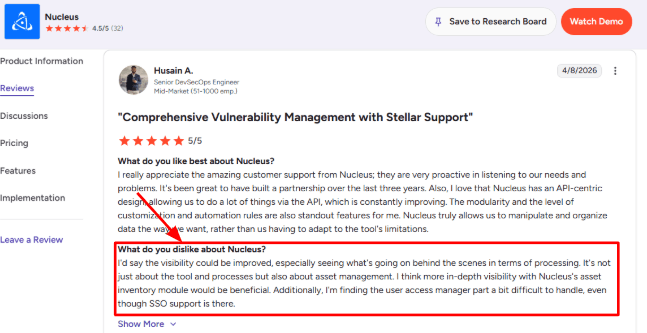
-
Call Reports
Nucleus has added deeper reporting with call activity, call outcomes, summaries, transcripts, recordings, and even action items. This matches the second G2 screenshot where the reviewer liked the reports, filters, dashboards, and scheduled reporting. For an electrician, this means you can track how many calls were about emergency panel repairs versus new construction quotes, so you know where your leads are actually coming from. Here,s the screenshot you can refer to: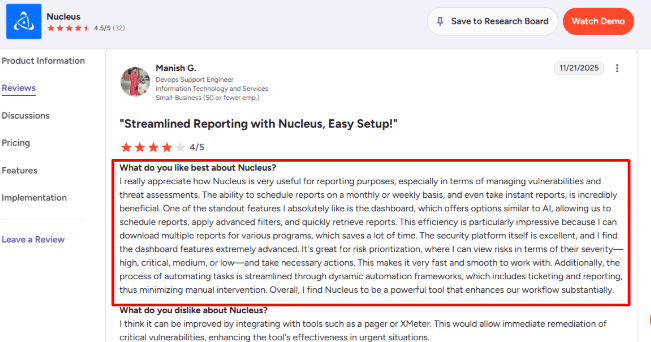
-
Availability Routing
Nucleus can route or transfer calls to different team members, which really matters for contractors who have dispatchers, owners, estimators, and field staff all handling different types of calls. This is useful when a caller needs urgent help like a burst pipe, a quote for a new job, or a specific person instead of just leaving a generic message that might get lost. For a HVAC contractor, a call about no heat in January needs to go to the on call technician while a call about a maintenance plan can go to the office staff the next morning. -
Business Training
You can train the receptionist with your business details, greetings, call rules, and prompts. This is where the setup needs real care because if your knowledge base is thin, the AI will answer in a generic way that does not sound like your business. Contractors should add their service areas because a plumber in Dallas should not promise to fix a pipe in Fort Worth, emergency rules like what counts as a true emergency versus a routine repair, hours, pricing boundaries like not quoting a water heater replacement over the phone without seeing it, and most importantly what the AI should never promise to a caller like guaranteeing a specific arrival time when traffic is unpredictable.
Pros
-
Nucleus has a strong free plan angle for small contractors who want to test AI call answering without committing to a large monthly contract right away, so it can work well for owner led businesses that just need basic call capture first.
-
The paid plan starts low compared to many human answering services, and it includes useful call reporting, transcripts, summaries, and action items for reviewing missed opportunities.
-
The US and Canada phone setup makes it easy for North American contractors to get started, and the product has a broader AI phone agent direction with workflows, CRM actions, and custom enterprise use cases mentioned on their official site.
Cons
-
Nucleus may not be the best pick over another AI receptionist if you need deep contractor specific workflows from day one, like dispatch rules that know which technician is closest to the job, emergency triage that can tell the difference between a leak and a flood, job booking logic that checks service area boundaries, and trade specific intake scripts that understand what a "water heater replacement" means versus a "furnace tune up". It feels better for general call answering first and contractor specific features later.
-
Independent review depth is pretty limited, so there is less public proof than mature phone system brands. Some plan details around team transfer limits seem inconsistent across official pages, so you should confirm current limits before choosing a plan.
-
Compliance claims need direct checking because Nucleus previously mentioned expected SOC 2, GDPR, and HIPAA timelines, and you should not assume those are in place without confirmation from Nucleus.
-
The free plan also has a small business information limit, which may feel tight for contractors who have many services, multiple locations, lots of FAQs, and complicated emergency rules like what to do when a caller says there is a gas smell versus a thermostat not working.
Pricing
-
Nucleus has a free plan with an AI receptionist answering, a US or Canadian number, branded greetings, missed-call emails, and basic reporting.
-
Premium is listed at $20/month and adds existing number support, SMS notifications, better voices, more business knowledge, recordings, transcripts, and advanced reporting.
-
Pro was listed at $189/month as coming soon, while Enterprise uses custom pricing for deeper integrations and workflows.
When Not to Choose Nucleus
I would skip it if you need a deeply trade specific answering system with built in dispatch logic that knows which truck is closest, complex job booking workflows that require deposit collection before scheduling, or confirmed compliance requirements like HIPAA from day one. For a larger operation with multiple trucks and dispatchers, you will probably outgrow it fast.
When to Choose Nucleus
Nucleus makes sense if you are a solo contractor or a small field service team that mainly wants calls answered, messages captured, and callers routed somewhere when the team is too busy to pick up. For a plumber who is tired of missing calls while under a sink, the free plan is worth testing. For an electrician who needs to know whether a caller is in their service area before promising to show up, you will need to train the AI carefully on those boundaries. It is a better fit for North America focused businesses that want a simple AI receptionist at a low starting price without a lot of complexity.
Ring Jenny helps Australian businesses use an AI answering assistant for common phone conversations instead of pushing every caller to voicemail.
HVAC teams face many similar missed-call issues, covered in this article on an AI receptionist for HVAC.
SkipCalls
I found SkipCalls when I was looking for a low cost AI receptionist that would not charge me a fortune just to test it out. For contractors, it makes the most sense when your main problem is pretty simple, calls are coming in but you are on a job site, driving between appointments, or just cannot pick up every time the phone rings. What interested me was that it tries to handle things like service area boundaries and emergency routing without making you build everything from scratch.
Features
-
AI Call Answering
SkipCalls can answer calls 24/7 and collect the caller's name, reason for calling, how urgent it is, and basic job details like what service they need and their address. For a plumber, this means the AI can ask whether water is actively leaking or if they just want an estimate, because those two calls need completely different response times. -
Calendar Integration
SkipCalls connects with Google Calendar, Outlook, Apple Calendar, Calendly, and other booking tools. For a HVAC contractor, the AI can check your calendar, see that you have a maintenance call until 2pm, and offer the caller a 3pm window instead of promising 1pm and making you rush. -
Call Summaries
Every call gets transcribed and summarized, so you can scan missed calls on your phone while driving and see that one caller has a burst pipe emergency, another wants a fence estimate, and a third is a sales pitch, all without listening to three voicemails. -
Spam Filtering
SkipCalls says it can detect and block robocalls, telemarketers, and low quality calls. For contractors who already get vendor calls, spam calls, and quote shoppers all day long, this can save real time during work hours. The part I would still test carefully is whether the AI becomes too aggressive with filtering because a wrongly blocked urgent call from a good customer could be expensive and frustrating. -
Voice Cloning
SkipCalls lets you clone your own voice from a short audio sample, which is a more unusual feature in this category. For solo contractors, that can make the AI receptionist feel much closer to your own phone presence instead of a generic robot voice. There is one legal detail worth knowing though, the FCC guidance says AI generated voice calls need proper consent in many outbound calling situations, so be careful if you use it for outbound calls.
Pros
-
SkipCalls is priced very aggressively for small contractors at 19.99 per month or 199 per year, which makes it much easier to test than most human answering services.
-
It covers the core contractor needs well, answering calls, collecting details, and booking appointments.
-
The calendar integration list is surprisingly strong for the price with Google, Outlook, Apple Calendar, Calendly, Cal.com, Square, and GoHighLevel all supported.
-
Call summaries and transcripts are genuinely useful when you are on a job and cannot write things down, and the built in spam filtering can reduce low value interruptions during your working hours.
Cons
-
SkipCalls may not be the right pick if you need a human receptionist for sensitive, angry, or high ticket calls because the AI can only do so much. For those cases, an AI receptionist with actual human fallback will feel safer.
-
The pricing says unlimited calls and minutes, but the fair usage policy mentions up to 200 calls per month, so if you are a high volume team you should read SkipCalls fair usage policy first.
-
It is not HIPAA compliant, so it should be avoided for healthcare-style conversations involving protected health information.
-
The product is still young, which may matter if a business wants a long operating history before moving its main phone line.
-
Some setup choices need careful testing, especially prompts, emergency handling, and when the AI should transfer the call.
Pricing
-
SkipCalls lists pricing at $19.99/month or $199/year, with a 7-day free trial and 30-day money-back guarantee.
-
The plan includes AI call answering, appointment booking, spam filtering, call summaries, and notifications.
-
The main nuance is fair usage. SkipCalls promotes unlimited minutes, but its policy mentions up to 200 calls/month before a custom plan discussion may be needed.
When Not to Choose SkipCalls
I would skip it if you need human backup for difficult calls, complex dispatch rules that know which truck is closest, or very high call volume. For a plumber just starting out and tired of missing calls under a sink, the free trial is worth testing. For a larger operation with multiple trucks and a dispatcher, you will need something more robust.
When to Choose SkipCalls
SkipCalls makes sense for a solo contractor or small team that mostly needs calls answered, leads captured with job details, spam filtered, and appointments booked while you are on site. For a plumber who wants to know if a caller is inside their service area before calling back, this works well if you train the AI on your zip codes. For an electrician who needs emergency calls about no power routed immediately while routine estimates go to voicemail, you can set those rules up.
RealVoice
I came across RealVoice when I was looking for an AI receptionist that could handle both phone calls and website visitors, not just one or the other. For contractors, this matters because a lot of leads come from Google searches and ads, not just people calling your number. RealVoice can answer calls, talk to people on your website, collect leads, and book appointments, which is useful when missed calls and after hours quote requests start costing you real jobs.
Features
- AI Call Handling
RealVoice can answer contractor calls, ask basic questions, and collect job details like service type, urgency, location, and customer contact info. For a plumber, this means the AI can find out if a caller has a burst pipe or a dripping faucet, because those need very different response times. This matters most during evenings, weekends, and when you are elbows deep under a sink.
I saw a Reddit review about RealVoice's recruiting process that raised some questions about the company itself, separate from the product. I am placing that screenshot below this section so you can judge it for yourself: 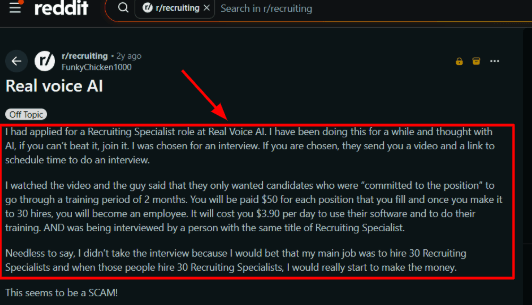
- Website Voice Widget
RealVoice can also sit on your contractor website as a voice widget, so visitors can speak their question instead of filling out a long form. For a roofer, this means someone looking at your site at 9pm can just ask "do you do metal roofs" and get an answer without typing. This is useful for people who need a quick answer before they decide to request a quote.
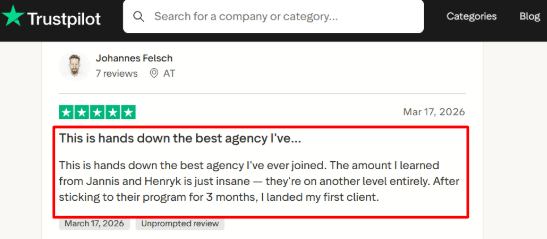
The Trustpilot review sounds positive but talks more about joining an agency and learning from people than the actual AI receptionist product. I am adding the screenshot below this point with a note that readers should separate product feedback from agency feedback:
-
Calendar Integration
RealVoice supports appointment booking with calendar integration, so a caller can go from asking a question to getting a booked slot without waiting for you to call them back. For a HVAC contractor, this means the AI can check your calendar, see you have a maintenance call until 2pm, and offer the caller a 3pm window for an estimate. When I tested the setup, this made sense for simple jobs, but complex dispatch rules like sending the closest truck may need more custom work. -
Home Service Actions
RealVoice has a contractor friendly angle around emergency dispatch, job qualification, service area checks, quote requests, and follow up calls. It also mentions integrations with tools like ServiceTitan and Housecall Pro, which is more relevant than a generic AI answering bot that does not understand contractor workflows. For an electrician, this means the AI can check if a caller's address is within your service area before promising to show up, and also capture whether they need emergency panel repair or just a quote for new lighting.
One small issue I noticed is that the most useful actions seem to depend on custom setup, which can slow things down if you expect everything to work instantly out of the box.
- Voice And Language Options
RealVoice lists custom voice cloning, 12 plus voice options, and 33 languages across its plans. For a contractor serving a diverse neighborhood, this helps you sound local and consistent when customers call after hours. One deeper point many basic reviews skip is that AI voice tools now sit inside a stricter compliance environment, and the FCC has said AI generated voices can fall under TCPA rules, so call consent and disclosure should be checked carefully before you go all in.
Pros
-
RealVoice covers both phone calls and website voice chats, which is useful for contractors who get leads from Google, ads, their website, and direct calls all at the same time.
-
It has clear contractor use cases like job qualification, emergency handling, service area checks, and appointment booking.
-
The public pricing is easy to understand with monthly plans and included minutes listed clearly, and the website widget can help turn visitors into quote requests without forcing them through a long form.
Cons
- I would not choose RealVoice over a contractor focused answering service if you need live human judgment for urgent, messy, or emotionally sensitive calls because it is better suited for structured call flows and predictable questions. Independent product reviews are pretty thin, so you will probably need a demo, references, and your own test calls before trusting it.
Some advanced workflows appear to need custom setup, which may add time before you can launch. Its API documentation was marked as coming soon in my research, so technical teams should verify current availability before planning around it. Voice cloning and AI call handling also need careful compliance checks, especially since the FTC has raised concerns around voice cloning misuse misuse.
Pricing
-
RealVoice starts at $99/month for the Starter plan with 100 included minutes.
-
Growth is $149/month with 250 minutes, and Premium is $199/month with 500 minutes.
-
Extra minutes are listed at $0.15/minute.
-
Custom plans are available for higher volume, multiple locations, SLA needs, white-label use, and deeper AI training.
When Not to Choose RealVoice
I would skip it if you need a heavily proven review footprint from other contractors, complex dispatch logic that knows which truck is closest to the job from day one, or human receptionists for high pressure calls where an AI might make things worse. Test the free trial with your real after hours calls before committing.
When to Choose RealVoice
RealVoice makes sense if you run a contractor business that loses leads from missed calls, website visitors who do not fill out forms, and after hours quote requests. It fits best when your calls follow repeatable patterns like estimate booking, job qualification, service area checks, and basic FAQs.
For a plumber who gets a mix of emergency calls and routine estimate requests, the AI can handle the routine ones while escalating emergencies to you. For an electrician who needs to know if a caller is inside their service area before promising to show up, this works well with proper training.
FirstDial
I came across FirstDial when I was looking for an AI answering service that was built specifically for contractors and home service businesses, not just a generic call bot. The idea is that you miss calls during jobs, after hours, weekends, or when you are slammed in busy season, and FirstDial steps in to answer, capture leads, book appointments, and transfer urgent callers without you having to build a whole phone system from scratch.
Features
-
24/7 Answering
FirstDial can answer contractor calls during work hours, after hours, weekends, and even holidays. For a plumber, this matters because calls often come when you are under a sink, driving between jobs, or already on the phone with another customer. The stronger use case is missed call recovery, instead of sending a potential customer to voicemail where they might just call your competitor, the AI can answer, collect basic details, and keep the lead moving. -
Human Handoff
FirstDial can collect caller details like name, phone number, service need, urgency level, and appointment request. For an electrician, this means the AI can find out if someone has a dead outlet or their whole panel is down, because those need very different responses. I would test this with real contractor call scenarios before going live, like an emergency repair call, a quote request, a reschedule, a service area question, and a price inquiry. -
Calendar Integration
FirstDial includes real time scheduling and calendar integration, so the AI can actually book appointments instead of just taking messages. For a HVAC contractor, this means the AI can check your calendar, see you have a maintenance call until 2pm, and offer the caller a 3pm window for an estimate. This is one of the more useful features because every call has a better chance of turning into a scheduled estimate, service visit, or callback instead of just a note on a sticky pad. -
Call Records
FirstDial offers call recordings and transcripts, with summaries available on higher plans. For a roofer, this helps you review what a customer asked about a leak, catch missed details like which side of the roof, and share notes with the right technician before they show up. Just keep in mind that call recording and AI voices disclosure rules can vary by state, so contractors should check consent requirements before using recordings heavily. -
Custom Scripts
FirstDial lets you customize how the AI answers calls, collects details, and responds to common questions. For a plumber, your scripts should include your service areas, emergency rules like what counts as a real emergency versus a routine repair, business hours, pricing boundaries like not quoting a water heater replacement over the phone, quote process, job types, and most importantly when the AI should transfer the caller to a human instead of trying to handle it.
Pros
-
FirstDial is actually built around contractor and home service call handling, so the use case is clear from the start instead of you trying to force a generic tool to work for your trade.
-
It covers the basics that contractors usually need like 24/7 answering, lead capture, appointment booking, recordings, transcripts, custom scripts, and calendar integration.
-
The pricing is easier to understand than a lot of AI answering tools that hide their real costs, and the human transfer option is useful when a caller needs urgent help or the AI just hits its limit.
-
The setup also fits small teams that want missed call coverage without hiring a full time receptionist.
Cons
FirstDial looks stronger for call answering and appointment booking than for full contractor operations like dispatch logic that knows which truck is closest. The monthly plans include a $129 setup fee, which makes the first month more expensive for small contractors who are just trying to test the waters. Public third party review depth looks pretty limited, so you should rely on demos, test calls, and references before moving your main phone line over.
Overage pricing is not clearly published anywhere I could find, so if you have high call volume you should ask about extra minutes before signing up. Custom integrations are mentioned but the public site does not clearly list every supported CRM, dispatch, or field service tool, so if you use something specific like ServiceTitan or Housecall Pro, check with them first so everything is reviewed during research.
Pricing
-
FirstDial starts at $129/month for 200 call minutes, with 24/7 answering, scheduling, transcripts, recordings, scripts, and calendar integration.
-
Professional is $249/month for 500 minutes and adds summaries, longer call history, and custom workflows.
-
Business is $479/month for 1200 minutes with customizable AI voice and priority support.
-
Monthly plans list a $129 setup fee, waived on quarterly and annual billing.
When Not to Choose FirstDial
I would skip it if you need advanced dispatching that knows which truck is closest to the job, built in payment collection, deep CRM automation, or clearly documented enterprise grade compliance before buying. Also factor in that $129 setup fee if you are on a tight budget because that makes the first month more expensive than the monthly price suggests. Test the demo with your real after hours calls before committing.
When to Choose FirstDial
FirstDial makes sense if you run a contractor or home service business that mainly needs missed call coverage, after hours answering, lead capture, and appointment booking without building a complex phone system. It is a good fit for small teams that want a simple AI receptionist that actually understands contractor workflows.
For a plumber who gets a mix of emergency calls and routine estimate requests, the AI can handle the routine ones while escalating true emergencies to you. For an electrician who needs to know if a caller is inside their service area before promising to show up, you can train the custom scripts on your zip codes.
Cactus
I found Cactus when I was looking for something that was built specifically for home service contractors, not just a generic AI call bot that someone tried to make work for plumbing and electrical. It is a 24/7 AI call center for contractors, and it makes sense when missed calls, after hours leads, slow follow ups, and basic lead qualification are actually costing you real jobs. What caught my attention is that they are backed by Y Combinator and raised $7 million, which at least tells me they are not going to disappear next month.
Features
-
Call Answering Cactus answers inbound calls around the clock and is positioned strongly for HVAC, plumbing, roofing, landscaping, and electrical businesses. Its YC profile also frames it as a 24/7 AI call center for home service businesses, which is a useful detail many basic tool lists skip. When I tested the setup flow conceptually, the biggest value was pretty clear, a contractor does not need every call to wait for a human CSR before the lead gets captured. For a plumber, that means someone calling about a burst pipe at 7pm on a Sunday does not go to voicemail, the AI picks up and starts collecting info immediately.
-
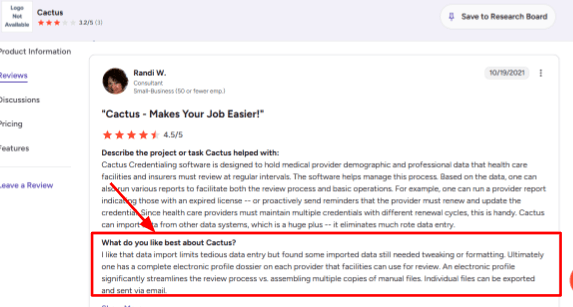
Lead Profiles Cactus collects details like name, phone number, service need, address, time frame, and even budget, then turns the call into a usable lead record. For an electrician, this means the AI can find out if someone has a dead outlet or their whole panel is down, and capture whether they are looking for a quote today or just researching. I saw a G2 review that mentioned imported data reduced manual work but some data still needed tweaking or formatting, so I am placing that screenshot below this point because automation helps but the captured data still needs checking:
-
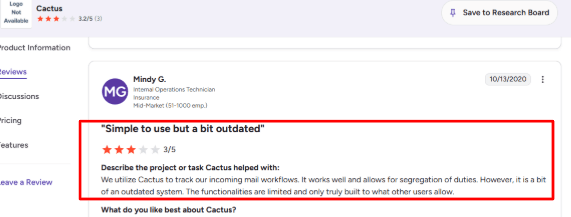
Workflow Tracking Cactus is trying to do more than just answer calls, it can qualify leads, score them, record and transcribe calls, follow up, and pass information into your business workflow. For a roofer, this means a call about a leak gets logged, prioritized, and sent to the right person without anyone typing notes. Another G2 review mentioned incoming mail workflow tracking and segregation of duties while also calling the system a bit outdated, so I am showing that screenshot below this section with a note that readers should judge how much that applies to the AI receptionist use case:
-
Calendar Integration For contractor teams, the practical value depends on how well Cactus connects call handling with actual scheduling or job booking. The company mentions CRM sync and lead handoff, and their LinkedIn material has referenced tools like ServiceTitan, Jobber, and Housecall Pro. This is the part I would test carefully before recommending it because a call can sound good, but the real win comes when the lead lands cleanly in the place your team already works, not in a separate system you have to check manually.
-
Follow-Up Automation Cactus can support callbacks, WhatsApp messages, email follow ups, maintenance reminders, old lead reactivation, cross sells, and referral requests. For a HVAC contractor, this means a caller who asked for an AC tune up in May can get a reminder in August before next season. The slightly annoying part is that public pages do not make every limit obvious, so I would ask about follow up volume, which channels are supported, how deep the CRM integration goes, and whether outbound workflows cost extra.
Pros
-
Cactus is clearly built for contractors and home service companies, so the messaging, examples, and use cases are much easier to map to HVAC, plumbing, roofing, electrical, and general contracting than broad AI receptionist tools.
-
It covers after hours calls, weekend calls, seasonal spikes, and missed call leakage in a direct way. It captures useful job details like address, budget, and urgency, which can reduce a lot of back and forth before a human follows up.
-
It also has a stronger growth story than basic answering tools because it includes callbacks, reactivation, maintenance reminders, and referral asks, not just answering the phone.
-
The $7 million seed round covered by PRNewswire is a useful trust signal for buyers who care about company momentum and whether the tool will still be around next year.
Cons
-
Cactus may not be the best pick if you only need a simple AI receptionist that answers calls and takes messages, because it makes more sense when you actually want lead qualification, follow ups, CRM movement, and a more managed workflow.
-
Public pricing is not fully clean across their pages, so you should confirm the real monthly cost before comparing it with other tools.
-
Integration depth needs direct confirmation, especially for ServiceTitan, Jobber, Housecall Pro, calendar booking, and dispatch workflows that know which truck is closest.
-
I did not find strong public review coverage for the current AI receptionist product, and the available G2 reviews seem more tied to workflow or credentialing use cases than call answering.
-
Security and compliance documentation is also fairly light publicly and the terms place some regulatory responsibility on the customer.
Pricing
-
Cactus publicly mentions AI phone answering starting at around $199/month, while its terms describe a flat monthly subscription.
-
Its ROI calculator uses $500/month as an example cost, so the actual price may depend on usage or setup.
-
Before choosing it, confirm included call volume, CRM integrations, outbound follow-ups, setup fees, and whether extra phone numbers cost more.
When Not to Choose Cactus
I would skip it if pricing clarity is a big concern for you, or if you need deep compliance proof for healthcare or legal work, or if confirmed native integration with your exact field service stack like ServiceTitan or Jobber is your main buying requirement before you will commit. Test the demo with your real after hours calls and ask them to show you exactly how the lead lands in your CRM before you sign up.
When to Choose Cactus
Cactus makes sense if you run a contractor or home service business with steady inbound calls, after hours demand, missed leads, and a team that needs cleaner lead qualification without everyone manually typing notes into a spreadsheet. For a plumbing company with a few trucks and a dispatcher, the AI can handle after hours calls and create lead profiles that your dispatcher can act on first thing in the morning.
It is a better fit for growing companies than very small solo operators who only need voicemail replacement. For a solo plumber just starting out and tired of missing calls under a sink, the $199 starting price might feel steep compared to simpler tools.
Goodcall
I have looked at Goodcall a few times for contractor use cases because it is mainly known as an AI phone agent for small businesses that want calls answered when staff are busy or unavailable. For contractors, it makes the most sense when missed calls, lead capture, call routing, and basic appointment requests are the bigger problems, not when you need complex dispatching or emergency triage.
Features
-
AI Call Answering
Goodcall can answer inbound calls, ask basic questions, and respond using the business information you add during setup. For a plumber, this means the AI can handle new job requests, answer service area questions like whether you serve a certain zip code, respond to pricing inquiries, and pick up after hours when you are on another call. One thing I would test carefully is how quickly the caller can reach the right path. I saw a Trustpilot review where the caller felt pushed through sales prompts and could not reach a useful human option. I am placing that screenshot below this point because it shows how a poorly designed flow can hurt the caller experience, especially for an emergency plumbing call where someone is already stressed: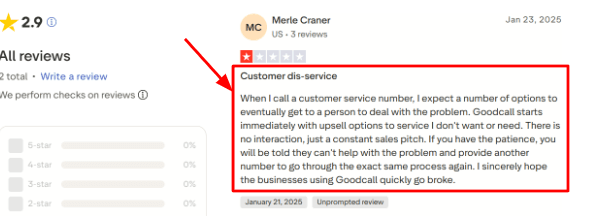
-
No-Code Setup
The setup is built for non technical teams, so you can add your business details, choose what the AI should do, and create basic call flows without needing a developer or an engineering degree. A G2 review also called Goodcall easy to use and mentioned its customer service and features, which matches what I noticed while testing the setup. That said, I would still run test calls before sending real contractor leads through it. The screenshot from G2 fits well below this section: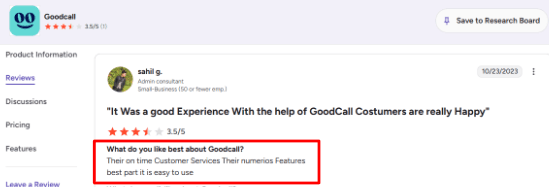
-
Lead Capture Forms
Goodcall can ask callers for details like name, phone number, job type, location, urgency, and notes. For an electrician, this means a missed call about a panel upgrade can still turn into a structured lead with the address and whether it is an emergency. The stronger use case is when the form feeds into a CRM, Google Sheet, or follow up workflow through Zapier. Basic reviews often stop at call answering, but the lead capture layer is where the tool becomes actually useful for a contractor. -
Call Routing
Goodcall supports call transfers, directories, departments, and branching logic. A contractor can route emergency calls about a burst pipe directly to a dispatcher, send quote requests to an estimator, push billing questions to the office, and handle existing customer issues differently from new leads. This took more thought than expected while I was setting it up because if your routing rules are too vague, the caller can land in a confusing loop or get a reply that sounds too generic for their specific problem. -
Calendar Integration
Goodcall can handle appointment requests by sending booking links, taking messages, transferring the caller, or triggering workflows through connected tools. For a roofer, this works best when booking is simple, like a standard estimate. If every job needs an inspection, custom pricing based on roof size and pitch, or dispatch checks to see which crew is available, I would use it more for intake than for direct scheduling. A useful third party context from Microsoft is that Goodcall was built around the missed call problem for small businesses, which explains why it is so focused on capturing leads rather than running complex operations.
Pros
-
Goodcall is a good fit for contractors who lose leads simply because their phones are busy after hours or on weekends. It can capture caller details, answer simple questions about what you do and what areas you serve, and keep the lead from disappearing to a competitor.
-
The unlimited minutes on current plans make pricing easier to understand for call heavy businesses, and the Zapier support helps send call data into CRMs, Google Sheets, Slack, and other tools you already use.
-
Branching logic gives you more control than a basic AI answering bot, and the local number and call forwarding options make it easier to plug into an existing phone setup without changing your main number.
Cons
-
Goodcall may not be the best pick when a contractor needs live human judgment on every single call. Emergency dispatch calls about a gas leak, complex quoting for a full HVAC replacement, warranty disputes with angry customers, and sensitive issues may still need a trained receptionist or dispatcher who can think on their feet.
-
The caller experience also depends heavily on how well you set everything up, and that Trustpilot review shows how bad routing can feel when callers cannot actually reach a real person.
-
The Starter plan has limited history with only 7 days of call and customer details, so if you need to look back at a call from two weeks ago you might be out of luck.
-
The pricing model can also get expensive for businesses with many unique monthly callers who only call once, like a plumbing company getting one off emergency calls from new customers.
-
Public review volume is still pretty thin, so there is less third party buyer feedback than larger phone or receptionist tools.
Pricing
-
Goodcall’s Starter plan is listed at $79/month per agent and includes 100 unique customers per month.
-
Growth is $129/month per agent with 250 unique customers, while Scale is $249/month per agent with 500 unique customers.
-
Overage is charged per extra unique customer.
-
Enterprise pricing is custom for higher-volume teams and custom workflows.
When Not to Choose Goodcall
I would be more careful if your calls require urgent human decisions like a gas smell call, complex dispatching that needs to know which truck is closest, or detailed quoting on the first conversation where a wrong number could cost you a job. In those cases, you might still need a human dispatcher and use Goodcall as the first line of defense rather than the only line.
When to Choose Goodcall
Goodcall makes sense if you are a contractor or contractor-facing a business that mainly needs call answering, lead intake, routing, and simple appointment handling without a lot of complexity. It fits smaller teams that miss calls during jobs, evenings, weekends, or busy seasons when everyone is already booked solid.
For a plumber who gets a mix of emergency calls and routine estimate requests, the AI can handle the routine ones and capture emergency details for you to call back quickly. For an electrician who needs to know if a caller is inside their service area before promising to show up, you can set up the lead capture forms to ask for zip code first.
Conclusion
After testing all of these tools, no single AI receptionist does everything a contractor needs, but several of them solve the one problem that costs you the most money, missed calls.
For a solo plumber or electrician just starting out, SkipCalls or Nucleus are worth testing. For home-service contractors that want stronger call answering and appointment booking, FirstDial and RealVoice AI are stronger fits. For growing HVAC, plumbing, roofing, and electrical teams that need lead qualification and follow-up, Cactus is the more serious option. Goodcall works well for local service businesses that want routing, lead capture, and workflow automation.
My honest advice is to not buy any of these without running your own test calls first. Call your own number after hours. Ask your pricing questions. Try to book an appointment. See what happens when you sound frustrated.
For contractors, service area boundaries matter. Emergency routing matters. Make sure whatever tool you pick can handle those contractor specific workflows, not just generic call answering. The right AI receptionist should help you sleep better at night knowing you are not losing leads while you are on a job.
Methodology
We shortlisted AI receptionists that fit real contractor workflows: missed calls, quote requests, emergency jobs, calendar booking, call summaries, and handoffs. Then we checked product pages, pricing, reviews, and setup flows. I also looked for gaps contractors usually feel, like noisy job-site calls, after-hours leads, crew routing, and client follow-ups.
FAQs
How do I choose the right AI receptionist for my contracting business?
Choose based on your call volume, job type, and booking process. Check call recordings, transcripts, calendar sync, spam filtering, after-hours coverage, and whether urgent calls can reach you or an on-call staff member.
Which AI receptionist is best for contractors?
Ring Jenny, Cactus, and FirstDial are strong options for contractor calls. Ring Jenny suits affordable all-round call handling, Cactus fits growing home service teams, and FirstDial focuses on 24/7 answering and appointment booking.
What mistakes do contractors make when buying an AI receptionist?
Common mistakes include not testing real job enquiries, skipping escalation rules, and using vague service descriptions. Set clear rules for emergency calls, cancellations, service areas, pricing questions, and when a caller needs a human.
How can I test an AI receptionist before changing my phone number?
Start with call forwarding on a limited schedule or after hours. Make test calls for quotes, urgent repairs, rescheduling, and missed calls. Review transcripts, booking accuracy, confirmation messages, and human handoff before expanding coverage.
Can an AI receptionist handle emergency and after-hours contractor calls?
Yes, if you configure it properly. It can capture the issue, collect the address, identify urgency, and alert the right person. Keep a fallback routing rule for safety risks, burst pipes, electrical faults, or other urgent jobs.
How accurate are AI receptionists with noisy job sites and different accents?
Accuracy varies with call quality, accents, and background noise. Test it with real contractor scenarios. The best setups repeat key details such as phone numbers, addresses, job type, preferred time, and booking changes before confirming.
Summarize this content with AI


