

Introduction
If you’re running a law firm, then your phone is your intake channel – and no calls are no business. Your customers are now coming AI-first as well. The latest Legal Trends Report by Clio indicates that over half of all consumers either have used or would use AI technology when facing a legal problem, and 28% of such consumers were advised to reach out to a legal expert. That is why the importance of choosing an appropriate AI answering service for lawyers should not be underestimated.
The main requirement is to provide clean legal intake with necessary disclaimers, proper notes, and emergency, specialty, or client routing. But without generating unnecessary risks for yourself, such as poor transcripts, awkward callbacks, or suspicious data management practices. That is why this guide will give an overview of some of the best services available – along with evidence-based facts and direct links for verification.
We carried out manual testing using the same scripts to make phone calls within each tool, followed by validating claims through online reviews and customer feedback. The other part we focused on included things that most customers avoid, such as terms of service, escalation policy, and what is documented in the transcript.
Table of comparison for each tool
| Use-case | Tool | Key strength | Pricing starts at |
|---|---|---|---|
| Solo law firms | Ring Jenny | Low-cost AI intake | $97/month |
| Legal intake calls | Smith.ai | Legal intake workflows | $300/month |
| Premium client calls | Ruby | Live receptionist quality | $250/month |
| High-volume lead intake | AnswerConnect | 24/7 call coverage | $350/month |
| HIPAA-sensitive intake | Abby Connect | AI with human backup | $165/month |
| Existing phone systems | RingCentral AI Receptionist | Phone-system AI routing | $39/month |
| After-hours calls | Ring Jennie | 24/7 appointment booking | $97/month |
| Complex legal screening | Smith.ai | AI plus human agents | $300/month |
A Closer Look at Each Tool
Ring Jenny
The reason I chose Ring Jenny is because I feel like it was created specifically for law firms who cannot afford any major misses when it comes to inbound calling. The product provides features such as legal intake, qualifying calls, routing of calls, spam protection, GDPR compliance, and package-based pricing.
The pricing also feels reasonable for smaller firms that want a legal answering service without hiring a full time receptionist. Ring Jenny's AI answering service for lawyers can collect the caller's details and reason for calling without trying to provide legal advice.
Legal intake questions: Ring Jenny can ask callers the right intake questions before the lead reaches your team.
If it’s a family law firm, it can get information regarding the matter the caller needs assistance on: divorce, custody, or property division. If it’s immigration, the caller will provide information on the visa needed and its application status.
Its AI answering service for lawyers can use intake questions to capture the type of legal matter, a safe callback number, and the caller's preferred time to speak. That gives the firm a clearer starting point before a qualified staff member follows up.
Call qualification: Not every call deserves an attorney’s time.
Ring Jenny can filter out basic queries, spam calls, telemarketing calls, and queries that are unlikely to convert into clients from reaching the law firm. It is very helpful in cases where the law firm handles many clients; such as in personal injury law, immigration law, criminal law, and employment law.
Practice area routing: Law firms often get very different types of calls on the same number.
Ring Jenny is capable of determining whether the caller is in need of advice related to family law, business law, conveyancing, immigration, or litigation and can then forward the call to the appropriate person.
After hours answering: Many legal leads come after office hours, especially urgent matters.
When the office is closed, Ring Jenny will be able to receive calls, record contact information, learn about the nature of the problem, and ensure that there is no loss of leads overnight or even during the weekend.
GDPR and language support: Trust matters more in legal services because callers often share sensitive details.
With its GDPR compliance and multiple languages, Ring Jenny becomes even more relevant for law firms working with foreign clients, immigration cases, or any other multinational or multilingual matters.
If most of your new enquiries still come through phone calls, Ring Jenny offers an AI call answering platform in Australia that can support the first response.
Pros of Ring Jenny
- Lower-cost call coverage for legal practices
For a small or growing law firm, hiring a full-time receptionist can be expensive once salaries, leave, training, and coverage outside standard hours are considered. Ring Jenny can give the firm a more affordable way to answer incoming calls, capture new enquiries, and avoid sending every missed call to voicemail.
This can be especially useful for firms where one new matter, such as a family law consultation, conveyancing enquiry, traffic offence case, or injury claim, may be worth far more than the monthly cost of call coverage.
- Helps capture enquiries when lawyers are unavailable
Lawyers are often in court, meeting clients, reviewing documents, or handling confidential work that cannot be interrupted. Ring Jenny can answer calls during these periods, collect the caller’s name, contact details, reason for calling, and preferred callback time.
That gives the practice a clearer intake record and reduces the chance that a prospective client calls another firm simply because nobody answered.
- Can book consultations while the caller is engaged
A potential client who has finally decided to call a lawyer may not want to wait for a callback before taking the next step. Ring Jenny can check availability and help book an initial consultation while the caller is still on the line.
For firms handling time-sensitive matters, such as traffic offences, urgent family issues, employment disputes, or upcoming court deadlines, this can help the team respond faster without promising legal outcomes.
- Hands-on setup for legal call flows
The onboarding team can help configure Ring Jenny around the practice’s services, business hours, intake questions, and preferred consultation process. This matters for law firms because callers often need different pathways depending on whether the enquiry concerns a new matter, an existing case, an urgent deadline, or a request to speak with a specific lawyer.
The firm should still review the call scripts carefully to make sure the receptionist only collects information and does not make legal claims, give advice, or create unrealistic expectations.
- Works with the firm’s existing phone number
A law firm does not need to ask clients, referrers, or past contacts to start calling a new number. Ring Jenny can work through call forwarding from the existing business line, allowing it to answer missed, overflow, or after-hours calls without changing the way people contact the practice.
This is useful for firms that already have their number listed on Google Business Profile, legal directories, signage, business cards, and referral materials.
Cons of Ring Jenny
-
Cannot provide legal advice
Ring Jenny should not advise a caller on whether they have a case, what legal action to take, how likely they are to succeed, or what they should say to another party. For legal enquiries, its role should be limited to answering approved general questions, collecting details, and arranging a callback or consultation with a qualified legal professional. -
Not suitable for highly sensitive or complex conversations
Some calls need a lawyer or experienced legal staff member from the start. This may include distressed family law callers, clients discussing criminal allegations, urgent safety concerns, complicated commercial disputes, or matters involving detailed legal strategy.
The practice should build clear escalation rules so that urgent, emotional, or high-risk calls are flagged for human follow-up rather than handled as a standard intake conversation.
- Not a replacement for relationship-led legal consultations
An AI answering service can make the first response faster, but it cannot replace the professional judgment, empathy, trust, and tailored discussion that clients expect from a lawyer. It works best as a front-line intake and booking layer, while lawyers and trained staff handle advice, case assessment, conflict checks, and important client conversations.
Firms looking for a country-specific overview can also compare this guide to an AI answering service in Australia.
Smith.ai
- **Legal Call Answering:**Smith.ai is widely known for virtual receptionists as well as AI call answering for lawyers due to its capability to answer calls round-the-clock, qualify leads, and manage emergency issues without needing a lawyer to employ a whole team of receptionists for the office.
As a lawyer, you need to know that missing calls might not always be just about random queries. You might miss calls from accident clients, immigration concerns, domestic issues, or even people who are checking out three lawyers simultaneously.
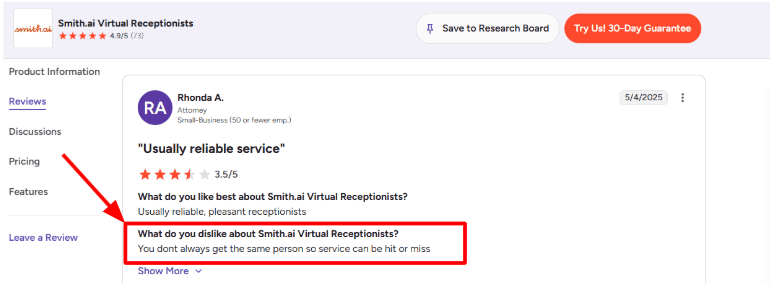
What needs to be remembered here is consistency, since it is possible that your calls will be managed by different agents depending upon their availability. I saw the same concern in a G2 review of Smith.ai Virtual Receptionists, where the reviewer said the service can be “hit or miss” because you do not always get the same person. I’d place that screenshot below this section:
- Legal Intake: The best application would be the intake. Smith.ai could gather the caller’s information, conduct its own inquiries, verify whether this is a valid lead, and transfer all that data to your people.
This is especially useful if you run a legal business, as the intake can include a series of specific inquiries to find out whether the client seeks assistance with a divorce, obtaining a green card, defending themselves from DUI charges, creating an estate plan, or getting a personal injury consultation.
It will take a little bit more effort to set up than a regular call answering service since you will have to come up with the criteria for determining what constitutes a good or a bad lead.
- Conflict Screening: Smith.ai has listed conflict checks as one of its legal services on its webpage Smith.ai legal answering service page. This is because not all inquiries received can be considered as a straightforward sales lead.
Specifically, this could help in cases where the caller gives information on the other party, the employer, spouse, landlord, or even company involved. Collecting the correct information prevents your lawyer from losing valuable time discussing a case that cannot go ahead.
This I would definitely have continue being the first level of screening, and not an actual conflict check in your legal practice management process.
- Live Agent Backup: The AI Receptionist from Smith.ai can handle the calls and screen them, but it also provides human handoff if AI is not appropriate for the situation. This is handy in the legal field because the person calling may be emotional or confused.
For instance, the caller may begin by asking something easy but later brings up medical bills, insurance adjusters, and time frames. These are cases where human handoff would be beneficial to avoid compromising the experience.
Around this point, I also found a positive G2 review of Smith.ai Virtual Receptionists where the reviewer praised their communication as “transparent, detailed, and straightforward.” I agree with that direction because the post-call visibility is one of the better parts of the product. 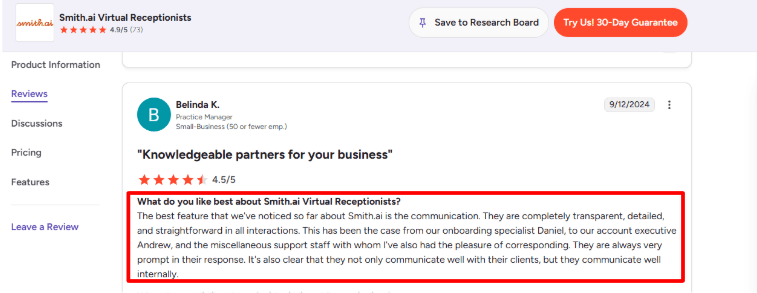
- Call Summaries: Smith.ai offers call summaries, calls recording, transcription, and dashboard view. One of the most practical tools offered by Smith is that the lawyer doesn't have to listen to each call from the beginning.
It was good that call summaries could be delivered via email, Slack, or Teams. In a small law firm, this makes it possible to learn instantly about who made a call and what their requirements are.
The only recommendation here is that lawyers will have to be strict about taking legal notes, which means that when clients share confidential information, law firms need to figure out how much of that needs to be noted and how it will be stored and shared.
- Software Integrations: Smith.ai integrates with CRMs and legal software like Clio, as well as with Zapier for even more automation. This is useful when you use your existing case management tool for lead tracking rather than Excel sheets.
Your ideal implementation might route leads qualified for immigration into one pipeline, family law callers into another, and existing clients into yet another path. This will ensure that new client acquisition processes are kept separate from client service.
Where things get difficult, however, is in deeper implementation. The initial implementation is fairly simple, but multi-disciplinary law firms with several lawyers working in different areas and with different intake policies will need to do some fine-tuning of their workflows.
This article on an AI phone answering service explains the core functions worth comparing.
Pros
-
Strong fit for law firms that get a lot of inbound calls and need after-hours coverage.
-
Specialized legal capabilities, including intake, conflict checking, call routing, scheduling appointments, and handling payment, make it more pertinent than an ordinary AI receptionist.
-
Good visibility after calls through summaries, recordings, transcripts, and dashboard history.
-
Live agent backup makes it safer for complex or sensitive legal calls than AI-only answering tools.
-
Useful for solo attorneys and small firms that cannot justify a full-time receptionist.
Cons
-
You may not always get the same person handling calls, so the quality depends heavily on your instructions and call playbook.
-
Pricing can rise quickly for firms with high call volume, especially if many calls need live agent handoff.
-
Deeper customization is easier on guided or annual plans, not the lowest self-service plan.
-
According to Smith.ai, it is not HIPAA compliant, which means personal injury or medical-adjacent legal intake requires caution with confidential information.
-
Monitoring is still required. Law firms will need to go over call notes periodically to spot missed nuances, poor lead matches, or any intake deficiencies.
Pricing
-
Smith.ai’s AI Receptionist self-service plan starts at $95/month, with higher monthly plans shown for larger call volumes on the Smith.ai AI Receptionist pricing page.
-
The self-service pricing is billed by call volume, with listed per-call rates and overage charges. This is easier to estimate than per-minute billing, but busy law firms should still calculate expected monthly calls carefully.
-
Done-for-you annual plans start at $500/month and include more guided setup, optimization, and deeper workflow support.
-
Live agent handoff is listed separately at $3/call, so firms that expect many complex legal conversations should include that in the real monthly cost.
Ruby
Ruby is popularly known as a live virtual receptionist service with AI-enhanced call handling, so law firms usually use it when they want real humans answering calls, but still want transcripts, routing, intake notes, and better call visibility.
- Custom call flows: Ruby allows a business to create personal greetings, rules for answering calls, intake questions, routing, and message delivery. This is important for lawyers, as using a standardized script on a call may be counterproductive. An incoming call about personal injury, one regarding immigration issues, and an existing client requesting information on their case should all be treated differently.
It takes careful configuration. I would not configure this software casually. The intake process must be outlined, the reasons for transferring a call defined, criteria for urgent calls established, and messaging recorded. I also saw this concern in a G2 Ruby Receptionists review, where the reviewer said implementation took two to three weeks of trial and error before things worked properly. I’d place that screenshot below: 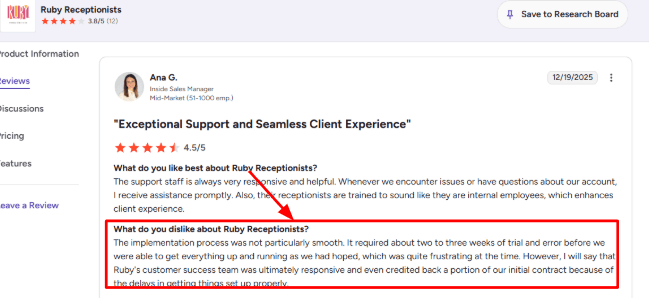
- 24/7 live answering: Ruby’s big strength is that calls can be answered by live receptionists outside normal office hours, including nights, weekends, and holidays, based on its Ruby legal virtual receptionist page. This is particularly helpful since a number of those who have high intent to call don’t hang around. They just go ahead and call the next lawyer.
It becomes particularly applicable when dealing with criminal defense, immigration, family law, personal injury and estate planning firms, all of which are likely to get calls at crucial times. The service has the capability of providing answers both in English and Spanish.
- Client intake: Ruby can gather all the lead’s details, qualify the lead, schedule a consultation, and provide your staff with all the necessary information needed prior to calling the individual. If we speak about lawyers, then I would recommend using Ruby to gather information related to the type of case, its location, deadlines, opposing side’s name, represented by an attorney, and have documentation prepared.
Here’s an example when the lead tells us he was hurt in a workplace accident. In such situations, Ruby will provide your team with all the necessary information regarding dates, the type of injury, employer’s information, insurance, and whether they have talked to any other attorney yet.
- Front-office relief: Ruby is useful when a law firm’s staff is getting pulled into calls that are important, but not always urgent. This lines up with a G2 Ruby Receptionists review where a long-time user said Ruby helped their front office stay focused instead of being interrupted by timely but non-urgent inquiries. That review screenshot would fit well here:
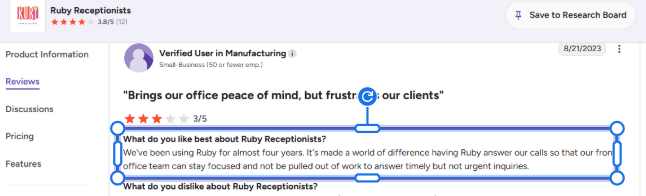
This application seems useful to me. For a small law firm, the benefit lies not merely in handling missed calls. The actual value would be the ability to minimize interruptions for low-priority tasks while drafting, preparing for hearings, conducting client consultations, handling billing issues, and reviewing documents.
- AI call visibility: Ruby cannot be called purely an AI answering system. Rather, it is more like a human-assisted AI answering system. Some of the capabilities of Ruby are listed under “What Ruby Does” by the company on its website under the heading Ruby virtual receptionist features.
This works very well for legal firms requiring reliability as well as all the advantages of AI. Transcripts will enable a review of whatever was discussed. Sentiment analysis will be used to detect whether there were any aggressive calls or calls by displeased clients. Robocall filter will make sure that the legal firm is free from spammers. The drawback is that this cannot be compared to an automated legal AI receptionist.
- Legal integrations: Ruby supports scheduling, outbound call assistance, payment collection, lead qualification, and intake, according to its Ruby plans and pricing page. Lawyerist also notes Ruby’s fit for firms using tools like Clio, MyCase, and Rocket Matter in its Lawyerist Ruby review.
While this is useful information, I still would like to go through the actual process before making a purchase. The legal intake process is riddled with small aspects that can affect the outcome. The receptionist’s notes may fail to indicate the urgency, deadline, or even opposition.
Pros & Cons
Pros
-
Strong fit for solo and small law firms that want live answering instead of a fully automated AI voice bot.
-
Good for high-intent inbound calls where speed matters, especially after hours or when the attorney is in court.
-
Custom scripts, intake, scheduling, call forwarding, and bilingual answering make it more useful than a basic message-taking service.
-
AI transcripts and sentiment analysis add visibility without removing the human receptionist layer.
-
Useful for reducing front-office interruptions and filtering low-value calls.
Cons
-
Setup can take real effort if the firm has multiple practice areas, urgent call rules, or detailed intake flows.
-
Not a pure AI answering service, so firms looking for heavy automation may find it more human-service-led than expected.
-
Pricing is usage-based, so firms with high call volume need to watch minutes closely.
-
Ruby serves many industries, not only legal, so the firm still needs to customize scripts carefully for legal intake.
-
Call quality depends heavily on how well the firm defines routing rules, escalation rules, and intake questions.
Pricing
-
Ruby’s official pricing page lists virtual receptionist plans starting at $250 per month for 50 minutes, then $395 for 100 minutes, $720 for 200 minutes, and $1,725 for 500 minutes.
-
Ruby says all virtual receptionist plans include the same core feature access. The main difference is the number of receptionist minutes.
-
Ruby also lists live chat plans separately, starting at $143 per month for 10 chats, with bundled options available for firms that want both phone answering and website chat.
-
Ruby says there are no added fees for activation, onboarding, setup, customization, or coverage during certain periods, based on its Ruby pricing page.
AnswerConnect
AnswerConnect is well-known because it has a live receptionist service that operates on a 24/7 basis. AnswerConnect is considered by most people because it can take messages after business hours, record information about potential clients, forward messages to the right person, and even route emergency calls.
- 24/7 call answering: AnswerConnect provides live human answering services during daytime hours as well as nights, weekends, and holidays. This is crucial in fields like personal injury, immigration, criminal defense, family law, and estate law since a potential client calling at the wrong time may simply end up being someone else's client.
AnswerConnect cannot be classified as an AI answering service in any sense. This is rather a human-led answering service that could find itself compared to an AI answering service in the attempt to decrease the number of missed calls.
Another aspect to consider is consistency. The G2 review on AnswerConnect agents on AnswerConnect agents mentions some agents who were not that friendly or knowledgeable as anticipated and who failed to use the script accordingly. Consistency is crucial for a law firm since the tone and intake accuracy are very important here. I would place this screenshot below: 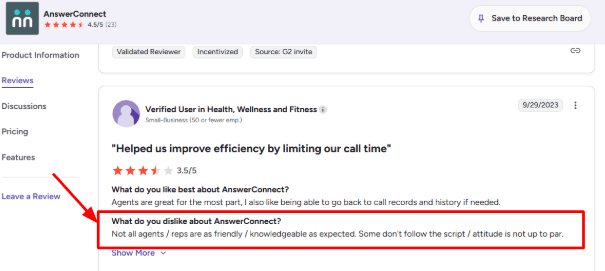
- Legal intake support: AnswerConnect has a Legal Answering Service page that mentions lead conversions, call forwarding, and legal intake. This makes the website helpful to lawyers and law firms who would want some background information before returning the call.
To illustrate, a client might indicate that he had been hurt in a car crash. At this point, the receptionist should be able to take down such information as his name, telephone number, date of incident, where it happened, if medical treatment has commenced, and if he is currently represented by an attorney. This information will be sufficient for a decision on a necessary follow-up.
Of course, the script will have to be brief as well. Legal intake is different from restaurant booking or home services calls. It is crucial to make it clear in the script that giving legal advice is strictly prohibited; there should be no promises made either.
- Call routing: AnswerConnect facilitates call transfers and routing, and that may be beneficial since the company will have various individuals in charge of different things. New leads can be directed to intake, current clients can be routed to the case manager, and urgent calls can be escalated accordingly.
That is important in smaller and medium companies, where a lawyer cannot pick up every phone call but also cannot afford to miss any of the higher value calls. From personal experience, this is the area where I will have to spend the most time in terms of setup due to potential issues with poor routing.
The thing about routing is that it requires proper planning because otherwise, you can make everything appear urgent. Instead, you should clearly state categories like urgent, court deadline tomorrow, arrest related, custody emergency, or client signed but needs help immediately.
- Custom scripting: AnswerConnect puts a lot of focus on scripting, and that is one of its stronger areas. Their own AnswerConnect call script guide explains how call flows guide receptionists on what to say and how to handle different caller paths.
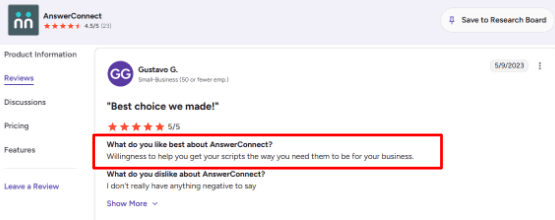
After looking at the first few features, this is where the second review fits naturally. A G2 review on AnswerConnect scripting praised their willingness to help get scripts right for the business. I agree with that as a positive sign because legal answering depends heavily on script quality, not just picking up the phone.
A positive surprise is that scripting can be fairly detailed. There can be scripts for leads, clients, opponents, suppliers, and unwanted telemarketers separately. This helps avoid any situation where all phone calls for a particular firm are handled in the same manner by the receptionist.
- Instant messages: AnswerConnect sends call details through its desktop and mobile app. The AnswerConnect app listing on Google Play says users can view inbound messages, contact clients, forward messages, add notes, and create reminders.
This is helpful for lawyers since the phone call is just the first part. What matters is whether the lawyer or the person handling calls receives that information fast enough to do anything about it.
This is good when receiving legal leads outside office hours. The company can have their notes ready to go for the next day rather than having disorganized voice mails. However, it is dependent on how much the receptionist was able to capture from the client’s problem.
- CRM integrations: AnswerConnect integrates with platforms such as Salesforce, Zoho, Zendesk, Slack, Zapier, and Setmore according to their website. The major benefit in terms of law firms is moving information about calls into an actual location of the intake follow-up.
It may work well if a law firm already uses a certain CRM or intake process. It is possible to route a new contact into the funnel, assign an employee, and follow up without the need to transfer call data from emails manually.
The problem with AnswerConnect is that it was not created specifically for lawyers. When a firm needs advanced integration with platforms like Clio, Lawmatics, LeadDocket, or PracticePanther, the firm better take a closer look at it before purchasing. While general support for CRMs is a great feature, lawyers have more requirements for integration.
Pros & Cons
Pros
- Strong 24/7 live answering coverage for law firms that cannot afford to miss inbound calls.
- Useful for after-hours legal intake, overflow calls, lead capture, and basic caller qualification.
- Custom scripting can be adapted for different practice areas and caller types.
- Human receptionists may work better than AI for sensitive legal calls where empathy matters.
- Mobile and desktop app make it easier to review messages and follow up quickly.
- Integrations with CRM and workflow tools can reduce manual admin work.
Cons
- It is not a pure AI answering service, so firms looking for AI automation may find it less advanced.
- Agent quality can vary, and that matters a lot when the caller is stressed or discussing a legal problem.
- Legal scripts need careful setup. A generic script can lead to weak intake notes or wrong routing.
- Pricing is based on minutes, so high-volume legal firms may see costs rise quickly.
- It is not legal-specific in the same way some niche legal answering services are.
- Firms may need extra checks for confidentiality, disclaimers, and intake compliance before going live.
Pricing
-
AnswerConnect’s public pricing starts with the Entry plan at $350 per month for 200 minutes, plus a $49.99 setup fee, according to the AnswerConnect pricing page.
-
The Growth plan is listed at $395 per month for 300 minutes with no setup fee. This plan includes customizable scripting and live chat, which may be more useful for law firms than the basic plan.
-
The Standard plan is listed at $575 per month for 400 minutes, plus a $49.99 setup fee.
-
Extra minutes are charged separately. This is important for law firms with high inbound lead volume because longer intake calls can use minutes quickly, especially for practice areas like immigration, personal injury, and family law.
Abby Connect
Abby Connect is well-known as a virtual human-backed receptionist and an artificial intelligence answering service, particularly useful for smaller businesses who don’t want to receive calls through a sterile-sounding automated system.
- AI call answering: With an AI call answering system, Abby can respond to calls at any hour of the day, ask general questions, and direct callers accordingly. This is especially important for law firms because it helps in situations where a caller is comparing several lawyers.
The good thing about Abby is that the call can always be routed to a real-life receptionist in case there are more complicated issues on the line.
- Call transcripts: Transcripts of the calls, their summaries, recorded calls, and sentiment detection are some features of Abby which assist lawyers since failure to note any aspect may alter the process of action, particularly with intake calls.
That said, names can be messy. I saw the same issue in this G2 review on Abby Connect, where the reviewer said AI transcriptions had errors in client names. I’d keep the screenshot below this point: 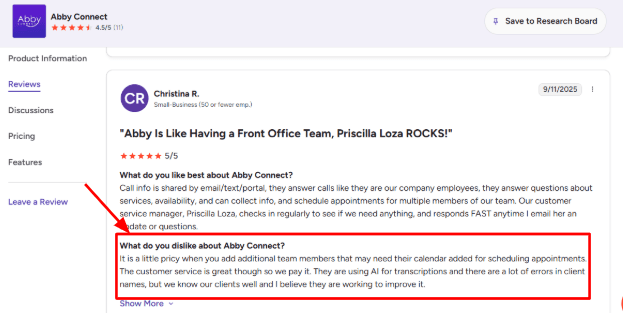
For purposes of legal intake, I do not think that the transcript should be regarded as the official record. It should be used only as a check level by the lawyer or intake personnel.
- Legal intake routing: Abby has the ability to get caller information, answer FAQ questions, handle transfers, leave messages, and also assist with appointment booking. In a law firm context, it would be used to distinguish calls relating to cases from sales calls, wrong numbers, and general fee questions.
Example: A person calling about a personal injury case following a car accident. The caller's information can be retrieved including their name, date of the accident, location of the accident, status of injury, insurance details, and whether they have an attorney.
- Easy setup: Another good aspect about the solution is the onboarding process, which, according to Abby, provides a “white glove setup.” Personally, I find that the set-up is much more directed compared to other phone tree-style solutions.
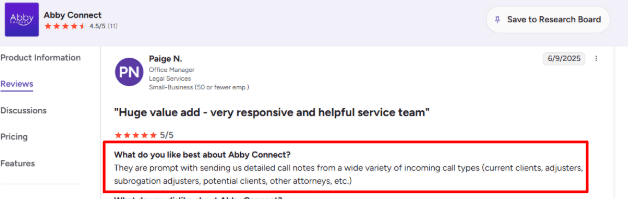
That matches the line I found in another G2 Abby Connect review, where the reviewer said it was “easy to set up and get going.” I agree with that for basic call answering. The setup gets heavier only when you add multiple attorneys, calendars, call rules, and intake paths.
- Bilingual support: According to Abby, the solution supports both English and Spanish answering capabilities, which is a huge benefit for firms dealing with immigration cases, family law matters, personal injury and workers’ compensation issues.
The key factor here is to ensure the script for Spanish speakers is created correctly. A bilingual receptionist can listen to the caller; however, the firm still needs clear guidelines on what information to gather, what not to promise, and when to escalate.
- App and portal: AbbyGo and the portal provide information on call details, messages, transcriptions, audio recordings, summaries, and after-call notes. It’s better than expected since the portal allows easier analysis without having to go through emails.
The challenge for lawyers is that there is no legal CRM integration yet. However, there is an integration with platforms such as Clio, Lawmatics, HubSpot, Zapier, and calendar apps. For some firms with complex intake processes, it might be useful to find out whether all fields correspond perfectly with the existing ones.
Pros
- Strong fit for small law firms that want AI answering with human receptionist backup.
- Useful for after-hours legal calls, overflow calls, intake screening, and missed-call reduction.
- English and Spanish support helps firms serving multilingual callers.
- Call summaries, transcripts, recordings, and portal access make follow-up easier.
- Legal integrations are better than many generic answering services.
- Setup is easier than expected for simple answering and routing flows.
Cons
- Pricing can rise quickly once more minutes, calendars, team members, or add-ons are needed.
- AI transcripts may misread client names, so law firms should review details before relying on them.
- Not a pure legal-only platform, so some workflows may need customization.
- High-volume firms may find per-minute pricing harder to predict.
- Appointment scheduling is useful, but it should be treated as part of intake, not the main product.
- Complex multi-attorney routing needs careful setup to avoid sending leads to the wrong person.
Pricing
- Abby’s AI Receptionist plans start at $99 per month after a 14-day free trial, with 50 minutes included.
- The $165 per month AI plan includes 100 minutes, while the $299 per month plan includes 200 minutes.
- Human receptionist plans start at $329 per month for 100 minutes and go up to $599 for 200 minutes and $1,380 for 500 minutes.
- For law firms, check pricing carefully if you need multiple calendars, human backup, legal CRM integrations, or higher call volume.
RingCentral
RingCentral is famous for being a phone system provider, that means if a law firm seeks to use some of the features listed above, such as an AI answering system, call routing, SMS messages, and human handoffs within a broader phone system, this provider becomes the top choice.
- AI Receptionist: The AI Receptionist by RingCentral is capable of answering questions of a routine nature, capturing leads, sending out text messages, and routing calls based on name recognition, locations, and keywords.
In the case of a law firm, it comes in handy when calls need to be treated differently depending on the topic of the request. For instance, a person calling regarding their divorce or car accident claims should not end up in the same general call queue.
Although powerful, it is not the easiest application to operate compared to others in our review list. I saw the same concern in a G2 RingCentral Contact Center review, where the reviewer said admin, reporting, and advanced customization were not as intuitive as expected. Screenshot below: 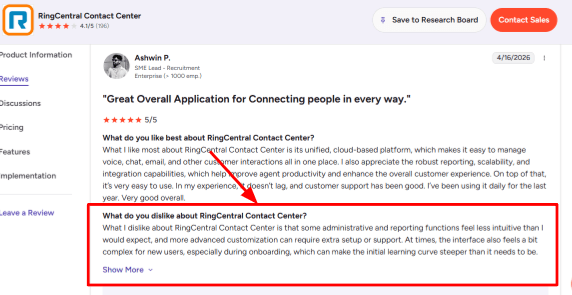
- Call Routing: RingCentral does a great job in directing leads to the right person or team member. There is flexibility in creating flows for practice areas, locations, languages, urgency, or even existing clients.
This is especially important for lawyers since the speed at which you can intake a lead makes all the difference. A lead for personal injury coming from someone who recently had an accident will likely call three different law firms within ten minutes. So, having the AI recognize what kind of case it is and direct it to the right intake specialist makes all the difference.
However, I did like the customization that you get when it comes to the way calls are routed. Small law firms might consider this more complex compared to using AI alone.
- Omnichannel Inbox: RingCentral combines calls, chat, emails, SMS, and other forms of communications into one place. As per RingCentral, RingCX can support voice and more than 20 digital channels in their RingCentral RingCX page.
It is possible for the law firms to benefit if they receive leads from Google Business Profile, website forms, phone call, referrals via emails, and even SMS texts. The intake process becomes easier as all of these need not be checked in five different places.
An unexpected benefit of this is how it makes following up easier. In case a prospective client calls but does not reach the intake specialist, he or she texts afterwards.
- Agent Assist: AI applications from RingCentral could assist live representatives with responses, notations, and call analysis. After mental simulation of the process during legal intake, I believe that this works better for law firms that actually have an intake staff as opposed to independent practitioners.
For instance, the application will help an inexperienced representative to maintain consistency while asking standard questions such as name, telephone number, email address, nature of the case, date of occurrence, and the opposition.
I also found a G2 RingCentral Contact Center review where the reviewer liked that RingCentral brings calls, chats, and emails into one place, routes customers automatically, and uses AI for basic questions. I agree with that for bigger law firms, but only if the workflows are set up properly. Screenshot below: 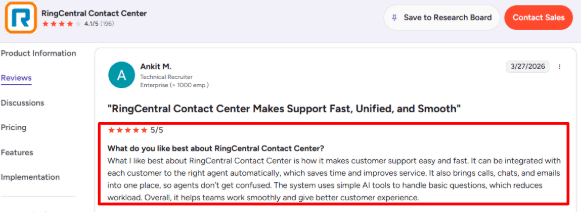
- Analytics Reports: RingCentral features reporting, dashboards, call analytics, and performance monitoring. This could be of great help for law firms investing in advertising since unanswered calls cost much.
You may monitor such metrics as call volumes, missed calls, waiting times, agent actions, and areas that experience bottlenecks. It might be interesting for a law firm that invests in advertisements concerning immigrants, accidents, and criminal law to know whether its leads are responded to in a timely manner.
The downside here lies in poor usability. The reports are thorough, though they might require some editing and training before partners and office managers can understand them properly.
- CRM Integrations: RingCentral supports CRM and workflow integrations, including prebuilt CRM integrations and APIs, which are listed on its RingCentral contact center features page.
This will be essential when you need the call to turn into a matter, lead, task, or follow-up within a case management system. It's not sufficient for the AI to take the call; the following steps must be neat.
I will, however, make sure that there is proper integration with your legal CRM before settling on the solution. General CRMs should be much simpler than legal ones.
Pros
-
Strong phone and contact center foundation for firms that handle high call volume.
-
AI receptionist, routing, SMS, and human handoff can reduce missed legal inquiries.
-
Good fit for multi-location law firms or firms with multiple practice areas.
-
Omnichannel setup helps intake teams manage calls, texts, chats, and emails in one place.
-
Reporting can help track missed calls, intake speed, and team performance.
-
Scales better than lightweight answering tools if the firm has a real intake operation.
Cons
-
Can feel too complex for a solo lawyer or small firm that only wants simple AI call answering.
-
Advanced admin setup, reporting, and customization may need support or internal training.
-
Not built only for law firms, so legal intake scripts, conflict language, disclaimers, and escalation rules need careful setup.
-
Pricing can become harder to judge because AI, contact center, phone, and add-ons may be separate.
-
Legal CRM integrations should be verified before assuming a clean workflow.
-
The AI should not be allowed to give legal advice, so guardrails need to be written clearly.
Pricing
-
RingCentral’s RingCX pricing page says contact center pricing starts at $65 per user per month, with savings available for annual billing on the RingCentral RingCX pricing page.
-
RingCentral’s AI Receptionist has its own separate pricing page, but it will finally boil down to several factors including your phone plan, AI package, users, and additional features.
-
In case of law firms, you should consider more than just your monthly plan. Plan for your call flow, intake questions, routing rules, after-hour processes, and even your CRM system.
-
It is best suited for pricing purposes if your law firm requires something more powerful than a simple AI answering machine.
Methodology
We selected practical AI answering services that a law firm can adopt, and we evaluated them based on different scenarios such as missed calls, scheduling consultations, simple conflicts, after-hours inquiries, filtering of spam emails, and transition process. The cost-effectiveness, installation complexity, and suitability for individual and small law firms were also considered.
FAQs
Which AI answering service is best for lawyers?
Ring Jennie, Smith.ai, Ruby are strong first options for law firms.
- Pick Ring Jennie for AI-led intake.
- Pick Smith.ai for lead handling.
- Pick Ruby when human receptionist quality matters.
How do I choose the right AI answering service for my law firm?
Start with your call volume, practice area, and intake process. Check for call recordings, transcripts, escalation rules, appointment booking, spam filtering, and human fallback before comparing price.
What mistakes do law firms make when buying an AI receptionist?
The biggest mistake is testing only the demo. Run real calls with messy details, accents, urgent cases, cancellations, and price shoppers. Then review transcripts to see what the AI missed.
Can an AI receptionist handle after-hours legal calls?
Yes, but it needs clear rules. Use AI for lead capture, appointment requests, FAQs, and callbacks. Send urgent matters, existing client issues, and sensitive case details to a human or attorney.
How should lawyers test AI answering before switching?
Forward a small percentage of calls first. Track missed calls, booked consultations, bad transfers, transcript quality, and caller complaints. Compare this with your current phone setup for at least one busy week.
When is a human answering service better for lawyers?
A human service is better when calls need empathy, judgment, or complex case screening. Tools like Ruby, AnswerConnect, and Abby Connect can work well when your firm wants warmth over automation.
Summarize this content with AI


