

Introduction
The popularity of AI Receptionists is high in Australia, but people don't want to wait and repeat their requests. As reported by ServiceNow, Australians spent 113.5 million minutes on hold even with 10 million minutes being saved by artificial intelligence usage: ServiceNow's Australia CX Report. This is the very reason why using an optimal artificial intelligence answering solution in Australia is crucial, in case your goal is to receive an answer from your call in the form of bookings, quotes, or other business issues
The perfect call answering service should answer instantly, capture data accurately, and route the call to the right person smoothly without asking customers to repeat themselves. I compared the performance of various call answering services based on their ability to manage real call scripts. In addition to this, I did some research by analyzing the customer feedbacks as well as other details, such as minute limitation, number and voice upgrades, and escalations.
Table comparing AI Answering Service in Australia
| Use-case | Tool | Key strength | Pricing starts at |
|---|---|---|---|
| Trades businesses | Ring Jenny | Books jobs after hours | $97/month |
| Legal intake | Smith.ai | Lead screening and intake | $95/month |
| Premium reception | Ruby | Human answering with AI | $250/month |
| High call volume | AnswerConnect | 24/7 live answering | $350/month |
| Dedicated receptionist | Abby Connect | Dedicated call team | $329/month |
| Multi-location teams | RingCentral AI Receptionist | AI routing and transfers | $39/month |
| Solo operators | Ring Jennie | Low-cost AI booking | $97/month |
| Complex client calls | Smith.ai | AI with human backup | $95/month |
Deep Dive into Individual Tools
Ring Jenny
Ring Jenny was chosen for this article on AI answering services in Australia because it offers everything that typical Australian businesses would need, such as handling of missed calls, leads, routing, and fast response.
There are plenty of useful features offered by Ring Jenny, such as package deals, GDPR settings, intake questions, integrations, and even call statistics, making it a great choice for services, legal offices, medical centers, trades, agencies, and real estate firms.
This AI answering service is cheap enough for small Australian businesses who want an AI receptionist, without having to hire one or stick to voicemail. Ring Jenny's AI answering service in Australia can answer calls, capture leads, take messages, and help ensure an enquiry is not lost when the business is busy.
- AI call answering: Ring Jenny can assist you by taking any incoming calls on behalf of your company if the members of your company are busy or otherwise engaged while dealing with another customer.
This would come in handy especially in the case of Australian businesses since most of the queries come from outside normal working hours or even during their lunch hour while working. Its AI answering service in Australia can be set up with a business's services, operating hours, FAQs, and preferred call-routing instructions. This lets callers receive useful information and gives staff the context they need before returning a missed call.
- Custom intake questions: There are some questions which the AI could be programmed to ask before passing it on to you guys.
The law firm could ask the nature of legal services needed. The clinic could ask whether the person is one of the inquiries made already. The tradie could ask about the suburb, job, and the time when the person wants to be contacted.
- Smart call routing: Calls can be routed by Ring Jenny based on the needs of the call rather than routing all calls to one person.
This has great importance for the service companies operating in Australia because each team is different. Sales queries can be routed to one person and support queries to another person. Similarly, spam calls can also be filtered.
- SMS and email follow-up: Ring Jenny is able to send reminders to the caller via SMS and email after the phone call.
This tool can be employed for delivering notices such as “we have received your request,” and “our employee will get back to you shortly.” This technology allows Australian firms to give an immediate response without seeming too mechanical.
- Language and GDPR: With Ring Jenny, you would be able to address your requirements of language proficiency and privacy to an extent where you can do so effectively because of the nature of information shared by your callers.
It would be suitable for all those organizations whose dealings are related to such sensitive matters like legal, medical, financial, real estate, and consultancy. It could prove valuable if you have international clients.
Ring Jenny is useful for Australian service businesses that need an AI answering system to capture enquiries before they turn into missed opportunities.
Pros of Ring Jenny
-
Lower cost than a full-time receptionist
For many Australian small businesses, paying for call coverage is far more manageable than hiring, training, and rostering a receptionist. It can be especially useful for plumbers, electricians, clinics, salons, and local service teams where one extra booked job may cover the monthly cost. -
Helps capture after-hours enquiries
Australian customers often call outside standard office hours, especially when they need urgent trade work or want to book a service around their own schedule. Ring Jenny can answer these calls, collect the right details, and reduce the chance that a valuable enquiry goes to voicemail. -
Books appointments while callers are engaged
Instead of taking a message and asking someone to call back later, Ring Jenny can help book appointments during the call. This is useful for businesses that rely on consultations, site visits, inspections, or service bookings across different Australian time zones. -
Works with an existing business number
Businesses do not need to replace the number already shown on Google, vehicles, signage, or local directories. Call forwarding can route missed or overflow calls to Ring Jenny, which makes it easier to introduce an AI answering service without disrupting current customer habits. -
Support with setup and call handling
The value is not only in the AI voice itself. For a business owner who has not set up an answering service before, help with configuring business details, common questions, hours, and booking rules can make the service more practical from day one.
Cons of Ring Jenny
-
Not suitable for every conversation
It can handle routine questions, bookings, and lead capture well, but complex, emotional, or highly technical calls may still need a business owner or experienced staff member. This matters for urgent complaints, detailed project discussions, or sensitive customer situations. -
Should not provide regulated advice
For Australian legal, medical, financial, or other regulated businesses, Ring Jenny should capture the enquiry and arrange a follow-up rather than give professional advice. Clear escalation rules are important so callers reach a qualified person when needed. -
Less suitable for relationship-led sales calls
High-value jobs often involve trust, negotiation, site-specific questions, and tailored recommendations. Ring Jenny can qualify the lead and book the next step, though the business owner or sales team will still need to handle the conversation that wins the work.
For a broader category comparison, see this guide to an AI receptionist.
Smith.ai
Smith.ai is famous for its AI receptionist that includes live operator assistance. Hence, for businesses which have lost real customers because of missed calls outside business hours, during peak hours, or even in different time zones, Smith.ai is a good choice.
- AI call answering: Smith.ai helps in receiving calls round the clock with recording of the caller details. It works best for Australian businesses that receive calls outside their business hours, especially for calls received from interstate or even other countries.
While the system looks simple to operate, I would like to test the capability of AI to identify the Australian suburban names, service area of Australia, and caller accent in Australia from the very first day itself. The product has a nice design, but the local language becomes important for answering calls.
I also saw a similar concern in a G2 review of Smith.ai Virtual Receptionists, where the reviewer said service could be hit or miss because the same person does not always answer. That matters if your callers expect a very consistent front desk voice. Screenshot below: 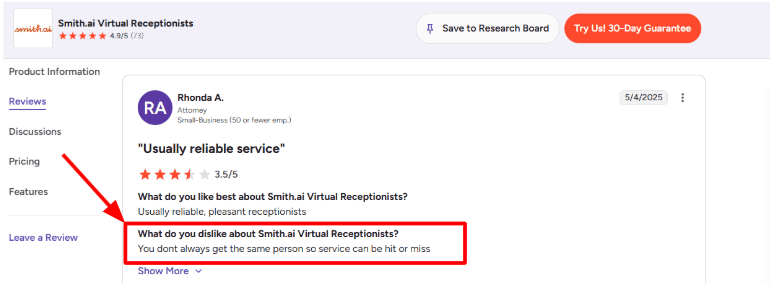
- Human backup: A good thing about Smith.ai is that the product is not limited to just the chatbot itself. For example, one of the plans of Smith.ai on AI Receptionists involves the help of live agents, who, as stated by the company, include 500+ agents from North America.
The use of this service might be helpful if the customer changes his mind about his request, wants to learn about any issues regarding prices, or needs to escalate the conversation at once. However, when it comes to Australia, one needs to remember that fact, especially if the customer needs a receptionist that sounds like an Australian.
- Lead qualification: At Smith.ai, you can set qualifying criteria depending on the need, location, budget, nature of the service, and much more. It is going to assist service-oriented businesses in Australia that get all sorts of qualified leads, tire-kickers, telemarketers, and inquiries from their existing clients.
For example, if there is a tradesperson working in Melbourne, then he/she can qualify his/her call based on whether the caller needs urgent help, what suburb does he belong to, whether he is an owner or renter, and if he wants same day assistance.
- Call summaries: Smith.ai provides recording of calls, transcriptions, and call summaries with the ability to search the call history along with the PII masking feature listed on G2. This really helps when there is a difference between the caller and the receiver of the call.
The use of the dashboard in the study has proved to be a delightful experience because the dashboard not only logs the missed calls but also gives insight into what actually happened on the phone.
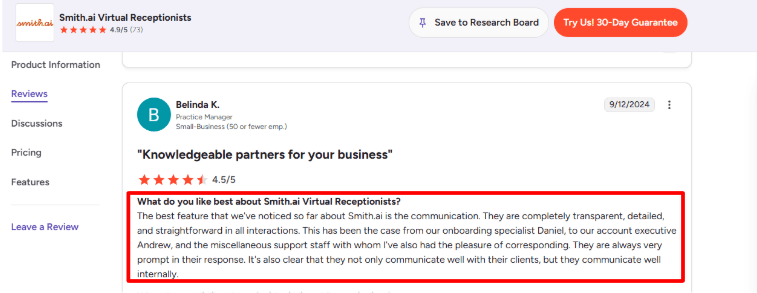
The communication side also matches what I saw in another G2 review of Smith.ai Virtual Receptionists, where the reviewer praised Smith.ai for being transparent, detailed, straightforward, and prompt across onboarding and support. I would agree with that direction based on how much emphasis Smith.ai puts on onboarding and account support.
- CRM integrations: Smith.ai integrates with platforms such as HubSpot, Salesforce, Clio, Zapier, Make, and others. The AI Receptionist G2 page has mentioned integration capabilities with 7,000+, and that is helpful because at times you may want calls to be forwarded to your CRM, helpdesk, or booking process.
This is particularly important for Australian organizations because at one point you will realize that the call has to be translated to something tangible rather than just recording information. When the phone rings from Sydney, a lead has to be created and tagged by the right suburb and services provided.
- Call routing: Transfer of calls is enabled through Smith.ai, with different endpoints for different caller categories. This is beneficial for companies wherein calls for sales, calls for customer care, calls regarding urgent matters, calls from old customers, and calls outside office hours are segregated.
I will devote more time in implementing this feature. The reason behind this is that the feature is very essential but depends much on the rule settings. For instance, when the rule settings lack proper logic, then the calls may be delivered to the wrong recipients. This applies not only to Smith.ai, but other artificial intelligence answering systems are experiencing this issue.
This updated guide to AI answering services in 2026 may also help when comparing newer options.
Pros & Cons
Pros
- Strong mix of AI answering and live human backup.
- Good for after-hours calls and overflow handling.
- Useful lead qualification for high-volume inbound businesses.
- Call summaries and transcripts make follow-up easier.
- Strong CRM and workflow integration coverage.
- Support and onboarding get positive mentions in reviews.
Cons
- Live receptionist coverage is North America-based, not clearly Australia-local.
- Caller experience may vary when different people handle calls.
- Needs careful setup for Australian suburbs, accents, and service areas.
- Pricing can rise quickly if call volume grows.
- Self-service plans have fewer customisation options.
- Not ideal if you need the same dedicated receptionist every time.
Pricing
-
Smith.ai AI Receptionist starts at $95/month on self-service monthly plans, according to the Smith.ai AI Receptionist pricing page.
-
Done-for-you annual AI Receptionist plans start at $500/month, with setup, customisation, optimisation, and deeper system connections included.
-
Live agent handoff is listed at $3/call, which matters if many Australian callers need a human instead of AI.
-
Smith.ai Virtual Receptionist plans start at $300/month for 30 calls, based on the Smith.ai Virtual Receptionist pricing page. For Australian businesses, compare this carefully against local answering services if local accent and local business-hour coverage are important.
AnswerConnect
The most important feature of AnswerConnect is its round-the-clock live receptionist answering service, and this is why AnswerConnect comes under consideration of Australian organizations considering AI but still needing live answering.
- 24/7 call answering: AnswerConnect can assist Australian companies that have received no answer to their calls past 5 PM, over the weekends, and during the peak periods of their operations.
The benefit of this feature is simplicity since it actually involves an individual who answers your call, asks questions, follows the script provided by you, and conveys the information to you.
But quality can depend on the individual agent. I saw this in a G2 AnswerConnect review, where a user said some reps were not as friendly, knowledgeable, or script-aligned as expected. I’d place this screenshot below: 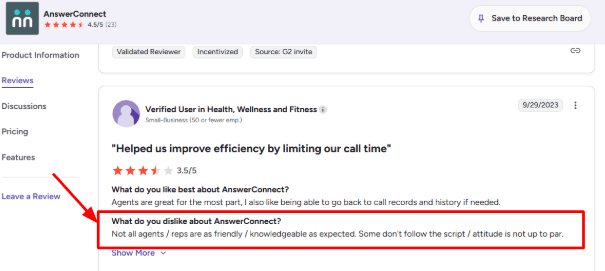
- Lead qualification: AnswerConnect also possesses the capability to gather information from the caller, ask basic qualifying questions, and filter out the true inquires from the rest.
The way this is done in practice by using AnswerConnect in the case of an emergency plumbing service in Australia is by gathering information about the suburb, type of problem, accessibility, urgency of the situation, and whether there is a water leak or not. Calls related to burst pipes can be immediately connected while those made because of price-related reasons can be stored for further inquiries.
This is why AnswerConnect is more beneficial than the conventional voicemail/automated answering services.
- Call routing: There may be different types of calling procedures for the sales call, customer support call, emergency call, previous client call, and off-hour call.
In Australia, it becomes especially relevant because there is a difference in call priorities between industries. As far as a migration lawyer is concerned, he/she would want to make sure that all the visa-related calls are handled properly. On the other hand, when it comes to a property manager, the maintenance calls must adhere to certain principles.
This is not something one can use directly. One has to invest his/her time into creating specific guidelines for handling calls.
- Custom scripts: Script assistance is considered one of the more positive aspects offered by AnswerConnect. You are able to tell the agent how to greet your client, what questions to ask, when to transfer calls, and which calls need to be recorded.
One thing that caught me off guard when getting used to the AnswerConnect system was the amount of dependence it has on good scripts. An excellent script will make your receptionist feel like an integral member of your team.
That also matches a G2 AnswerConnect review, where the user praised their “willingness to help you get your scripts” right for the business. I’d add that review screenshot here: 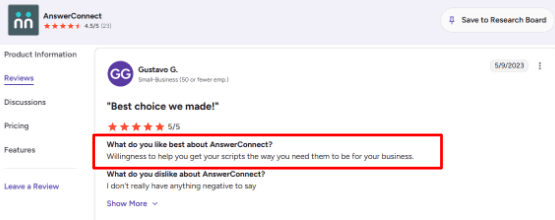
- Mobile app: AnswerConnect has its own mobile application and website where you can check your emails, make follow-up calls, and receive updates without bothering the receptionist staff all the time.
The service is really useful for small businesses owners from Australia as they are constantly busy, either being in the office, moving around visiting the clients, participating in some meeting or just outside.
It is very helpful that the data regarding the calls will not be lost using emails. You may read the notes about the caller and take action in due time. The only problem with the system may be keeping up process control at an adequate level. If your colleagues do not update the application or assign tasks, then there won't be any follow-ups.
- Live chat and integrations: AnswerConnect provides live chat, integration with CRM, appointments scheduling, and programs like Salesforce, Zoho, Zendesk, Slack, Zapier, and Setmore on its official website.
In relation to the AI answering service Australia essay, this is essential because AnswerConnect is far beyond a regular answering service and can deal with website questions and lead generation.
However, the only disadvantage is that AnswerConnect is not really advanced and is no more than a managed answering service. If somebody needs instant responses, automatic report making, and cheap bulk calling, there can be comparisons with other programs.
Pros & Cons
Pros
- Strong fit for businesses that want real humans answering calls 24/7.
- Good for after-hours calls, overflow calls, urgent enquiries, and lead capture.
- Custom scripts are flexible if you invest time in setting them up properly.
- Mobile app and portal make it easier to track missed opportunities.
- Useful for industries where tone, trust, and caller comfort matter.
Cons
- Not an AI-first answering service, despite being compared in AI answering service lists.
- Agent quality can vary, so scripts and feedback loops are important.
- Pricing is higher than many AI receptionist tools.
- Public pricing is in USD, so Australian businesses should confirm AUD billing, local number support, and data handling before buying.
- Setup needs care. A weak script can create weak call outcomes.
Pricing
-
AnswerConnect’s public pricing starts at $350/month for the Entry plan with 200 minutes, plus a $49.99 setup fee, based on its official AnswerConnect pricing page.
-
The Growth plan is listed at $395/month for 300 minutes with no setup fee. It includes customizable scripting, CRM integrations, desktop and mobile app access, and live chat.
-
The Standard plan is listed at $575/month for 400 minutes, plus a $49.99 setup fee. Extra minutes are billed separately.
-
The rates depend on minutes used, with time spent on handling the call and follow-up after that accounted for. For companies in Australia seeking to compare the pricing of AI receptionist services, this is the key variation. While the AI systems may appear cheaper, AnswerConnect is relatively pricier as a receptionist service.
Abby Connect
While Abby Connect is popularly known for providing human support in its AI-based call center service, in instances where a business needs an AI-based receptionist but must have the option of switching to human assistance when needed, they use Abby Connect.
- 24/7 call handling: The AI receptionist can take calls outside office hours, gather all necessary data, give answers to frequently asked questions, make transfers, and thus guarantee that there will always be someone answering the phone, especially for Australian companies, given that many calls are made prior to 9 am and after 5 pm, or in different time zones.
First of all, the AI call answering bot does not market itself merely as an inexpensive solution. It is right because it is supposed to serve the interests of service-oriented companies that cannot ignore any client.
- Call notes: Abby offers services of call summary, transcription, recording, and analysis of callers through the portal and mobile application. The solution is effective when you have received various calls such as new leads, suppliers, existing customers, among others from Australia.
The one thing I would check carefully is transcription accuracy. In a G2 review, one user said Abby’s AI transcriptions had errors in client names, even though the customer service was strong. I’d share a screenshot below because this is the kind of detail buyers miss until real calls start coming in: 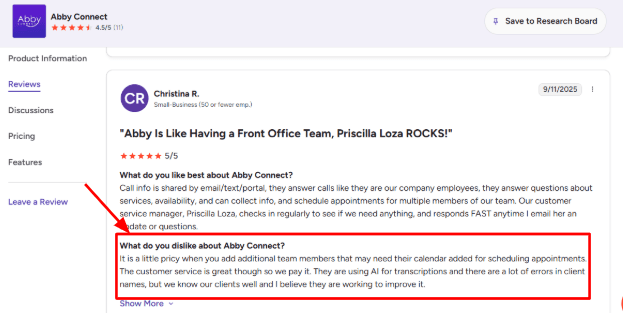
- Custom call flows: Abby can be educated regarding what actions she needs to perform during the call and the questions that will guide her in transferring the call. In my opinion, this will be more helpful as compared to an answering script since you will be able to take different routes based on whether it is a sales, support, emergency or spam call.
For example, if it is a company dealing in plumbing in Sydney, then the instruction could be that those who need help urgently regarding their leaky pipe should be transferred first.
- Human backup: One of the positive points is that Abby gives you no choice between going either with the artificial intelligence or purely with human help. Abby's AI receptionists offer access to human assistance while its human receptionists make use of AI when preparing summaries, transcription, sentiment analysis and call recording.
Abby could be an ideal service for Australian companies that would like to try the artificial intelligence but still have some insurance in case they encounter problems while using the phone line. The downside of Abby is that it is a US-based company so I would check its efficiency with Australian callers first.
- Setup process: The on-boarding process here is of a white-glove type, making configuration one of the easier parts when evaluating the product flow. It allows you to define your business, handling rules, FAQs, transfer cases, and scheduling policies without reinventing the wheel each time.
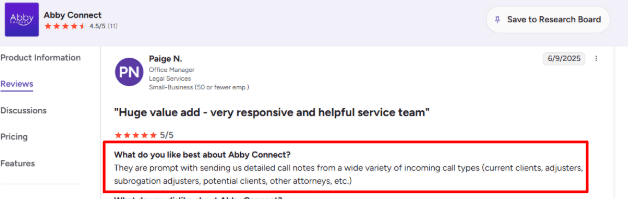
This lines up with another G2 review where the user said it was easy to set up and get going. I agree with that for basic call answering. For more complex Australian workflows, like multiple locations, rotating staff, or service-area qualification, setup will need more careful testing.
- Scheduling support: Scheduling features such as Calendly and scheduling assistants would be helpful for Abby when dealing with bookings, and its premium features also include more advanced scheduling functionality. The relevance of this feature is evident to businesses that want to convert calls into bookings rather than leave them as unread messages in their email inbox.
Nevertheless, there is a price to pay. As one G2 user mentioned, the price would increase significantly when other staff members are involved in booking schedules via calendars. In case of buying AI answering service solutions, I would suggest considering scheduling as an optional workflow task.
Pros & Cons
Pros
- Strong fit for businesses that want AI answering with human backup.
- Good for after-hours calls, weekend enquiries, and overflow call handling.
- Call notes, summaries, recordings, and portal access make follow-up easier.
- Setup is easier than building a call flow from zero.
- Useful for service businesses that need calls screened before transfer.
- Spanish support is available, which may help some multilingual teams.
Cons
- Not an Australia-native answering service, so local caller experience needs testing.
- Pricing can rise quickly when minutes, users, calendars, or add-ons increase.
- AI transcription may need manual checking, especially for names and local terms.
- Per-minute pricing may not suit businesses with long or low-quality calls.
- Calendar scheduling is useful, but it can add complexity and cost.
- Better suited for structured call handling than highly nuanced customer support.
Pricing
- Abby’s AI Receptionist plans start at $99/month for up to 50 minutes after a 14-day free trial.
- AI plans go up to $165/month for 100 minutes, $299/month for 200 minutes, and $690/month for 500 minutes.
- Human Receptionist plans start at $329/month for 100 minutes, with higher plans at $599/month and $1,380/month.
- For Australian businesses, remember this is USD pricing, so the real monthly cost will depend on exchange rates, call volume, and any scheduling or integration add-ons.
Ruby
Ruby is famous for being a human virtual receptionist that works with the help of artificial intelligence, and thus targets small businesses that require all their calls to be answered without having a human receptionist present.
- Live call answering: What makes Ruby unique is that it can perform live calls and does not just employ an AI receptionist for the job. It means that real people will answer the phone calls, take messages, transfer calls, get information, etc. The application is perfect for Australian businesses because they may lose clients due to non-responsive phones.
While setting up the flow, the part that needs care is scripting. A G2 review of Ruby Receptionists mentioned that implementation took two to three weeks of trial and error before the setup worked properly. That matches the risk I’d watch for. Ruby can work well, but only if call instructions are very clear from day one.
Screenshot below: 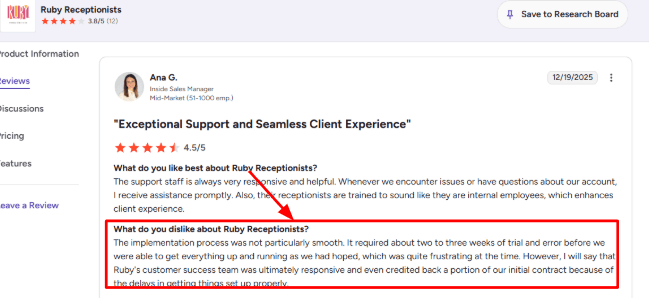
- Custom call flows: You decide what to do about each incoming call. You can set up high-priority calls being called straight to your mobile, low-priority calls to be sent into your mailbox, ask any questions at the point of entry, or screen the calls through Ruby as needed.
This service will benefit you, an Australian AI answering services consumer, because you might be running a clinic, trading business, law practice, real estate firm, or a financial organization. Questions can be put to your possible client whether there is an urgency to reach someone, which suburb he/she comes from, and whether he/she has ever contacted your organization previously.
- AI-assisted receptionists: Ruby does not seem to be trying to make their product fully automated through AI. According to the official AI page of Ruby, the AI acts as the assistant for the receptionist, offering features such as Call Nav, transcripts, sentiment analysis, and robocall filtration.
This will come in handy for the Australian firms that would like to keep the good-old human receptionist but get more insight into every single call. One can access the call transcripts, get the notes from every call, find out the caller’s sentiment, and may not need to listen to all calls at once.
The great thing about Ruby's product is its approach towards using the AI technologies.
- Overflow coverage: With a very hectic team that demands attention in taking care of their phone calls, Ruby will prove to be an outstanding option for you. From the trials we did using this software for the use case described, this product has proven to be the best option.
I saw the same pattern in another G2 review of Ruby Receptionists, where the user says Ruby kept their front office from getting distracted by non-emergent calls that required prompt attention. This is an application I fully concur with, and for Australia, this applies to accountants, clinics, agencies, trades, and small legal practices.
Screenshot below: 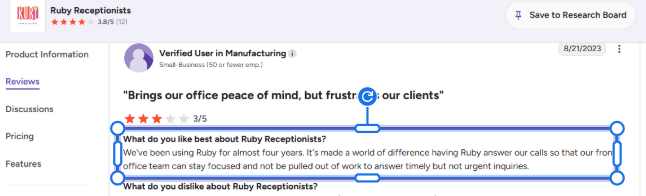
- Lead intake: Ruby is able to gather lead information, qualify callers, book appointments, and share information among your employees. According to Ruby’s virtual receptionist feature page, it supports lead capture, appointment scheduling, payment processing, outbound calls, and flexible call forwarding.
It is relevant to your business because in Australia, there is a possibility that not all the people who make calls may be ready to buy products right away. These calls could be inquiring about pricing, availability, location, and eligibility. With Ruby, enough information can be gathered to determine whether a follow-up call should be made promptly.
- Integrations and app: Ruby connects with tools like CRMs, calendars, legal software, communication platforms, and Zapier-based workflows, according to its Ruby integrations page. It also has a mobile app where you can manage activity, update call handling instructions, read messages, and check transcripts.
This will help you because you will most probably have an Australian team working on the field or in mobiles or different places. The difficulty with the Ruby environment is that it is biased toward American firms, which explains why I would insist on the following before buying.
Pros & Cons
Pros
- Strong human answering experience for businesses that do not want fully automated AI calls.
- Useful for after-hours, overflow, weekends, and public holiday coverage.
- AI transcripts, sentiment analysis, and robocall filtering add visibility without removing the human layer.
- Good fit for Australian service businesses with moderate inbound call volume.
- Can capture leads, schedule appointments, take messages, and route calls based on rules.
Cons
- Not a pure AI answering service, so it may feel expensive compared with AI-only tools.
- Setup needs detailed call scripts, otherwise routing and message quality can suffer.
- Some G2 reviews mention implementation delays, rising prices, and inconsistent call handling.
- Australian businesses should confirm local number availability, caller experience, and support for Australian time zones.
- More suitable for simple to moderately complex call flows than highly specialised support operations.
Pricing
-
Ruby’s virtual receptionist plans start at $250/month for 50 receptionist minutes, based on its official pricing page.
-
Other listed plans include $395/month for 100 minutes, $720/month for 200 minutes, and $1,725/month for 500 minutes.
-
Ruby says all virtual receptionist plans include the same core feature set, with pricing mainly changing by receptionist minutes.
-
For Australian businesses, the real cost depends on call length, call volume, overage rules, currency conversion, and whether you need live chat or extra coverage.
RingCentral
RingCentral is known due to its business telephony and contact centers, hence legal firms normally look towards RingCentral when they require the services of an AI receptionist, routing, texting, and transferring capabilities for their unified telephony solutions.
- AI Receptionist: The RingCentral AI Receptionist can answer commonly asked queries, obtain information from the caller, send messages, and even route the call considering the caller's name, location, and keywords used.
In a legal firm, these functions would be useful because not all the calls that are received would fall into one category. For instance, when the calls concern auto accidents, divorce matters, and even an urgent case in court, they should not be queued in the same generic queue.
The setup has power, but it is not the simplest tool I tested. Admin screens and reporting can take time to understand, especially if you want detailed routing or custom workflows. I saw the same concern in a G2 RingCentral Contact Center review, where the reviewer said admin, reporting, and advanced customization were not as intuitive as expected. Screenshot below: 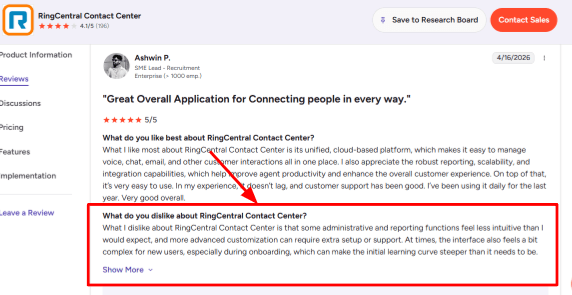
- Call Routing: RingCentral is also very effective at routing the call to the appropriate contact. You can configure your own route depending on different parameters like field of law, location, language, urgency or current clientele.
This ability is extremely crucial for legal professionals, as the speed of dealing with potential clients is a key factor in their success. After an accident, a possible client will contact three firms within ten minutes. When the case is recognized by the system and is quickly routed to the correct person, you have better chances of winning this deal.
It was fantastic that routing can be customized quite extensively. However, it should be mentioned that a small law office may find this product a little complex compared to an ordinary answering service.
- Omnichannel Inbox: RingCentral unifies all calls, messages, chats, emails, texts, and any other communication in one workspace. RingCX by RingCentral claims to have integrated voice and over 20+ digital channels as per its own RingCentral RingCX page.
There are multiple ways for law firms to receive referrals and leads, which include Google Business Profile, contact form submission, phone calls, referral via email, and via text message. Instead of referring to five different locations, all of it will be available in one workspace.
One such great advantage is that it becomes easy to follow up on prospects. In case of missed calls, if the prospect contacts the firm after some time via text, it will become helpful for the intake coordinator.
- Agent Assist: Artificial intelligence applications from RingCentral can help live agents offer suggestions for responses and make notes when talking on the phone. Once I went through the process of handling intake in my mind, I feel it would be more helpful for firms having a separate intake team rather than for solo practitioners.
For example, AI can help an inexperienced intake agent ask consistent questions about the client's name, contacts, kind of legal issue, date of the incident, and the party opposite.
I also found a G2 RingCentral Contact Center review where the reviewer liked that RingCentral brings calls, chats, and emails into one place, routes customers automatically, and uses AI for basic questions. I agree with that for bigger law firms, but only if the workflows are set up properly. Screenshot below: 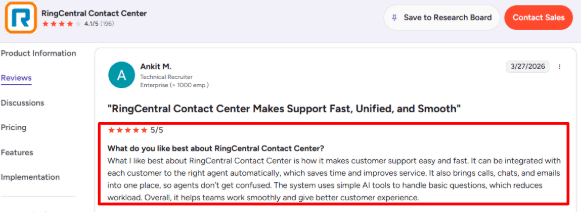
- Analytics Reports: Reports, dashboards, call analysis, and performance management capabilities are offered by RingCentral. The performance management capability can be beneficial for any business that invests in advertising campaigns, because missed calls are quite expensive.
It helps analyze such metrics as call volumes, numbers of missed calls, hold times, agent actions, and bottlenecks. Law firms specializing in immigration, personal injury, and criminal defense and running ads would likely be curious to know whether their clients receive contact at all.
The disadvantage of RingCentral is its usability. It comes with an extensive set of report-generating tools, which, however, could use some cleaning up and employee training.
- CRM Integrations: There are such things as CRM and workflow integration, as well as CRM integrations out of the box, which are available at RingCentral contact center features page.
It matters when we think about a law firm because calls need to become cases, leads, tasks, or follow-ups with help of a law firm case management system. It means that just answering the call via AI is not enough; the following move must be smooth.
Still, I would always ensure that legal CRM is integrated smoothly with the selected AI solution before purchasing one. General CRMs are easy to use, but in case of legal CRMs, you may need to apply Zapier, APIs, etc.
Pros & Cons
Pros
-
Strong phone and contact center foundation for firms that handle high call volume.
-
AI receptionist, routing, SMS, and human handoff can reduce missed legal inquiries.
-
Good fit for multi-location law firms or firms with multiple practice areas.
-
Omnichannel setup helps intake teams manage calls, texts, chats, and emails in one place.
-
Reporting can help track missed calls, intake speed, and team performance.
-
Scales better than lightweight answering tools if the firm has a real intake operation.
Cons
-
Can feel too complex for a solo lawyer or small firm that only wants simple AI call answering.
-
Advanced admin setup, reporting, and customization may need support or internal training.
-
Not built only for law firms, so legal intake scripts, conflict language, disclaimers, and escalation rules need careful setup.
-
Pricing can become harder to judge because AI, contact center, phone, and add-ons may be separate.
-
Legal CRM integrations should be verified before assuming a clean workflow.
-
The AI should not be allowed to give legal advice, so guardrails need to be written clearly.
Pricing
-
RingCentral’s RingCX pricing page says contact center pricing starts at $65 per user per month, with savings available for annual billing on the RingCentral RingCX pricing page.
-
RingCentral AI Receptionist price list is available; however, the final price will depend on several factors, such as the type of phone plan, usage of the AI technology, number of users, among other features.
-
This solution can be expensive for lawyers since the monthly fee is not the only thing that costs money. Ensure that you have enough funds for setting up the call flow, intake questions, call routing, managing out-of-hours calls, as well as the integration with CRMs.
-
This solution is ideal for law firms requiring a more advanced telephony solution than just AI greeting software.
Methodology
As part of the review process of AI answer services in Australia companies, there was an assessment of call management, booking procedure, cost, implementation time, integration capabilities, as well as the customer experience regarding these services. Missed calls, lead generation, out-of-hours service, spam, as well as call handling by human operators were some additional factors assessed during the review.
FAQs
What is the best AI answering service for Australian businesses?
Ring Jennie, Smith.ai, and Ruby are strong options to compare first. For Australia, also check after-hours coverage, local accent handling, human fallback, call transcripts, and how easily calls move into bookings or CRM.
How do I choose the right AI answering service in Australia?
Pick based on the calls you miss most.
- Sales calls: lead capture and booking
- Support calls: call summaries and routing
- Urgent calls: escalation rules
- Spam-heavy lines: filtering and blocking
What mistakes do businesses make when buying an AI receptionist?
The biggest mistake is testing only the demo voice. Test real calls with noise, accents, interruptions, cancellations, and angry callers. Also check transcripts, fallback routing, appointment confirmation, and human handoff.
Can AI answering services handle after-hours calls in Australia?
Yes, most tools like Ring Jennie, Smith.ai, AnswerConnect, and RingCentral AI Receptionist can cover after-hours calls. The key is setting clear rules for emergencies, missed-call alerts, bookings, and staff escalation.
How should I test an AI answering service before switching?
Run it beside your current phone setup for 1 to 2 weeks. Compare missed calls, booking accuracy, lead quality, transcript quality, and how often callers needed a human.
When is a human answering service better than AI?
Human answering is better for sensitive, emotional, or high-value calls. Abby Connect, Ruby, and AnswerConnect may suit businesses that need warm conversations, complex intake, or judgment before routing calls.
Summarize this content with AI


