

Introduction
I have tested over a dozen AI answering services in the last few months, and the truth is that most small businesses do not need a fancy contact center. They just need someone to pick up the phone when they are busy working. This is becoming more critical as voice AI adoption accelerates. A Gartner survey from February 2026 found that 91% of customer service leaders are under pressure to implement AI, but pressure does not equal fit. I built this guide to help you find a practical AI phone answering tool that matches your call volume, budget, and how much your callers actually need a real human.
Best AI answering services at a glance
| Use case | Tool name | Why I chose this tool |
|---|---|---|
| General AI receptionist for small businesses | Ring Jenny | I chose Ring Jenny because it covers the core tasks many Brisbane businesses expect from an AI answering service: call answering, lead capture, common enquiry handling, and appointment booking. The AI plus human backup model also makes it relevant for businesses that want a virtual receptionist without relying only on automation. |
| Human-backed answering service for more sensitive enquiries | Smith.ai | When I compared AI receptionist options, Smith.ai stood out for businesses that want AI call answering with the option of human support. This can suit service businesses where some after-hours calls, complex questions, or higher-value leads may need a person to step in. |
| After-hours call answering for existing phone systems | RingCentral AI Receptionist | I chose RingCentral AI Receptionist for businesses already using RingCentral for calls and team communication. Its AI answering service add-on can make sense when the goal is to handle after-hours calls, answer routine questions, and capture leads without adding another separate phone system. |
| Appointment booking and lead capture for local services | Rosie AI | I included Rosie AI because its focus fits local service businesses that need a simple AI receptionist for incoming calls and lead capture. It is useful to compare when appointment booking matters, although businesses should check which plan includes booking tools before choosing it. |
| Simple AI phone answering for local businesses | Goodcall | When I went through the feature details, Goodcall looked useful for businesses that mainly need simple AI phone answering and call routing. It can help with routine enquiries, basic lead capture, and directing callers to the right person, though pricing may rise as unique customer usage grows. |
| Comparing another virtual receptionist option before choosing | Dialzara | I included Dialzara so readers can compare a broader set of AI answering service tools rather than looking only at one type of solution. For Brisbane businesses, it is worth reviewing its current call answering, appointment booking, lead capture, integration, and pricing details before making a final decision. |
How I tested these AI answering services
| Test area | What I checked |
|---|---|
| Setup | How fast I could create a working AI phone agent |
| Call quality | Voice delay, naturalness, and interruption handling |
| Lead capture | Whether caller details were collected cleanly |
| Booking | Whether the tool could book, reschedule, or route appointments |
| Handoff | Whether calls could move to a human smoothly |
| Pricing | Minute limits, overages, add-ons, and hidden usage triggers |
Deep dive into individual AI Answering Service Tools
Ring Jenny
I selected Ring Jenny because it covers the parts of an AI answering service that matter most to Australian businesses in 2026, especially missed calls, after hours enquiries, lead capture, and faster call routing.
It is built for businesses that need an AI receptionist to answer routine calls without making every caller wait for a team member to become free.
Its flexible packages make the cost easier to plan, while privacy considerations such as GDPR requirements for overseas callers are useful for businesses handling customer details across different regions. Ring Jenny's AI answering service in Australia is designed around practical call coverage, including common-question handling, lead capture, and message-taking.
- After Hours Call Coverage
This is the first thing I look for in an AI answering service. Ring Jenny can help businesses respond when staff are on site, driving, serving customers, or already on another call.
For example, an Australian plumbing business can use it to capture an urgent leak enquiry at night, collect the suburb and contact details, then pass the request to the right person for a callback. One feature to look for in an AI answering service is access to call summaries, recordings, and transcripts after each enquiry. This gives business owners a record of what the caller needed and makes follow-up easier when several calls come in during a busy period.
- Useful Lead Capture
Ring Jenny can collect the details your team actually needs instead of leaving you with unclear voicemail messages. You can guide it to ask for the caller name, phone number, location, service needed, and urgency level.
I recommend keeping this simple. A caller should not feel like they are filling out a long form just to ask for help.
- Call Routing Rules
This feature helps you separate urgent calls, new sales enquiries, existing customer questions, and general requests. It gives the caller a clearer path instead of sending every call to the same person.
For a medical clinic, the AI receptionist can capture the reason for the call and pass it to the right team member without trying to give medical advice itself.
- Business Specific Answers
You can set Ring Jenny up with approved answers about your services, opening hours, service areas, pricing guidance, and common policies. This reduces repeat questions that take staff away from real work.
A property management business, for instance, can use it to explain office hours, collect maintenance details, and direct urgent tenancy issues to the correct escalation process.
- Packages and Privacy Controls
The package based approach is useful for small businesses that want predictable AI receptionist costs instead of paying for a full time receptionist just to cover overflow calls.
I would also review what caller information is collected, where it is stored, and how privacy expectations are handled. GDPR can matter when your business receives calls from European customers, while Australian businesses should also keep local privacy obligations in mind.
Pros of Ring Jenny
For businesses comparing AI answering services in 2026, Ring Jenny stands out most for covering routine inbound calls, capturing leads, and helping callers book without adding another full-time front desk role.
-
Lower cost call coverage
Ring Jenny can cost far less than hiring, training, and managing a receptionist for full-time phone coverage. For many service businesses, recovering even a small number of missed enquiries can make the monthly cost easier to justify. -
Guided business setup
The setup process can start with information from a website or Google Business Profile, including services, hours, contact details, and common questions. This is useful in 2026, when businesses want an AI answering service that can be configured around real operating details rather than generic scripts. -
Answers when staff cannot
It can respond during lunch breaks, after hours, weekends, and periods when the team is busy with customers or on-site work. Instead of pushing callers to voicemail, the business can still acknowledge the enquiry and collect the information needed for a follow-up. -
Appointment booking during calls
Ring Jenny can check availability and help book an appointment while the caller is still engaged. This matters for businesses where leads often contact several providers and may move on when they do not get an immediate answer. -
Works with existing phone numbers
Businesses can use call forwarding instead of asking customers to learn a new number. That makes it easier to add AI call coverage without changing signage, ads, Google Business Profile details, or the number long-term customers already use.
Cons of Ring Jenny
-
Not right for complex conversations
Highly technical requests, emotional complaints, pricing negotiations, or unusual service issues may still need a business owner or experienced staff member. The strongest setup is usually one that gives callers a clear route to human help when the conversation becomes more detailed. -
Should not provide professional advice
For legal, medical, financial, or other regulated enquiries, Ring Jenny should capture the caller’s details and arrange the right follow-up. Businesses should be careful about how they configure answers for anything involving advice, eligibility, safety, or compliance. -
Limited for outbound and relationship-led sales
Ring Jenny is better suited to answering incoming calls, taking enquiries, and booking appointments than cold calling or handling high-value sales conversations. Calls that depend on trust-building, tailored recommendations, or negotiation are still better handled by a person.
For more local comparison points, see this guide to an AI answering service in Australia.
Smith.ai
Smith.ai is different because it pairs AI answering with live human backup. When the bot gets confused or the caller is frustrated, a real agent can step in. This makes sense for law firms, agencies, consultants, and home services where every missed call is lost revenue. I tested it to see where it shines and where those human handoffs start adding up on your bill.
Features
- AI Receptionist
Smith.ai’s AI receptionist can answer calls, ask intake questions, qualify leads, send summaries, and move callers into the right next step. When I walked through the setup, the core flow felt built for service businesses that get real buying intent over the phone, not just people asking for directions.
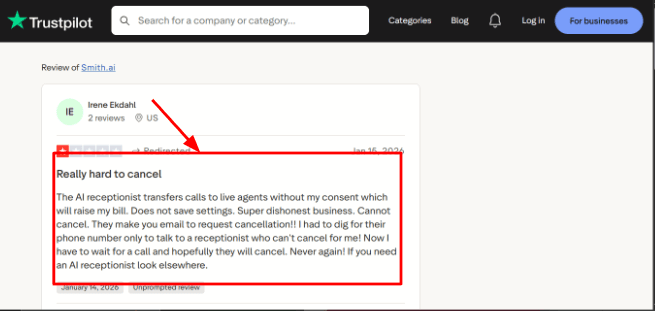
One thing I would watch closely is the live agent handoff. A Trustpilot review mentioned calls being transferred to live agents and their bill went up. I am dropping that screenshot below because it is a real setup concern you need to know before you start.
-
Human Backup
The main thing that sets Smith.ai apart is the AI plus live agent model. The AI handles the easy stuff, and human agents step in when the caller needs more help or gets frustrated. Another Trustpilot review said the AI answered many questions almost like a human and the team was really supportive. I am adding that screenshot here so you can see both sides of the experience.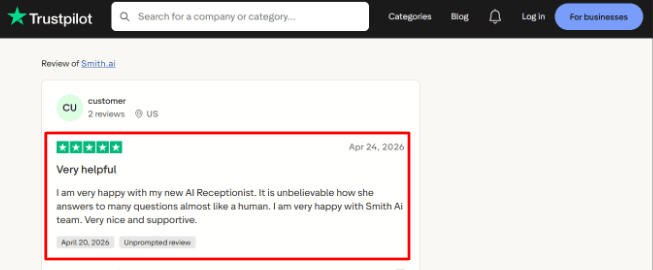
-
Calendar Integration
Smith.ai can schedule appointments through Calendly on its AI plans, while live receptionist workflows can use booking links and custom calendaring add ons. This matters because a call that ends with a booked meeting, consultation, or estimate is worth way more than a call that just takes a message. -
Lead Intake
You can build intake flows with custom questions, caller screening, and qualification rules. This is more important than basic call answering because a law firm, agency, or home service company needs different questions for every caller type. A sales call should not be handled the same way as a support call. -
Call Records
Smith.ai gives you call recordings, transcripts, summaries, spam blocking, and dashboard visibility. I also checked their BBB profile during my research mainly because cancellation policies and complaint handling can tell you a lot about long term trust.
Pros
-
Smith.ai is a strong fit for service businesses that need calls answered, screened, and converted into appointments. The AI plus live agent setup gives you way more coverage than a basic voicemail replacement.
-
It works well for law firms, agencies, consultants, home services, and similar teams where every missed call can mean lost revenue. The depth across intake, summaries, routing, scheduling, call transcripts, and CRM workflows is solid.
-
The fact that live agents are North America based matters for businesses that care about caller experience. And they publish their pricing, which makes early comparison easier before you have to sit through a sales call.
Cons
-
Smith.ai is probably the wrong pick if you only need a low cost AI answering service for simple FAQs and message taking. In that case, a lighter AI only tool is easier to justify.
-
Pricing can climb fast once live agent handoffs, overages, or add ons enter the picture. The cancellation experience should be checked carefully, especially after that Trustpilot review you shared.
-
The self service AI plan has fewer setup and optimization resources than the higher annual plans. And healthcare businesses need to verify compliance carefully because Smith.ai explicitly says it is outside HIPAA compliant PHI handling for regulated healthcare use.
Pricing
- The AI Receptionist starts at $95/month for self-service plans.
- Done-for-you AI Receptionist plans start at $500/month annually.
- Virtual Receptionists start at $300/month for 30 calls.
- Live receptionist overages can add $8.50 to $11.50 per call.
- Add-ons like appointment booking, payment collection, Spanish line, and custom calendaring may increase the final monthly cost.
Why people switch from Smith.ai
People switch from Smith.ai when the monthly cost starts feeling too high for simple call answering. The AI plus human backup model is useful, but live agent handoffs, add-ons, overages, and higher setup plans can make it expensive for smaller teams. They may also switch when they want a lighter AI-only answering service with simpler pricing and less dependence on live receptionist support.
When to Choose Smith.ai
Pick Smith.ai if your business gets valuable phone leads and you need AI answering, intake, scheduling, and human backup all in one system. It is a strong fit for law firms, agencies, consultants, home services, and other service businesses where every call has real value.
Skip it if you only need cheap call answering, simple FAQ handling, or a basic AI phone agent with minimal setup and no live agent billing risk.
For small teams in Australia, Ring Jenny can act as an AI phone receptionist that answers when the team is busy, unavailable, or outside working hours.
The main call-handling functions are also covered in this guide to an AI phone answering service.
Goodcall
Goodcall is an AI phone answering service for small businesses that get a lot of inbound calls. Think contractors, home services, appointment based shops. The kind of places where the phone rings and if you do not pick up, that customer just calls your competitor instead.
Features
- AI Call Answering
Goodcall answers inbound calls with an AI agent that can handle common questions, capture leads, transfer calls, and deal with basic customer requests. When I walked through the setup, the product felt more like a call center tool than a simple chatbot with a phone number attached.
One thing to watch is the caller experience. A Trustpilot reviewcomplained that the call started with upsell style prompts and made it really hard to reach an actual person. I am sharing the screenshot below because this is exactly the area you need to test before using it for customer support calls. 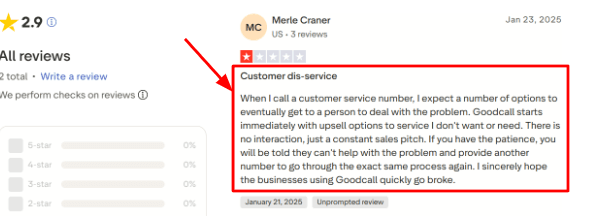
-
Call Flow Logic
Goodcall lets you build branching call flows so different callers get handled differently based on what they need, like a quote request going one way and a booking going another. This is useful when you do not want sales calls and angry customers landing in the same voicemail box. A G2 reviewsaid Goodcall is easy to use and has many features, which matched what I saw during setup. Check the screenshot below too because it helps explain why ease of use is probably one of its stronger points.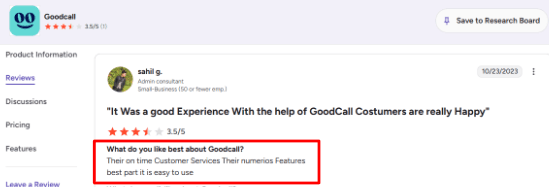
-
Calendar Integration
Goodcall can handle appointments by sending booking links, routing callers to the right scheduling flow, or connecting through Zapier, plus it has deeper integrations for some vertical tools like Boulevard for wellness businesses. I would still test the exact booking flow before relying on it fully because some setups feel simple while others need way more configuration than you would expect. -
Lead Capture Forms
Goodcall can ask callers questions to collect names, numbers, emails, service needs, and other details, then send all that information to you so you have context before calling someone back. The strong part is that the data can also move into Google Sheets, CRMs, Slack, and other apps through Zapier, so you are not just collecting info, you are actually doing something with it. -
Business Knowledge
You can train Goodcall with your business information, FAQs, service details, pricing notes, policies, and uploaded documents so the AI can answer basic questions without sending every single caller to a human. A useful detail from Microsoft is that Goodcall was built specifically around small businesses missing valuable calls, which explains why the product is so focused on call automation and local business phone workflows.
Pros
-
Goodcall is strong for small businesses that want calls answered 24/7 without hiring front desk staff, especially phone heavy businesses where a missed call is basically missed revenue. The setup is fairly simple for basic call answering, lead capture, and routing, plus Zapier support makes it easy to push call data into CRMs, Slack, Google Sheets, and follow up workflows.
-
It supports more than just basic answering too, including branching logic, contact forms, transfers, and business knowledge. The local phone number focus makes it useful for US based service businesses that depend on local calls.
Cons
-
Goodcall is probably a weak fit if you need a more human heavy answering service for sensitive support calls because that Trustpilot review I mentioned points to a real risk around callers feeling stuck in a sales like phone path with no way out. Public review volume is still pretty thin, so there is less buyer proof compared to older answering service brands.
-
Pricing can also rise quickly for businesses with many unique callers since overages are based on unique monthly customers instead of total minutes. The Starter plan has limited call history, team members, directory contacts, and logic flows, and some advanced workflows need careful setup especially when you are combining documents, skills, transfers, forms, and appointment logic all together.
Pricing
- Goodcall pricing starts at $79/month per agent on the Starter plan, with 100 unique monthly customers included.
- Growth is $129/month per agent, and Scale is $249/month per agent.
- Annual billing reduces the monthly equivalent.
- Current plans include unlimited minutes and AI tokens, with $0.50 charged per extra unique monthly customer.
Why people switch from Goodcall
People switch from Goodcall when they need smoother human handoff, more predictable pricing, or better handling for sensitive calls. Goodcall works well for simple lead capture and routing, but some businesses may find the phone flow too automated for real customer support. They may also switch if unique customer-based pricing becomes hard to estimate as call volume grows.
When to Choose Goodcall
Here is where I would actually use Goodcall. A small service business that gets frequent inbound calls and wants AI answering, lead capture, routing, and basic appointment handling all in one place, especially local US businesses, appointment led services, and teams that want phone calls pushed into simple workflows without a lot of manual data entry.
But if your callers often need a real human within seconds, you handle sensitive support issues where a bad automated response could cause real problems, or your call volume includes many unique monthly callers and pricing predictability is critical to your budget. In those cases, Goodcall might create more headaches than it solves.
RingCentral AI Receptionist
RingCentral AI Receptionist is best known for AI call answering, smart routing, appointment booking, SMS follow ups, and CRM lead capture, but what makes it different is that it feels closer to a proper phone system layer than a simple missed call bot. This is not a standalone tool you just turn on and forget, it is built for businesses that already think about call routing and multi location setups.
Features
- AI Call Answering
RingCentral AI Receptionist answers calls 24/7, handles multiple callers at once, and responds to common questions using your website, FAQs, and uploaded business details. In my setup notes, the basic answering flow felt strong, but the admin side requires patience if you want cleaner reporting and deeper customization.
I saw a similar point in a G2 review of RingCentral Contact Center where the reviewer said admin and reporting functions can feel less intuitive. I am dropping that screenshot below because it supports the setup experience well. 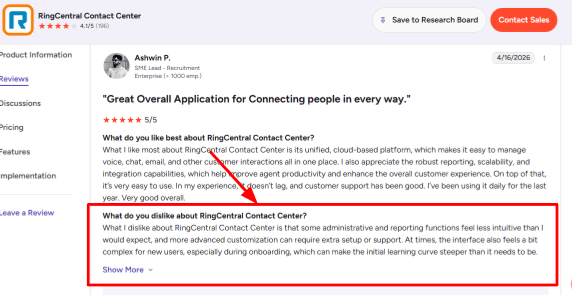
-
Smart Routing
It can route callers by location, department, person, keyword, or caller intent, which makes it useful for teams with multiple agents or offices. The stronger use case is when a caller says what they need, and the system sends them to the right person with some context.
A G2 reviewer also liked that RingCentral can connect customers to the right agent automatically and bring calls, chats, and emails into one place. That screenshot fits nicely here because this is where RingCentral feels more mature than basic call answering tools.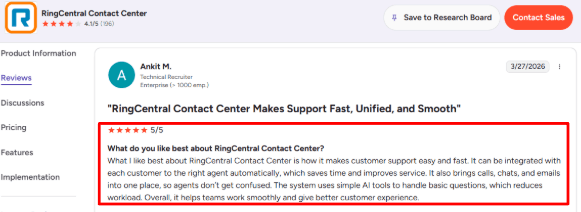
-
Calendar Integration
RingCentral AI Receptionist can connect with Google Calendar and Microsoft Outlook to book or reschedule appointments directly during the call. I would treat this as a serious buying point for service businesses because the AI can answer the call, collect all the needed details, find an open slot, and send a confirmation text without any human involvement. -
SMS Follow-Up
The tool can send texts after calls with appointment confirmations, links, forms, or business details. RingCentral has also expanded its AI into text message answering, which makes it more useful for businesses where customers naturally move between phone calls and SMS throughout their day. -
Multi-Location Setup
You can configure different hours, greetings, routing rules, and SMS responses for each of your locations, which is a lifesaver if you run a business with multiple offices that operate on different schedules. A small but important market point from TechTarget is that AI receptionists are increasingly replacing old IVR systems, and RingCentral fits that shift really well for call heavy businesses.
Pros
-
If your phone system already runs on RingCentral, the setup should feel very connected because your numbers, extensions, routing, and business context can all sit inside the same environment instead of being stitched together across different tools.
-
The routing depth is genuinely useful for teams that need caller intent, departments, and locations handled properly rather than just dumping everyone into the same queue.
-
The fact that it handles both calls and texts makes it more useful after the first interaction, and the multi location support means different offices can have separate hours, greetings, and routing flows.
-
Plus RingCentral brings a mature cloud phone system behind the AI receptionist layer, so you are not relying on a startup that might disappear next year.
Cons
-
RingCentral is probably a poor fit for tiny teams that only need basic answering because if you just want a low cost AI answering service for missed calls and simple FAQs, this may feel way heavier than necessary.
-
The setup, routing, and reporting layers make more sense when call operations are already important to your business, not when you are just getting started.
-
Usage can get expensive too since the starting plan only includes 100 AI minutes, so high call volume teams need to calculate their real monthly usage carefully before committing.
-
The admin setup takes real effort, especially for reporting, routing, and advanced customization, and availability differs by country with stronger public availability in the US and Canada while other regions like the UK, Australia, and parts of the EU are more limited.
-
Advanced workflows also push you toward higher tiers, and complex agent actions or deeper automation may require AIR Pro AIR Pro, which changes the buying decision.
Pricing
- RingCentral AI Receptionist starts at $39/month as an add-on with 100 AI minutes included.
- AIR Everywhere starts at $59/month with 100 AI minutes and works with other phone systems.
- Extra usage is sold in additional 100-minute bundles, so the final cost depends heavily on call volume and call length.
Why people switch from RingCentral AI Receptionist
People switch from RingCentral AI Receptionist when they want a simpler AI answering service without a full phone system setup. RingCentral makes sense for teams already using its platform, but smaller businesses may find the routing, reporting, admin setup, and per-minute usage harder than they need. They may also switch if they only need missed call handling, basic FAQs, and appointment booking at a lower cost.
When to Choose RingCentral AI Receptionist
RingCentral AI Receptionist is a good choice for you if you already use RingCentral, manage multiple locations, route calls across teams, or want AI answering with appointment booking, SMS, and CRM capture all working together. If you only need a simple AI answering service for a small business with low call volume and very basic FAQs then it will be unnecessary. The complexity and per minute pricing will feel like overkill.
Rosie AI
Rosie AI is mainly known as an AI answering service for small businesses that miss calls during work hours, after hours, or while teams are busy on jobs. You want an AI receptionist to answer calls, collect caller details, respond to common questions, and send useful follow up context to your team without you having to call everyone back blindly.
Features
- Business Training
Rosie can be trained on your website, FAQs, services, Google Business Profile, and other business details. In testing this kind of setup, the value really depends on how clean your source content is because if your service pages are vague or full of fluff, the AI can only be as clear as the material you give it.
I saw a similar point in a G2 reviewwhere the reviewer said there is a learning curve around how to use the platform and its functions. I am sharing that screenshot below because it matches exactly what I would watch for during setup. 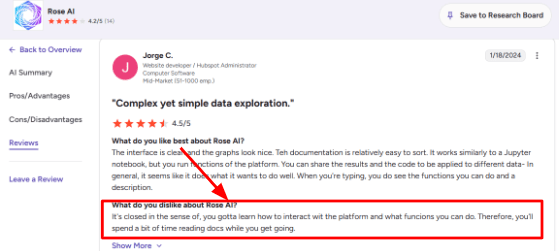
-
Call Answering
Rosie answers calls 24/7 and can handle multiple calls at the same time, which is useful for small teams that lose leads when nobody picks up. The interface itself seems designed for owners who do not want a heavy phone system. That lines up with another G2 review that praised the intuitive UI, natural language handling, and automation flow. I am adding the screenshot below because it shows why some users may find the product easy to use once the initial setup is done.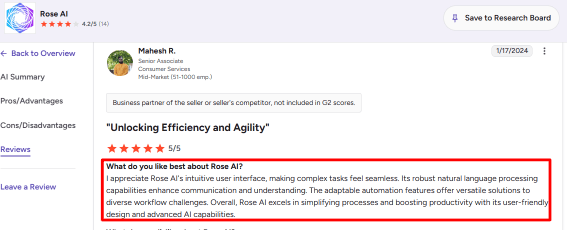
-
Calendar Integration
Rosie's higher plan can book appointments through tools like Google Calendar and Calendly, and this is one of the bigger buying points because it moves the product from basic call answering into actual lead handling. I would still test the booking flow carefully before relying on it for complex services though, because every business has different rules around availability, buffers, staff assignment, and appointment types that a simple integration might not handle well. -
Call Records
Rosie includes call summaries, transcripts, and recordings, which is super helpful when the owner is out in the field and only needs the key details from a call without listening to the whole thing. It also helps teams check what the AI actually captured, what the caller asked for, and whether follow up needs to happen quickly or can wait until tomorrow. -
Bilingual Support
Rosie supports English and Spanish across all its plans, which makes it much more useful for US and Canada service businesses with mixed language callers. This is a practical feature for plumbers, HVAC companies, law offices, real estate teams, and other local businesses that simply cannot afford to miss Spanish speaking leads.
Pros
-
Rosie is easy to understand as a product because the use case is very clear, it answers calls, collects details, and helps small businesses avoid losing leads to voicemail.
-
The starting price is low compared to hiring a receptionist or using many live answering services, and the call summaries, transcripts, and recordings make follow up easier for busy owners and field teams.
-
The English and Spanish support gives it a stronger fit for many local service businesses, and the broader AI receptionist category is growing fast with companies like Yelp entering the space according to The Verge, which means Rosie is part of a category that buyers are starting to understand and trust.
Cons
-
Rosie may be weak for companies that need a full AI answering service with advanced routing, deep CRM workflows, large team controls, or broad multilingual support because it feels better suited to simple call answering and small business lead capture.
-
Appointment booking and call transfers are not on the entry plan either, so the real cost can rise significantly if you want Rosie to take action during calls instead of just taking messages.
-
The product is focused on the US and Canada, and Rosie's own terms add important limits around geography, consent, recordings, and sensitive data that you should read before signing up.
-
Website texting costs extra, which may surprise businesses that expect web chat or SMS capture to be included, and the setup can take some learning especially if you want the AI to answer nuanced questions without sounding like a generic robot.
Pricing
-
Rosie AI starts at $49/month for the Professional plan with 250 minutes, custom message questions, English and Spanish support, call records, and mobile apps.
-
The Scale plan is $149/month with 1,000 minutes, appointment booking, direct transfers, warm handoff transfers, and texting during calls. Growth is $299/month with 2,000 minutes and training files.
-
Custom plans start at $999+/month for multi-location and high-volume needs.
Why people switch from Rosie AI
People switch from Rosie AI when they need deeper routing, stronger CRM workflows, broader integrations, or more control over complex call flows. Rosie is useful for local service businesses, but teams with multiple departments, detailed intake, or advanced follow-up needs may outgrow it. They may also switch when appointment booking, transfers, or higher call volume push them into more expensive plans.
When to Choose Rosie AI
Pick Rosie AI if you run a local service business and mainly need help answering missed calls, capturing caller details, sending summaries, and handling simple appointment workflows. Skip it if you need deep CRM workflows, complex routing, broad multilingual support, or advanced team-level call handling.
Dialzara
Dialzara is a low cost AI answering service for small businesses that miss calls during busy hours or after closing. It is worth considering if you want 24/7 call answering, appointment booking, call summaries, and basic lead screening without hiring a receptionist, especially when your budget is tight but you cannot afford to keep losing leads to voicemail.
Features
- Dialzara answers inbound calls 24/7 and can handle multiple calls at the same time, which felt most useful to me for businesses where every missed call can become a lost lead like home services, real estate, legal intake, or local appointments.
I also saw a
Trustpilot review praising its business and tech support, especially a person named Adam. I am dropping that screenshot below because support quality really matters when an AI receptionist is handling your actual customer calls. 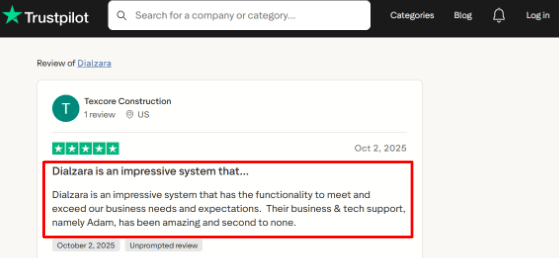
- Calendar Integration
Dialzara can connect with Google Calendar and book appointments based on your real availability. The useful part is that it can collect caller details first and then offer times that actually fit your business calendar, so you are not double booked or scrambling to adjust.
The pricing page also makes it clear that wider custom calendar support is mostly tied to higher plans, so teams using Outlook or Apple Calendar should check this before committing to setup.
- Call Screening
Dialzara can ask caller questions, detect intent, block known spam numbers, and route calls based on rules you set up. This is really helpful when your business gets a mix of new leads, current customers, vendors, sales reps, and spam calls all on the same line.
The setup can feel a little heavy when you start writing caller rules because the answer quality depends a lot on how clearly you train the agent, which takes some trial and error.
-
Call Summaries
Every plan includes call recordings, summaries, and SMS or email notifications, and I like this because your business does not need to replay every single call just to know who called, why they called, and what needs follow up. This is especially useful for owners who take calls between jobs or only have a small admin team. -
AI Training
Dialzara lets you train the AI with business details, documents, scripts, and website information, and its newer feature page points to broader AI agents across voice, text, and chat. That matters because some older comparisons still describe it mainly as a basic phone answering tool when it has evolved past that. You can check the Dialzara features page for confirmation.
Pros
-
Dialzara starts at $29 per month, which makes it much easier to test than many AI answering services, and for a low call volume business this is a practical entry point.
-
It includes call recordings, summaries, and SMS or email notifications on every plan, and the Google Calendar booking is really useful for appointment led businesses that want calls converted into scheduled slots.
-
The training guide gives you good control over tone, caller questions, transfer rules, and business instructions, plus spam blocking and caller screening help reduce time wasted on low quality calls that were never going to convert anyway.
Cons
-
Dialzara is probably a weak fit if you need a full AI answering service with human backup, complex escalation, or sensitive call handling because for that scenario a more managed answering service with real people feels safer.
-
The $29 plan only includes 60 minutes, so your costs can rise quickly once call volume grows beyond very light usage.
-
Warm transfer does not start until the Pro plan, so the cheapest plan may feel limited for sales calls or urgent service requests where you need a live person.
-
Businesses using Outlook, Apple Calendar, or custom booking systems should check calendar support carefully before choosing it, and healthcare or regulated businesses should verify HIPAA, BAA, and sensitive data terms directly since the public privacy policy does not make that simple enough to assume.
Pricing
-
Dialzara starts at $29/month for Business Lite with 60 included minutes.
-
Business Pro costs $99/month with 220 minutes.
-
Business Plus costs $199/month with 500 minutes.
-
All plans include a 7-day free trial, call recordings, call summaries, SMS and email notifications, and 24/7 availability.
-
Overage is $0.48 per minute, so high-call-volume teams should calculate real monthly cost.
Why people switch from Dialzara
People switch from Dialzara when they need more call minutes, stronger handoff, deeper integrations, or advanced reporting. Dialzara is affordable and easy to test, but the lower plans can feel limited once call volume grows. They may also switch if they need live human backup, multi-location routing, complex escalation, or support beyond basic appointment booking and call summaries.
When to Choose Dialzara
Dialzara makes sense for a small business with low to mid call volume that just needs after hours coverage, call screening, and basic appointment booking. It is less suited for complex calls, regulated industries, multi location routing, or anything beyond Google Calendar
Conclusion
The best AI answering service really depends on what kind of business you run and how much call support you actually need.
Smith.ai is the strongest choice for professional services that need serious lead intake and real human backup when the AI gets stuck. Goodcall fits local businesses that want simple AI call handling with booking support and do not mind the unique customer pricing model. RingCentral AI Receptionist works well for teams that already use business phone systems and want something that integrates natively. Rosie AI is a solid pick for solo owners and home service businesses where calls are straightforward and repeatable. Dialzara is the easiest budget option for basic 24/7 call answering when you are just getting started and watching every dollar.
For most small businesses, start with the tool that matches your call volume, your booking needs, and your budget. You can always upgrade later as your business grows and your call handling needs become more complex. The important thing is to actually test one instead of just letting those calls keep going to voicemail.
Methodology
For this guide, we tested each AI answering service like a real small business would. We checked call handling, missed-call follow-up, lead capture, pricing, setup effort, integrations, and support quality. We also read recent reviews, pricing pages, and use-case notes to spot gaps that do not show up in demos.
FAQs
How do I choose an AI answering service for my business?
Choose based on what happens after a call. Smith.ai suits human fallback, Goodcall fits simple routing, and Rosie AI is built for local service work. Check booking, escalation, transcripts, and integrations before deciding.
What is the best AI answering service in 2026?
Smith.ai, Goodcall, and RingCentral AI Receptionist are strong options for different needs. Smith.ai offers human backup, Goodcall focuses on straightforward routing, RingCentral suits existing users, while Dialzara and Rosie AI are worth comparing for tailored call handling.
What mistakes should I avoid when buying an AI answering service?
The biggest mistakes are skipping live call tests, forgetting after-hours rules, and choosing a plan before estimating call volume. Review recordings, spam handling, appointment confirmations, cancellations, and the exact cost of human escalation.
How can I test an AI receptionist before replacing my current phone setup?
Run a two-week pilot using real enquiries. Test lead capture, wrong-number handling, noisy calls, booking changes, and urgent transfers. Compare call recordings and transcripts with your current missed-call rate before moving every number.
Can an AI receptionist manage after-hours calls and urgent enquiries?
Yes, when rules are set clearly. It can answer common questions, capture requests, send confirmations, and route urgent callers to an on-call person. For medical, legal, or safety emergencies, use immediate human escalation.
When is a human answering service a better option than AI?
Choose human cover for sensitive, high-value, or complex calls that need judgement, reassurance, or detailed advice. A blended setup works well when AI handles routine leads and a person takes escalations or disputed payments.
Summarize this content with AI


