

Introduction
If your phone rings while you’re on a job, in a meeting, or asleep, a lead can vanish fast. A good AI phone receptionist for small businesses answers calls, routes them, and books appointments without friction.
The shortlist of AI phone receptionist tools keeps changing, so it’s worth choosing based on real call behavior rather than marketing claims. Zendesk’s 2026 contact center trends says 90% of CX trendsetters see voice AI driving the next era of service: 6 contact center trends to watch.
For this best-of guide, I did hands-on testing and combed through review portals like G2 and Capterra for repeat patterns. I also dialed each tool’s demo line to check latency, barge-in handling, and human handoff quality, with screenshots and links so you can evaluate the best AI phone receptionist for your small business.
AI Phone Receptionists for Small Business: Tool Comparison
| Use case | Tool name | Why I chose this tool |
|---|---|---|
| General AI receptionist for small businesses | Ring Jenny | I chose this because its focus is close to what many small businesses need from an AI receptionist: handling missed calls, answering common questions, capturing customer details, and supporting appointment or job booking. It is a relevant example for businesses that want help with after-hours calls without adding a full-time receptionist. |
| After-hours call answering | Rosie AI | When I went through the feature summary, this looked useful for businesses that need a virtual receptionist to cover after-hours calls and communicate in more than one language. Its 24/7 and bilingual focus makes it a practical example of AI call answering when a team cannot always respond to inbound calls itself. |
| Lead qualification and guided call flows | Goodcall | I chose this for lead capture because its custom call logic can shape what the AI asks, what information it collects, and where a caller goes next. That makes it a useful example for service businesses that want an AI answering service to qualify enquiries before a staff member follows up. |
| Team phone system and call routing | RingCentral | When I compared the phone-system options, this looked more relevant for teams that need AI call handling alongside routing across users or locations. I included it to show that an AI receptionist can sit within a wider business phone setup, rather than only work as a stand-alone virtual receptionist. |
| Simple AI phone answering for local businesses | Dialzara | I chose this as a simple AI phone answering example for local businesses that mainly want calls answered without a complex rollout. Its low-cost call answering position makes it useful for readers comparing a more basic AI receptionist option for routine questions, missed calls, and initial enquiry capture. |
Deep Dive into Individual Tools: AI Phone Receptionist
Ring Jenny
Ring Jenny is a strong pick for small businesses that need an AI phone receptionist built around real customer calls in Australia.
It covers the essentials: answering missed calls, handling common questions, collecting lead details, and passing urgent enquiries to the right person.
Its flexible call packages, privacy conscious setup, and reasonable pricing make it a practical option for smaller teams that want reliable phone coverage without hiring a full time receptionist. Ring Jenny's AI phone receptionist can answer inbound calls, take messages, and collect the details staff need for a useful follow-up.
-
Business trained call answers
You can train Ring Jenny around the questions customers ask most often, such as your services, areas covered, opening hours, and what counts as urgent.
I recommend adding the basics first so callers get useful answers without your team repeating the same information every day. For a plumber, that could mean treating a burst pipe as urgent while logging a routine quote request for a callback.One practical feature of its AI phone receptionist is call forwarding from an existing business number, so customers can keep calling the number they already know. It can then answer routine enquiries and send a summary, recording, or transcript to the team.
-
Custom caller details
Ring Jenny can collect the information your team needs before returning a call, such as the caller’s name, number, suburb, service needed, and best time to speak.
Keep this short so the conversation feels natural. A cleaning business could ask whether the caller needs a regular clean, an end of lease clean, or a one time deep clean. -
Team and enquiry routing
Small businesses often have one number for everything, which means urgent calls, sales enquiries, accounts questions, and general support requests all reach the same person.
Ring Jenny helps create a clearer call flow so the right enquiry reaches the right team member. For a trades business, urgent repair requests can go to the on call owner while general enquiries are passed to the office. -
Automatic call summaries and follow ups
Every call should leave your team with a clear record of who called and what they needed. Ring Jenny can help send call summaries and follow up details to your team after the conversation.
This is especially useful when you are on site, serving a customer, driving between jobs, or simply unable to answer your phone yourself. -
Flexible packages, language, and privacy
A small business should be able to choose a call package that matches the number of calls it receives instead of paying for a full time receptionist from day one.
Ring Jenny also gives growing businesses a more considered setup around language, privacy, and GDPR expectations where relevant, which matters when you deal with customers outside Australia too.
Pros of Ring Jenny
-
Hands-on setup without extra onboarding fees
For a small business owner, setting up an AI phone receptionist can feel like another technical job on an already long to-do list. Ring Jenny’s team can help configure the receptionist, train it on services, business hours, common questions, and booking rules, so you are not left trying to build call flows from scratch. -
Lower cost than hiring a receptionist
This is one of Ring Jenny’s biggest advantages for small businesses. It can give you call coverage without the ongoing cost of recruiting, training, managing, and paying a full-time receptionist. For businesses where even one missed job, booking, quote request, or consultation can be valuable, the monthly cost can be easier to justify. -
Answers missed and after-hours calls
Many small businesses lose enquiries because calls come in while the owner is with a customer, driving between jobs, working after hours, or simply unable to answer. Ring Jenny can answer those calls immediately, collect the caller’s details, handle basic questions, and reduce the number of people sent straight to voicemail. -
Can book appointments while the caller is still engaged
Instead of taking a message and hoping someone calls back before the customer tries another business, Ring Jenny can help book an appointment during the call. This is particularly useful for service businesses that rely on consultations, site visits, bookings, quote enquiries, or follow-up calls to win work. -
Works with your existing business number
Small businesses do not need to replace the phone number customers already know. Ring Jenny can work through call forwarding, allowing it to answer missed or redirected calls while you still pick up personally whenever you are available. That makes it easier to introduce an AI phone receptionist without disrupting your existing customer experience.
Cons of Ring Jenny
-
Not suitable for every type of conversation
Ring Jenny is best for routine enquiries, lead capture, booking requests, and common customer questions. Highly technical, emotional, sensitive, or unusual conversations may still need the business owner or an experienced staff member to step in. -
Cannot provide professional or regulated advice
For legal, medical, financial, insurance, or other regulated enquiries, the AI should capture the caller’s information and arrange a follow-up rather than give advice. Small businesses in these industries will need clear boundaries around what the receptionist can and cannot say. -
Not built for relationship-led sales or outbound campaigns
Ring Jenny is designed primarily for incoming calls, missed-call handling, and appointment booking. It is not the right replacement for detailed sales calls, negotiations, complex recommendations, or cold-calling campaigns where a human conversation and relationship-building are essential.
RingCentral AI Receptionist
RingCentral AI Receptionist is known for AI call answering inside the broader RingCentral phone system. It works best for teams that want calls answered, routed, summarized, and followed up without hiring more front-desk staff.
Features
-
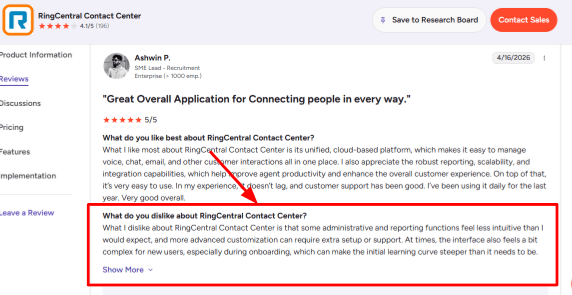
AI Call Routing This was the most crucial feature in my set-up notes regarding RingCentral. They can say what they require, and then the AI can route them according to the department, individuals, places, keywords, or intentions of the callers. It is beneficial for businesses that have support departments, sales departments, billing departments, and various offices. Its setup can be more complicated than that of an AI answering tool. I saw the same pattern in a G2 review, where the user said admin and reporting functions felt less intuitive during onboarding. I am sharing that screenshot below so readers can judge the learning curve for themselves.
-
Agent Handoff
RingCentral AI Receptionist could route the call to the correct individual, along with other information about the caller, such that the human agent did not have to begin from scratch. This would work well in situations where the AI captured the caller’s identity, purpose of the call, priority level, and whether an appointment was needed before routing the call. This matched the second G2 review you shared. It highlighted how RingCentral routed callers to the correct agent and kept all calls and chats in one location. That screenshot is worth placing below this section because it supports the real workflow benefit.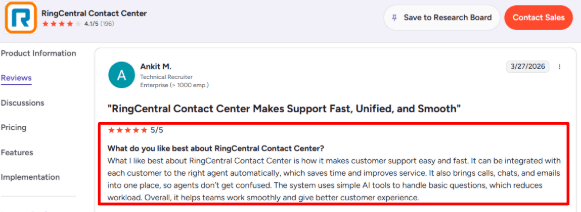
-
Calendar Integration
The RingCentral AI Receptionist makes bookings and scheduling via Google Calendar and Microsoft Outlook. During testing, at this point, this product starts looking like a real-life phone receptionist because it is able to take the call, get the information, schedule a slot in the calendar, and even send the appointment confirmation text message afterwards. -
SMS Follow-Up
Text messages may be sent by the product after the calls for such purposes as booking confirmation, link, forms, etc. It works well in a case when people contact the business and do not want to write down any information during the phone call itself. It minimizes the possibility that customers will simply forget about the necessary step to take. -
Business Knowledge
RingCentral can form answers out of web content, FAQ, uploaded files, working hours, services, and policies of the business. This is important because now there is an opportunity to use an AI receptionist as a substitute for outdated call center IVR menu systems, as covered in this TechTarget report. The quality of answers still depends on how clean the source material is.
Pros
-
AI Receptionist by RingCentral integrates into companies that have RingCentral since the calls, routing, users, extensions, and phone processes all remain in one location. Hence, it is more convenient than implementing a new AI phone receptionist in an already existing RingCentral setup.
-
RingCentral’s solution allows for advanced routing needs between different departments, agents, and geographical locations, and even queues.
-
One workflow may involve answering calls, scheduling appointments, SMS follow-ups, lead generation, and finally handing over the conversation to a human agent.
-
This multilocation approach suits clinics, agencies, real estate organizations, home services providers, and even companies operating in several regions.
-
With its established phone technology, the choice of RingCentral is justified when the AI becomes the first voice on the line.
Cons
-
RingCentral AI Receptionist is less suitable for those who only require a basic AI telephone receptionist for their small organization requiring only call answering capabilities. A more simplified product may be a better choice if the organization is small and doesn’t require many advanced functionalities.
-
Call volume pricing will apply to RingCentral because their public package comes with 100 AI minutes and additional minutes come in bundle purchases.
-
The admin experience can feel dense for new users, especially if the team has complex routing or reporting needs.
-
Advanced automation may require AIR Pro, which RingCentral positions separately for deeper workflows and integrations.
-
Public access is based on geographic locations where the United States and Canada have better access, plus selected availability in the U.K., Australia, and EU countries listed by RingCentral.
Pricing
- RingCentral AI Receptionist starts at $39/month with 100 AI minutes for RingCentral users in the U.S. and Canada.
- AIR Everywhere starts at $59/month with 100 AI minutes and works with other phone systems.
- Extra usage is sold through 100-minute bundles, so high-volume teams should estimate monthly call minutes before choosing it.
When to Choose RingCentral AI Receptionist
Select RingCentral AI Receptionist if you’re using RingCentral in your organization, have several departments, experience heavy incoming calls, or require AI-powered call routing with appointment scheduling and SMS reminders.
Skip RingCentral AI Receptionist if you're looking for an extremely basic virtual phone receptionist solution with easy setup, fixed pricing, and minimal system configuration.
For appointment-heavy teams in Australia, Ring Jenny can work as an AI appointment answering service that helps handle callers before they book.
For a broader view of this category, see this overview of an AI receptionist.
Goodcall
Goodcall shines as an AI receptionist solution designed for small businesses that prioritize answering calls, capturing leads, and satisfying callers’ basic needs without increasing front-desk personnel.
Features
-
AI Call Answering
Goodcall handles incoming calls, asks the basics, and answers based on the information you provide when setting up your company. While setting up was quite easy for me, the experience of a caller is very much dependent on the quality of your call flow. This is also where the Trustpilot review felt relevant. They found it annoying that their call started with sales pitches and made it difficult to get through to a person, so I would put the picture right after this paragraph as an actual warning.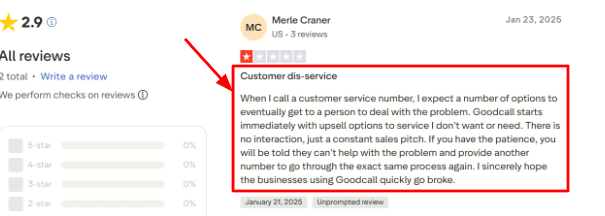
-
Lead Capture
Goodcall could collect the name, telephone number, email address, and other lead information from the caller. This collected information could then be sent to the business by the application using notifications or workflows.
I’d treat the G2 review more positively here. The review highlights easy usability, good customer services, and multiple features. The screenshot in question can be placed beneath this topic since it involves lead capturing.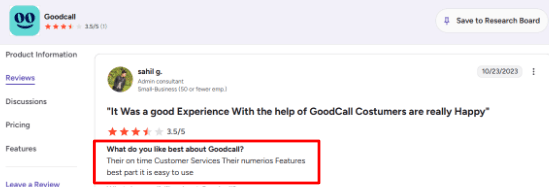
-
Call Routing
It would be possible to connect calls to the appropriate person, department, or action using directory contacts and logic branching in Goodcall. Such an opportunity will help companies organize their sales, support, billing, or location-based routing. The problem in the installation process for me was related to the logic. In case it is messy in the company's routing system, the AI may seem unnatural to the caller. -
Calendar Integration
Appointment requests could be made using Goodcall either through booking link integration, call transfer, taking a message or linking with the booking process. Integration differs from one application to another; hence, it is advisable that one considers what exact booking tool is being used before opting for it. This method works well when requests are rather straightforward such as quote calls. -
Workflow Automation
Goodcall links call results to applications such as CRMs, Google Sheets, Slack, and calendars using Zapier. In other words, completion of a call can lead to creation of a lead entry, a Slack notification, an additional row on a spreadsheet, or another follow-up task. A useful detail from a Microsoft profile is that Goodcall was created based on problems faced by small businesses when missing their calls.
Businesses focused mainly on inbound lead capture may also want to compare an AI phone answering service.
Pros
-
Strong for missed-call recovery: Goodcall works well for businesses that lose leads because no one picks up the phone. It can answer after hours, capture details, and keep the caller moving.
-
Simple no-code setup: You can build a working AI receptionist without engineering work.
-
Useful lead workflows: Caller details can be collected, organized, and pushed into other tools.
-
Good routing depth: Departments, contacts, transfers, messages, and branching logic give teams more control.
-
Unlimited minutes model: Goodcall’s current plans include unlimited minutes, which can be easier to plan around than per-minute billing.
Cons
-
Weak fit for urgent human support: Avoid Goodcall if your callers need to connect with someone immediately in situations where confidentiality, urgency, or stress is involved. From your Trustpilot review, we can see how an AI routing system can create problems for callers.
-
Pricing can rise with caller volume: Goodcall charges overages after the included unique monthly customer limit, according to its pricing page.
-
Starter plan is limited: The entry plan has limits on logic flows, team members, directory contacts, and call history.
-
Setup quality matters a lot: Bad prompts, weak documents, or confusing call flows can create a poor caller experience.
-
Public review volume is thin: There are fewer public reviews than many older phone answering and virtual receptionist tools.
Pricing
- Goodcall currently starts at $79/month per agent on the Starter plan, with annual billing shown at $66/month per agent.
- Growth is listed at $129/month per agent, and Scale is listed at $249/month per agent.
- Plans include unlimited minutes and AI tokens, with usage based on unique monthly customers.
- Extra unique customers are billed at $0.50 each after the included monthly allowance.
When to Choose Goodcall
Select Goodcall if you manage a local service business wherein missing calls, quote requests, appointment requests, and leads matter on a daily basis. Goodcall is a good fit for people seeking an AI phone receptionist with features like routing, forms, call summaries, and workflow automation.
Skip Goodcall if the callers always require immediate human intervention, complicated decision-making, or a quick connection to a live person.
Rosie AI
Rosie AI is most popular as an AI virtual phone receptionist solution for local small business. Choose it when you need missed call handling, lead capturing, and basic query management without hiring a dedicated phone operator.
Features
-
Call Answering
Rosie AI is always online to take calls and can communicate with several people simultaneously. For me, such functionality seems most relevant to plumbers, HVAC services, agencies, real estate offices, and other companies which may receive many calls while being busy elsewhere. As I was exploring Rosie AI's functionality flow, I came to a conclusion that despite simplicity of the initial settings, there is something unique about the service's approach. A G2 review you shared mentioned a similar learning curve, where the user had to spend time reading docs to understand what functions were available. I’d place that screenshot below this point.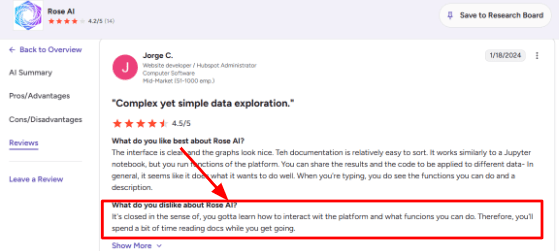
-
Smart Training
Rosie has the capability of scanning your website and Google Business Profile and using this data to respond to questions asked by the callers. In addition to this, you can create custom FAQ answers, set up message templates, and also add business details such as opening hours and location. The second G2 review that you've added aligns with the above-mentioned feature. The reviewer appreciated the user interface, the natural language processing and automation aspect of the app, which looks quite reasonable in this particular scenario.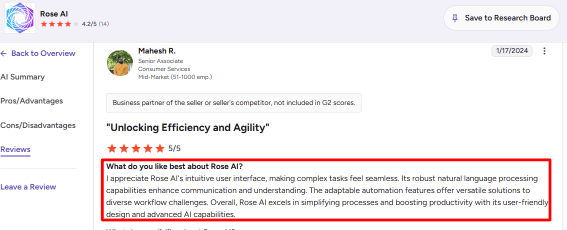
-
Calendar Integration
On higher plans, Rosie can link up to Google Calendar, Calendly, Acuity, and Appointlet. This gives callers the ability to inquire about their availability and schedule appointments without any human assistance. This is when the application begins to resemble a receptionist more than an answering machine. The one downside is that bookings cannot be done fully on the lowest tier plan. -
Call Summaries
Rosie generates call summaries, transcriptions, and recordings post-call. This is helpful for those owners who need the essential information without listening through all the conversations. With respect to phone AI, there's an interesting compliance factor that often gets neglected during reviews. The FCC rule says AI-generated voices are treated as artificial voices under robocall law, so businesses should be careful with consent, caller transparency, and recording policies. -
Mobile Inbox
Rosie allows the user to review calls, messages, transcripts, recording, and alerts using either their iOS or Android app. This is something that I would recommend especially in situations where the business is owner-managed since the process will be initiated by a call anyway.
Pros
-
Rosie is easy to understand for local service businesses. It answers calls, captures details, filters spam, and helps owners follow up faster.
-
The $49/month starting price is approachable for small businesses testing AI phone answering.
-
Website and Google Business Profile scanning can reduce setup time.
-
Call summaries, transcripts, and recordings make follow-up easier.
-
English and Spanish support gives it a practical edge for US local businesses.
Cons
-
Avoid it in case your requirements include a phone system that can support more advanced routing, omnichannel communication, in-depth analytics, and stringent compliance features.
-
Full appointment booking is only available on higher plans.
-
Pricing can feel tight if call volume grows because plans include monthly minute limits.
-
Recording and SMS compliance need care, and Rosie’s terms put much of that responsibility on the business.
-
Independent review coverage is still limited compared with larger phone and contact-center tools.
Pricing
- Rosie AI starts at $49/month for the Professional plan, which includes 250 minutes, message taking, spam detection, bilingual English and Spanish support, and mobile app access.
- Scale costs $149/month and adds 1,000 minutes, appointment booking, direct transfers, warm handoffs, and texts during calls.
- Growth costs $299/month with 2,000 minutes and training files. Custom plans start at $999/month.
When to Choose Rosie AI
Consider going with Rosie if your business is relatively small, and all you need is answering business calls and managing leads through a chatbot. It works perfectly for business types that depend on a lot of phone calls like home services, real estate, accounting offices, legal services, property management services, and other small agencies.
Skip this tool if you are looking for a solution for larger contact centers, advanced customization options, extensive compliance support, and multi-channel capabilities.
Dialzara
Dialzara is popular due to its cost-effective service for AI phone receptionists used by smaller companies that require round-the-clock answering services. Consider this product if you want to handle calls, schedule appointments, route calls, and receive summary reports all without employing front desk personnel.
Features
-
AI Receptionist
Dialzara receives the incoming call, asks basic questions, records messages and directs calls according to the rules you establish. The product gave me the impression of being designed for smaller teams looking for quick coverage. The review on Trustpilot also highlighted Dialzara's customer service and technical support, with particular regard to their staff member called Adam. I would include the screenshot above this section, since the importance of the technical support becomes apparent when training an AI phone receptionist.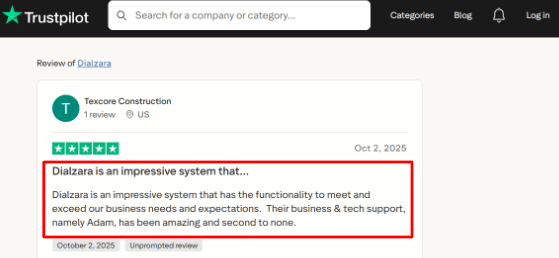
-
Call Routing
You can set up different routes depending on whether it's a sales, support, urgent call, or anything else. Useful if there is a single telephone number getting calls of varying kinds, so the client could speak to the appropriate representative. The somewhat complicated part is the decision-making about when the call should be transferred and when the message should be created. -
Calendar Integration
Using Dialzara, a business can schedule an appointment using Google Calendar. Before confirming the time slot, the AI can see if that time works for the business. For businesses whose work relies on appointments, this is perhaps the most important feature because the AI can convert calls to bookings. Before launching a full-fledged version, I would run a test because there might be rescheduling criteria, buffer times, and other special circumstances to consider that might make the process messy. -
Call Summaries
Following each conversation, Dialzara can generate notes and share recording files along with notifications about the call with the business. This will be helpful for calls when the information is crucial. A broader point here is timing. Customer service teams are under pressure to adopt AI, and Gartner reported that 91% of service leaders surveyed felt executive pressure to implement AI in 2026. -
Knowledge Base
Dialzara allows adding company information, FAQs, website content, and special questions. From my experience, the quality of answers provided by Dialzara depends greatly on how well I can set it up initially. For example, the initial setup is fast. However, better results can only be achieved with a list of questions and services, prices, etc.
Pros
-
Dialzara offers low costs per month and therefore is easy to try out compared to many other solutions on the market designed to replace phone receptionists using artificial intelligence technology.
-
The setup flow is simple enough for small teams that do not have a technical operator.
-
It includes useful basics like call recordings, summaries, message taking, and phone notifications.
-
Google Calendar booking makes it practical for appointment-heavy businesses.
-
The pricing page is clearer than many answering services, with published plans and overage rates.
Cons
-
Avoid using Dialzara as your core AI phone receptionist if you are planning to build an extensive enterprise contact center environment. This solution is best suited for simple call answering for smaller organizations.
-
The $29 plan includes only 60 minutes, so call-heavy businesses may outgrow it quickly based on Dialzara’s pricing page.
-
Warm transfers are not available on the lowest plan.
-
The AI quality depends heavily on how well you train the knowledge base.
-
Some calendar, CRM, and multilingual details should be verified before buying because plan-level access can matter.
Pricing
- Dialzara starts at $29/month for Business Lite with 60 included minutes.
- Business Pro is $99/month with 220 included minutes.
- Business Plus is $199/month with 500 included minutes.
- Overage is listed at $0.48/minute.
- It also offers a 7-day free trial, no setup fee, and no long-term contract.
When to Choose Dialzara
Consider choosing Dialzara if you are running a local service company and need an AI phone receptionist for managing your after-hours, missed, and lead calls and making appointments. This is ideal for sole proprietors, small practices, and agencies.
Skip it if you have complicated requirements for your call center operations, require extensive compliance documentation, need extensive CRM integrations, or need human receptionists for critical conversations.
IONOS
IONOS offers an affordable phone answering service powered by artificial intelligence to answer incoming calls for your business 24 hours a day. Use this service if you need call answering, missed call follow-ups, basic call summaries, appointment scheduling capabilities, and a fast integration process using your website or Google Maps page profile.
Features
-
Call Answering
IONOS will be able to attend to the incoming calls for your business during peak business times, out-of-office days, or holidays. The initial testing on the setup process showed one definite advantage that it was designed for those who lost opportunities due to unanswered calls. -
Website Setup
This AI can retrieve business information from your website or Google Maps page. While this can simplify the entire setup process, you still need to pay attention to any data imported from your website (PDFs, images, services with poor formatting). This is also where I would watch the broader IONOS account experience. One Trustpilot review mentioned extremely slow file uploads, and I am sharing that screenshot below because it fits the setup friction a buyer may want to check.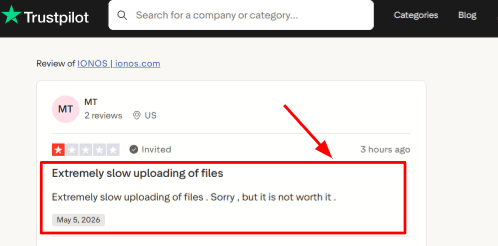
-
Support Access
IONOS has 24/7 support, which matters because phone forwarding, call routing, and assistant setup can get confusing for non-technical users. A Trustpilot reviewer said support helped fix a confusing issue and showed them how to handle it next time, which lines up with why a larger vendor can feel safer for SMBs. The screenshot below gives useful context.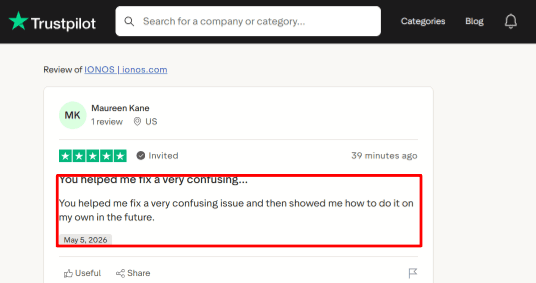
-
Calendar Integration
Appointment scheduling comes with the higher tiers offered by IONOS. This means that the receptionist could help callers shift from inquiry to booking mode. I will conduct thorough tests before deploying this capability due to differences in restaurant booking and third-party booking processes. -
Multilingual Calls
IONOS offers multilingual support where language changes may occur throughout the course of the call. While this may come in handy in situations where local businesses cater to clients using different languages, further tests need to be conducted to ensure that customer phrases are understood by voice AI systems.
Pros
-
Low starting price: IONOS starts at $9/month in the US, which makes it one of the cheaper AI phone receptionist options for small businesses. That price is useful for basic missed-call coverage.
-
Fast setup from existing business data: The website and Google Maps setup flow can save a lot of manual work.
-
Good SMB fit: It suits local service businesses, restaurants, consultants, and small teams that need simple phone coverage.
-
Backed by a large vendor: IONOS already serves millions of SMBs, and reports around its Newo.ai partnership show this is part of a broader AI push.
-
Phone plus website chat: The included website chat agent gives small businesses another way to handle basic customer questions.
Cons
-
Avoid it for regulated healthcare: IONOS should not be the first pick for medical practices that need a HIPAA-ready AI phone receptionist. Its own HIPAA page says IONOS does not provide qualifying HIPAA-compliant services.
-
Entry plan is limited: The $9/month plan includes only 30 calls, so active businesses may hit extra usage charges quickly.
-
Advanced features cost more: Appointment scheduling and outbound calls are available on higher plans.
-
Setup still needs checking: The AI can import website data, but you should manually review services, pricing, hours, and FAQs before going live.
-
Limited AI Receptionist reviews: Most public IONOS reviews are about hosting, domains, or support, so buyer feedback specific to the AI receptionist is still thin.
Pricing
- IONOS AI Receptionist starts at $9/month in the US with 30 calls included and $0.49 per extra call.
- The $19/month plan includes 100 calls, outbound calls, and appointment scheduling.
- The $29/month plan includes unlimited calls.
- UK pricing starts at £9/month, with higher plans at £19/month and £29/month.
When to Choose IONOS
Consider IONOS for a small business with a need for budget-friendly coverage 24/7 via phone support without a complicated setup. This system suits companies which mainly require call answering, summarization, routing, chats on the site, and appointment scheduling.
Skip it when healthcare compliance, complex call center workflows, CRM routing, and a highly-reviews receptionist tool are needed.
Quo
Quo is famous as a phone system for business featuring AI-powered call handling, shared texting features, and team inbox. It works well when you require an AI-powered phone receptionist plus one inbox for all communications with your clients.
Features
-
Shared Inbox
Quo places calls, messages, voicemails, recordings, and internal notes into shared inboxes. For me, using such a workflow proved helpful in small teams since all team members had access to the same conversation without the need to ask each other whom the client talked with. One small detail felt clunky. A G2 review also mentioned that marking a desktop text as read requires clicking Done, which removes it from the message list. I would place that screenshot below this point because it shows a real workflow issue.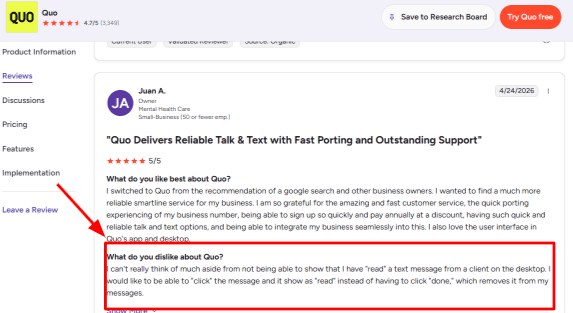
-
Business Texting
Quo works perfectly for businesses moving out of landlines since one can port his number to the system and subsequently make and send text messages through mobile and desktop devices. It also offers an option for automated text replies on missed calls, voicemail messages, and texts sent to the number. The second G2 review fits here. The user liked porting their old landline, texting from a cell phone, and using auto-replies as a sole proprietor. That screenshot is worth showing because it explains the practical value better than a feature list.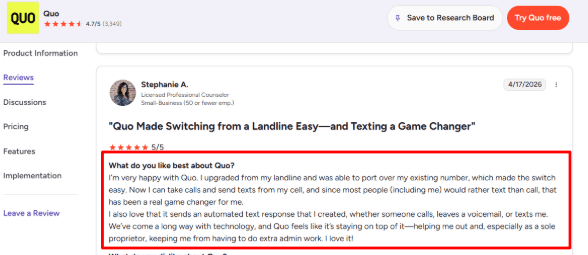
-
Sona AI Agent
Sona has the ability to handle calls, receive messages, take down information about callers, provide answers to questions based on a knowledge base and even transfer calls. I find its integration in call flows interesting and helpful, allowing it to act as a backup to the business when calls occur out of office hours. -
After-hours Availability
Quo is a good solution to consider in cases where a business requires support on their phones outside of working hours. With Quo, call flows can be created where callers listen to the menu, interact with Sona, leave messages and connect with the appropriate individual. It is practical for businesses with localized teams that miss leads after 5 p.m. -
CRM Integrations
Quo connects with tools like HubSpot, Salesforce, Zapier, Make, Slack, Google Contacts, Zoho CRM, Pipedrive, Jobber, Attio, and Gong. One useful context point is that Quo is the new name for OpenPhone, and a PRNewswire announcement tied the rebrand to its AI front-office direction.
Pros
-
Strong for small teams: Quo is a good fit when calls and texts need to be handled by more than one person. The shared inbox makes ownership, follow-ups, and customer history easier to track.
-
Easy number porting: Existing landline or business numbers can be ported, which makes switching less disruptive.
-
Useful AI receptionist: Sona can answer calls, take messages, capture lead details, and handle common questions.
-
Good US and Canada fit: Unlimited calling and messaging in the US and Canada makes pricing easier to understand for local businesses.
-
Solid CRM ecosystem: HubSpot, Salesforce, Zapier, Make, Jobber, and Slack support make it easier to fit into existing workflows.
Cons
-
Weak fit for appointment-first teams: If the main need is an AI phone receptionist that books meetings deeply around calendars, payments, packages, and appointment rules, Quo can feel too phone-system-first. It is stronger for calls, texts, inboxes, and routing.
-
Sona usage costs extra: Sona includes limited free credits, and heavier AI call handling needs paid credit bundles.
-
Messaging setup has fees: US carrier registration can add setup and monthly messaging fees, as shown on Quo’s pricing page.
-
Some AI features need higher plans: AI call tags and broader AI summaries are tied to higher tiers.
-
Desktop message handling has quirks: The G2 review about read status shows that small inbox actions may feel less natural for some users.
Pricing
Quo starts at $15/user/month on annual billing, or $19/user/month on monthly billing. Business costs $23/user/month annually, and Scale costs $35/user/month annually. Extra phone numbers cost $5/month each. Sona AI includes limited free credits, with paid bundles starting at $25/month for more AI-handled calls.
When to Choose Quo
Use it if you want a modern business communication phone system that incorporates call answering using AI technology, messaging together, phone number transfers, call routing, and integration with the Customer Relation Management.
Skip it if you are searching for a solution that can integrate with calendars deeply and manage bookings on a deeper level.
Conclusion
The best AI phone receptionist depends on the call volume, team size, and setup you need.
For small businesses, Rosie AI, Goodcall, and Dialzara are strong picks for 24/7 call answering, lead capture, and appointment booking. RingCentral fits better for teams that need a full phone system with AI features. Quo works well if you want AI calling inside a modern business phone setup, while IONOS is useful for businesses that want AI phone and website lead handling at a low starting price.
Methodology
We reviewed AI phone receptionist tools by looking at real call handling flows, setup steps, pricing, integrations, missed-call recovery, booking support, and customer-fit. We also checked product pages, review sites, and practical use cases to see which tools can answer calls, qualify leads, book meetings, and reduce front-desk work daily.
FAQs
Which AI phone receptionist is best for a small business?
Ring Jenny, Rosie AI, and Goodcall are strong options for small businesses. Choose Ring Jenny for everyday call handling, Rosie AI for bilingual scheduling, or Goodcall for custom lead qualification and higher call volumes.
How do I choose an AI phone receptionist for my business?
Start with the calls you miss most, then test the tool on them. Check call recordings, transcripts, appointment booking, spam filtering, human handoff, and whether pricing still works as call volume grows.
What is the best low-cost AI receptionist or phone system for a small team?
IONOS suits very small budgets and website chat, Dialzara suits low-cost call answering, and RingCentral is better for established teams needing phone routing across staff or locations.
What mistakes should I avoid when choosing an AI receptionist?
Do not buy based on monthly price alone. Confirm fallback routing, emergency escalation rules, cancellation handling, data access, and whether staff can easily update answers when hours, services, or availability change.
How can I test an AI receptionist before changing my phone system?
Run a short pilot using your existing number or missed-call forwarding. Call with common enquiries, unclear speech, scheduling changes, cancellations, and urgent requests. Review transcripts, recordings, booked appointments, and every human handoff.
Can an AI receptionist handle after-hours calls and urgent requests?
Yes, when it has clear guardrails. Set business hours, emergency language, escalation contacts, and after-hours messages. It should capture lead details, confirm next steps, and transfer genuine emergencies to the right person.
Summarize this content with AI


