

Introduction
If your firm misses one call, that consultation may never happen. Reuters reported a significant gap in legal client service: 72% of lawyers felt they delivered caring service, but only 40% of clients agreed. That is why choosing the right scheduling software for a law firm matters more than it may initially appear. That is why picking scheduling software for law firms matters more than it sounds. For this guide, I tested each tool from the initial enquiry through booking, rescheduling, cancellation, reminders, and calendar synchronisation. I also reviewed recurring feedback across G2, Capterra, Trustpilot, and Reddit, focusing on details such as intake handoffs and follow-up speed.
Best scheduling software for law firms
Quick shortlist by use case
| Use case | Best tool | Why it fits |
|---|---|---|
| Solo lawyer consults | Lunacal | Clean booking pages, intake, and payments in one flow |
| Small firm with website bookings | Acuity Scheduling | Strong forms, payments, and easy embeds |
| Microsoft-based firms | Microsoft Bookings | Native Outlook and Teams integration |
| Intake-heavy legal teams | Lawmatics | Built-in CRM, pipelines, and automation |
| Full practice management | Clio | Scheduling tied to matters, billing, and documents |
| Teams needing round robin | Lunacal | Built-in routing and team scheduling logic |
| Firms selling consult packages | Lunacal | Multi-session packages and payments supported |
| Budget-conscious teams | Microsoft Bookings | Included in Microsoft 365 plans |
Feature and pricing comparison
| Feature | Lunacal | Microsoft Bookings | Lawmatics | Clio | Acuity Scheduling |
|---|---|---|---|---|---|
| G2 rating | 4.9 | 3.8 | 4.7 | 4.6 | 4.7 |
| Starting price | $9 | $6/user | Custom | $49/user | $16 |
| Calendar sync | Yes | Partial | Partial | Partial | Yes |
| SMS + email reminders | Yes | Yes | Yes | Yes | Yes |
| Paid bookings | Yes | No | No | Partial | Yes |
| Intake forms | Yes | Basic | Advanced | Yes | Yes |
| Team scheduling | Yes | Yes | Yes | Yes | Yes |
| Round robin | Yes | No | No | No | Partial |
| Packages | Yes | No | No | No | Yes |
| Custom domain | Yes | Partial | No | No | Partial |
| Legal workflow depth | Low | Low | High | Very high | Low |
| Best for | Scheduling + conversion | Internal scheduling | Intake + automation | Full operations | Simple booking + payments |
Lunacal
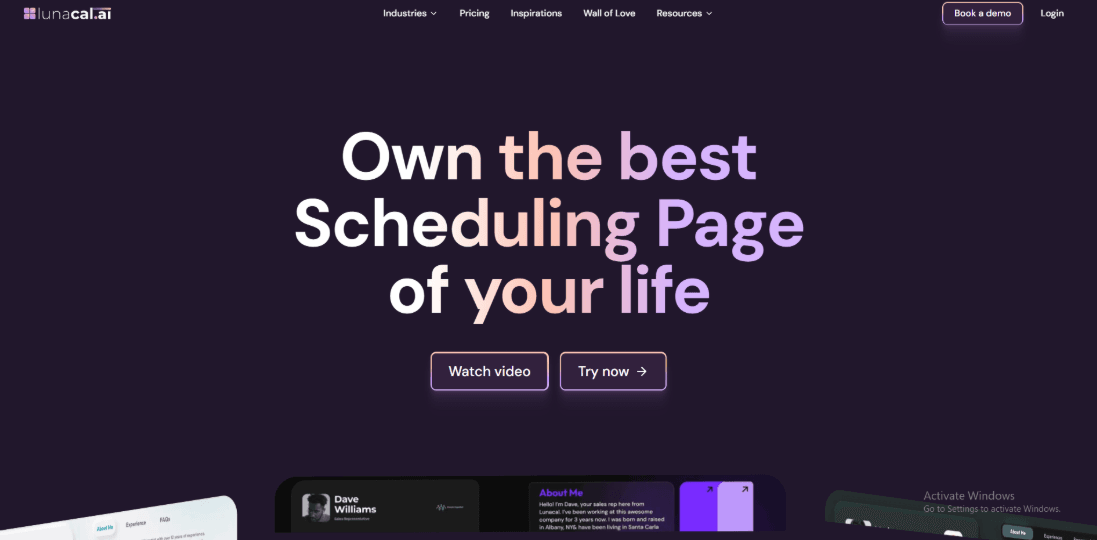
Lunacal is scheduling software for law firms that helps firms turn more potential clients into booked consultations with client intake, reminders, payments, and branded scheduling pages. Lunacal has a 4.9/5 rating on G2, placing it among the highest-rated scheduling tools included in this comparison. When someone is looking for legal help, they are usually stressed and comparing options. A clear and informative booking page helps them feel more confident before they reach out.
Features
- Booking pages with useful content
This is the first thing a potential client sees, and it shapes their impression right away. With Lunacal, your consultation page can include details about your practice, your team, and your experience alongside the calendar. This helps people understand who you are before they book. It also means they come into the consultation more prepared and serious.
- Set availability with exceptions
You can choose your working hours and block specific dates when you are not available. This is important for law firms because schedules change often due to court dates, meetings, and events. Once set, your calendar stays accurate wherever you share your booking link. If consultations are Monday to Thursday from 9 AM to 4 PM, you set it once. If you have a trial or meeting on a specific day, you block it and the system updates automatically.
- Connect multiple calendars
Lunacal lets you connect more than one calendar. Booked meetings go into one calendar, while others are checked in the background to avoid conflicts. This is useful for lawyers who manage different schedules. You can send confirmed bookings to your main work calendar. At the same time, connect your court calendar and personal calendar so those time slots stay blocked.
- Automatic confirmations and reminders
Lunacal sends email and SMS reminders automatically. You can customise messages with all the details the client needs. This helps reduce missed appointments and keeps everything professional.
- Paid consultations
You can collect payment at the time of booking using Stripe or PayPal. Many firms see better quality leads when consultations are paid. Set a fee for a one-hour consultation with a senior lawyer. Offer a lower price for a shorter call with a junior lawyer. Payment happens before the meeting.
- Intake questions before booking
You can ask a few questions before someone confirms their consultation. This helps you prepare and also helps filter cases early. Keep it short and focused. Ask what type of legal help they need, whether any legal action has already started, and for a short description of their situation.
Pros
- Very strong public rating signal. On G2, it shows 4.9 out of 5 with 41 reviews, which usually means the basics are working well for most teams.
- Helps reduce admin overhead by collecting intake details upfront and keeping reschedules in the same flow.
- Team scheduling options exist on the Teams plan, including round robin and collective scheduling.
- Payment support is available if you want to charge for consults or sessions.
- Automation options exist through Zapier and webhooks for firms that want tighter ops.
Cons
- If your law firm needs deep legal workflow features like matter management and document handling, this should not be your primary system for that. It is better as the scheduling layer, not the full law practice platform.
- Multi-company and custom domain setups may feel rough in some cases, based on a Reddit user report.
- Package booking has a known limitation around collective scheduling, so some multi-attorney scenarios need workarounds.
- Flexible duration does not automatically change pricing, so you may end up creating separate event types.
Pricing
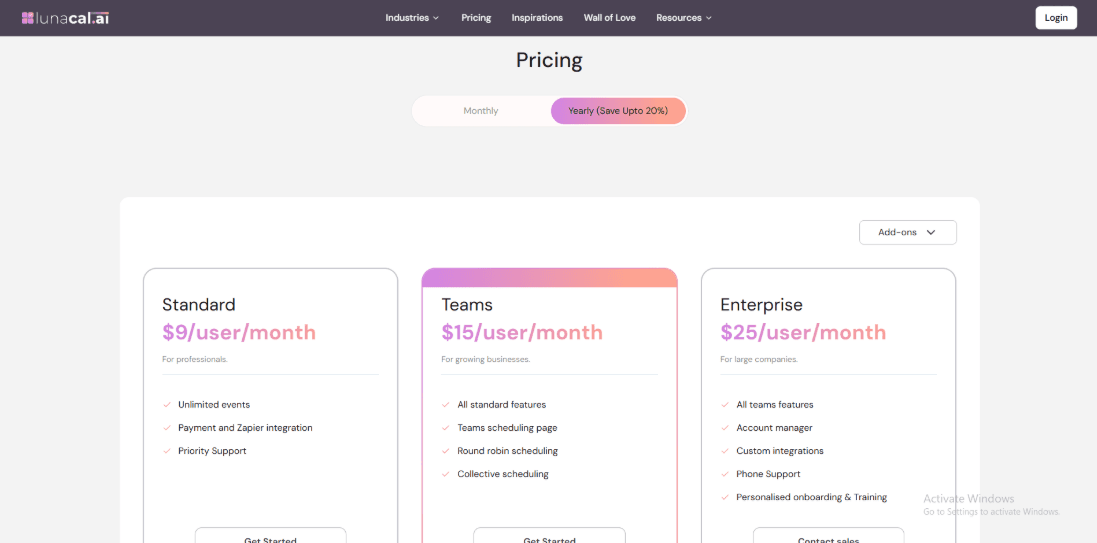
- Standard is 9 dollars per user per month and includes unlimited events, payments, Zapier integration, and priority support.
- Teams is 15 dollars per user per month and adds a team scheduling page, round robin, and collective scheduling.
- Enterprise is 25 dollars per user per month and includes an account manager, custom integrations, phone support, and onboarding.
When to Choose Lunacal
Choose it if your law firm mainly needs a clean scheduling flow, better intake, and fewer rescheduling emails. It fits firms that already use separate tools for matters and documents. Skip it if you want one system to run the entire practice end to end, or if you have complex multi-brand domain needs and want everything perfect on day one.
Acuity Scheduling
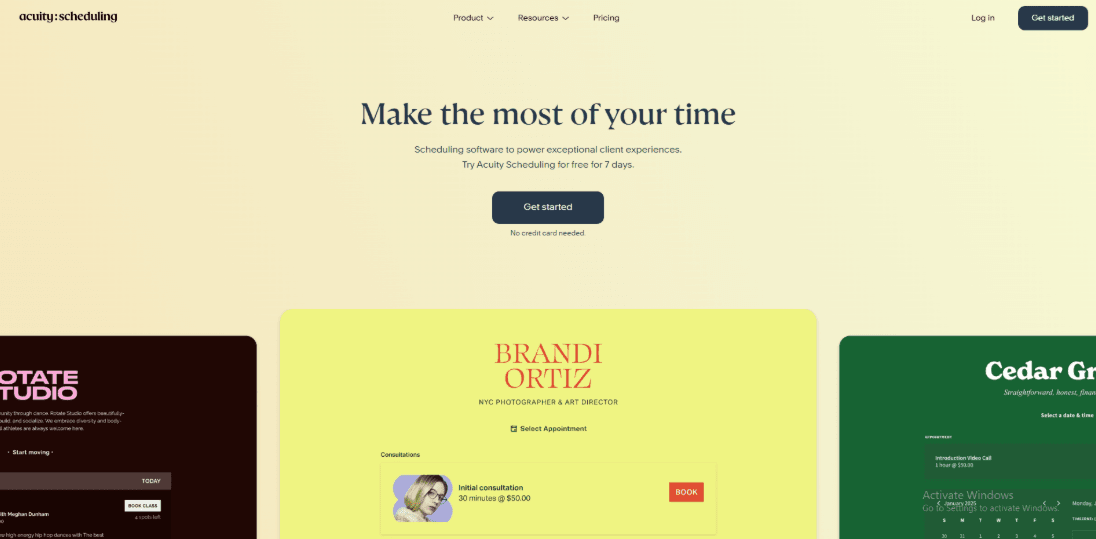
Acuity Scheduling is a well-known scheduling option for law firms. It allows clients to book appointments independently while the firm collects intake details, sends reminders, and accepts payments. This can reduce back-and-forth communication and help lawyers receive relevant case information before a consultation.
- Calendar sync
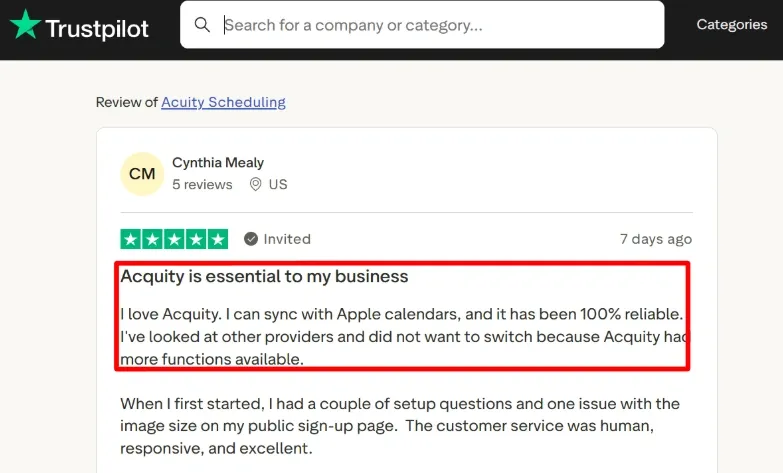
I connected Google and iCloud calendars first. It worked as expected and blocked busy time properly. This keeps the lawyer’s calendar clean and avoids double bookings. One detail I liked is that it supports multiple Outlook types too, which matters for firms on Microsoft accounts. I also saw this in a Trustpilot review where they called the Apple calendar sync reliable and I am sharing a screenshot below.
- Availability rules
You can control when people are allowed to book. You can set how early they need to book, how many bookings you accept in a day, and when they can cancel or reschedule. I did notice one thing. A small change in settings can hide your available slots, so it is important to test after making updates.
- Client intake forms
You can ask clients for details before the call, including case type, urgency, location, and contact preference. This gives the lawyer useful context before the consultation. Firms should keep initial intake questions focused and avoid requesting unnecessary sensitive case information through a public booking form.
- Payment integration
You can take payments using Stripe, Square, or PayPal, which is useful for paid consults or no-show protection. In my testing, the processor choice matters more than people expect, as it affects which payment flows you can support. It is simple once connected, but the first pass can feel fiddly if you are switching processors.
- Website embed
You can add the booking page directly to your law firm website. This makes the experience feel more natural for clients. I recommend testing it on both mobile and desktop because layout and spacing can change.

Pros
- Works well for law firms that want a simple and reliable booking system with forms and payments in one place.
- Calendar sync works across Google, iCloud, and Outlook.
- Intake forms help you collect useful case details before the call.
- Payments make it easier to handle paid consultations and deposits.
- You can embed it into your website without much effort.
Cons
- If your firm needs full legal workflows like document handling, e-signatures, or matter tracking, you may need a more specialized tool alongside it.
- Plan names and billing can feel confusing at first.
- SMS reminders are not available in all countries, so you should check support for your region.
- Some advanced features depend on higher plans.
- Firms with strict data location requirements may need to review how data is stored.
Pricing
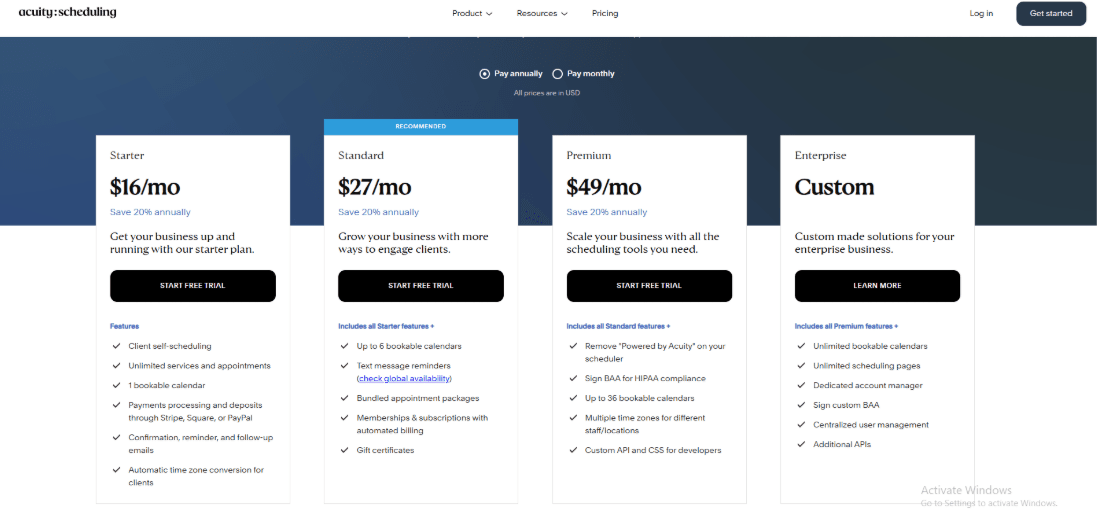
- Starter is $20 per month on monthly billing or $16 per month on annual billing.
- Standard is $34 per month on monthly billing or $27 per month on annual billing.
- Premium is commonly shown as around $61 per month or $49 per month annually on major summaries.
- There is a 7-day free trial, and pricing is shown in USD with taxes extra.
When to Choose Acuity Scheduling
Choose it if you are a solo lawyer or small firm that wants consult booking, calendar sync, intake forms, and payments without a heavy setup. It also works well if you want clients to self-schedule from your website. Skip it if you need legal-specific workflows that connect scheduling to matters, documents, and billing in one system. Be careful if your process depends heavily on SMS delivery in restricted regions or strict data residency requirements.
Microsoft Bookings
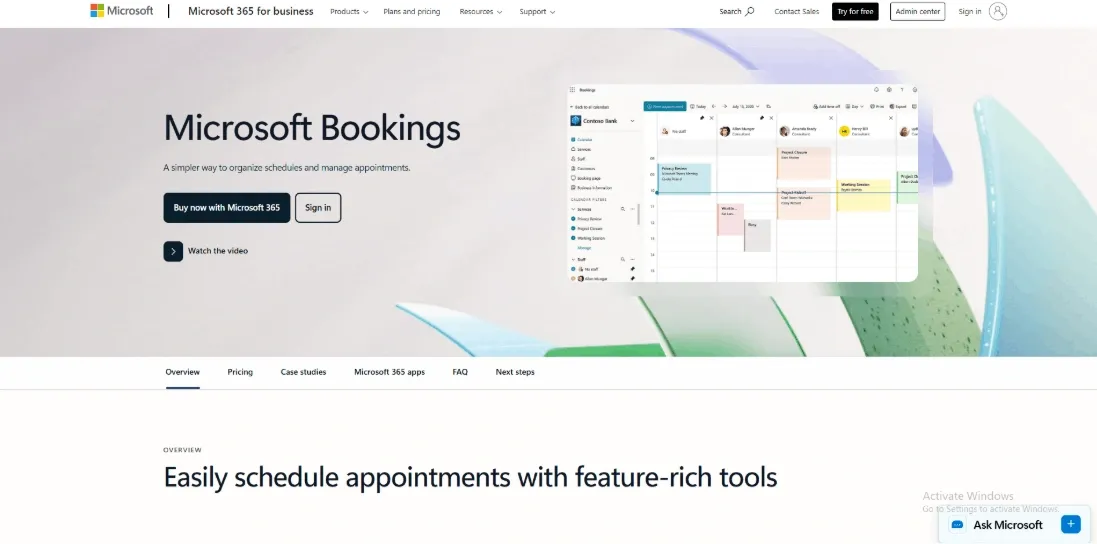
For firms already using Microsoft tools, it can provide basic client scheduling without introducing a completely separate platform. It is particularly suitable when the main requirement is straightforward appointment booking connected to Outlook and Teams.
- Calendar sync
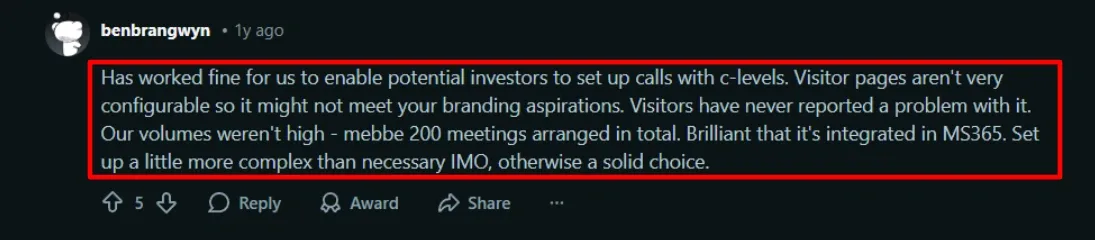
It connects directly with Outlook calendars. This helps prevent double bookings and keeps schedules accurate. In my testing, it worked well for managing staff availability. I also saw a similar gap noted in a Reddit review, so I’m sharing a screenshot below to provide context.

- Intake questions
You can add custom questions to capture basic information such as matter type, preferred call mode, and conflict check details. This is also where something seemed odd to set up. A Reddit review mentioned you cannot always force certain responses unless you use the shared booking pages, and that matched what I noticed when I tried to make a few fields mandatory.
- Teams meetings
It can automatically create a Teams meeting link for each booking. This is helpful for remote consultations and saves time.
- Scheduling policies
You can set booking rules like notice period, cancellation time, and buffer between meetings. For law firms, this helps avoid last-minute bookings before court or client deadlines, and it keeps intake slots predictable across the week.
- Workflow automation
For deeper routing, you can connect Microsoft Bookings to Power Automate and send booking information into internal workflows. This can help firms create follow-up tasks, maintain a record beyond the calendar invitation, or route consultation details to the appropriate team.
Pros
- Works smoothly if your firm already uses Microsoft 365.
- Keeps everything connected with Outlook and Teams.
- Simple setup for basic consultation booking.
- Teams meeting links are created automatically.
- Staff roles help assistants manage schedules.
Cons
- Does not include built-in payments for consultations.
- Customization of the booking page is limited.
- SMS reminders are not available in all regions.
- Setup can feel slightly complex at the beginning.
- Not ideal for advanced scheduling needs across multiple teams or locations.
Pricing
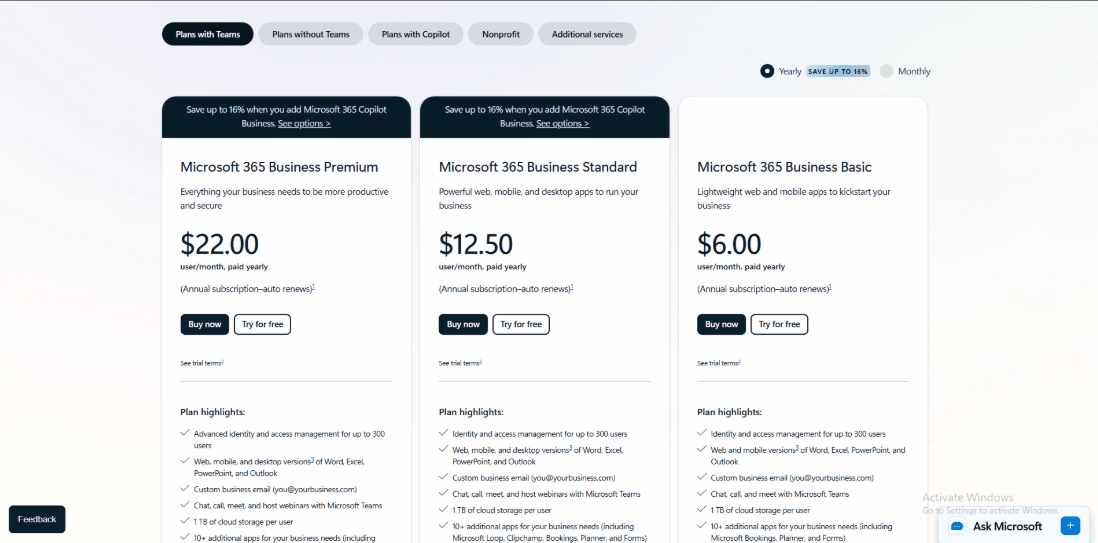
- Microsoft Bookings is typically included in Microsoft 365 business subscriptions rather than sold standalone.
- In India pricing pages, Microsoft lists Business Basic, Business Standard, and Business Premium plans that commonly cover Bookings access for staff.
- Budget for any add-ons that affect appointment workflows, especially if you rely heavily on Teams features tied to premium licensing.
- If you are already paying for Microsoft 365, the incremental cost can be close to zero for a basic rollout.
When to Choose Microsoft Bookings
Choose it if your firm already uses Microsoft 365, you want reliable Outlook availability, and you mainly need consult booking with Teams links and basic intake questions. Skip it if you need payments, deeper client intake, heavy page customization, or complex routing across multiple practice teams and locations.
Lawmatics
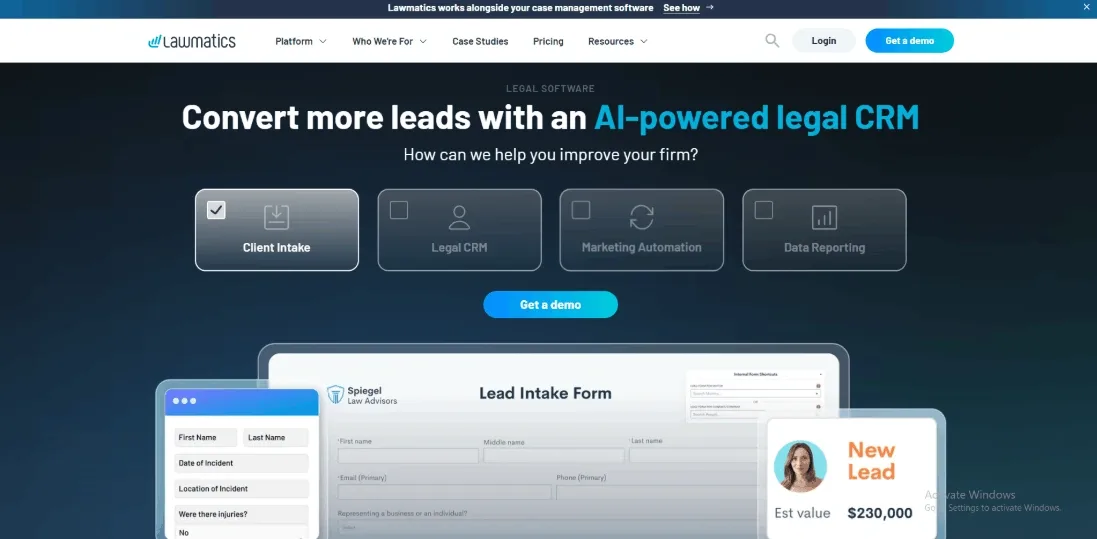
Lawmatics is a tool built for law firms that want to manage leads, intake, and follow-ups in one place. It includes scheduling, but the main value comes from how it handles everything around the appointment.
It works well as scheduling software for law firms that need more than a calendar. You can track leads, send forms, and follow up automatically without relying on separate tools.
Features
- Intake pipelines
When I set it up, the pipeline view made things clear right away. You can see who just came in, who has booked a consult, and who is still deciding. This helps teams stay organized. Leads do not get lost in emails or missed messages. You can also create different pipelines for different types of cases. That makes it easier to manage things when your firm handles more than one practice area.
- Document automation
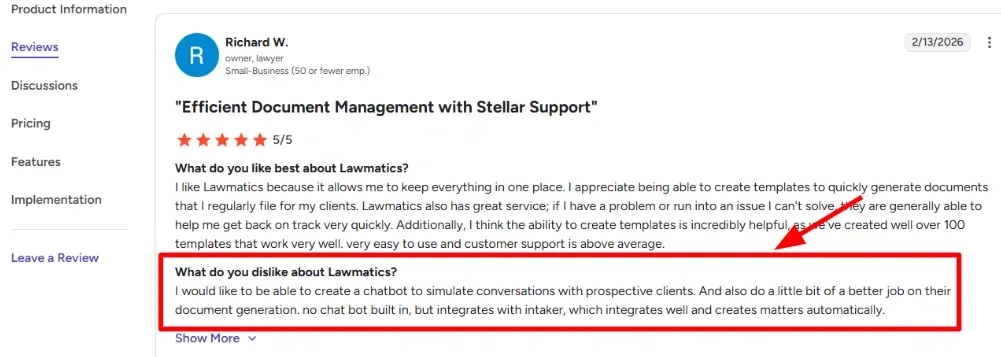
You can create documents like fee agreements using saved client details. Then send them for e-signature inside the same system. It works well once everything is set up, but the field mapping needs attention. I had to test it a couple of times before it felt reliable. I also saw a similar note in a G2 review about wanting stronger document generation and a built-in chatbot. I am sharing a screenshot below so you can see the exact wording.
- Follow-up automations
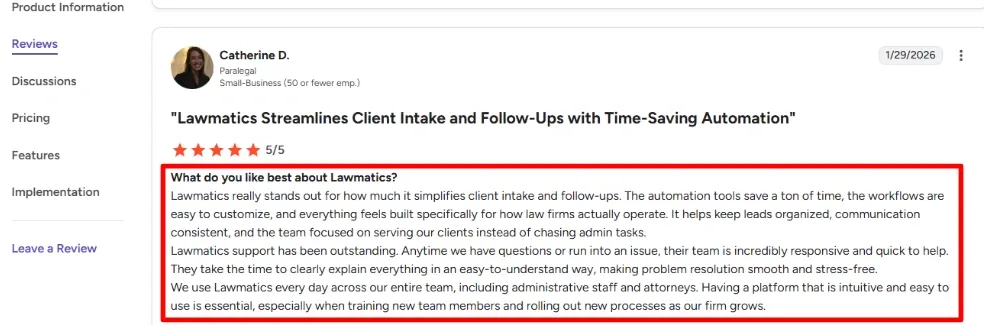
This is where Lawmatics becomes really useful. You can set up automatic messages after someone books, misses a call, or needs a reminder. It saves time and keeps leads from going cold. In my testing, this made a big difference. You do not have to remember to follow up manually every time. I have added that screenshot below as well.
- Calendar integration
Connecting your calendar is simple. You can set your availability, add buffer time, and control booking rules. You can also assign bookings to the right person without repeating the setup each time. This helps as your team grows. For firms handling a steady flow of consults, this keeps scheduling consistent.
- Case system sync
The integration story matters if your firm already runs on a case management system. LEAP publicly announced a Lawmatics integration that pushes client details into a new matter once a lead converts on PRNewswire. In practice, this saves a lot of retyping when intake is high volume.
Pros
- Strong automation once everything is set up. Follow-ups happen without manual work.
- Easy to see and manage leads in one place.
- Works well with other legal tools if you want a connected system.
- Support is helpful during setup and early use.
- Forms and workflows can be adjusted based on different case types.
Cons
- If you only need basic scheduling, this can feel like too much. A simpler tool may be easier to use.
- Setup takes time. You need to test forms, emails, and workflows before everything runs smoothly.
- Document field mapping can take a few tries to get right.
- Text messaging costs can increase if your volume is high.
- There is no built-in chatbot for intake, so you may need another tool if that is important.
Pricing
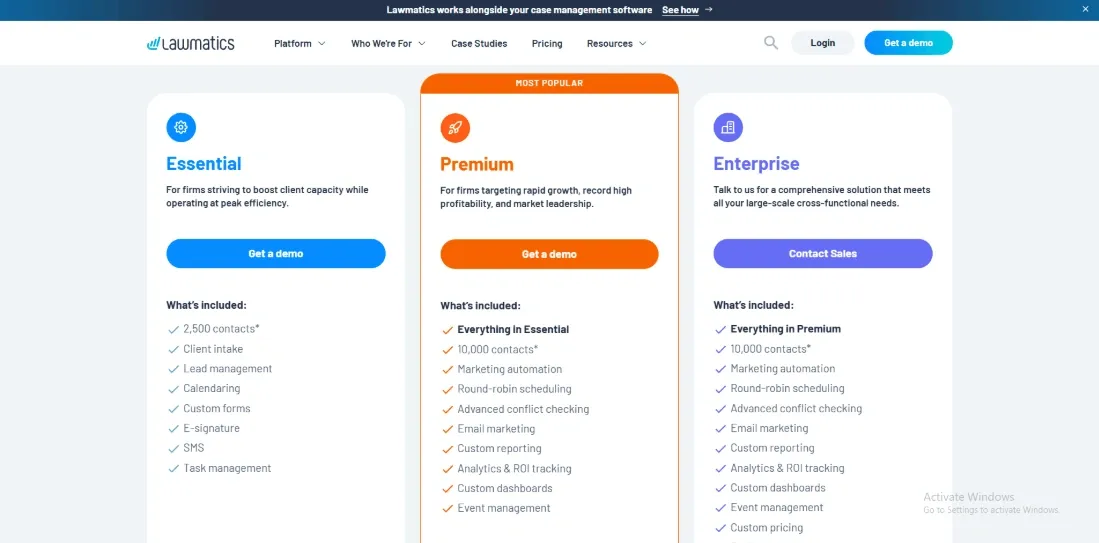
- Pricing is quote-based, so you usually talk to sales for a firm-specific plan.
- Plans are structured around tiers like Essential, Premium, and Enterprise with different contact limits and automation depth.
- Add-ons exist for things like time and billing, and AI-style qualification credits.
- SMS and MMS come with tiers and overage charges, which matter if you text a lot.
When to Choose Lawmatics
Choose it if your scheduling problems start at intake and follow-up, not at the calendar itself.
It fits firms that want forms, automation, and lead tracking tied to consult booking.
Skip it if you only need basic booking links and reminders for a small team.
Also, think twice if you want chatbot-style intake inside the product without integrations.
Clio
Clio is a practice management platform for law firms. It combines scheduling, casework, billing, client intake, and matter management in one system.
Features
- Matter management
When I set it up, everything was tied to a matter. Tasks, notes, documents, and billing all stayed in one place. That sounds basic, but it stops the daily hunt across email, drives, and invoices.
- Billing workflows
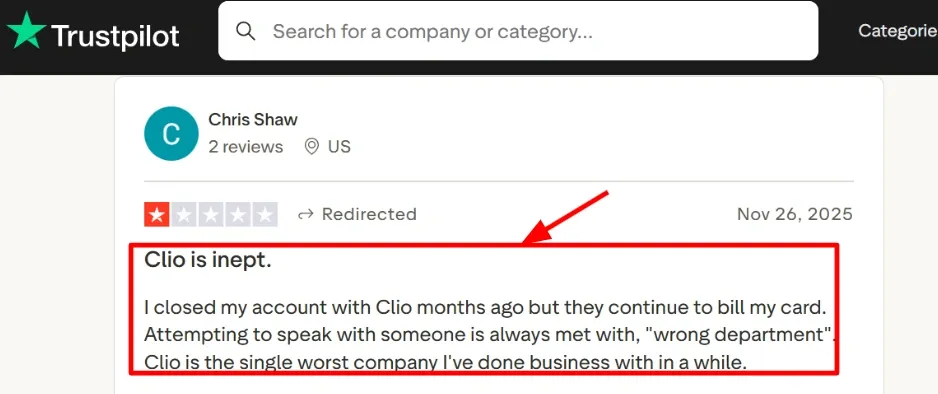
Once your matters are set up, creating time entries and invoices is simple. Payments also fit into the same flow. I also saw a Trustpilot review describing charges continuing after cancellation and support bouncing them around. Screenshot is below so you can read it in full, and it matches what I noticed when I tried finding the right billing help path.
- Intake pipeline
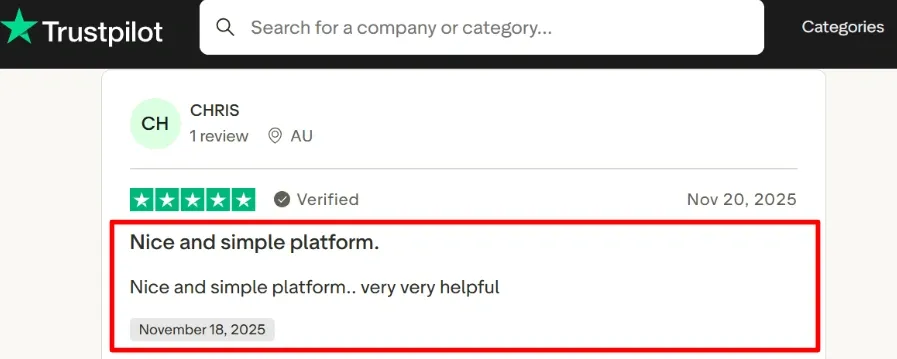
The intake side feels like a simple funnel where you can track new leads, collect details, and convert them into matters. One Trustpilot reviewer called it nice and simple, and the screenshot below captures that point well after a quick test run.
- Compliance signals
Clio publishes security and compliance documentation that can help firms complete initial vendor reviews. However, firms with strict security, residency, or regulatory requirements should still evaluate the relevant documentation against their own internal policies.
- Calendar integration
You can connect your calendar and schedule consultations easily. Meetings link back to matters, so follow-ups stay organized. Once availability and buffers are set, the booking flow stays consistent. This makes it reliable as scheduling software for law firms that need structure.
Pros
- Setup is practical for small and mid-sized firms. You can get started without a long setup process.
- Matters keep everything organized in one place.
- The intake flow helps you track leads clearly.
- Billing and payments work together, which reduces manual follow-ups.
- Security information is easy to access when needed.
Cons
- If you only need a simple booking tool, this may feel like too much.
- Custom fields and reporting can feel limited for very specific workflows.
- Support can be harder to navigate in some cases, especially around billing changes.
- E-filing and court support may vary depending on location.
- Compliance claims are easiest to validate in the Clio Trust Center, and some teams will still ask for deeper evidence before approval.
Pricing
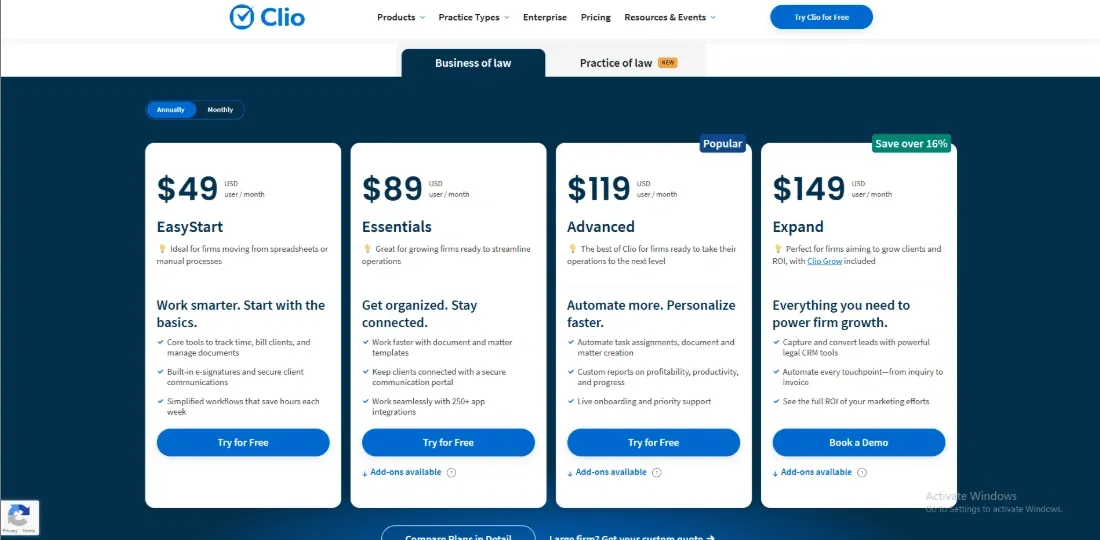
- Pricing is per user per month, with higher tiers adding deeper reporting, automation, and admin controls.
- Public listings often show starting points around the 49 to 59 per user per month range, and annual billing can change the effective rate.
- Some capabilities sit in separate add-ons like intake, payments, or accounting, so the real cost depends on which modules you enable.
When to Choose Clio
Choose it if your law firm wants scheduling tied to matters, billing, and intake, and you want one system to run day-to-day operations. It fits solo, small, and growing firms that want fewer tools and cleaner handoffs between admin and attorneys. Skip it if you only want a standalone scheduler with advanced routing, or if your firm needs highly bespoke reporting and data models.
Conclusion
If you want a quick answer, the right choice depends on whether scheduling is your main problem or just one part of a larger legal workflow.
- Choose Lunacal if your priority is converting more consultations with better booking pages, intake, and payments in one flow
- Choose Acuity Scheduling if you want a simple, reliable scheduler with forms and payments that embeds easily into your website
- Choose Microsoft Bookings if your firm already runs on Microsoft 365 and needs basic internal scheduling with minimal extra cost
- Choose Lawmatics if your bottleneck is intake, follow-ups, and lead tracking rather than calendar management
- Choose Clio if you want scheduling tightly connected to matters, billing, and day-to-day legal operations
From testing, the biggest decision factors here are intake depth, payment support, team scheduling complexity, and whether you need full legal workflow integration or just a strong scheduling layer. Pick based on where your current process breaks, not just feature lists.
Methodology
I evaluated scheduling software for law firms with a clear objective: reduce back-and-forth communication while ensuring client data is handled securely. The shortlist was based on hands-on product usage, official documentation, and real user feedback. Each tool was assessed against a consistent checklist to maintain fairness, with additional weight given to features like legal intake support and role-based access controls.
Sources
- Reviewed official websites, pricing pages, FAQs, and help documentation to verify feature availability and understand how they function in real use.
- Tested free trials where available, noting setup complexity, feature limitations, and which capabilities are restricted to paid plans.
- Analyzed user feedback on platforms such as Trustpilot and G2, and cross-checked with discussions on Reddit and Quora to identify recurring issues and edge cases.
Test setup for a mid-size US firm
- Configured two attorney calendars, a shared intake calendar, and a staff account for reception workflows.
- Enabled calendar synchronization, added intake forms, and set up both email and SMS reminders.
- Evaluated administrative controls, audit logs, and data export capabilities for operational reliability.
Common scenarios we tested
- New client intake flows, including required fields, time zone handling, and confirmation messaging.
- Scheduling policies such as buffer times, minimum notice periods, and defined working hours.
- Team-based routing for consultations, along with rescheduling, cancellations, and follow-up appointment handling.
FAQs
Which is the best scheduling software for law firms?
Some of the best scheduling software options for law firms are Lunacal, Acuity Scheduling, Microsoft Bookings, Lawmatics, and Clio. Lunacal is suited to branded consultation booking, intake forms, payments, and team scheduling. Lawmatics is stronger for lead intake and follow-up automation, while Clio is better suited to firms that want scheduling connected to matter management, billing, and broader legal operations.
How do the leading scheduling tools for law firms compare?
Popular options include Lunacal, Acuity Scheduling, and Microsoft Bookings.
- Lunacal: best when the booking page needs to build trust fast, and you want intake forms plus payments for consults.
- Acuity Scheduling: strong for service based scheduling with flexible forms and client flows.
- Microsoft Bookings: easiest when the firm already lives inside Microsoft 365 and wants simple internal control. If intake and follow up need to sit inside a legal marketing system, Lawmatics is usually the cleaner path.
What country specific privacy and regulatory nuances affect scheduling software for law firms?
Country rules change what you can collect and store in a booking flow.
- US: keep intake minimal unless it routes into your case system, and log client consent for texts.
- UK, Canada, Australia and EU: map data retention, breach notices, and subcontractors.
- GDPR in the EU: show lawful basis, offer deletion, and avoid storing sensitive notes in German, French, Spanish free text fields without controls.
What features are essential in scheduling software for law firms?
Essential features include intake forms that support conflict-check workflows, calendar synchronisation with double-booking protection, secure client reminders, team routing for multiple lawyers, buffer and travel-time rules, time-zone handling, audit logs, and reliable exports to a matter-management system or CRM.
How do law firms reduce no shows with scheduling software?
Reduce no shows by requiring confirmation, sending timed reminders, taking deposits for paid consults, and using intake forms to filter fit. Lunacal and Acuity handle this cleanly for solo attorneys.
Summarize this content with AI


