

Introduction
Health coaches may collect sensitive client information through booking forms, reminders, intake questions, and session notes. This guide compares seven budget-friendly scheduling tools that can support HIPAA-compliant workflows, including secure intake, reminders, payments, packages, and client management. We assessed each tool against the same health-coaching workflow: booking, intake, rescheduling, reminders, payments, packages and client follow-up. Product documentation was used to verify features, while user reviews were used to identify recurring usability concerns. I also reviewed G2, Capterra, and Reddit feedback to catch patterns that only show up after months of use. And I dug into the details most people miss, like BAAs, audit logs, notification content controls, and surprise add-on fees, with screenshots and links so you can verify everything yourself.
Quick comparison of HIPAA-compliant scheduling tools
| Use-case | Tool | Key strength | Pricing starts at |
|---|---|---|---|
| Solo health coach | Mint Scheduling | HIPAA booking without EHR | $19/month |
| Nutrition coaching | Practice Better | Forms, packages, automations | $35/month |
| Hybrid wellness practice | Healthie | Client portal and telehealth | $19.99/month |
| Behavioral health coaching | SimplePractice | EHR with secure scheduling | $49/month |
| Multi-practitioner clinic | Jane App | Scheduling, charting, billing | CAD $54/month |
| Budget private practice | Sessions Health | Simple EHR and scheduling | $39/month |
| Free starter setup | Carepatron | Free portal and telehealth | $0/month |
| Group coaching programs | Practice Better | Cohorts, packages, reminders | $35/month |
Detailed reviews of HIPAA-compliant scheduling tools for health coaches
Mint Scheduling
I selected Mint Scheduling because it covers the things health coaches usually need in a HIPAA conscious scheduling setup without making the tool feel heavy.
It includes useful features like paid sessions, intake questions, reminders, packages, calendar sync, GDPR settings, and content rich booking pages that help clients understand the coach before booking.
The pricing is reasonable, and with a 4.9/5 rating on G2, it is one of the highest rated scheduling tools for small health coaching businesses looking for budget friendly HIPAA compliant scheduling software.
-
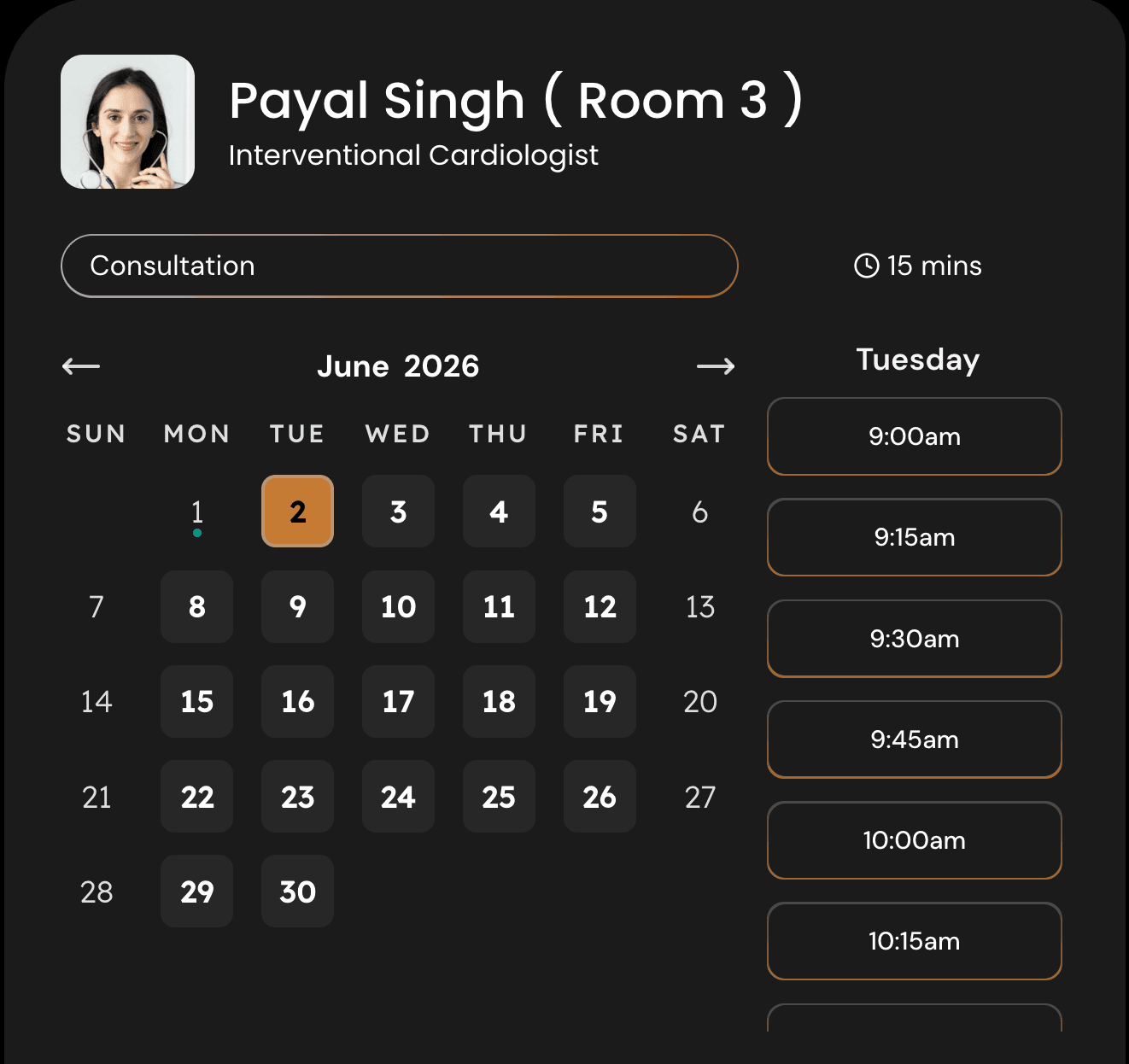
Content rich pages: For health coaches, the booking page should not feel like a blank calendar link. Clients often want to understand your coaching style, areas of focus, credentials, and what will happen in the first session before they book.
In Mint Scheduling, you can add content next to the calendar so someone booking a gut health consult, weight loss coaching call, or stress management session gets more context before choosing a time. I’d use this space for a short intro, coaching approach, FAQs, testimonials, and a note on privacy.
I took this screenshot:
-
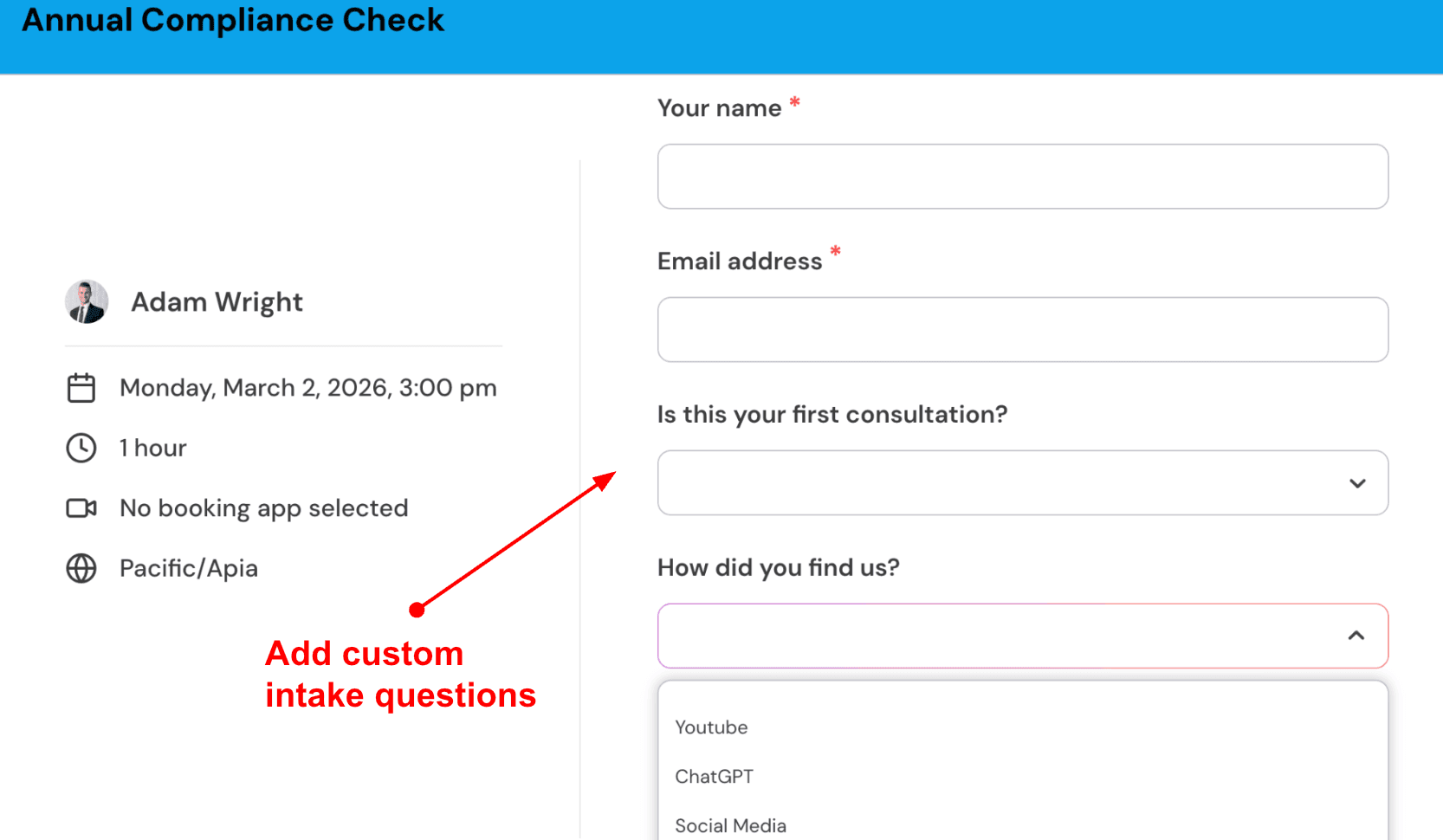
Intake questions: Health coaching calls are more useful when you know the client’s goal before the session starts. Mint Scheduling lets you add custom booking questions so you can collect basic context without sending a separate form later.
For example, a health coach can ask about the client’s main goal, current routine, food preferences, coaching history, or whether they are booking an initial consultation or follow up session. I’d keep it short because long forms can reduce completed bookings.
Here’s how it looks:
-
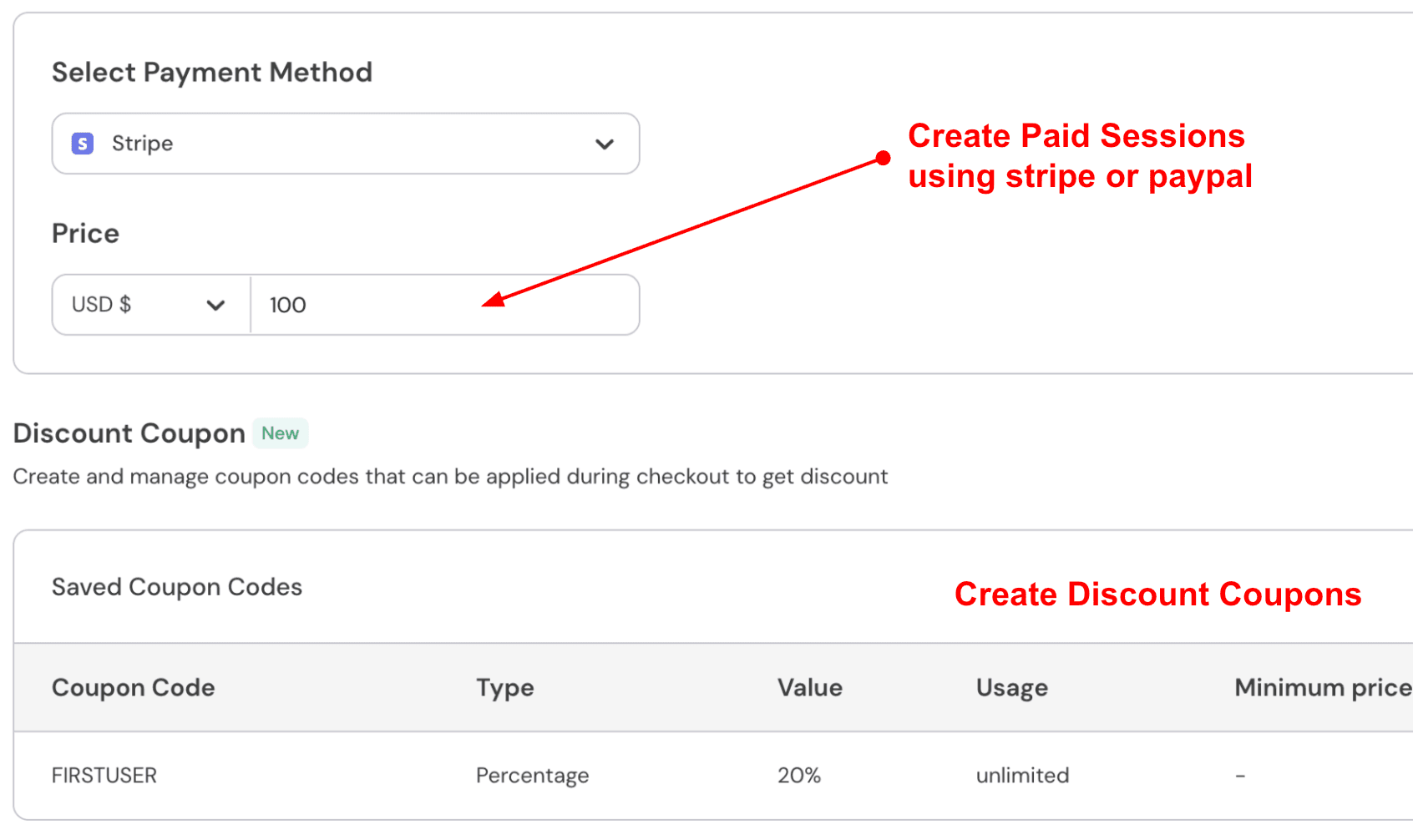
Paid sessions: Many independent health coaches sell discovery calls, one on one sessions, habit coaching packages, or paid follow up consultations. Mint Scheduling lets you connect Stripe or PayPal and collect payment during booking.
This is useful because payment before the call reduces no shows and removes awkward follow up messages. For example, you can charge for a 45 minute nutrition coaching session or create a discounted first consultation for new clients.
Here’s a screenshot from the tool:
-
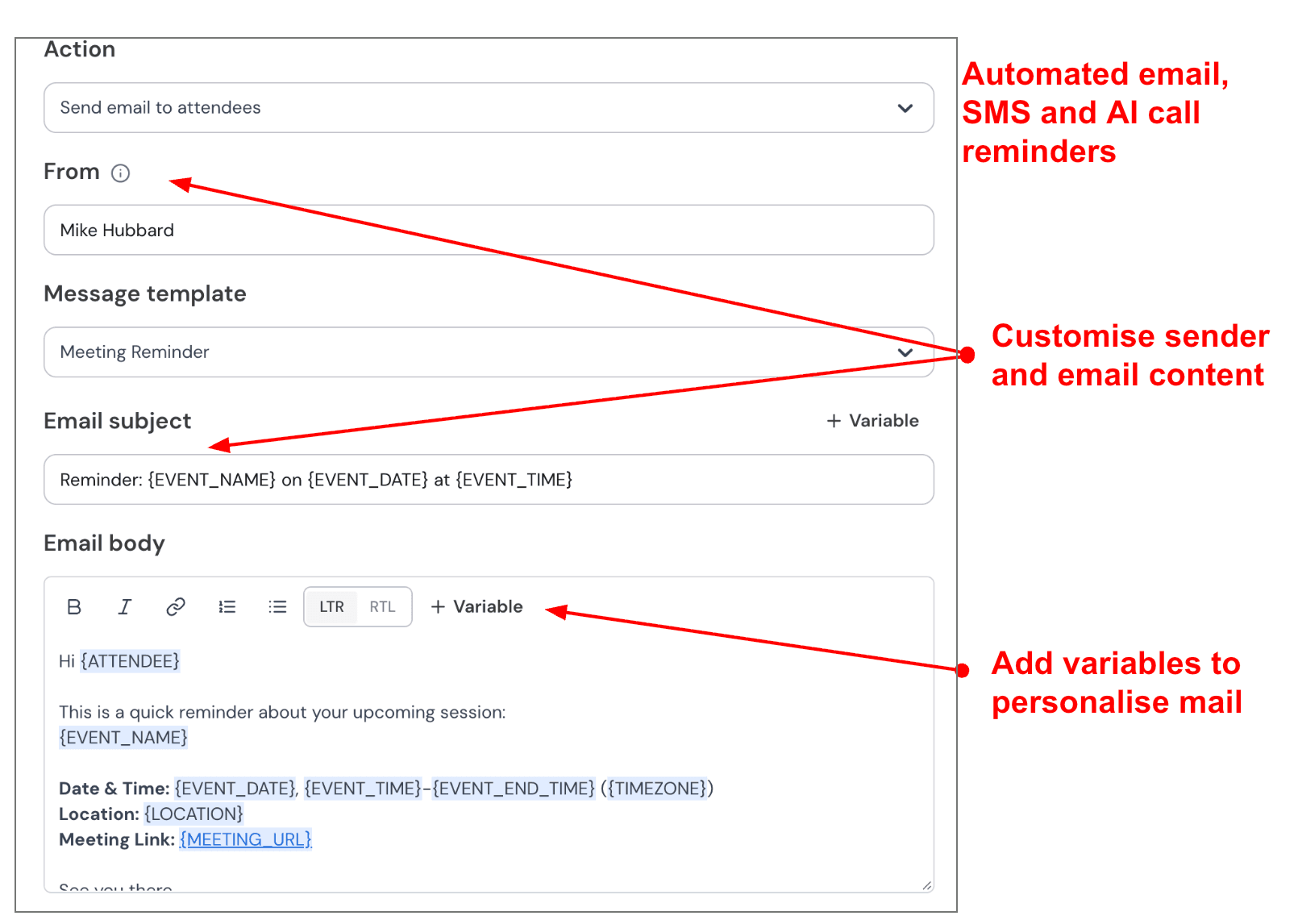
Automated reminders: Health coaching clients often book sessions around work, workouts, meals, family routines, and appointments. Reminders matter because missed sessions are not just annoying, they break momentum.
Mint Scheduling can send email and SMS reminders before the appointment. I’d use one email reminder 24 hours before and one SMS reminder 1 hour before, with the meeting link and a short line asking them to keep their notes ready.
Screenshot below:
-
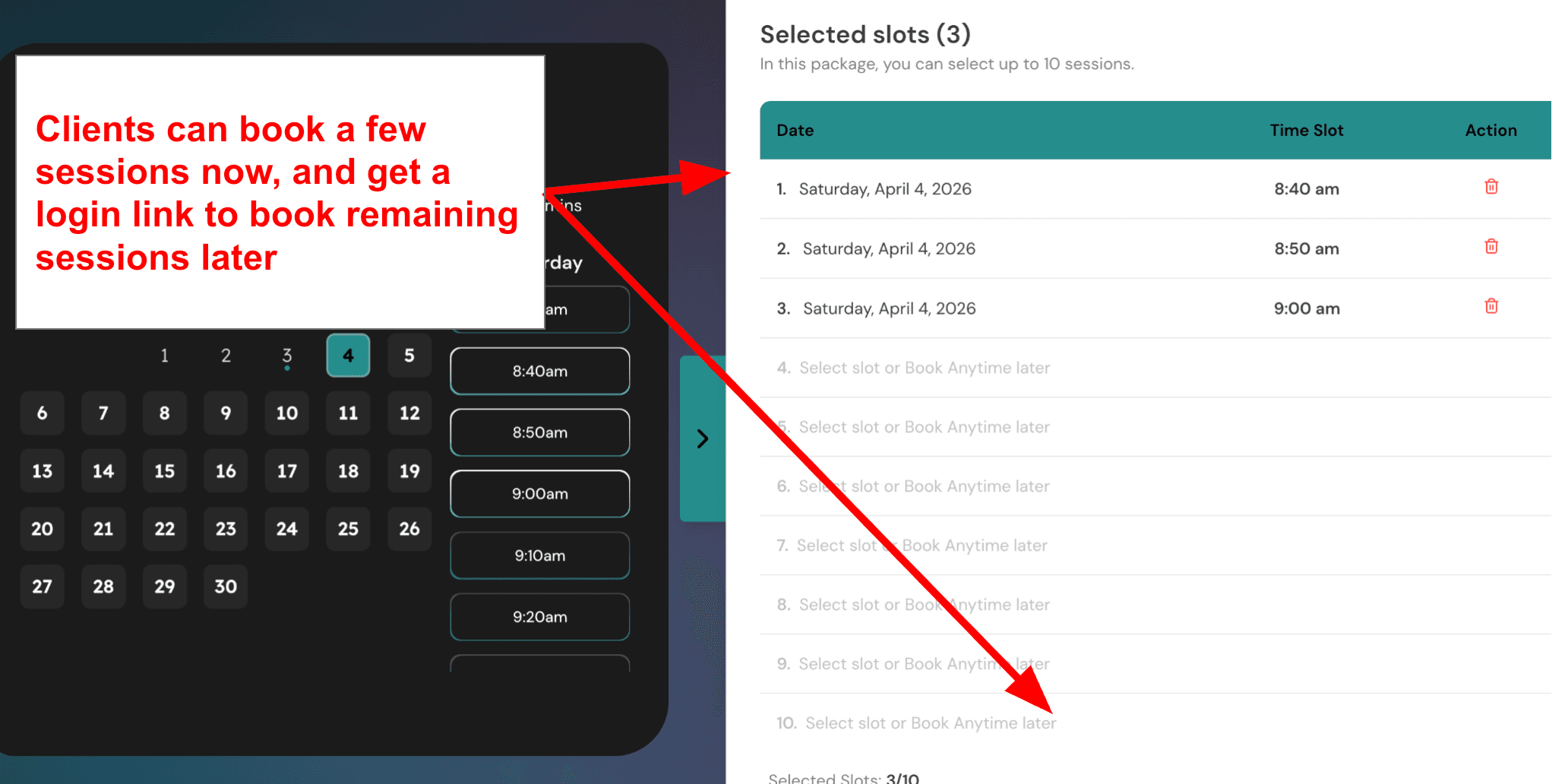
Multi session packages: Health coaching rarely works as a single appointment. Most clients need follow ups, habit reviews, accountability check ins, and progress tracking over a few weeks or months.
Mint Scheduling lets you create packages where clients can buy multiple sessions together and book remaining sessions later. This is a strong fit for health coaches selling 4 week accountability programs, 6 session wellness plans, or monthly coaching bundles.
Use this screenshot here:
Practice Better
Practice Better is popularly known among health coaches as an all-in-one practice management platform because it brings scheduling, HIPAA-friendly client communication, forms, notes, programs, billing, and telehealth into one place.
-
Client Scheduling: Practice Better gives health coaches a proper booking system, not just a calendar link. Clients can book online, reschedule, receive reminders, and complete intake steps before the session. The official Practice Better pricing page lists client booking, appointment calendar, telehealth, reminders, and packages across plans.
When I set up availability, the basics were easy enough, but the deeper rules need patience. For example, if a coach runs discovery calls on Mondays, paid sessions on Tuesdays, and group sessions on Saturdays, it takes some careful setup to avoid messy booking windows.
This is also why the pasted G2 Healthie review is useful competitor context. The reviewer complained that schedule customization was tedious and wanted a mass availability customizer. It is not a Practice Better review, so I would show the screenshot as a broader scheduling pain point, not as a Practice Better complaint.
-
HIPAA Telehealth: Practice Better includes built-in HIPAA-compliant telehealth, so a health coach does not need to stitch together Zoom, forms, notes, and reminders separately. Its Practice Better telehealth page says coaches can launch video sessions, manage intake, write notes, and handle billing inside the same workflow.
This is helpful for budget-conscious coaches because fewer tools usually means fewer subscriptions and fewer privacy gaps. The pleasant surprise is that telehealth feels connected to the appointment flow instead of being treated like a separate video add-on.
-
Client Portal: The client portal is one of the stronger parts of Practice Better. Clients can book appointments, fill forms, view resources, message securely, and track progress from one place. The Practice Better client portal page specifically mentions HIPAA-compliant messaging, scheduling, paperwork, resources, goals, and progress tracking.
For a health coach, this matters after the call. A client may need to log meals, upload forms, check a protocol, or ask a question between sessions. A basic scheduler cannot handle that properly.
-
Programs & Protocols: Practice Better fits health coaches who sell more than one-off appointments. It supports protocols, resources, online programs, client tasks, and repeatable workflows. Practice Better’s own health coach app comparison positions it strongly for coaches who deliver structured programs, track client metrics, and need HIPAA compliance by default.
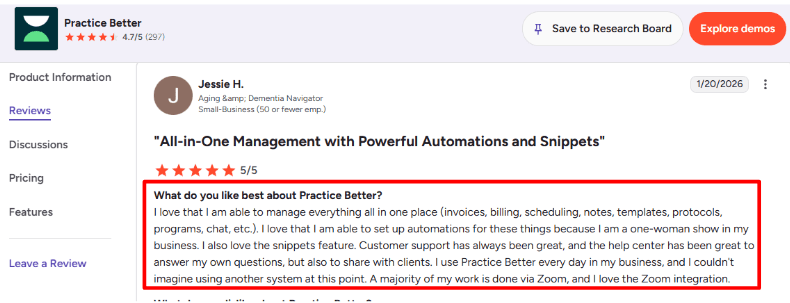
The second pasted G2 Healthie review praises Healthie for templates, client portal, HIPAA messaging, video, SOAP notes, scheduling, payments, journaling, feedback, and courses. That same “all-in-one” expectation is exactly where Practice Better competes well. I would agree with the review’s broader point: health coaches often do not want only scheduling. They want the coaching system around the booking.
-
Forms & Notes: Practice Better includes intake forms, waivers, note templates, session notes, and document sharing. The Practice Better help page lists client booking, charting, session notes, secure messaging, mobile apps, workflow automations, templates, documents, and HIPAA/PIPEDA/GDPR compliance even on its entry-level structure.
This is useful for health coaches who need cleaner onboarding. Instead of asking clients to email health goals, medical history, diet notes, and consent forms separately, the coach can collect it before the first call.
-
Payments & Packages: Practice Better supports invoices, payments, deposits, recurring payments, packages, and billing workflows. For budget health coaches, packages are important because many sell 4-week, 8-week, or 12-week programs rather than single sessions.
I liked that the billing tools sit close to scheduling. A coach can sell a package, let the client book sessions, and reduce manual follow-up. The part to check carefully is plan limits. Some features, client limits, SMS reminders, branding, group sessions, and advanced tools may require higher plans or credits.
Pros
- Strong fit for health coaches who need more than a booking link.
- HIPAA-compliant telehealth, secure messaging, forms, notes, and client portal in one system.
- Good for coaching packages, protocols, programs, and between-session client engagement.
- Useful for solo coaches who want to avoid using separate tools for scheduling, video, forms, payments, and client resources.
- Review patterns on GetApp Practice Better show strong ratings for features, ease of use, support, and health/wellness use cases.
Cons
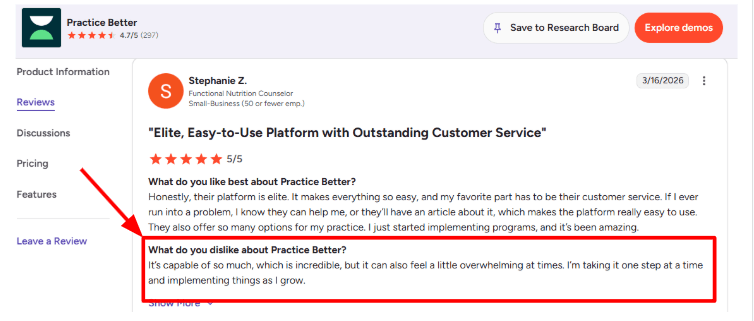
- Setup can feel heavier than a simple appointment scheduler because there are many moving parts.
- Best value may not be the cheapest plan if you need more clients, group sessions, stronger branding, SMS, or advanced workflows.
- Some coaches may find it too much if they only need HIPAA-friendly booking and reminders.
- A Capterra Practice Better review mentions that customer service can sometimes be slow because support may require submitting a ticket.
- Pricing is affordable compared with running several separate tools, but it may still feel high for brand-new coaches with only a few paying clients.
Pricing
-
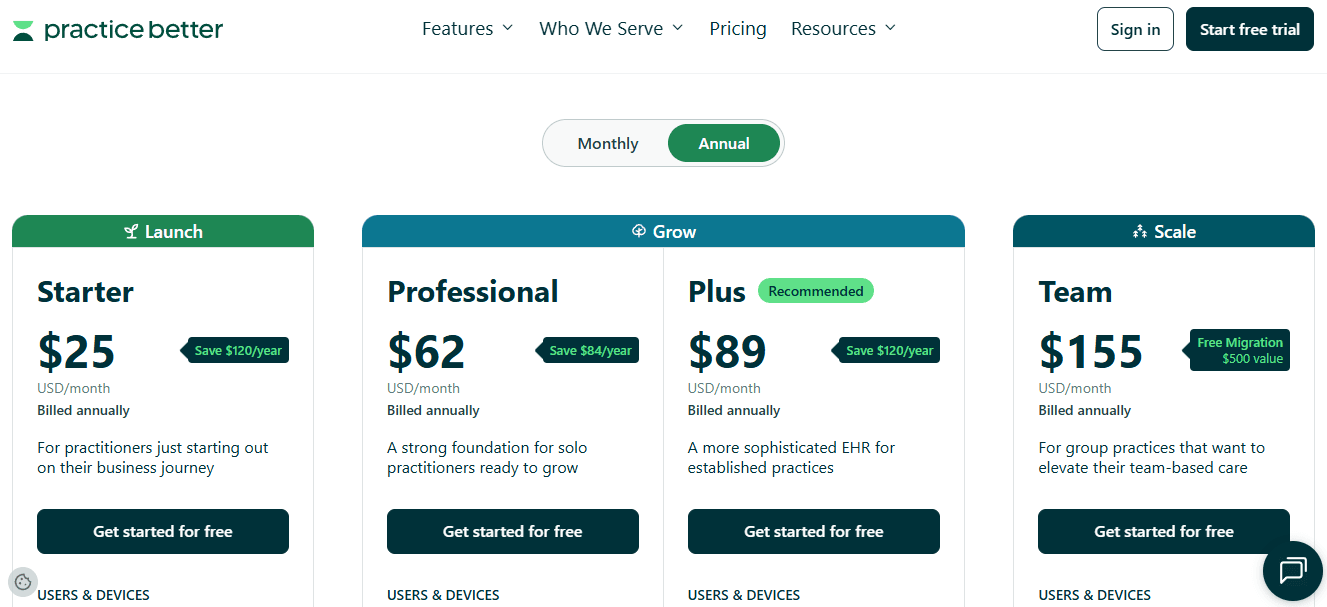
Practice Better has a free Sprout plan for very small use, with up to 3 active clients listed on its pricing comparison page.
-
Starter is listed at $25/month when billed annually or $35/month monthly on the Practice Better pricing page. It supports up to 10 clients, which may work for a new health coach.
-
Professional is listed at $59/month annually and supports up to 300 clients. This is usually the more realistic plan once a coach has ongoing programs, more clients, and stronger workflow needs.
-
Plus and Team plans are higher-priced options for unlimited clients, more admin/team needs, SMS allowances, group practice features, and scaling beyond a solo coaching setup.
Healthie
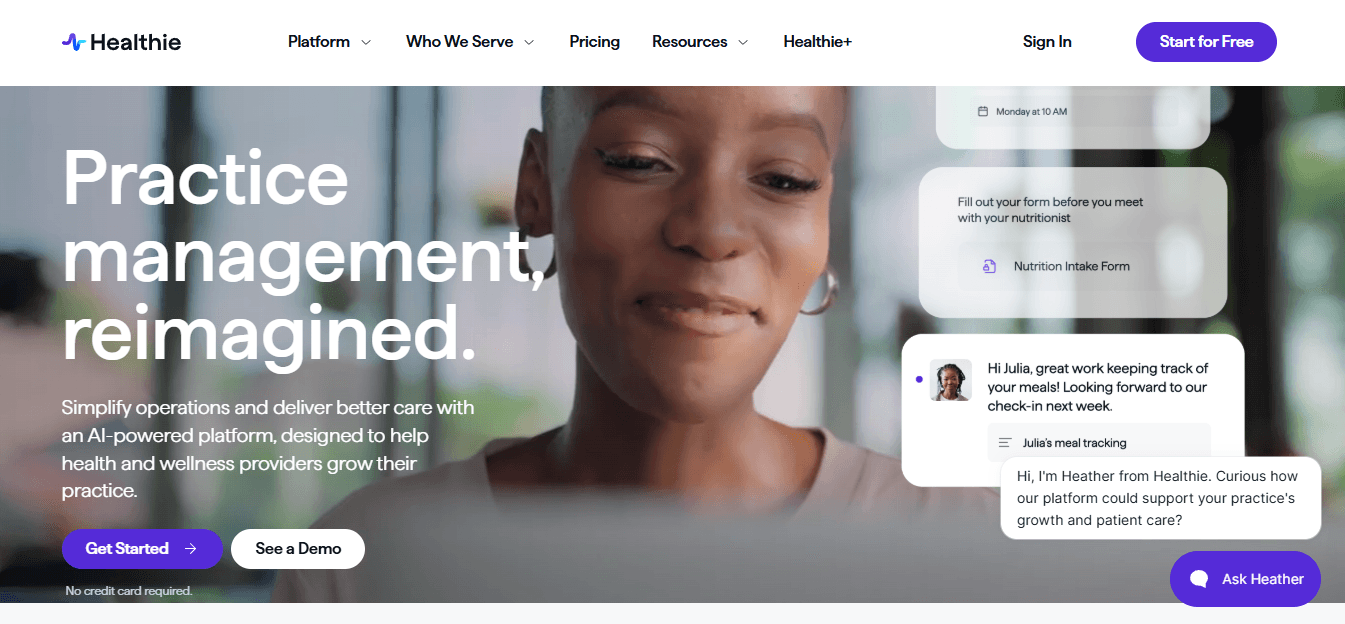
Healthie is popularly known as an all-in-one EHR, telehealth, and practice management platform, which is why many health coaches use it when they need HIPAA-friendly scheduling, client tracking, payments, and coaching workflows in one place.
-
HIPAA Scheduling: Healthie covers the basics well for health coaches who need clients to self-book sessions, complete forms, receive reminders, and join appointments without jumping across too many tools.
I liked that scheduling connects directly with paperwork, charting, billing, and the client portal. For a budget-conscious health coach, that matters because a cheaper standalone scheduler can become expensive once you add forms, reminders, payment links, and secure communication separately.
The calendar also supports multiple appointment types, multiple providers, multiple locations, and two-way sync with Google, iCal, and Outlook, as mentioned on the Healthie scheduling page.
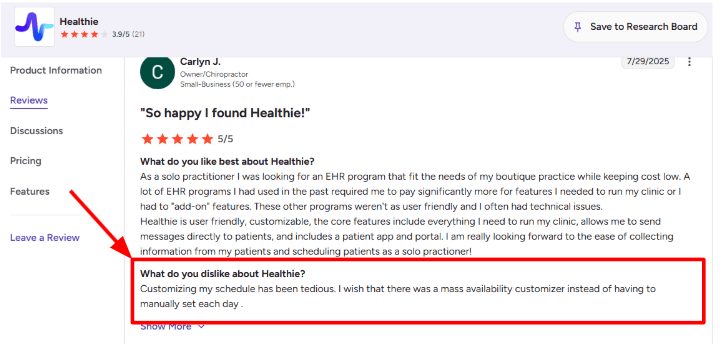
The main issue is availability setup. One G2 reviewer said schedule customization was tedious because they had to manually set each day instead of using a mass availability customizer. I can see why. When I tested the setup flow mentally for a coach offering discovery calls, 12-week package sessions, and follow-up calls, repeating availability rules can slow you down. I’d place the screenshot below this point.
-
Client Portal: Healthie’s client portal is one of its stronger parts because it gives clients a secure place to book, message, complete forms, view documents, and stay connected between sessions.
For health coaches, this is useful because the relationship does not end after the appointment. Clients may need to log food, share progress, ask follow-up questions, or check what they agreed to do before the next session.
This is where Healthie feels more complete than a normal appointment scheduling tool. A simple scheduler can book the call. Healthie can support the coaching journey around that call.
-
Telehealth Sessions: Healthie includes HIPAA-compliant video calls for one-on-one sessions, and higher plans support group video through Zoom for Healthcare, according to Healthie video call support.
This is practical for health coaches running virtual consultations, nutrition check-ins, accountability calls, or small group coaching programs.
One small thing to watch is that Healthie can feel broader than needed if you only want booking links and reminders. But if you want secure video, notes, forms, and payments under one login, the extra structure starts making sense.
-
Templates and Notes: Healthie offers customizable intake forms, charting templates, SOAP notes, and smart fields that can pull intake answers into charting workflows, based on Healthie’s charting support docs.
This helps when a coach wants to collect goals, health history, lifestyle habits, food preferences, and consent forms before the first call.
After roughly setting it up, the positive surprise was how much admin work can be removed if the templates are built properly once. A weight-loss coach, for example, could collect sleep, cravings, stress, exercise, and meal patterns before the first consultation, then use that data during the session instead of wasting 20 minutes asking basic questions.
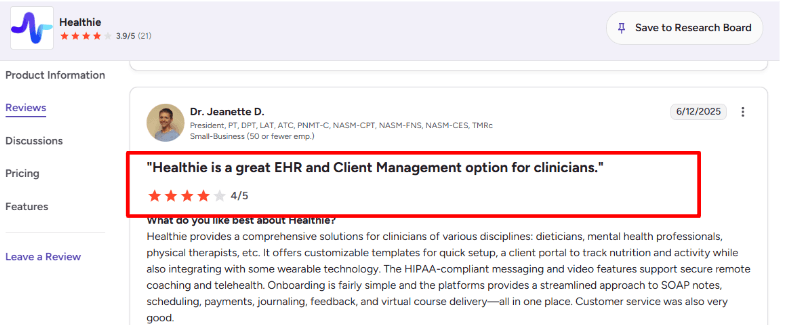
The second G2 review I went through matches this. The reviewer liked Healthie because it brings templates, client portal, nutrition and activity tracking, wearable integrations, HIPAA-compliant messaging, video, SOAP notes, scheduling, payments, journaling, feedback, and courses into one system. That is a fair strength, especially for coaches who want more than a booking calendar. I’d add the screenshot from the G2 Healthie review page around this section.
-
Packages and Payments: Healthie supports client packages for one-time services, recurring services, programs, products, and other offerings, as explained in Healthie’s client packages guide.
This is important for health coaches because many do not sell only one-off appointments. They sell 4-session plans, 12-week coaching programs, nutrition reset packages, group programs, and follow-up bundles.
The setup is more practice-management style than “quick payment link” style. That can feel slightly heavy at first, but it is useful if you want clients to buy a package, get enrolled, book sessions, and stay inside the same workflow.
-
Programs and Tracking: Healthie is not just for appointment booking. It also supports programs, journaling, messaging, nutrition tracking, activity tracking, and integrations with apps like Google Fit, Apple Health, and Fitbit, mentioned on Healthie’s main platform page and G2 profile.
This makes it a better fit for health coaches who care about follow-through between sessions. A coach can use appointments for live calls, then use the portal for food logs, habit updates, messages, and progress tracking.
The gap is that it may be more software than a very early solo coach needs. If someone only wants a low-cost HIPAA-friendly scheduler, Healthie may feel like a full operating system. If they want coaching delivery, client management, and secure communication together, it becomes much easier to justify.
Pros
-
Strong all-in-one setup for health coaches who need scheduling, telehealth, forms, notes, payments, and client communication together.
-
HIPAA-focused workflow is useful for wellness businesses handling sensitive client information.
-
Client portal, journaling, nutrition tracking, and wearable integrations make it better suited to coaching than a basic booking tool.
-
Packages and programs help coaches sell structured services instead of only single appointments.
-
Good fit for solo coaches who plan to grow into group programs, courses, or a small team.
Cons
-
Availability customization can take extra work, especially if you manage different schedules for different services.
-
It can feel heavier than needed if you only want a simple appointment scheduler.
-
Some of the best growth features sit on higher plans, so the entry price may not tell the full story.
-
Coaches who do not need EHR-style notes, charting, or client records may find the platform too clinical.
-
Setup takes thought. If forms, packages, reminders, and programs are not organized well, the system can become messy.
Pricing
-
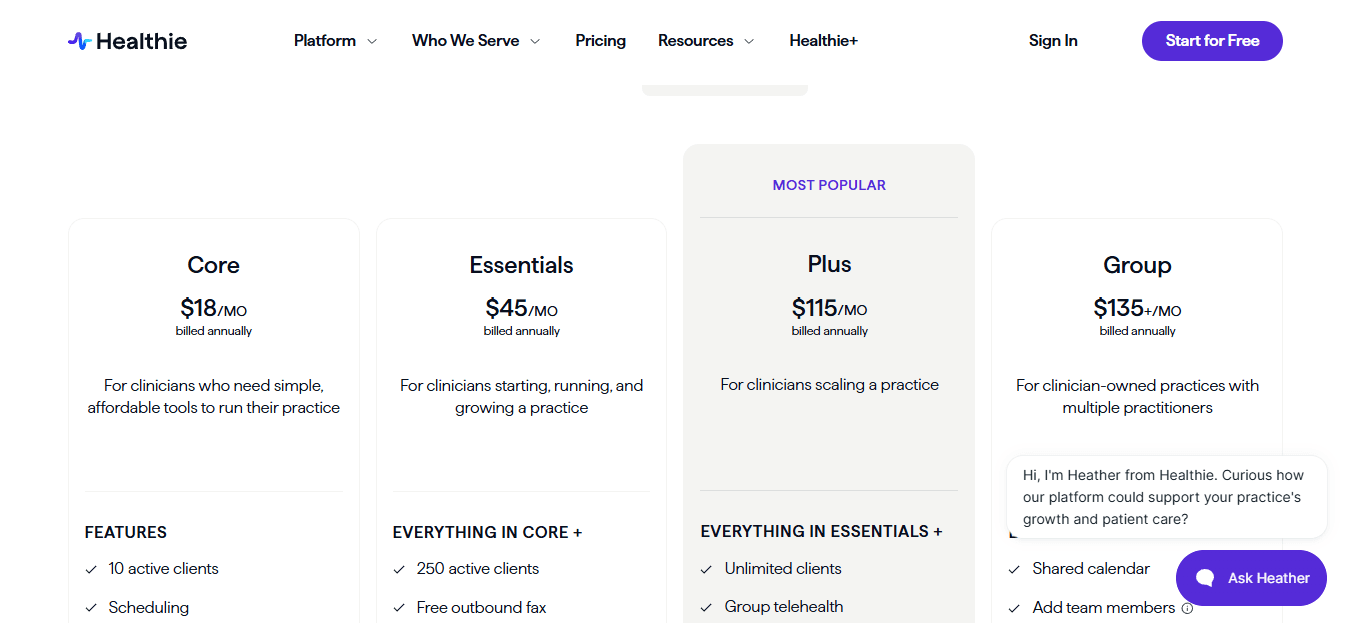
Healthie’s support page lists the Core plan at $19.99/month for solo providers with up to 10 active clients. It includes scheduling, payment processing, charting, telehealth, client portal, and mobile apps.
-
The Essentials plan is listed at $49.99/month for solo providers with up to 250 active clients. It adds SMS appointment reminders, group messaging, message blasts, basic email branding, and migration support.
-
The Plus plan is listed at $129.99/month for solo providers with unlimited clients. It adds programs, group video calls via HIPAA-compliant Zoom, premium branding, and other advanced features.
-
The Group plan starts at $149.99/month and includes 1 provider seat plus 1 support seat. Additional provider seats are listed at $50/month. These prices are from the Healthie pricing support page, so check the live pricing page before publishing.
SimplePractice
SimplePractice is popularly known as a HIPAA-compliant EHR and practice management tool, which is why many health and wellness practitioners use it for scheduling, notes, billing, telehealth, and client records in one place.
-
HIPAA scheduling: SimplePractice works well if you want health coaching appointments to sit inside a more clinical workflow, not just a calendar link. You can manage client appointments, recurring sessions, cancellations, intake, reminders, and payments from the same account.
For a solo health coach who offers discovery calls, paid coaching sessions, and package check-ins, this is useful because the schedule is tied to the client file. You are not jumping between a booking tool, Google Drive, Zoom, and payment links.
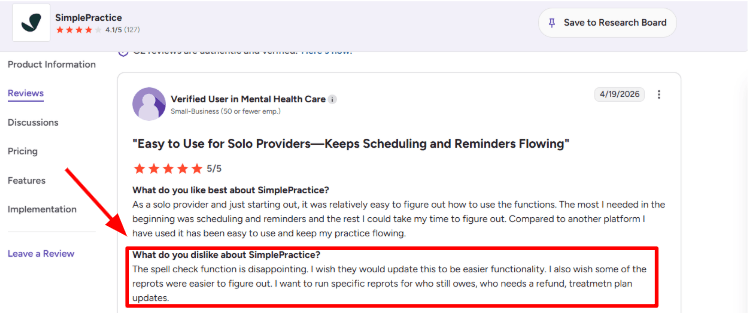
The setup is mostly clean, but some admin areas take a little time to understand. I saw the same thing mentioned in a G2 SimplePractice review, where the reviewer liked the platform overall but found reports and spell check weaker than expected. I’d place a screenshot of that review below this section because it matches the reporting gap quite closely.
-
Client portal: The SimplePractice Client Portal lets clients request appointments, manage documents, send messages, and pay in one place. For health coaches handling protected health information, this is much safer than sending forms over normal email.
I liked that the portal feels built for ongoing client relationships. A health coach can collect intake forms, food history, lifestyle notes, consent forms, and follow-up documents without asking the client to keep checking different links.
The only downside is that it may feel heavier than a simple budget scheduling app if you only need a booking page and reminders.
-
Telehealth sessions: SimplePractice includes HIPAA-compliant telehealth, which is important for health coaches who run virtual sessions and discuss sensitive health information. The SimplePractice telehealth page also mentions built-in screen sharing, secure chat, whiteboard, and automated text and email reminders.
This is helpful for coaches who do habit reviews, meal planning calls, accountability sessions, or weekly wellness check-ins. You don’t need to stitch together Zoom, a separate scheduling tool, and a reminder tool.
The positive surprise for me was how natural the telehealth flow feels once it is connected to the appointment.
-
Appointment reminders: Reminders are one of the strongest practical features here. According to the SimplePractice reminder setup guide, reminders can be sent by email, text, or voice, and timing can be customized before the appointment.
This matters a lot for health coaches because missed sessions can break continuity. If a client books a 7 AM accountability call before work, a reminder 24 or 48 hours before can reduce manual follow-up.
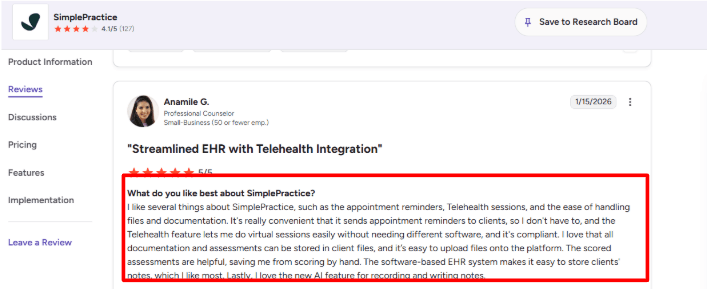
The second G2 SimplePractice review also praised appointment reminders, telehealth, documentation, file handling, scored assessments, and AI notes. I agree with the reminder and telehealth part. For health coaches, those two features alone reduce a lot of admin work.
-
Files and notes: SimplePractice is stronger than normal appointment scheduling software when it comes to documentation. You can keep client notes, assessments, uploads, forms, and session records attached to the client profile.
For example, if a client is working on sleep, stress, nutrition, and exercise over 12 weeks, the coach can keep weekly notes and uploaded documents in the same record. This is more useful than a plain calendar booking tool where the appointment exists but the client context lives somewhere else.
I found the documentation side useful, but it can also feel like too much if your coaching model is very lightweight.
-
Billing and reports: SimplePractice supports payments, invoices, superbills, insurance-related workflows, and business reporting. The SimplePractice features page positions it as a tool for managing scheduling, documentation, payments, reminders, and reports together.
For health coaches who sell paid sessions or ongoing packages, the billing connection is useful. You can reduce the usual mess of booked calls, pending payments, and client records being tracked separately.
Reporting is where I’d be careful. Basic business tracking is useful, but if you want very specific views like who owes, who needs a refund, or which plan needs an update, reviews suggest this may take extra digging.
Pros
- Strong fit for health coaches who need HIPAA-aware scheduling, telehealth, notes, forms, payments, and client records together.
- Client portal is useful for secure intake, document sharing, appointment requests, and client communication.
- Appointment reminders reduce manual follow-up, especially for recurring coaching sessions.
- Built-in telehealth means fewer tools to manage for virtual health coaching.
- Documentation and file storage are much stronger than a basic scheduling tool.
Cons
- Pricing is higher than lightweight appointment scheduling tools.
- It can feel too clinical if you only need simple health coaching bookings.
- Reporting may not be intuitive for specific payment or client-status questions.
- Some smaller usability issues, like spell check and report navigation, show up in user reviews.
- Best value comes when you use the EHR-style features, not just the calendar.
Pricing
-
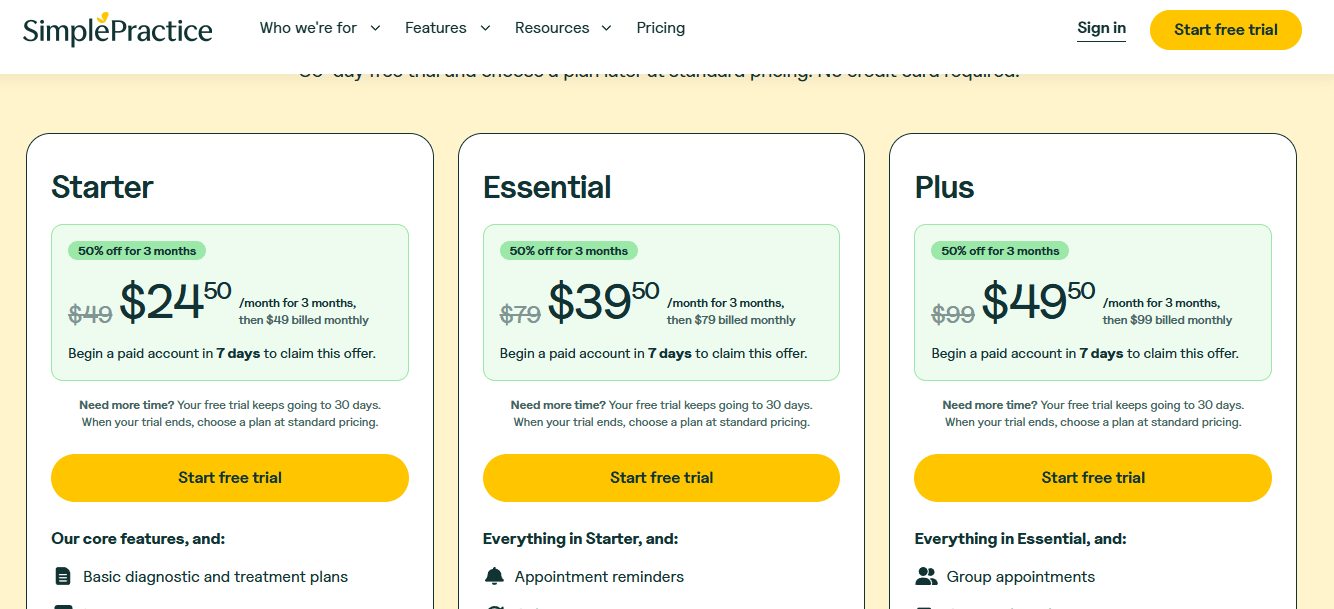
SimplePractice currently lists three monthly plans on the SimplePractice pricing page: Starter at $49/month, Essential at $79/month, and Plus at $99/month after the introductory discount.
-
There is a 30-day free trial, and SimplePractice currently advertises 50% off for 3 months if you begin a paid plan in the first 7 days of the trial.
-
For budget-conscious health coaches, Starter may be enough for basic practice management, but Essential or Plus may be needed if you want more automation and admin depth.
-
Optional add-ons can increase the total cost. The SimplePractice pricing FAQ mentions add-ons like group appointments with telehealth, ePrescribe, and Note Taker.
Jane App
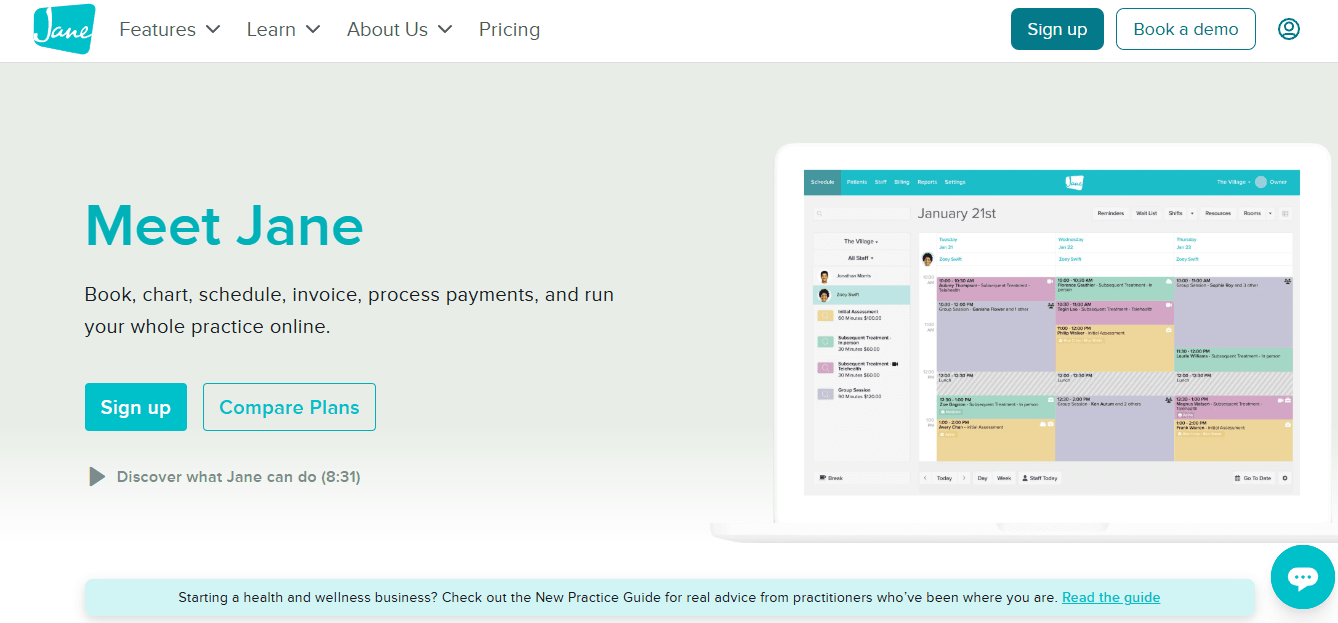
Jane App is popularly known in health and wellness clinics for online booking, scheduling, charting, secure messaging, telehealth, and billing in one place, which is why many health coaches consider it when they want HIPAA-compliant appointment scheduling without stitching together too many tools.
-
Online Booking: Jane’s booking flow is clean for a health coach who offers discovery calls, follow-up sessions, virtual coaching, group classes, or in-person consultations. You can add services, providers, locations, and availability, and clients can book without too much back-and-forth.
The booking setup is not the lightest tool in this list, but it gives more control than basic calendar schedulers. I liked that Jane treats booking as part of the full client journey, not just a time slot.
-
Scheduling Workflow: The calendar is useful if you run a mix of private coaching sessions, class-based programs, and recurring follow-ups. Jane also supports waitlists, return visit reminders, calendar subscriptions, breaks, shift management, and room or equipment handling on higher plans.
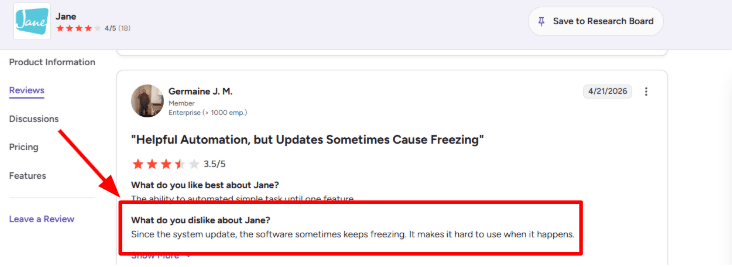
One thing to watch is performance. I also saw this in a G2 review on Jane software freezing after an update, where the reviewer said the system sometimes freezes after an update. Sharing a screenshot below:
For a solo health coach, this may not be a daily issue. But if your schedule is packed with client calls, intake calls, and payment follow-ups, even small lag can slow down admin work.
-
HIPAA Controls: Jane clearly positions itself as HIPAA compliant and lists security features like 2-step verification, access permissions, logged access, encryption, SOC 2-audited systems, and remote data storage on its pricing and HIPAA pages.
This matters for health coaches who collect sensitive details like medical history, nutrition goals, lifestyle issues, lab-related notes, medication context, or mental wellness information. Jane also says it can work with practices on a BAA agreement, which is important if you are handling PHI in the US.
-
Intake Forms: Jane’s intake forms are strong for health coaching because you can collect health history, consent details, billing information, and client goals before the first session. This helps avoid wasting the first 15 minutes asking basic questions.
Example: a health coach running a 12-week weight management program can ask about sleep, digestion, existing conditions, current supplements, food preferences, and consent before the first call. That makes the first session more useful.
After checking the form setup flow, my main note is that Jane gives depth, but it may feel heavier than a simple scheduler. That is fine for serious coaching practices, less ideal for someone who only wants a quick booking link.
-
Client Experience: Jane includes secure messaging, a client portal, email reminders, SMS reminders on higher plans, and a client mobile app for managing appointments. This is helpful for health coaches because clients often need nudges before and after sessions.
This is where I agree with the positive pattern in G2 reviews. One G2 review on Jane customer service and user-friendly software says the customer service is outstanding and the software is user friendly. That matches Jane’s own positioning around unlimited support, free data imports, setup calls, and human support.
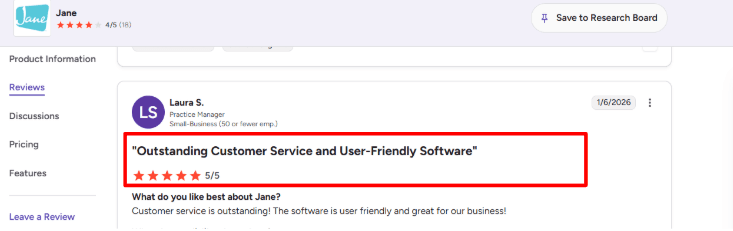
The positive surprise is that support is not treated like a small side feature. For a budget-conscious health coach moving from Calendly or spreadsheets, that can reduce setup mistakes.
-
Packages & Payments: Jane supports integrated payments, invoices, payment requests, gift cards, and on the Thrive plan, packages and memberships. This is useful if you sell coaching bundles instead of single appointments.
A health coach could sell a 6-session gut health package, a monthly accountability plan, or a group wellness program, then let clients redeem eligible sessions while booking. Jane’s package logic is more clinic-style than creator-style, so it may not replace a course platform, but it works well for session-based care.
Pros
- Strong HIPAA-focused setup for health coaches handling sensitive client information.
- Good mix of booking, telehealth, intake forms, payments, reminders, and client communication.
- Client portal and secure messaging make it more complete than a basic scheduling tool.
- Packages and memberships are useful for coaching bundles and recurring care plans.
- Customer support gets strong praise in reviews, which matters during migration.
- Better fit for serious health and wellness practices than casual one-person booking pages.
Cons
- More complex than lightweight schedulers if you only need a simple appointment link.
- Packages and memberships are only available on the higher Thrive plan.
- A G2 reviewer mentioned freezing after a system update, so performance should be tested before moving all bookings.
- Some automation depth may feel limited compared with tools built around marketing workflows.
- Pricing is in CAD and can rise as you add practitioners, add-ons, or advanced features.
- It may be too clinic-oriented for health coaches who mainly sell digital products, courses, or community programs.
Pricing
-
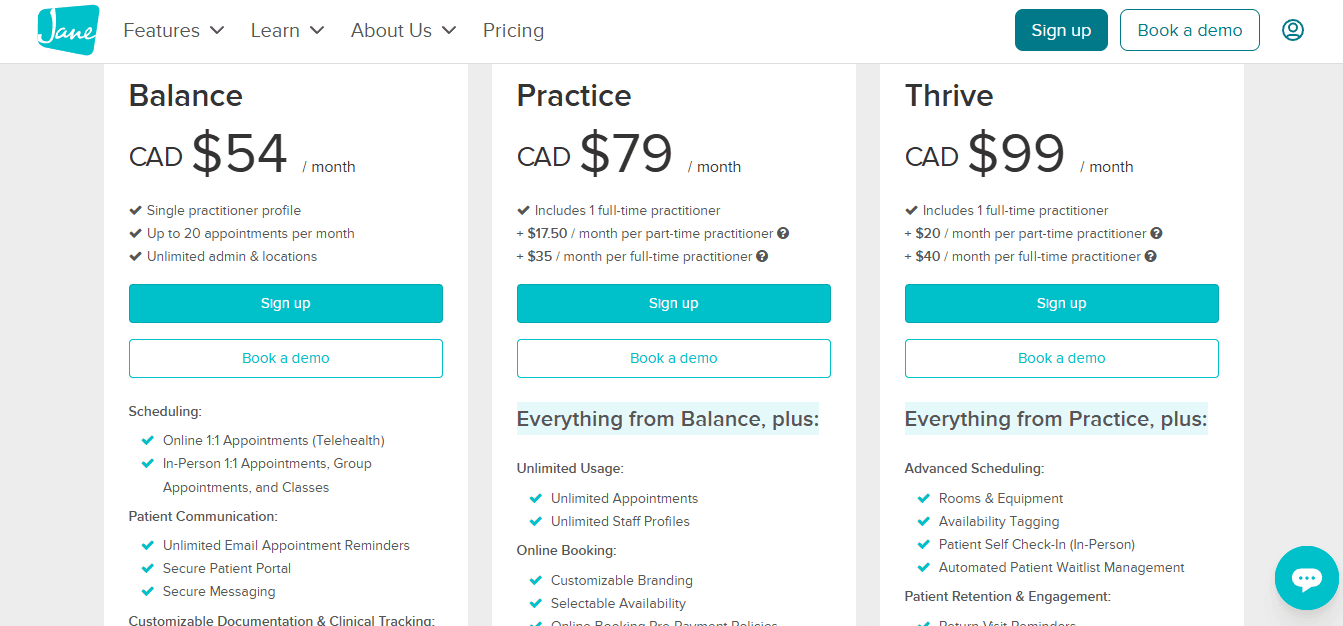
Jane’s Balance plan starts at CAD $54/month for a single practitioner and up to 20 appointments per month, according to the Jane App pricing page.
-
The Practice plan is CAD $79/month and adds unlimited appointments, unlimited staff profiles, custom branding, selectable availability, online booking payment policies, and SMS reminders where available.
-
The Thrive plan is CAD $99/month and adds advanced scheduling, return visit reminders, packages, memberships, ratings, reviews, and Google Analytics integration.
-
Add-ons can increase the cost. AI Scribe is listed at CAD $15/month per opted-in practitioner, group telehealth is CAD $15/month per opted-in practitioner, and insurance billing starts at CAD $20/month.
Sessions Health
SessionsHealth is mostly known as a therapist-built EHR, so health coaches usually consider it when they want HIPAA-safe scheduling, intake, billing, notes, and client communication in one place.
-
HIPAA Scheduling: SessionsHealth gives health coaches a proper scheduling setup instead of just a public booking link. You can create appointments, manage availability, sync calendars, send reminders, and let clients request sessions through the client portal.
When I set it up, the calendar flow was clean and not overloaded. The better part is that appointment requests can be separated for new and existing clients, which is useful if you offer discovery calls, paid coaching sessions, and follow-up check-ins differently.
One thing to note is that it still feels more EHR-first than marketing-first. If you want a polished coaching landing page with testimonials, packages, and sales content around the booking flow, SessionsHealth is not really built for that.
-
Billing Tools: SessionsHealth has invoices, online payments, superbills, claims, AutoPay, client balances, and payment history. For health coaches who sell reimbursable sessions, superbills, or hybrid wellness programs, this is much stronger than a basic scheduler.
But billing reporting may not go deep enough for everyone. I also saw this in a G2 SessionsHealth review, where a user said they did not like the billing tab because they wanted better reporting on billed sessions. I’d place that screenshot below this section because it matches the exact gap.
In real use, this matters if you run a small health coaching practice with 30 clients and want to quickly see which sessions were billed, which packages are pending, and which clients have repeat payment issues. The basics are covered, but advanced revenue reports may need manual work.
-
Client Portal: The client portal is one of the stronger parts of SessionsHealth. Clients can complete intake forms, sign documents, send secure messages, request appointments, pay invoices, and view statements from one place.
For HIPAA-focused health coaches, this is useful because sensitive intake details do not have to sit inside email threads, Google Forms, or random WhatsApp messages. A client can fill a nutrition history form, sign consent, book a coaching call, and pay through the same portal.
The positive surprise was how simple the portal felt from the client side. It is not fancy, but it is clear enough for non-technical clients, which matters a lot in wellness and coaching.
-
Therapy-First Design: SessionsHealth is clearly built around mental health workflows, and that can help or limit health coaches depending on how clinical your work is.
After going through the product, I agree with the second G2 SessionsHealth review where the reviewer said it is built by therapists and understands what therapy businesses need. You can see that in the notes, forms, client records, reminders, billing, and documentation structure.
For a health coach who works closely with behavioral change, habit tracking, stress management, or trauma-informed coaching, this structure can feel useful. But for a pure wellness coach selling programs, courses, challenges, or packages, the therapy-first setup may feel heavier than needed.
-
Telehealth Sessions: SessionsHealth has integrated HIPAA-compliant telehealth with browser-based access, waiting rooms, screen sharing, chat, virtual backgrounds, and multi-participant support. According to the SessionsHealth telehealth page, clients do not need to download an app.
This is practical for health coaches doing remote 1
sessions, couple wellness sessions, family nutrition coaching, or small accountability calls. You can run the appointment, keep the record, and handle payment inside one system.The catch is pricing. Telehealth is an add-on, not included in the base price. So if your main need is only HIPAA-safe video plus booking, you should compare the final monthly cost, not just the starting plan.
-
Forms and Notes: SessionsHealth includes custom forms, note templates, assessments, treatment plans, and documentation tools. The SessionsHealth features page also mentions documentation, scheduling, billing, telehealth, client portal, security, and AI Assist as core areas.
For health coaches, this is helpful when you want structured intake, follow-up notes, progress tracking, lifestyle history, consent forms, and session summaries. It gives your practice a more organized back office.
I would not call it the lightest tool for coaching, though. Some coaches may find the documentation depth useful, while others may feel they are paying for clinical workflows they do not fully need.
Pros
- Strong HIPAA-compliant setup for health coaches handling sensitive client information.
- Better than basic schedulers because it includes intake, billing, notes, portal, payments, and reminders.
- Client portal is clean and useful for forms, payments, messaging, and appointment requests.
- Good fit for health coaches who work close to therapy, behavioral health, nutrition, stress, or wellness documentation.
- Free plan for up to 3 active clients helps new coaches start without immediate software cost.
- Transparent base pricing compared with many healthcare practice tools.
Cons
- Built mainly for therapists, so some health coaches may find parts of the system too clinical.
- Billing is useful, but reporting around billed sessions may feel limited for revenue analysis.
- Telehealth costs extra, so the real monthly price can be higher than the headline price.
- Not ideal if you need coaching packages, course delivery, community features, or marketing-heavy booking pages.
- The booking experience is practical, but not as conversion-focused as modern coaching sales tools.
- May be more system than needed for a solo coach who only wants simple HIPAA scheduling.
Pricing
-
SessionsHealth has a free plan for up to 3 active clients, which is useful for new health coaches testing HIPAA-compliant workflows.
-
The Professional plan starts at $39/month for the first practitioner, according to the SessionsHealth pricing page.
-
Additional practitioners cost $29/month each, which makes it predictable for small coaching teams.
-
Telehealth is an optional add-on at $10/month per practitioner. AI Assist is also listed as a paid add-on at $35/month per practitioner on the pricing page.
-
Electronic claims and eligibility checks are usage-based, so coaches who handle insurance-related workflows should calculate those costs separately.
Carepatron
Carepatron is popularly known as an all-in-one healthcare practice management tool, and health coaches usually consider it because it brings booking, HIPAA-friendly records, telehealth, notes, reminders, and payments into one place.
-
Online Booking: Carepatron’s booking flow is simple enough for a solo health coach who does not want to stitch together Calendly, Zoom, forms, and a payment tool.
When I set up a basic consultation flow, the useful part was how quickly I could move from service setup to client booking. For budget-conscious health coaches, that matters because the tool is not only taking appointments. It can also hold client details, notes, payments, and follow-up tasks in the same workspace.
-
Telehealth Video: Carepatron includes built-in telehealth, so you can run virtual coaching sessions without sending clients to a separate video link. For HIPAA-focused health coaches, this is cleaner than using a generic meeting tool and then manually updating notes later.
The only caution is reliability after updates. I also saw this in a G2 review on Carepatron, where the reviewer mentioned frequent updates and occasional video loading issues after those updates.
-
Client Records: Carepatron feels more like a lightweight healthcare operating system than a plain scheduler. You can keep client profiles, session notes, intake information, documents, and communication history together.
For example, a health coach working with a client on blood sugar habits could store the intake form, weekly check-in notes, food log uploads, and progress updates in one client record. That is much better than having bookings in one tool, notes in Google Docs, and client files in a folder nobody remembers to update.
-
AI Notes: The AI scribe is one of the more useful parts of Carepatron, especially if you spend too much time writing follow-up notes after calls. Carepatron’s own help docs explain that its AI can transcribe telehealth calls and attach the transcript and note to the client record.
This matches a G2 review on Carepatron, where the reviewer liked the fast booking and AI features, especially transcription and SOAP-style notes. I agree with the general point, but I would still treat AI notes as a first draft. For health coaching, it can capture goals, blockers, and next steps, but you still need to clean it up before sending anything client-facing.
-
Client Portal: The client portal is helpful if you want clients to access forms, appointment details, files, invoices, and messages without digging through email threads.
This is useful for health coaches who run structured programs. A client can book a session, complete intake, join the call, and receive notes or resources from the same system. The setup does take some attention though. It is not as light as a pure scheduling link, so I would keep the client-facing flow minimal.
-
Billing Workflows: Carepatron supports invoices, payments, billing, reminders, and admin workflows. That makes it useful for coaches who sell paid consultations, recurring check-ins, or higher-touch wellness programs.
The practical benefit is fewer loose ends after a booking. A client books, gets reminded, attends the session, pays, and has their notes stored in one place. The tradeoff is that Carepatron is built with healthcare workflows in mind, so if you sell simple coaching packages, check whether the payment and package setup feels flexible enough before moving everything over.
Pros
- Strong all-in-one setup for health coaches who want scheduling, telehealth, notes, records, and payments together.
- HIPAA and SOC compliance positioning makes it more relevant than generic appointment scheduling tools.
- AI transcription and SOAP-style notes can save time after coaching calls.
- Free plan gives budget-conscious solo coaches a low-risk way to test the system.
- Client portal helps keep forms, files, messages, and appointment details organized.
Cons
- Video reliability can be a concern after frequent product updates, based on the G2 review shared above.
- The platform can feel more clinical than coaching-specific, especially for simple wellness or habit coaching workflows.
- AI notes are useful, but still need human review before being used for follow-ups.
- Pricing can be a little confusing because public pricing sources show monthly, annual, and promotional numbers differently.
- Coaches selling courses, cohorts, or packaged programs may still need a separate coaching or content platform.
Pricing
-
Carepatron has a free plan, which is useful for testing basic scheduling, telehealth, client portal, payments, storage, and AI note-taking.
-
G2 lists Carepatron plans as Free at $0, Essential at $29/month, Plus at $39/month, and Advanced at $49/month.
-
Capterra and GetApp show lower annual-equivalent pricing, with Essential around $23/user/month, Plus around $31/user/month, and Advanced around $36/user/month.
-
For a budget health coach, the free plan is good for testing. A paid plan becomes more realistic once you need reminders, calendar sync, more storage, group sessions, stronger automation, or admin controls.
Methodology
Each tool was compared on BAA availability, intake privacy, reminder controls, payments, packages, calendar sync, telehealth, client experience and setup effort for a solo health coach. Product documentation was used for feature verification, while user reviews were used only to identify recurring usability concerns.
FAQs
What are the best HIPAA-compliant scheduling tools for health coaches?
Mint Scheduling, Practice Better, Healthie are strong picks for health coaches who need HIPAA compliant scheduling.
- Pick Mint Scheduling for simple booking and payments
- Pick Practice Better for coaching programs
- Pick Healthie for nutrition and wellness care
How do I choose scheduling software for a health coaching business?
Choose based on how you run sessions.
Solo health coaches usually need online booking, reminders, intake forms, payments, and a BAA.
If you sell packages or programs, check client portals, recurring sessions, and group coaching support.
What mistakes do health coaches make when buying scheduling software?
The biggest mistake is choosing only by price.
Check these first:
- Does it offer a BAA?
- Can clients reschedule easily?
- Are reminders built in?
- Can it handle packages, forms, and payments?
Which HIPAA-compliant scheduling tools work well for solo health coaches?
For solo health coaches, Mint Scheduling, Practice Better, and Carepatron are practical options.
Mint Scheduling works well for simple booking flows.
Practice Better fits coaches selling programs.
Carepatron is useful if you want scheduling plus basic practice management.
How should I test HIPAA scheduling software before switching?
Test the full client flow before moving everything.
Book a fake session, fill an intake form, reschedule it, cancel it, and check the reminders.
Also review payment setup, calendar sync, and how easy the client handoff feels.
Do health coaches need more than appointment scheduling?
Yes, many health coaches need more than a booking link.
Look for forms, packages, payments, reminders, client notes, and secure messaging.
Jane App, SimplePractice, Sessions Health, and Healthie may fit better if you need broader practice tools.
Summarize this content with AI


