

Introduction
Do you accept payments when customers book online? Every time someone schedules a session, they go through a checkout flow—and that flow needs to be optimised.
This is why choosing the right online booking system with payment support can increase completed bookings and sales. I also checked integrations with Stripe and PayPal where available.
I also read through reviews on G2, Capterra, and Reddit. Along with that, I checked the details around how refunds work, what happens when a payment fails, and how cancellations are handled.
Online Booking Systems With Payment Support: Comparison Tables
Best tools by business use case
| Use-case | Best tool | Why it fits |
|---|---|---|
| Multi-payment support with zero commission | Lunacal | Strong booking page experience with payments, content, and trust signals |
| Solo consultants, coaches | Calendly | Fast setup, simple paid one-on-one bookings, strong calendar sync |
| Service businesses selling sessions | Acuity Scheduling | Handles packages, classes, intake forms, and repeat bookings well |
| Local salons, clinics, studios | Square Appointments | Built-in payments, POS alignment, staff and location management |
| Multi-service teams, memberships | SimplyBook.me | Flexible system with packages, memberships, and feature add-ons |
Feature comparison of booking tools with payments
| Feature | Lunacal | Acuity Scheduling | Square Appointments | SimplyBook.me | Calendly |
|---|---|---|---|---|---|
| G2 rating | 4.9 | 4.6 | — | 4.4 | 4.7 |
| Starting price (USD) | 9 | 16 | 49 | 16 | 10 |
| Calendar sync | Full | Full | Partial | Partial | Full |
| Payments supported | Stripe, PayPal | Stripe, Square, PayPal | Square | Multiple | Stripe, PayPal |
| Paid bookings | Yes | Yes | Yes | Yes | Yes |
| Packages / classes | Yes | Yes | Yes | Yes | No |
| Team scheduling | Yes | Yes | Yes | Yes | Yes |
| Round robin | Yes | Partial | No | No | Yes |
| Custom domain | Yes | Partial | Partial | Yes | No |
| Reminders (SMS/email) | Yes | Yes | Yes | Yes | Yes |
| Booking page control | High | Medium | Basic | Medium | Basic |
| GDPR support | Yes | No | Yes | Yes | Yes |
Deep dive into the best online booking systems with payment support
Lunacal
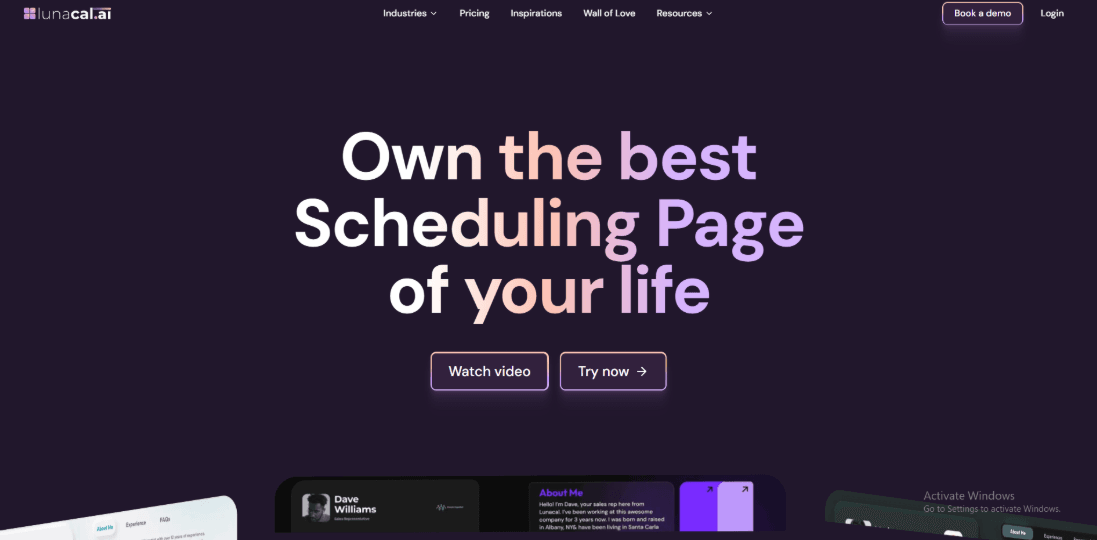
Lunacal brings your booking page, payment collection, and client information into one simple flow. It focuses a lot on how the page feels before someone books, which matters when people need to trust you before paying.
Features
- Beautiful scheduling pages with rich content
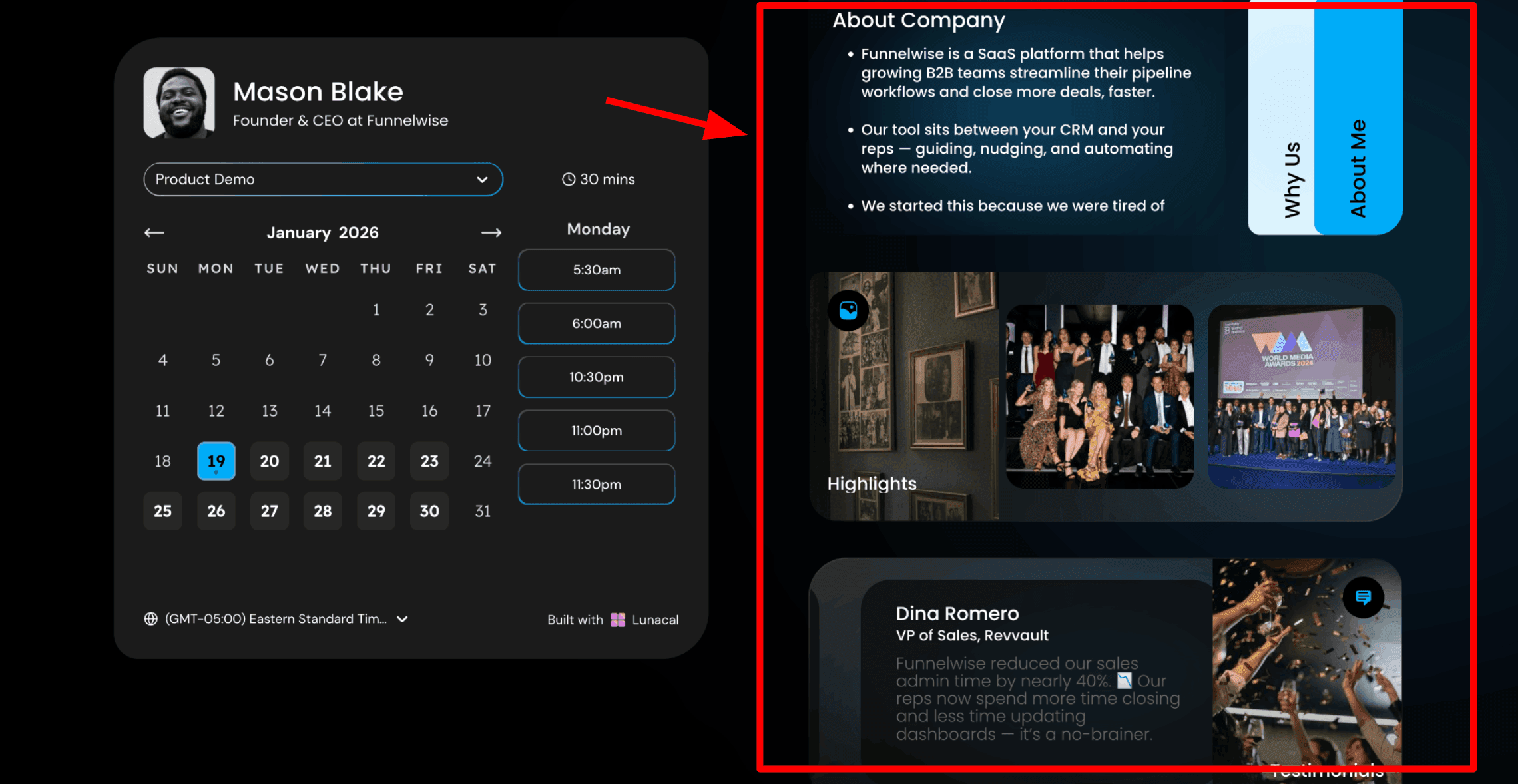
This is the first thing I would focus on because it directly affects whether someone completes a paid booking or leaves the page. In Lunacal, the booking page includes your content alongside the calendar, so visitors understand what they are paying for, who they are working with, and why it is worth it before they choose a time and enter their payment details. This becomes even more important for paid bookings because people need more clarity before spending money. Here is a screenshot below:
- Drag and drop booking page editor
This is how you build the page. Lunacal gives you a simple editor where you can add text, testimonials, images, videos, documents, service details, and intake forms without needing technical skills. Everything is created in one place and shared through a single link. For service businesses using multiple tools for pages, scheduling, and payments, this simplifies the setup and reduces cost.
- Booking windows with date exceptions
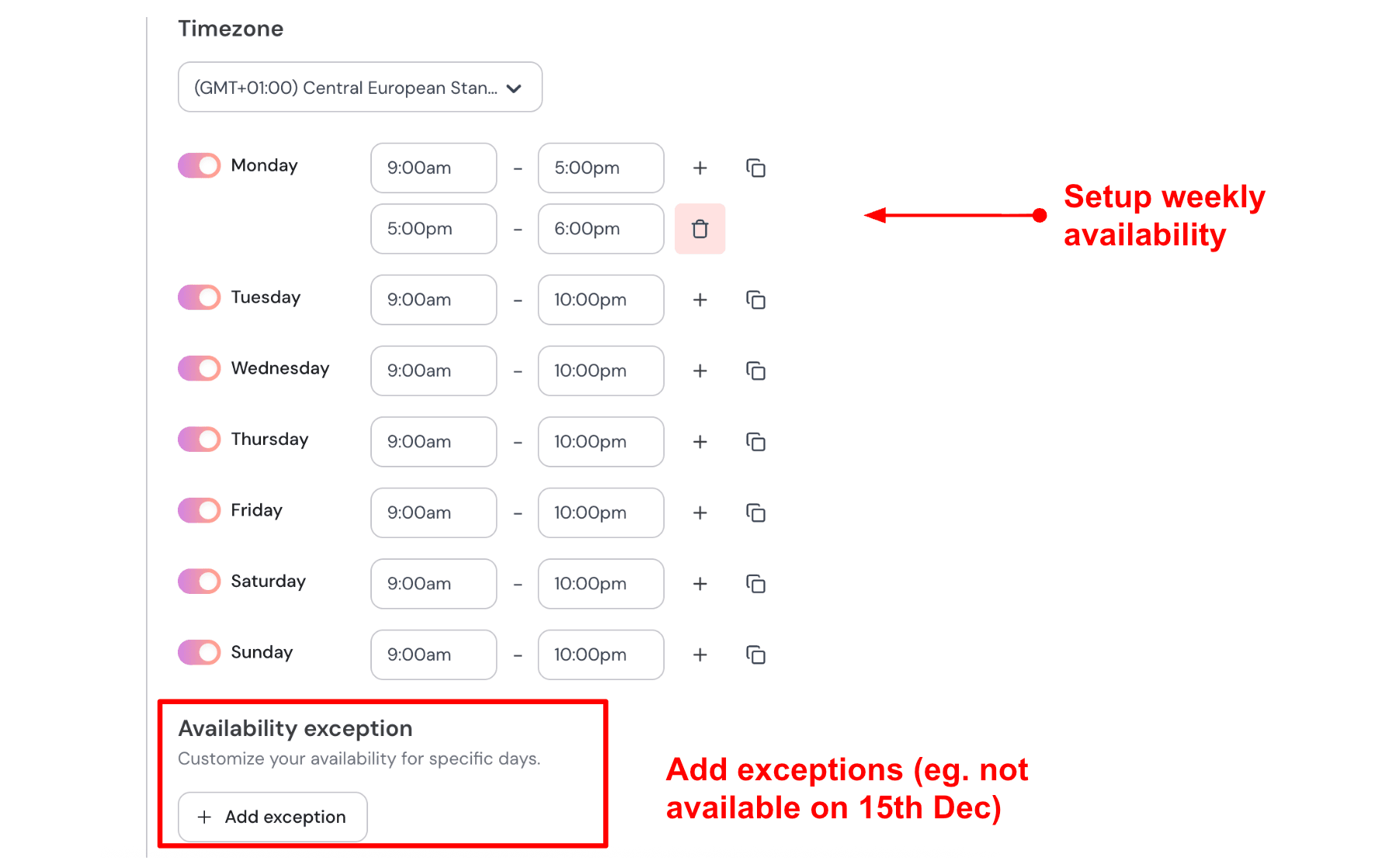
Once your page is ready, you set when people can book. You choose your working hours and block specific dates when you are not available. This keeps your booking link accurate wherever you share it, whether in emails, on your website, or on social media. People only see times that are actually available, which helps avoid confusion and lost bookings. If I run sessions from Tuesday to Friday between 10 AM and 4 PM, I set that once. If I take a break or get fully booked for a week, I block those dates and the page updates automatically. Here is how I set up my availability:
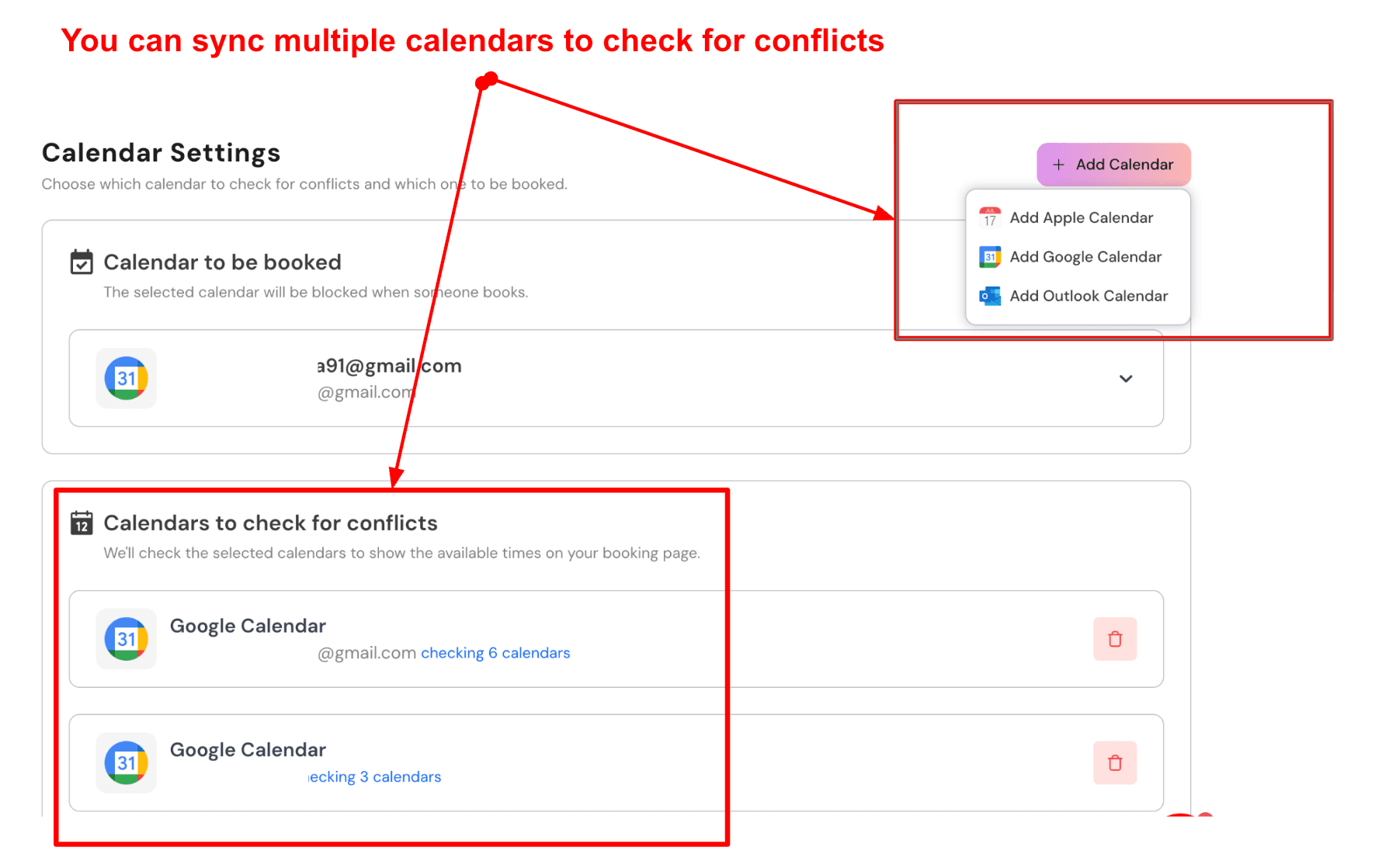
- Sync multiple calendars to prevent booking conflicts
Lunacal connects with multiple calendars so your availability stays accurate. Paid bookings go into your main calendar, while other calendars are checked in the background before time slots are displayed. This helps avoid double bookings, which can create problems with refunds and rescheduling. Here is a screenshot of that:
- Custom pre-payment intake questions
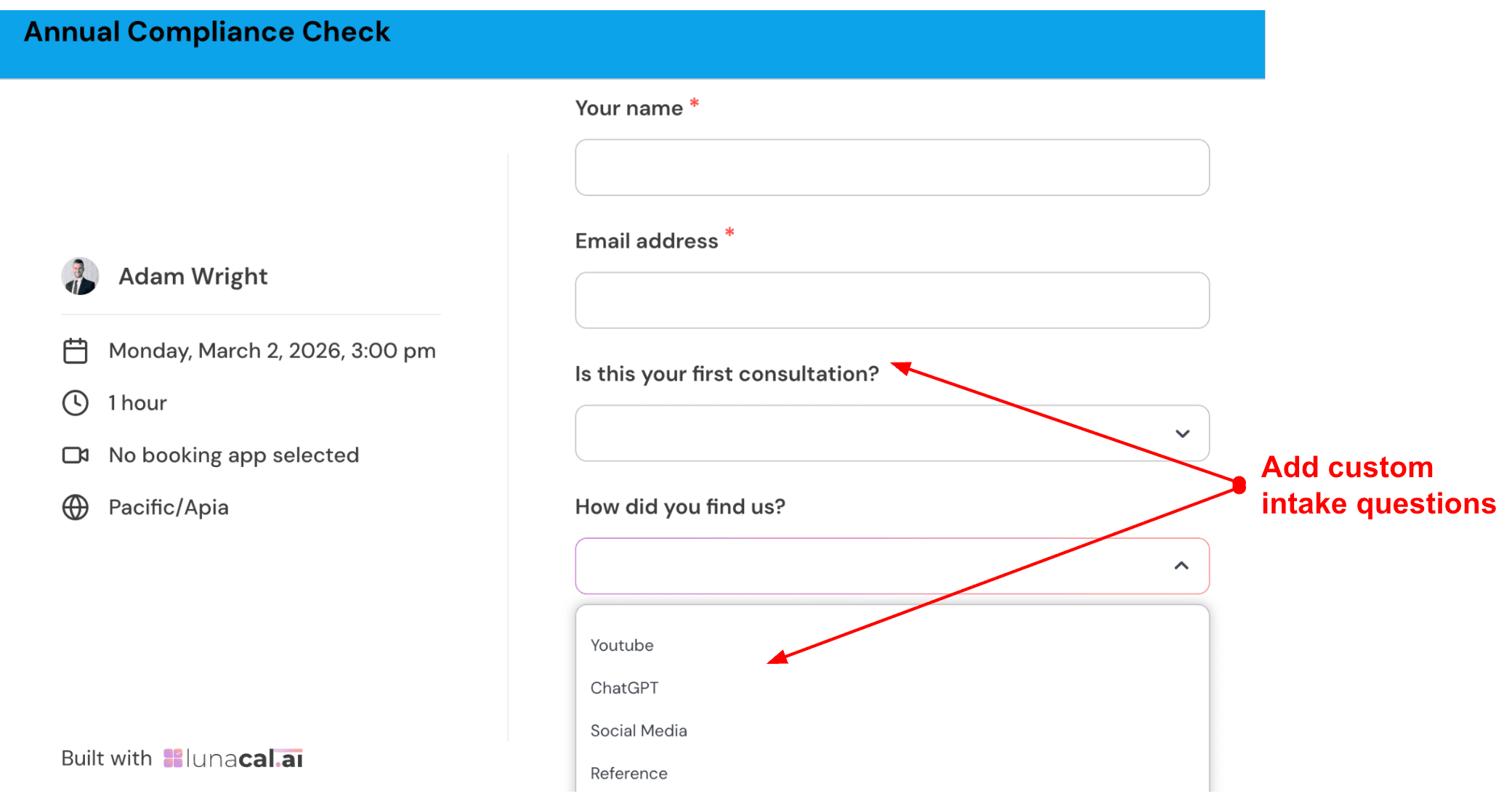
You can ask a few questions before someone completes their booking. This helps you prepare better and shows that your process is well-thought-out. It also makes the client feel more confident about the session. It is best to keep it short and only ask what truly matters. For a brand strategy session, I would ask about their main business challenge, their current stage, and whether they have worked with a strategist before. Check out the intake form I created:
- Multi-service and multi-provider paid booking flow
Clients can choose a service, select a provider (if needed), pick a time, and complete payment in a single flow. If you have a team, they can also choose any available provider to get the earliest slot. This works well for businesses offering different services at different price points. You can create options such as a 60-minute consultation, a longer deep-dive session, and a half-day session, each with its own price.
- Automated payment confirmations and pre-session reminders
Lunacal sends automatic confirmations and reminders through email and SMS. You can customise these messages with details like the client’s name, session time, amount paid, and meeting link. This helps reduce confusion and keeps the experience professional.
- Stripe and PayPal payments built into the booking flow
You can connect to Stripe or PayPal and collect payment during booking. Clients choose a time, pay, and receive confirmation in one smooth process. There is no need for separate invoices or follow-ups. Keeping scheduling and payment in the same flow reduces missed payments and removes the need to send separate invoices. Once configured, the process runs automatically for future bookings. For higher-priced services, I would take a deposit and collect the remaining amount later. This setup runs automatically once configured and works well for most paid booking systems.
Pros
- The booking page gives enough space to explain your service and build trust before someone books
- Paid bookings, coupons, and packages support real business use cases
- Team features like round robin and shared availability are useful when you grow
- Calendar sync and booking flow feel stable in day to day use
- Works well across different time zones and languages
Cons
- It may feel like extra setup if you only want a quick pay and book link
- Creating similar event types takes more time because there is no simple duplicate option
- Per user pricing can increase as your team grows
- Some advanced setups may take time to figure out
- It may feel limited if you need very deep developer level control
Pricing
- On the official Lunacal pricing page, Standard starts at $9 per user per month, Teams starts at $15 per user per month, and Enterprise starts at $25 per user per month
- Standard includes core scheduling, payments, and Zapier
- Teams adds round robin and shared scheduling
- Annual billing offers savings, so it is better to calculate cost based on team size first
When to Choose Lunacal
Choose Lunacal when you want the booking page to explain your service, build trust, and collect payment in one flow. A simpler scheduler may be enough when you only need a basic pay-and-book link and do not need detailed page customisation or team scheduling.
Acuity Scheduling
Acuity Scheduling is known for simple self-booking with payments built in. I use it when I want to get a booking page live quickly with forms, reminders, and payments all working together. It feels reliable once everything is set up, and it does the core job well for most service-based businesses.
Features
- Availability rules
I set buffers, daily limits, and custom hours in a few minutes, then tested bookings to make sure everything worked correctly. It handled back-to-back sessions well and kept the schedule clean without overlaps.
- Payment collection
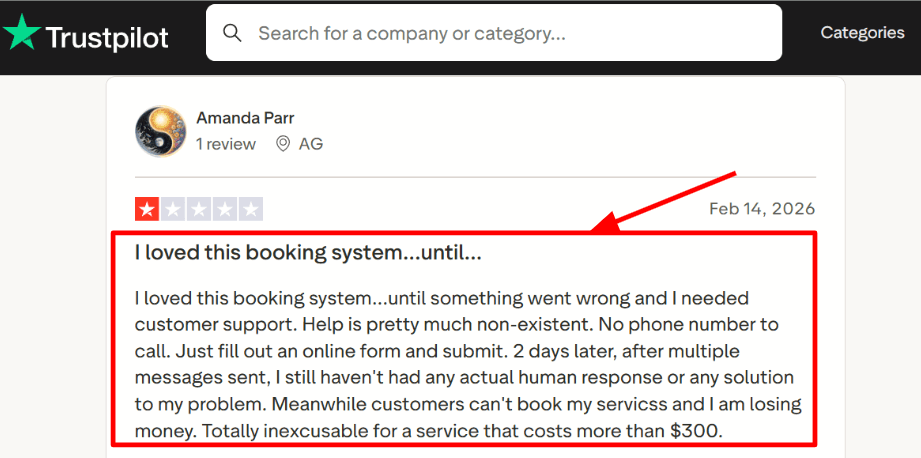
It supports Stripe, Square, and PayPal, so most setups are covered. I was able to require payment at the time of booking for selected services, which removes the need to follow up with clients separately. I also saw the same concern in a Trustpilot review, and I am sharing a screenshot below so you can review it.
- Client controls
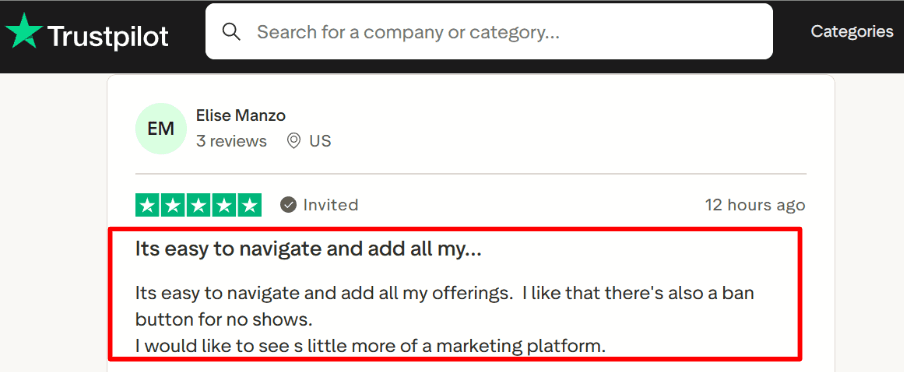
Adding services and appointment types felt simple, and it was easy to adjust duration and pricing later. A Trustpilot reviewer mentioned a ban option for no-shows, which shows what some users expect. In my testing, the useful controls were requiring payment upfront, setting clear policies, and limiting reschedules. I am sharing that screenshot below as well.
- Intake forms
You can collect details before the session so you are not starting from zero on the call. I created a short form and checked it on mobile, and it stayed clean and easy to fill out.
- Calendar sync
Calendar sync helps avoid double bookings and keeps your schedule accurate. I tested it by connecting a real calendar, and it reflected availability correctly. The way Squarespace explains this in their own [Squarespace docs] is also helpful when you are researching Online Booking Systems With Payment and comparing tools.
Pros
- Quick to launch a working booking flow
- Supports Stripe, Square, and PayPal for paid sessions
- Intake forms help you prepare before calls
- Packages and subscriptions support repeat clients
- Calendar sync reduces manual work
Cons
- Not ideal if you need advanced marketing tools inside the same system
- Support can feel slow when issues come up
- No free plan, only a limited trial
- International SMS may vary depending on [SMS coverage]
- Team features and scaling require higher plans
Pricing
- Free trial is available for testing
- Paid plans usually start around $20 per month
- Pricing increases based on staff, calendars, and features like SMS
- Higher tiers include advanced features and compliance options
- Best to check current pricing if you are comparing Online Booking Systems With Payment
When to Choose Acuity Scheduling
Choose it if you want a reliable booking system with payments, forms, and reminders in one place. It works well for solo users and small teams who want clients to book on their own without extra steps. It is a good fit when you want something that works quickly and keeps admin work to a minimum. It may not be the right choice if you need built-in marketing tools or fast support during critical issues.
Square Appointments
Square Appointments is known for keeping scheduling and payments inside the same system. If you plan to charge for bookings, it feels simple because everything sits in one place, from booking to reminders to checkout. It fits well for service businesses that want fewer moving parts. It also works as one of the more practical Online Booking Systems With Payment when you want a direct setup without extra tools.
Features
- Payment Integration
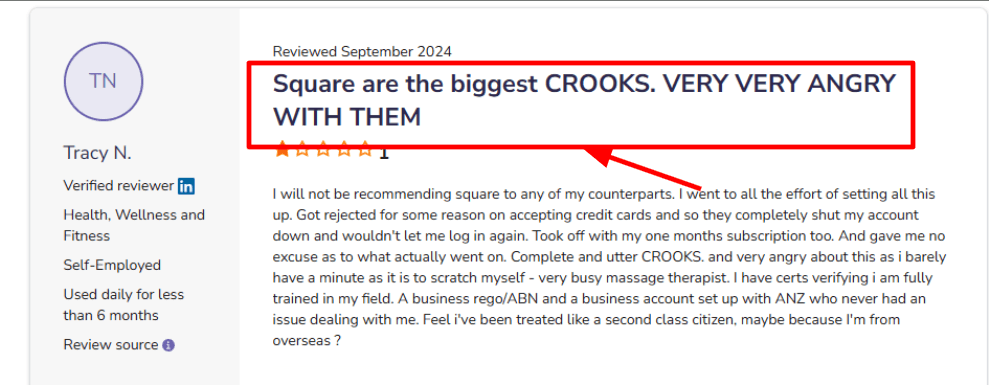
I set it up with Square payments, and the flow felt easy for paid appointments and collecting fees tied to bookings. You can also add cancellation fees and no-show charges, which helps when your calendar is full. One thing to keep in mind is that payment access depends on your account setup, so onboarding steps matter.
I also saw a rough version of this in a Software Advice review.
Sharing a screenshot below so you can judge the context yourself.
- Online Booking Page
You can share a booking link so clients can schedule without back-and-forth messages. It works well for simple services. When I tested it, I could get a basic page live quickly and then adjust services and timing later. If you operate from multiple locations, clients can select the relevant location during the booking process, helping prevent bookings at the wrong branch.
- Availability Rules
You can set working hours, buffer time, and basic rules to keep your schedule manageable. It supports a consistent weekly routine without much effort. While testing on mobile, I had to double-check a few settings before they worked as expected, but once set, it stayed stable.
- Automated Reminders
Confirmations and reminders are included, which helps reduce missed appointments. This saves time if you handle many bookings. I also tried rescheduling and found the drag and drop option on mobile useful for quick changes when clients shift their time.
- Client Profiles
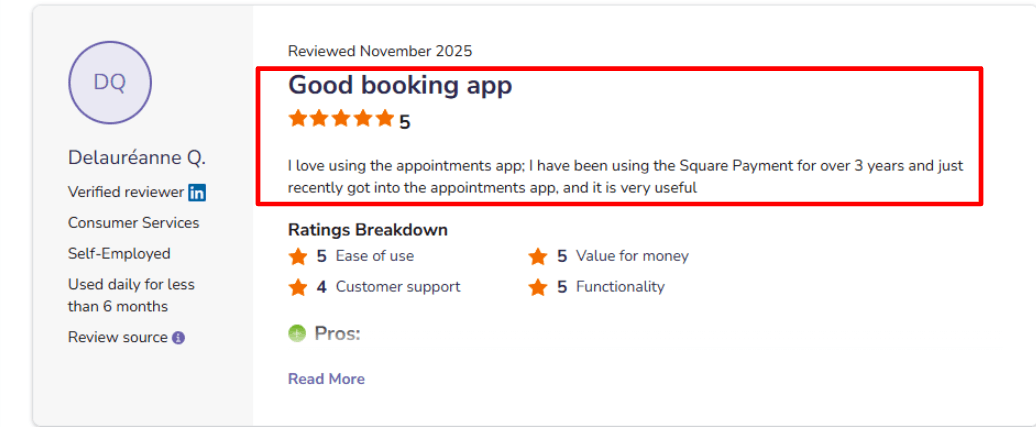
Each booking builds a history so you can see past visits and notes. This helps when working with repeat clients. I also saw a Software Advice note mentioning it works well for users already using Square payments, and that matched my experience. I’m adding a screenshot below so you can skim it quickly.
Pros
- If you already want an online booking system with payment, everything works together in one place
- Easy to launch a booking page and improve it over time
- Built-in reminders help reduce missed appointments
- Client profiles support repeat customers
- Mobile actions become quick once you get used to the layout
Cons
- Can feel heavy if you only want simple scheduling without payments
- Some settings take time to locate between web and mobile
- Account and payment approval can slow things down in some cases
- Advanced booking needs, like complex resource setups, are limited
- Multi-location setups need clear processes to run smoothly
Pricing
- Free plan available for solo users with basic features
- Paid plans start at $49 per month for teams
- Higher tiers include more operational features
- Cost grows as your team and needs expand
When to Choose Square Appointments
Choose it if you want scheduling and payments together in one system, and you run a service business where reminders and policies like no-show fees matter. It works well if you already use Square tools in your daily work. It is also a good fit among Online Booking Systems With Payment when you want a simple flow from booking to payment. Skip it if you want only a lightweight scheduler or need advanced booking setups.
SimplyBook.me
SimplyBook.me is an online booking tool where you can switch on only the features you need. It works well if you want online booking with payments, along with options like packages or memberships, without building everything from scratch. Among Online Booking Systems With Payment, this one stands out for how flexible it is once you set it up.
Features
- Payment setup
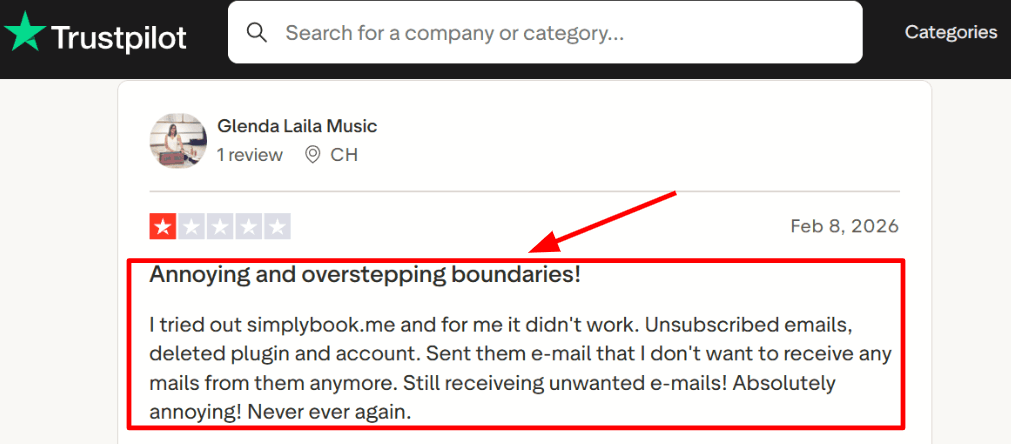
I tested the Accept Payments flow and it covers what most people need. You can charge clients at the time of booking, and the payment stays linked to the appointment. This also makes it easier to sell packages or memberships instead of just one-off sessions. One thing I noticed in a Trustpilot review is a complaint about unwanted emails even after unsubscribing, so that is something to be aware of. I am adding a screenshot below so you can see it in context.
- Availability rules
You get good control over your working hours, breaks, and buffer time, so the system does not offer slots you cannot actually take. When I tested this, it felt reliable for daily use, even when multiple services shared the same staff. You can keep things simple if you are working alone, or adjust settings as your setup grows.
- Booking website and embed
You can create a full booking website or embed the booking widget into your existing site. This makes it faster to go live without needing extra tools. I tested the embed on a simple site and it worked without much effort. The only part that took time was figuring out which features to turn on, since there are many options in the dashboard.
- Packages and memberships
This is where SimplyBook.me becomes more useful for paid services. You can create session packages or memberships and control who can book based on what they have purchased. Some package and membership options depend on additional custom features being enabled, so the required setup should be checked before launch.
- AI Voice Booking
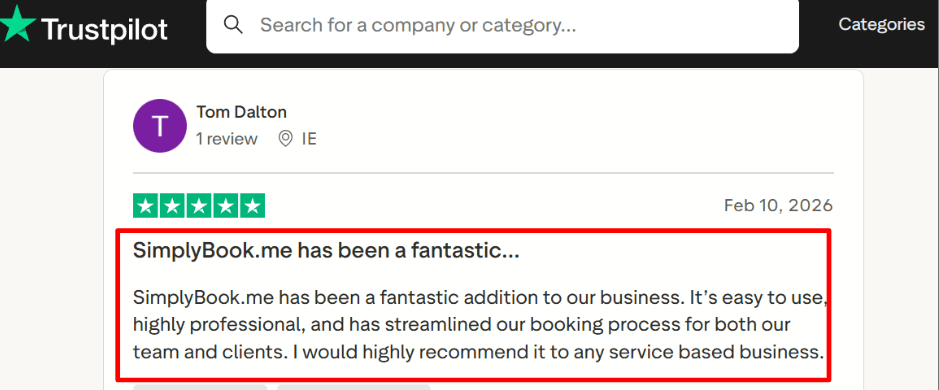
There is also an AI Voice Booking option for people who prefer calling or quick chat-style booking. It runs on credits, so you need to watch usage if you enable it. I came across a positive Trustpilot review that described it as easy and professional for teams, and my experience with the core booking flow was smooth once everything was set up. Sharing the screenshot below for context.
Pros
- Flexible setup where you can enable only the features you need
- Payments connect smoothly with bookings
- Good control over availability and service timing
- Packages and memberships support repeat customers
- Booking website and embed options help you launch faster
- Can scale with extra bookings or credits when needed
Cons
- Setup can feel heavy if you only need a simple booking tool
- Pricing can get confusing with add-ons and feature limits
- SMS and WhatsApp costs vary by country and credits.
- Some features depend on others, so you may need to enable more than expected
- AI Voice Booking uses credits, which can increase cost if usage grows
Pricing
- Free plan at €0 with 50 bookings per month, 1 custom feature, and 1 provider
- Paid plans start around €9.9 per month
- Higher plans increase booking limits, providers, and features, up to 2000 bookings
- Extra costs apply for SMS, WhatsApp, and AI credits
When to Choose SimplyBook.me
Choose SimplyBook.me if you want one of the more flexible Online Booking Systems With Payment that can handle bookings, payments, and extras like packages or memberships in one place. It works well for teams with multiple providers and for businesses that want both a booking website and embed options.
Skip it if you want the simplest possible paid booking link with minimal setup, or if you prefer a tool without add-on-style costs for messaging and automation.
Calendly
Calendly is known for simple scheduling links and a setup that most teams can get live quickly. It works well as one of the Online Booking Systems With Payment when you need paid meetings, calendar syncing, reminders, and a booking flow that feels familiar to most people.
Features
- Availability Rules
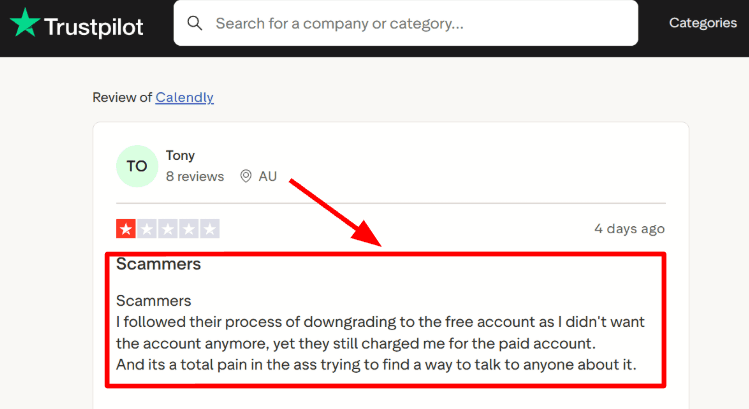
When I tested it, this was one of the first things that worked smoothly. You can set working hours, buffers, date limits, and booking windows, so your calendar stays protected before anyone books a meeting. I also came across a Trustpilot review about login verification emails arriving too late to use. I’m sharing that screenshot below too, because if account access becomes slow, it can delay everything before the booking process even begins.
- Meeting Tool Integration
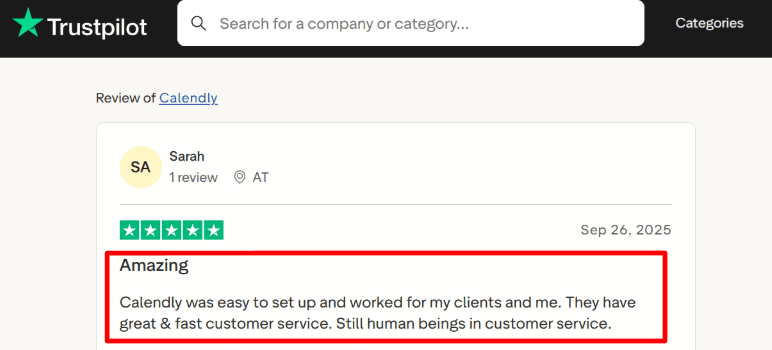
Calendly connects with Zoom, Google Meet, and Microsoft Teams, and the setup felt quick. Once a booking is confirmed, the meeting link gets added automatically, which saves time and avoids extra steps. This also matches what I saw in this Trustpilot review from someone using it for student consultations. I’m adding that screenshot below as well since this part usually works as expected.
- Payment Integration
This is one of the main reasons to use Calendly for paid bookings. It supports Stripe and PayPal, so you can collect payment at the time of booking. This works well for coaching calls, consultations, and other fixed-price sessions where you want commitment before scheduling the meeting.
- Routing Forms
Calendly now includes routing forms, which let you ask a few questions before showing available time slots. Based on the answers, people can be directed to the right person or event. This is useful for teams that handle different types of requests. While testing, I had to spend some time exploring settings to get the exact routing setup I wanted.
- Team Scheduling
Calendly supports round robin, collective meetings, and group events. This makes it useful for teams that want to distribute bookings or manage shared sessions. A small team can use it to balance incoming requests, while larger teams can coordinate demos or calls more easily. I also checked Calendly’s developer documentation, which explains how scheduling can be embedded in other tools as part of a larger workflow.
Pros
- Easy to set up and start using quickly
- Payment collection works well with Stripe and PayPal
- Calendar sync helps avoid double bookings
- Team scheduling features support shared workloads
- Reminders and integrations reduce manual work
Cons
- Booking page design is simple and may feel limited for branding
- Free plan becomes restrictive once you need more features
- Some advanced features require higher plans
- Apple users should check the Calendly Help Center for current iCloud support
- Finding deeper settings can take some time
Pricing
- Free plan available with basic features for one user
- Paid plans start around $10 per user per month on annual billing
- Higher tiers include team features and admin controls
- Enterprise pricing is custom for larger organisations
When to Choose Calendly
Choose Calendly if you want a simple and reliable option from Online Booking Systems With Payment. It works well for consultants, small teams, educators, and service businesses that want a quick setup and a familiar booking flow. It may not be the best choice if your booking page needs strong branding, detailed content, or a more customised experience.
Best online booking systems with payment: Summary
If you want a quick answer, the best tool depends on how you take bookings and collect payments in your business.
- Lunacal is the strongest choice if your booking page needs to convert visitors into paid clients with clear service explanations and built-in payments
- Acuity Scheduling works best for service businesses that rely on packages, classes, and repeat bookings with solid automation
- Square Appointments is the right fit if you already run payments through Square and want everything in one system
- SimplyBook.me makes sense for teams that need flexibility, memberships, and more operational control
- Calendly is ideal for simple paid meetings where speed and ease of setup matter most
From my testing, the biggest decision factors in this category are how you handle payments at booking, whether you need packages or memberships, how important the booking page experience is, and how your team shares availability. Pick based on the workflow you run every week, not just feature lists.
Methodology
To find the best online booking system with payment, I spent several weeks researching and testing online booking tools used by real businesses use today. Every tool on this list was evaluated directly — nothing was included based on marketing copy alone.
Sources
- Official websites, pricing pages, help docs, and FAQ sections were reviewed for each tool to understand exactly what is offered and how it works.
- Trial accounts were created on every platform to test features first-hand.
- Review platforms like Trustpilot, G2, and Capterra were used to study long-term user sentiment and spot recurring complaints.
- Communities on Reddit and Quora were explored to find raw, unfiltered feedback — the kind that does not always surface in formal reviews.
Test Setup for Booking and Payment Tools
A test account was built on each platform as a small service business owner setting up for the first time. Real service types, pricing tiers, and availability schedules were configured to reflect a genuine business setup.
Common Scenarios We Tested
- Building a service menu and calendar from scratch with no technical help.
- Going through a full client-facing booking and payment flow end to end.
- Testing cancellations, refunds, and automated reminder settings.
- Checking the full experience on a mobile device as both a business owner and a client.
FAQs
What is the best online booking system with payment built in?
The five tools compared in this guide are Lunacal, Acuity Scheduling, Square Appointments, SimplyBook.me, and Calendly. Lunacal stands out as one of the highest-rated tools on G2 at 4.9/5, offering seamless payment integration, beautiful booking pages, customisable intake forms, and multi-language support, making it a strong pick for businesses that want everything in one place.
Does your location affect how you should set up an online booking system with payment?
Yes, your location changes a few important things to get right. Here is what to keep in mind:
- US: Stripe and PayPal are widely used and well-supported by most platforms
- ** UK and EU**: Review the provider’s data processing agreement, privacy terms, data locations, and safeguards for international data transfers.
- Canada: Quebec has its own privacy laws similar to GDPR, so check if your platform covers that
- Australia: GST handling in invoices matters, verify your platform supports it
- Germany, France, Spain: Localised booking pages and multi-language support are critical for client trust
What features should an online booking system with payment actually have?
A solid online booking system with payment should handle real-time availability, collect payments at the point of booking via Stripe or PayPal, send automated reminders, and let you customise intake forms. Support for team scheduling and calendar sync with Google or Outlook are non-negotiable for most businesses managing multiple staff.
Summarize this content with AI


