
Introduction
Best scheduling tool depends on pre-call preparation. My five favorites are Lunacal, because of the most intuitive booking page with customizable settings and human support, Calendly, for its income teams routing feature, Cal.com, for open-source control of your calendar, Doodle for group voting, and SavvyCal for polite invitee experience. Here I have analyzed booking process, calendar security, teamwork coordination, integrations, support, and when a free/paid version turns into limitations.
That choice matters because scheduling another call is not the same as making work clearer. In its May 2024 meeting research, Atlassian found that 77% of 5,000 knowledge workers frequently attended meetings that ended by scheduling a follow-up meeting. A good scheduler should reduce coordination without making it easier to fill every open minute.
Which meeting scheduler is best for your workflow?
Best meeting schedulers by use case
| Tool | Best fit | Starting price | Main trade-off |
|---|---|---|---|
| Lunacal | Branded client meetings | $9/user/month | No permanent free plan |
| Calendly | Revenue team routing | Free; $10/seat/month | Advanced tools cost more |
| Cal.com | Open-source scheduling | Free; $12/user/month | More setup decisions |
| Doodle | Multi-person time polls | Free; $11/seat/month | Free plan has ads |
| SavvyCal | Recipient-friendly scheduling | $10/user/month annually | No permanent free plan |
Meeting scheduling features compared
| Tool | Invitee experience | Team scheduling | Calendar protection | Integrations | Human help |
|---|---|---|---|---|---|
| Lunacal | Rich custom page | Round robin, collective | Buffers, notice, limits | Calendars, video, payments | Free 1 support |
| Calendly | Familiar link flow | Routing, round robin | Buffers, meeting limits | Broad revenue stack | Chat on Standard |
| Cal.com | Flexible booking flow | Managed, collective, routing | Limits, buffers, workflows | 100+ apps | Plan-dependent support |
| Doodle | Poll or booking page | Co-hosts on Team | Deadlines, reminders | Calendars, video, Zapier | Email support |
| SavvyCal | Calendar overlay | Collective, round robin | Ranked slots, limits | Video, CRM, Zapier | Small-team support |
References: Lunacal pricing · Calendly G2 reviews · Cal.com pricing · Doodle pricing · SavvyCal G2 reviews
In-depth reviews of the best meeting scheduler tools
Lunacal
I would opt for Lunacal in the scenario where my booking page has to communicate my meeting while remaining easy to use. What distinguishes Lunacal is the ability to customize pages, an intuitive calendar interface, and the ability to get assistance from people.
Who is Lunacal best for?
Consultants, coaches, company founders, recruiters, and small client-oriented teams who wish to have a branded calendar without having to become administrators of scheduling software. I would use this when trust, context, and responsive human support are as important as availability.
When is Lunacal a poor fit?
However, it is not suitable for individuals who need a permanently free meeting link or engineers who want to host the scheduling stack themselves. Lunacal begins with trials and paid plans, while Cal.com is the better choice with its open source code.
Features
Custom booking pages
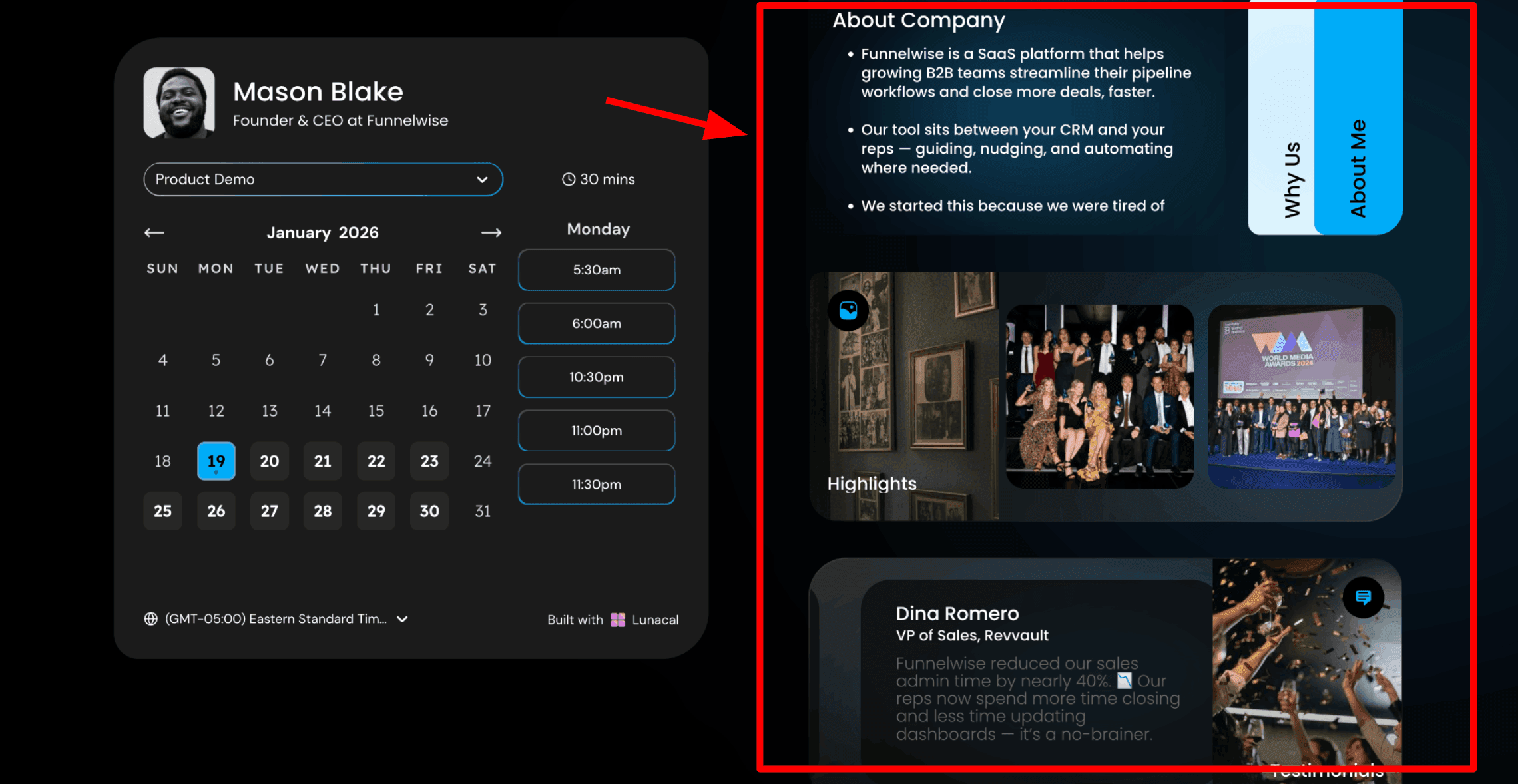
The main reason I put Lunacal first is that it lets the page do more than expose a calendar. When I built a booking page, I could add service context, testimonials, FAQs, video, and other supporting blocks around the booking flow, then stop once the invitee had enough information to choose confidently. It felt more customizable than a standard link while remaining simple for the person selecting a time.
Lunacal's current plan comparison includes booking-page customization on Standard and complete branding on Enterprise. For practical examples of how this differs from a conventional link, the Calendly alternatives guide shows where a richer page helps a client-facing business.
The screenshot below shows how Lunacal can place useful context beside the calendar without distracting from the time-slot decision.
Human setup help
Human support is unusually important in a category where a small rule can quietly block valid times. Lunacal advertises free one-to-one support and a setup or demo call on its official pricing page. I would use that access to check calendars, buffers, meeting locations, and the public page before sending the link to a live prospect.
The Lunacal G2 review page lists customer support, ease of use, and scheduling among its recurring review themes, while also noting that advanced configurations may require exploration. That combination matches my conclusion: the product is simple at the surface, customizable underneath, and most useful when a human can help with the unusual part.
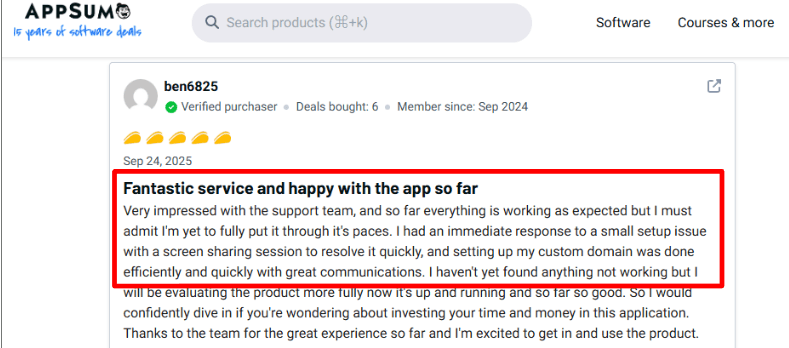
One AppSumo reviewer praised Lunacal's fast support and smooth custom-domain setup. The review screenshot appears below.
Availability guardrails
I can set event-specific availability, minimum notice, buffers, and booking limits so an open calendar does not become an invitation to create a fragmented day. This is where a scheduler should protect attention, not merely maximize bookings.
Microsoft's June 2025 Work Trend Index special report found that 30% of meetings crossed time zones. I would therefore test Lunacal's local-time display and leave enough notice and buffer for distributed calls rather than assuming every invitee reads the timezone label correctly.
Team meeting modes
Lunacal separates round robin, which distributes meetings, from collective scheduling, which looks for a time when several hosts are free. I like that the setup begins with the meeting logic rather than treating every multi-person call as the same problem. The Teams plan on the official pricing page includes both team scheduling and round robin.
One limitation is that team routing can still take thought. A G2 reviewer said the setup required some tweaking. I would run test bookings for ownership, conflicts, and fallback behavior before putting a shared link on a high-traffic page.
Pros
- The booking page can explain the person, service, or meeting beside availability, which reduces pre-call uncertainty without making the time picker complicated.
- Free one-to-one support gives small teams a human path through calendar or domain setup instead of leaving every edge case to documentation.
- Standard includes unlimited calendars and services, while Teams adds round robin and collective workflows for pooled or multi-host meetings.
- The page, reminders, payments, and meeting rules can grow around a client workflow without requiring a self-hosted deployment.
Cons
- There is no permanent free plan, so a user who only needs one basic meeting link may prefer Calendly or Cal.com Free.
- Team routing and advanced rules still need testing; customization removes rigid defaults but creates decisions.
- SMS usage, payment-processing costs, taxes, and the currency shown at checkout should be checked separately from the subscription.
Pricing
Standard
- Price: $9 per user/month.
- Billing: Monthly display; annual saves 10%.
- Includes: Unlimited calendars and services, video meeting tools, payments, reminders, and booking-page customization.
Teams
- Price: $15 per user/month displayed.
- Billing: Check selected cadence.
- Includes: Standard features, team scheduling, packages, round robin, and webhooks.
Enterprise
- Price: $25 per user/month displayed.
- Billing: Confirm with Lunacal.
- Includes: Account manager, complete branding, premium support, onboarding, and AI Voice Agent.
Pricing checked on 5 September 2026 against Lunacal pricing. Confirm currency, taxes, billing cadence, and usage-based charges at checkout.
Calendly
Calendly is the established meeting scheduler for organizations that need familiar booking links, large integration coverage, and lead routing. I would choose it for a revenue workflow where CRM handoffs matter more than turning the booking page into a content-rich destination.
When should you choose Calendly?
Choose Calendly for sales, recruiting, customer success, or other teams that need standardized event types, round robin, qualification forms, and connections to a mature revenue stack. It also suits an individual who wants one recognizable link with minimal explanation.
Who needs an alternative to Calendly?
Brand-led consultants may find the lower-tier page controls too restrained, while small teams can hit paid-plan boundaries around routing and managed team events. A business that wants live setup help and a richer page should look at Lunacal first.
Features
Calendar synchronization
Calendly checks connected calendars for conflicts and creates conferencing details automatically. When I connected a calendar and video tool, the basic flow was quick to configure. For me, this is the essential reliability layer: a polished booking page is irrelevant if Outlook, Google Calendar, or Zoom does not reflect the same meeting.
The Calendly G2 review page contains repeated praise for calendar integration and easy setup, but it also includes individual reports of calendar or video-link problems. Before rollout, I would connect the production calendar, place two test meetings in different time zones, reschedule one, and confirm that every participant receives the same location.
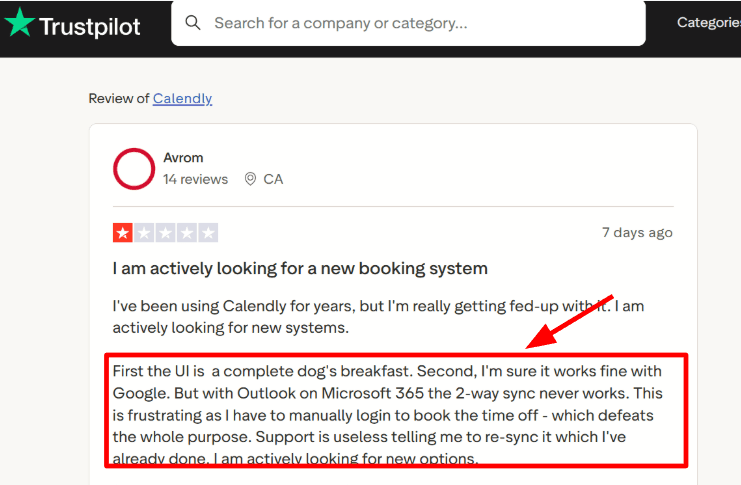
One Trustpilot reviewer reported flaky Microsoft 365 synchronization. It is a single experience, not a platform-wide failure rate, but it is a useful reason to test the connection; the screenshot is below.
Routing forms
Calendly's Teams plan can qualify and route leads, connect marketing forms, and send meetings to Salesforce. I would use it when the scheduler sits inside a defined sales process: territory, account ownership, company size, or intent decides whose availability the visitor sees.
The official pricing comparison places routing, round robin, centrally managed event types, Marketo, Pardot, and Salesforce capabilities on Teams at $16 per seat per month annually. That is capable, but it means a small team should price the workflow it actually needs rather than evaluating Calendly from the free plan alone.
Meeting protection
Buffers, minimum notice, event duration, and daily limits let me decide how much of the calendar can be booked. One Trustpilot reviewer specifically valued daily caps for preventing nonstop Zoom time, which is the practical consequence I care about.
Asana's 2024 State of Work Innovation findings report that 44% of workers dread meetings and that five hours per week are lost to unproductive meetings. I would use Calendly's controls to constrain meeting load before adding automations that generate more of it.
Reminders and follow-up
Standard includes automated reminders and scheduling outreach, while the free plan does not. I like reminders when they carry a clear agenda, location, and reschedule path; a generic sequence that simply repeats the booking time adds noise.
Recent G2 reviewers describe automated confirmations and reminders as reducing manual follow-up, while some say advanced features feel locked behind higher tiers. That evidence supports upgrading for a defined no-show or follow-up problem, not merely because automation exists.
Pros
- A familiar booking experience reduces the explanation needed when sharing a link with prospects, candidates, or partners.
- Standard combines multiple calendars, unlimited event types, reminders, payments, and a broad set of common integrations.
- Teams adds mature revenue routing, round robin, managed event types, and Salesforce-oriented workflows.
- Meeting polls and one-off links cover situations where a permanent event type would be excessive.
Cons
- The free plan is limited to one event type and one connected calendar.
- Routing forms and round robin require Teams, raising the per-seat cost for small revenue groups.
- Branding and workflow customization can feel limited on lower tiers compared with a richer Lunacal page or a developer-led Cal.com setup.
- Individual review reports about sync, confirmations, and support make end-to-end testing important before rollout.
Pricing
Free
- Price: $0.
- Billing: Always free.
- Includes: One event type, one calendar, one-to-one scheduling, booking-page customization, and browser extension.
Standard
- Price: US$10 per seat/month.
- Billing: Billed annually.
- Includes: Unlimited event types, up to six calendars, automations, payments, and common marketing integrations.
Teams
- Price: US$16 per seat/month.
- Billing: Billed annually for 1–30 seats.
- Includes: Round robin, lead routing, managed event types, Salesforce, Marketo, and Pardot connections.
Enterprise
- Price: Starts at US$15,000/year.
- Billing: Annual; 50-seat minimum.
- Includes: Enterprise security, compliance, advanced routing, and dedicated support.
Pricing checked on 5 September 2026 against Calendly pricing. Calendly also offers Plus variants with AI meeting tools; confirm selected add-ons and seat tiers before purchase.
Cal.com
Cal.com is the strongest option here for a developer-led team that values open-source software, APIs, deployment choice, and a generous individual plan. It offers more control than most hosted schedulers, but that flexibility gives the owner more setup decisions.
Which teams benefit most from Cal.com?
Product teams, technical startups, platforms embedding scheduling, and privacy-conscious organizations benefit most. I would use it when scheduling must conform to an application or internal process instead of remaining a separate branded link.
Where does Cal.com fall short?
It falls short for a nontechnical solo operator who wants a guided, human-assisted setup with few choices. The hosted product can be straightforward, but self-hosting, routing, APIs, and deep configuration add operational responsibility.
Features
Generous individual plan
Cal.com Free includes unlimited event types and calendars, notifications, payments, and more than 100 app integrations for one user. Testing several event types on the hosted version felt materially more flexible than free plans that limit event types or connected calendars.
The official Cal.com pricing page is unusually explicit about those individual allowances. For a solo user who needs several meeting types but does not need shared team availability, I would begin there before paying for collaboration features.
Open-source control
Cal.com can be hosted as a service or deployed on infrastructure a team controls. That matters when scheduling is part of a product, a compliance design, or a custom data flow rather than an isolated SaaS tool.
The trade-off is operational effort. In a self-hosting discussion on Reddit, commenters described Cal.com-style deployments as cumbersome for a simple one-person need. I would not self-host merely to avoid a subscription; I would do it when ownership or extensibility justifies updates, monitoring, and configuration.
Team scheduling
Teams adds one team, shared availability, round robin, managed and collective event types, recurring events, routing forms, analytics, and APIs. I like how these controls can model a real intake flow, but I would document who owns each route before exposing it.
On the Cal.com G2 review page, reviewers praise customization, calendar integration, and team scheduling while also describing a learning curve around complex events and workflows. That is a useful buying signal: the power is real, and so is the setup cost.
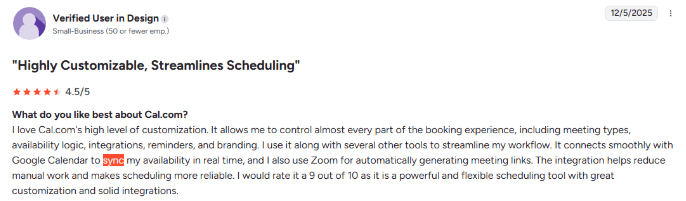
A G2 reviewer praised Cal.com's seamless Google Calendar sync. That is one person's experience rather than a platform-wide reliability measure; the screenshot follows.
Embeds and APIs
Cal.com offers embedding and custom APIs on its paid team plans, and its open-source foundation makes it attractive for scheduling inside another product. I would choose this route when the booking flow must inherit an application's navigation, identity, or business logic.
The G2 product evidence also contains positive comments about API flexibility and website integration, alongside calls for smoother onboarding and deeper analytics. Developers should prototype the exact embed and routing path rather than infer fit from the breadth of the feature list.
Pros
- The free individual plan includes unlimited event types and calendars, payments, notifications, and broad integrations.
- Open-source deployment and APIs support product-embedded or infrastructure-controlled scheduling.
- Paid team plans cover collective events, round robin, recurring events, routing, and managed workflows.
- Review evidence is strong on flexibility, calendar sync, and tailoring the booking flow to unusual processes.
Cons
- Deep configuration can overwhelm a user who only needs a basic meeting link.
- Self-hosting transfers maintenance, updates, security, and reliability work to the deploying team.
- Team collaboration begins at a higher annual price than Calendly Standard and Lunacal Standard.
- Complex workflows and mobile administration receive mixed review feedback.
Pricing
Individuals
- Price: $0.
- Billing: Free forever for one user.
- Includes: Unlimited event types and calendars, notifications, 100+ apps, mobile app, and payments.
Teams
- Price: US$12 per user/month.
- Billing: Billed annually.
- Includes: One team, shared availability, round robin, managed events, workflows, routing, analytics, and APIs.
Organizations
- Price: US$28 per user/month.
- Billing: Billed annually.
- Includes: Unlimited subteams, company subdomain, SSO, SCIM, roles, additional APIs, and advanced routing.
Pricing checked on 5 September 2026 against Cal.com pricing. Self-hosting costs depend on the infrastructure and engineering time a team supplies.
Doodle
Doodle is the best specialist in this shortlist for finding one time across many people who do not share a calendar system. Its group poll starts with candidate times and participant votes rather than one host exposing bookable availability.
What does Doodle suit best?
It suits committees, interview panels, community groups, educators, recruiters, and cross-company teams coordinating several participants. I would pick it when collecting availability is the difficult part and the organizer can make the final choice.
When should you skip Doodle?
Skip Doodle when almost every meeting is a one-to-one client booking and presentation quality is central. Lunacal offers more room to explain the meeting, while Calendly provides a more conventional professional link and stronger revenue routing.
Features
Group polls
I tested Doodle with a set of proposed times and a participant poll. The strongest overlap was easy to identify without exchanging a long email thread. That is a different workflow from round robin or collective scheduling because participants actively contribute their choices.
The Doodle G2 review page contains repeated praise for coordinating large groups and reducing back-and-forth. It also records a slight learning curve for organizers and individual reports of notification problems, so I would explain the voting deadline in the invitation.
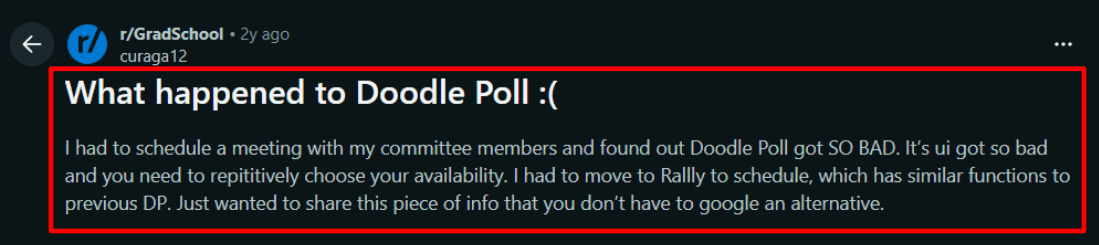
A Reddit discussion warns that participants can become frustrated when they repeatedly select availability in a large poll. The relevant screenshot is below.
Booking pages
Doodle also supports one-to-one links and booking pages, so an organizer can use the same account for polls and direct meetings. Free permits one booking page and one one-to-one setup; Professional removes those limits.
The official free-versus-paid guide explains that participants do not need an account, while paid organizers gain unlimited pages, reminders, participant controls, branding, and Zapier. I would use the free level to validate the poll flow, not as the final client-facing experience if ads or branding matter.
Deadlines and reminders
Paid plans add deadlines, automated reminders, participant tracking, and hidden participant details. I find deadlines especially useful because an availability poll without a decision date can become another asynchronous task everyone postpones.
One G2 reviewer described sending one link and seeing the strongest slot become obvious across teams and time zones, while criticizing free-plan restrictions and prominent branding. That supports paying when polls are frequent and external-facing, not merely to unlock more settings.
Calendar connections
Connecting a calendar lets an organizer or participant see conflicts while considering poll options. Google Meet is available on Free, while Microsoft Teams and Webex are paid according to Doodle's July 2026 help comparison.
I would verify the final calendar invite after closing a poll. The same G2 evidence includes individual complaints about syncing and notifications, which makes the transition from vote to confirmed meeting the step worth testing.
Pros
- Group polls solve multi-organization scheduling without requiring shared calendar access or participant accounts.
- Free covers an occasional poll, booking page, one-to-one meeting, calendar connection, and Google Meet.
- Paid plans add deadlines, reminders, participant controls, integrations, and an ad-free experience.
- Booking pages and sign-up sheets extend the product beyond one-off time polls.
Cons
- The free experience includes ads and prominent Doodle branding, which can feel unsuitable for senior clients.
- Repeatedly marking availability becomes tedious as a poll accumulates many people or proposed slots.
- A one-to-one client business may pay for group-poll capabilities it rarely needs.
- Review evidence includes isolated sync and notification complaints, so organizers should confirm the final invite.
Pricing
Free
- Price: US$0.
- Billing: Free.
- Includes: One group poll, one booking page, one one-to-one setup, and basic sign-up sheets.
Pro
- Price: US$11 per seat/month.
- Billing: Billed annually; US$132/year.
- Includes: Unlimited scheduling tools, advanced settings, video integrations, and no ads.
Team
- Price: US$16 per user/month.
- Billing: Billed annually; two-seat minimum.
- Includes: Admin console, co-hosting, booking on behalf, reports, branding, payments, and priority support.
Enterprise
- Price: Starts at US$15,000/year.
- Billing: Annual custom pricing.
- Includes: Security, organization-wide controls, dedicated success management, branded URLs, and SLA.
Pricing checked on 5 September 2026 against Doodle pricing. Doodle localizes some currencies and reduces Team per-user rates at larger seat counts.
SavvyCal
SavvyCal is the most considerate option for the person receiving a scheduling link. Its defining feature is letting invitees overlay their own calendar while viewing the host's availability, supported by ranked slots and frequency controls.
Is SavvyCal right for your business?
It is right for consultants, creators, investors, podcasters, and relationship-led teams that send many external links and care about how the request feels to the recipient. I would choose it when a modestly better invitee decision is worth a paid-only product.
Who should avoid SavvyCal?
Avoid it if a permanent free plan, native mobile administration, enterprise security depth, or product self-hosting is mandatory. Its focused approach is appealing, but it does not cover every platform or deployment requirement.
Features
Calendar overlay
SavvyCal lets a recipient overlay their calendar on the host's available times. When I tried the overlay, comparing both calendars in one view felt more considerate than switching between tabs and remembering commitments, particularly when neither side wanted to dictate a single slot.
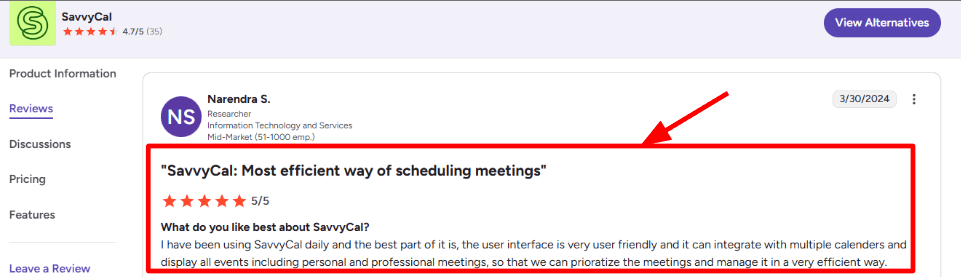
The SavvyCal G2 review page highlights the ability to view available slots together and praises multi-calendar integration. A Reddit contributor in a meeting-scheduler discussion made the same practical distinction: the overlay creates a cleaner way to see when both people are free.
The review below highlights how seeing work and personal events together can make it easier to choose a time.
Ranked availability
I can rank preferred slots instead of presenting every open time as equally desirable. That reduces the need to protect the calendar with artificially narrow availability and gives the invitee useful guidance without removing choice.
SavvyCal lists optimized availability, ranked availability, time blocking, and frequency limits in its official feature comparison. I would use ranking sparingly—enough to shape the week, but not so aggressively that every reasonable time looks second-rate.
Meeting modes
Basic includes team scheduling, collective mode, round robin, group mode, unlimited links, and unlimited polls. That is a strong bundle for a small team whose needs are more collaborative than the word “Basic” suggests.
The SavvyCal G2 evidence praises the clear all-slots view and calendar integrations. The smaller review volume than Calendly or Doodle means I treat this as directional experience evidence, not proof that every team will find the same setup easy.
Delegation and domains
Premium adds custom domains, delegated access for an assistant, paid bookings, custom sending domains, and removal of SavvyCal branding. I would upgrade when a scheduling link is part of a client-facing identity or when an assistant genuinely manages the calendar.
The official pricing page keeps those controls on Premium, so custom branding changes the economic comparison. Lunacal Standard gives more page-content customization at a lower listed entry price, while SavvyCal Premium focuses on domain, delegation, and invitee flow.
Pros
- Calendar overlay reduces the cognitive work imposed on recipients choosing a time.
- Ranked availability, time blocking, and frequency limits shape the calendar without hiding every nonpreferred slot.
- Basic includes unlimited links, polls, calendars, teams, collective meetings, and round robin.
- The interface is focused on mutual convenience rather than maximizing the host's available inventory.
Cons
- There is no permanent free live-scheduling plan; the product can be tested before activation, but ongoing use is paid.
- Custom domains, delegated access, paid bookings, and brand removal require Premium.
- The lack of a mobile app limits on-the-go administration, a drawback also raised in G2 feedback.
- Its review base and enterprise footprint are smaller than Calendly's, which may matter in a procurement-heavy organization.
Pricing
Basic
- Price: US$10 per user/month.
- Billing: Billed annually; monthly option available.
- Includes: Unlimited calendars, links, polls, and teams, plus collective, round robin, and group modes.
Premium
- Price: US$17 per user/month.
- Billing: Billed annually; monthly option available.
- Includes: Basic features, custom domains, delegation, paid bookings, custom sending domains, and brand removal.
Pricing checked on 5 September 2026 against SavvyCal pricing. The annual prices save two months relative to the monthly selection shown on the page.
How I evaluated these meeting schedulers
I looked for the tool that best solves each meeting workflow, rather than awarding points for the longest feature list.
- I checked every product's official pricing on 5 September 2026 and kept currencies and billing cadences as displayed.
- I tested one-to-one links, multi-person polls, collective meetings, round robin, and lead-routing use cases.
- I compared the invitee experience, calendar guardrails, integrations, branding, setup effort, and access to human support.
- I read current G2 pages and relevant Reddit discussions for specific observations about sync, configuration, reminders, polls, and plan limits.
- I used three dated workplace studies only where the finding changed a scheduling decision; pricing figures were not treated as statistics.
- I selected five tools because each represents a distinct buyer workflow and avoided adding near-duplicates to lengthen the list.
Meeting scheduler questions
What is the best free meeting scheduler?
Cal.com has the most generous free individual plan here, with unlimited event types and calendars. Calendly Free is easier to recognize but limits the user to one event type and one connected calendar; Doodle Free is better when the job is an occasional group poll.
Which meeting scheduler is easiest to use?
Lunacal is my pick for the simplest customizable client-facing setup because the booking flow stays straightforward, the page can carry richer context, and free one-to-one human help is available. Calendly is also easy for a basic link, but its page and routing trade-offs become clearer as the workflow grows.
Can a meeting scheduler prevent double bookings?
Yes, when the correct calendars are connected and the scheduler is set to check them for conflicts. Always test a live booking, reschedule, cancellation, timezone change, and video link before relying on any scheduler for external meetings.
Which tool is best for scheduling a group meeting?
Doodle is best when several participants need to vote on proposed times. For a meeting that always requires the same internal hosts, use collective scheduling in Lunacal, Calendly, Cal.com, or SavvyCal instead of running a new poll each time.
Is Cal.com better than Calendly?
Cal.com is better for a free multi-event individual setup, APIs, embedding, or self-hosting. Calendly is better for a familiar external link and mature revenue routing with Salesforce and marketing integrations.
Do meeting schedulers work across time zones?
All five options can present availability in an invitee's local time, but implementation still matters. Include the timezone in confirmations, set minimum notice and buffers, and test the booking flow with a second timezone before sharing it broadly.
My recommendation
If you prefer simplicity and customization together with human intervention in the meeting scheduler, opt for Lunacal, as it provides sufficient context for the client to make reservations without making the calendar an intricate form. Calendly is good to go for revenue stack standardization, whereas Cal.com is the right option for open source or embedded use cases. Doodle is preferable for polls, and SavvyCal for calendar overlay experience of invitees.
Summarize this content with AI


