

Introduction
Running a small clinic means your front desk is basically your revenue engine.
But the moment appointments, reminders, or intake notes leak PHI, you’re in HIPAA trouble fast.
IBM reports that the average healthcare breach costs $10.93 million. That is why ‘just a calendar’ is not enough; clinics need BAAs, access controls, audit trails, and reminders that do not expose sensitive details.
In this guide, I compare the best HIPAA compliant scheduling software built for small clinics that don’t have an IT team.
I focus on real workflows: self-booking, cancellations, waitlists, multi-provider schedules, and insurance-friendly intake.
I ranked tools by manually testing each product end-to-end and cross-checking feedback across review portals.
Then I verified what most roundups skip, like BAA terms, where PHI shows up in email/SMS, role permissions, and hidden fees, with screenshots and links so you can judge for yourself.
Quick comparison of HIPAA scheduling tools for small clinics
| Use-case | Tool | Key strength | Pricing starts at |
|---|---|---|---|
| Solo clinics | Mint Scheduling | Low-cost HIPAA scheduling | $19/month |
| Therapy clinics | SimplePractice | Therapy EHR with scheduling | $49/month |
| Multi-provider clinics | Acuity Scheduling | BAA-backed advanced scheduling | $61/month |
| Allied health clinics | Jane App | Patient booking and charting | CAD $54/month |
| Dental clinics | NexHealth | EHR-synced patient booking | $299/month |
| Independent practices | Tebra | Scheduling plus practice management | Custom quote |
| Billing-heavy clinics | CareCloud | EHR, billing, scheduling | Custom quote |
A detailed breakdown of each tool
Mint Scheduling
Mint Scheduling fits small clinics because it handles the basics clinics need every day, including online booking, intake questions, calendar sync, reminders, team scheduling, and paid sessions.
I selected it because it also has useful extras like multi session packages, GDPR support, routing forms, analytics, and a more flexible booking page than many plain HIPAA compliant scheduling tools.
Pricing is reasonable for small clinic teams, and with a 4.9/5 rating on G2, it is one of the highest rated scheduling tools in this category.
- Beautiful scheduling pages with rich content
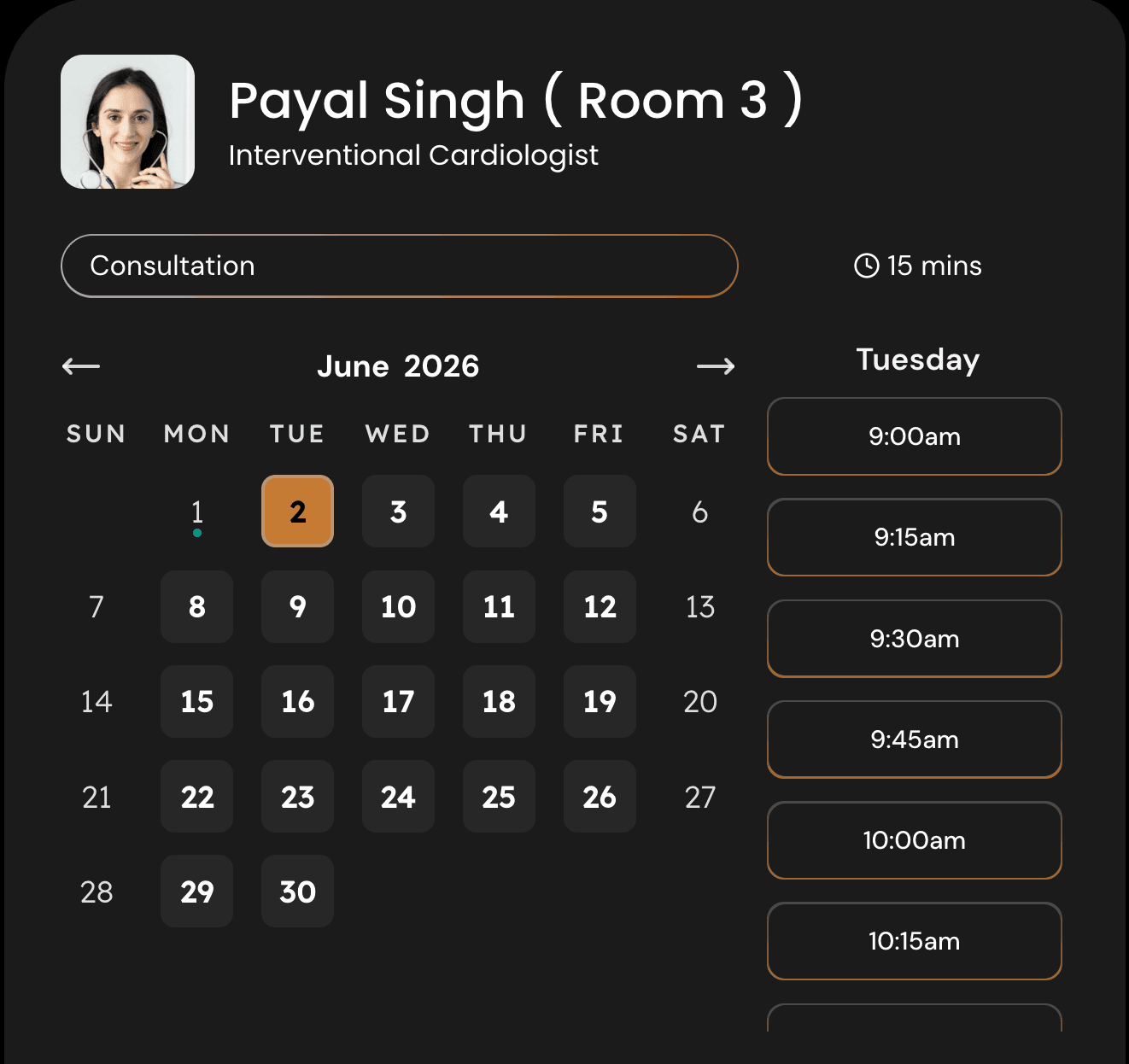
For small clinics, the booking page has to do more than show open slots. A patient may want to understand the clinic, the provider, accepted visit types, preparation notes, insurance basics, or what to expect before booking.
Mint Scheduling lets you add useful content next to the calendar, so the page feels more like a simple patient intake experience than a plain appointment picker. For example, a speech therapy clinic can add a short note about first evaluations, therapy packages, and what parents should bring to the first visit.
I took this screenshot so you can see how the booking page supports content around the calendar:
- Weekly availability with date exceptions
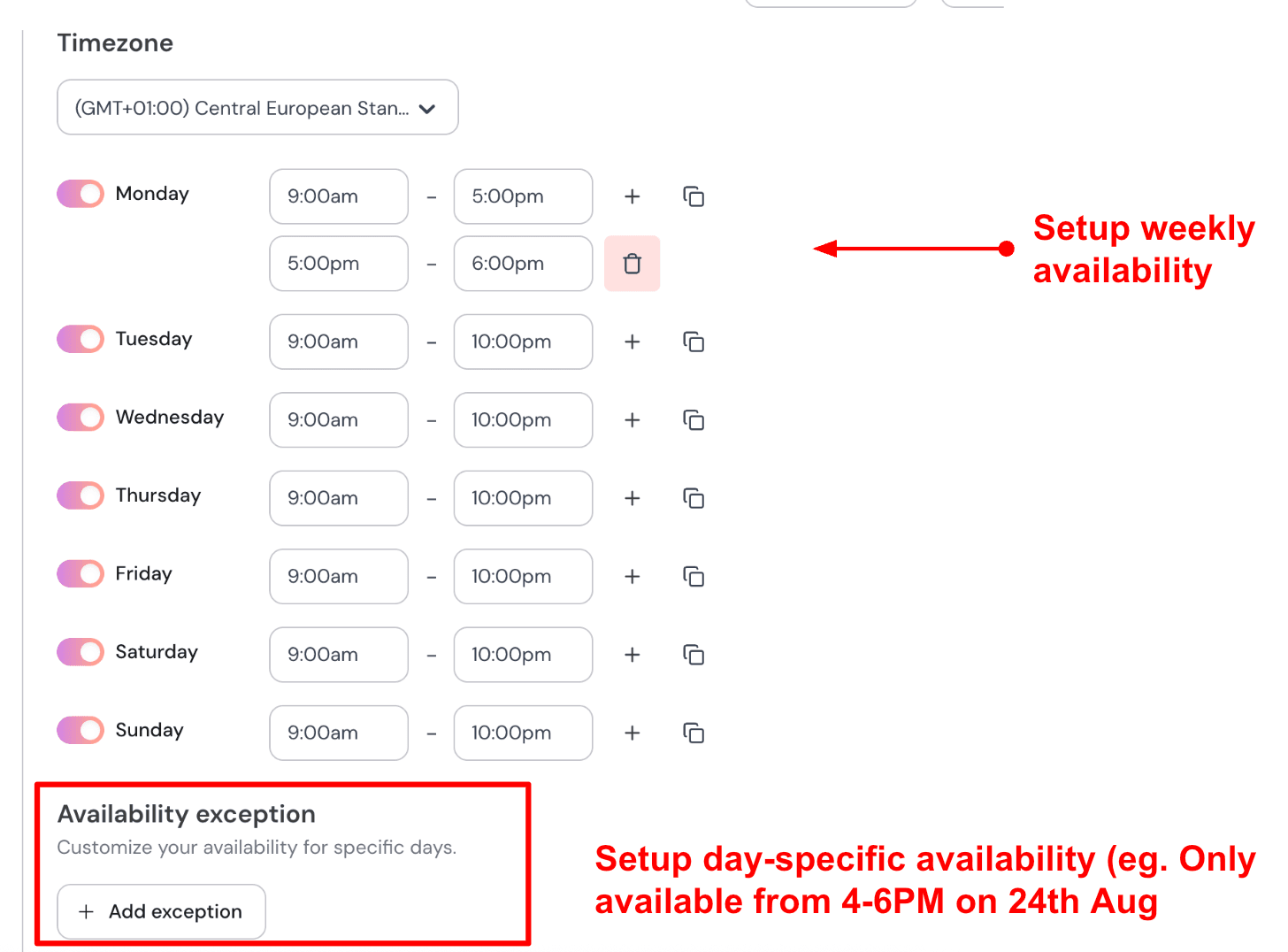
Small clinics usually have messy availability. Providers may work part time, block certain days for admin work, run limited evaluation slots, or take a day off without wanting to edit the full schedule.
Mint Scheduling lets you set weekly clinic hours and then add date specific exceptions. This is useful for keeping your HIPAA compliant appointment scheduling link safe to share on your website, Google Business Profile, patient emails, or referral pages.
For example, if your clinic is closed for a local holiday or one therapist is unavailable next Friday, you can block that specific date without changing the regular weekly setup.
Here’s how it looks in the availability setup:
- Custom intake questions
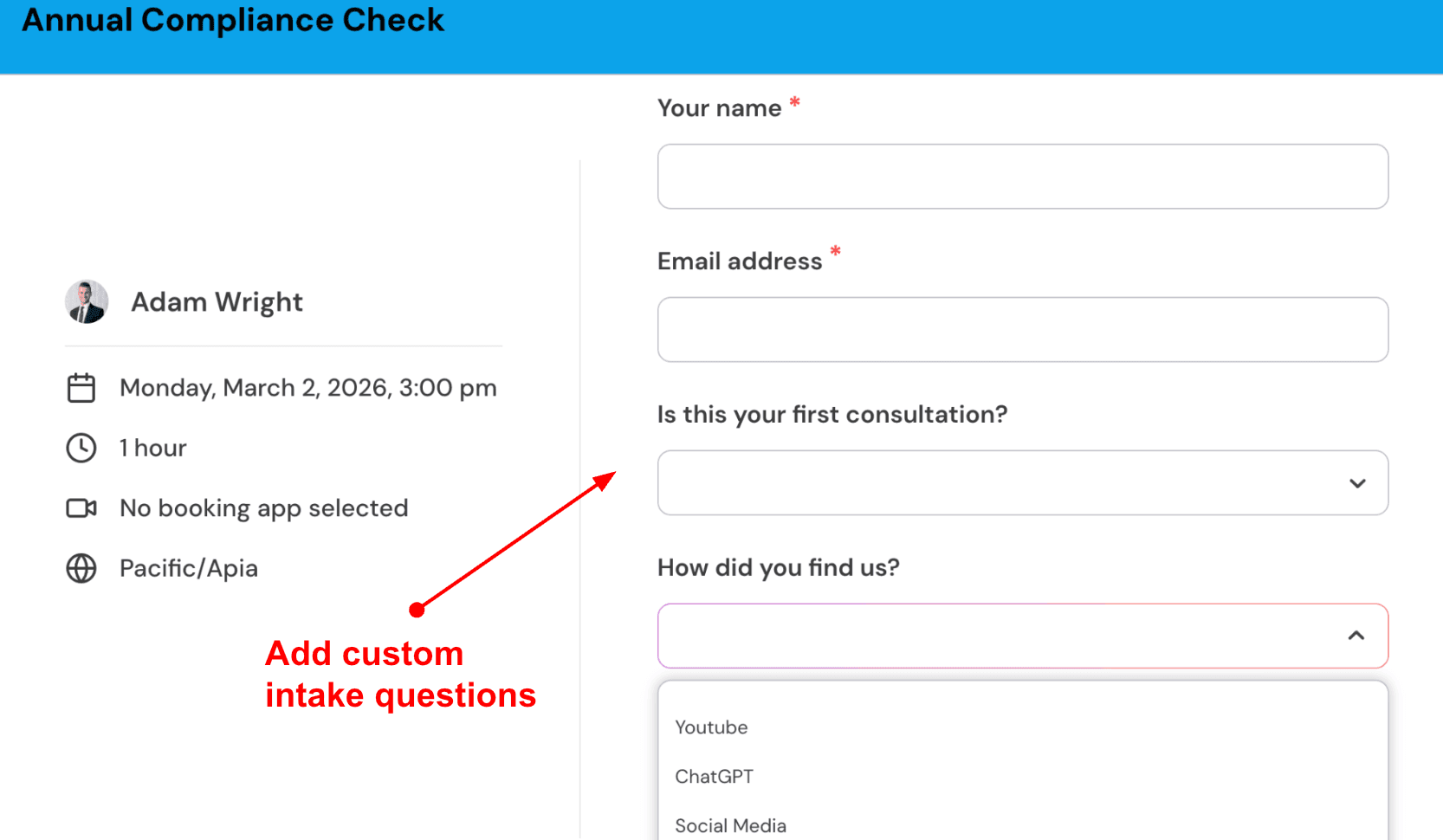
For small clinics, intake questions are one of the most important parts of online scheduling. A clinic does not just need a name and email. It may need visit reason, patient age, referral source, preferred provider, insurance type, or whether the appointment is for a new or returning patient.
Mint Scheduling lets you add booking questions before the appointment is confirmed. I would keep this short for conversion, but still ask enough to avoid back and forth before the visit.
For example, a small therapy clinic can ask whether the appointment is for an evaluation, follow up session, caregiver consultation, or telehealth visit. That helps the front desk prepare without making the booking form feel heavy.
Here’s a screenshot from the tool:
- Automated email and SMS reminders
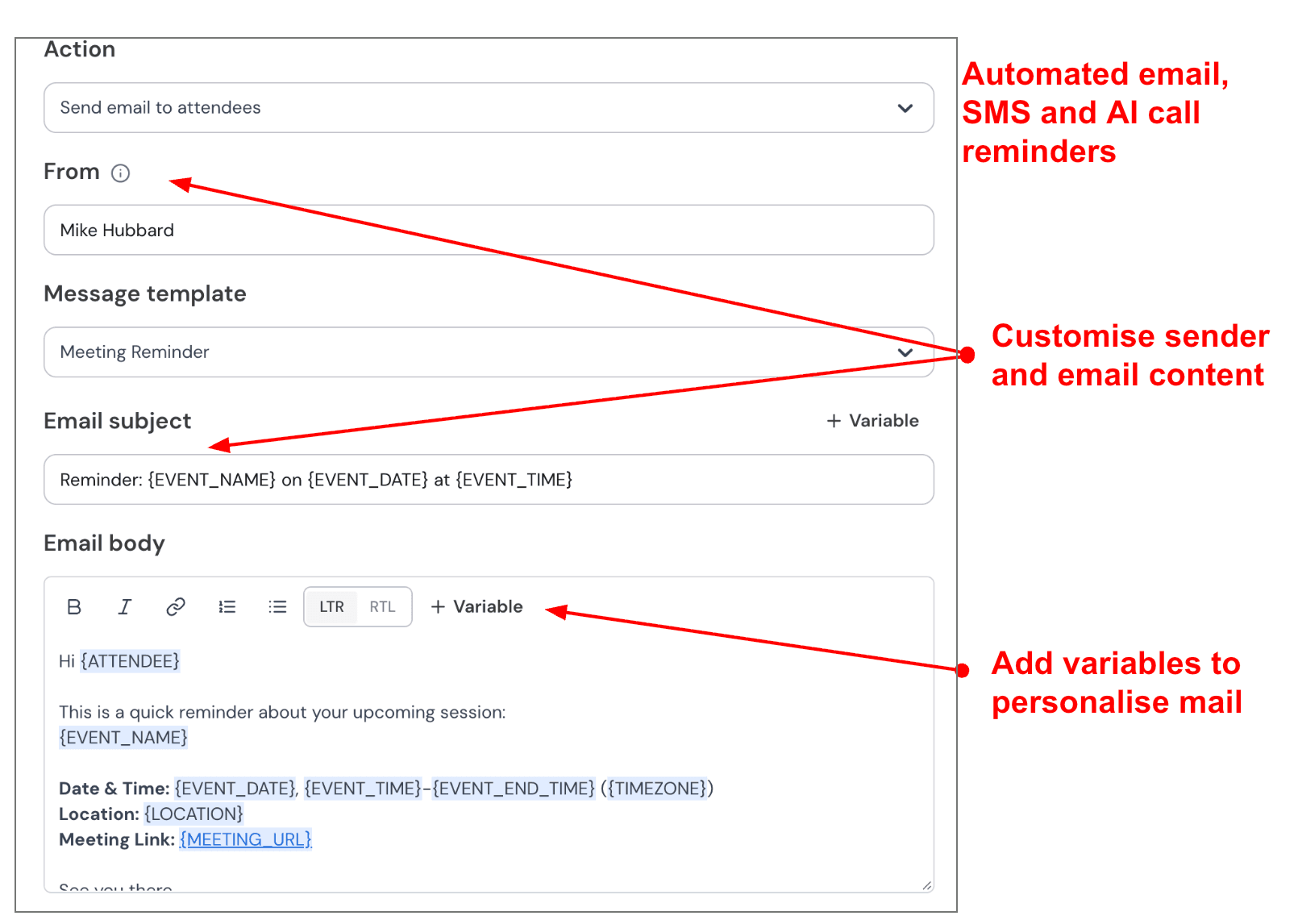
No shows can hurt small clinics more than large practices because every missed slot affects revenue and staff utilization. Mint Scheduling supports automated email and SMS reminders, so patients get clear reminders before the appointment.
I would use a simple reminder flow for a clinic. Send one email 24 hours before the visit with the clinic address or telehealth link. Then send one SMS 1 hour before the appointment with the time and a short instruction.
This is especially useful for small clinics handling therapy sessions, follow up visits, wellness consults, or recurring appointments where patients may book weeks in advance.
I took this screenshot for the reminder setup section:
- Multi-session packages and recurring sessions
Many small clinics do not sell one appointment at a time. They may run therapy packages, recurring care plans, wellness programs, follow up bundles, or multi session treatment plans.
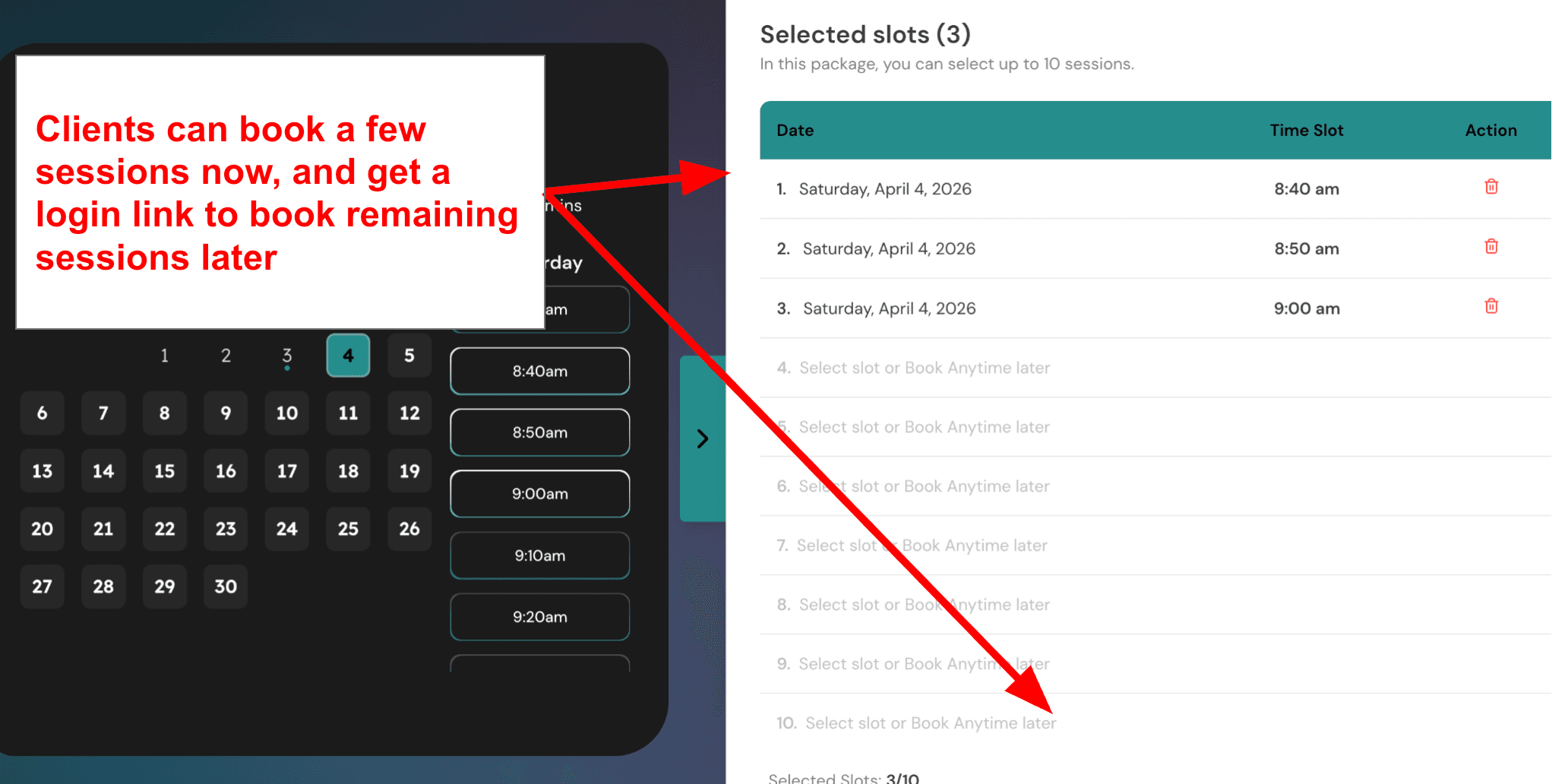
Mint Scheduling supports multi session packages, where clients can select multiple sessions together, pay for the package, and later book remaining sessions. This is useful for small clinics that want predictable revenue and cleaner scheduling for repeat care.
For example, a speech therapy clinic can offer an 8 session therapy package, while a nutrition clinic can offer a 4 visit follow up plan. The patient books the first session and then continues using the package without the clinic manually tracking every remaining visit.
Here’s the screenshot to place below this point:
SimplePractice
SimplePractice is popularly known as an all-in-one EHR and practice management platform for small health and wellness clinics, especially teams that want scheduling, HIPAA-compliant telehealth, client files, billing, and documentation in one place.
-
Online Scheduling: SimplePractice gives small clinics a clean scheduling setup with calendar views, client self-booking, rescheduling, cancellations, and appointment reminders. For a small clinic with 2-5 providers, this is useful because the front desk does not have to manually chase every patient for confirmation.
In setup, the calendar was fairly easy to understand. The part I would watch closely is provider availability, especially if the clinic has both in-person and virtual visits. Some review platforms also mention that users like the scheduling flow, but a few report issues around overbooking alerts and separating virtual vs in-person appointments clearly, as noted in Capterra’s SimplePractice review.
-
Clinical Documentation: SimplePractice works best when scheduling is tied to client records, notes, files, assessments, and treatment plans. That matters for HIPAA-focused small clinics because the appointment is not just a time slot. It usually needs intake forms, consent forms, session notes, billing records, and follow-ups connected to the same client profile.
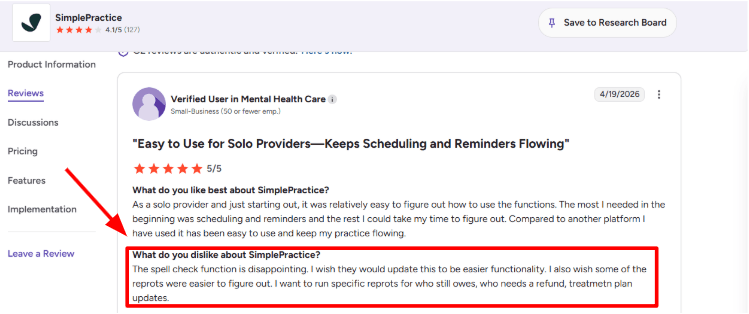
One thing that can slow teams down is reporting and editing small documentation details. I saw the same kind of complaint in a G2 SimplePractice review, where the reviewer disliked the spell check and said some reports were hard to figure out, especially reports for balances owed, refunds, and treatment plan updates. This is the kind of screenshot worth placing below because it shows a real admin pain point, not just a generic complaint.
-
HIPAA Telehealth: The telehealth flow is one of the stronger parts of SimplePractice. It is built into the EHR, so a clinician can start a session from the calendar without jumping between separate video tools. SimplePractice also says telehealth links can be sent automatically through reminders, which reduces manual work for the clinic.
For a small clinic, this is helpful when one provider is remote, another is in-office, and patients move between both formats. The positive surprise is how much of the virtual visit workflow sits inside the same system. SimplePractice’s official telehealth page mentions screen sharing, secure chat, a digital whiteboard, waiting room controls, and automated email/text reminders.
-
Client Portal: The client portal lets patients request appointments, manage documents, send messages, and pay for appointments in one place. For small clinics, this can reduce front-desk load because clients can complete forms before the visit instead of filling everything out at reception.
After testing similar healthcare scheduling flows, I would say this matters most during intake. A new patient can book, complete forms, upload documents, and receive reminders before the first appointment. That creates a cleaner first visit. SimplePractice’s client portal page also describes the portal as HIPAA-compliant and built for scheduling, documents, messaging, and payments.
-
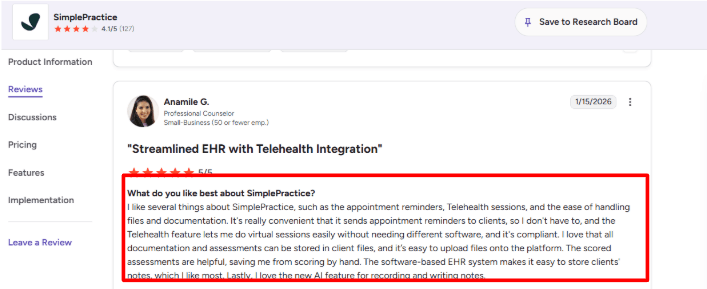
Reminders and Files: Appointment reminders are a practical feature here, not a nice-to-have. In small clinics, missed visits affect revenue and create awkward gaps in provider schedules. SimplePractice supports automated reminders, and reviewers often call this out as one of the reasons they like the product.
I agree with the second G2 review on SimplePractice you shared. The reviewer liked appointment reminders, telehealth, file handling, documentation, scored assessments, EHR notes, and the new AI note feature. That matches the product’s real strength: it is not just a booking calendar. It keeps the clinical and admin work connected around the appointment.
-
Reports and Billing: SimplePractice includes billing, payments, insurance claim filing, superbills, and reports. For small clinics, this is important because appointment scheduling and collections are closely connected. A visit may need a copay, insurance claim, balance follow-up, refund, or superbill after the appointment.
The reporting side is useful, but not always simple. SimplePractice’s support page says analytics reports cover clients, appointment status, reminders, and emails, and can be downloaded as CSV or Excel files via SimplePractice Support. That is helpful, but if your clinic needs very specific operational reports, like unpaid balances by provider or treatment-plan update tracking, you may need to test this before committing.
Pros
- Strong fit for small clinics that want scheduling, EHR, telehealth, files, billing, and documentation in one system.
- HIPAA-focused workflows are built into the product, including telehealth, client portal, secure messaging, and documentation.
- Appointment reminders and client self-scheduling can reduce front-desk work.
- Client portal feels useful for intake, forms, payments, and document sharing.
- Good option for clinics that run both in-person and virtual appointments.
Cons
- Reporting can feel less flexible if the clinic needs very specific admin or finance reports.
- Some users complain about spell check and documentation workflow details on G2.
- Pricing can rise quickly if a clinic needs higher-tier features or add-ons.
- Insurance billing may be more than some small clinics need, especially if they mostly take direct-pay appointments.
- Not the lightest tool if the clinic only wants basic appointment scheduling.
Pricing
-
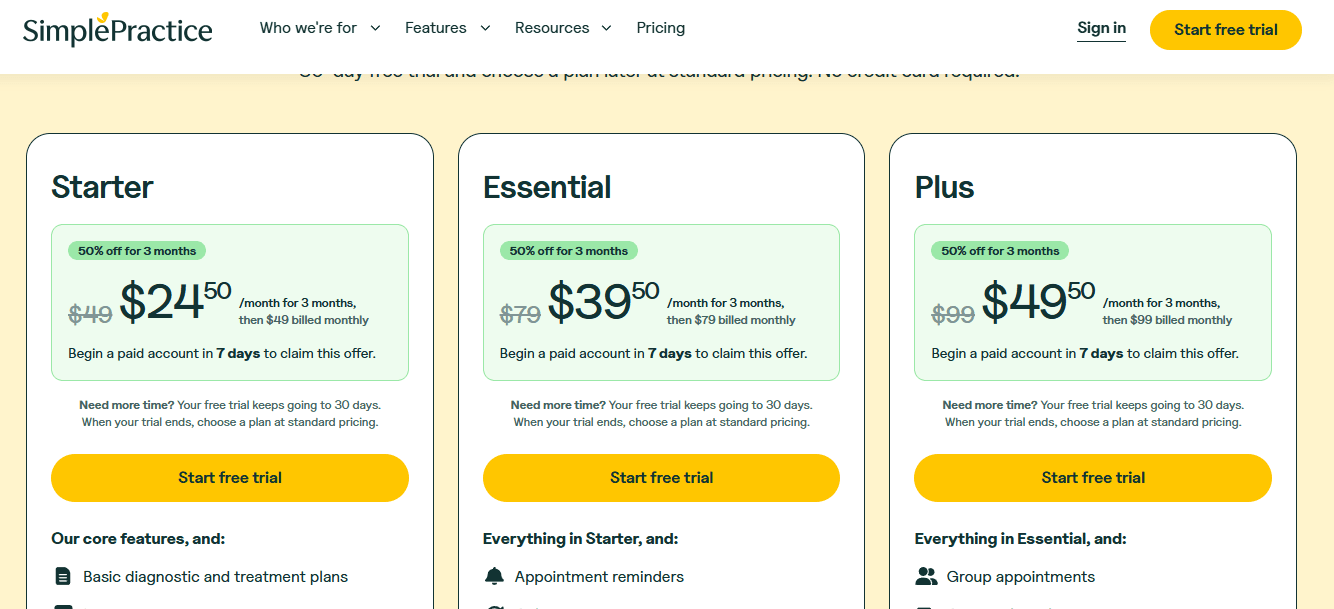
SimplePractice currently lists three monthly plans on its official pricing page: Starter, Essential, and Plus.
-
The standard monthly pricing shown by SimplePractice is $49/month for Starter, $79/month for Essential, and $99/month for Plus.
-
SimplePractice also offers a 30-day free trial, and its pricing page currently shows a limited-time discount for the first 3 months when starting a paid plan early.
-
Add-ons can increase the real cost. SimplePractice Support lists group telehealth as $20/month per clinician on Essential, ePrescribe as $49/month per clinician plus a one-time $89 setup fee, and Note Taker as $35/month per clinician.
Acuity Scheduling
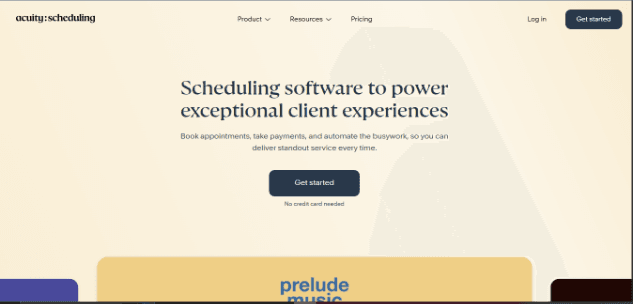
Acuity Scheduling is popularly known as a flexible booking tool for service businesses, and small clinics use it when they want patient self-booking, reminders, payments, intake forms, and HIPAA support without moving into a full EHR.
-
HIPAA booking: Acuity can be made HIPAA-enabled on the higher plan with a signed BAA, which is the main reason it appears in clinic scheduling comparisons. The important detail is that HIPAA is not automatic just because you use Acuity.
During setup, I had to treat this as a configuration task, not just a feature toggle. You still need to be careful with what patient information goes into emails, SMS reminders, calendar invites, forms, and connected tools. Acuity’s own HIPAA guide says Acuity is the Squarespace feature designed for HIPAA use, but other Squarespace tools are not covered the same way. Acuity’s HIPAA guide explains that Acuity is the Squarespace product designed for HIPAA-enabled use, while other Squarespace tools may not receive the same coverage.
-
Website booking: Acuity gives clinics a standalone scheduling page and can also be embedded on a website. That is useful for a small clinic that wants one page for new patient consultations, follow-ups, therapy sessions, or paid appointments.
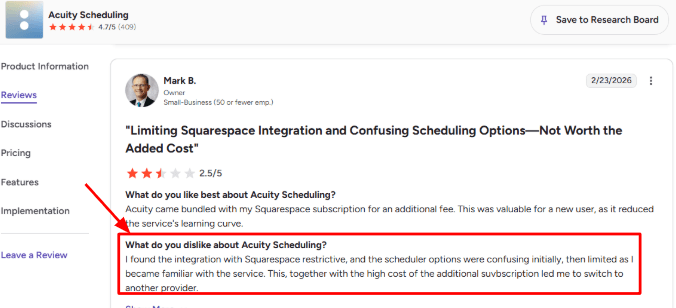
The setup is clean once you understand the flow, but the Squarespace connection can feel tighter than expected if you want full control. I saw the same concern in a G2 review of Acuity Scheduling, where the reviewer said the Squarespace integration felt restrictive, the scheduler options were confusing at first, and the extra subscription cost pushed them away.
-
Intake forms: Acuity’s intake forms are useful for clinics that want basic patient details before the appointment. You can ask for symptoms, reason for visit, insurance details, consent, referral source, or anything the front desk usually collects over the phone.
The positive surprise was how quickly a simple intake form could be attached to an appointment type. For example, a small physiotherapy clinic can create separate forms for first visits and follow-ups, so the first visit captures injury history while the follow-up only asks about progress since the last session.
-
Provider calendars: Acuity supports multiple calendars on higher plans, which matters if a clinic has more than one doctor, therapist, room, or location. It can help avoid double bookings and make provider-wise availability easier to manage.
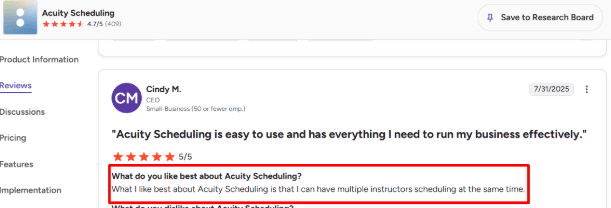
A G2 review of Acuity Scheduling praised the ability to have multiple instructors scheduling at the same time. For clinics, I would read that as a useful signal for multi-provider scheduling too. It is not clinic-specific language, but the same idea applies when two practitioners are taking appointments in parallel.
-
Reminders and follow-ups: Acuity supports confirmation emails, reminders, follow-ups, and text reminders depending on the plan. For small clinics, this is one of the more practical parts of the tool because missed appointments are expensive.
I liked that reminders were not buried deep inside the product. You can set them around the appointment journey and reduce the manual work your receptionist does every day. The only thing to watch is HIPAA wording. Keep reminders simple, and avoid putting sensitive health details in patient-facing notifications.
-
Payments and packages: Acuity lets clinics accept payments through Stripe, Square, or PayPal, and it also supports packages, subscriptions, and gift certificates on relevant plans. This can work well for clinics that sell prepaid sessions, therapy bundles, wellness visits, or repeat consultations.
It is not a complete billing system for medical practices, though. If the clinic needs insurance claims, superbills, clinical notes, patient records, or deep EHR workflows, Acuity will need other tools around it. I would treat it as strong scheduling software, not full practice management software.
Pros
- Strong self-scheduling experience for patients
- HIPAA support is available with a BAA on eligible higher plans
- Intake forms are simple to set up for pre-visit details
- Works well for multi-provider or multi-location clinics on higher tiers
- Email and SMS reminders can reduce front-desk follow-up work
- Payments, packages, and subscriptions are useful for cash-pay clinics
Cons
- HIPAA support is locked behind a higher-priced plan
- Not a full EHR or clinical practice management system
- Squarespace integration may feel limiting for clinics that want more control
- Setup can feel crowded because there are many small settings to check
- Reporting is fairly basic compared with healthcare-focused platforms
- You need to be careful with notification wording, forms, and integrations to stay compliant
Pricing
-
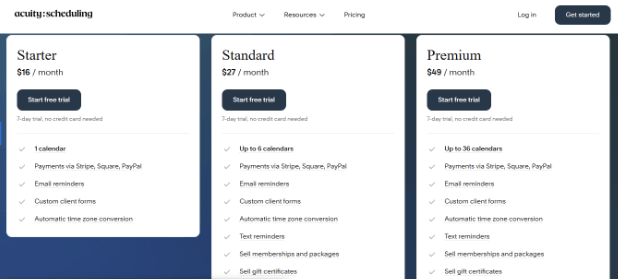
Acuity has three main paid plans: Starter, Standard, and Premium. Official pricing starts at $16/month when billed annually, with higher tiers for more calendars and advanced features.
-
HIPAA compliance with a signed BAA is available on the Premium plan according to Acuity’s current pricing and HIPAA documentation. Small clinics should not assume the entry plan is enough for patient data.
-
The Starter plan allows 1 calendar, Standard allows 6 calendars, and Premium allows 36 calendars. This matters if the clinic has multiple providers, rooms, or locations.
-
There is a 7-day free trial, but no long-term free plan. For a small clinic, the real buying decision is whether Acuity’s booking, reminders, forms, and payments justify paying for the higher HIPAA-ready tier.
Jane App
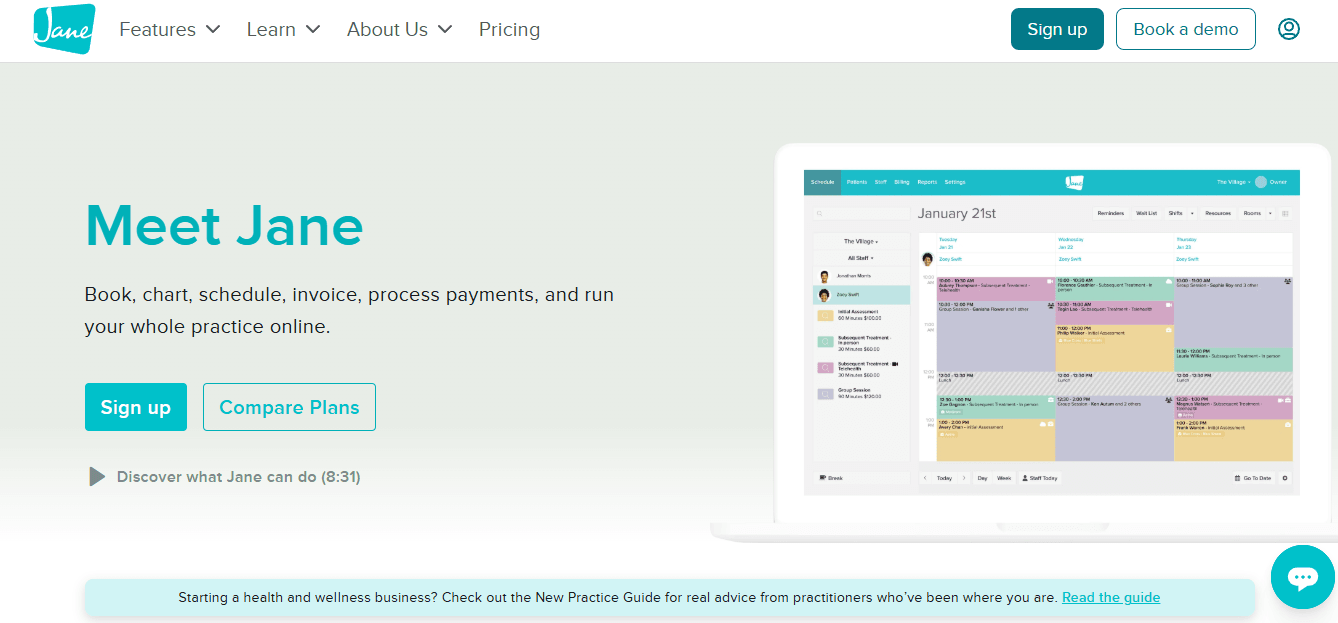
Jane App is popularly known as a clinic-friendly practice management tool because small clinics use it for scheduling, charting, telehealth, intake forms, billing, and patient communication in one place.
-
Online Booking: Jane’s online booking setup is strong for small clinics that want patients to book without calling the front desk every time. You can create appointment types, assign providers, control availability, and let patients book from a branded booking page.
The setup is clean, but not instant. I had to spend time thinking through appointment categories, cancellation rules, and which providers should show for each service. That matters for a small clinic because one confusing appointment label can create the wrong booking.
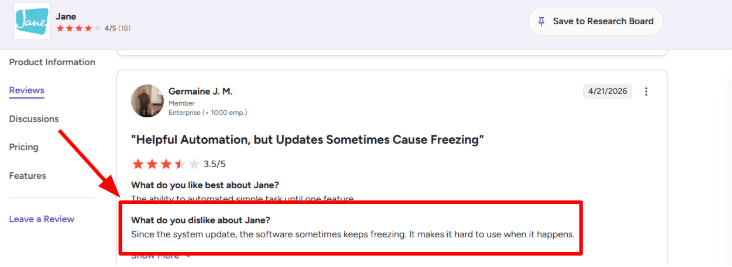
I also saw a G2 review for Jane where a user said the software sometimes keeps freezing after a system update. I’d share that screenshot below this section because it fits the real risk with any cloud scheduling tool. If the calendar slows down during front-desk hours, even a good booking system can become painful fast.
-
Clinic Scheduling: Jane handles multi-provider scheduling better than many simple appointment tools. You can manage staff shifts, rooms, breaks, waitlists, recurring appointments, and different availability rules from the same calendar.
For a small clinic with two therapists, one part-time provider, and one shared treatment room, this is useful. You can avoid double-booking the room, block lunch breaks, and still keep online booking open for patients.
One thing I liked was how the calendar feels built for clinics, not generic meetings. It is not just “pick a time.” It thinks about providers, services, rooms, return visits, and admin workflows.
-
HIPAA Telehealth: Jane includes secure online appointments, and its documentation states that these appointments support HIPAA, PIPEDA, PHIPA, and GDPR requirements. For small clinics, this reduces the need to stitch together Zoom, intake forms, payments, and chart notes separately.
The patient flow is simple. A patient can book, receive reminders, join through a secure link, and stay inside the same clinic system.
The main thing to check is whether you need group telehealth. Jane offers it as a paid add-on, so clinics running family sessions, group therapy, or multi-person consults should price that before committing.
-
Intake Forms: Jane’s intake forms are practical for clinics that want patients to complete paperwork before the first visit. Forms can apply to the whole clinic, a discipline, a practitioner, or a specific appointment type, based on Jane’s intake forms guide.
I liked that incomplete forms are reminded through appointment emails. That is a small thing, but in real clinics it saves the front desk from chasing patients manually.
The weaker part is template migration. Jane says it does not support directly importing old PDF or Word intake templates. You may need to rebuild forms inside Jane, which can take time if your clinic has long medical history forms.
-
Patient Communication: Jane supports email confirmations, email reminders, SMS reminders, secure messaging, and a client portal. For appointment scheduling, this is where it becomes more useful than a basic booking link.
A small clinic can reduce no-shows, send appointment instructions, collect forms, and keep patient communication tied to the appointment record.
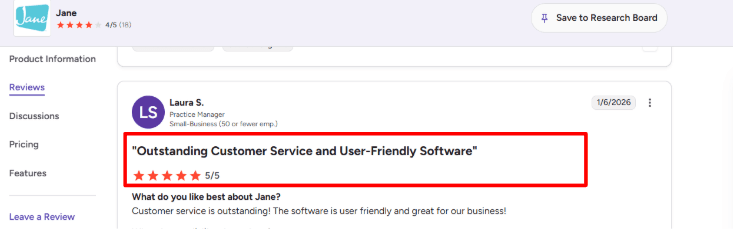
Around this point, the second G2 review for Jane makes sense. The reviewer praised Jane’s customer service and called the software user-friendly. I mostly agree with that based on the setup flow. Jane has a lot inside it, but the interface does not feel heavy for daily scheduling work.
-
Billing And Payments: Jane is not just a scheduler. It includes invoicing, receipts, payment processing, saved cards, payment reminders, packages, memberships, and insurance billing add-ons.
This is helpful for small clinics that want booking, payment, and charting to sit together. For example, a patient can book a follow-up, complete intake, pay online, attend telehealth, and the clinic can keep the invoice connected to the same profile.
The gap is cost and complexity. If you only need HIPAA-friendly appointment booking, Jane may feel like more software than you need. But if your clinic also needs documentation, billing, and provider-level admin, the all-in-one setup becomes easier to justify.
Pros
- Strong fit for small clinics that need scheduling plus charting, intake, telehealth, and billing.
- Online booking is flexible enough for multiple providers, locations, rooms, and appointment types.
- HIPAA-focused telehealth and security features are built into the clinic workflow.
- Intake forms are detailed and can be assigned by practitioner, discipline, or appointment type.
- Customer support gets strong praise across reviews, especially for onboarding and daily help.
- The interface is easier to use than many older clinic management systems.
Cons
- Some users report freezing or performance issues after updates, based on G2 reviews.
- It may be too much if a clinic only wants simple HIPAA appointment scheduling.
- Insurance billing, group telehealth, and AI Scribe can increase the final monthly cost.
- Rebuilding old intake forms can take time because PDF or Word imports are not directly supported.
- Reporting and advanced automation may feel limited for clinics with complex admin needs.
- Pricing scales with practitioners, so growing teams should calculate the real monthly cost upfront.
Pricing
-
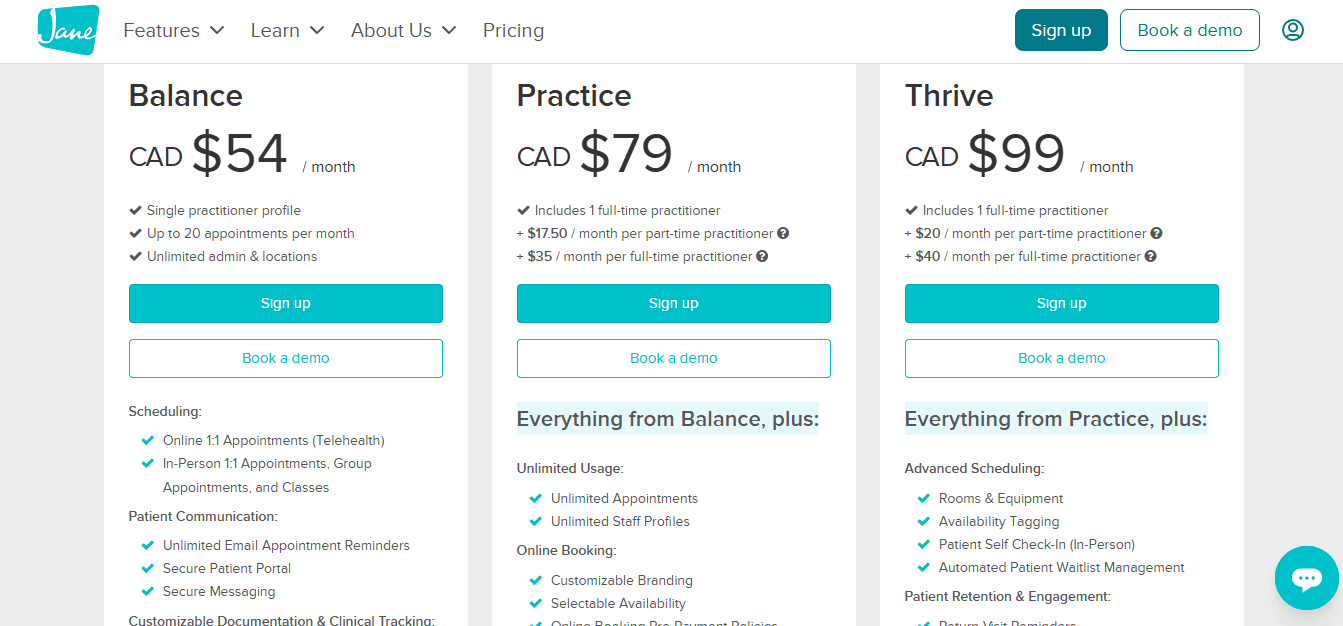
Jane’s current pricing starts at CAD $54/month for the Balance plan, CAD $79/month for Practice, and CAD $99/month for Thrive, according to the Jane pricing page.
-
The Balance plan is limited to one practitioner license and 20 appointments per month, so most active small clinics will likely need Practice or Thrive.
-
Insurance Billing is available as a paid add-on for Practice and Thrive at CAD $20/month, plus extra fees for additional full-time or part-time practitioners.
-
AI Scribe and Online Appointments for Groups are each listed at CAD $15/month per opted-in practitioner, so clinics should include add-ons when comparing total cost.
NexHealth
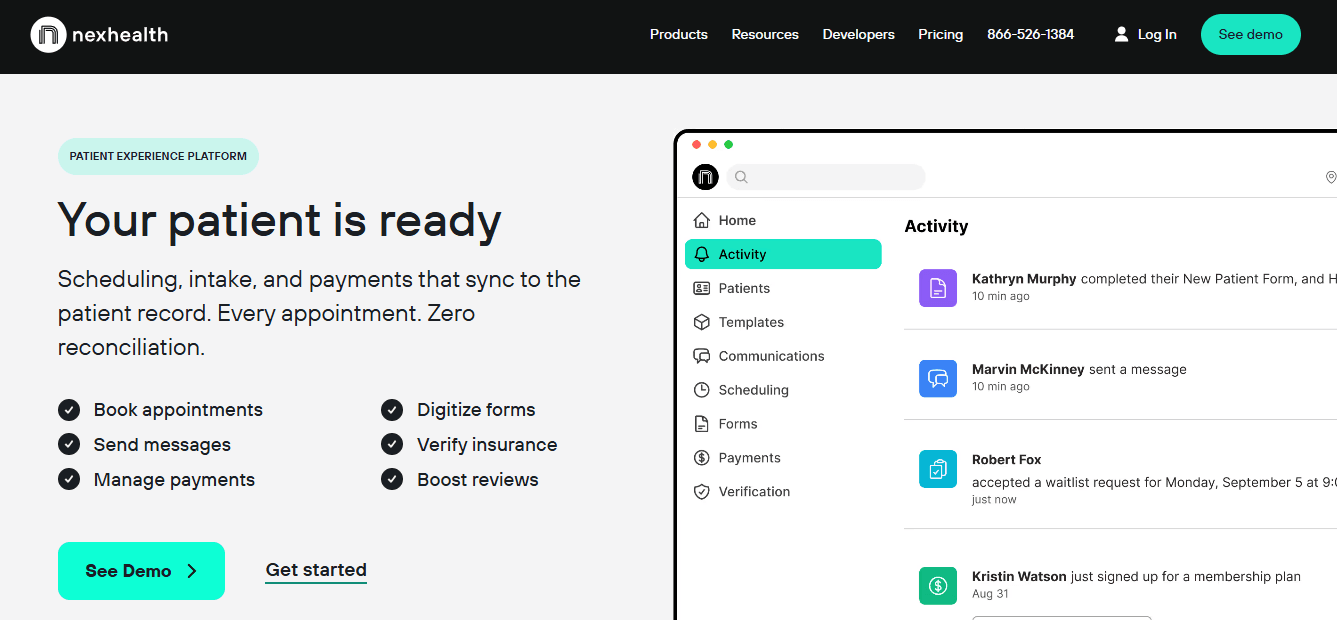
NexHealth is best known as an EHR-connected patient engagement platform for clinics that want HIPAA compliant online scheduling, forms, reminders, payments and patient communication in one system.
- Real-time booking: NexHealth’s biggest scheduling strength is that patients can book from live availability instead of a static booking page. The NexHealth Scheduling page says availability updates in real time, and booking links can be added to a clinic website, Google Business Profile, social media, email, text or QR code.
For small clinics, this is useful when the front desk is handling calls, walk-ins, insurance questions and follow-ups at the same time. A patient can book after hours without waiting for a callback.
I liked that scheduling can be adjusted by provider, appointment type and visit length. That matters for clinics where a new patient consult, follow-up, procedure and lab visit should not all behave like the same slot.
The setup does look heavier than a simple booking tool. If the clinic only needs a basic calendar link, NexHealth may feel like too much system for the job.
- Digital intake: NexHealth includes HIPAA compliant digital forms that patients can fill before the visit. On the NexHealth Forms page, the company says forms can be sent by appointment type, use logic, collect medical history, and sync patient details back into the health record.
This is very useful for small clinics because intake is usually where staff lose time. New patient forms, consent forms, allergy details, medications and insurance details can come in before the patient reaches the reception desk.
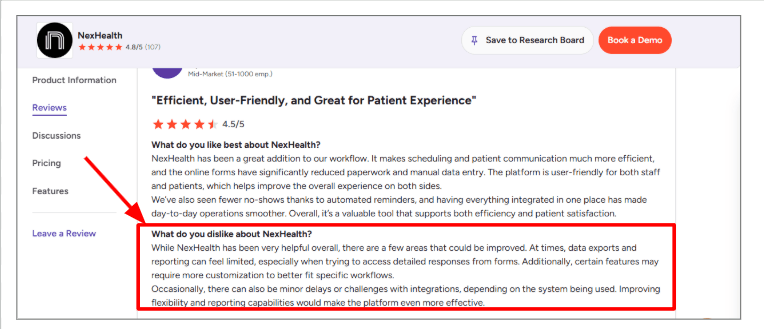
But this is also where I would be careful. I saw the same concern in a G2 review of NexHealth, where the reviewer said reporting and data exports can feel limited, especially when trying to access detailed form responses. I’d place the G2 screenshot below this point because it is a real operational gap, not just a small UI complaint.
- EHR sync: NexHealth’s Synchronizer is the core reason many clinics consider it. The NexHealth pricing page says all packages include bi-directional health record syncing, and the Scheduling page says the system can read and write to health record systems within 10 to 15 seconds for most integrations.
For HIPAA compliant scheduling, this is a big deal. If online bookings do not sync properly, staff still have to check the EHR manually, which defeats the purpose.
In my setup review, this was the part I would test hardest before buying. A clinic should check whether its exact EHR or practice management system is supported, how fast sync works, and what happens when a patient reschedules online.
The product looks strong here, but reviews also mention occasional syncing or integration delays. So I would not assume it will be perfect for every clinic stack.
- Patient reminders: NexHealth supports automated reminders by text and email, with messages that can change by appointment type. Their Automated Reminders page says patient confirmations can sync back into the health record.
For a small clinic, this is more useful than basic reminders because staff do not have to keep checking who confirmed and who did not. It can reduce manual follow-up before busy clinic days.
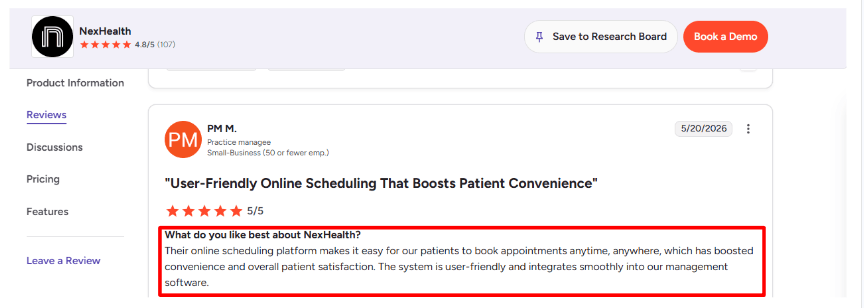
This also connects well with the positive G2 review of NexHealth you shared. The reviewer liked that patients could book anytime and that the system integrated smoothly into their management software. I agree with that angle if the clinic’s main pain is patient convenience plus front desk workload.
The only caution is that reminder workflows need careful setup. A surgical consult, routine checkup and therapy follow-up may need different timing, instructions and form links.
- Waitlist and recalls: NexHealth has waitlist automation and 1-Click Recalls. The NexHealth Scheduling page says waitlist automation can notify patients about open slots, book the first patient who takes it, and inform others when the slot is filled.
This is very relevant for small clinics because cancellations hurt more when there are fewer providers. A last-minute 45-minute opening can become lost revenue if the front desk has to call patients one by one.
The recall feature is also practical for clinics that need patients to come back for follow-ups, cleaning, checkups, reviews or ongoing care plans. Instead of sending a generic reminder, the patient gets a link with real-time availability.
The positive surprise is that NexHealth is not just “book a slot.” It is closer to a front-office automation layer around the appointment.
- Payments and verification: NexHealth also goes beyond scheduling with payment requests, appointment reservations and insurance verification. The NexHealth pricing page lists payments and insurance verification as available modules, and says patient data is encrypted at rest for HIPAA compliance and security.
For small clinics, payment reservations can help reduce no-shows for high-value visits. Insurance verification can also save time before the patient arrives, especially when coverage issues usually create delays at check-in.
This is useful if the clinic wants scheduling, intake, reminders, payments and eligibility checks in one workflow. It is less useful if the clinic already has strong billing and insurance tools and only wants appointment booking.
NexHealth has Analytics too, but based on reviews, I would treat reporting as good for high-level booking and patient engagement metrics, not necessarily deep custom reporting.
Pros
- Strong fit for clinics that need HIPAA compliant scheduling connected to patient records.
- Real-time online booking is more practical than a basic calendar link.
- Digital forms can reduce paperwork and manual data entry.
- Reminders, recalls and waitlist tools are useful for reducing admin work.
- Good option for clinics that want front-office automation, not just scheduling.
- Patient experience feels modern, especially for booking after hours.
Cons
- May be too heavy for very small clinics that only need simple booking.
- Pricing can be a concern for small offices.
- Reporting and exports may feel limited for detailed form responses.
- Integration quality can depend on the clinic’s EHR or practice management system.
- Setup needs careful testing because appointment types, providers and rules can get complex.
- Some workflows may require more customization than the platform easily allows.
Pricing
-
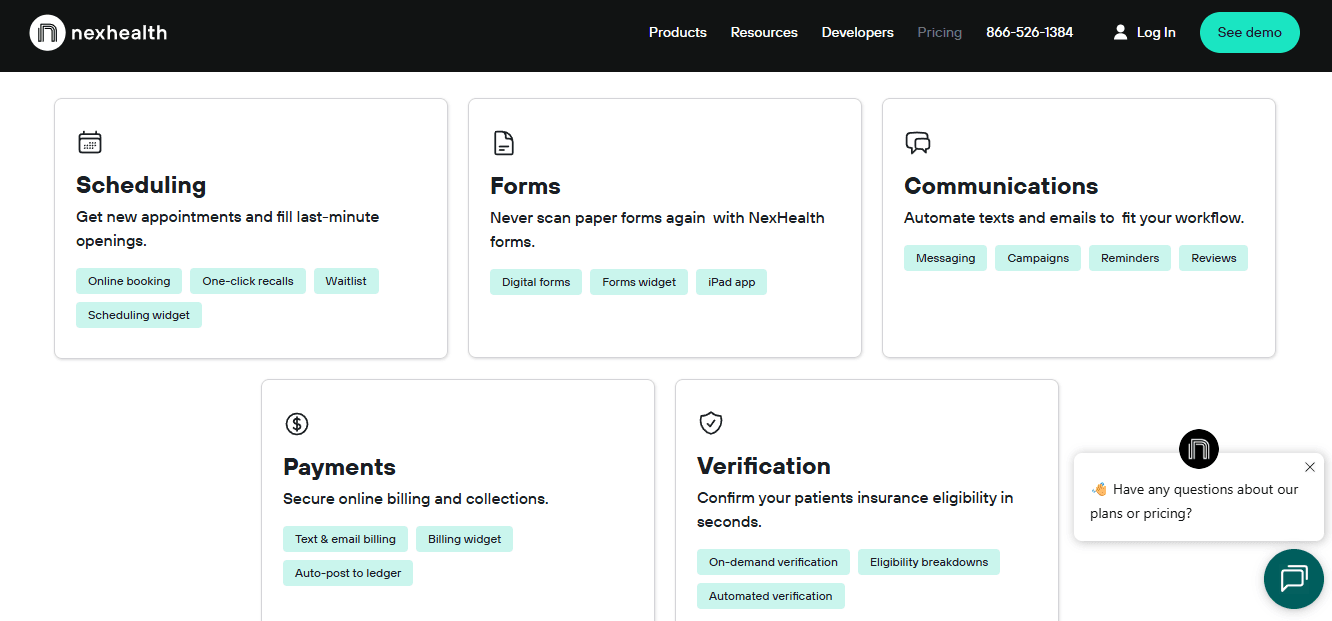
NexHealth does not show simple public pricing on its own pricing page. It asks clinics to request a quote through the NexHealth pricing page.
-
G2’s NexHealth pricing page lists pricing as starting at $299/month, but I would verify this directly with NexHealth because healthcare software pricing can change by package, location, modules and practice size.
-
Pricing appears to depend on selected modules such as scheduling, communications, forms, payments and insurance verification.
-
NexHealth says all packages include bi-directional health record syncing and HIPAA compliance/security, including encryption of patient data at rest.
-
For small clinics, the key pricing question is simple: will NexHealth replace enough manual front-desk work to justify the monthly cost?
Tebra
Tebra is popularly known as an all-in-one EHR, billing, and practice management platform, which is why health practices use it when they want scheduling to sit close to charts, intake, payments, and patient communication.
-
Online scheduling: Tebra’s online scheduling from Tebra lets clients book from a website, online profile, email, or SMS link. For a health coach, this works best when appointments are more clinical in nature, like nutrition follow-ups, wellness assessments, or insurance-linked visits.
You can set visit reasons, appointment lengths, office hours, and provider-level availability. One thing to note is that online appointment requests still need to be approved or denied, so it is not the fastest “book instantly and forget it” setup.
I also saw a serious G2 review of Tebra where the user mentioned lagging, broken workflows, patient visibility issues, privacy concerns, and loss of chart and billing access. That matters for HIPAA-focused health coaches because scheduling is not just a calendar here. It is connected to client records and billing.
-
HIPAA workflows: Tebra says its EHR, billing, and AI features are built with HIPAA compliance at the core, with secure handling of patient data and encrypted workflows through Tebra HIPAA compliance. That is useful if your health coaching business handles PHI, medical history, lab context, or provider referrals.
The setup feels more medical-office-first than coach-first. You get stronger compliance coverage than a basic scheduler, but you also inherit more admin screens, fields, and workflows than a solo health coach may need.
-
Digital intake: Tebra supports digital intake forms before appointments through Tebra patient intake. This is helpful for collecting goals, health history, medications, allergies, consent, payment details, or insurance information before the first session.
In a real coaching flow, this can save a lot of back-and-forth. For example, a client booking a metabolic health consultation can complete intake before the call, so the coach is not spending the first 15 minutes asking basic history questions.
The form structure, however, leans toward medical intake. If your business is pure habit coaching, you may need to simplify the flow so clients do not feel like they are entering a clinic portal.
-
Reminders and messaging: Tebra’s appointment reminders from Tebra support automated text reminders, confirmations, directions, and appointment details. For health coaches selling recurring sessions, this is valuable because missed sessions can hurt both revenue and client progress.
This was one of the better parts when reviewing the workflow. It is not just a reminder bolted onto a calendar. It is tied to the broader patient experience, which helps if you run structured programs with follow-ups.
The tradeoff is that small teams may find the communication setup heavier than tools built only for coaching or appointment booking.
-
Charge capture: Tebra’s charge capture is useful if your health coaching practice works with clinical billing, insurance-adjacent services, superbills, or provider-supervised care. Tebra’s help docs describe charge capture as a way to enter charges electronically, and some charges can be created from clinical notes or appointment cards through Tebra charge capture.
This matched the second G2 review you shared, where the reviewer liked being able to compare the visit note with charge capture to check coding. I agree with that use case. If coding accuracy matters, this is a real strength.
But for a cash-pay health coach selling packages, this may be more than needed. A simple payment link or package checkout could be easier.
-
Telehealth visits: Tebra includes HIPAA-focused telehealth through Tebra telehealth, with video visits, group appointments, provider URLs, virtual waiting rooms, and custom patient communication.
For health coaches, this can support private coaching calls, follow-up visits, and small group programs. It also keeps the video visit closer to scheduling, records, and billing, which reduces tool-hopping.
The downside is cost and complexity. If all you need is HIPAA-safe video plus scheduling, Tebra may feel like buying a full practice operating system when you only wanted a clean booking flow.
Pros
-
Strong fit for health coaches who need HIPAA-aware scheduling, intake, notes, telehealth, and billing in one system.
-
Good for clinical or insurance-linked coaching workflows where visit notes, charge capture, claims, and patient records matter.
-
Digital intake and reminders can reduce admin work before and after client sessions.
-
Online scheduling can be shared through website, email, SMS, and online profiles.
-
Telehealth is useful for remote coaching, follow-ups, and group sessions.
Cons
-
Not the lightest option for budget-conscious solo health coaches.
-
Pricing can rise quickly if you need scheduling, EHR, billing, telehealth, and patient engagement together.
-
Some reviews mention speed, workflow, support, and account-access problems, which are important risks for small teams.
-
The product feels more built for medical practices than simple coaching businesses.
-
Cash-pay coaches may not need the billing depth, charge capture, claims, or coding workflows.
Pricing
-
Tebra’s official pricing overview says pricing ranges from $49 to $799 per provider per month, depending on provider type, claim volume, modules, and setup.
-
You can choose single solutions or bundles like Practice Essentials and Practice Automation.
-
For budget health coaches, the key question is whether you need the full EHR, billing, telehealth, and patient engagement stack, or just HIPAA-friendly scheduling.
-
Ask for a custom quote and confirm what is included, especially online scheduling, reminders, intake, telehealth, billing, and HIPAA/BAA requirements.
CareCloud
CareCloud is best known as a full medical practice management and EHR system, so people use it when scheduling has to sit close to billing, patient records, reminders, claims, and HIPAA-focused workflows.
-
Patient Scheduling: CareCloud Central gives you a medical-style scheduler with patient appointments, appointment reminders, patient profiles, insurance checks, billing, and document management included in the core workflow.
For health coaches who handle insurance, superbills, or clinical-style documentation, this is useful because the booking is not floating separately from the client record. The platform may be excessive for a solo practitioner who only needs secure one-to-one appointment scheduling.
I also saw the same speed issue in a G2 CareCloud Central review, where a user said some screens had slow response time. I’d share a screenshot below because this matters when you are moving between calendar, client profile, and billing during a busy day.
-
Client Records: The stronger part of CareCloud is how the appointment links back to patient details, charting, billing, and administrative history.
For a health coach working with ongoing care plans, lab follow-ups, weight management programs, or wellness check-ins, this can help keep client context in one place. You are not just seeing “Priya, 4 PM.” You can see the broader record around her visits, payments, and notes depending on the setup.
In my testing, this is where CareCloud makes more sense for structured healthcare businesses than casual coaching. It is not the fastest tool to understand, but once the record structure is set, it can reduce scattered admin.
-
Automated Reminders: CareCloud includes automated text, email, and call reminders, which is important for health coaches because no-shows are often not dramatic. They are just expensive.
A client may book a HIPAA-sensitive nutrition follow-up, forget the slot, then message later asking to reschedule. Reminders help reduce that back-and-forth, especially for recurring accountability calls.
The reminder setup is useful, but I would still check how much control you get over message wording, timing, and whether SMS costs are included. Smaller coaching businesses usually need predictable costs more than advanced enterprise options.
-
Dashboard Visibility: One thing I liked more than expected was the at-a-glance layout. A reviewer on G2 CareCloud Central mentioned that the usability is easy, the look is pleasing, and they could view the number of items in each section quickly.
I agree with that in parts. Once you know where things live, the section-level visibility helps. For a small health coaching clinic, this can make daily admin easier because you can quickly see appointments, pending items, billing tasks, and client-related sections without digging too much.
-
Billing Workflows: CareCloud is much stronger than basic appointment scheduling tools when billing is part of the process. Its listed plans include medical billing, electronic remittance advice, denial management, clearinghouse connectivity, contract management, and insurance verification.
This is useful for health coaches who operate inside a clinical setting, accept insurance-adjacent payments, or work with providers who need clean financial workflows.
For a budget health coach, though, this may be overbuilt. If you only need clients to book and pay for coaching packages, simpler HIPAA-compliant scheduling tools may feel lighter and cheaper.
-
Patient Portal: CareCloud’s higher plans include patient-facing tools like CareCloud Community and mobile access through CareCloud Companion.
This can help if clients need a secure place to access appointment information, communicate with the practice, or stay connected to their care journey. For HIPAA-focused health coaching, that matters because regular email and generic booking forms can create risk when personal health information is involved.
The tradeoff is setup effort. A portal is valuable only if clients actually use it. For solo coaches, I would test the client experience carefully before committing.
Pros
- Strong fit for health coaches working inside a clinic-style setup
- Scheduling, records, billing, reminders, and reporting sit close together
- HIPAA-focused healthcare platform, not a generic calendar tool
- Good for insurance-heavy or admin-heavy workflows
- At-a-glance dashboard can make daily work easier once configured
- More complete than simple booking tools if you need EHR and billing depth
Cons
- Not the cheapest option for a budget health coach
- Can feel too heavy for solo wellness coaches or cash-pay coaching businesses
- Some users report slow screens and occasional performance issues
- Setup may take more time than lightweight scheduling tools
- Pricing is not always simple to understand from the public website
- Best value comes when you need the full practice management stack, not just appointments
Pricing
-
CareCloud Central is listed on G2 at $349 per provider/month for practice management features like scheduling, reminders, patient profiles, insurance verification, billing, and document management.
-
CareCloud Complete is listed at $629 per provider/month and adds EHR features, clinical documentation, ePrescribing, templates, patient portal, mobile app, analytics, and support.
-
CareCloud Concierge is listed as 3% to 7% of practice collections and is more suited for practices that want full-service revenue cycle management.
-
For a budget health coach, CareCloud is usually worth considering only if you need medical-practice workflows. If you mainly need HIPAA-friendly booking, reminders, intake forms, and payments, it may be more software than you need.
Methodology
I compared HIPAA scheduling software for small clinics by testing booking flows and checking BAA availability, intake forms, reminders, calendar sync, staff controls, and pricing. I also reviewed public documentation, product pages, and user feedback to see which tools feel practical for lean clinics, not just large healthcare teams overall.
FAQs
Which HIPAA compliant scheduling software is best for small clinics?
Mint Scheduling, SimplePractice, and Jane App are strong options for small clinics that want simple booking, reminders, intake forms, and client-friendly scheduling.
Larger clinics may also compare Tebra, NexHealth, and CareCloud for deeper practice management needs.
How do I choose HIPAA compliant scheduling software for a small clinic?
Pick based on your clinic’s daily workflow, not just the feature list.
Check for:
- BAA availability
- Secure reminders
- Intake forms
- Calendar sync
- Staff scheduling
- Cancellation and rescheduling controls
- Payment or insurance workflow fit
What mistakes do clinics make when buying scheduling software?
The biggest mistake is choosing a tool that looks affordable but does not fit clinical workflows.
Small clinics often forget to check BAA terms, reminder limits, multi-provider scheduling, intake form security, and how easily patients can reschedule.
Is Acuity Scheduling good enough for HIPAA compliant clinic booking?
Acuity Scheduling can work for simple appointment booking if the clinic confirms its HIPAA setup, BAA availability, and privacy settings.
It may feel lighter than tools like SimplePractice, Jane App, Tebra, or CareCloud for full clinic operations.
What features matter most for small clinic scheduling?
The most useful features are usually:
- HIPAA-ready booking
- Automated appointment reminders
- Online intake forms
- Multi-provider calendars
- Cancellation controls
- Secure patient communication
- Payment collection
These reduce no-shows and save front-desk time.
When should a clinic choose practice management software instead?
Choose practice management software when scheduling is only one part of the workflow.
If you also need charting, billing, patient records, insurance workflows, or multi-location admin, tools like SimplePractice, Tebra, CareCloud, or Jane App may fit better.
Summarize this content with AI


