HIPAA-compliant scheduling software in 2026 is not just about letting patients choose a time from a calendar. is not just about letting patients pick a time from a calendar. It is about protecting the places where protected health information, or PHI, can quietly leak without you even noticing. Intake forms that ask about medical history. Reminder texts that mention appointment types. Appointment labels that show up on shared calendars. Staff access that is too broad. Telehealth links that are not secure. Payment notes that contain diagnosis codes.
Healthcare data can also be exposed through internal access problems and mistakes in everyday workflows—not only through sophisticated cyberattacks.
For this guide, I tested HIPAA compliant scheduling tools on real workflows. Booking, rescheduling, intake forms, reminders, BAA availability, staff permissions, telehealth, payments, and what information appears in emails and SMS.
Quick answer
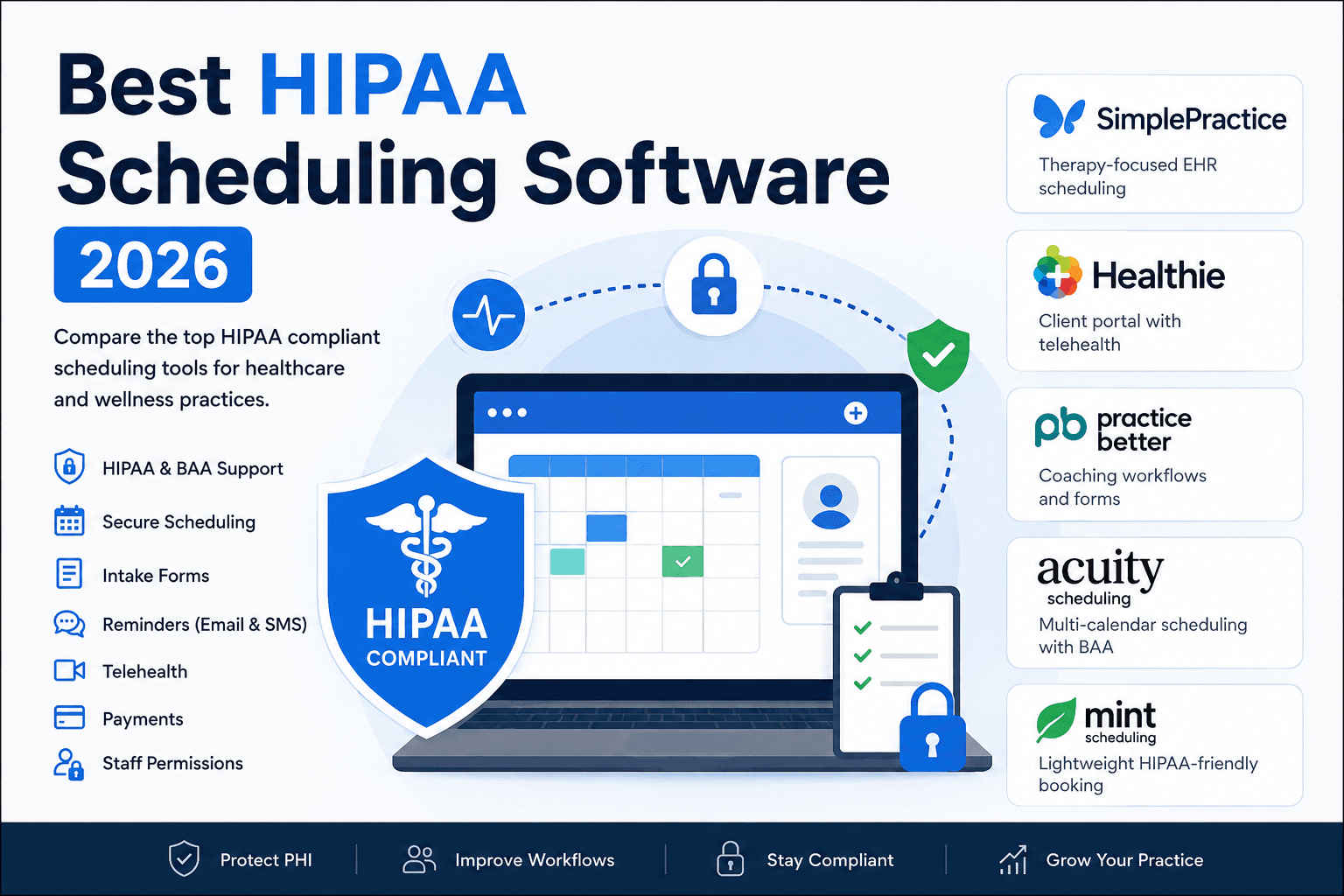
The best HIPAA compliant scheduling software depends on the type of care workflow you need. SimplePractice is best for therapists who need scheduling, telehealth, notes, billing, and client files. Healthie is best for health coaches, nutritionists, and wellness practices that need a client portal and ongoing care workflows. Practice Better is strongest for coaching programs, forms, packages, and client engagement. Acuity Scheduling works well for HIPAA-aware appointment booking with forms, payments, and multi-provider calendars. Mint Scheduling is best for lightweight HIPAA-friendly booking without a full EHR.
Best HIPAA compliant scheduling software by use case
Use-case
Best-fit Tool
Key strength
Starting Price
Simple HIPAA booking
Mint Scheduling
Lightweight compliant scheduling
$19/month
Solo therapists
SimplePractice
Therapy-focused EHR scheduling
$49/month
Health coaches
Healthie
Client portal with telehealth
$19.99/month
Nutrition practices
Practice Better
Coaching workflows and forms
$35/month
Multi-calendar clinics
Acuity Scheduling
36 calendars with BAA
$49/month
Wellness providers
Mint Scheduling
Scheduling without full EHR
$19/month
Growing practices
Healthie
Scheduling plus client management
$49.99/month
Coaching programs
Practice Better
Packages and client reminders
$35/month
HIPAA compliance and workflow comparison
Tool
BAA support
Best fit
Main compliance/workflow caution
SimplePractice
Yes
Therapists and clinical practices
Can feel heavy if you only need scheduling
Healthie
Yes
Nutritionists, health coaches, wellness practices
Setup can take time because it includes portal, forms, charting, and billing
Practice Better
Yes
Coaching programs and wellness workflows
Lower plans may become limiting as client volume grows
HIPAA support is plan-dependent, not available on every plan
Mint Scheduling
Confirm BAA directly before use
Lightweight HIPAA-friendly booking
Not a full EHR or clinical documentation system
What HIPAA scheduling software should protect
HIPAA scheduling software should protect more than the calendar slot. The risky parts are usually intake forms, reminder messages, appointment names, telehealth links, payment notes, uploaded files, staff permissions, and calendar visibility.
For email and SMS reminders, keep the message plain. Avoid diagnosis details, treatment names, medication names, sensitive appointment labels, or anything that reveals more than the client needs to know.
For forms, only ask what you actually need before the appointment. If deeper clinical history is required, it should live inside a secure client portal or EHR workflow, not a generic booking form.
For staff access, check roles, permissions, audit logs, and separate provider calendars. This matters as soon as receptionists, assistants, multiple providers, or contractors can access the account.
In-depth analysis
Mint Scheduling
Mint Scheduling is a lightweight HIPAA friendly scheduling option for practices that need booking, intake questions, paid sessions, packages, reminders, and calendar sync without adopting a full EHR. It makes the most sense for wellness providers, coaches, consultants, and small teams that want a cleaner booking workflow but do not need clinical notes, insurance billing, treatment plans, or deep patient records inside the same system.
Core Features
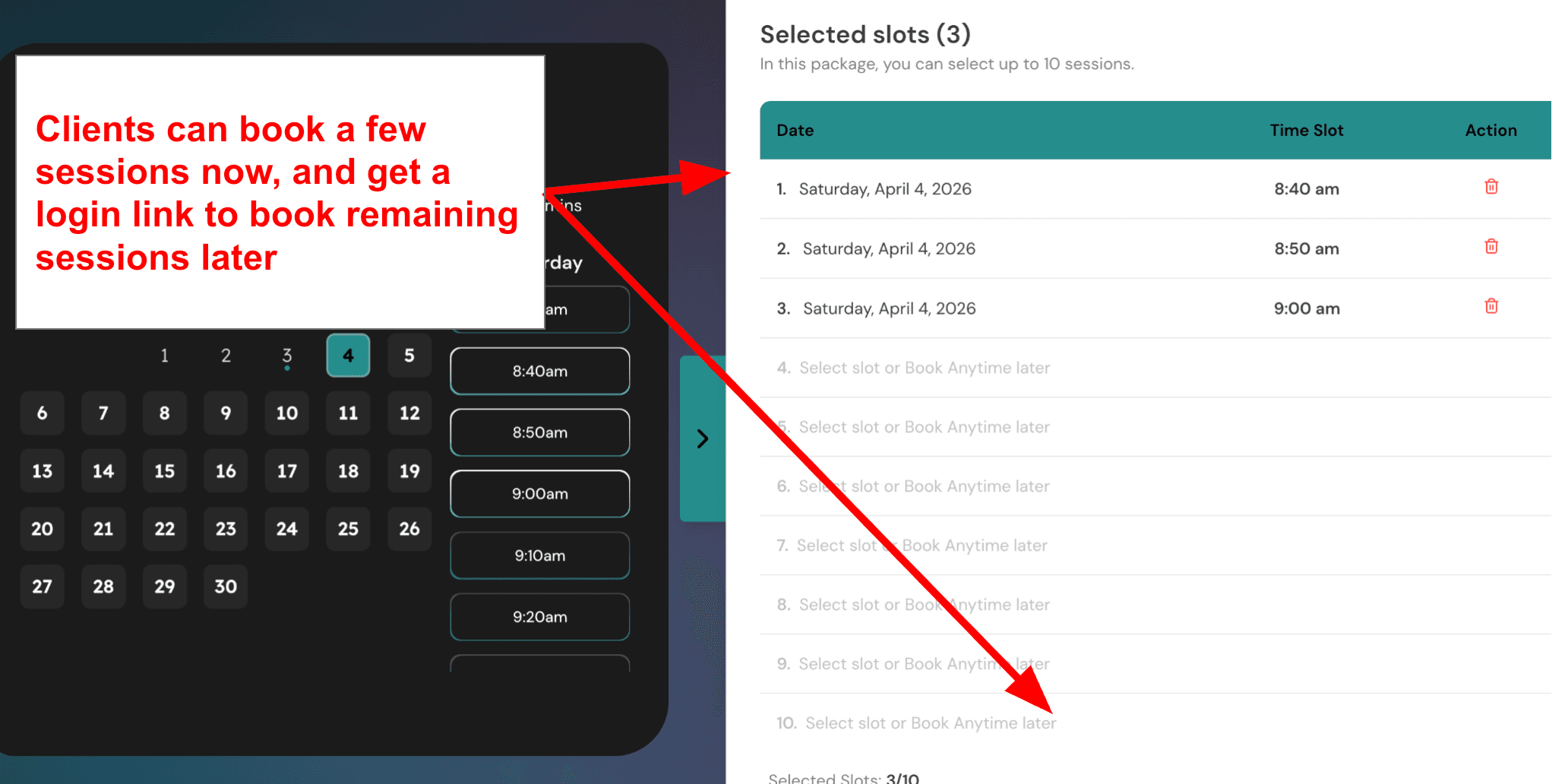
Multi session packages and recurring sessions: This is useful if you sell care plans instead of one off appointments. A nutritionist, health coach, or therapist can create a four session or eight session package, collect payment once, and let the client book the remaining sessions later whenever they want. I like this for lightweight HIPAA aware scheduling because it reduces admin work without forcing every provider into a full practice management system. You do not have to send invoices between sessions or chase payments. The client pays upfront and books on their own schedule.
* A Screenshot Multi-session packages in Mint Scheduling*
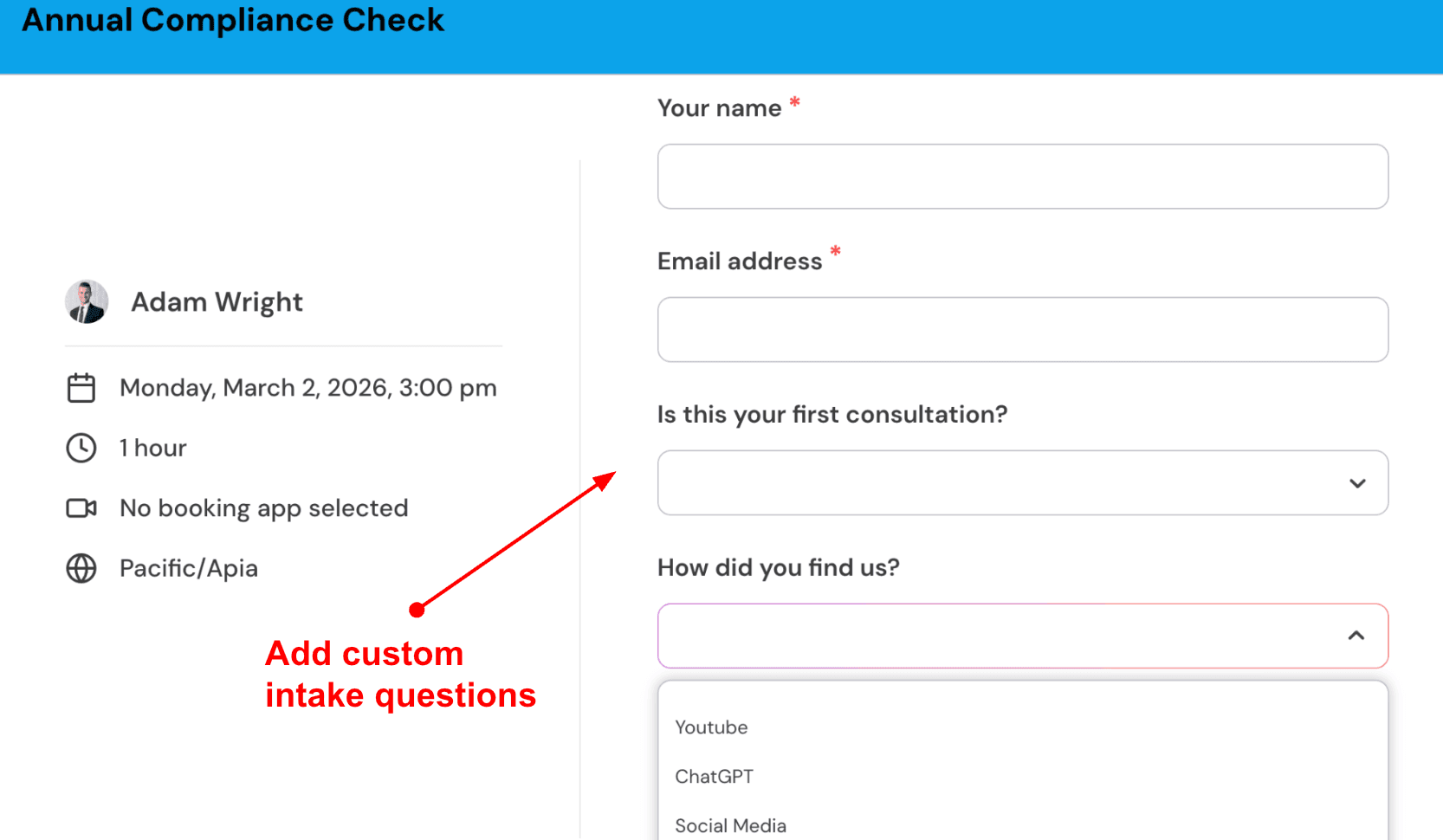
Custom intake questions: You can add a few questions before someone books, so you are not starting every appointment from zero. For example, a health coach can ask about goals, current routine, and preferred session type before the first call. A therapist can ask about the reason for coming in or any previous experience with therapy. I would keep this short. Ask only what you actually need to prepare for the session, especially if you want the booking flow to feel simple and not overwhelming for patients. Too many questions will drive people away before they book.
A Screenshot of the Booking Questions
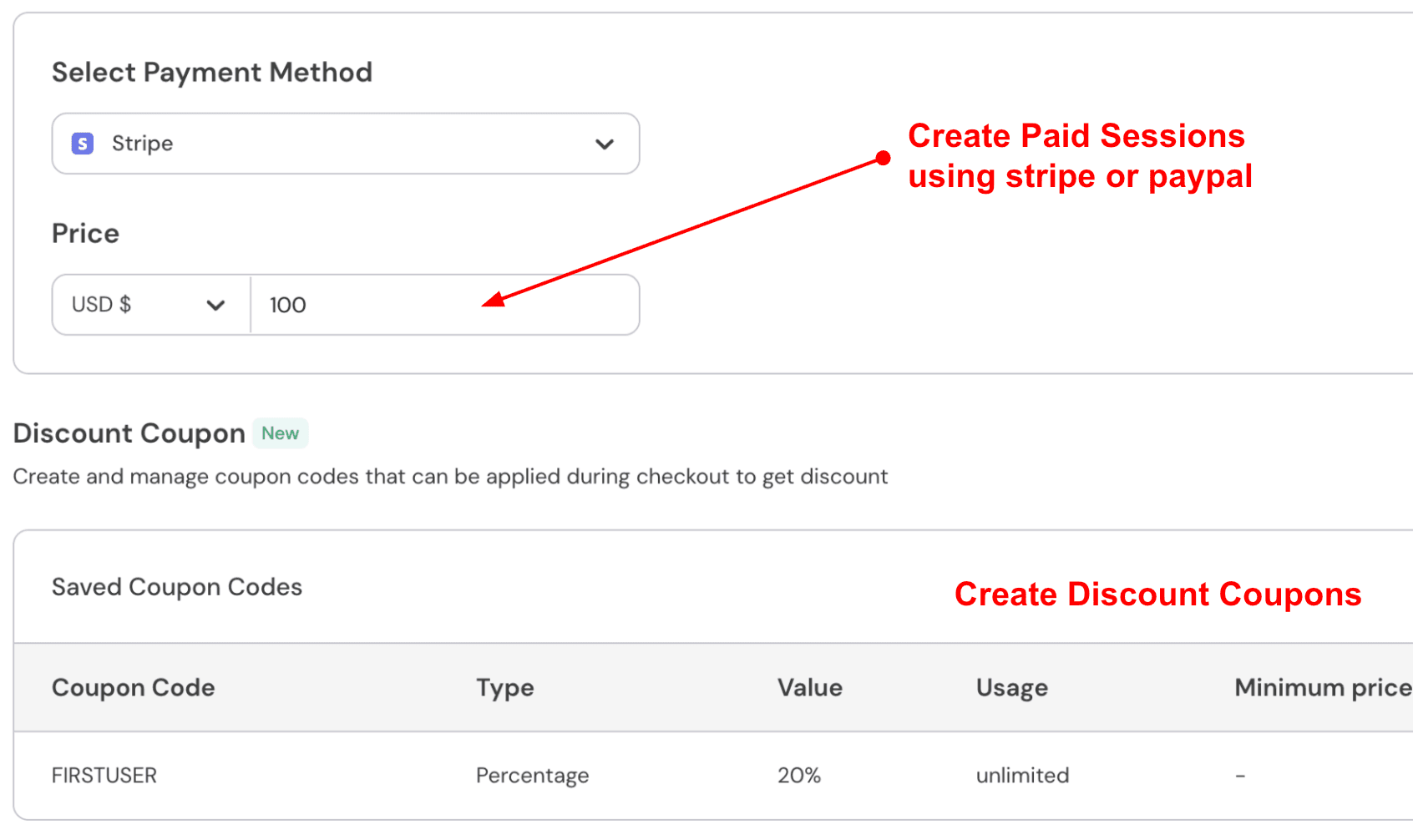
Paid sessions: Mint Scheduling lets you connect Stripe or PayPal and charge during the booking flow. This is really helpful for private pay therapists, wellness consultants, nutritionists, and coaches who do not want to chase payments after the appointment or send separate invoices. You can also create coupon codes for first time consults, referral offers, or discounted package calls to attract new patients.
Screenshot of the Setup Paid Sessions
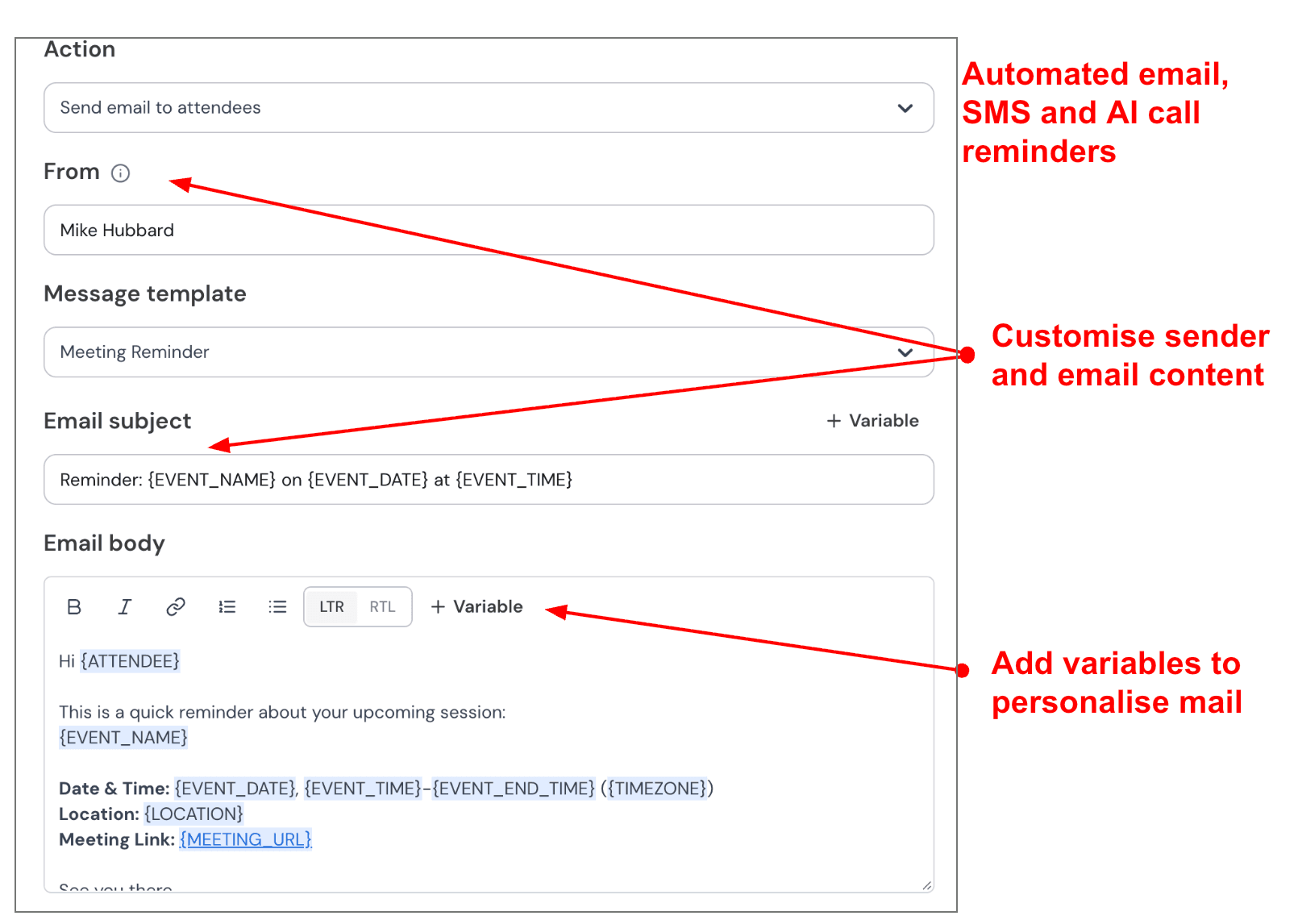
Automated email and SMS reminders: Reminders are one of the easiest ways to reduce no shows in any healthcare practice. A small clinic, therapist, or health coach can send one email reminder 24 hours before the appointment and one SMS reminder one hour before. You can edit the sender name, subject line, and message text, so the reminder feels professional but not like a generic robot. For HIPAA compliance, the key is making sure no protected health information appears in the reminder content. A reminder that says "appointment with Dr. Smith for anxiety treatment" is a breach. A reminder that says "you have an appointment tomorrow at 2pm" is fine. You’ll find a screenshot of this below:
Automated SMS and email reminders before meetings
Pros
-Lightweight and affordable compared to full EHR systems
-Multi session packages work well for care plans and recurring appointments
-Custom intake questions help you prepare before the session
-Paid sessions through Stripe or PayPal reduce payment chasing
-Automated reminders help cut down no shows
-BAA available for HIPAA compliance
Cons
-Does not include clinical notes, treatment plans, or insurance billing
-Better suited for private pay practices than insurance based clinics
-May feel too basic for large practices with complex staff permissions
-Some advanced features are locked behind higher plans
-Not a replacement for a full EHR if you need patient records and e prescribing
Pricing
-Mint Scheduling starts at $9 per user per month.
-The pricing is reasonable for solo practitioners and small teams that want HIPAA friendly scheduling without paying -for a full practice management system.
-Annual billing saves money, and there is no commission on paid bookings.
When to Choose Mint Scheduling
Mint Scheduling makes sense if you are a private pay therapist, health coach, nutritionist, or wellness provider who needs HIPAA compliant scheduling software with packages, intake questions, and payments, but you do not need clinical notes or insurance billing. It is a great fit if you want something lighter than a full EHR and are comfortable managing patient records separately.
Why Not to Choose Mint Scheduling
I would skip Mint Scheduling if your practice bills insurance, needs clinical notes and treatment plans inside the same system, or requires deep staff permission controls for a large team. Also avoid it if you need e prescribing or lab integration. For a clinic that needs full EHR features, look at tools like TherapyNotes or SimplePractice instead. For a private pay practice that just needs scheduling and payments, Mint Scheduling is a strong choice.
Acuity Scheduling
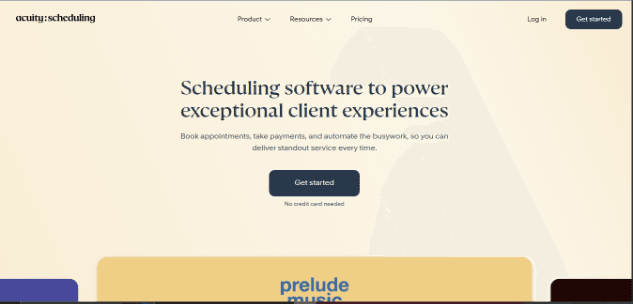
The Homepage of Acuity Scheduling
Acuity Scheduling is popularly known for appointment scheduling that handles forms, payments, reminders, and multi provider calendars all in one place. That is why many small health, wellness, and therapy style practices consider it when they need HIPAA aware booking without jumping straight into a full EHR.
Core Features
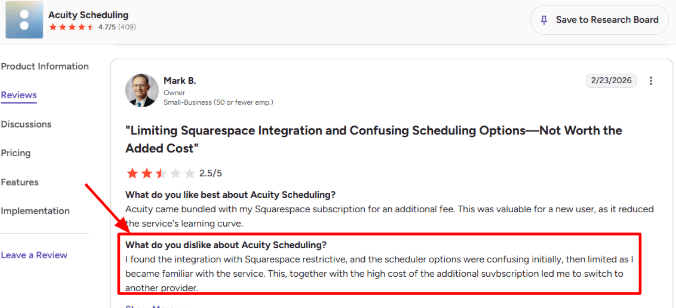
HIPAA setup: Acuity can be used for HIPAA compliant scheduling, but there is a catch. Its Acuity Scheduling HIPAA guide says HIPAA can only be enabled after signing a BAA on the Premium or Powerhouse plan. The Starter plan looks affordable, but it is not the plan for patient information. I saw this concern echoed in a G2 review on Acuity Scheduling where a user mentioned restrictive Squarespace integration and confusing options. You can find the screenshot below.
G2 Review of Acuity Scheduling
Client intake forms: Acuity lets you collect client information during booking using custom forms and agreements. The Acuity intake forms guide mentions use cases like symptoms, address, referral source, and terms. For small HIPAA focused businesses, this is useful for basic pre-appointment context. A nutritionist can ask about goals. A physical therapist can collect visit reasons. The limitation is that it is scheduling first intake, not a full clinical workflow.
Booking workflows: Acuity handles self scheduling, appointment types, classes, availability rules, and calendar sync. Its getting started guide covers appointments, classes, availability, staff, embeds, and booking links. The part that took more attention was deciding which settings applied globally versus per appointment type. A discovery call, therapy session, and follow up should not all use the same form.
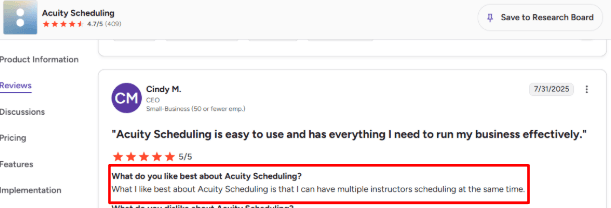
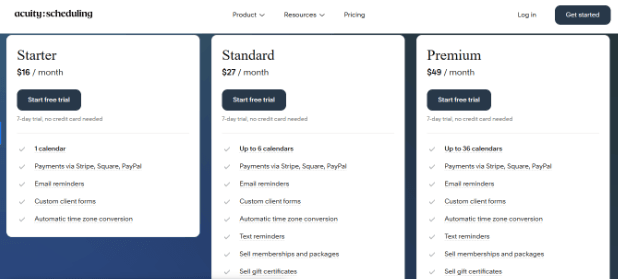
Provider calendars: Acuity works well for businesses with multiple practitioners. The pricing page lists one calendar on Starter, up to six on Standard, and up to thirty six on Premium. A positive surprise was how practical this is for small teams. A G2 reviewer on Acuity Scheduling liked that multiple instructors could schedule at the same time, and I agree.
Another G2 review on Acuity Scheduling
Payments and packages: Acuity supports payments through Stripe, Square, and PayPal, plus deposits, packages, and memberships. This is helpful for private pay services like coaching and nutrition sessions. The gap is that payments are not healthcare billing. If you need insurance billing or claims, Acuity will feel light.
Pros
-Strong appointment scheduling for small health and wellness businesses
-HIPAA support available with signed BAA on higher plans
-Intake forms flexible enough for basic pre-session information
-Works well for multi provider teams with separate calendars
-Supports payments, deposits, packages, and memberships
-Good reminder and rescheduling flow for reducing no shows
Cons
-HIPAA support is not available on the cheapest plan
-Premium pricing can feel high for simple compliant scheduling
-Not a full EHR or practice management system
-Intake forms are not deep clinical documentation
-Email and SMS reminders need careful HIPAA safe configuration
Pricing
Acuity’s Pricing Page
-Starter starts at $16/month annually or $20/month monthly, but no BAA based HIPAA support
-Standard starts at $27/month annually or $34/month monthly. Adds up to 6 calendars, SMS reminders, packages, and memberships
-Premium starts at $49/month annually or $61/month monthly. This is the plan for HIPAA use because Acuity lists BAA signing here
-7 day free trial, but no free forever plan
When to Choose Acuity Scheduling
Acuity makes sense for small health, wellness, or therapy practices that need HIPAA aware scheduling with intake forms, payments, and multi provider calendars, but not a full EHR. It fits private pay clinics, nutritionists, coaches, and small teams that collect payment at booking.
Why Not to Choose Acuity Scheduling
Skip Acuity if you need HIPAA support on a budget plan, because Premium is required for a signed BAA. Also avoid it if you need clinical notes, treatment plans, insurance billing, or e prescribing. For a private pay practice that just needs compliant scheduling, Acuity is a strong choice. For a clinic that needs full EHR features, look at TherapyNotes or SimplePractice instead.
Simple Practice
Simple Practice Home Page
SimplePractice is best known as a HIPAA compliant EHR and practice management tool for therapists, counselors, and small health practices. People choose it when they want scheduling, telehealth, reminders, notes, billing, and client files in one place instead of stitching together separate tools.
Core Features
Online booking: SimplePractice lets clients request appointments online through the Client Portal, and you can control services, availability, appointment start times, and whether new clients can request specific sessions. The setup is not as light as a pure scheduling tool, but that is because it sits inside a wider clinical workflow. A therapist can create a 15 minute consult service, allow only new clients to request it, and keep full therapy sessions private until intake is complete. That level of control matters for HIPAA focused businesses that do not want every service exposed publicly.
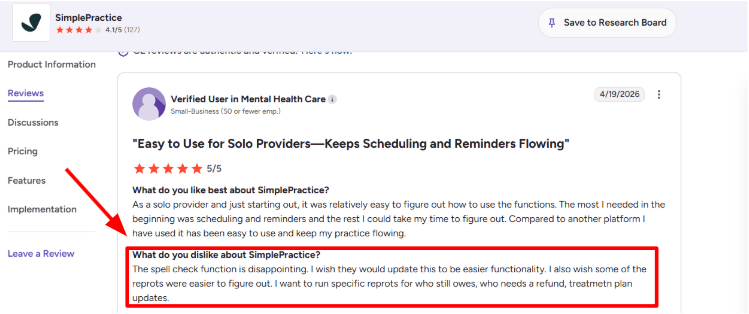
Reports and billing: SimplePractice has analytics and reports for clients, appointments, reminders, sent emails, income, and outstanding balances. Reports can also be downloaded as CSV or Excel, which helps when checking who still owes money or which appointments need follow up. This is one area where I had to slow down while testing. The reports are useful, but finding the exact view is not always obvious on the first pass. I saw the same complaint in a G2 review of SimplePractice where the reviewer mentioned that reports for balances, refunds, and treatment plan updates were harder than expected. Sharing a screenshot below makes sense here because this is the kind of issue buyers should see before choosing it.
A G2 review of SimplePractice
Client files: SimplePractice is much stronger than a basic appointment scheduler when it comes to client documentation. You can store intake forms, progress notes, assessments, treatment plans, uploaded files, and other documents inside the client record. This is where the product feels more like an EHR than scheduling software. A solo coach who only needs bookings may find it heavy. A therapist or wellness provider who needs notes, files, and secure storage will appreciate the structure.
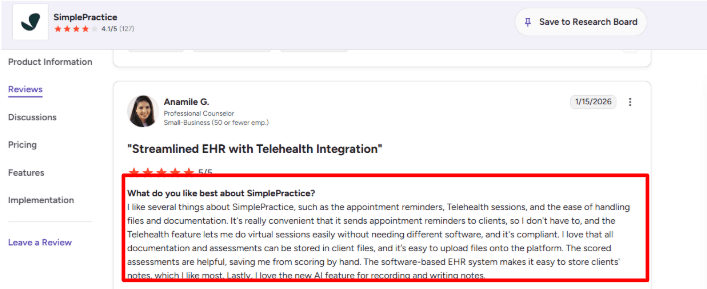
Reminders and Telehealth: Appointment reminders are one of the strongest practical features. SimplePractice supports text, email, and voice reminders on higher plans, and Telehealth reminders can include video links. Telehealth is included across all plans with no limit on session length or appointment count. The reviewer liked appointment reminders, Telehealth, file handling, documentation, scored assessments, and the AI note feature. The positive surprise for me was that telehealth is not treated like a small side feature. It is properly tied into appointments, reminders, client records, and billing.
The SimplePractice plans
Clinical templates: SimplePractice includes templates for intake forms, progress notes, treatment plans, scored measures, and other documents. On Essential and Plus plans, note templates and treatment plan templates can be customized more deeply. This matters for affordability because a cheaper scheduler may save money upfront but still leave you paying for forms, signatures, assessments, notes, and storage elsewhere. The tradeoff is that SimplePractice takes more setup time. Customizing templates is not hard, but it is not instant either.
Pros
-Strong fit for therapists, counselors, and small health practices that need HIPAA compliant scheduling plus EHR features
-Telehealth, reminders, documents, notes, billing, and client files all sit in one system
-Online appointment requests give more control than a public booking page
-Client documentation and scored assessments are much stronger than lightweight schedulers
-Good option when you want fewer separate tools to manage
Cons
-Not the cheapest option if you only need appointment booking
-Reports can take time to understand, especially for balances, refunds, and treatment updates
-Some useful features are limited by plan
-Team pricing can become expensive for growing practices
-The system may feel heavy for coaches or wellness providers who do not need full EHR workflows
Pricing
SimplePractice Pricing Page
-Starter is $49 per month. Includes online booking, telehealth, and basic features
-Essential is $79 per month. Adds appointment reminders, customizable note templates, and insurance billing (10 claims included)
-Plus is $99 per month. Adds team members, group appointments, advanced calendar sync, and more
-AI Note Taker is available as an add-on at $35/month per clinician, according to the SimplePractice plan comparison.
-ePrescribe is a $49 per month add on per clinician with a one time $89 setup fee
Healthie
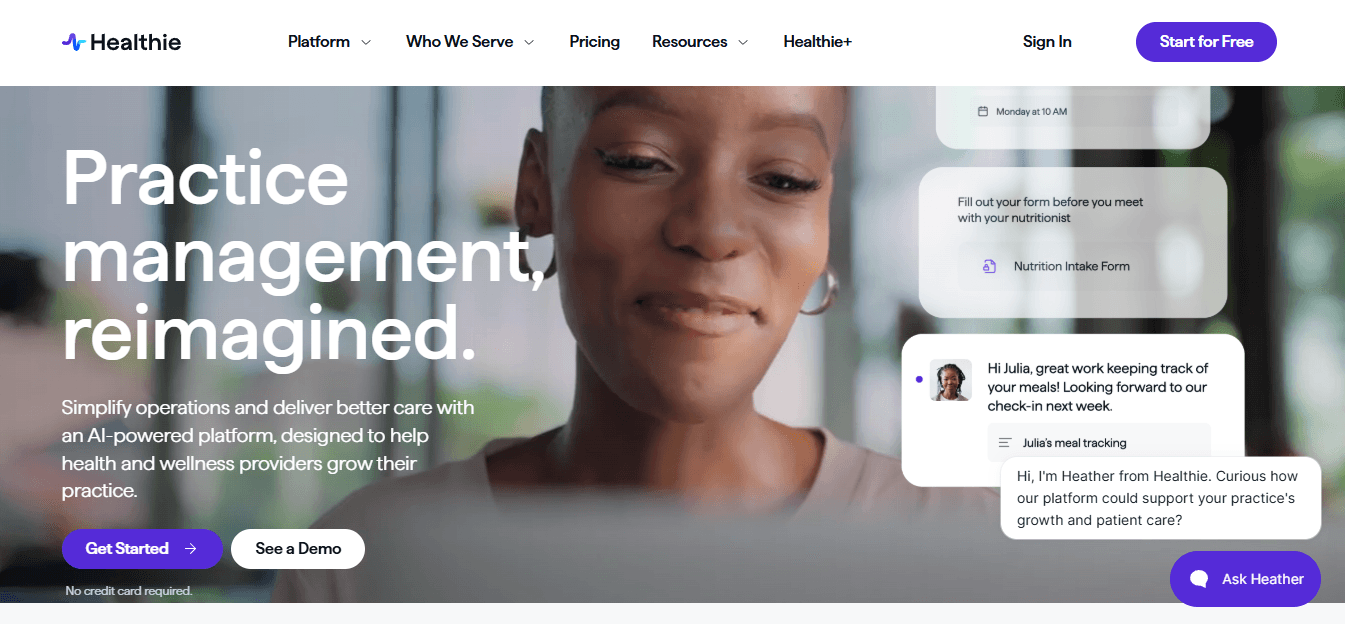
Healthie’s Home Page
Healthie is best known as an all-in-one HIPAA compliant EHR and practice management platform for health and wellness providers who want scheduling, telehealth, charting, payments, and client communication in one place. It is not the lightest tool, but it is one of the more complete options for providers who need more than just a booking link.
Core Features
Online Scheduling: Healthie lets providers create appointment types, embed booking links on a website, allow clients to reschedule or cancel online, set recurring appointments, and connect sessions to packages or payments. Its HIPAA-compliant scheduling guide also highlights email and text reminders, calendar sync, and telehealth links inside the booking flow. For a small practice comparing affordable HIPAA compliant scheduling software, this is useful because the booking system is not floating separately from client records. A new client can book a discovery call, receive reminders, complete forms, and then continue into telehealth without needing four different tools.
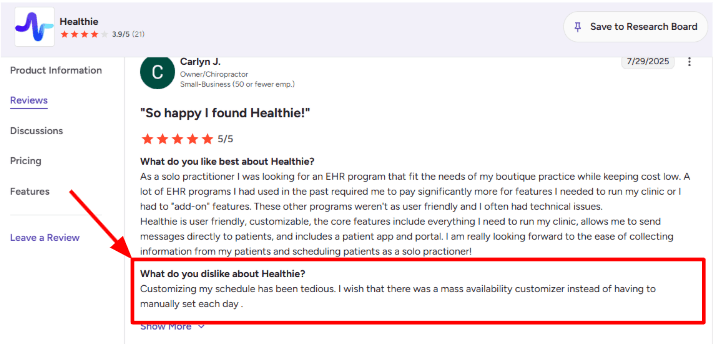
Availability Setup: The calendar is flexible enough for different appointment types, in person visits, video sessions, phone calls, and recurring client appointments. But setting up availability can take more clicks than expected, especially if your weekly schedule changes often. I also saw this in a G2 Healthie review where a user said customizing the schedule was tedious because they wanted a mass availability editor instead of setting each day manually. I am placing that screenshot below this section because it matches what many solo providers will care about during setup:
*Healthie’s review on G2
Telehealth Workflow: Healthie includes HIPAA compliant telehealth, secure messaging, client portal access, and video visit support. The official pricing and help pages list telehealth in the Core plan, and Healthie says its platform supports secure ways to send messages, documents, forms, and faxes virtually. One positive surprise for me was how connected the visit flow is. In a typical provider workflow, the video link, reminders, client portal, and forms are closely connected.
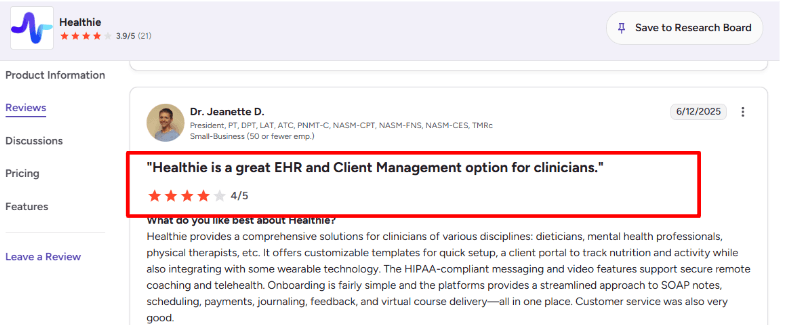
Client Portal: Healthie's client portal is stronger than a normal scheduling tool. Clients can access appointments, forms, messages, nutrition logs, activity tracking, documents, and mobile app features. This is where Healthie starts feeling more like a care platform than a booking page. Another G2 Healthie review praised the platform for supporting multiple clinician types, including dietitians, mental health professionals, and physical therapists. I mostly agree with that review. Healthie is not the lightest scheduling tool, but it works well when the practice needs portal based care, not just appointment booking.
Another G2 review on Healthie
Charting Tools: Healthie includes charting, intake forms, SOAP notes, e signatures, document sharing, and customizable templates. This is important for affordable HIPAA compliant scheduling software because many cheaper schedulers stop at the appointment. Healthie goes further into what happens before and after the session. A nutrition coach can send intake forms before the first call, review food logs between sessions, write notes after the appointment, and keep everything tied to the client profile.
Pros
-Strong fit for health and wellness providers who need more than basic appointment scheduling
-HIPAA compliant scheduling, telehealth, messaging, forms, charting, and client portal all in one system
-Useful for nutritionists, therapists, health coaches, physical therapists, and small group practices
-Client portal and mobile app make ongoing care easier after the booking is made
-Good option if you sell paid packages, programs, recurring sessions, or telehealth services
-Lower entry pricing makes it more accessible than many full EHR platforms
Cons
-Availability customization can take extra time if your schedule changes often
-May feel too heavy if you only need a HIPAA compliant booking link
-Some setup areas, especially forms and deeper customization, can take time to learn
-Team pricing can rise quickly for part time providers or small group practices
-Billing and insurance workflows may be more than a simple cash pay practice needs
-The product has many features, so the first setup is not as quick as lightweight schedulers
Pricing
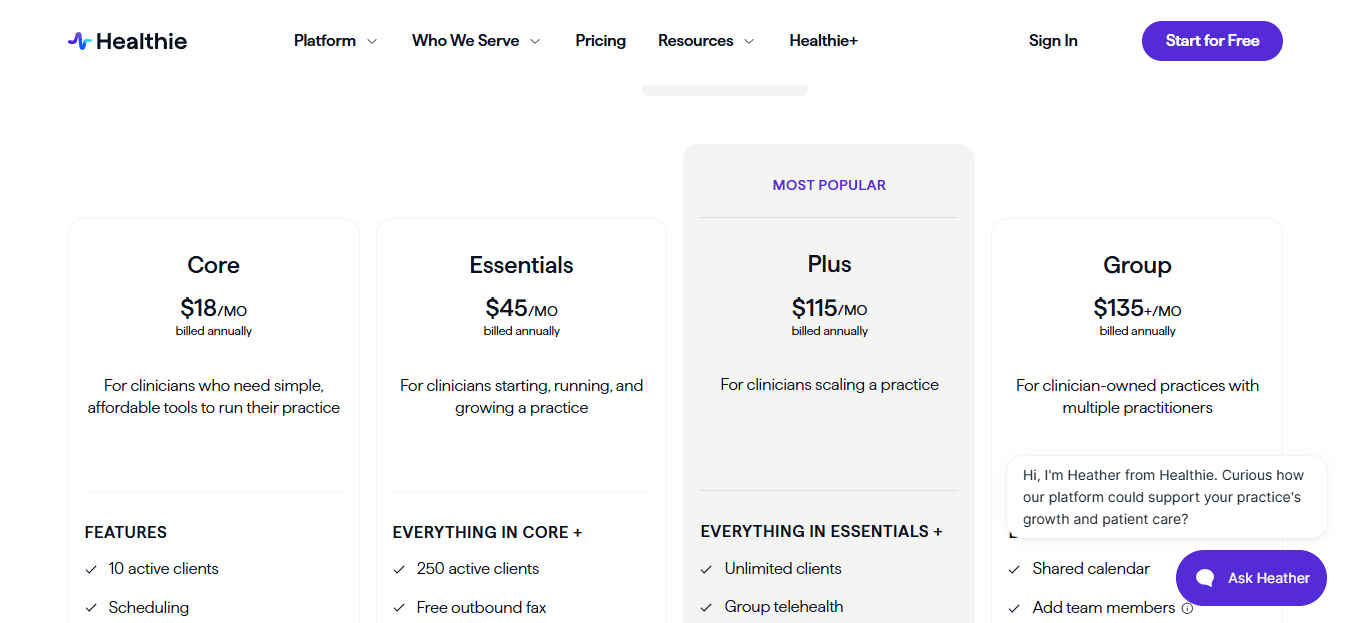
Healthie’s Pricing Page
-Healthie’s official pricing help page lists the Core plan is $19.99 per month or $18 per month billed annually for solo providers with up to 10 active clients
-Essentials plan is $49.99 per month or $45 per month billed annually, supports up to 250 active clients
-Plus plan starts at $129.99 per month and includes unlimited clients and premium features
-Group plan is listed at $149 per month on Capterra, with shared calendar, team members, roles, permissions, and internal team chat
When to Choose Healthie
Healthie makes sense if you are a health or wellness provider who needs HIPAA compliant scheduling plus charting, telehealth, forms, and client communication in one system. It fits nutritionists, dietitians, health coaches, therapists, and small group practices that sell packages and want a client portal for ongoing care.
Why Not to Choose Healthie
Skip Healthie if you only need a simple HIPAA compliant booking link with no charting, forms, or client portal. A lighter tool like Mint Scheduling or Acuity will save you money and setup time. Also avoid it if you are a solo provider who does not want to learn a platform with many features. For a private pay coach who just needs scheduling and payments, look at Mint Scheduling instead. For a practice that needs full EHR features with charting and client engagement, Healthie is worth the cost. Be prepared to spend time on initial setup, especially for availability rules and forms.
Practice Better
Practice Better’s Home Page
Practice Better is best known as an all-in-one EHR and practice management platform for health, wellness, nutrition, and coaching businesses that need HIPAA compliant scheduling, client records, payments, forms, and telehealth all in one place. It is not a lightweight scheduler, but it is one of the more complete options for practitioners who want everything connected.
Core Features
Online scheduling: Practice Better lets clients book, reschedule, and confirm appointments through a public booking page or widget, with real time availability and custom bookable services. For HIPAA compliant scheduling software, bulk availability editing can save a lot of time when a practitioner works different hours across clinics, telehealth days, and in person days.
Client portal: The client portal is one of Practice Better's strongest areas. Clients can book sessions, complete intake forms, access shared resources, message securely, and track progress all from one place. This is useful for affordable HIPAA compliant scheduling because many low cost tools stop at appointments. Practice Better goes further by keeping the client journey connected before and after the session. A nutritionist can send an intake form before a discovery call, collect payment for a package, run the appointment, share recommendations, and then track food or habit journals without moving between five separate tools.
HIPAA telehealth: Practice Better includes built in secure video sessions, so you do not need to stitch together a booking tool and a separate telehealth tool. The platform supports HIPAA compliant telehealth, automated reminders, intake forms before calls, and client rescheduling. I liked that telehealth is not treated as a separate add on workflow. It sits inside the appointment flow, which makes it easier for a solo practitioner to manage remote sessions without admin help. The tradeoff is that Practice Better can feel heavier than a basic scheduler. If you only need a clean booking page and reminders, the EHR style depth may be more than you want.
Forms and notes: Practice Better supports intake forms, waivers, note templates, and client records. This is important for practitioners comparing affordable HIPAA compliant scheduling software because appointments often involve protected health information, consent, session notes, and follow up tasks. Where Practice Better stands out is the workflow around coaching style care. Notes, forms, recommendations, and client engagement are tied closely to appointments, which makes it more practical than a generic HIPAA scheduler.
Programs and engagement: Practice Better is not just a scheduler. It also supports programs, courses, protocols, journals, reminders, secure messaging, and wellness integrations. The official pricing page mentions fixed date programs, self paced programs, evergreen programs, form templates, note templates, nutrition planning, food journals, and integrations like That Clean Life, Fullscript, Fitbit, Garmin, Apple Health, and Zapier. This makes it a strong fit for practitioners who want scheduling plus ongoing client engagement. The positive surprise for me is how much post booking work it can handle. Many affordable schedulers help someone book a call. Practice Better helps manage what happens after the call too.
Pros
-Strong all in one setup for scheduling, HIPAA telehealth, forms, notes, payments, messaging, and client portal
-Good fit for health coaches, nutritionists, dietitians, wellness providers, and functional medicine practitioners
-Built for client care workflows, not just appointment booking
-Packages, payments, superbills, reminders, and programs make it useful for paid sessions and ongoing care
-The client portal is more complete than what most basic scheduling tools offer
-HIPAA, PIPEDA, and GDPR compliance are clearly listed on the official pricing page
Cons
-Can feel too detailed if you only need a simple HIPAA booking link
-Starter is affordable, but the 10 client limit can become restrictive quickly
-Some useful growth features like group scheduling, branding, SMS reminders, and team tools require higher plans
-Availability and service setup takes more thought than a lightweight scheduler
-Reviewers on Capterra mention that support can sometimes be slower because help often goes through tickets.
-The platform is best for wellness style workflows, not for practices that only want appointment scheduling
Pricing
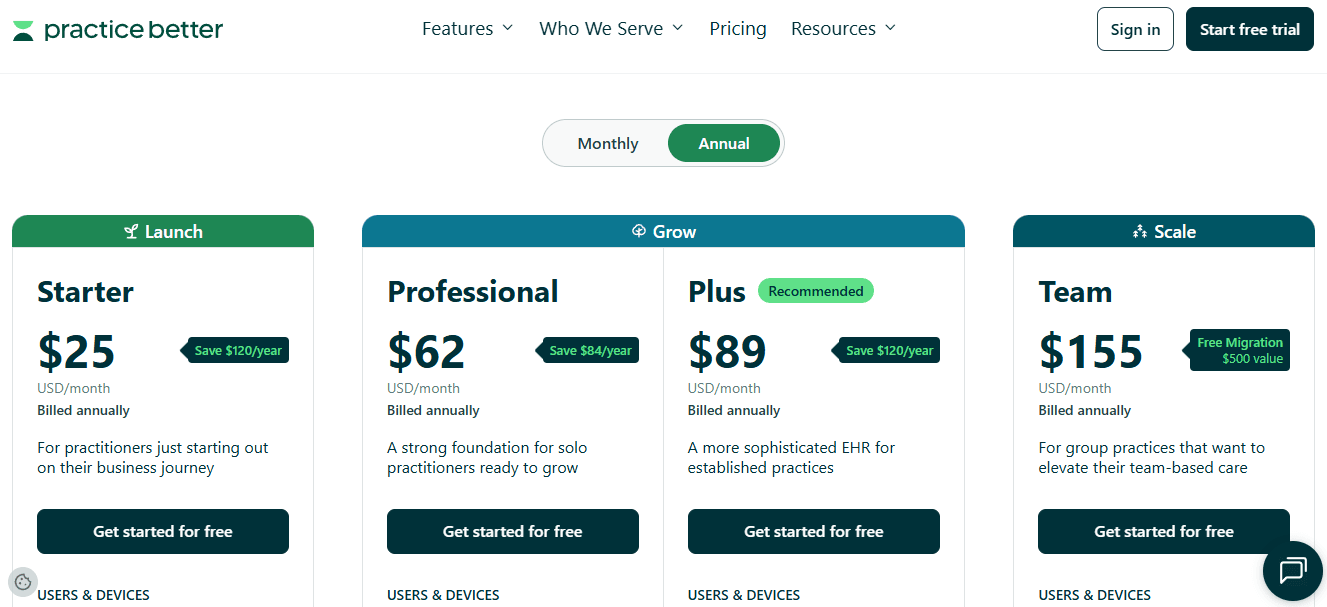
Practice Better’s Pricing Page
-Free Sprout plan is available for students and very new practitioners, limited to 3 clients
-Starter plan is $25 per month annually or $35 per month monthly. Includes scheduling, telehealth, billing, secure messaging, client portal, forms, and note templates
-Professional plan is $59 per month annually and supports up to 300 clients, with added features like group scheduling, group messaging, fixed date programs, PDF branding, deposits, and payment plans
-Plus and Team plans are for established practices needing unlimited clients, more branding, SMS reminders, team scheduling, shared calendars, and higher storage limits
Final verdict
The best HIPAA compliant scheduling software depends on how close your scheduling workflow is to actual care delivery. A therapist needs different things than a health coach or a nutritionist.
If you run a therapy practice and need scheduling, telehealth, notes, billing, reminders, and client files all in one system, SimplePractice is the strongest fit I tested. It is built for clinical workflows, not just appointment booking.
If you run a nutrition, health coaching, or wellness practice with ongoing client engagement, Healthie and Practice Better are better suited. They combine scheduling with portals, forms, packages, programs, and secure communication that goes beyond just booking a time.
If you mainly need HIPAA aware appointment booking with forms, payments, provider calendars, and reminders, Acuity Scheduling is a practical choice, as long as you are on the correct BAA supported plan. The Premium tier is where HIPAA support actually starts.
Mint Scheduling fits smaller teams that want lightweight scheduling, paid sessions, packages, reminders, and intake questions without moving into full EHR territory. It is a good middle ground between a basic scheduler and a heavy practice management system.
My advice is simple. Do not choose based on features alone. Test the full client journey. Booking, intake form, reminder, telehealth link, payment, reschedule, staff access, and most importantly, what information actually appears in email or SMS. HIPAA problems often show up in the small details, not the homepage feature list.
Methodology
We compared HIPAA-compliant scheduling software by testing real booking flows, checking BAA availability, intake forms, reminders, calendar sync, access controls, and pricing. We also reviewed product pages, support docs, and user feedback to see what actually works for solo providers, small clinics, therapists, and care teams handling PHI every day.
FAQs
Which HIPAA compliant scheduling software is best in 2026?
SimplePractice, Healthie, and Acuity Scheduling are strong picks for most healthcare and wellness teams. Choose based on your workflow.
Therapy practices fit SimplePractice better. Nutrition coaching fits Healthie or Practice Better. Simple HIPAA-aware appointment booking fits Acuity on the right plan.
Do I need a BAA for appointment scheduling software?
Generally, a BAA is required when a scheduling vendor creates, receives, maintains, or transmits PHI on behalf of a covered entity or business associate. Confirm the vendor’s BAA coverage and your specific compliance requirements before using the platform with PHI.
How do I choose HIPAA compliant scheduling software for my practice?
Start with the basics: BAA availability, secure intake forms, calendar sync, reminders, and payment support.
Then check the daily workflow. A solo therapist may prefer SimplePractice. A health coach may prefer Healthie or Practice Better. A small practice that just needs booking and forms may prefer Acuity or Mint Scheduling.
How should I test HIPAA scheduling software before switching?
Test the full patient journey before moving everyone over.
Book a fake appointment, submit an intake form, reschedule it, trigger reminders, collect payment, and check what staff can see in the system.
Small workflow issues become big problems later when real patients are involved. Also send yourself the reminders and see what PHI shows up in the email or text. That is where most compliance gaps hide.