If you’re booking therapy sessions, coaching calls, or clinic visits, a normal scheduling link can accidentally turn into a compliance risk.
One breach can be massive. Reuters reported the Change Healthcare hack impacted about 192.7 million people, per the US health department’s site.
That’s why “HIPAA-friendly” isn’t enough. You want tools that support a BAA and reduce the places PHI can leak.
This list is for picking the best HIPAA-compliant Calendly alternatives without guessing.
Method: I manually tested the core flows (book, reschedule, cancel, reminders, intake) and compared speed, friction, and admin controls.
Then I cross-checked G2/Capterra-style reviews and dug into the stuff most people miss: BAA availability, notification channels (email/SMS), audit logs, and retention settings, with lots of screenshots and source links so you can verify everything yourself.
Table of comparison for each tool
Use-case
Tool
Key strength
Pricing starts at
Solo health coaches
Mint Scheduling
Simple HIPAA booking
$10/month
Private practices
Acuity Scheduling
HIPAA-ready client scheduling
$16/month
Coaching programs
Healthie
Client portal and EHR
$49/month
Therapy practices
SimplePractice
Therapy practice management
$49/month
Wellness clinics
PracticeQ
Intake forms and payments
$29/month
Group coaching
Healthie
Packages and group sessions
$49/month
Multi-provider clinics
SimplePractice
Team scheduling and records
$49/month
Low-cost scheduling
Acuity Scheduling
Affordable HIPAA scheduling
$16/month
Deep dive into individual tool
Mint Scheduling
I selected Mint Scheduling because it feels built for people who need more than a basic Calendly style booking link.
For therapists, health coaches, wellness providers, small clinics, and consultants looking for HIPAA compliant Calendly alternatives, it has the features that matter in real daily work. Intake questions, paid sessions, reminders, packages, multi session bookings, GDPR controls, and a cleaner booking experience.
The pricing is reasonable too, and it is ranked 4.9/5 on G2, making it one of the highest rated scheduling tools in this category.
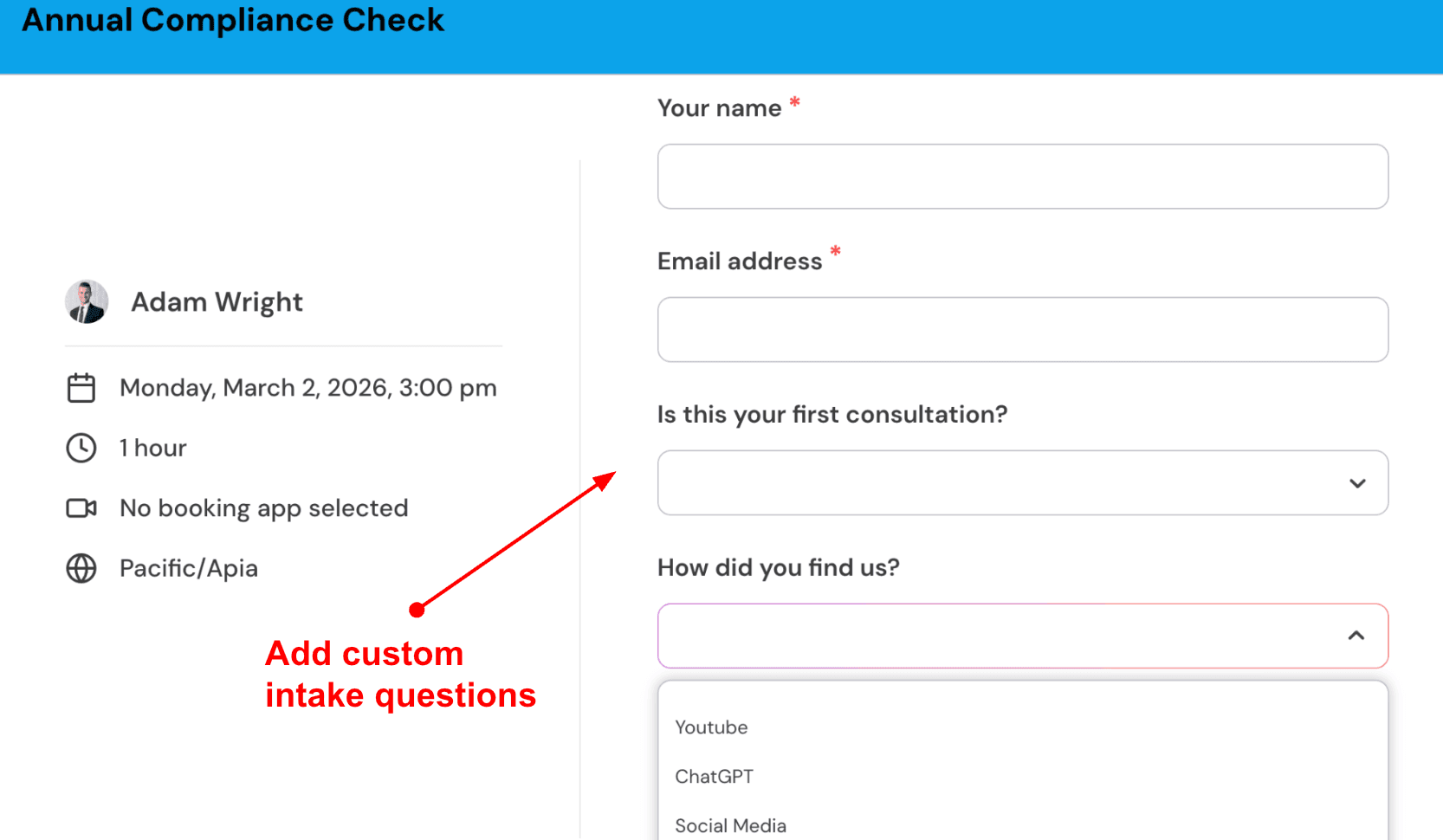
Custom intake questions: This is one of the first things I would set up if you are using Mint Scheduling as a HIPAA compliant scheduling software for client calls, therapy consults, coaching sessions, or wellness appointments.
You can ask only the details you need before the booking is confirmed. For example, a therapist can ask whether the client wants an individual session, couples session, or initial consultation. A health coach can ask about goals, diet preferences, or current challenges.
Here’s how it looks inside the tool:
Sync multiple calendars: This is important if you are comparing Mint Scheduling with Calendly for healthcare, therapy, coaching, or clinic appointments.
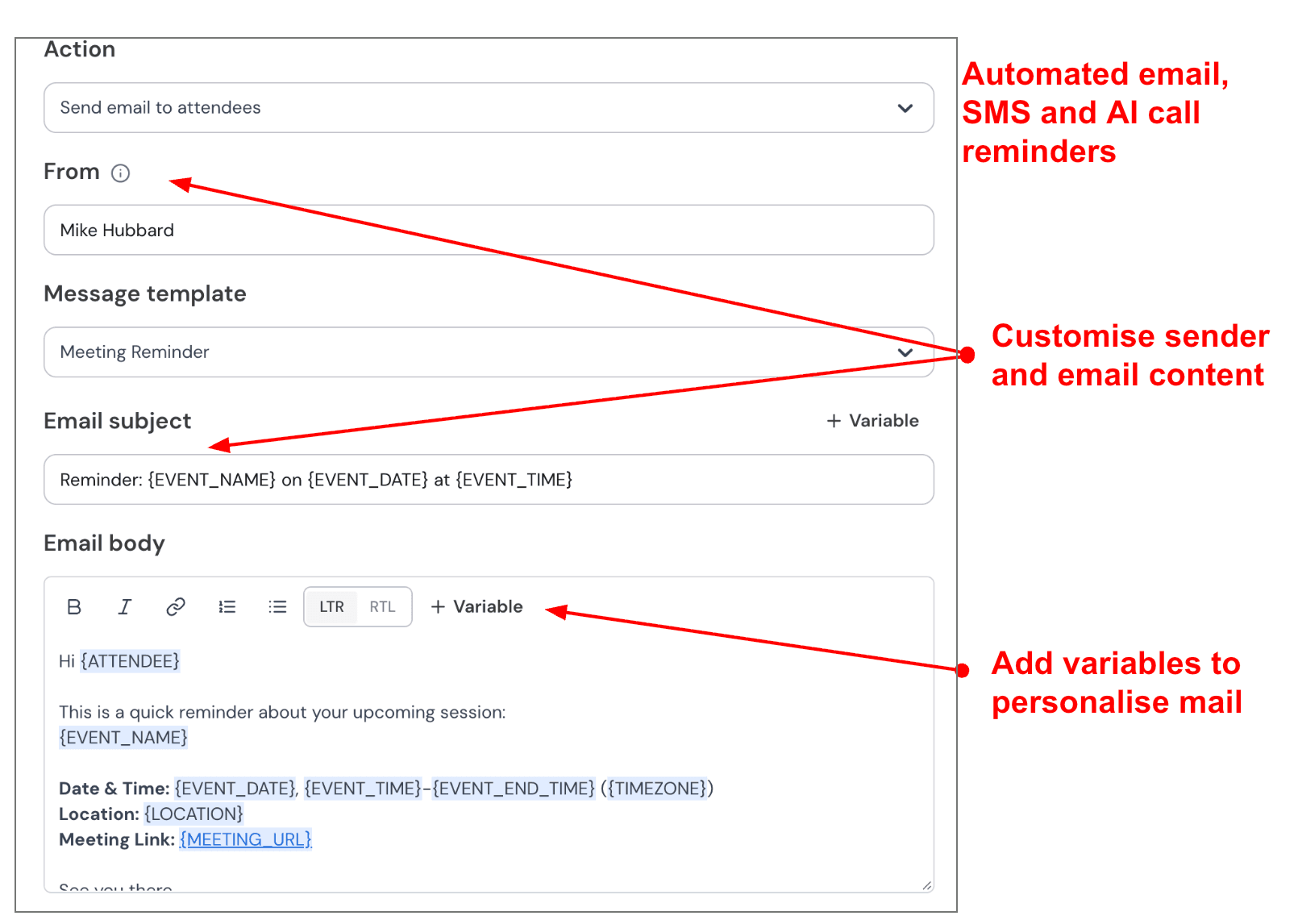
Automated email and SMS reminders: Missed appointments are painful when every session has real revenue attached. Mint Scheduling lets you send automatic email and SMS reminders before the meeting.
For a therapist or coach, I would keep this simple. Send one email reminder a day before the session and one SMS reminder an hour before. Include the date, time, meeting link, and a short note so the client knows exactly what to do.
Here’s a screenshot from the reminder setup:
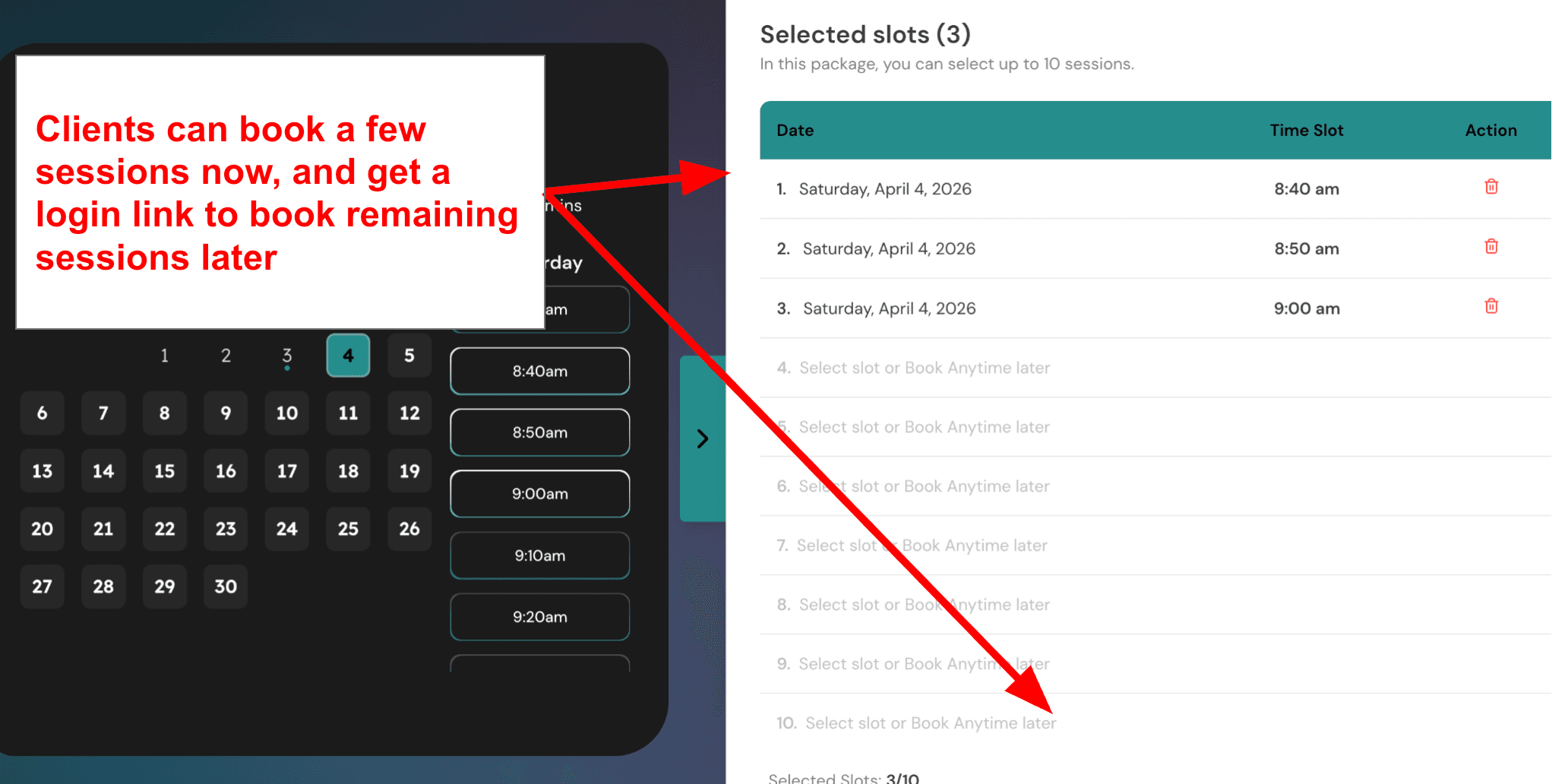
Multi session packages: This is one of the features that makes Mint Scheduling stronger than a simple calendar booking tool.
You can create packages where clients book multiple sessions together and pay for them as a bundle. For example, a therapist can offer a 6 session therapy package, a health coach can offer a 12 week coaching plan, and a nutritionist can sell a follow up bundle after the first consultation.
Here’s the screenshot the writer can replace below:
Acuity Scheduling
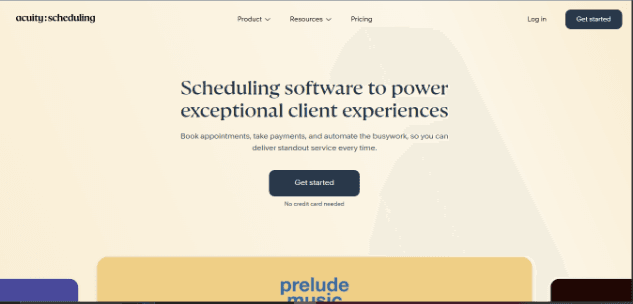
Acuity Scheduling is popularly known as a flexible appointment booking tool that also offers a HIPAA-enabled setup, which is why many small healthcare, therapy, coaching, and wellness businesses compare it with Calendly alternatives.
HIPAA Setup: Acuity can be used for HIPAA-conscious scheduling, but it is not something you should treat as “ready by default.” You need the eligible higher plan, enable HIPAA features, and sign a BAA before collecting protected health information through the system.
When I set it up, the main workflow was clear enough, but the compliance responsibility still sits heavily on the business. You have to think through what goes into emails, texts, forms, calendar invites, and connected tools. Acuity’s own HIPAA guide from Acuity Scheduling says HIPAA-related features alone are not enough; your settings and business practices still matter.
Squarespace Connection: Acuity is now closely tied to Squarespace, and that can be useful if you already run a Squarespace site. You can embed the scheduler, collect bookings, and keep the setup inside one broader website system.
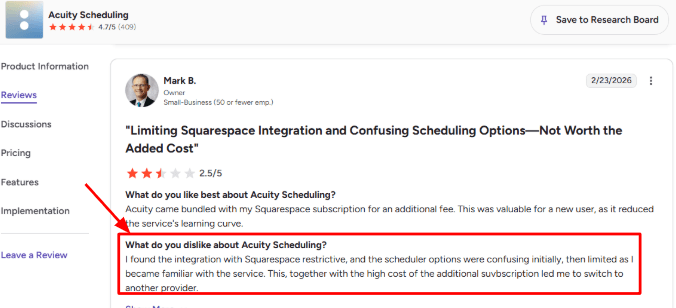
But this is also where some users run into limits. In one G2 review of Acuity Scheduling, a user said the “integration with Squarespace” was restrictive and the scheduler options were confusing at first, then limited later. I’d place that screenshot right below this point because it matches the exact tradeoff: Acuity is polished, but not always flexible in the places a healthcare business may want control.
Intake Forms: Acuity’s custom forms are useful for healthcare-style booking because you can collect details before the appointment. For a therapist, nutritionist, health coach, or small clinic, that could mean reason for visit, consent notes, preferred contact method, or basic intake questions.
The good part is that forms are available even on the lower plan. The part to handle carefully is PHI. Acuity notes that HIPAA-enabled accounts add protections, such as keeping form answers out of email notifications and limiting some file-upload behavior. That was a positive surprise because intake forms are often where compliance mistakes begin.
Multi-Provider Calendars: Acuity handles separate calendars for staff, providers, rooms, or locations. This matters if a small practice has multiple therapists, coaches, consultants, or treatment rooms and wants patients to pick the right person or service.
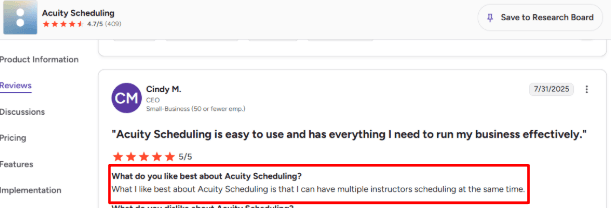
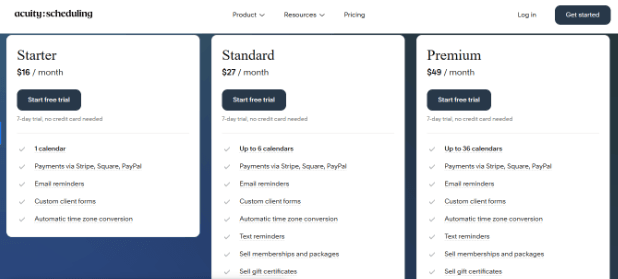
The official calendar setup guide from Acuity Scheduling says the Starter plan has 1 calendar, Standard has up to 6, and Premium has up to 36. This also lines up with a G2 Acuity Scheduling review where a user liked that they could have “multiple instructors scheduling at the same time.” For HIPAA alternatives to Calendly, I’d agree with the sentiment, but only if the business is ready to pay for the plan that gives enough calendars.
Reminders And Messages: Acuity supports confirmation emails, reminder emails, follow-up emails, and text reminders. For healthcare and wellness businesses, this helps reduce missed appointments without making staff manually chase every client.
The setup is practical, but not something I would leave untouched in a HIPAA context. Acuity says email and text notifications may contain PHI by default, including names, appointment types, and appointment dates. So a clinic may need to simplify reminder copy, remove sensitive appointment names, and check whether calendar invite files should be disabled.
Payments And Packages: Acuity supports payments through Stripe, Square, and PayPal, and higher plans support packages, memberships, subscriptions, and gift certificates. This is useful for wellness providers who sell multi-session plans, recurring coaching, therapy packages, nutrition programs, or prepaid consultations.
A real example: a nutrition coach could sell a 6-session care plan, let the client pay upfront, and then allow them to book each session from the same package. That is stronger than a basic Calendly-style booking link. The limitation is that in HIPAA workflows, every connected payment or third-party tool needs separate review, because Acuity clearly says many third-party integrations do not support HIPAA.
Pros
Acuity can be HIPAA-enabled with a signed BAA on the eligible higher plan.
Stronger than Calendly for businesses that need forms, payments, packages, staff calendars, and reminders in one place.
Works well for small healthcare, coaching, therapy, wellness, and consulting businesses that need structured appointment booking.
Multi-calendar support is useful for teams, locations, providers, rooms, or shared resources.
Intake forms are practical and can reduce back-and-forth before the first session.
Payments, deposits, packages, and subscriptions make it useful beyond simple free consultations.
Cons
HIPAA setup is not automatic. The business still has to configure messages, integrations, forms, and workflows carefully.
HIPAA support requires the higher plan, so it may feel expensive for solo providers who only need basic compliant scheduling.
Some normal integrations become limited or need extra review when HIPAA is enabled.
Email and text reminders can include sensitive information by default, so they need careful editing.
Squarespace users may like the bundled experience, but some users find the integration restrictive.
It is still mainly a scheduling tool, not a full practice management system with clinical notes, claims, EHR workflows, or deep patient records.
Pricing
Acuity has a 7-day free trial, and prices are listed in USD before taxes on the Acuity Scheduling pricing page.
Starter starts at $16/month annually or $20/month monthly, but it only includes 1 calendar and does not include HIPAA BAA support.
Standard starts at $27/month annually or $34/month monthly, with up to 6 calendars, text reminders, packages, memberships, and gift certificates.
Premium starts at $49/month annually or $61/month monthly, includes up to 36 calendars, and is the plan that lists BAA signing for HIPAA compliance.
Healthie
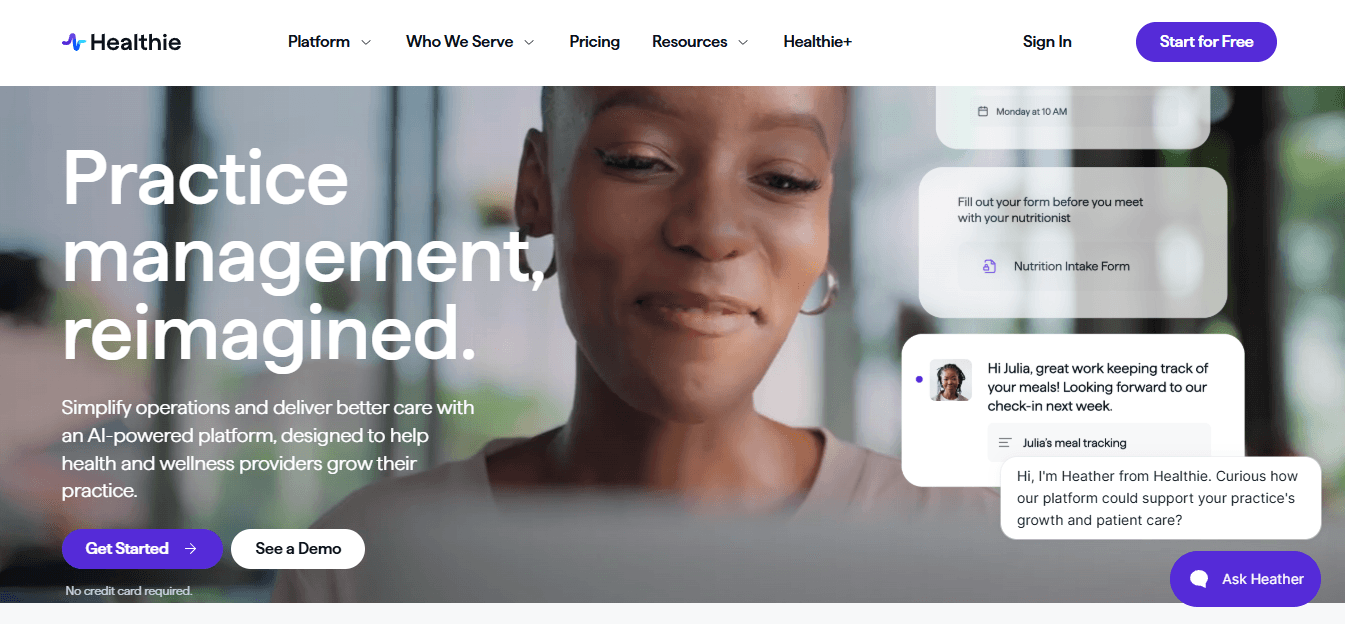
Secure scheduling: Healthie is best known as a HIPAA-compliant practice management and EHR platform, not just a Calendly-style booking tool. People usually choose it when scheduling needs to connect with intake forms, charting, payments, telehealth, and client records.
The booking flow is strong for healthcare and wellness use cases because clients can self-book through a website or client portal, while appointments can connect to paperwork and billing workflows. Healthie also supports calendar sync with Google, iCal, and Outlook, which matters when a provider is juggling discovery calls, follow-ups, and paid sessions.
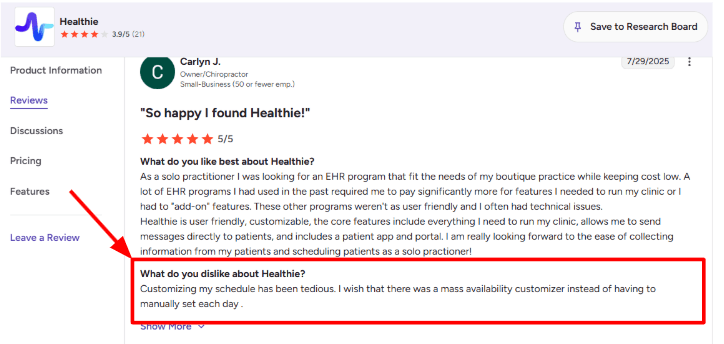
The part that needs patience is availability setup. While testing the scheduling side, setting repeated availability was not as quick as lighter tools like Calendly. I also saw the same complaint in a G2 Healthie review, where a user said schedule customization was tedious and wished there was a mass availability customizer. Sharing that screenshot below makes sense because this is exactly the kind of issue buyers compare against Calendly.
!
Client portal: Healthie’s client portal is one of the bigger reasons it works as a HIPAA-compliant Calendly alternative. Instead of only letting someone book a time, it gives clients a secure place to complete forms, view appointments, message the provider, and access care-related resources.
This is useful for health coaches, therapists, dietitians, nutritionists, and small clinics where the appointment is only one part of the workflow. For example, a nutrition coach can have a client book a follow-up, complete an intake form, upload updates, log meals, and continue the conversation inside the same system.
The positive surprise is that the portal makes Healthie feel less like a scheduling add-on and more like a lightweight operating system for client care.
Telehealth visits: Healthie includes telehealth video calls, with HIPAA-compliant Zoom listed as part of its platform and pricing details on the Healthie pricing page. This makes it more relevant for private practices that cannot use a standard booking page and then casually send a meeting link.
For HIPAA-focused buyers, this is important. The booking, reminder, video session, and client record can stay connected, which reduces the mess of using one tool for scheduling, another for video, and another for documentation.
The tradeoff is that if someone only wants a simple calendar link, Healthie can feel heavier than needed. But for care delivery, that extra structure is usually the point.
Forms and charting: Healthie connects scheduling with electronic forms, waivers, charting, SOAP notes, smart-fill charting, and client records. That makes it stronger than generic scheduling tools for providers who need documentation before or after each appointment.
After roughly setting it up, the logic is clear: the appointment is not treated as an isolated calendar event. It becomes part of the client timeline. A first consultation can trigger intake paperwork, a paid follow-up can sit next to charting, and client communication can stay inside the profile.
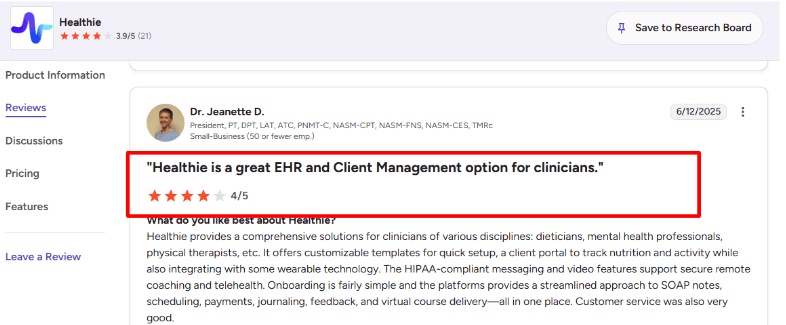
This is also where the second review fits naturally. A clinician on G2’s Healthie reviews praised it as a comprehensive solution across dietitians, mental health professionals, and physical therapists, mentioning templates, client portal, wearable integrations, HIPAA-compliant messaging, video, SOAP notes, scheduling, payments, journaling, feedback, and virtual course delivery. I agree with the main point. Healthie’s value is breadth. The caution is that breadth can also mean more setup work.
Payments and packages: Healthie supports payment processing, invoicing, card-on-file, one-time services, recurring services, and client packages. Its help docs also say providers can bill for one-time and recurring self-pay services through built-in payments, no separate third-party payment app needed.
This matters for HIPAA-compliant Calendly alternatives because many healthcare and wellness providers do not just want free booking. They may want paid consultations, packages of sessions, monthly coaching plans, or subscriptions where clients get a set number of appointments every month.
For a small private-pay practice, this can reduce tool sprawl. The main thing to watch is transaction cost. Healthie lists Stripe payment processing at 2.9% + $0.30 on its pricing page, so higher-volume practices should include that in their calculation.
Team practice tools: Healthie is not limited to solo providers. Its higher plans support shared calendars, multiple providers, roles and permissions, support accounts, internal team chat, care teams, and organization-level reporting.
This makes it a stronger fit for group practices, small clinics, wellness teams, and multi-provider coaching businesses that need HIPAA-safe scheduling across more than one calendar. A clinic can have different appointment types, different providers, and a shared view of what is happening across the practice.
The gap is that Healthie is more clinical and operational than conversion-focused. If the goal is a beautiful public booking page that sells the provider before someone books, Healthie is not really built around that. If the goal is compliant scheduling tied to care workflows, it is much closer.
Pros
Strong HIPAA-compliant alternative to Calendly for healthcare, wellness, coaching, therapy, and nutrition use cases.
Scheduling connects with forms, charting, client portal, payments, messaging, and telehealth.
Good fit for providers who need more than a simple booking link.
Useful client portal and mobile app for ongoing care, not just one-time appointments.
Supports paid sessions, packages, subscriptions, and card-on-file workflows.
Works for solo providers and can scale into group practices.
Cons
Availability customization can take more manual work than expected.
Heavier than Calendly if someone only needs a simple public calendar link.
Some advanced workflows may need setup time before the system feels smooth.
Payment processing fees can add up for high-volume private-pay practices.
Public booking page experience is more functional than brand-led or conversion-focused.
Virtual programs and deeper client engagement features may feel less polished than specialist tools.
Pricing
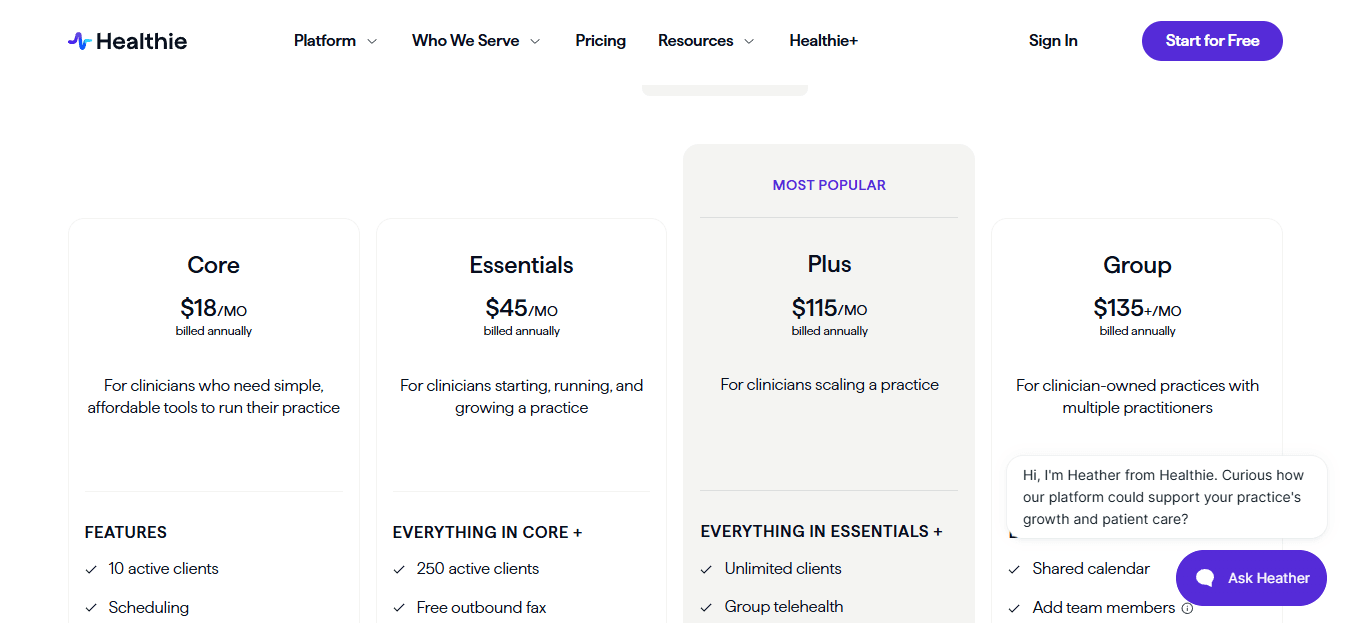
Healthie’s Core plan starts at $19.99/month for solo providers with up to 10 active clients, or $18/month when billed annually.
Essentials starts at $49.99/month and supports up to 250 active clients, with added features like SMS reminders, CMS 1500s, outbound fax, and basic branding.
Plus starts at $129.99/month and adds unlimited clients, group telehealth, online programs, and dedicated eFax.
Group starts at $149.99/month for multi-provider practices, with extra provider licenses listed at $50/month.
Healthie lists payment processing at 2.9% + $0.30 per transaction through Stripe.
###SimplePractice
SimplePractice is popularly known as a HIPAA-compliant EHR and practice management platform for therapists, counselors, and wellness providers. People usually pick it when they want scheduling, telehealth, client records, forms, reminders, billing, and secure communication in one place instead of using Calendly with separate HIPAA tools around it.
HIPAA Scheduling: SimplePractice gives you a proper healthcare-style scheduling system, not just a booking link. You can set availability, create appointment types, manage online appointment requests, sync calendars, block time off, and use waitlists when your caseload is full.
When I tested the setup flow, the calendar was easy enough to understand, especially if you are used to clinical appointments. But it does feel built for care workflows first. If someone only wants a clean Calendly-style page for quick discovery calls, SimplePractice can feel heavier than needed.
Client Portal: The client portal is one of the strongest reasons to consider SimplePractice as a HIPAA-compliant Calendly alternative. Clients can book, reschedule, complete intake forms, pay bills, send secure messages, access files, and join telehealth from one protected place.
This matters in a real practice. A therapist, dietitian, or health coach may need a new client to book a first session, sign consent forms, upload past reports, complete an assessment, and receive a video link. SimplePractice keeps most of that journey inside one system.
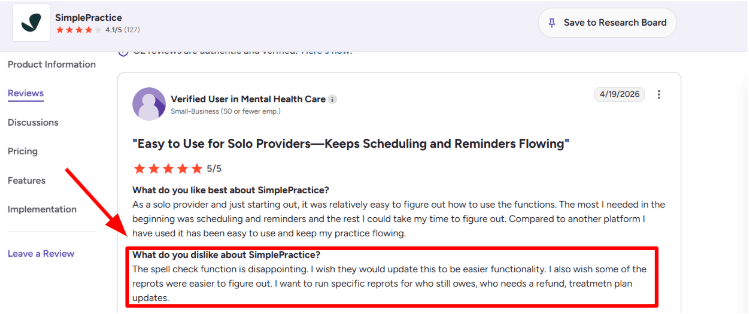
One small gap showed up around admin clarity. I also saw the same concern in a G2 review on SimplePractice, where the reviewer mentioned weak spell check and reports that were harder to figure out for balances, refunds, and treatment plan updates. I’m sharing that screenshot below because it matches the kind of admin friction you may notice after setup, not on day one.
Automated Reminders: SimplePractice includes automated text and email reminders, which is a big deal for healthcare and wellness appointments where no-shows directly cost time and revenue. Clients can also confirm or cancel, which helps keep the calendar cleaner.
I liked that reminders are not treated like a side feature. They are connected to the appointment workflow, client record, and telehealth flow. For HIPAA-sensitive businesses, this is safer than stitching together a normal scheduling tool and a random reminder app.
Telehealth Sessions: Built-in telehealth is another major reason SimplePractice works well for this category. You can run video sessions without sending clients to a separate Zoom or Google Meet workflow, and the telehealth experience sits inside the same practice system.
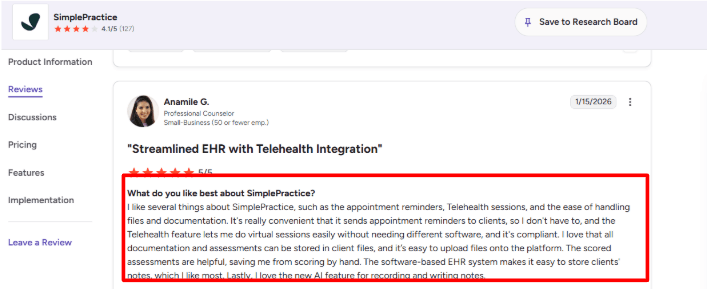
This is where the second G2 review fits naturally. The reviewer praised appointment reminders, telehealth sessions, file handling, documentation, scored assessments, EHR notes, and the newer AI note feature. I agree with the general point. SimplePractice is strongest when you use it as a full practice operating system, not just as a scheduler.
Files And Documentation: SimplePractice lets you store client notes, forms, assessments, uploaded files, and documentation inside the client profile. For HIPAA-compliant scheduling, this is important because the appointment is rarely the whole workflow.
A normal Calendly alternative may help someone book time. SimplePractice goes further by connecting that booking to intake, clinical notes, treatment plans, assessments, billing, and secure records. The downside is that this adds more screens and settings. It is useful, but not as lightweight as pure booking tools.
AI Notes: SimplePractice has an AI Note Taker that can transcribe sessions and draft progress notes in formats like SOAP, DAP, and BIRP. This is a positive surprise because it reduces post-session admin work without forcing the provider to move notes into another system.
The important detail is control. The provider still reviews and edits the note before saving it. For therapists and clinicians already using SimplePractice, this can be a strong add-on. For someone just looking for HIPAA-compliant scheduling, it may be more than they need.
Pros
Strong fit for therapists, counselors, dietitians, health coaches, and small wellness practices that need HIPAA-compliant scheduling plus records.
Client portal, telehealth, reminders, documentation, forms, files, billing, and secure messaging sit in one system.
Better than Calendly for workflows where the appointment needs intake forms, private files, assessments, and clinical notes.
Automated reminders and built-in telehealth reduce the need for extra tools.
AI Note Taker adds real value for providers who spend a lot of time on progress notes.
Cons
Too heavy if you only need a simple HIPAA-friendly booking page.
Reporting can take time to understand, especially for balances, refunds, and treatment plan updates.
The booking experience is more clinical than modern SaaS-style scheduling tools.
Some advanced value comes from using the whole platform, so it may feel expensive if scheduling is your only need.
Group practice controls and add-ons can make pricing and setup more complex than basic Calendly alternatives.
Pricing
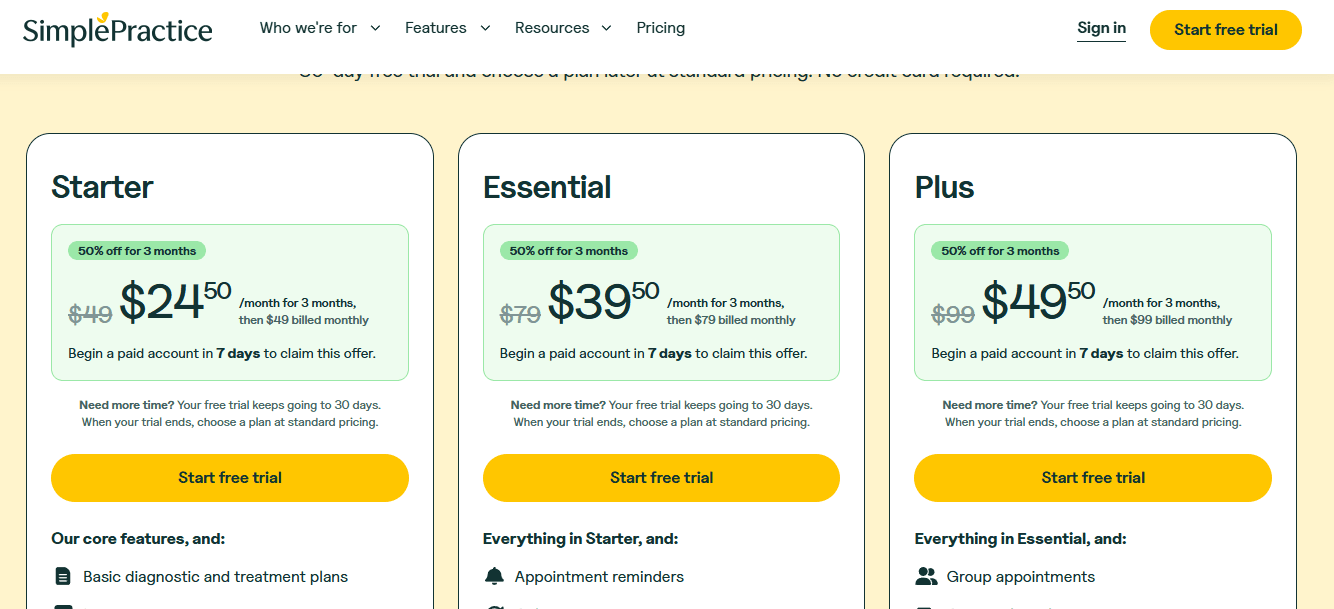
SimplePractice offers a 30-day free trial with no credit card required.
Current monthly plans listed on the official pricing page are Starter at $49/month, Essential at $79/month, and Plus at $99/month.
SimplePractice was offering 50% off for the first 3 months if you begin a paid plan in the first 7 days of the trial.
Add-on features are available on every plan, so check the final monthly cost if you need extras like AI notes or other advanced tools.
PracticeQ
PracticeQ is best known as a HIPAA-compliant EHR and practice management system for healthcare providers who want scheduling, forms, notes, billing, and patient communication in one place.
Patient Scheduling: PracticeQ covers the basics you would expect from a HIPAA-focused Calendly alternative, including online appointment requests, reminders, recurring bookings, Google Calendar sync, and booking links that can be added to a website or social profile.
The setup is more clinical than Calendly. That is useful if appointments are tied to intake forms, payments, packages, or follow-up tasks. But if someone only needs a clean booking link for consultations, PracticeQ can feel heavier than needed.
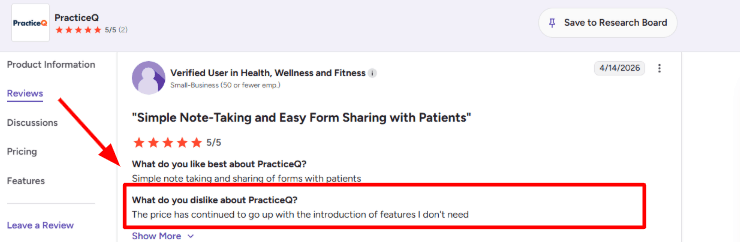
I noticed the same trade-off in a PracticeQ review on G2, where a user said the price kept going up with new features they did not need. Sharing a screenshot below makes sense here because that complaint fits the biggest buying question for this category: are you buying scheduling, or a full practice system?
HIPAA Workflows: The main reason PracticeQ belongs in a HIPAA-compliant Calendly alternatives article is that it is built around healthcare workflows, not just booking slots.
It supports HIPAA-compliant handling of patient data, secure communication, forms, portal access, and a Business Associate Agreement. That matters for therapists, coaches handling PHI, small clinics, chiropractors, nutritionists, and other providers who cannot use a generic booking tool without thinking about privacy.
One thing I liked while checking the setup is that scheduling does not sit alone. A new patient can book, complete forms, sign documents, get reminders, and move into the charting flow without the provider stitching together multiple tools.
Custom Intake Forms: This is one of PracticeQ’s stronger areas. You can create detailed intake forms, consent forms, surveys, assessments, and branded documents, then connect that information back to the patient record.
For example, a health coach working with clients on chronic conditions may need medical history, consent, lifestyle details, medication notes, and goals before the first call. With a simple Calendly-style tool, that usually means adding a separate form link and hoping the client completes it. PracticeQ keeps that intake step closer to the appointment workflow.
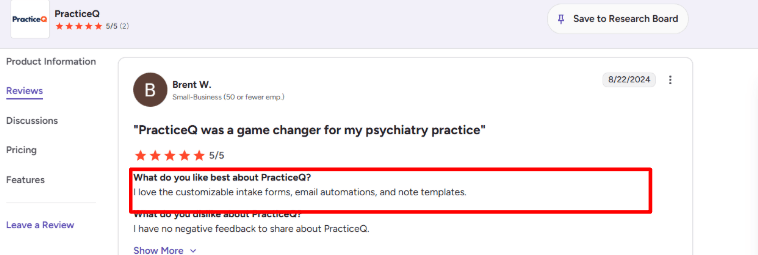
After covering the first few features, the second review you shared from G2’s PracticeQ reviews fits well here. The reviewer liked the customizable intake forms, email automations, and note templates. I agree with that part. Those are exactly the features that make PracticeQ more useful than a simple scheduler for healthcare-adjacent businesses.
Clinical Notes: PracticeQ includes note templates and charting tools, including SOAP-style documentation and customizable clinical templates.
This is not something every buyer of a HIPAA-compliant Calendly alternative will need. But for therapists, dietitians, chiropractors, mental health providers, and functional medicine practices, notes are often part of the real workflow.
I found the customization useful, but it also means there is more setup work. You need to think through what information should be collected before the appointment, what should flow into notes, and what should stay as internal documentation.
Patient Portal: PracticeQ has a secure patient portal where patients can complete forms, book appointments, pay bills, send messages, and access shared information.
This is a major difference from Calendly. Calendly is mainly built around booking. PracticeQ gives patients a place to return after booking.
That can be valuable for small practices where patients need to upload files, receive instructions, view treatment-related documents, or manage future appointments. The positive surprise was how much of the patient journey can sit inside one system instead of getting scattered across email, forms, payment links, and calendar invites.
Payments And Billing: PracticeQ includes invoicing, payments, superbills, claims support, appointment packages, and recurring appointment workflows.
This matters if the appointment is not just a free discovery call. Many HIPAA-focused businesses need to collect payment, store cards, invoice patients, or manage packages.
For a solo provider, this can reduce admin work. For a small team, it can also keep scheduling and payment status in the same place. The downside is that buyers comparing it only against Calendly may find the product broader than expected, especially if they do not need insurance, notes, or advanced billing.
Pros
Strong HIPAA-focused alternative to Calendly for healthcare and wellness providers.
Good fit for practices that need scheduling plus intake forms, notes, billing, and secure patient communication.
Custom intake forms and note templates are genuinely useful for clinical or semi-clinical workflows.
Patient portal helps reduce back-and-forth after the appointment is booked.
Supports recurring appointments, packages, reminders, payments, and provider workflows.
Better suited than generic schedulers when patient data privacy is a serious requirement.
Cons
Can feel too heavy if someone only wants a simple HIPAA-compliant booking page.
Pricing may feel high for solo providers who do not need the full EHR-style feature set.
Setup takes more thinking than a basic scheduling tool because forms, notes, workflows, and portal settings are connected.
Some features may be unnecessary for coaches or wellness providers who do not need billing, claims, or charting.
The interface and workflow depth may take time for non-clinical users to get comfortable with.
Pricing
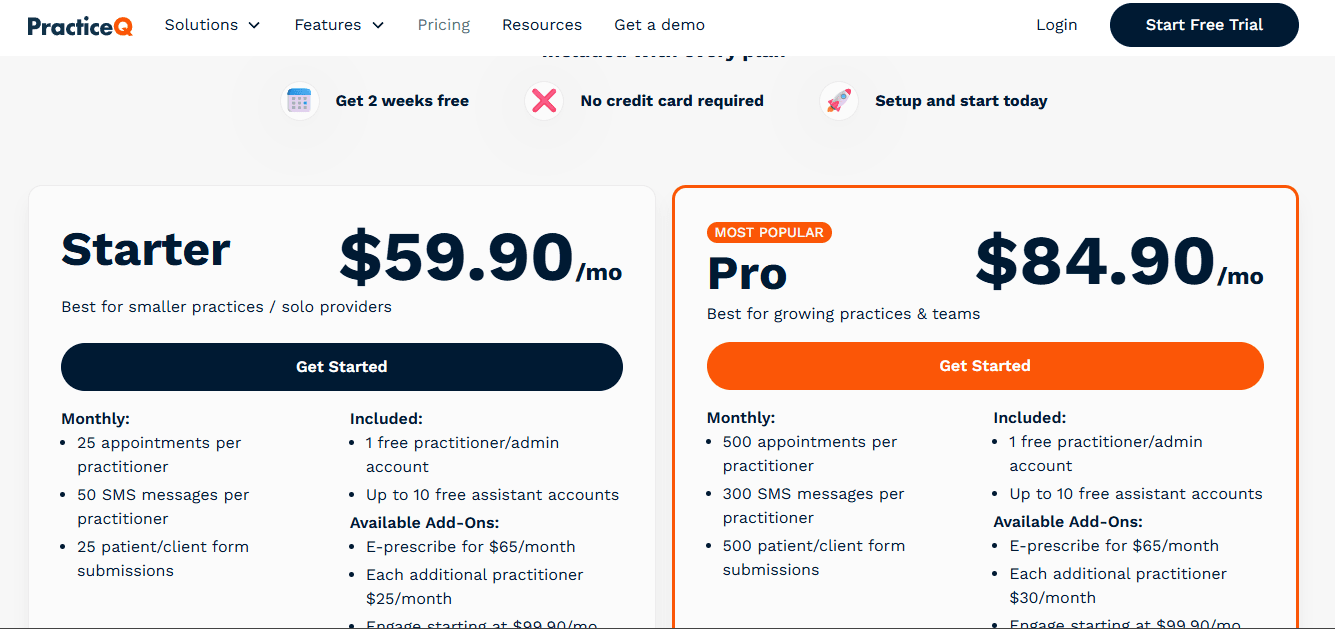
PracticeQ lists a Starter plan at $59.90/month, aimed at smaller practices and solo providers.
The Pro plan is listed at $84.90/month and is positioned for growing practices and teams.
The Starter plan includes lower monthly limits, including 25 appointments per practitioner and 25 patient/client form submissions.
Add-ons can increase the total cost. E-prescribing is listed at $65/month, additional practitioners cost extra, and Engage starts at $99.90/month.
Methodology
We compared HIPAA-compliant Calendly alternatives by looking beyond the booking link. I checked whether each tool supports secure intake, reminders, calendar sync, payments, packages, workflows, and simple setup for solo providers. I also reviewed pricing, public reviews, privacy cues, and how practical the tool feels for small healthcare businesses today.
FAQs
How do I choose the right HIPAA compliant Calendly alternative?
Start with your workflow, not the feature list. Check for BAA support, secure intake forms, calendar sync, reminders, payment collection, cancellation handling, and whether clients can easily book without calling your office.
Which is the best HIPAA compliant Calendly alternative?
Mint Scheduling, Acuity Scheduling, SimplePractice are good starting points. Pick Mint Scheduling for simple HIPAA-focused booking, Acuity for flexible scheduling, and SimplePractice, Healthie, or PracticeQ if you also need client management.
What should I check before using a scheduling tool with client health information?
Look beyond the HIPAA label.
BAA availability
Secure intake forms
Reminder privacy controls
Role-based access
Audit-friendly records
Safe payment and cancellation workflows
The tool should protect PHI across the full booking flow.
What mistakes do people make when buying HIPAA compliant scheduling software?
The biggest mistake is choosing based only on price. Many teams forget to test reminders, cancellation rules, form privacy, staff access, calendar sync, and whether PHI appears inside emails or SMS messages.
Is a practice management tool better than a simple scheduling tool?
Use a practice management tool like SimplePractice, Healthie, or PracticeQ if you need notes, forms, packages, client records, and billing together. Use a simpler scheduler if booking is the main problem.
How should I test a HIPAA compliant scheduler before switching?
Run a real booking test from start to finish. Check client booking, intake forms, reminders, rescheduling, cancellations, payments, staff access, calendar sync, and what information appears in email or SMS notifications.