
Introduction
LunaCal, Calendly, Cal.com, Acuity, Setmore, and YouCanBookMe offer appointment scheduling with SMS and email reminders. Their differences include reminder timing, message customization, reply handling, and usage costs.
Calendly's public booking flow requires six-digit SMS verification. Its Book on Behalf flow sends a confirmation link instead. In both cases, the client must confirm before automated texts begin. That extra interaction matters when staff arrange appointments for customers.
The table below compares the reminder features, followed by each tool's controls, limitations, and pricing.
SMS and email reminder features compared
Compare 10 reminder features across six tools. The five lifecycle triggers are booking, before the appointment, rescheduling, cancellation, and follow-up. Advanced features depend on the plan.
| Feature | LunaCal | Calendly | Cal.com | Acuity | Setmore | YouCanBookMe |
|---|---|---|---|---|---|---|
| SMS verification | No OTP | OTP; staff bookings use a confirmation link | No* | No* | No* | Double opt-in |
| SMS triggers | Book, remind, reschedule, cancel, follow-up | Five lifecycle triggers + start/no-show | Five lifecycle triggers + no-show | Before appointment | Before appointment | Five lifecycle triggers + no-show |
| Email triggers | Book, remind, reschedule, cancel, follow-up | Five lifecycle triggers + start/no-show | Five lifecycle triggers + no-show | Book, remind, reschedule, cancel, follow-up | Book, remind, reschedule, cancel; review request | Five lifecycle triggers + no-show |
| Multiple SMS reminders | Yes; 10-workflow cap | Yes; 50-Automation cap | Yes; paid workflows | No; one per appointment | No; one per appointment | Yes; paid notifications |
| AI voice reminders | Yes; Enterprise | No* | Yes; Cal.ai | No* | No* | No* |
| Edit SMS copy | No | Restricted for new accounts | Yes | Yes; business verification required | Yes; no URLs | Yes |
| Send email from your own account/domain | Yes; Enterprise SMTP | Yes; Gmail/Outlook | No* | No; Acuity sender | No* | Yes; Gmail/own domain |
| SMS recipients | Client | Client or host | Client or specific number | Client; staff copies | Client | Client, team or other recipients |
| SMS replies | No* | No | No* | No; contact business separately | No* | Forwarded to email |
| SMS plan and usage cost | From $9/user monthly + usage | From $10/seat monthly annually billed; credit limits | Teams $12/member monthly annually billed; credits | Standard $27/month annually billed; SMS included | Pro $5/user monthly annually billed; fair use | Plan-dependent + $0.07/basic segment; confirm checkout |
An asterisk marks a feature or requirement the reviewed guides do not confirm. The table covers native features. Prices are in USD; destination charges, consent rules and plan limits apply.
How Calendly's SMS verification works
An appointment can be booked while texts remain unconfirmed
Calendly requires an OTP for SMS in its public booking flow. A receptionist booking for a client may not have access to the client's phone to obtain the code. The appointment can still be booked, but texts require the client's verification.
Calendly does provide an alternative. Its Book on Behalf instructions say that the invitee receives a confirmation link by text after the host books. The client must confirm before text notifications begin. That avoids collecting a live code, but it still requires the client's action.
I would separate three states when evaluating a scheduler: the appointment exists, the client has consented to messages, and the reminder channel is ready. They don't always happen together. A successfully created appointment alone doesn't prove that an SMS reminder will arrive.
Check verification on other tools
If staff book appointments by phone, check whether the client must verify their number before reminders can be sent. Also check the available reminder timings and what happens after rescheduling. Obtain the client's consent even when no OTP is required.
YouCanBookMe staff confirmed a double opt-in change for every booking page sending SMS in April 2026. Its double opt-in requirement adds a consent step; the support discussion doesn't establish whether that step uses an OTP.
1. LunaCal: SMS, email and voice reminders
LunaCal appointment reminders include email, SMS without a booking-time OTP, and optional AI calls. That setup suits staff arranging appointments for clients. The main limitation is SMS customization: the current text templates can't be edited.
Email and SMS across five trigger points
In SMS and email workflows, select the event types, choose booking, pre-start, rescheduling, cancellation, or post-event timing, and configure the notification. Email recipients can include attendees, the host, or a specific address; SMS currently targets the attendee.
Use separate workflows for different reminder offsets, such as a day-before email and a closer-to-start text. The reminder settings bring both channels into the appointment setup.
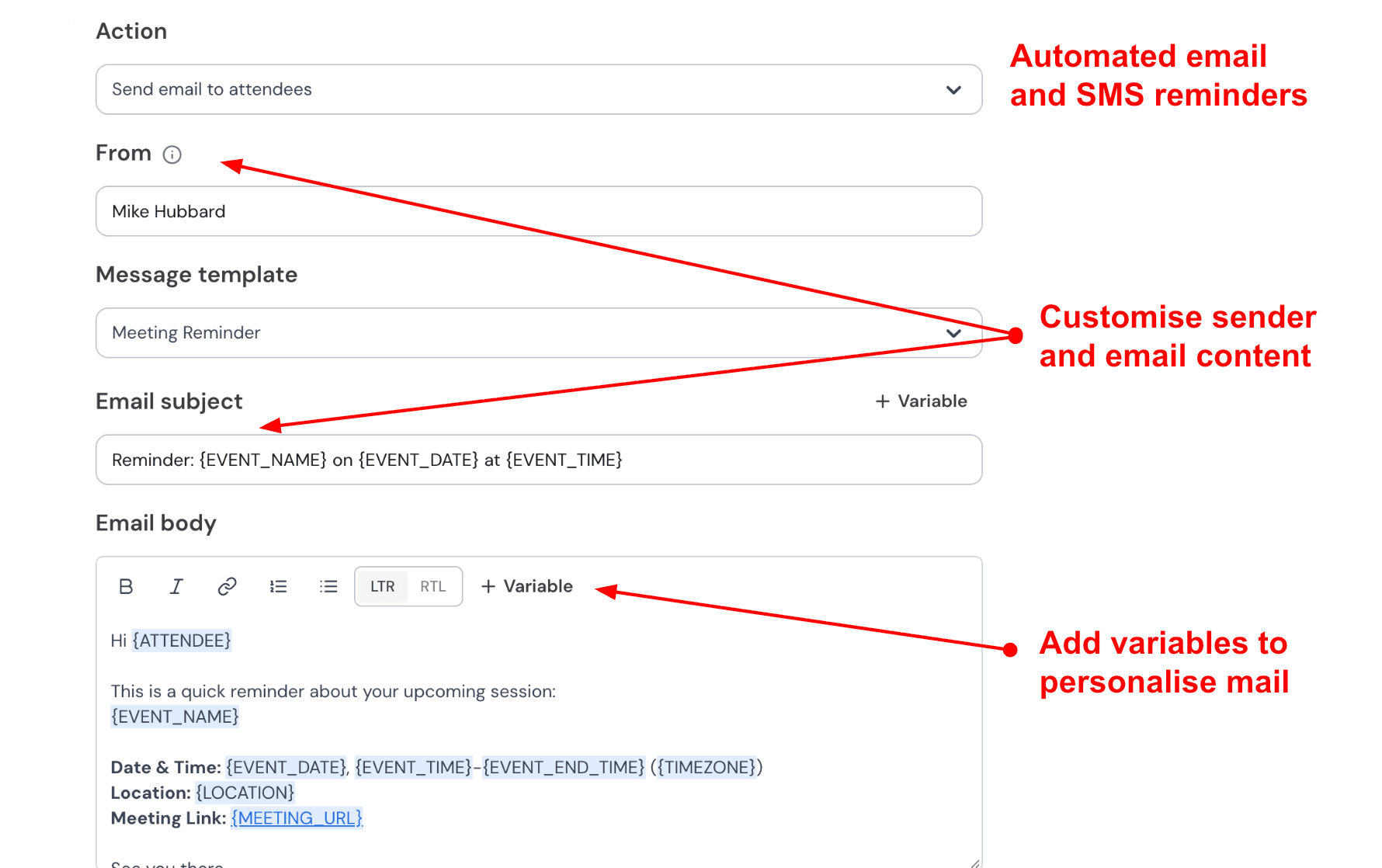
AI calls that can respond to a change of plans
LunaCal's voice reminder agent can remind the attendee, provide meeting details, and help reschedule or cancel when asked. The documented workflow action runs before the event. Calls cost $0.15 per minute, have a three-minute cap, and share the SMS credits balance. The help page explicitly lists the US, UK, Canada, and Australia; confirm other destinations before enabling calls.
Email from your own domain
Enterprise custom SMTP uses your email server for booking confirmations, reminders, and workflow notifications. You control the sender name and address. If you later disconnect SMTP, affected workflows need to be reattached before sending resumes.
Pros
- SMS without a booking-time OTP suits appointments arranged by staff.
- Five native SMS/email trigger points cover changes as well as upcoming appointments.
- Optional conversational voice reminders give clients another way to confirm or change plans.
- Own-domain email on Enterprise keeps appointment communications under your business identity.
Cons
- SMS templates currently can't be edited; customizable email does not imply customizable text copy.
- The help guide caps workflows at ten, so allocate them carefully across services and timings.
- SMS charges depend on destination and message segments. AI calls add usage charges and have regional rollout limits.
Pricing and my verdict
The displayed monthly plans are Standard at $9 per user, Teams at $15, and Enterprise at $25. Standard includes text/email reminders; the Enterprise plan card includes the AI Voice Agent. SMS and calling usage are additional.
I'd consider LunaCal when staff need to arrange SMS reminders without collecting a booking-time code, or when a voice call is useful. Check the ten-workflow limit and fixed SMS templates before committing.
2. Calendly: meeting reminders and SMS verification
Calendly offers meeting reminders, attendance reconfirmation, and managed team Automations. It fits teams already using its meeting links, provided invitees can complete SMS verification.
Communications across the meeting lifecycle
Calendly's Automation triggers cover booking, before start, at start, rescheduling, event end, cancellation, and a marked no-show. A user or team can create up to 50 Automations. No-show marking suppresses ordinary post-meeting follow-ups, which avoids thanking someone who never attended.
Personalization and attendance confirmation
Messages can insert event details and booking answers through message variables. Separate reconfirmation messages let invitees confirm attendance through an email button or SMS link. That attendance confirmation is separate from verifying consent to SMS.
Consistent team and stakeholder messages
Teams and Enterprise support managed Automations. Emails can also reach non-meeting participants, such as a coordinator who needs to prepare materials.
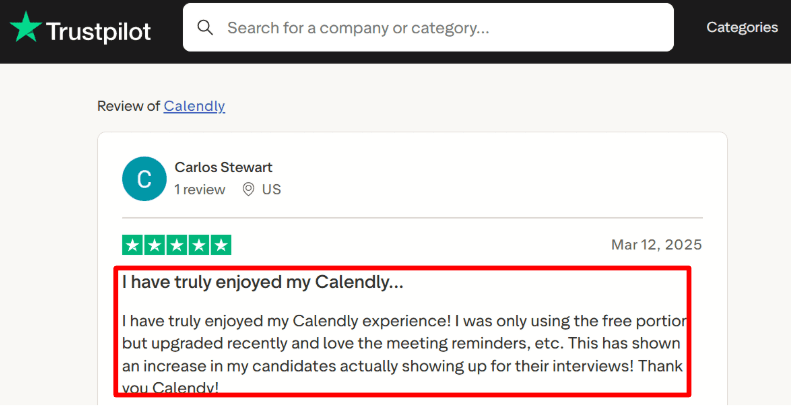
The archived review below describes fewer no-shows after the customer enabled paid reminders. It illustrates the value of reminders to that customer; it doesn't establish the behavior of Calendly's newer SMS verification flow.
Pros
- Broad meeting triggers, reconfirmation links, and managed team messaging.
- Dynamic booking fields support relevant preparation and follow-up copy.
- A meeting timeline helps administrators inspect when Automations ran.
Cons
- Clients must confirm SMS activation before texts begin, including appointments booked through Book on Behalf.
- SMS messages come from automatically assigned numbers; replies aren't delivered or monitored.
- SMS customization is restricted for new accounts, texts aren't available during the trial, and groups above 100 invitees require email Automations.
Pricing and who should choose it
Standard costs $10 per seat per month on annual billing; Teams costs $16. The SMS credit policy allocates 250 monthly credits per non-Enterprise seat and 1,000 on Enterprise. US/Canada destinations currently consume zero credits; other destinations use one, three, or nine. At the credit limit, messages switch to email.
I'd choose Calendly for teams that need managed meeting communications and whose invitees can complete verification.
3. Cal.com: configurable reminder workflows
Cal.com connects reminder workflows with payment, routing, and booking-request events. It also supports Cal.ai calls, giving teams more options for the actions a workflow performs.
More trigger and action choices
Cal.com Workflows handle the usual appointment lifecycle plus requests, rejections, payment events, routing forms, and no-show updates. Actions include email, SMS, WhatsApp, and calling an attendee through Cal.ai. A workflow can contain multiple actions.
Custom messages and recipients
Variables can include event details, attendee information, and cancellation or rescheduling links. Emails can reach hosts, attendees, or a specified address; SMS can target an attendee or a specified number. Full custom workflows require Teams or higher.
Credits that can be replenished
The workflow credit system lets users buy additional credits. Teams includes 750 credits per member each month and Organizations includes 1,000. US and Canadian SMS is free; other destinations use destination-based charges. SMS/WhatsApp stops when the balance is exhausted, with messages sent by email instead.
Strengths and limitations
Pros: broad trigger coverage, customizable copy, multiple communication actions, purchasable credits, and native Cal.ai calls.
Cons: full custom workflows require a paid team tier; calling and non-free messaging use credits; invitee OTP requirements and a native two-way SMS inbox weren't established by the reviewed guides. I wouldn't promise a verification-free replacement without testing the intended booking route.
Pricing and recommendation
The Individual plan is free; Teams starts at $12 per user per month on annual billing, with Organizations at $28. Free notifications and fully customized workflows have different entitlements.
Cal.com fits teams that need reminder logic tied to payment, routing, or processes controlled through its API. I'd check the custom-workflow plan requirements and expected credit usage first.
4. Acuity: service appointment reminders
Acuity combines service appointments with intake, appointment-specific email templates, and notification records. Its email sequences are more flexible than its one-text-per-appointment SMS setup.
Several emails before and after a service
Acuity supports up to three reminder emails, with separate timing. Its follow-up email controls allow one follow-up on Starter and up to six on Standard/Premium. You can limit a follow-up to clients with no future appointment and suppress it for cancellations or no-shows.
One pre-appointment text
Acuity's SMS reminder settings allow one message per appointment, sent 15 minutes to 14 days before it starts. Clients opt in per appointment. Business verification controls customized SMS; that is different from requiring the client to supply an OTP.
Detailed notification records
Appointment activity logs show email/SMS activity, including delivery or bounce status and email opens where tracking permits. That helps a coordinator investigate a missed reminder before assuming the client ignored it.
Appointment-specific email content
The email template editor supports formatting, tags, images, and HTML source. Templates can vary by appointment type and include intake answers.
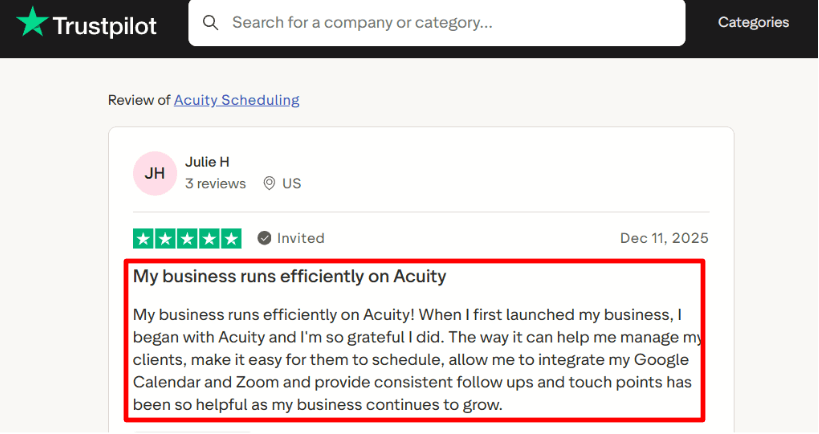
This customer review credits Acuity's calendar/Zoom integrations and follow-ups with simplifying client management. The follow-up workflow is useful when a service ends and the next appointment still needs to be arranged.
Pros and cons
Pros: several email reminders, conditional rebooking follow-ups, detailed templates, and useful notification logs. Standard/Premium SMS has no extra sending fee.
Cons: only one SMS reminder per appointment; no booking-confirmation text; ordinary SMS replies don't become a conversation with your business. SMS isn't available in the trial. Native AI reminder calls weren't documented.
Pricing and verdict
Starter costs $16 per month on annual billing or $20 monthly. SMS starts with Standard, at $27 annually billed or $34 monthly, supporting up to six calendars. The price is per subscription with a calendar allowance, so compare it carefully with per-seat tools.
I'd choose Acuity when email sequences and notification troubleshooting matter more than sending several texts per appointment.
5. Setmore: basic appointment reminders
Setmore suits a small business that needs a booking calendar and a simple reminder setup. Its lower subscription price is attractive if the supported SMS destinations cover your customers and one text per appointment is enough.
One text and a small email sequence
Setmore text reminders are available on Pro, with customizable copy and timing up to 30 days before the appointment. Each appointment receives one SMS. The appointment record shows sent, failed, or opted-out status.
Booking changes and review requests
Automated notifications include booking, rescheduling, and cancellation emails. Free gets one email reminder; Pro gets two. A review-request email can go out one hour after the appointment, which is narrower than a fully configurable follow-up sequence.
A destination check before rollout
Setmore's SMS fair-use policy excludes destinations including India, Germany, France, New Zealand, and Ireland. Unsupported destinations receive email reminders. Class SMS is limited to the US, UK, Canada, and Australia.
Pros
- Free email reminders and a low-cost SMS upgrade.
- Simple per-appointment SMS status checks.
- Booking-change emails for customers and providers.
Cons
- One SMS per appointment; the documented SMS feature is an upcoming-appointment reminder.
- URLs aren't allowed in SMS, limiting direct links to join, cancel, or reschedule.
- Restricted destinations can make an apparently inexpensive plan unsuitable for an international customer base.
Pricing and recommendation
Pro costs $5 per user per month annually billed, or $12 monthly. Free includes email reminders. SMS remains subject to fair use.
Setmore covers basic reminders at a low subscription cost. Its one-SMS limit and country exclusions are the main checks before choosing it.
6. YouCanBookMe: customizable notifications
YouCanBookMe lets teams customize notifications and forwards Basic SMS replies to email. That helps staff see replies in an inbox they already use, although responding by email doesn't send a text back.
Messages throughout the appointment lifecycle
The confirmation and reminder settings document booking, rescheduling, cancellation, pre-start, post-event, and no-show notifications across email and SMS. Paid pages can configure unlimited notifications, with advanced workflows depending on the plan.
SMS replies that reach the team
In Basic SMS notifications, replies forward to the booked team member or account owner's email. Responding to that forwarded email contacts the customer's email address; it doesn't automatically send a text reply. Basic credits cost $0.07 per 160-character segment, with volume discounts and higher consumption for longer or Unicode messages.
Recognizable sender options
Enhanced SMS offers a dedicated business line for Professional/Teams in the US and Canada. Provisioning, rental, bundle terms, and commitment are additional considerations under the service terms. Gmail sending can also put notification emails in your connected account's Sent folder.
Advantages and tradeoffs
Pros: extensive template controls, several recipient options, unlimited paid notifications, SMS-to-email reply forwarding, and dedicated-number options where supported.
Cons: the newer double opt-in requirement matters for verification-sensitive buyers; SMS credits are an extra cost; dedicated-line availability and charges differ from Basic SMS; native AI voice reminders weren't documented.
Price and who should choose it
The vendor's published pricing guide lists Individual at $9 monthly or $8.10 with annual billing, Professional at $13 or $11.70, and Teams at $18 or $16.20 per member. That guide was last updated in March 2025, so confirm paid rates at checkout; don't confuse its two-year discount with annual pricing. The current plan comparison places advanced follow-up/no-show workflows on Professional.
I'd choose YouCanBookMe for notification customization and reply visibility. Check its double opt-in flow and the separate costs of Basic and Enhanced SMS before deciding.
How to choose a reminder workflow that fits your appointments
Start with the way the appointment gets booked
A customer selecting a time on their phone can complete a verification step immediately. A coordinator booking after a phone conversation may need an additional interaction to activate that same reminder channel. I would run the exact staff-booking route before committing to a tool.
Match the channel to the information
Email is useful for preparation details, attachments or resource links, and longer explanations. SMS can carry a short appointment reminder. An optional voice call can let someone say that they need to move the appointment.
A sensible starting sequence is booking confirmation, an email with preparation details the day before, a text closer to the start, and an appropriate follow-up. Treat those timings as a starting configuration, not a proven recipe. Add calls only where the customer's preferences and the appointment justify them.
Check changes and costs before using the workflow broadly
Create a booking, reschedule it, cancel it, and book close to the normal reminder time. Check which messages actually get scheduled and which stop. If you use no-show marking, verify that it suppresses ordinary thank-you messages.
Estimate usage as appointments multiplied by SMS messages and billable segments, then apply the destination rate. Add voice minutes and dedicated-number charges where relevant. Free US/Canada credits, subscription-based SMS, and paid destination segments aren't interchangeable pricing models.
LunaCal's SMS segment guide publishes destination rates and explains why longer final messages cost more. Names, event titles, and language can change the final segment count.
Frequently asked questions
Does Calendly require OTP verification for SMS reminders?
Calendly's public booking flow has a mandatory OTP verification step for SMS. Its separate Book on Behalf flow sends a confirmation link after booking instead. Invitees must complete the applicable verification or confirmation before receiving text notifications. These requirements concern SMS activation; they shouldn't be described as a universal OTP requirement for every email reminder.
Which scheduling tool offers SMS without a booking-time OTP?
LunaCal supports SMS reminders without a booking-time OTP. Obtain the client's permission and check destination support. For the other tools, test the intended booking route when their guides don't explain invitee verification.
Which tools include AI voice reminders?
LunaCal has a workflow voice agent that can remind attendees and help reschedule or cancel. Cal.com also documents a Cal.ai call action. Both have usage and eligibility considerations. Calendly's Callie email scheduling assistant is a different capability from an outbound voice reminder.
Can clients reply to SMS reminders?
YouCanBookMe forwards Basic SMS replies to email. Calendly doesn't deliver or monitor SMS replies. Acuity directs ordinary replies to contact the business elsewhere. An editable SMS template, a dedicated sender number, and two-way conversation are separate capabilities.
Can I send more than one SMS reminder per appointment?
Acuity and Setmore document one native SMS reminder per appointment. LunaCal, Calendly, Cal.com, and paid YouCanBookMe workflows support more flexible communication sequences, within their workflow, consent, and usage limits. Configure each timing deliberately so overlapping workflows don't send duplicate messages.
Summarize this content with AI


