Most electrician calls are not casual shopping. They are a breaker tripping, lights out, or a quote needed today.
If you miss that call, the homeowner usually dials the next electrician on Google.
That is why I built this list of the best AI receptionist tools for electricians in 2026, focused on booking jobs and capturing the right details fast.
I manually tested each tool with real call scripts like after hours emergency, estimate request, and reschedule, then checked how it routes to SMS, voicemail, and a human.
I also combed G2, Capterra, and Reddit reviews, and dug into what most roundups skip like minute limits, overage fees, and whether the call summary actually captures address, urgency, and job type, with lots of screenshots and links so you can verify.
Table of comparison for each tool
ai receptionist for electricians Use-case
Tool
Key strength
Pricing starts at
Emergency job calls
Ring Jenny
Emergency lead transfer
$97/month
Solo electrician
My Ai Frontdesk
Affordable AI call answering
$99/month
After-hours estimates
Smith.ai
AI plus live escalation
$95/month
Premium caller experience
Ruby
Trained live receptionists
$250/month
High call volume
AnswerConnect
24/7 live call coverage
$350/month
Existing phone system
RingCentral AI Receptionist
Native call routing
Custom quote
Multi-location crews
Ring Jennie
Location-based job routing
Custom quote
Lead qualification
Smith.ai
Intake and CRM logging
$95/month
Ring Jenny
I selected Ring Jenny because electricians need more than a basic phone answering tool.
It works well for electrical contractors who get urgent calls, after-hours enquiries, quote requests, repeat customer questions, and service calls that need quick filtering.
The pricing is reasonable for small electrical businesses, and features like call packages, lead qualification, call routing, follow-ups, and GDPR-focused data handling make it a strong fit for an AI receptionist for electricians.
Emergency call handling: Ring Jenny can answer calls when you are on-site, driving, working inside a panel, or unable to pick up. For electricians, this matters because many calls are urgent and the customer may call the next contractor if nobody answers.
You can train the AI receptionist to identify calls like power outage, burning smell, tripping breaker, exposed wiring, EV charger issue, or switchboard fault. This helps separate real emergency electrical calls from general enquiries.
Smart intake questions: Instead of taking a vague message, Ring Jennie can ask the caller the right questions before passing the lead to you. This is useful for electrical service businesses because every job needs some basic context before you decide how urgent it is.
For example, it can ask whether the issue is residential or commercial, what suburb the customer is in, whether power is completely out, and if there is any visible smoke, smell, or spark. That gives you a cleaner job summary.
Team call routing: If your electrical business has multiple electricians, Ring Jenny can route calls based on the type of work, area, or urgency. This is useful when one person handles emergency faults, another handles installations, and someone else manages quotes.
For example, EV charger installation leads can go to the person who handles planned projects, while urgent safety issues can be pushed to the on-call electrician. It keeps your phone system simple without making the customer repeat everything twice.
Automated follow-ups: Ring Jenny can send SMS or email follow-ups after a call, so the customer gets the next step clearly. For electricians, this is helpful because customers often call while stressed and may forget what was discussed.
You can use it to send a short confirmation, request photos of the switchboard, ask for the property address, or share a link for job details. It also helps reduce back-and-forth before you decide whether to visit the site.
Language and GDPR controls: Ring Jenny can support different language preferences and handle customer details in a more structured way. This is useful if your electrical business serves mixed local communities or handles customer data from different regions.
For electricians, the AI may collect names, addresses, phone numbers, job details, and property information. So GDPR-focused handling is not just a nice extra. It helps customers feel safer when sharing details about their home or business.
Smith.ai is best known for mixing AI call answering with live receptionists, which makes it useful for electricians who cannot pick up every emergency call, estimate request, or after-hours lead.
24/7 call answering: Smith.ai can answer calls day and night, which matters a lot for electricians because urgent calls rarely wait for office hours. A homeowner with a tripping breaker or a shop with a power issue wants a response now, not a voicemail.
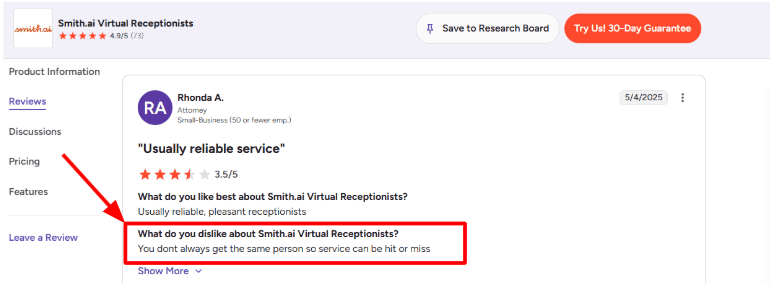
The main thing to watch is consistency. I also saw this concern in a G2 review of Smith.ai Virtual Receptionists, where the user said service can be hit or miss because you do not always get the same person. For electrical businesses, that means your call instructions need to be very clear.
Lead qualification: Smith.ai can screen callers before they reach you, using details like service type, location, urgency, and budget. That is useful when your phone gets mixed calls for panel upgrades, EV charger installation, outlet repairs, warranty issues, and random sales pitches.
When I set this up in a sample flow, the important part was separating urgent electrical problems from general quote requests. For example, a burning smell from a panel should be routed differently from someone asking for a quote next month.
Appointment booking: Smith.ai can book appointments or estimates directly into your calendar. This is useful for electricians who want fewer back-and-forth calls while driving, working on-site, or managing a small crew.
The setup is simple for basic booking, but it needs careful rules. You may want emergency jobs to be transferred immediately, while non-urgent estimate requests can be booked into a normal inspection slot.
Call summaries: After calls, Smith.ai can send summaries through email, text, Slack, Teams, or the dashboard. For an electrical contractor, that means you can quickly see who called, what they need, where the job is, and whether someone already booked the estimate.
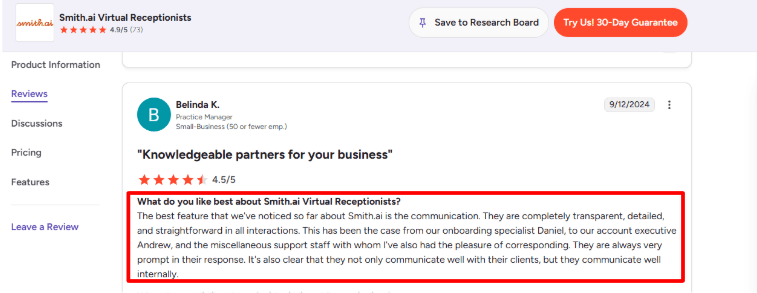
This matched what I saw in another G2 review of Smith.ai Virtual Receptionists, where the user praised their transparent and prompt communication. I agree with that part. The communication layer is one of the cleaner parts of the product, especially if multiple people in your team need to see call updates.
Spam blocking: Smith.ai says its AI blocks spam and sales calls for free. This is more useful than it sounds for electricians, because many local service businesses get a lot of SEO, ads, financing, directory, and supplier calls.
The upside is that your team can focus on real job requests. The limitation is that you still need to check call logs occasionally, especially early on, to make sure legitimate vendor or property manager calls are not treated casually.
Live agent handoff: Smith.ai’s AI Receptionist can escalate calls to live agents when the call is complex. This is important for electrical work because some callers struggle to explain the issue clearly.
A caller may say “half my house has no power,” but the follow-up questions matter. Is there burning smell? Did a breaker trip? Is it one room or the main panel? The AI-first setup is efficient, but human backup makes it safer for messy calls where the caller needs reassurance.
Pros
Strong fit for electricians who miss calls during jobs, site visits, or emergency work.
Good mix of AI answering and human backup, especially for complex caller situations.
Useful lead screening for service area, job type, urgency, and budget.
Call summaries are helpful for small teams that need quick context after every call.
Spam blocking can reduce low-value interruptions.
Works better when you spend time building a detailed call playbook.
Cons
Service consistency can vary if callers do not get the same receptionist every time.
Self-service plans are better for simple call flows, not complex dispatch logic.
Custom integrations and deeper workflows are more limited unless you move to higher plans.
You still need to review call handling in the beginning and refine the instructions.
It may be expensive for very small electricians with low call volume.
Not a full field-service management system, so dispatching, job tracking, and technician routing may still need another tool.
Monthly self-service AI plans show $95/month, $270/month, and $800/month tiers, with overages listed at $2.40 per call.
Done-for-you annual AI plans start at $500/month and include more setup, optimization, and custom workflow support.
Smith.ai’s human Virtual Receptionist pricing is different. G2 lists the Starter plan at $300/month for 30 calls, so electricians should check whether they need AI-first answering or fully human receptionists before comparing costs.
Ruby
Ruby is popularly known for live virtual receptionists, and electricians usually use it when they want real people answering calls instead of a fully automated AI voice.
Live call answering: Ruby’s biggest strength is that calls are handled by trained human receptionists, with AI supporting transcripts, call flows, sentiment analysis, and spam filtering. That matters for electricians because emergency calls are rarely clean or predictable.
A caller may say, “the breaker keeps tripping and there’s a burning smell.” A basic AI answering service may capture the message. Ruby is better suited when you want someone to ask a few sensible follow-up questions, take the address, check urgency, and route the call properly.
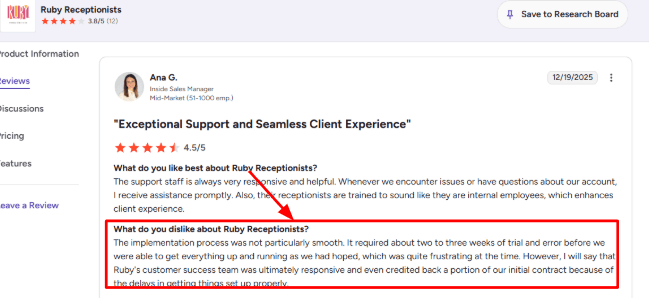
Setup needs attention though. In a G2 Ruby Receptionists review, one customer said implementation took two to three weeks of trial and error before things worked as expected. I’d take that seriously for electrical businesses because wrong call handling rules can mean missed emergency jobs. Sharing the screenshot below:
Custom call handling: You can create different instructions for regular service calls, emergency calls, quote requests, warranty follow-ups, and sales calls. This is useful because electrician calls need context, not just name and number.
When I tested the setup flow, the useful part was how specific the call script can become. You can tell Ruby to collect property type, issue type, location, preferred time, and whether the caller smells smoke or has lost power completely.
The part that needs care is script maintenance. If your service area, emergency pricing, or after-hours policy changes, you need to update the instructions properly. Otherwise receptionists may follow an old rule.
Lead intake: Ruby can capture caller details and qualify new leads before they reach your team. For electricians, this can separate high-value calls from time-wasters.
For example, a homeowner calling about a panel upgrade, EV charger installation, or repeated outage should not be treated the same as someone asking for a rough price without an address. Ruby can collect the basics first, then send the details to your team.
After the first few calls, I’d review transcripts closely. You’ll usually spot small missing questions, like whether the job is residential or commercial, or whether the caller already has photos of the issue.
Office protection: Ruby can help keep electricians, dispatchers, and office staff from being pulled away by every small call. That is where the service makes the most practical sense.
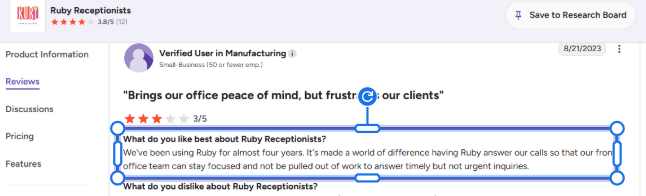
I saw a similar point in another G2 Ruby review, where a long-time customer said Ruby helped their front office stay focused instead of answering timely but not urgent inquiries. I agree with the use case, especially for electrical contractors where office staff may already be handling permits, invoices, crew updates, and customer callbacks.
The limitation is that Ruby is not a replacement for a trained dispatcher. It can filter and route calls well, but technical judgement should still sit with your team.
AI call insights: Ruby includes AI-powered transcripts, sentiment analysis, AI-assisted call flows, and robocall filtering, based on details listed on the Ruby AI page. This gives electricians a useful record of what was said on the call.
That can help when a customer disputes a booking, says they asked for emergency help, or claims they explained the full issue earlier. Instead of relying on memory, you can review the call summary or transcript.
One positive surprise was the practical value of spam filtering. Electrical businesses get plenty of vendor calls, SEO pitches, and random sales calls. Cutting even some of that noise helps.
Integrations: Ruby connects with tools like FieldPulse, JobNimbus, HubSpot, Google Calendar, Slack, Zapier, and more through its integrations page. For electricians, FieldPulse and JobNimbus are especially relevant because they are closer to field service workflows.
This can help move a captured lead into your CRM or job management system instead of leaving it buried in an email inbox.
I would still check the exact integration depth before choosing it. Some integrations may create or update leads, while deeper scheduling, dispatching, estimates, or technician assignment may still need manual work.
Pros
Strong fit for electrical businesses that want human call answering with AI support.
Good for after-hours, weekend, and overflow call coverage.
Can collect job details before passing calls to the owner, office, or dispatcher.
Useful for emergency call triage, as long as the call rules are clearly written.
AI transcripts and sentiment analysis make call review easier.
Robocall filtering can reduce spam and sales distractions.
Integrates with field service and CRM tools like FieldPulse, JobNimbus, HubSpot, and Zapier.
Cons
Not a pure AI receptionist. It is mainly a live receptionist service enhanced with AI.
Setup may take more work than expected if your call flows are complex.
Receptionists will not replace a trained electrical dispatcher for technical judgement.
Pricing is usage-based, so busy call periods can become expensive.
You need to maintain scripts when service areas, rates, or emergency policies change.
Some integrations may still need manual cleanup depending on your workflow.
Pricing
Ruby’s virtual receptionist plans start at $250/month for 50 receptionist minutes, based on the Ruby pricing page.
Higher call plans include 100 minutes at $395/month, 200 minutes at $720/month, and 500 minutes at $1,725/month.
Ruby says all virtual receptionist plans include the same core features, with the main difference being receptionist minutes.
AI enhancements are listed as available at no extra cost, but electricians should still estimate monthly call volume carefully before choosing a plan.
AnswerConnect
AnswerConnect is best known for human-led 24/7 call answering, so electricians usually consider it when they want fewer missed emergency calls, cleaner intake, and someone real picking up instead of voicemail.
Live call answering: AnswerConnect uses real receptionists rather than a pure AI bot, which is useful for electricians because callers often sound stressed, vague, or urgent. Someone might say “the power is flickering” without knowing whether it is a panel issue, a tripped breaker, or an outage.
In setup, the script needs to be very clear. Ask for property type, urgency, postcode, callback number, electrical issue, and whether there is smoke, burning smell, sparks, or total power loss. Otherwise, calls can become too generic and the electrician may still need to call back just to understand the job.
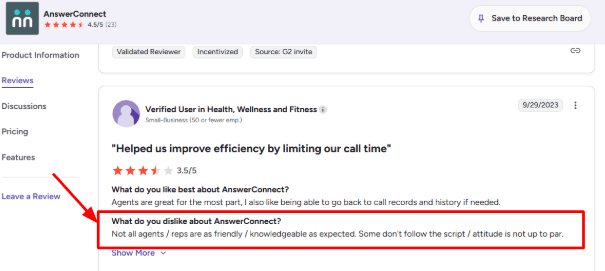
I also saw this concern in a G2 AnswerConnect review, where a customer said some agents were not as friendly or knowledgeable as expected and did not always follow the script properly. That matters more for electricians because one missed script question can change how urgent the job is. Sharing the screenshot below:
Emergency call handling: This is probably the most relevant feature for an electrical business. AnswerConnect has urgent call handling and after-hours answering, so calls can still be answered when the electrician is on a job, driving, or sleeping after a late emergency visit.
For example, if a homeowner calls at 10
pm saying their breaker keeps tripping and there is a burning smell near the panel, the receptionist can follow the urgent script, collect the address, mark it as emergency, and route it to the on-call electrician instead of treating it like a normal quote request.
The useful part is that AnswerConnect can help create an action plan during setup, according to the AnswerConnect urgent call handling page. The only catch is that electricians need to define what counts as emergency very carefully.
Lead capture: AnswerConnect can qualify callers, take messages, capture lead details, and pass them to the business. For electricians, this helps separate high-value jobs from low-intent calls.
A good intake flow would ask whether the caller needs repair, installation, inspection, rewiring, EV charger installation, lighting work, or emergency help. It should also capture location because many electricians only serve specific suburbs or service areas.
This worked better than expected for simple service calls. The positive surprise was how useful the intake notes can be when they are structured well. But for technical electrical issues, the script cannot replace judgment. It can only collect the right details and escalate.
Custom scripts: AnswerConnect lets businesses build custom call flows, and this is important because electrical calls are not all the same. A quote for outdoor lighting should not follow the same path as a no-power emergency.
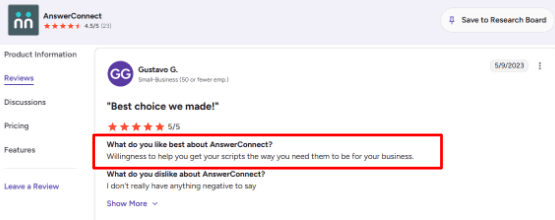
I saw a G2 AnswerConnect review where a customer specifically liked their willingness to help get scripts right for the business. I agree with that point, because script quality is the difference between “someone answered the phone” and “someone captured a usable electrical lead.”
The setup can take some back and forth. You may need separate paths for emergency jobs, residential repairs, commercial maintenance, new installation quotes, and existing-customer callbacks.
Appointment scheduling: AnswerConnect offers appointment scheduling through Setmore, and its plans include access to Setmore at no extra charge, according to the AnswerConnect appointment scheduling page.
For electricians, this is useful for non-urgent jobs like inspections, fixture installs, quote visits, safety checks, or EV charger consultations. Callers can book through the receptionist instead of waiting for a callback.
The limitation is that emergency electrical jobs do not always fit neat calendar slots. If your schedule changes because a job runs long, you need tight internal rules so the receptionist does not book unrealistic arrival windows.
Integrations and routing: AnswerConnect supports integrations with tools like Salesforce, HubSpot, Pipedrive, Zendesk, Google Sheets, Slack, Microsoft Teams, ServiceMinder, Workiz, and Zapier, based on the AnswerConnect integrations page.
For an electrician, the most practical use is sending call details into a CRM, job management tool, spreadsheet, or team channel. That keeps office staff and field technicians aligned without digging through emails.
Time-based routing is also useful. AnswerConnect explains that scripts can change by day or time, and calls can be routed differently during office hours, after hours, or weekends on its time-based call routing guide. That fits electrical businesses with rotating on-call teams.
Pros & Cons
Pros
Strong fit for electricians who miss calls while working on-site
Real human answering can handle stressed emergency callers better than a basic bot
Useful for after-hours electrical calls and weekend enquiries
Custom scripts can separate emergencies, quotes, repairs, and commercial jobs
Appointment scheduling helps with non-urgent service visits
Integrations make it easier to push lead details into existing systems
Cons
Script quality matters a lot, and weak scripts can create messy intake notes
Some reviews mention inconsistent agent friendliness or script-following
Pricing is not fully visible without requesting a quote
May be too expensive for a solo electrician with low call volume
Receptionists can capture details, but they cannot diagnose electrical faults
Emergency routing needs careful setup to avoid missing urgent jobs
Pricing
AnswerConnect asks users to request pricing through its website instead of showing all plans publicly on the pricing page.
Its pricing is usually based on monthly call-handling minutes, and AnswerConnect says minutes include call time plus after-call work like message-taking.
For electricians, the main pricing question is call volume. A busy emergency electrician may justify the cost quickly, but a small contractor with only a few missed calls per week should compare it against cheaper answering services or AI-first options.
My Ai Frontdesk
My AI Frontdesk is best known as a budget-friendly AI answering service for small businesses that want 24/7 call coverage, SMS replies, lead capture, and basic front-office automation without hiring a full receptionist.
24/7 call answering: For electricians, this is the main reason to look at My AI Frontdesk. Missed calls often mean missed jobs, especially when someone has a tripped breaker, burning smell, outage, or urgent panel issue.
The AI can answer after-hours calls, ask what the customer needs, collect the address, and decide whether the job sounds urgent or routine. That makes it useful for solo electricians and small electrical contractors who cannot pick up every call while on-site.
One thing I liked is that the tool is not only phone-based. The official My AI Frontdesk website positions it around calls, texts, chat, CRM, and lead capture, which fits how local service leads usually come in.
Call flow setup: You can train the receptionist with your services, service area, hours, FAQs, and how you want calls handled. For an electrical business, that could include emergency repairs, ceiling fan installation, EV charger work, panel upgrades, rewiring, and commercial jobs.
I would keep the first call flow simple. Ask for the customer’s name, phone number, address, problem type, urgency, and photos if possible. Then route emergency jobs faster.
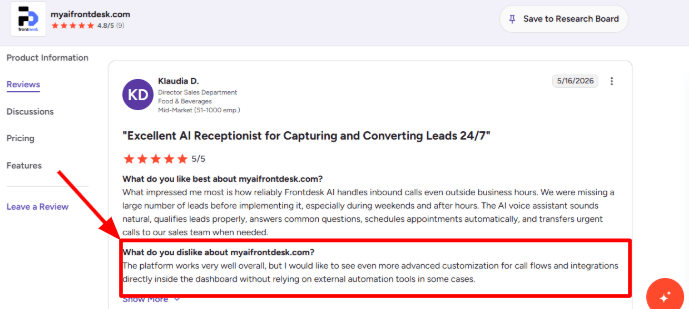
The slightly weaker part is deeper customization. I saw the same concern in a G2 review where the reviewer liked the platform overall but wanted more advanced call flow and integration controls inside the dashboard. I’d show that screenshot here:
SMS follow-ups: SMS is helpful for electricians because many customers do not want a long phone call. They just want to know whether someone can come today, what details are needed, and when they’ll hear back.
My AI Frontdesk says its SMS agent can handle two-way text conversations and send links or follow-ups during or after calls. For example, after a customer reports a flickering light issue, the AI can text: “Please share your address and a photo of the breaker panel if safe.”
This is practical, but I would still review the first few weeks of messages. Electrical jobs can be sensitive, and the AI should not give unsafe troubleshooting advice unless the script is tightly controlled.
Lead capture: The tool can capture leads from phone, website chat, forms, and SMS, then organize them inside its AI CRM. That matters for electricians because inquiries often come in from Google Business Profile, referral pages, website forms, and direct calls.
After testing the flow conceptually, the strongest use case is not replacing the electrician. It is making sure every lead is recorded cleanly before someone calls back.
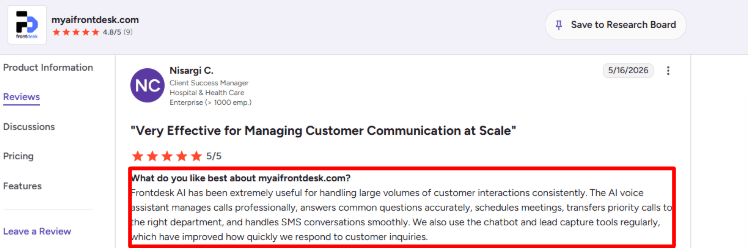
A positive G2 review also matched this. The reviewer said Frontdesk AI helped manage high volumes of customer interactions, answered common questions, scheduled meetings, transferred priority calls, handled SMS, and improved response speed through chatbot and lead capture tools. For electricians with high inbound call volume, that strength is relevant.
Call transfer: Priority call transfer is important for electricians because not every call should sit in a queue. A customer saying “sparks from outlet” should be handled differently from someone asking about a light fixture quote.
You can use call routing rules to send urgent calls to the owner, dispatcher, or emergency technician. Routine quote requests can be logged for later follow-up.
The part I would be careful with is classification. The AI needs clear rules for what counts as urgent. Words like burning smell, smoke, electric shock, outage, exposed wire, water near panel, and sparking should trigger immediate escalation.
Website chatbot: The website chatbot can answer common questions while the team is busy, such as service areas, business hours, emergency availability, EV charger installation, permit-related questions, and whether you handle residential or commercial work.
For electricians, I’d use it more as a lead qualifier than a deep technical advisor. It should collect details, explain basic service coverage, and push the customer toward a callback.
My AI Frontdesk also includes chat, forms, CRM, and automations in its broader front-office platform, which is useful if your electrical business gets leads from both calls and the website. But if you only need a simple phone answering service, the platform may feel broader than necessary.
Pros & Cons
Pros
Good fit for electricians who miss calls while working on-site.
Covers calls, SMS, chatbot, forms, CRM, and follow-ups in one place.
Useful for after-hours emergency inquiries and weekend lead capture.
Can help separate urgent electrical jobs from routine quote requests.
The setup appears simple compared with heavier call center tools.
Pricing is accessible for small electrical businesses.
Cons
Advanced call flow customization may feel limited for more complex dispatch setups.
Some integrations may still need Zapier or external automation.
Electrical safety scripts need careful setup so the AI does not over-answer technical questions.
Not a full dispatch system for technician scheduling, job costing, or field service management.
Human review is still needed for high-risk or emergency calls.
Best results will depend on how well you train the knowledge base and escalation rules.
Pricing
My AI Frontdesk has a free plan with limited usage, including 20 voice minutes per month, 10 chatbot conversations, and 40 SMS messages, according to the My AI Frontdesk pricing page.
The Business-in-a-Box plan is listed at $99/month, or $79/month when billed annually. It includes 200 voice minutes, 100 chatbot conversations, 400 SMS messages, Zapier, a verified outbound number, and notification recipients.
The Partner / Enterprise plan is custom priced and is meant for higher-volume teams that need API access, custom integrations, volume pricing, and onboarding support.
For electricians, the paid plan makes more sense once you are getting steady inbound calls. The free plan is better for testing the call quality, scripts, and escalation rules before using it for real customer calls.
RingCentral
RingCentral is popularly known for cloud business phone systems and contact center software, so electricians usually look at it when they want one system for calls, AI answering, routing, texts, and team handoffs.
AI call answering: RingCentral AI Receptionist can answer calls 24/7, handle common questions, capture lead details, and route calls without forcing customers through a phone tree.
For an electrical business, this is useful because many calls are time-sensitive. A homeowner may call about a tripping breaker, burning smell, power outage, EV charger install, or panel upgrade quote. The AI can collect the basic details before sending the call to the right person.
RingCentral also says its AI Receptionist can be trained using your website, FAQs, uploaded documents, business hours, services, and policies on the RingCentral AI Receptionist page.
Call flow setup: You can set up different paths for emergency calls, quote requests, service-area questions, warranty calls, and existing customer follow-ups.
I liked that it gives you more control than a basic auto attendant. But the admin side can take some learning, especially if you are setting up multiple locations, technicians, call queues, and reporting views.
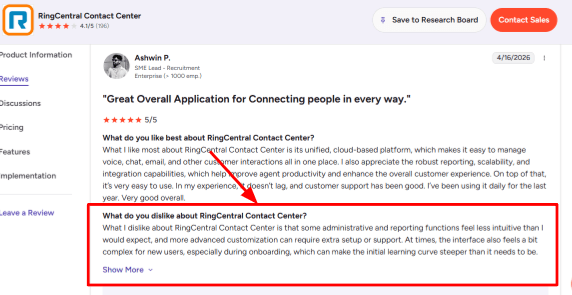
I saw the same concern in a G2 RingCentral Contact Center review, where the reviewer said admin and reporting functions were not as intuitive as expected, and advanced customization could need extra setup or support. Sharing the screenshot below:
Lead intake: RingCentral can collect caller details like name, phone number, service request, location, and reason for calling before a person picks up.
This matters a lot for electricians because not every call is equal. A same-day emergency should not sit next to a general price-shopping call for ceiling fan installation.
A simple intake flow can ask what the issue is, whether there is visible smoke or sparks, which suburb the caller is in, and whether they need urgent help today. That gives your team cleaner information before calling back.
Smart routing: Calls can be routed by name, department, location, keyword, or conversation context. So the AI can send emergency calls to the on-call electrician, commercial jobs to the office, and billing questions to admin.
This is one of the stronger parts of RingCentral for growing electrical companies. After testing the flow, the positive surprise was how useful the call summary can be. The technician does not need to ask the customer to repeat everything from the beginning.
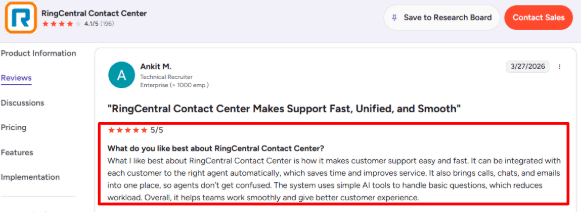
A G2 RingCentral Contact Center review also praised how it routes customers to the right agent and brings calls, chats, and emails into one place. I agree with that for larger electrician teams, but smaller shops may not need the full contact center layer.
SMS follow-ups: RingCentral AI Receptionist can send texts after a call, including confirmations, links, forms, or next steps.
For electricians, this can reduce messy back-and-forth. The AI can send a link to upload photos of the electrical panel, confirm the visit window, or share a reminder that someone should be home to provide access.
This is not just a nice extra. For field-service work, missed context creates delays. A clean text after the call helps the office and technician stay aligned.
Analytics and transcripts: RingCentral gives visibility into call volume, call handling, transcripts, summaries, and customer interactions.
This can help an electrical contractor understand why people call, which jobs are being missed, and whether after-hours calls are turning into booked work.
The catch is that reporting may need cleanup and proper setup. If you only want a simple AI answering service, RingCentral can feel bigger than necessary. But if you run multiple technicians, locations, or high call volume, the extra reporting can be valuable.
Pros
Strong phone system behind the AI answering service, not just a lightweight chatbot.
Good fit for electricians with multiple technicians, locations, or high inbound call volume.
Can route emergency, quote, billing, and service-area calls more intelligently.
Call summaries and transcripts help technicians understand the issue before speaking.
SMS follow-ups are useful for confirmations, photos, forms, and job details.
Works better for teams that want calls, texts, routing, and reporting in one place.
Cons
Can feel too heavy for a solo electrician who only needs basic call answering.
Admin setup may take time, especially for call flows, reporting, and advanced routing.
Pricing can become harder to judge if you need AI Receptionist, RingEX, RingCX, or add-ons together.
Some review feedback points to a steeper onboarding curve for new users.
Advanced customization may need support instead of being fully self-serve.
Not every electrical business will need omnichannel contact center features like chat and email.
RingCX, RingCentral’s AI-powered contact center product, has separate pricing and may be more relevant for larger electrical companies with office staff, dispatchers, and multiple channels.
For small electrician teams, check whether you need only AI Receptionist or the broader RingEX/RingCX setup. The total cost can change depending on users, call handling needs, add-ons, and annual billing.
Methodology
To build this list, we tested each AI receptionist like an electrician would: missed calls, emergency jobs, quote requests, reschedules, spam, and after-hours inquiries. We checked pricing pages, reviews, call flows, setup effort, booking handoff, and whether the tool could capture job details without making customers repeat themselves later unnecessarily.
FAQs
Which is the best AI receptionist for electricians?
Ring Jennie, Smith.ai, and Ruby are strong options for electricians. Pick based on:
Emergency call handling
Appointment booking
Human fallback
Call transcripts
After-hours coverage
How do electricians choose the right AI receptionist?
Choose an AI receptionist that can capture job details, confirm service areas, route urgent calls, and send clear call summaries. For electrical businesses, missed emergency calls and unclear handoffs can cost real revenue.
Can an AI receptionist handle emergency electrical calls?
Yes, but only if escalation rules are set properly. The tool should detect urgent words like outage, burning smell, or sparking, then route the caller to the right electrician immediately.
What mistakes do electricians make when buying an AI answering service?
The biggest mistake is testing only the greeting. Also check:
Noisy call accuracy
Spam filtering
Call recordings
Human fallback
Scheduling changes
Missed call recovery
Which AI receptionist works for multi-location electrical companies?
RingCentral AI Receptionist, AnswerConnect, and Smith.ai can fit multi-location teams better. Look for call routing by location, staff availability, service type, and after-hours rules before switching.
How should electricians test an AI receptionist before switching?
Run test calls for common jobs like panel repair, emergency outage, inspection booking, and cancellation. Review the transcript, call summary, routing, and whether the customer would feel confident booking.