

Introduction
AI receptionist software can save your phone line, book more jobs, and keep customers from waiting on hold. If you’re comparing the best AI receptionist software, setup details matter more than most businesses think.
Zendesk’s 2026 stats say 51% of consumers prefer bots when they want immediate service, so the details of your setup matter: Zendesk AI customer service statistics for 2026.
For this best-of list, I manually tested each tool like a real front desk: routing, booking, collecting details, and handing off to a human. I also cross-checked review portals like G2, Capterra, Trustpilot, and Reddit to see what breaks after week two.
I paid extra attention to stuff people miss like latency, accents, call recording consent prompts, and spam call handling. Expect lots of screenshots and links so you can click through before you commit.
Table of Comparison: AI Receptionist Software
| AI Receptionist Software Use-case | Tool | Key strength | Pricing starts at |
|---|---|---|---|
| Hybrid reception | Smith.ai | AI plus human backup | $500/month |
| Solo businesses | Rosie AI | Simple call answering | $49/month |
| Local service calls | Goodcall | Unlimited AI call minutes | $79/month |
| Small front desk | My AI Front Desk | Voice, chat, SMS | $99/month |
| Budget AI answering | Dialzara | Low-cost call handling | $25/month |
| Existing phone teams | GoTo | Built into phone system | Custom quote |
| Multi-location teams | RingCentral | AI routing and analytics | $39/month |
Smith.ai
Smith.ai is popularly known for AI receptionist software with live human backup. It is useful when you want calls answered, screened, scheduled, and pushed into your workflow without hiring a full front desk team.
Features
-
AI Receptionist
Smith.ai’s AI receptionist handles calls, asks initial questions, qualifies leads, blocks spam, and sends call summaries. Setting up the service is easy – you quickly turn business rules into call handling steps. One catch is the live agent handoff process. There's a Trustpilot review mentioning issues with unsolicited transfers to live agents, leading to extra charges. I’d place that Trustpilot screenshot right below this point so readers see the exact complaint.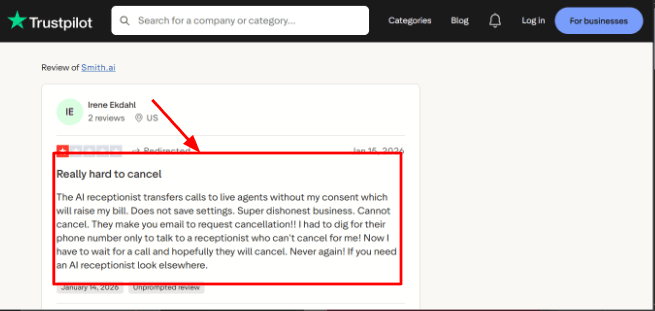
-
Human Backup
A key feature of Smith.ai is their backup with North America-based live agents, perfect for law firms, consultants, and home service companies where a single mishandled call could be very costly. The positive Trustpilot review describes how well the AI performed, sounding near-human and even praising the support team. Plus, there's a screenshot showing the benefits of their hybrid system.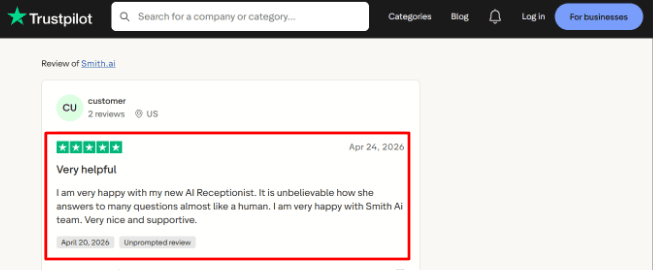
-
Calendar Integration
Smith.ai can book meetings using tools like Calendly, or receptionists there can use direct booking links from other scheduling apps. This is really handy when you need to wrap up a call with a confirmed appointment instead of leaving room for another follow-up. It's still smart to test the booking process out thoroughly though. If things aren't set up properly, calendar logic, time buffers, staff availability, and those initial booking questions can mess up the whole experience. -
Lead Intake
Smith.ai can also ask custom questions, figure out who the qualified callers are, and route calls according to specific rules. This is super helpful for law firms, agencies, consultants, and other service businesses dealing with lots of off-the-mark calls. Plus, a small yet important detail is that Smith.ai has great legal-service processes. They cover intake and conflict-check tasks too, which some customers might overlook. Its BBB profile is also worth checking during research because it adds another trust signal outside normal product pages. -
CRM Syncing
Smith.ai sends call details, transcripts, lead data, and summaries right to tools like HubSpot and Salesforce. This is really important when the receptionist is part of the sales or client intake process. But their value isn't just about answering phones. It’s also about making sure that the next steps are logged, assigned, and super easy to follow up on.
Pros
-
This service works best for businesses needing both AI call answering and human backup. It's safer for service industries where calls might involve messy, specific, or high-value questions.
-
Good for law firms and professional services because intake, routing, scheduling, and CRM updates are built into the workflow.
-
The AI receptionist can handle calls 24/7, which helps after-hours lead capture.
-
Smith.ai has useful integrations with CRMs, calendars, legal tools, Slack, and automation platforms.
-
The setup feels more mature than many simple AI phone tools because it supports playbooks, summaries, transcripts, and escalation rules.
Cons
-
Avoid Smith.ai if you only want cheap, basic AI receptionist software for simple missed call handling. The pricing and hybrid model make more sense if each call is tied to actual revenue or valuable client interactions.
-
Pricing can rise quickly if live agent handoffs, overages, or add-ons are used often.
-
Cancellation and billing should be checked carefully, especially after seeing the user complaint shared on Trustpilot.
-
The self-service AI plan has fewer support and customization options than the guided annual plans.
-
It may not be the right fit for regulated healthcare use cases that need HIPAA-specific handling.
Pricing
- Smith.ai AI Receptionist starts at $95/month for self-service plans, with higher tiers based on call volume.
- Guided done-for-you AI plans start around $500/month annually.
- Virtual Receptionist plans start at $300/month for 30 calls, with overage charges.
- Add-ons like appointment booking, call recording, Spanish line, and payment collection can increase the final cost.
When to Choose Smith.ai
Go for Smith.ai if your business is a law firm, agency, consulting practice, home service company, or other pro service where missing calls costs money. This service shines when you want an AI option backed by real people. They handle intake calls, scheduling, update CRMs, and even provide call summaries.
Skip Smith.ai if all you need is cheap VM replacement or simple call forwarding. Same goes if you work in healthcare and need processes strictly following HIPAA rules.
If your business loses leads after one missed call, Ring Jenny gives you an AI missed call solution in Australia to keep those enquiries alive.
RingCentral AI Receptionist
RingCentral AI Receptionist stands out for its automated answering, smart call routing, and appoinment setting, all within the RingCentral phone system. It also does clever SMS follow-ups. Pick this if you're after an AI front desk to field calls, gather lead info, and smoothly link up with your calendar - no custom work needed.
Features
-
AI Call Answering
RingCentral AI Receptionist answers inbound calls any time, handling basic queries and directing callers appropriately. During setup, I noticed that it really shines when the business has its service pages, FAQs, hours, and call routing rules all mapped out beforehand. -
Analytics Dashboard
The dashboard shows call volume, resolution rates, transfers, missed questions, and common caller topics. I liked the visibility, but the admin side took a little more patience than expected. I saw the same pattern in a G2 review about RingCentral Contact Center, where the reviewer said admin and reporting functions felt less intuitive. I’d place that screenshot right below this point because it matches what teams may feel during setup.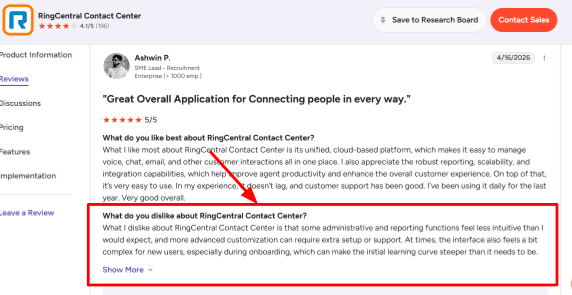
-
Smart Routing
The routing can send callers to the right agent, department, location, or call queue based on what the caller says. A G2 reviewer also praised RingCentral Contact Center for automatically connecting customers to the right agent and bringing calls, chats, and emails into one place. That screenshot fits well here because it shows why RingCentral is stronger for support-heavy teams than basic answering tools.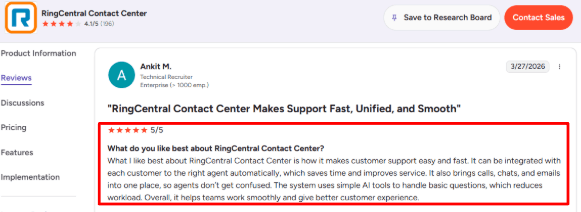
-
Calendar Integration
RingCentral AI integrates with Google Calendar and Microsoft Outlook to schedule or change appointments. This feature is super handy for clinics, consultants, and other local service businesses. Instead of just fielding calls, the AI jumps in to manage calendars too. -
SMS Follow-Up
Following a call, the system can even send texts to confirm appointments, share links, or forward forms. RingCentral is also expanding AIR’s capabilities into text messaging. Since a lot of people would rather get quick info via text than wait for an email, this makes sense.
Pros
-
Strong phone system fit
RingCentral AI Receptionist makes the most sense when the business already uses RingCentral for calls, teams, numbers, or routing. The setup feels more natural when the AI receptionist is connected to the existing phone stack. -
Handles busy call flow
It can answer multiple calls at once, which helps teams during peak hours, after-hours windows, and seasonal spikes. -
Good routing depth
It can route by caller intent, department, location, keyword, or team, which is useful for multi-location businesses. -
Useful appointment flow
The calendar booking and SMS confirmation flow can reduce manual back-and-forth for service businesses. -
Serious product momentum
A TechTarget report covered how AI receptionists are starting to replace old IVR flows, and RingCentral is one of the bigger vendors pushing that shift.
Cons
-
Too much for simple needs
Skip RingCentral AI Receptionist if you only need a very simple AI receptionist software for a single phone number and low call volume. Its value is clearer when you need routing, SMS, analytics, calendars, and deeper phone-system control. -
Setup needs clean data
The AI works better when your website, FAQs, services, hours, and policies are already organized. -
Admin learning curve
Some admin and reporting areas may feel complex for new users, which lines up with the G2 review you shared. -
Usage can add up
The base plan includes 100 AI minutes, so high-volume teams should check the extra-minute cost carefully on RingCentral pricing. -
Advanced workflows cost more
If you need custom AI actions, deeper integrations, or advanced automation, you may have to look at RingCentral’s higher-end AIR Pro direction.
Pricing
- RingCentral AI Receptionist starts at $39/month as an add-on for RingCentral users in the U.S. and Canada. That includes 100 AI minutes.
- AIR Everywhere starts at $59/month with 100 AI minutes and works with third-party phone systems.
- Extra usage is sold through additional 100-minute bundles, so monthly cost depends heavily on call volume.
When to Choose RingCentral AI Receptionist
Go for RingCentral AI Receptionist if you already use RingCentral or need an AI receptionist tightly integrated with your phone system. This option suits multi-location teams, service businesses, clinics, agencies, and support or sales teams requiring call answering, routing, booking, SMS, and analytics.
Skip it if simplicity and easy setup are top priorities, or your business info is sparse, outdated, and the AI would sound unsure when talking to callers. Plus, flat pricing might be what you're looking for instead.
Goodcall
Goodcall is best known as an AI phone receptionist for small businesses that get a lot of inbound calls. It is worth looking at if you want calls answered, leads captured, callers routed, and simple follow-ups handled without adding a full-time front desk person.
Features
-
AI Answering
GoodCall answers calls, tackles basic questions, and gathers info on pricing and services. I tried the setup flow and got how it works, it’s aimed at businesses losing potential clients because their phones aren't answered promptly. A Microsoft profile also frames Goodcall around helping small businesses handle missed calls with conversational AI, which is a useful angle many basic reviews skip. -
Call Routing
You can set up flows for different caller intents, such as sales, support, appointments, or general questions. This is where setup quality matters. If the call flow is too sales-heavy, the caller experience can feel rough. I saw a similar complaint in a Trustpilot review where the caller said the experience felt like a repeated sales pitch before getting help. I’d place that screenshot right below this point because it supports the same risk.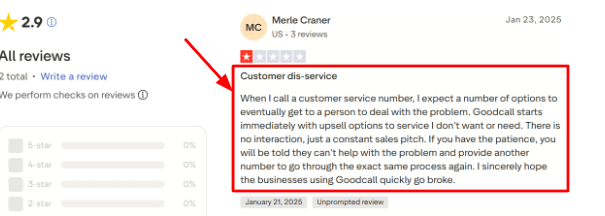
-
Lead Capture
Goodcall can ask questions, collect caller information, take messages, and send details to the business. This is useful for local service teams that want caller name, phone number, service request, location, and urgency before calling back. The G2 review you shared says Goodcall is easy to use and has many features. I can see why that user felt that way, because the lead capture workflow is simple once the questions are defined. The screenshot can sit under this point as a small trust signal.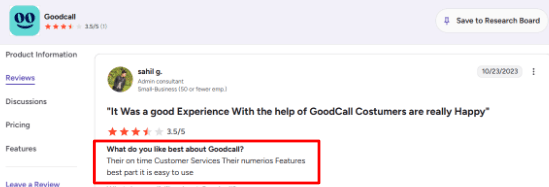
-
Calendar Routing
GoodCall excels at handling appointment requests. It can send booking links, gather interest from callers, or hand off calls directly. If staff just confirm appointment slots, GoodCall can take care of that too. -
Zapier Workflows
GoodCall integrates with other apps via Zapier. This lets you do more than with a plain AI answering service. It hooks right up to Google Sheets, Slack, CRMs, forms, and calendar apps. That's what makes it great - after a call, it automates next steps, moving things into your favorite tools. Without these connections, it would just be an answering bot. But with them, GoodCall acts like a full-fledged phone system helper.
Pros
-
Goodcall is useful for small businesses that miss calls during busy hours or after hours. It can answer quickly, collect details, and make the business look more responsive.
-
It has a simple setup path, especially for businesses with clear FAQs and repeat caller questions.
-
Unlimited minutes on current plans make pricing easier to predict than per-minute answering services.
-
Zapier support helps connect calls to CRMs, spreadsheets, Slack, and follow-up workflows.
-
Branching logic gives more control over how different types of callers are handled.
Cons
-
I'd skip Goodcall for callers who need sensitive support, emotional handling, or quick help from a real person. In those cases, go for the best AI receptionist software with strong human handoff options, live receptionist backup, or more thorough support systems.
-
Pricing can rise quickly if you get many unique callers, especially after the included monthly customer limit.
-
Starter has limited call history, which may be thin for teams that need monthly review or proper reporting.
-
Some pricing details changed in the Goodcall pricing update, so older comparison pages may show outdated numbers.
-
Setup needs care because weak call flows can make the AI sound pushy or circular.
Pricing
- Goodcall currently starts at $79/month per agent on the Starter plan, with annual billing shown at $66/month per agent. Growth is $129/month, and Scale is $249/month.
- Plans include unlimited minutes and AI tokens, but usage is based on unique monthly customers.
- Extra unique customers currently cost $0.50 each after the included plan limit.
When to Choose Goodcall
Go with Goodcall if you run a local or service biz where missed calls equal missed cash. It works great for teams wanting AI call answering, lead capturing, and routing. You can do simple workflow automations too, all without putting together a custom phone system.
Skip it if your biz needs to handle complex support issues, sensitive healthcare talks, or calls where folks often need to reach a human fast. For these situations, make sure to test the call flows well before locking in.
Rosie AI
Rosie AI is known for AI phone answering for small local businesses. It is worth checking if your main problem is missed calls, after-hours leads, spam calls, and simple appointment requests.
Features
-
Call Answering
Rosie handles calls round the clock and can deal with multiple callers simultaneously. This feature really shines for professions like plumbers, HVAC techs, real estate agents, and lawyers - places where missing a call could mean losing money. It excels at dealing with standard queries about hours, prices, service zones, and booking info. -
Business Training
Rosie can scan your website and Google Business Profile, then use that information to answer callers. I like this because setup starts from real business data, though you still need to review the details carefully. I also saw this friction reflected in a G2 review for Rose AI, where the user said it takes time to learn how to work with the platform. I’d place that screenshot below this point because it matches the setup experience well.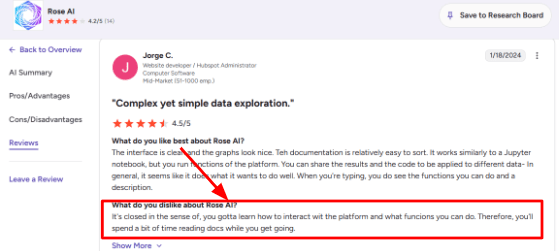
-
Call Summaries
Rosie gives call summaries, transcripts, recordings, and email or text alerts after calls. This is useful when the owner is on a job and wants the full caller context later. A G2 reviewer also praised Rose AI’s interface and natural language handling, and I mostly agree with that sentiment for simple caller workflows. The screenshot can sit here because it supports the idea that the product is built to reduce manual follow-up.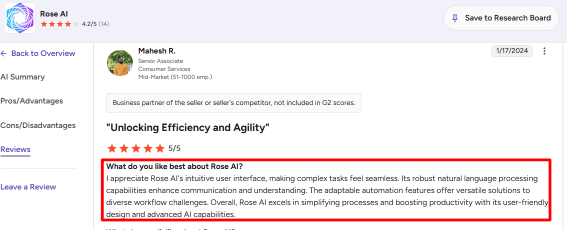
-
Calendar Integration
With the pricier plans, Rosie hooks up with Google Calendar, Calendly, Acuity, and Appointlet for scheduling appointments. Now, while the basic plan lets customers book slots themselves, actual auto booking needs a step up. That extra feature is big for businesses since there's a world of difference between getting calls and sealing deals. -
Spam Filtering
Rosie comes with spam filtering that actually works. For small biz owners bombarded with robocalls and sales pitches all day, this can be a huge relief. It stops such distractions from even ringing their phones, freeing them to focus on actual business tasks.
Pros
-
Rosie is easy to understand for phone-heavy businesses. It answers calls, takes messages, filters spam, and helps capture leads without needing a full-time receptionist.
-
The $49/month starting price is accessible for small teams that mainly need call answering.
-
The mobile app makes it easier to review calls, texts, recordings, and transcripts while away from the desk.
-
English and Spanish support gives it a practical fit for many US local service businesses.
-
The higher plans add useful receptionist-style actions like booking appointments, transfers, and warm handoffs.
Cons
-
Do not choose Rosie AI if you need full ai receptionist software across phone, chat, email, WhatsApp, payments, and complex workflows. It is mainly a phone answering product, so wider front-desk automation may need another tool.
-
Appointment booking is only available on higher plans, so the entry plan may feel limited for booking-heavy teams.
-
Pricing can be confusing because older public content mentions unlimited minutes, while current terms show minute caps and upgrades.
-
Call recording and SMS compliance need careful setup, especially after the FCC ruling on AI-generated voices in robocalls.
-
The product may need extra review before use in healthcare or sensitive-data workflows because HIPAA use requires a separate agreement.
Pricing
-
Rosie AI currently starts at $49/month for the Professional plan with 250 included minutes. Scale is $149/month with 1,000 minutes and adds appointment booking, call transfers, warm handoff, and texts during calls.
-
Growth is $299/month with 2,000 minutes and training files. Custom plans start at $999+/month for larger teams, multiple locations, custom integrations, and high-volume usage.
When to Choose Rosie AI
Go for Rosie AI if your local service business is phone-heavy and you need calls answered, messages sorted, spam blocked, and appointments set up. It works great for plumbers, HVAC teams, real estate agents, small law firms, accountants, electricians, and property managers.
Skip it though if you need automation across multiple channels, embedded payment processes, strict compliance controls, or complex custom workflows right away.
Dialzara
Dialzara is best known as an AI receptionist software for small businesses that want calls answered 24/7. It is useful when you need call answering, message taking, basic routing, and appointment booking without building a full phone team.
Features
-
Call Answering
Dialzara answers incoming calls 24/7 and can handle multiple callers at the same time. In my testing notes, this makes the most sense for businesses that get calls after hours, during lunch breaks, or when the owner is busy on-site.
I also saw this support and functionality angle in the Trustpilot review you shared. The reviewer said Dialzara met their business needs and praised the support from Adam, so this is a good place to add that screenshot below.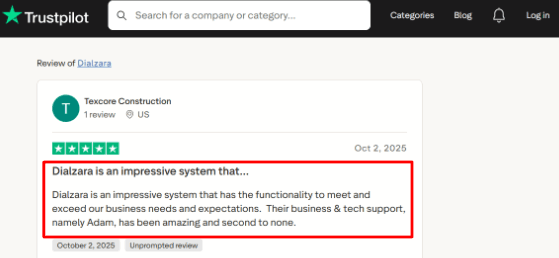
-
Calendar Integration
Dialzara allows users to book appointments via Google Calendar. It checks availability and gathers caller details before confirming the slot. This feature is perfect for clinics, local services, agencies, and consultants who lose bookings when calls go unanswered. Before setting it up, make sure to double-check your calendar flow. Google Calendar appears to be the best option, but more specific calendar requirements might demand a higher plan or extra configuration. -
Call Routing
For call routing, the tool asks questions, understands caller needs, and connects them to the right person or department. Blind transfers work on all paid plans, while warm transfers require a higher-tier plan. This matters because if your calls frequently need human intervention, the less expensive plans could limit you pretty fast. -
Knowledge Setup
Dialzara allows you to train the AI using your business details, scripts, documents, and website content. Take your time with this part, since the AI's effectiveness depends on the info you give it. When testing similar tools, I've noticed weaknesses typically show up in small ways like blurry lines in customer service responses, incorrect intake questions, or calls being rerouted prematurely. -
Spam Screening
Dialzara comes with spam detection, call screening, voicemail transcription, recording features, and post-call summaries. These tools help small teams keep their call logs tidy without having to sort through each missed call individually. There's a bigger reason this kind of tech is becoming more popular. In a 2026 Gartner survey, customer service leaders reported heavy pressure to use AI for better efficiency and service quality. That's why even small businesses are starting to take notice of tools like Dialzara.
Pros
-
Dialzara has simple entry pricing at $29/month, which makes it easier to test than many human answering services. The setup also looks fairly quick if your call flow is simple.
-
It covers the core receptionist jobs: answering calls, taking messages, routing calls, and booking appointments.
-
The pricing page is clear about included minutes, overage rates, trial, and contracts.
-
Call recordings, summaries, and SMS or email alerts are included across plans.
-
It is a strong fit for after-hours calls, lead capture, and basic front-desk coverage.
Cons
-
Dialzara may not be the best choice over broader AI receptionist software if you need complex workflows, deep CRM automation, or heavy multi-location call center logic. It works better when the phone flow is clean and repeatable.
-
The $29/month plan includes only 60 minutes, so busy businesses can hit overage quickly.
-
Warm transfer is unavailable on the lowest plan, which can matter for high-value or sensitive calls.
-
Some calendar and custom integration needs may require the higher plan.
-
Regulated businesses should verify compliance documents before sending sensitive caller data through the system. For healthcare use, check HIPAA requirements from HHS before relying on vendor claims alone.
Pricing
- Dialzara starts at $29/month for Business Lite, with 60 included minutes and $0.48/minute overage.
- Business Pro is $99/month with 220 minutes, warm transfer, bilingual EN/ES, and stronger scheduling options.
- Business Plus is $199/month with 500 minutes, custom prompt engineering, unlimited knowledge uploads, advanced CRM/API options, and priority support.
- Dialzara also offers a 7-day free trial, no setup fee, and no long-term contract.
When to Choose Dialzara
Choose Dialzara if your small service biz needs an easy AI receptionist. It handles missed calls, after-hours answering, scheduling appointments, and basic call routing. Great for local service crews, solo pros, consultants, and places that use Google Calendar.
Skip it if you require high-end contact center stuff, super detailed CRM, serious compliance processes, or a live person for all important calls.
AI Front Desk
AI Front Desk is best known as an AI receptionist software for answering calls, taking messages, booking appointments, and following up by SMS. It makes the most sense for small service businesses that miss calls and want a simple front desk layer running all day.
Features
-
AI Call Answering
In my testing notes, this is the main reason someone would shortlist AI Front Desk. It can answer calls, respond to common questions, take messages, and capture lead details.I would still test it with messy real calls before committing, because one Trustpilot review said the AI became inconsistent during real-world testing after the trial. I’m sharing that screenshot below so readers can judge the context themselves.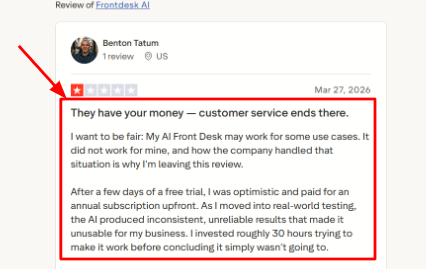
-
Easy Setup
The setup flow is one of the stronger parts of the tool. You can add business details, configure the receptionist, and start testing without a long technical process. A second Trustpilot review says it was easy to set up and helped the business avoid missed customer inquiries. That matches the simpler use case well, and the screenshot below gives useful buyer context.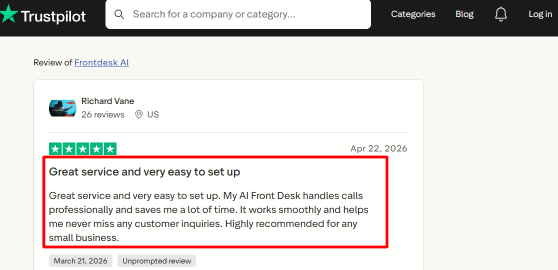
-
Calendar Integration
AI Front Desk syncs up with Google Calendar, letting callers schedule meetings via the AI receptionist. I appreciated that you could set the meeting length, add buffer time, arrange for concurrent bookings, and even include custom intake fields. Super handy for appointment-led businesses, though it might need a bit of patience if you've got several booking rules to manage. -
SMS Follow-up
The tool also handles follow-ups by SMS, which is great since many folks don’t want to stay on the phone for all the details. It can confirm bookings and remind people of next steps, keeping those leads warm after the initial call. -
CRM and Inbox
Another benefit is that AI Front Desk keeps caller info, call transcripts, and SMS chat histories all in one spot. This helps small teams get a quick overview of who called and why. Plus, it’s pretty cool how AI receptionists are getting more commonplace in local businesses now. Restaurant Dive reported Yelp’s move into AI phone answering for restaurants, which shows where the category is heading.
Pros
-
Good for simple call answering and missed-call recovery. If your main problem is lost inbound calls, AI Front Desk covers the basics without needing a full call center setup.
-
Setup feels quick for a small business with a straightforward service menu.
-
Calendar booking, SMS, chatbot, forms, CRM, and email drafts sit inside one product.
-
The free plan gives enough room to test the core experience before paying.
-
It has useful automation depth for follow-ups, appointment intake, and lead capture.
Cons
-
Pick another AI receptionist software if your calls need deep expert judgment, sensitive medical intake, or complex troubleshooting. AI Front Desk looks better suited for simple reception tasks than high-stakes conversations.
-
Public reviews are limited, so buyer confidence depends heavily on your own testing.
-
Business plan voice minutes can run out fast if call volume is high.
-
Compliance needs extra checking because its own materials are mixed on HIPAA-style use cases, and the vendor’s LLM page warns against PHI workflows.
-
Some advanced workflows may require Zapier, API access, or a higher plan.
Pricing
-
AI Front Desk has a Free plan with limited voice minutes, SMS, chatbot conversations, forms, and email drafts.
-
The main paid plan is Business-in-a-Box at $99/month, or $79/month when billed annually. It includes 200 voice minutes, 400 SMS, 100 chatbot conversations, 300 form submissions, Zapier, and 20 knowledge base pages.
-
Partner and Enterprise pricing is custom, with API access, custom integrations, onboarding help, and higher usage limits.
When to Choose AI Front Desk
Choose AI Front Desk if you run a small service business and mainly need calls answered, leads captured, appointments booked, and follow-up messages sent. It does great simple reception work, handles local service queries, and offers good after-hours support too.
Skip it for regulated healthcare scenarios, complex support calls, super high call volumes, or any situation needing expert accuracy in every answer.
GoTo
GoTo is best known as a business phone system with AI receptionist, call routing, messaging, meetings, and contact center tools in one place. It makes sense if you want AI call answering inside a proper phone setup, especially for teams that already care about routing, reporting, and call queues.
Features
-
AI Receptionist
GoTo's AI Receptionist is super handy, taking calls around the clock, answering typical questions, and routing them to the correct person. This works great for service businesses missing calls due to peak hours or afterhours needs. Plus, it gets smarter by learning from company FAQs, documents, and sites, which really matters since its abilities can falter without that extra info. -
Phone App
The mobile and desktop apps give staff access to calls, messaging, contacts, and basic phone controls. In my testing mindset, this is useful for distributed teams because people can answer business calls without sitting at a desk phone all day.
The app is also where GoTo can feel a bit heavy. I saw the same pattern in a G2 review, where the user mentioned dropped calls and said the phone app navigation could be simpler. I’d place that screenshot right below this point because it gives readers a real view of the daily-use friction.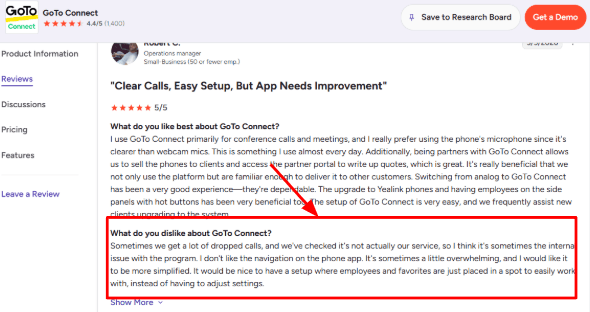
-
Call Center Tools
GoTo has call queues, real-time monitoring, enhanced reporting, agent dashboards, call wrap-up, and supervisor tools. That makes it more useful for teams where calls are handled by multiple reps, receptionists, or departments. A second G2 review lines up with this well. The user liked that call center reps could work efficiently, changes were simple, and real-time monitoring made communication easier to track. The screenshot should sit under this point because it shows the feature working in a real call center setup.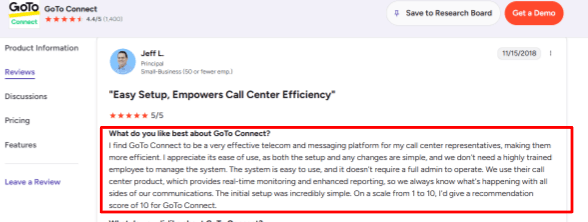
-
Meeting Integration
GoTo Connect also includes video meetings, helpful when calls need to turn into discussions or team chats. While this isn’t the top perk, it sure cuts down on switching tools for those already using GoTo phones. Ideal for sales, support, and consulting groups handling both scheduled and drop-in talks. -
Dial Plan Builder
The visual dial plan builder is one of GoTo’s more practical features. You can build call paths for business hours, departments, locations, queues, and fallback routing without needing a highly technical admin. This detail matters for growing teams. BusinessWire also reported GoTo’s push into automotive AI scheduling, CRM and DMS integrations, and smarter routing, which shows how much GoTo is leaning into complex call workflows.
Pros
-
GoTo fits well if you need AI answering plus a full business phone system. It gives you call routing, queues, SMS, meetings, reporting, and contact center features under the same product family.
-
The AI Receptionist can answer routine questions and transfer callers, which helps reduce missed calls.
-
The visual dial plan builder is strong for teams with departments, locations, or different call paths.
-
Real-time monitoring and enhanced reporting make it useful for call center-style teams.
-
The platform has a mature security posture, including SOC 2 Type II audits and broader privacy controls.
Cons
-
GoTo may be too much if you only need simple AI receptionist software for basic call answering. A smaller business that wants quick setup, low cost, and a lightweight AI phone agent may find the wider phone system setup heavier than needed.
-
Pricing is quote-based on the official site, so it is harder to compare quickly.
-
The AI Receptionist is an add-on, which can make the final cost less obvious at the start.
-
Some advanced AI, reporting, and integration features may depend on the plan or add-on package.
-
The phone app can feel busy for some users, and call reliability complaints do appear in G2 reviews.
Pricing
- GoTo Connect pricing is currently quote-based on the official site, so buyers need to contact sales for exact numbers.
- The AI Receptionist is listed as a paid add-on, with per-minute and fixed-minute options depending on region.
- Third-party sources have reported older plan ranges around $26 to $80 per user per month, but the official pricing should be checked before publishing.
When to Choose GoTo
GoTo is great for AI receptionist software within a bigger business phone or contact center setup. It suits multi-location teams, call centers, dealerships, and service businesses needing routing, monitoring, and reporting features.
Skip GoTo if you just want a simple AI answering service with a quick setup and easy-to-find pricing.
Conclusion
The best AI receptionist software depends on how your business handles calls.
Choose Smith.ai if you want AI answering with human backup. Pick Goodcall or Dialzara if you need affordable AI call handling for a small business. Rosie AI and My AI Front Desk work well for simple front desk coverage. If your team already uses business phone systems, GoTo and RingCentral are better fits.
Methodology
We shortlisted AI receptionist tools that real businesses are likely to compare in 2026, then checked their websites, pricing pages, feature claims, and review patterns. We looked beyond call answering: booking flows, handoff quality, integrations, missed-call handling, setup effort, and whether the tool fits small teams without adding messy overhead.
FAQs
How do I choose the right AI receptionist software for my business?
Pick based on call volume, booking needs, and handoff rules. Check if it supports call recordings, transcripts, fallback routing, spam filtering, appointment changes, cancellations, and live human escalation.
Which is the best AI receptionist software?
Smith.ai, Rosie AI, and RingCentral AI are strong options for different needs. Smith.ai fits businesses wanting human backup, Rosie AI suits simple phone answering, and RingCentral AI works well for existing RingCentral users.
What mistakes do people make when buying AI receptionist software?
Many buyers only test the demo voice. Also check real calls, noisy environments, caller accents, missed-call handling, emergency routing, calendar updates, payment collection, and how fast the system transfers to a person.
How do I test AI receptionist software before switching?
Run a small test using real call scenarios. Include new leads, reschedules, cancellations, after-hours calls, spam calls, angry callers, and appointment confirmations. Review recordings and transcripts before changing your main phone line.
Can AI receptionist software handle after-hours calls?
Yes, most tools can answer after-hours calls, capture lead details, book appointments, and send summaries. For urgent cases, set clear escalation rules so calls go to staff, voicemail, or an emergency number.
When should I choose a human answering service instead?
Choose human answering if calls are emotional, complex, high-value, or require judgment. Smith.ai can be useful here because it combines answering support with human handoff, while GoTo and RingCentral AI suit phone-system-led workflows.
Summarize this content with AI


