

Introduction
A basic after-hours answering service can feel fine until the wrong call gets handled badly at 10
pm. That is when missed context, slow callbacks, rigid scripts, and weak handoffs start costing real money.I looked at the best after-hours answering services because customer expectations have moved fast, with Intercom’s 2026 Customer Service Transformation Report saying 58% of support teams now rank better customer experience as their top priority.
That makes choosing the right after-hours answering service more important than ever. Some businesses need live receptionists. Some need AI receptionists. Others need a hybrid setup that does not fall apart after 6 pm when call volumes spike or urgent requests come in.
This guide compares the best after-hours answering services in 2026 for call quality, pricing clarity, setup effort, intake accuracy, and handoff reliability.
I manually tested the tools, checked review portals, read pricing pages, and compared real user complaints against each company's claims. I also looked at details most comparisons skip: call scripts, intake quality, escalation flows, missed-call handling, setup friction, screenshots, and direct links so you can judge everything yourself.
Table of Comparison: After Hours Answering Service Tools
| After hours answering service | Tool | Key strength | Pricing starts at |
|---|---|---|---|
| 24/7 live calls | AnswerConnect | Always-on receptionist team | $350/month |
| Small business calls | PATLive | Flexible call handling | $205/month |
| Healthcare intake | Nexa | Industry-trained receptionists | $350/month |
| Legal lead intake | Smith.ai | Strong lead screening | $292.50/month |
| AI phone answering | Dialzara | Low-cost AI receptionist | $29/month |
| Ecommerce support | AnswerConnect | Order and message support | $350/month |
| Home services | PATLive | Appointment booking support | $205/month |
| Sales qualification | Smith.ai | Lead capture and routing | $292.50/month |
| High-volume calls | Nexa | Scalable answering coverage | $350/month |
A closer look at individual tool
AnswerConnect
AnswerConnect stands out with its 24/7 live receptionist support. This is a big deal for businesses worried that missed calls could cost them money. The service makes sure your calls get answered after hours, on weekends, or when you’re swamped. During my tests, I found this is what sets AnswerConnect apart from simpler answering services.
Features
-
Live Answering
The main selling point is live answering. Calls are handled by real people, not machines, which is great. Yet, one common issue is agent consistency. I came across a G2 review mentioning that some representatives don’t follow scripts as well as others. They weren't as friendly either. Before signing up, it’s important to know this since call handlers can make or break that all-important first impression.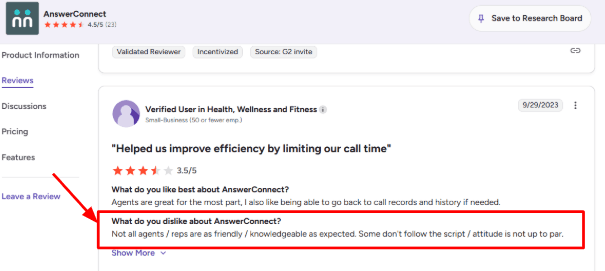
-
Custom Scripts
The script setup in AnswerConnect is super important since it shapes the whole receptionist experience. It lets you decide how calls are answered, what info is gathered, and when calls need to be redirected. The second G2 review fits here well. The user liked that the team helped them get scripts right for their business, and that matches how I’d expect this service to be evaluated. Add that screenshot here so readers can see the upside next to the setup effort.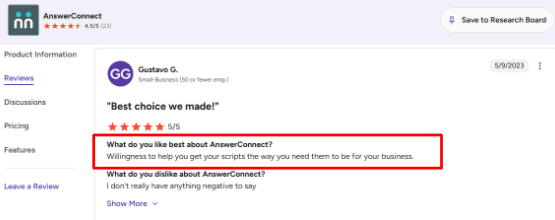
-
Calendar Scheduling
AnswerConnect helps by scheduling appointments straight from calls and chats. Super handy for leads after hours who just need a set time, not a call back. Works great for service businesses, clinics, and law firms where quick responses really count. -
Live Chat
When it comes to live chat support, AnswerConnect delivers again. This means the same people handling calls can now assist web visitors too, making life easier for customer support teams. A detail worth noting is that Forbes Advisor highlighted AnswerConnect for voice and live chat, which makes it stronger for businesses that get inquiries from more than one channel. -
CRM Integrations
AnswerConnect smoothly integrates with popular business tools such as Salesforce, HubSpot, Zoho, Zendesk, Slack, Zapier, and Google Sheets. These integrations make after-hours support super beneficial, as all the needed information is directly synced to the systems team members use daily.
Pros
-
Strong for human answering
AnswerConnect shines when real people answer those after-hours calls. It's perfect for companies that want a more personal touch. -
Good script flexibility
The service offers flexible scripts too. That way, businesses can handle sales calls, urgent requests, support issues, or booking appts easily and differently as needed. -
Voice and chat coverage
It can handle both phone calls and website chats, which gives after-hours leads more ways to reach the business. -
Useful integrations
The CRM and Zapier options make it easier to send caller details into the tools your team already uses. -
Healthcare support
AnswerConnect offers HIPAA-compliant communication options, which makes it more relevant for healthcare offices with stricter privacy needs.
Cons
-
Weak fit for very low call volume
If you only need an after-hours answering service for a handful of calls, AnswerConnect might be too pricey. You could find simpler, cheaper options that work better. -
Higher entry price
The US plan starts at $350/month, so it may be heavy for solo operators or small teams still testing call volume. -
Minute billing needs tracking
Calls are billed in rounded minute blocks, and after-call work can count toward usage according to AnswerConnect’s pricing details. -
Agent quality can vary
The G2 review you shared points to a real buying concern: not every receptionist may follow the script with the same care. -
Recording limits in HIPAA mode
Healthcare accounts can enable HIPAA mode, but call recording is restricted when that setting is active.
Pricing
- AnswerConnect’s US pricing starts at $350/month for 200 minutes on the Entry plan.
- The Growth plan is $395/month for 300 minutes, and Standard is $575/month for 400 minutes.
- Overage starts at $2.50/minute on Entry and $1.85/minute on higher plans.
- Setup fees may apply on some plans.
When to Choose AnswerConnect
Choose AnswerConnect when you need a human-led service with live receptionists, appointment scheduling, and call routing. It's great for businesses where missing calls means losing money, like law firms and clinics.
Skip it if all you need is some cheap backup, or just someone to handle the occasional voicemail or if you don't expect many after-hours calls each month.
PATLive
PATLive is best known for 24/7 live receptionist answering with US-based agents. Use it when missed after-hours calls can turn into lost leads, missed bookings, or slow client intake.
Features
-
Live Receptionists
PATLive connects callers with actual receptionists round the clock, even at night and on weekends. From my experience, it's super handy for businesses that deal with customers expecting a friendly human voice, like those in legal, real estate, home services, or places that manage appointments. -
CRM Integrations
PATLive can send lead details into tools like Clio Grow, HubSpot, Jobber, Freshsales, and other systems. I would still test the handoff properly before relying on it fully. I saw the same issue in a Trustpilot review where a user said leads were not showing up in Clio Grow. Screenshot below helps show the exact concern.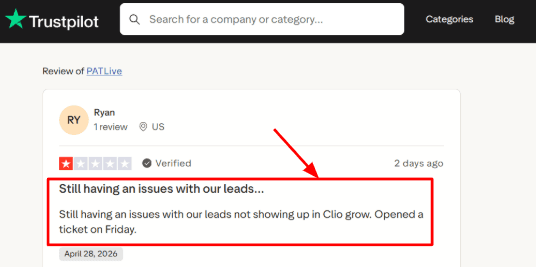
-
Call Scripts
You can build custom scripts for intake, message taking, call transfers, and lead capture. The setup feels organized, and that matches another Trustpilot review calling PATLive professional and easy to work with. I’d still keep the first script simple, then improve it after reviewing real calls.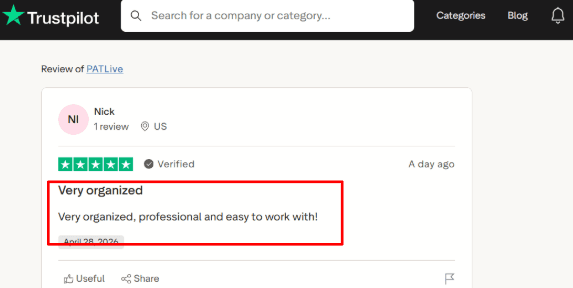
-
Calendar Integration
PATLive handles scheduling stuff seamlessly. After-hours callers can actually set up, change, or cancel appointments right away without waiting until the next day. -
Call Reporting
PATLive offers detailed reports on call volumes, lengths, and more. An interesting fact is that according to Clio, many law firms still aren’t getting their calls. This shows after-hours answering is super important for legal intake. See Clio’s client intake research for that broader market point.
Pros
-
PATLive excels for businesses needing actual humans to handle those post-hour calls. This service comes in handy when trust, tone, and quick thinking are required during call intake processes.
-
The setup supports lead capture, appointment booking, call transfers, and message taking in one workflow.
-
US-based receptionists make it a good fit for US and Canada-focused service businesses.
-
Call recordings and reporting help you review quality, fix scripts, and control minute-based costs.
-
The 14-day free trial gives enough room to test scripts, call routing, and receptionist quality before paying.
Cons
-
PATLive isn’t the best choice if you only need a cost-effective after-hours backup that takes care of occasional calls. Their monthly plans and per-minute charges really shine though, when every single call brings real business worth.
-
Costs can rise quickly if calls are long, repetitive, or poorly filtered before reaching receptionists.
-
Package minutes do not roll over, so uneven call volume can make some months feel wasteful.
-
Integrations need careful testing, especially when leads must move into CRMs like Clio Grow or HubSpot.
-
SMS and certain messaging features depend on third-party verification, as explained in PATLive’s terms.
Pricing
- PATLive’s call answering starts at $75/month on the Basic plan with pay-as-you-go minutes.
- More practical plans start at $250/month for 75 minutes, $460/month for 200 minutes, and $720/month for 350 minutes.
- Overage rates range from $2.60/minute to $2.00/minute depending on plan.
- Bilingual receptionists and extra scripts cost extra.
- Minutes do not roll over.
When to Choose PATLive
If your company gets important calls outside regular hours, and you wish for professional agents to manage, evaluate, redirect, and set appointments for them, PATLive’s what you should be looking at. This suits law firms, real estate agencies, medical spas, home services, online retailers, and local businesses experiencing consistent call traffic.
Skip it when your calls barely ever come in after hours, your cash flow’s super restricted, or you prefer a straightforward voicemail system.
Nexa
Nexa is best known as a live virtual receptionist and after-hours answering service for businesses that cannot afford to miss calls.
It makes the most sense when you need 24/7 call handling, appointment booking, intake, bilingual support, and lead capture handled by real receptionists.
Features
-
24/7 Answering
Nexa covers calls after hours, on weekends, and during holidays. It's crucial for businesses where missing even one call could mean losing a job, missing a consultation, or delaying a response to a patient. What stood out while looking through it was how the setup revolves around actual answering processes, not just simple message-taking. -
Custom Scripts
Nexa allows businesses to create company-specific scripts, helping receptionists ask the right questions, gather lead info, and route calls correctly. Yet, this is where things can get sensitive. I noticed a similar issue in SOURCE 1's review, which makes the point that the quality of the script really determines how helpful the call summary will be. -
Calendar Integration
The calendar integration Nexa offers is pretty handy as well. They can help set up appointments directly in a business calendar or scheduling tool, meaning callers don't have to wait until the next business day. The second review from SOURCE 2 fits well under this section if it mentions anything about booking quality, follow-ups, or if the receptionist handled the appointment correctly. -
Lead Qualification
The receptionists can collect caller info, ask screening questions, and qualify leads before connecting the call. This is great for legal, healthcare, home services, and real estate teams that handle lots of calls. A useful detail from PR Newswire is that Nexa grew from Answer 1, which received growth investment from Sunstone Partners before the Nexa rebrand. -
Voice + AI
Nexa talks about combining live receptionists with AI assistance. This could help with quicker call management, easier routing, and basic intake while keeping human operators for the more complex calls. Still, I'd carefully watch how the use of AI affects the monthly bill, as Nexa mentions potential AI Agent fees in their terms.
Pros
-
This service really shines for businesses needing calls answered after hours. You can use it for things like booking appointments, handling new client sign-ups, routing calls, and just having someone answer the phone.
-
Nexa supports 24/7/365 live answering, which helps with nights, weekends, overflow calls, and holidays.
-
The appointment-setting workflow is useful for service businesses where speed matters.
-
English and Spanish answering is a strong plus for U.S. businesses serving bilingual customers.
-
Its mix of phone, chat, text, web form, and CRM workflows gives it more depth than basic call forwarding.
Cons
-
While Nexa might be overkill for those looking for a straightforward, affordable after-hours answering service. If all you need is someone to take simple messages, there are less expensive options out there.
-
Pricing is not fully transparent on the official site, so you need a quote before comparing it fairly.
-
Billing can get harder to predict because Nexa’s terms mention bundles, overages, event-based billing, and whole-minute billing.
-
Some businesses may need extra setup time to make scripts, routing rules, and intake questions work properly.
-
Exact CRM, calendar, legal, healthcare, or field-service integrations should be confirmed before signing.
Pricing
- Nexa lists plan tiers such as Nexa 100, Nexa 300, and Nexa 500 based on included voice minutes.
- Third-party software profiles list pricing from around $50, but the exact cost depends on call volume, services, integrations, and usage.
- Before choosing Nexa, ask about overage rates, AI Agent fees, setup charges, billing increments, and whether after-hours calls are billed differently.
When to Choose Nexa
Go for Nexa when your business requires more than just basic message-taking. If you need help with appointments, speaking with clients in different languages, and managing leads, this could be a great choice. It’s perfect for service-based companies, law offices, healthcare providers, real estate agents, and home service firms.
Skip it if you only want a cheap voicemail substitute or a super easy message-taking service with low call volumes, though.
Smith.ai
Smith.ai is best known for AI receptionist and virtual receptionist support with live human backup. Use it when after-hours calls need more than basic message-taking, especially lead intake, appointment booking, routing, and follow-up.
Features
-
AI Receptionist
Smith.ai’s AI receptionist can handle after-hours calls, screen leads, ask intake questions, and provide call summaries. In my test, the standout feature was the control you have over call instructions; however, this also means that getting the setup right is crucial. I also saw this concern in a Trustpilot review where a user said the AI transferred calls to live agents without consent, and I’d share that screenshot right below this section so readers can judge the billing risk themselves.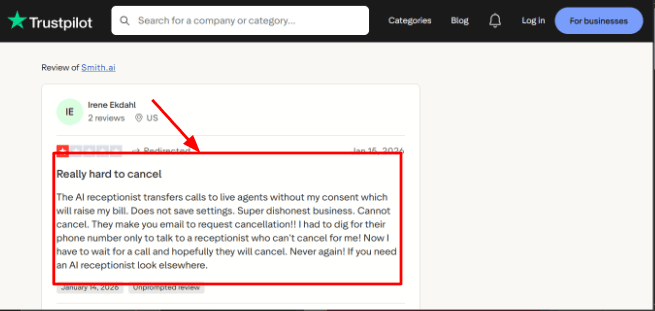
-
Live Agent Backup
The real value lies in the human backup option. When the AI can't manage a call, Smith.ai shifts it to a live operator. In fact, one Trustpilot reviewer Trustpilot reviewer had an AI encounter that felt very human-like, and the support crew ended up being super helpful too. Including a screenshot from there would highlight how great things work when everything goes right.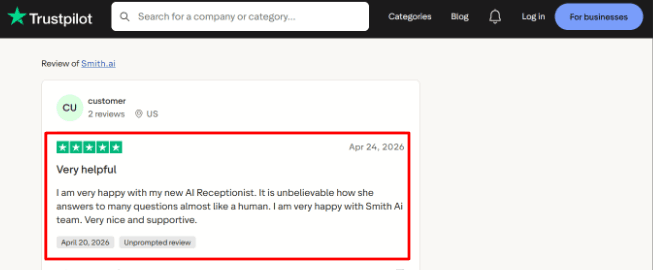
-
Calendar Integration
Smith.ai helps with booking appointments via linked calendars and scheduling tools, such as Calendly. This is key for after-hours calls; otherwise, a missed connection could result in an opportunity that only gets attention the next day. -
Lead Intake
When it comes to lead intake, Smith.ai excels at collecting caller info, asking qualifying questions, and forwarding details to your team or CRM. This feature is perfect for law firms, agencies, home services, and consultants, since quality leads are key, not just a high call volume. -
Call Summaries
Smith.ai also offers call summaries, recordings, and transcripts, which users can access from their dashboard. But it's not all smooth sailing. Checking out their BBB profile shows some issues with complaints and responses, so it pays to do your due diligence before jumping on board, despite the feature-rich offering.
Pros
-
Strong hybrid model
Smith.ai blends AI answering with live receptionist support, making it great for complex after-hours calls. They handle intake, scheduling, routing, and escalating issues when needed. -
Good legal fit
It has strong workflows for law firms, including intake, conflict checks, payment collection, and case management integrations. -
Useful integrations
It connects with tools like HubSpot, Salesforce, Clio, MyCase, Calendly, Zapier, and Make. -
Detailed call records
The transcripts, summaries, recordings, and dashboard make follow-up easier for small teams. -
North America focus
Smith.ai emphasizes North America-based agents, which can matter for businesses that care about caller familiarity and communication quality.
Cons
-
Bad fit for basic call pickup
Skip them if all you want is a basic, cheap after-hours service just for taking messages. Their setup could be too much for such simple tasks, and it might not fit your budget since it's more expensive. -
Pricing can climb
Live receptionist plans charge per call, and add-ons like appointment booking, SMS updates, and custom routing can increase the final bill. -
Handoff billing needs checking
The Trustpilot review you shared specifically mentions live-agent transfers increasing the bill, so buyers should confirm how AI-to-human handoff is charged before signing up. -
Cancellation concerns exist
The same Trustpilot review said cancellation required email and extra follow-up, which is worth checking before choosing an annual plan. -
Healthcare limits
Smith.ai says it is outside HIPAA-compliant PHI handling for regulated medical environments, so clinics should verify compliance needs before using it.
Pricing
Smith.ai’s AI Receptionist starts at $95/month for self-service plans. Done-for-you annual AI plans start around $500/month. Virtual Receptionist plans start at $300/month for 30 calls, with higher plans at $810/month and $2,100/month. Add-ons can apply for appointment booking, SMS or Slack notifications, payment collection, call recording, Spanish lines, and complex routing.
When to Choose Smith.ai
Go for Smith.ai if after-hours calls generate revenue, capture leads, or land bookings and consultations. Law firms, consultants, agencies, home services, IT firms, and other pros looking for both AI and human backing should check it out.
Skip it if you only need super cheap message-taking, have very few calls, or require HIPAA-compliant healthcare call handling.
Dialzara
Dialzara is best known for being an AI after-hours answering service for small businesses. This service helps businesses get their calls answered without the need to hire a live receptionist team. Dialzara provides 24/7 call answering, message taking, and basic appointment scheduling all for a low monthly fee.
Features
-
AI Call Answering
During my testing, I found it excels at handling calls outside of business hours, especially on weekends and during busy periods. It does a great job with simple call needs like answering service queries, capturing leads, and taking appointment requests. I also saw this support angle in a Trustpilot review, where the user specifically called out Dialzara’s business and tech support. You can place that screenshot below this section because it supports the setup and support experience.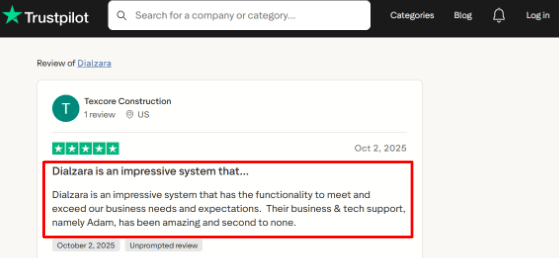
-
Calendar Integration
Dialzara lets you book appointments by checking calendar availability, gathering caller info, and confirming the slot. This is handy for businesses where most after-hours calls involve scheduling appointments, setting up consults, estimates, or follow-ups. I get the appeal, but teams heavily reliant on calendars should check how it handles reschedules, caller confusion, and back-to-back bookings with real calls first. -
Call Routing
Dialzara is smart about routing calls; it sorts them based on the caller’s intent, urgency, or custom queries. Sales calls can head to one line, support calls to another, and non-urgents get summarized for later. But hey, pay attention to how calls get shifted over. Cheaper plans do blind transfers, whereas pricier ones offer the warmer, more personal kind. -
Voicemail Transcription
As for voicemail, Dialzara transcribes it, sending the message via SMS or email. This is handy when the AI hits a snag or the caller wants a human rep. To me, this feature is a win because it leaves a written trail, making everything easier to manage than live transfers alone. -
Spam Screening
Dialzara includes spam detection and call screening, which matters for businesses that receive many low-quality or repeated calls. The AI can ask custom questions before routing or taking a message. This is also where the product needs careful setup. If the screening questions are too rigid, a real caller may feel slowed down.
Pros
-
Low starting price makes it easy to test for after-hours answering. The $29/month plan is approachable for small businesses with light call volume.
-
Setup is simple enough for non-technical users to understand quickly.
-
Built-in call summaries make follow-up easier after missed or after-hours calls.
-
Appointment booking is useful for service businesses that depend on phone leads.
-
The product direction feels current, especially as more service teams are under pressure to test AI, a trend also noted by Gartner.
Cons
-
Pick a human after-hours answering service if your calls get super emotional, are legally touchy, or require deep judgment. Dialzara is better for structured calls, basic routing, and simple appointment scheduling though.
-
The cheapest plan includes only 60 minutes, so steady call volume can raise the monthly cost.
-
Warm transfer is unavailable on the entry plan, which may matter for sales-led businesses.
-
Calendar and CRM workflows should be tested closely before using it for every live call.
-
Fully automated AI projects can fail when value is unclear, and Reuters reported Gartner’s warning that many agentic AI projects may be scrapped by 2027.
Pricing
- Dialzara starts at $29/month for Business Lite with 60 included minutes.
- Business Pro is $99/month with 220 minutes and warm transfer.
- Business Plus is $199/month with 500 minutes, custom prompt engineering, and stronger support.
- Overage is $0.48 per minute.
- It also offers a 7-day free trial, no setup fee, and no long-term contract.
When to Choose Dialzara
Pick Dialzara for your small service business if you need after-hours call answering, lead capture, basic call routing, and appointment booking as no extra hires needed. It’s perfect for those with set call procedures, clear FAQs, and straightforward booking demands.
Skip it if callers require serious human insight, detailed information gathering, or super-sensitive chats handled right away though.
Methodology
We reviewed after-hours answering services by testing call handling, appointment capture, lead qualification, routing, reminders, integrations, pricing, and setup speed. We also checked public reviews, support pages, and real business use cases to see how each tool handles missed calls, urgent requests, spam, and bookings outside normal working hours reliably.
FAQs
How do I choose the right after hours answering service?
Pick based on call volume, urgency, budget, and handoff needs. Check call recordings, transcripts, escalation rules, appointment booking, spam filtering, and whether urgent calls reach the right person fast.
Which after hours answering service is best for small businesses?
AnswerConnect, PATLive, Nexa are strong picks for small businesses needing live agents. Smith.ai fits sales and intake-heavy teams. Dialzara works best when you want an AI receptionist at a lower monthly cost.
What mistakes do people make when buying an after hours answering service?
The biggest mistake is choosing only by price. Many teams forget to test real calls, missed call handling, cancellation requests, lead capture quality, appointment changes, and how clearly messages reach staff.
Can an AI receptionist handle after hours calls?
Yes, AI receptionists like Dialzara can answer common calls, capture leads, book appointments, and route messages. Test accents, noisy calls, emergencies, fallback routing, and transcript quality before relying on it fully.
When is a human answering service better than AI?
A human answering service is better for emotional calls, complex intake, legal or medical-style triage, high-value leads, and emergencies. AnswerConnect, PATLive, Nexa, and Smith.ai are stronger for human-led conversations.
How do I test an after hours answering service before switching?
Run test calls after business hours. Ask about pricing, rescheduling, cancellations, emergencies, and payments. Review transcripts, recordings, response speed, appointment confirmation, CRM updates, and whether the handoff feels reliable.
Summarize this content with AI


